Overview
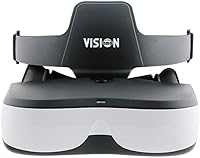
The VISIONHMD Bigeyes H1 Video Display Glasses are not a VR headset — that distinction matters more than it might seem. Where VR gear builds an interactive virtual environment, these video glasses do one thing: put a private movie screen in front of your eyes. The experience is closer to sitting in a personal cinema than strapping on a gaming headset. Powered by dual independent LCD panels and driven by an HDMI-first design, they pair with streaming sticks, Blu-ray players, and HDMI-capable phones. Since their late 2021 launch, they have carved out a quiet but loyal following in the personal viewing space.
Features & Benefits
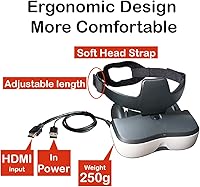
Each eye gets its own 1280x720 LCD panel, which is how the Bigeyes H1 achieves side-by-side 3D without the brain-strain that cheaper single-screen solutions often cause. The HDMI input is HDCP-compliant and handles both 720p and 1080p at 60Hz, so protected content from Netflix or a Blu-ray disc plays without issues. The inter-pupillary distance is adjustable, meaning you are not stuck fighting the optics if the default spacing does not suit your face. Notably, built-in diopter correction covers up to 5.0D of nearsightedness — a genuinely useful feature that most competitors skip. At just over a pound, it is light enough for longer sessions when paired with the included face seal and earphones.
Best For
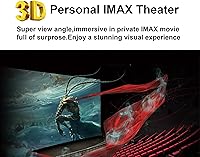
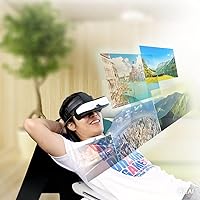
These video glasses hit their stride in a few specific scenarios. Frequent travelers who want a private viewing experience on planes or trains will get real value here — nobody else sees your screen. 3D movie fans with a compatible Blu-ray player or streaming setup will appreciate the side-by-side format done properly. Drone pilots using a controller with HDMI output can also use this head-mounted display for FPV flying, which is a nice bonus without needing a separate headset. That said, buyers should be clear-eyed about the limits: gaming, spreadsheets, document reading, and anything that demands sharp, legible text are not what this device was built for.
User Feedback
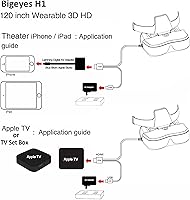
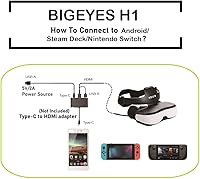
Owners who buy the Bigeyes H1 for its intended purpose — private 3D movie watching — tend to come away satisfied, specifically praising the immersive 3D quality and the sheer novelty of having a personal screen wherever they go. The complaints, however, are worth knowing upfront. Brightness and overall image clarity fall short of what a good TV or projector delivers, and the gap becomes obvious in darker scenes. Mobile users frequently run into friction because the device requires an HDMI adapter; if your phone lacks native HDMI output, this needs a workaround. The 2D to 3D switching also requires a deliberate three-second button hold to avoid a scrambled picture. Comfort during long sessions gets mixed marks depending on head shape.
Pros
- Dual independent LCD panels deliver genuine, comfortable side-by-side 3D movie viewing.
- HDCP-compliant HDMI input handles protected content from streaming sticks and Blu-ray players without issues.
- Built-in diopter correction up to 5.0D means many nearsighted users need no extra lens adapters.
- Adjustable inter-pupillary distance accommodates a wide range of face shapes without tools or hardware swaps.
- At just over one pound, the Bigeyes H1 is light enough for extended viewing sessions on long trips.
- Doubles as an FPV headset for drone pilots with HDMI-output controllers, adding genuine versatility.
- The included face seal and earphones make the out-of-box setup reasonably complete without extra purchases.
- Provides real screen privacy — no one sitting nearby can see what you are watching.
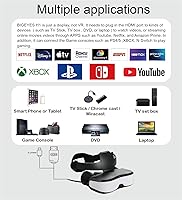
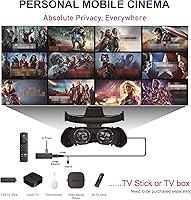
- Compatible with popular streaming sources including Apple TV, Roku, and Chromecast via standard HDMI.
Cons
- Image brightness falls noticeably short of a good TV or projector, especially in dark or shadowy scenes.
- Mobile users without native HDMI output must source a compatible adapter, adding friction and compatibility risk.
- Switching between 2D and 3D requires a deliberate three-second button hold, which catches new users off guard.
- Text readability is genuinely poor — menus, subtitles, and on-screen writing appear soft and tiring to follow.
- Comfort over very long sessions is inconsistent; weight distribution can create pressure points depending on head shape.
- No wireless connectivity means you are always tethered by an HDMI cable, restricting how freely you can position yourself.
- Image sharpness for non-video content like app interfaces or slideshows is noticeably underwhelming.
- The simulated large-screen impression does not replicate a true cinematic experience for every viewer, particularly those used to high-end displays.
Ratings
Our scores for the VISIONHMD Bigeyes H1 Video Display Glasses are generated by AI after analyzing verified global user reviews, with spam, bot-submitted, and incentivized feedback actively filtered out. Each category reflects the honest consensus of real buyers — the genuine strengths and the frustrations that keep surfacing — so you can make a fully informed decision before committing.
3D Viewing Experience
Image Clarity
Brightness & Contrast
Comfort & Fit
Connectivity & Compatibility
Value for Money
Text Readability
Ease of Setup
Build Quality
Travel Portability
Nearsighted Accommodation
Audio Quality
FPV Drone Usability
Suitable for:
The VISIONHMD Bigeyes H1 Video Display Glasses are a strong fit for anyone whose primary goal is private, immersive movie watching — whether at home or while traveling. Frequent flyers and commuters who find shared cabin screens frustrating will appreciate having what amounts to a personal cinema on their face, with no one else able to see the content. Dedicated 3D movie fans who own a Blu-ray player or run a streaming stick like Roku or Apple TV will get the most out of the side-by-side 3D format, which genuinely adds depth compared to flat-screen alternatives. People with mild to moderate nearsightedness also stand to benefit, since the built-in diopter correction handles up to 5.0D and removes the need for prescription lens inserts in most cases. Drone hobbyists with a controller that has HDMI output get a meaningful bonus here — the same glasses double as a capable FPV display, which makes the asking price easier to justify. Anyone living in a small or shared space who wants screen privacy without headphones and a visible monitor will also find this head-mounted display solves that problem cleanly.
Not suitable for:
The VISIONHMD Bigeyes H1 Video Display Glasses are a poor match for anyone who primarily needs to read text, navigate menus at length, or use a screen for any kind of productivity work. The LCD optics are tuned for video, and text — whether in subtitles, app interfaces, or documents — tends to appear soft and difficult to read comfortably for extended periods. Gamers should look elsewhere; these video glasses carry no meaningful low-latency or high-refresh advantage, and the interface is simply not built around fast-paced interactive content. Smartphone users need to be aware upfront that unless their phone natively outputs HDMI, a compatible adapter is required — and not every adapter-and-cable pairing will work reliably, which is a real hassle. Buyers expecting the brightness or sharpness of a quality television or monitor will be let down; the display panels here are functional but cannot compete with premium standalone screens. If your viewing needs are varied and you want one device that handles everything from movies to work tasks, this head-mounted display is too narrowly focused to serve that role.
Specifications
- Display Type: The device uses two independent LCD panels, one positioned in front of each eye, rather than a single shared screen.
- Resolution: Each LCD panel runs at 1280x720 pixels, providing per-eye HD clarity suitable for video content.
- Supported Resolutions: The HDMI input accepts both 720p and 1080p video signals at up to 60Hz.
- Refresh Rate: The display operates at a 60Hz refresh rate, which is standard for movie and streaming content playback.
- Connectivity: Input is handled exclusively via HDMI; there is no wireless, Bluetooth, or USB-C video input.
- HDCP Support: The HDMI input is fully HDCP-compliant, allowing playback of DRM-protected content from streaming devices and Blu-ray players.
- 3D Format: The device supports Side-by-Side Horizontal 3D video and accepts both 2D and native 3D source material.
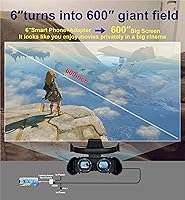
- Simulated Screen: The optical system is designed to approximate the visual impression of a 57″ screen viewed at a normal watching distance.
- Aspect Ratio: Content is displayed in a 16:9 widescreen aspect ratio, matching the standard format for HD movies and streaming.
- Diopter Correction: Built-in adjustable diopter lenses support nearsightedness correction in a range of 0 to 5.0D, eliminating the need for prescription inserts in most cases.
- IPD Adjustment: The inter-pupillary distance is manually adjustable to fit a range of face shapes and eye spacings without requiring any tools.
- Weight: The headset weighs approximately 1.06 pounds, keeping it on the lighter end for head-mounted video displays.
- Dimensions: The unit measures 6.3 x 2.05 x 2.48 inches, making it compact enough to pack in a carry-on bag or backpack.
- In the Box: The package includes the display unit, a face seal rubber pad, a pair of earphones, a lens cleaning cloth, and a user manual.
- Secondary Use: The device is compatible for use as FPV goggles with drone controllers that provide a direct HDMI video output; an RF receiver is not included.
- Color: The unit is available in a black and white two-tone finish.
- Model Number: The official model identifier is Bigeyes H1, manufactured under the VISIONHMD brand.
Related Reviews
ZTCOLIFE 1080P HD Video Glasses

ASUS ProArt Display PA169CDV 15.6” 4K Pen Display
TnoxHD Smart Glasses
YFDSPSM QY360 Mini Projector
Calibrite ColorChecker Video Color Calibration Chart
Emerhome E13 Bluetooth Smart Glasses
RUIMEN H1 Smartwatch
VITURE Pro XR Glasses
QZTELECTRONIC Glasses-01 Bone Conduction Smart Glasses