Overview

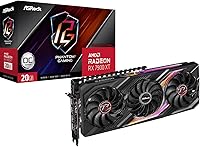
The ASRock RX 7900 XT Phantom Gaming Graphics Card is ASRock's premium answer to AMD's high-end RX 7900 XT silicon, sitting squarely in their top-tier Phantom Gaming lineup — a distinct step above the more affordable Challenger series. This isn't a budget card dressed up in fancy clothing; it targets enthusiast builders who want serious performance without reaching for true flagship pricing. If you're weighing your options in the upper tier of the AMD GPU market and want to know whether this Phantom Gaming card delivers on its promises, this review covers thermal performance, VRAM utility, display connectivity, and real buyer sentiment.
Features & Benefits

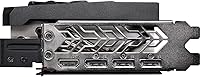
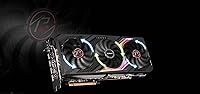
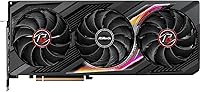
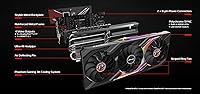
The big draws here start with cooling. The triple-fan cooling system uses a fan-stop mode that keeps things completely silent during light tasks like web browsing or video playback — the fans only spin up when the GPU actually needs them. That matters more than people expect day-to-day. The RX 7900 XT ships with 20GB of GDDR6 across a wide 320-bit memory bus, which means 4K gaming with high-res texture packs rarely feels constrained. Three DisplayPort 2.1 outputs open the door to high-refresh 4K or even 8K display configurations, and there's also an HDMI 2.1 port for TV setups alongside a reinforced metal frame that feels genuinely solid.

Best For

This Phantom Gaming card hits a sweet spot for a fairly specific type of builder. If you're gaming at 4K and want high frame rates in demanding titles, the RX 7900 XT has the raw horsepower to deliver without constantly running into VRAM limits. Creative professionals — especially 3D artists or video editors working with large assets — will appreciate that 20GB of headroom more than almost any other user. It also suits multi-monitor setups well, given the DisplayPort 2.1 bandwidth on tap. And for anyone building a home theater PC, the 0dB fan-stop makes quiet media playback genuinely practical, not just a marketing checkbox.

User Feedback

Across roughly 180 ratings, this ASRock GPU holds a 4.5-star average — and reading through the feedback, that score feels earned. Buyers consistently praise thermal performance, noting the card runs cool and quiet under real gaming loads. Build quality draws frequent compliments too, particularly the backplate and overall rigidity. That said, some users flag the card's physical length as a tight fit in smaller cases, and a handful mention that AMD driver updates occasionally require patience. A few owners found Polychrome SYNC less reliable than expected. Compared to similarly priced rivals, though, most buyers feel the VRAM advantage alone justifies their decision.

Pros

  • 20GB of GDDR6 VRAM provides exceptional headroom for 4K gaming and GPU-intensive creative workloads.
  • The triple-fan cooling system keeps temperatures genuinely low even during extended gaming sessions.
  • Fan-stop mode runs completely silent during light tasks, which matters for mixed-use builds.
  • Three DisplayPort 2.1 outputs make this ASRock GPU future-ready for high-bandwidth display configurations.
  • The reinforced metal frame and backplate feel premium and reduce sag on the PCIe slot.
  • HDMI 2.1 support makes TV-connected gaming setups straightforward without adapters.
  • Phantom Gaming branding reflects real build quality differences over ASRock's entry-level cards.
  • The RX 7900 XT holds up competitively in rasterization workloads at 4K resolution.
  • Polychrome SYNC integrates cleanly for users already in the ASRock hardware ecosystem.
  • At its price point, the VRAM-to-performance ratio is difficult to match among competing cards.

Cons

  • The card's 27-centimeter-plus length can cause real fitment problems in smaller PC cases.
  • Power consumption under load is high, and older or budget power supplies may need replacing.
  • AMD's driver ecosystem still lags behind in certain professional and creative software applications.
  • Ray tracing performance at this tier falls short of NVIDIA competitors in several titles.
  • Polychrome SYNC software has drawn mixed reviews, with some users reporting reliability issues.
  • The card's weight and size put meaningful stress on the PCIe slot without additional support.
  • No bundled GPU sag bracket is included despite the card's considerable mass.
  • Buyers not already in the ASRock ecosystem get little practical value from Polychrome SYNC integration.

Ratings

The scores below reflect our AI-driven analysis of verified global buyer reviews for the ASRock RX 7900 XT Phantom Gaming Graphics Card, with spam, bot-generated, and incentivized feedback actively filtered out before scoring. Each category captures both the genuine strengths buyers celebrate and the real frustrations they report, giving you an honest picture of where this card excels and where it falls short.

Gaming Performance
88%
At 4K resolution, buyers consistently report smooth, high-frame-rate experiences in demanding titles without the VRAM bottlenecks that haunt cards with smaller memory allocations. The RX 7900 XT handles texture-heavy open-world games particularly well, and users upgrading from previous-generation mid-range cards describe the jump as immediately noticeable.
In ray tracing-heavy titles, performance trails comparably priced NVIDIA options, which frustrates buyers who specifically wanted to push ray tracing quality at 4K. A handful of users also note that frame pacing can feel inconsistent in certain titles, a recurring AMD driver characteristic rather than a hardware flaw.
Thermal Management
91%
The triple-fan cooler genuinely impresses buyers, with many reporting GPU temperatures staying comfortably in the mid-70s Celsius during extended gaming sessions — cooler than several competing triple-fan designs at this tier. The thermal headroom also means the card rarely throttles, which translates directly to consistent in-game frame rates.
A smaller group of buyers in poorly ventilated cases report that the cooler struggles more than expected when ambient temps are high, suggesting case airflow matters more with this card than the marketing implies. The heatsink is also large enough that it can impede airflow to other components in tighter builds.
Noise Levels
84%
During light workloads — desktop use, streaming, or light productivity — the 0dB fan-stop mode delivers genuinely silent operation that owners of HTPC-style builds particularly appreciate. Even under moderate gaming loads, multiple buyers describe fan noise as unobtrusive compared to the blower-style or aggressively tuned coolers on competing cards.
Under sustained full-load gaming or rendering, the fans do become audible, and a few buyers feel the ramp-up curve is slightly aggressive, spinning the fans louder than necessary before temperatures actually demand it. This is tunable with software, but it should not require manual adjustment out of the box.
VRAM & Memory
93%
The 20GB GDDR6 allocation is consistently cited as one of the strongest reasons buyers chose this Phantom Gaming card over competitors with 16GB or less. Content creators running large 3D scenes or high-resolution video timelines specifically call out that they have yet to hit a memory ceiling, which is a meaningful vote of confidence.
The wide memory bus and large VRAM capacity contribute to the card's high power draw, which some buyers feel is a trade-off they did not fully anticipate. A small number of professional software users also note that AMD's memory architecture, while large, does not always translate to linear performance gains in CUDA-dependent applications.
Build Quality
89%
The metal backplate and reinforced frame earn consistent praise from buyers who have handled lesser-built cards before — the card feels dense and well-engineered right out of the box. Several reviewers specifically mention that after months of use there is no flex, no rattling from the cooler shroud, and no signs of material degradation.
Despite the solid construction, some buyers note the card's weight puts visible stress on the PCIe slot over time, and no GPU support bracket is included in the box, which feels like an oversight at this price point. A few users report that the shroud's plastic components feel slightly less premium than the metal elements suggest.
Connectivity
87%
Three DisplayPort 2.1 outputs give multi-monitor users and future display upgraders meaningful flexibility, and buyers running dual 4K monitors at high refresh rates report zero bandwidth issues. The included HDMI 2.1 port also makes connecting a television straightforward without needing an adapter.
Some users point out that four total outputs is one fewer than certain competing cards offer, which limits flexibility for users running four-monitor productivity setups. HDMI is limited to a single port, meaning TV-plus-monitor mixed configurations require careful planning around which output handles which display.
Driver Stability
71%
29%
For the majority of buyers using the card purely for gaming, AMD's Adrenalin drivers work reliably after initial installation, and major game launches typically receive timely performance patches. Several buyers note the driver interface itself has improved considerably compared to earlier AMD generations.
A recurring frustration involves driver updates occasionally introducing new bugs or reverting settings, which forces technically less-confident users to troubleshoot after routine updates. Professional software users — particularly those working in applications that favor NVIDIA's CUDA ecosystem — encounter compatibility friction that AMD has not fully resolved.
Software (Polychrome SYNC)
63%
37%
For buyers already running ASRock motherboards with Polychrome SYNC support, the integration works as advertised and RGB synchronization across components functions without manual fiddling in most cases. The lighting effects themselves are visually polished when the software cooperates.
Polychrome SYNC reliability draws repeated criticism — buyers report the software losing sync after system restarts, requiring manual re-application of settings more often than it should. Users outside the ASRock ecosystem find the software adds little value and describe it as bloatware they simply uninstall.
Installation & Fit
74%
26%
Physical installation is straightforward for most full-tower and large mid-tower builds, and buyers with spacious cases report a clean, snug fit with no clearance issues. The card's PCIe connector placement is accessible, and power cable routing is manageable.
The card's 27-centimeter-plus length genuinely causes problems in compact and smaller mid-tower cases, with several buyers having to rearrange drives or swap cases entirely after purchase. This is consistently the single most common source of negative reviews and regret among buyers who did not verify case compatibility beforehand.
Value for Money
78%
22%
Buyers who specifically prioritize VRAM capacity tend to rate value highly, arguing that 20GB at this price point undercuts competitors offering significantly less memory. Long-term owners also express satisfaction, noting the card has aged well without feeling outpaced in the titles they play.
Buyers comparing raw rasterization performance per dollar against competing options at the same price tier find the value proposition less clear-cut, particularly when NVIDIA alternatives sometimes offer stronger ray tracing and better software ecosystems. Price-sensitive buyers feel the premium over AMD reference pricing is hard to fully justify on cooling improvements alone.
Aesthetics & RGB
82%
18%
The card looks striking in a windowed build — the backplate is clean, the shroud has a purposeful aggressive style, and the RGB lighting is vibrant without being cartoonishly over-lit. Buyers building themed systems with dark or monochrome aesthetics specifically praise the design restraint compared to flashier competing coolers.
RGB customization depth is limited compared to what dedicated RGB controllers offer, and buyers who want precise per-zone lighting control find the options underwhelming. Those using non-ASRock motherboards cannot sync lighting at all without workarounds, which reduces the feature's practical appeal significantly.
4K Content Creation
86%
Video editors and 3D artists working in professional applications consistently highlight the RX 7900 XT as a capable workstation-adjacent card, particularly for Blender rendering and DaVinci Resolve workflows where the VRAM buffer meaningfully reduces scrubbing lag on complex timelines. The raw compute performance handles GPU rendering tasks with confidence.
Applications deeply tied to NVIDIA's CUDA framework — including certain machine learning tools and some Adobe acceleration features — do not leverage AMD hardware as efficiently, leaving some creative professionals feeling they are not extracting the full value of the card within their specific toolchain.
Power Efficiency
66%
34%
Under lighter workloads and during idle with fan-stop active, power draw is reasonably modest for a card of this class, and buyers running mixed workloads report that daily usage is not as punishing on their power bill as they feared. Efficiency during 1440p gaming is notably better than at 4K.
Under full 4K gaming or rendering loads, the RX 7900 XT draws enough power that buyers with older 650W to 750W power supplies have encountered instability and crashes, sometimes requiring an unplanned PSU upgrade. The wattage ceiling frustrates buyers in regions with high electricity costs or those running power-constrained systems.

Suitable for:

The ASRock RX 7900 XT Phantom Gaming Graphics Card is a strong fit for PC builders who are serious about 4K gaming and want a card with enough VRAM headroom to stay relevant for years rather than months. If you regularly play texture-heavy open-world titles or run games at maximum quality settings, the 20GB GDDR6 buffer means you are unlikely to hit memory walls that increasingly plague cards with smaller allocations. Content creators — particularly 3D artists, video editors working in high-resolution formats, or anyone running GPU-accelerated rendering workloads — will find that extra VRAM genuinely useful rather than just a spec sheet talking point. The triple-fan cooling setup also makes this Phantom Gaming card a sensible choice for home theater PC builds, where quiet operation during movies or streaming matters as much as raw performance. Builders already invested in the ASRock ecosystem with Polychrome SYNC-compatible motherboards will get a cohesive RGB setup without juggling separate software platforms.
Not suitable for:

Buyers working with compact or mid-tower cases should measure carefully before committing, as the RX 7900 XT stretches past 27 centimeters in length and can create clearance headaches in tighter builds. If your workload is primarily 1080p or 1440p gaming at moderate settings, the performance on offer here is more than you realistically need, and spending this much simply does not make practical sense at those resolutions. The ASRock RX 7900 XT Phantom Gaming Graphics Card also runs on AMD drivers, which — while significantly improved — still require more patience during major update cycles than some buyers expect, particularly on certain productivity software with better NVIDIA optimization. Users who prioritize ray tracing performance above all else should be aware that AMD's hardware ray tracing still trails NVIDIA's at this tier in several benchmarks. Finally, anyone on a strict power budget should note that the RX 7900 XT draws substantial wattage under full load, which may necessitate a power supply upgrade.
Specifications

  • GPU: The card is built on the AMD Radeon RX 7900 XT graphics processor, AMD's high-end RDNA 3 architecture chip.
  • VRAM: 20GB of GDDR6 memory provides substantial headroom for 4K gaming, high-resolution texture packs, and GPU-accelerated creative workloads.
  • Memory Bus: A 320-bit memory bus width enables high memory bandwidth, helping the card sustain performance in demanding, data-intensive scenarios.
  • Memory Speed: The GDDR6 memory operates at 20000 MHz effective speed, contributing to fast data throughput across gaming and compute tasks.
  • Display Outputs: The card features three DisplayPort 2.1 ports and one HDMI 2.1 port rated at 20Gbps, supporting up to four simultaneous displays.
  • Max Resolution: Native output support reaches up to 7680x4320 pixels (8K), suitable for next-generation monitor configurations with compatible displays.
  • PCIe Interface: The card uses a PCI Express 4.0 interface, ensuring compatibility with modern AMD and Intel platform motherboards.
  • Cooling System: A triple-fan Phantom Gaming 3X cooling solution covers the card's heatsink, designed to manage thermals during sustained high loads.
  • Silent Mode: A 0dB fan-stop function halts all three fans completely when GPU temperatures remain below a set threshold during light tasks.
  • RGB Lighting: Polychrome SYNC RGB lighting is built into the card and can be controlled through ASRock's Polychrome SYNC software ecosystem.
  • Backplate: A stylish metal backplate covers the rear of the PCB, adding structural rigidity and a cleaner aesthetic finish.
  • Frame: A reinforced metal frame surrounds the card to reduce flex and provide additional support for the cooler assembly.
  • Dimensions: The card measures 9.45 x 27.17 x 0.98 inches, making it a large triple-slot design that requires adequate case clearance.
  • Weight: The card weighs 3.08 pounds, which is typical for a large triple-fan cooler design at this performance tier.
  • Brand Tier: This model sits within ASRock's Phantom Gaming lineup, which represents their premium consumer graphics card series above the entry-level Challenger range.

Related Reviews
Sapphire Radeon RX 7900 XT Graphics Card
78%
91%
Rasterization Performance
63%
Ray Tracing Performance
93%
VRAM Capacity
88%
Build Quality
84%
Thermal Management
More
GIGABYTE Radeon RX 9060 XT Gaming OC 16G
83%
93%
1440p Gaming Performance
96%
Memory Capacity (VRAM)
89%
Thermal Management
84%
Acoustic Performance
87%
Build Quality & Materials
More
GIGABYTE RX 7600 XT 16GB Graphics Card
80%
88%
Value for Money
84%
1080p Gaming Performance
72%
1440p Gaming Performance
93%
VRAM Capacity
86%
Thermal Performance
More
GIGABYTE RX 7700 XT 12GB Graphics Card
83%
88%
1440p Gaming Performance
91%
Thermal Performance
83%
Noise Level
93%
Build Quality
76%
Value for Money
More
GIGABYTE RX 7800 XT 16GB Graphics Card
78%
91%
1440p Gaming Performance
88%
Thermal Management
93%
VRAM & Future-Proofing
79%
Value for Money
61%
Driver & Software Experience
More
GIGABYTE Radeon RX 6700 XT Gaming OC 12GB Graphics Card
87%
94%
4K Gaming Performance
91%
Cooling System Efficiency
88%
Installation and Setup
86%
Design and Durability
89%
Frame Rates in Demanding Games
More
MSI RX 6700 XT Gaming X GPU
78%
88%
1440p Gaming Performance
84%
Thermal Management
91%
Noise Levels
87%
Build Quality
67%
Driver Stability
More
MSI RX 5700 XT Gaming X GPU
81%
88%
1440p Gaming Performance
91%
Thermal Performance
86%
Acoustic Performance
63%
Driver Stability
82%
Value for Money
More
ASUS TUF RX 6700 XT Graphics Card
76%
88%
1440p Gaming Performance
91%
Thermal Management
93%
Build Quality
84%
Fan Noise
67%
Driver Stability
More
ASUS TUF RX 7900 XTX Graphics Card
80%
91%
Thermal Performance
94%
Build Quality
89%
Gaming Performance
86%
Noise Levels
93%
VRAM Capacity
More

FAQ

It depends on the specific case. The card runs just over 27 centimeters long, so you should check your case's maximum GPU length spec before buying. Most full-tower and larger mid-tower cases handle it fine, but compact mid-towers can be a tight fit or outright incompatible.

AMD recommends at least an 800W power supply for the RX 7900 XT under typical system loads. If your build includes a high-core-count CPU or multiple storage drives, budgeting 850W to 1000W gives you a comfortable margin and avoids stability issues during peak draw.

Yes, but it only kicks in when the GPU is genuinely idle or running a very light workload — think desktop use, video streaming, or light browsing. The moment you launch a game or a render, the fans spin up normally. Do not expect silence during gaming sessions, but idle and media use are genuinely quiet.

It is a solid choice for video editing, particularly if you work in high-resolution formats like 4K or 6K. The 20GB VRAM buffer is a real advantage when handling large project timelines with multiple effects layers. Keep in mind that some professional editing software is better optimized for NVIDIA cards, so it is worth checking your specific application's GPU support before committing.

Ray tracing performance is respectable but not class-leading. AMD's RDNA 3 architecture handles ray tracing better than previous generations, but at equivalent price points, NVIDIA cards generally pull ahead in ray tracing workloads. If ray tracing is your top priority, that is worth factoring into your decision.

Yes. The three DisplayPort 2.1 outputs allow independent multi-monitor configurations, and each display can run at its own resolution and refresh rate. The HDMI 2.1 port adds a fourth option if needed, making this card well suited for productivity-focused multi-display setups.

The card can output a signal to an 8K display, but actual 8K gaming at high frame rates is extremely demanding and not practical in most current titles even with this hardware. The 8K output capability is more useful for desktop use, media playback, or low-demand applications on an 8K panel.

Polychrome SYNC is ASRock's RGB lighting control software that lets you synchronize the card's lighting with compatible ASRock motherboards and other components. If you are not using other ASRock hardware, you can still control the card's RGB through the software, but the ecosystem benefits are limited. Some users have reported occasional reliability hiccups with the software itself, so managing expectations there is fair.

Yes, always install the latest AMD Adrenalin drivers rather than relying on whatever ships on the included disc or is bundled with Windows. AMD releases regular driver updates that improve performance and fix compatibility issues, so grabbing the current version from AMD's website before your first boot is the right move.

The Phantom Gaming line uses higher-grade cooling hardware, a more robust metal frame, RGB integration, and a premium backplate — the Challenger series is more utilitarian and aimed at buyers who prioritize value over aesthetics or cooling headroom. On the same GPU chip, the performance difference is minor, but the Phantom Gaming card runs cooler and quieter under sustained load, which matters for long gaming or rendering sessions.

Where to Buy