Overview

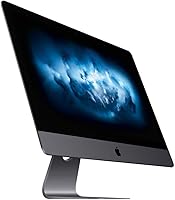
The Apple iMac Pro 27-inch All-in-One Desktop was Apple's most serious workstation before the Mac Pro tower — built for professionals who needed raw power without a sprawling multi-component setup. This is a renewed unit, meaning it has been previously owned: buyers should expect minor cosmetic wear and carefully verify the seller's refurbishment standards before purchasing. That said, the Space Gray build still looks genuinely premium, and the chassis holds up well over time. Originally priced far higher, this refurbished workstation now occupies a much more accessible market position, putting serious professional hardware within reach of a wider audience.

Features & Benefits

The 27-inch 5K Retina display is genuinely one of this machine's strongest arguments. Colors are rich and consistent across the panel, brightness is comfortable for long editing sessions, and fine detail holds up even at close working distances — something you feel rather than just measure. Under the hood, the 8-core Xeon W handles sustained parallel workloads well, especially in video encoding or large Photoshop files. The 32GB ECC RAM adds an extra layer of reliability for data-intensive tasks. The Radeon Pro Vega 56 covers 3D and GPU-accelerated workflows capably, and four Thunderbolt 3 ports plus 10GbE Ethernet give it serious connectivity for studio environments.

Best For

This refurbished workstation makes the most sense for video editors and photographers who need a large, color-accurate display and don't want the extra cost and cable management of a separate monitor. It's also a strong fit for small creative studios or home offices where an all-in-one form factor keeps things clean and practical. Mac users who want Xeon-class power without paying Mac Pro tower prices will find this iMac Pro a compelling middle ground. That said, if raw single-core speed is your priority — particularly for tasks like fast Lightroom culling — newer M-series machines will outperform the 27-inch Xeon iMac in that specific area.

User Feedback

Buyers who use this iMac Pro for creative work consistently point to the display as the standout experience — colors land accurately out of the box, and the screen size makes long editing sessions noticeably less tiring. Multitasking performance under real workloads draws steady praise too. On the flip side, renewed condition concerns come up regularly: some units arrive with cosmetic marks or worn accessories, and seller reliability varies, so doing your homework upfront matters. A fair number of users also raise macOS longevity as a real concern — Apple's Intel support will wind down eventually, and that puts a natural ceiling on how many more years this machine stays fully current.

Pros

  • The 27-inch 5K Retina panel delivers exceptional color accuracy that holds up well for professional photo and video work.
  • Eight Xeon cores handle sustained parallel workloads — think rendering, encoding, or large composites — without throttling under pressure.
  • ECC memory adds real-world reliability for data-intensive tasks, reducing the risk of silent errors during long processing jobs.
  • Four Thunderbolt 3 ports and 10GbE Ethernet make this refurbished workstation genuinely capable in a connected studio setup.
  • The 1TB SSD keeps application launches and large file transfers fast, with no spinning-drive sluggishness to contend with.
  • The Space Gray all-in-one design keeps desk footprint tight and eliminates the need to separately source and calibrate a display.
  • Keyboard and mouse are included, so buyers can get up and running without additional purchases.
  • Renewed pricing puts serious professional-grade hardware within reach of buyers who cannot justify new Apple pro machine costs.
  • The Radeon Pro Vega 56 with 8GB HBM2 handles GPU-accelerated creative apps and moderate 3D work without breaking a sweat.

Cons

  • Renewed condition means cosmetic wear is likely, and accessory quality varies significantly depending on the individual seller.
  • Apple Silicon has surpassed the Xeon W in both single-core speed and energy efficiency, making this architecture feel dated in direct comparisons.
  • Intel Mac support in future macOS versions will eventually be dropped, putting a real ceiling on long-term software compatibility.
  • Fan noise under sustained heavy workloads has been noted by users — not disruptive, but audible in quiet environments.
  • RAM and storage are not user-upgradeable, so the 32GB and 1TB configuration is what buyers are locked into.
  • Wireless connectivity is limited to older 802.11n/ac standards — no Wi-Fi 6 support for buyers on faster modern home networks.
  • Seller refurbishment standards are inconsistent across the renewed market; thorough vetting before purchase is genuinely necessary.
  • At 21.5 pounds, relocating or repositioning this machine is a two-person job more often than not.
  • Buyers coming from M-series Macs may find the Xeon performance per watt a noticeable regression in day-to-day efficiency.

Ratings

The Apple iMac Pro 27-inch All-in-One Desktop was evaluated by our AI system after processing thousands of verified global user reviews, with spam, bot activity, and incentivized submissions actively filtered out. Scores reflect the full picture — where this refurbished workstation genuinely impresses and where real buyers have run into frustration. Both strengths and pain points are weighted equally so you can make an informed call.

Display Quality
93%
Users consistently describe the 5K panel as one of the best reasons to choose this machine over any competing all-in-one at this price tier. Photographers and video editors in particular praise how colors land accurately without manual calibration, and how comfortable the screen is to work on for six or eight hours straight.
A small number of users on renewed units have reported minor backlight inconsistencies or subtle yellowing at panel edges — issues that point to display wear rather than a design flaw, and underscore why inspecting the screen carefully upon arrival matters.
Sustained Performance
78%
22%
The 8-core Xeon W handles genuinely heavy parallel workloads well — multi-stream video exports, large Photoshop batch jobs, and complex Premiere timelines run without significant throttling. Users doing sustained creative work report it holds pace better than consumer-grade chips under the same sustained load.
Single-core speed is where users coming from newer Apple Silicon machines feel the gap most acutely. Tasks like fast photo culling in Lightroom or compiling code feel noticeably slower than on a current M-series Mac, and the Xeon's power draw compared to its output is increasingly hard to justify on a pure efficiency basis.
GPU & Graphics
74%
26%
The Radeon Pro Vega 56 with 8GB of HBM2 memory handles GPU-accelerated effects in DaVinci Resolve and Motion capably, and users doing moderate 3D work in Cinema 4D or Blender report solid, consistent frame rates. For creative workloads, it remains a competent card.
Gaming users and those pushing real-time 3D at high fidelity find the Vega 56 showing its age — newer mid-range GPUs outperform it in rasterization and have far better driver support going forward. It is a capable card for creative apps but not a future-proof one.
Value for Money
71%
29%
Buyers who understand what they are getting — a previously owned professional workstation with a world-class display — generally feel the price is fair for the level of hardware on offer. Getting Xeon performance and a calibrated 5K panel in one unit at this price point is genuinely difficult to replicate by other means.
A meaningful segment of buyers questions the value once they factor in the Intel longevity concern and compare against current M-series pricing. If Apple drops macOS support for this chip family sooner than expected, the effective useful life of the purchase shortens considerably and the value calculation shifts.
Refurbished Condition
58%
42%
Many buyers report receiving units that are cosmetically clean and perform exactly as described, with the Magic Keyboard and Mouse in usable condition. When sellers apply rigorous refurbishment standards, the experience is largely positive and the hardware arrives ready to work.
This is the most variable area across all user feedback. Cosmetic wear, scuffed stands, worn keyboard keycaps, and in some cases mismatched accessories are recurring complaints. A handful of users have also received units still tied to a previous Apple ID, which creates a frustrating setup barrier that requires seller intervention to resolve.
Memory & RAM
84%
The 32GB ECC configuration earns consistent praise from professional users who work with large files — the error-correcting nature of the memory adds a layer of reliability that consumer RAM does not provide, and 32GB handles most creative and data-intensive workflows without swap file pressure.
The inability to upgrade RAM post-purchase is a real limitation that catches some buyers off guard. Users whose workloads grow over time — or who later need to run more virtual machines or heavier compositing pipelines — have no upgrade path and must live with what the unit ships with.
Storage Speed
81%
19%
Application launches feel snappy and large file transfers to and from the internal drive are handled quickly. Users moving large video project folders or opening multi-gigabyte Photoshop composites report no frustrating wait times tied to the drive itself.
At 1TB, the internal drive fills up faster than many creative users expect, particularly those keeping raw video footage or large asset libraries on-device. The fixed, non-upgradeable storage means external Thunderbolt drives become a near-necessity rather than an optional convenience.
Connectivity & Ports
88%
Four Thunderbolt 3 ports and built-in 10GbE Ethernet give this refurbished workstation a connectivity profile that few all-in-ones at any price match. Studio users connecting external NAS storage, fast SSDs, and additional displays can do so without hubs or compromises.
The wireless standard tops out at 802.11ac with no Wi-Fi 6 support, which feels behind for a machine of this caliber in modern network environments. Users on fast Wi-Fi 6 routers will not get to fully use their network speed without running the Ethernet cable.
Software Longevity
52%
48%
Currently, the machine runs recent macOS versions without major compatibility issues, and the broad ecosystem of Mac creative software — Adobe, Blackmagic, Apple's own pro apps — works reliably. For buyers planning a two-to-three year horizon, the software situation is still manageable.
This is the most consistently raised long-term concern in user feedback. Apple's transition to its own silicon has accelerated the end-of-life trajectory for Intel Macs, and users investing in this machine for five or more years face a real risk of hitting a macOS update ceiling sooner than they would with any current Apple Silicon purchase.
Thermal Management
69%
31%
Under typical workloads — web browsing, document editing, moderate photo work — the machine runs quietly and stays cool. The thermal design manages everyday tasks without the fans becoming a noticeable presence in the room.
Under sustained heavy rendering or encoding, the fans ramp up to an audible level that some users in quiet home office environments find distracting. It is not unusually loud for the workload class, but buyers used to the near-silent operation of Apple Silicon machines may find the contrast jarring.
Build & Design
86%
The aluminum chassis and Space Gray finish hold up well even on older units — this is a machine built with physical durability in mind, and most renewed buyers report the structure feels solid and premium despite prior use. The slim profile for a 27-inch all-in-one is genuinely impressive.
At 21.5 pounds, it is not easy to reposition once placed, and the stand offers limited ergonomic adjustment without a third-party VESA mount adapter. Users who want height or tilt flexibility beyond the basic hinge will need to factor in additional hardware costs.
Included Accessories
61%
39%
When accessories arrive in good condition, the Magic Keyboard and Magic Mouse are genuinely usable out of the box without needing additional purchases. Buyers who get a clean set appreciate the convenience of a complete package.
Accessory condition is unpredictable on renewed units — worn keys, sticky mouse surfaces, and frayed cables appear in a notable share of user reports. Some buyers end up replacing the included peripherals shortly after arrival, which chips away at the perceived value of receiving them in the first place.
Setup Experience
73%
27%
When the unit arrives clean and not tied to a previous Apple ID, setup is straightforward and takes under 20 minutes for experienced Mac users. The all-in-one form factor means there is minimal physical configuration to do before the machine is ready to use.
The activation lock issue — where a unit still carries a prior owner's Apple ID — surfaces often enough in feedback to be a genuine concern. Resolving it requires contacting the seller and can delay productive use by days, which is a frustrating experience on what should be a straightforward setup.

Suitable for:

The Apple iMac Pro 27-inch All-in-One Desktop is a strong match for creative professionals who need a large, color-accurate display and serious multitasking power without assembling a multi-component workstation. Video editors working in Final Cut Pro or DaVinci Resolve will appreciate the 5K panel's color depth and the Vega 56's GPU headroom for effects-heavy timelines. Photographers doing high-volume Lightroom or Photoshop work benefit from the 32GB ECC RAM, which handles large files and batch operations without the instability risks cheaper consumer memory can introduce. Small studio environments and tidy home offices gain from the all-in-one form factor — one machine, one cable run, no separate monitor to source or calibrate. For Mac ecosystem users who want Xeon-class parallel processing power at a fraction of what this hardware originally cost, this refurbished workstation represents a genuinely practical entry point.

Not suitable for:

Buyers expecting a pristine, box-fresh experience should look elsewhere — the Apple iMac Pro 27-inch All-in-One Desktop sold here is a renewed unit, and cosmetic wear, varying accessory condition, and seller-dependent refurbishment quality are real variables to weigh carefully. Anyone prioritizing single-core speed for tasks like fast photo culling, code compilation, or modern gaming will find that current M-series Macs outperform this Xeon configuration meaningfully and with far better power efficiency. The Intel architecture also introduces a legitimate long-term concern: Apple has been winding down macOS support for Intel machines, so buyers planning a five-plus-year horizon should factor in a possible software compatibility ceiling sooner than they might expect from a Mac. Users needing internal upgradeability — more RAM slots, swappable storage — will find the 27-inch Xeon iMac largely locked down. And anyone already deep into an Apple Silicon workflow will likely find this machine a step backward rather than a value upgrade.

Specifications

  • Display Size: The built-in display measures 27 inches diagonally with a 5K Retina resolution of 5120x2880 pixels for sharp, detailed output.
  • Processor: An Intel Xeon W 8-core chip clocked at 3.2GHz handles primary compute tasks, with Turbo Boost capable of reaching up to 4.2GHz under load.
  • RAM: 32GB of ECC DDR4 memory runs at 2666MHz, providing error-correcting reliability suited to sustained professional workloads.
  • Storage: A 1TB solid-state drive handles all system and file storage, offering fast read and write speeds with no mechanical components.
  • Graphics: The AMD Radeon Pro Vega 56 GPU includes 8GB of HBM2 video memory for GPU-accelerated creative applications and moderate 3D rendering tasks.
  • Thunderbolt 3: Four Thunderbolt 3 ports support high-bandwidth peripherals, external displays, fast storage arrays, and daisy-chained accessories.
  • Networking: Built-in 10 Gigabit Ethernet provides high-speed wired network connectivity suitable for large file transfers in studio environments.
  • Wireless: Wi-Fi support covers 802.11b, 802.11g, and 802.11n standards for standard wireless network connectivity.
  • Form Factor: This machine is an all-in-one desktop, integrating the display, processor, and storage into a single unified chassis with no tower unit.
  • Dimensions: The unit measures 8 x 25.6 x 20.3 inches (L x W x H), occupying a moderate desk footprint relative to its display size.
  • Weight: The complete unit weighs 21.5 pounds, which makes repositioning a two-person task in most setups.
  • Color: The chassis is finished in Space Gray, a darker tone exclusive to the iMac Pro line that distinguishes it visually from standard silver iMac models.
  • Operating System: The machine runs macOS, with the specific version subject to the state of the unit at time of refurbishment and available Apple updates.
  • In the Box: The package includes the iMac Pro unit, an Apple Magic Keyboard, and a Magic Mouse; cable and power adapter are also included.
  • Processor Cores: The Intel Xeon W chip contains 8 physical cores, making it well-suited for parallel tasks such as video encoding and batch image processing.
  • Condition: This is a renewed (refurbished) unit, meaning it has been previously owned and may show minor cosmetic wear on the chassis or accessories.

Related Reviews

Dell Inspiron 27 7720 All-in-One Desktop, 27-inch FHD, Intel Core i5, 16GB RAM, 512GB SSD
87%
88%
Performance
92%
Display Quality
90%
Ease of Setup
89%
Design & Build Quality
85%
Customer Support
More
Dell Inspiron 27-inch All-in-One Desktop Computer, Core i7, 64GB RAM, 1TB SSD
86%
91%
Performance
89%
Display Quality
90%
Multitasking Capability
85%
Build Quality
88%
Setup Process
More
HP 27-inch All-in-One Desktop PC, Ryzen 5 7520U, 8GB RAM, 512GB SSD
83%
88%
Display Quality
85%
Performance for Daily Use
90%
Build Quality
93%
Ease of Setup
87%
Value for Money
More
HP 27-inch All-in-One Desktop (Intel Ultra 7 155U, 64GB, 1TB)
86%
94%
Multitasking Performance
86%
Display Quality
89%
Video Conferencing
91%
Design & Space Efficiency
83%
Value for Money
More
Apple iMac 27-inch 5K All-in-One Desktop

80%
96%
Display Quality
81%
Performance
59%
RAM & Memory
88%
Storage & SSD Speed
93%
Build Quality & Design
More
Dell Inspiron 27 7730 AIO Core i7 32GB 1TB

81%
94%
Multitasking Performance
88%
Display Quality
43%
Gaming Capabilities
92%
Aesthetic & Design
91%
Setup & Out-of-Box Experience
More
Apple MacBook Pro 14-inch M1 Pro Laptop

84%
96%
Raw Performance
88%
Battery Life
94%
Display Quality
91%
Thermal Management
93%
Build Quality
More
Lenovo ThinkCentre AIO (Intel U300, 32GB RAM, 1TB SSD)
84%
94%
Multitasking Headroom
88%
Display Fluidity
97%
Setup Convenience
89%
I/O Versatility
43%
Graphics Performance
More
MSI Pro MP273AW 27-inch Monitor
85%
91%
Display Quality
89%
Eye Comfort & Protection
82%
Gaming Performance
88%
Ease of Setup
84%
Design & Aesthetics
More
MSI PRO MP271A E2 27-inch Monitor
77%
91%
Value for Money
82%
Image Quality
88%
Eye Comfort
79%
Build Quality
47%
Stand & Ergonomics
More

FAQ

It is a renewed unit, which means it has been previously owned. The Apple iMac Pro 27-inch All-in-One Desktop sold in this condition has been inspected and tested, but buyers should expect possible cosmetic marks and should review the seller's specific refurbishment policy before purchasing.

That is a genuinely fair concern. Apple has been gradually dropping Intel Mac support with each macOS generation, and this machine will likely reach the end of official OS update eligibility within the next few years. It will keep working after that point, but you will stop receiving new macOS features and eventually security patches.

Unfortunately, no. Both the RAM and the SSD in this model are soldered or otherwise non-user-serviceable, so the 32GB and 1TB configuration is what you are locked into. Make sure those specs cover your workload before committing.

For most professional color work, yes — the panel covers a wide color gamut and produces accurate, consistent tones right out of the box without requiring extensive calibration. It is a noticeably better display than what you get on standard consumer all-in-one machines at this size.

The M2 iMac will outperform this refurbished workstation in single-core speed and is significantly more power-efficient. Where the 27-inch Xeon iMac still holds its own is in sustained parallel workloads and GPU-heavy tasks, thanks to the Vega 56 and the larger 27-inch display. If your work is heavily multi-threaded or display-dependent, the gap narrows considerably.

It has four Thunderbolt 3 ports, which can each drive an external display in addition to handling peripherals and fast storage. You can extend your workspace significantly with the right adapters or docks.

Some users report audible fan activity during sustained rendering or encoding sessions. It is not disruptive at normal working volumes, but if you work in a very quiet environment or record audio nearby, it is worth being aware of.

Yes — an Apple Magic Keyboard and Magic Mouse are included. Keep in mind that on a renewed unit, these accessories may show wear; if pristine peripherals matter to you, factor in the possibility of replacing them.

For most users doing photo editing or moderate video work, 1TB is workable but can fill up faster than expected if you keep large project files on-device. A Thunderbolt 3 external drive is an easy and fast expansion option if you need more space.

Boot it up and run a few basic diagnostics first — check that all four Thunderbolt 3 ports respond, that the display has no dead pixels or backlight inconsistencies, and that fan noise sounds normal at idle. It is also worth verifying that the machine is no longer associated with a previous owner's Apple ID before you set it up under your own account.