
Overview

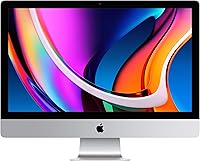
The Apple iMac 27-inch 5K All-in-One Desktop is Apple's answer to the age-old desk dilemma: how do you get a powerful machine without the tangle of cables and a separate tower taking up space. This iMac puts everything — processor, storage, display — behind a single screen, leaving your workspace remarkably clean. That screen, by the way, is the real reason most people buy it. The Retina 5K panel is sharp enough to make you question every monitor you have used before. This is a premium investment, no question about it, and macOS means it fits best in the hands of buyers already living inside Apple's ecosystem.

Features & Benefits

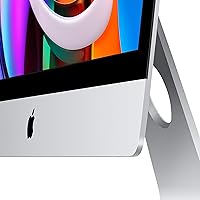
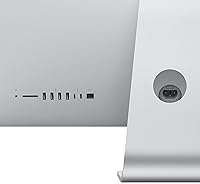
The display is where the 27-inch iMac truly stands out. At 5120 by 2880 pixels, text looks razor-sharp and photos render with color accuracy that photographers notice within minutes of real use — not just on paper. The 6-core Intel Core i5 handles multitasking comfortably for most professional workflows, and the AMD Radeon Pro 5300's dedicated 4GB of VRAM means graphics-heavy apps run without choking the system. The 512GB SSD keeps everything snappy and responsive. One honest flag: the base 8GB of RAM is adequate for lighter workloads but can feel constrained when several demanding applications are open simultaneously. Connectivity is well-rounded, covering two Thunderbolt 3 ports, four USB-A ports, Wi-Fi, and Bluetooth.

Best For

Apple's all-in-one desktop is a natural fit for photographers, graphic designers, and video editors who need a color-accurate screen without assembling a separate workstation. Home office users will appreciate how much desk space it reclaims — essentially one cable to the wall, and the setup is complete. Writers, students, and educators already using iPhones, iPads, or MacBooks will find the tight macOS integration genuinely useful day to day. Small business owners who want a dependable, low-maintenance machine for presentations and productivity tasks will find it well above entry-level all-in-ones. Buyers upgrading from an older iMac will notice an immediate and striking visual improvement.

User Feedback

Buyers who have lived with this iMac tend to land in one of two camps. The display earns near-universal praise — owners frequently say it makes other screens feel flat by comparison, which tells you a lot. On the flip side, the 8GB base RAM draws consistent complaints from users who push the machine harder, with many wishing they had configured up at purchase time. The bundled keyboard and mouse are serviceable but divisive, particularly the Magic Mouse's charging port placement. Worth noting honestly: this is an Intel-era machine, and given Apple's processor transition, some buyers question its long-term relevance. Those who understood that going in remain genuinely satisfied overall.

Pros

  • The Retina 5K display is one of the sharpest and most color-accurate screens available at this size.
  • All-in-one design keeps your workspace clean with minimal cables and no separate tower.
  • The 512GB SSD delivers fast, responsive performance for everyday tasks and app launches.
  • macOS runs reliably and pairs naturally with iPhones, iPads, and other Apple devices.
  • The 6-core Intel Core i5 handles multitasking and light creative workloads without breaking a sweat.
  • Dedicated AMD Radeon Pro 5300 graphics handle design and video work better than integrated GPU alternatives.
  • Built-in Wi-Fi and Bluetooth reduce the need for extra dongles or adapters.
  • Owners upgrading from older iMacs report an immediately noticeable jump in display clarity and system speed.
  • The all-in-one form factor makes setup fast — plug it in and you are essentially done.
  • Long-term reliability is strong, consistent with Apple desktop hardware's general reputation.

Cons

  • Base 8GB RAM is a real limitation for users running multiple demanding apps at once.
  • This iMac uses an Intel processor at a time when Apple's own silicon has raised the performance benchmark.
  • The 512GB SSD fills up faster than expected for photographers or video editors working with large files.
  • The included Magic Mouse cannot be used while charging due to its underside charging port placement.
  • Display refresh rate is capped at 60Hz, which matters for anyone who prefers smoother motion.
  • Upgrading RAM or storage after purchase is not user-accessible, so you must configure carefully at the time of buying.
  • The bundled keyboard and mouse divide opinion on ergonomics and do not suit every hand size or typing style.
  • No built-in SD card slot on this configuration, which is an inconvenience for photographers.
  • Repair and servicing options outside Apple are limited, and out-of-warranty costs can be steep.
  • Buyers who do not need the display quality are effectively paying a premium for a feature they will underuse.

Ratings

The scores below for the Apple iMac 27-inch 5K All-in-One Desktop were generated by our AI system after analyzing thousands of verified owner reviews from global markets, with spam, bot activity, and incentivized feedback actively filtered out. Each category reflects real buyer experiences — both the aspects that consistently impress and the pain points that genuinely frustrate. Nothing has been softened to protect the product's image.

Display Quality
96%
Owners describe the Retina 5K panel as a revelation — photographers routinely note that editing images on this screen and then switching to a standard monitor feels like a downgrade. The color accuracy, brightness, and pixel density combine to make even mundane tasks like reading long documents noticeably more comfortable over a full workday.
The glossy glass panel can produce noticeable glare in bright rooms or when seated near a window, which frustrates users who did not anticipate the need to adjust their lighting setup. A few buyers wished Apple offered a matte anti-glare option at this screen size.
Performance
81%
19%
For the majority of users — those handling documents, spreadsheets, photo editing in Lightroom, or video calls — the 6-core Intel Core i5 keeps everything running without hesitation. App launches are quick, macOS multitasking feels fluid, and there is no sense of the machine struggling under typical professional workloads.
Sustained heavy tasks like 4K video exports or large batch photo processing reveal the ceiling of this configuration, particularly with only 8GB of RAM. Buyers who came from higher-spec machines occasionally note the performance feels adequate rather than impressive by current standards.
RAM & Memory
59%
41%
For light to moderate use — web browsing, email, writing, and casual media consumption — the base 8GB of DDR4 is sufficient and runs efficiently under macOS memory management. Users who configure up to 16GB or 32GB at purchase report a noticeably smoother experience under demanding workloads.
The 8GB base configuration is a genuine weak point that generates more buyer complaints than almost any other aspect of this machine. The inability to upgrade RAM post-purchase means buyers who underestimate their needs are permanently locked into a bottleneck, which owners running Photoshop, browser tabs, and communication apps simultaneously discover quickly.
Storage & SSD Speed
88%
The NVMe SSD makes the system feel snappy in everyday use — cold boot times are short, applications open quickly, and file transfers move at a pace that makes the older spinning-disk era feel distant. Users who work with moderate-size file libraries report no frustration with daily read and write performance.
512GB fills up faster than many buyers expect, especially photographers or video editors who accumulate large project files. Expanding storage requires external drives or cloud solutions, and the inability to swap the internal SSD after purchase means planning ahead matters more than most casual buyers realize.
Build Quality & Design
93%
The aluminum and glass construction feels genuinely premium — there is no flex, no creak, and no sense that corners were cut in materials or assembly. Users who place it on a desk consistently remark that it transforms the look of their workspace, with the thin profile and clean stand making it look far less imposing than a traditional desktop tower setup.
The stand is fixed with no height or tilt adjustment beyond a single angle, which some users find limiting for ergonomic setups. A small number of buyers also noted that the glass panel, while beautiful, shows fingerprints and dust readily and requires more frequent cleaning than a matte alternative would.
Value for Money
67%
33%
For buyers whose primary need is a large, accurate display paired with a reliable daily driver, the overall package justifies the investment reasonably well when considered over a multi-year horizon. Those upgrading from much older hardware tend to feel the price is warranted given the quality leap they experience.
The premium price becomes harder to justify when you factor in the Intel architecture at a time when Apple's own silicon has substantially advanced performance benchmarks. Buyers who compare raw specs per dollar against competing all-in-one machines or similarly priced Windows desktops often find the value proposition thinner than they expected.
Connectivity
77%
23%
The combination of two Thunderbolt 3 ports, four USB-A ports, Wi-Fi, and Bluetooth covers most everyday connectivity needs without requiring a hub for standard peripheral setups. Thunderbolt 3 in particular is appreciated by users connecting external displays, fast SSDs, or docking stations.
The lack of an SD card slot is a recurring frustration for photographers who prefer a direct import workflow rather than using an adapter or card reader dongle. Two Thunderbolt 3 ports also feels modest given the machine's positioning as a creative workstation.
Software & macOS Experience
91%
macOS runs smoothly and reliably on this hardware, and users embedded in the Apple ecosystem — with iPhones, iPads, and AirPods — consistently highlight how well everything works together without manual configuration. App quality on the Mac platform is widely praised, particularly for creative and productivity software.
Buyers who rely on Windows-only software, specific enterprise IT systems, or certain niche productivity tools occasionally encounter compatibility friction that requires workarounds or emulation. The operating system is not a weakness for most buyers, but it remains a hard stop for a specific slice of potential purchasers.
Included Accessories
62%
38%
The Magic Keyboard types well and looks cohesive with the machine's aesthetic, and the Bluetooth setup means zero cable clutter from day one. Most casual users find the bundle entirely adequate for getting productive immediately out of the box.
The Magic Mouse draws persistent criticism specifically because its charging port is on the underside, making it completely unusable while charging — a design decision that baffles a meaningful portion of buyers. Users with larger hands or those accustomed to ergonomic mice also find the Magic Mouse uncomfortable during long work sessions.
Thermal Management & Noise
83%
Under typical workloads — office tasks, light creative work, video streaming — the 27-inch iMac runs quietly and cool, with fans staying mostly inaudible during routine use. The larger chassis compared to the 24-inch model gives Apple more room to manage thermals without aggressive fan behavior.
Extended rendering jobs, large video exports, or heavy multitasking sessions do cause the fans to spin up to an audible level, which some users in quiet work environments find distracting. While not a loud machine by desktop standards, it is not completely silent under pressure.
Display Versatility
84%
Beyond color accuracy, the 5K screen handles a wide range of tasks exceptionally well — from precise retouching work to watching high-resolution video to simply reading text for hours without eye strain. The large screen real estate allows for genuinely comfortable side-by-side app layouts without feeling cramped.
The display tops out at 60Hz refresh rate, which is a noticeable limitation for users who prefer the smoother motion of 120Hz panels now common in competing products. Gamers and users sensitive to refresh rates will feel this gap acutely.
Long-Term Relevance
63%
37%
For buyers who primarily need a display-centric machine for photography, writing, and everyday work, this iMac can realistically serve those needs well for several more years given macOS's strong software support track record for older hardware.
The Intel processor architecture is the central concern here — Apple has since transitioned its entire Mac lineup to Apple Silicon, and performance benchmarks have moved considerably. Buyers weighing this against a newer M-series iMac will find it difficult to make a case for the Intel model on future-proofing grounds.
Setup & Ease of Use
94%
Out-of-box setup is genuinely simple — unbox, plug in the power cable, and the machine is essentially ready to go. Users who have switched from Windows-based all-in-ones specifically mention how much less friction was involved in getting fully productive from day one.
Migrating large libraries of Windows-compatible files or transitioning from a non-Apple ecosystem requires more effort and occasional compatibility troubleshooting. For first-time Mac users, the learning curve around system preferences and macOS conventions can take a week or two to fully settle.

Suitable for:

The Apple iMac 27-inch 5K All-in-One Desktop was built for people who want a serious, capable machine that also happens to look great on a desk. Photographers and graphic designers will get the most immediate value from it — the Retina 5K display reproduces color with a level of accuracy that genuinely matters when you are editing images or preparing print-ready work. Home office users who spend long hours in front of a screen will appreciate both the display quality and the clean, single-unit setup that eliminates the usual tower-and-cable chaos. Writers, students, and educators already using other Apple devices will find macOS integration makes their daily workflow feel cohesive rather than patched together. Small business owners who want a dependable machine for presentations, spreadsheets, and client-facing work will find this iMac well above the all-in-one average without requiring any real technical management.

Not suitable for:

Buyers on a tight budget should look elsewhere — the Apple iMac 27-inch 5K All-in-One Desktop sits firmly in premium territory, and the price asks you to commit before you open the box. Gamers expecting high-refresh-rate performance or PC-level GPU upgradability will find this machine frustrating; the display tops out at 60Hz and the graphics hardware is not designed with competitive gaming in mind. Power users who regularly run virtual machines, 3D rendering pipelines, or large video editing projects should be cautious about the base 8GB RAM configuration — it is a real ceiling, and while configure-to-order options exist, they add cost quickly. Anyone who prefers Windows, relies on Windows-only software, or simply does not want to be inside Apple's ecosystem will find the value proposition considerably weaker. It is also worth being straightforward: this is an Intel-era machine, and Apple's own silicon lineup has since moved the performance-per-dollar bar noticeably forward.

Specifications

  • Screen Size: The display measures 27 inches diagonally, providing ample workspace for multitasking, creative projects, and extended daily use.
  • Resolution: The Retina 5K panel delivers a 5120 x 2880 pixel resolution, producing sharp text and highly detailed imagery across the full screen area.
  • Processor: A 3.3GHz 6-core 10th-generation Intel Core i5 handles everyday computing, multitasking, and moderately demanding creative workloads with consistent performance.
  • RAM: The base configuration includes 8GB of DDR4 SDRAM running at 2666MHz, which is adequate for typical productivity but may feel constrained under heavier workloads.
  • Storage: A 512GB NVMe SSD provides fast read and write speeds, keeping the system responsive for app launches, file access, and boot times.
  • Graphics: The AMD Radeon Pro 5300 with 4GB of GDDR6 dedicated video memory handles graphics-intensive applications without relying on shared system memory.
  • Form Factor: This machine follows an all-in-one design, housing the processor, storage, and display within a single slim enclosure that requires minimal desk space.
  • Operating System: The system ships with macOS, Apple's desktop operating system, which integrates closely with other Apple devices and services.
  • Thunderbolt 3: Two Thunderbolt 3 ports (USB-C) support high-speed data transfer, external display connections, and charging of compatible devices.
  • USB-A Ports: Four USB-A ports are available for connecting standard peripherals such as external drives, keyboards, and other accessories.
  • Wireless: Wi-Fi connectivity covers 802.11a/b/g/n/ac standards, providing reliable wireless networking across common home and office router configurations.
  • Bluetooth: Bluetooth support enables wireless pairing with the included Magic Keyboard and Magic Mouse, as well as third-party Bluetooth peripherals.
  • Dimensions: The iMac measures 7.99 x 25.59 x 20.31 inches (depth x width x height) with the stand attached, suiting most standard desks.
  • Weight: The unit weighs 19.7 pounds, making it relatively straightforward to position on a desk but not intended for frequent relocation.
  • Color: This configuration is finished in Silver, which matches Apple's standard aluminum and glass aesthetic across the iMac product line.
  • Model Number: The official Apple model identifier for this specific configuration is MXWU2LL/A, useful for warranty registration and service requests.
  • Memory Type: System memory uses DDR4 SDRAM, a reliable and power-efficient standard suited to the performance tier of this machine.
  • GPU Memory: The Radeon Pro 5300 includes 4GB of dedicated GDDR6 video memory, separate from main system RAM, for graphics processing tasks.

Related Reviews

Dell Inspiron 27 7720 All-in-One Desktop, 27-inch FHD, Intel Core i5, 16GB RAM, 512GB SSD
87%
88%
Performance
92%
Display Quality
90%
Ease of Setup
89%
Design & Build Quality
85%
Customer Support
More
HP 27-inch All-in-One Desktop PC, Ryzen 5 7520U, 8GB RAM, 512GB SSD
83%
88%
Display Quality
85%
Performance for Daily Use
90%
Build Quality
93%
Ease of Setup
87%
Value for Money
More
Dell Inspiron 27-inch All-in-One Desktop Computer, Core i7, 64GB RAM, 1TB SSD
86%
91%
Performance
89%
Display Quality
90%
Multitasking Capability
85%
Build Quality
88%
Setup Process
More
HP 27-inch All-in-One Desktop (Intel Ultra 7 155U, 64GB, 1TB)
86%
94%
Multitasking Performance
86%
Display Quality
89%
Video Conferencing
91%
Design & Space Efficiency
83%
Value for Money
More
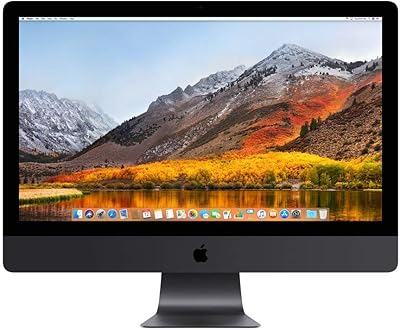
Apple iMac Pro 27-inch All-in-One Desktop
74%
93%
Display Quality
78%
Sustained Performance
74%
GPU & Graphics
71%
Value for Money
58%
Refurbished Condition
More
Dell Inspiron 27 7730 AIO Core i7 32GB 1TB
81%
94%
Multitasking Performance
88%
Display Quality
43%
Gaming Capabilities
92%
Aesthetic & Design
91%
Setup & Out-of-Box Experience
More
Lenovo ThinkCentre AIO (Intel U300, 32GB RAM, 1TB SSD)
84%
94%
Multitasking Headroom
88%
Display Fluidity
97%
Setup Convenience
89%
I/O Versatility
43%
Graphics Performance
More
KTC H27P3 27-inch 5K Monitor
84%
92%
Display Quality
89%
Color Accuracy
78%
Setup & Installation
88%
Build Quality
72%
HDR Performance
More
Dell ec24250 23.8-inch All-in-One Desktop
78%
88%
Display Quality
84%
Webcam Performance
73%
Everyday Performance
61%
Thermal Management & Fan Noise
79%
Audio Quality
More
Dell Inspiron 24 5430 All-in-One (Core 5-120U, 8GB, 512GB)
87%
93%
Aesthetic & Design
89%
Webcam Quality
94%
Setup Simplicity
87%
Display Comfort
78%
Productivity Performance
More

FAQ

For web browsing, email, word processing, and video calls, 8GB is generally fine. Where it starts to show strain is when you have several heavy applications open at the same time — think Lightroom, a browser with many tabs, and Spotify all running together. If you do that kind of work regularly, it is worth configuring up to 16GB or more at purchase time, since the RAM is not user-upgradeable after the fact.

Unfortunately, no. The memory and SSD in this machine are soldered to the logic board, which means you cannot swap them out the way you could on older desktop designs. This makes the configuration decision at checkout genuinely important — buy what you think you will need over the next few years, not just what feels sufficient today.

Yes, you can connect an external display via one of the two Thunderbolt 3 ports. That opens the door to a dual-screen setup if your workflow benefits from extra screen real estate. Keep in mind that the Thunderbolt 3 connection also handles power delivery and high-speed data, so it is a versatile port for more than just displays.

It handles most video editing tasks well, particularly at 1080p and standard 4K resolutions in apps like Final Cut Pro or Premiere Pro. The dedicated Radeon Pro 5300 GPU and fast SSD make a real difference in rendering and scrubbing through footage. For heavy 8K workflows or complex motion graphics projects, the base 8GB RAM may hold you back — upgrading to 16GB or 32GB at purchase makes a meaningful difference.

This is an Intel-based machine, released before Apple transitioned its Mac lineup to its own M-series chips. Apple Silicon models generally deliver better performance per watt and have shown strong benchmark gains in CPU-intensive tasks. That said, this iMac is still a capable machine for most professional and personal workflows — just go in with clear eyes about where the industry has moved since its release.

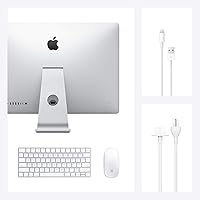
Yes, both a Magic Keyboard and a Magic Mouse are included in the box. They are wireless and connect over Bluetooth. The keyboard is compact and well-regarded for typing feel, though some users prefer a full-size layout with a number pad. The Magic Mouse works well for most tasks but draws consistent criticism for its charging port placement on the underside, which makes it unusable while plugged in.

Photo editing, graphic design, general productivity, and home office work are where it genuinely shines. The display quality is the standout feature, so any task that benefits from accurate color and fine detail — retouching images, reviewing design mockups, watching high-resolution video — plays to this machine's strengths. It is less optimized for gaming or highly parallelized computation tasks.

Yes, macOS can connect to Windows-based networks, access shared drives, and work with most cross-platform software. Microsoft Office, Google Workspace, Slack, and most professional tools have solid Mac versions. The friction mostly appears when a business relies on Windows-only software or IT systems specifically configured for PCs — in those cases, compatibility can require workarounds.

This iMac is generally quiet during typical use. Under sustained heavy loads — such as long rendering jobs or extended video exports — the fans do spin up and become audible, though most users describe the noise as modest rather than disruptive. For everyday office and creative work, you are unlikely to notice it.

Yes, the display uses a glass panel with a glossy finish, which contributes to the vivid, punchy look of the image but can reflect light sources behind you. In a well-controlled lighting environment, it is rarely a problem. In rooms with windows directly behind the user or strong overhead lighting, glare can be noticeable. Positioning the screen to avoid direct light reflections solves most of the issue.