Overview

The MSI MPG EZ120 ARGB 120mm Fans 3-Pack targets enthusiast builders who want their cooling setup to look as good as it performs. The headline differentiator is the magnetic daisy-chain connector system — a genuinely fresh approach to fan wiring that cuts installation time compared to the usual tangle of PWM cables and molex adapters. Aesthetics and ease of installation are clearly the priorities, and the kit delivers on both. The included fan hub makes this a more complete package than most bare fan packs, and MSI Mystic Light and Cooling Wizard compatibility adds real value for those already in that ecosystem. Airflow performance is respectable but not the main draw.
Features & Benefits

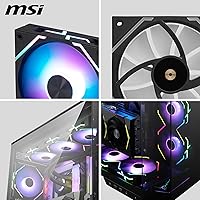
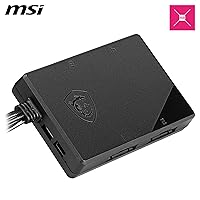
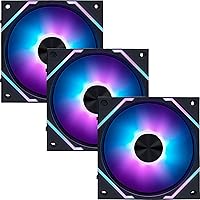
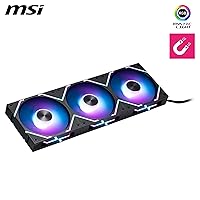
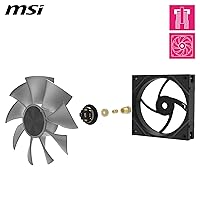
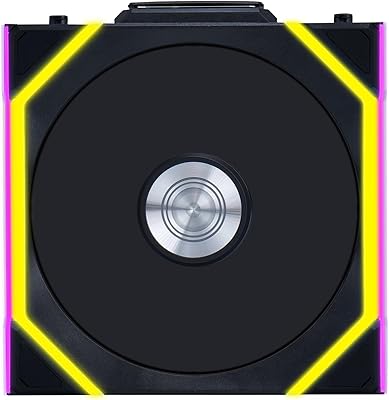
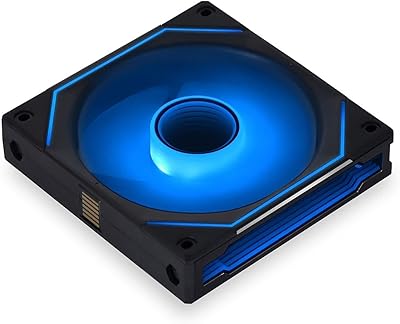
The magnetic connector blocks are the centerpiece, and they work exactly as advertised. Instead of fumbling with individual fan headers, you click the fans together — power, speed control, and LED signal all travel through one connection point. It feels sturdy, not like a gimmick. Each fan packs 33 addressable LEDs split across three independently controllable zones, and the lighting is uniform and vivid through a tempered glass panel. The fluid dynamic bearing keeps noise at or below 30 dB during typical use, and the extra nut-fixing adds mechanical stability that cheaper bearings skip. The included hub supports up to 18 fans — overkill for most mid-towers, but a genuine advantage in larger full-tower arrays.

Best For

These MSI ARGB fans make the most sense for builders already running MSI hardware — an MPG or MEG motherboard especially — where Mystic Light sync works without workarounds or third-party hacks. Anyone building inside a windowed case who dreads cable management will find the daisy-chain approach a real relief. The hub and scalable connection system also reward larger builds where six or more fans are planned; the per-fan cost becomes easier to justify when you factor in what you would otherwise spend on cable combs and splitters. That said, if you are chasing maximum airflow or building a near-silent workstation, dedicated performance fans from Noctua or be quiet! will serve you better.

User Feedback

Owners consistently highlight the magnetic connectors as the standout feature, with many reporting noticeably faster installation compared to conventional fan setups. LED color consistency across all three fans also draws frequent praise — buyers note the hues match closely with no obvious drift between units. On the critical side, users on non-MSI motherboards report friction with software compatibility; full lighting control requires Mystic Light, which does not integrate cleanly with ASUS Armoury Crate or Gigabyte RGB Fusion. A smaller number of buyers flagged questions about connector durability over repeated attach-and-detach cycles. The fan hub is generally well-received, though a few noted the plastic feel does not quite match the fans themselves.

Pros

  • The magnetic daisy-chain connectors genuinely cut installation time — most builders report the process feels faster and cleaner than any conventional fan wiring setup.
  • All three fans in the kit match closely in LED color and brightness, a consistency that is not guaranteed across many competing ARGB packs.
  • The 3-zone per-fan lighting control produces layered, visually distinct effects that hold up well through a tempered glass panel.
  • The included fan hub supports up to 18 fans, making this fan kit a solid foundation for large-scale builds without extra purchases.
  • Fluid dynamic bearings keep noise at comfortable levels during everyday workloads, including extended light-to-moderate gaming sessions.
  • The extra nut-fixing bearing structure adds a layer of mechanical durability that many competing ARGB fans at this tier skip entirely.
  • PWM control via standard 4-pin headers means basic speed control works on non-MSI boards, even if full lighting features are limited.
  • For full MSI builds, Cooling Wizard integration allows hands-off fan curve management without manual configuration in the BIOS.
  • The package ships as a genuinely complete kit — hub, connectors, and mounting hardware are all included in the box.

Cons

  • Software compatibility outside of Mystic Light is a real limitation; ASUS and Gigabyte users lose access to per-zone LED control entirely.
  • The fan hub feels noticeably cheaper in hand than the fans themselves, and its mounting options inside a case are limited.
  • At or near maximum RPM, fan noise rises to an audible level that undercuts the quiet-system experience many buyers expect.
  • Replacement magnetic connector blocks are not sold separately, which creates a support gap for users who damage a connector during installation.
  • The daisy-chain layout only works cleanly when fans are mounted in close proximity — unconventional or spread-out configurations break the chain logic.
  • Long-term connector durability data is thin given the product is relatively new, leaving frequent system-reconfigurers with genuine uncertainty.
  • Per-fan cost is high relative to competing 120mm ARGB kits when evaluated purely on airflow output and acoustic performance.
  • The LED zone count, while solid, falls short of per-LED control offered by some rivals, limiting complex custom animation options.
  • Using these fans as radiator-mounted coolers on AIO units produces noticeably weaker results than purpose-built static-pressure alternatives.

Ratings

The MSI MPG EZ120 ARGB 120mm Fans 3-Pack has been evaluated by our AI system after processing verified buyer reviews from global markets, with spam, bot-submitted, and incentivized feedback actively filtered out. Scores reflect real-world builder experiences across a wide range of system configurations and use cases. Both the genuine strengths and the recurring frustrations are transparently represented in every category below.
Installation Experience
91%
The magnetic connector system is consistently the first thing buyers mention — and the praise is specific. Builders report that wiring up three fans takes a fraction of the time compared to routing individual PWM and lighting cables, and the connectors click into place with satisfying confidence. For first-time builders especially, this reduces one of the most frustrating steps of a case build.
The magnetic daisy-chain design works best when fans are physically adjacent, so unconventional mounting layouts — like mixing intake and exhaust on opposite sides of a case — can limit how cleanly the chain runs. A small number of users also noted that the connector blocks add a few millimeters of depth at each fan junction.
RGB Lighting Quality
88%
With 33 LEDs per fan divided into three individually addressable zones, the EZ120 trio produces vivid, consistent lighting that reads well through tempered glass side panels. Buyers frequently highlight that all three fans in the pack match closely in color and brightness, which is not always guaranteed with ARGB kits. The 3-zone control gives enough granularity to create layered effects.
Full lighting customization requires MSI Mystic Light, and outside of that software environment the per-zone control is not easily accessible. Users on non-MSI platforms report that the fans default to a basic rainbow cycle, which is attractive enough but lacks the fine-tuning that makes the LED array worthwhile.
Software Compatibility
58%
42%
Within the MSI Mystic Light and Cooling Wizard ecosystem, integration is smooth and the per-zone controls work as expected. MSI board owners can manage all three fans from a single interface alongside other RGB components, which genuinely simplifies the lighting setup process for an all-MSI build.
This is the most divisive aspect of the fan kit. Buyers using ASUS, Gigabyte, or ASRock motherboards report meaningful friction — Mystic Light does not integrate cleanly with Armoury Crate or RGB Fusion, and full zone control is effectively off the table. Several users flagged this as a deal-breaker they wished they had researched before purchasing.
Noise Level
83%
At typical desktop workloads, these fans run quietly enough to fade into the background. The fluid dynamic bearing design contributes to a smooth, low-frequency hum rather than the higher-pitched whine associated with sleeve-bearing fans, and most buyers report not noticing them during everyday use including light gaming.
At or near maximum 1800 RPM, the noise floor rises to a noticeable level. For builders running aggressive fan curves or using these fans in small form factor cases where higher speeds are necessary for adequate airflow, the 30 dB ceiling is not always achievable in practice.
Airflow Performance
71%
29%
For standard mid-tower case ventilation — front intake, rear and top exhaust — the EZ120 trio handles thermal duties respectably. Builders running mainstream CPUs and mid-range GPUs report stable temperatures with all three fans installed, and the airflow is adequate for open-air case designs.
These are not high-static-pressure fans, and they are not marketed as such. Builders using them as radiator fans on all-in-one coolers or pushing air through dense mesh front panels will find the performance underwhelming compared to purpose-built options. Raw CFM-focused buyers should look elsewhere.
Build Quality & Materials
79%
21%
The fan blades and frame feel solid, and the extra nut-fixing structure on the bearing housing gives the EZ120 a more mechanically robust feel than many competing ARGB fans in the same size category. The overall fit and finish suggests MSI put meaningful engineering time into the physical design.
The included fan hub, while functional, draws consistent criticism for its plastic construction. Several buyers noted it feels noticeably less premium than the fans themselves, and a few questioned its long-term durability when handling six or more fans worth of load across extended use.
Magnetic Connector Durability
67%
33%
For builders who assemble a system and leave it running, the magnetic connectors show no meaningful signs of degradation over time. The snap connection holds securely during normal operation, and there are no reported issues with fans losing signal or power during use.
The longer-term durability picture is less certain for builders who regularly reconfigure their systems. A subset of buyers who frequently swapped components expressed concern about connector wear after multiple connect-and-disconnect cycles, and MSI does not currently offer replacement connector blocks as standalone accessories.
Fan Hub Quality
62%
38%
The hub supports up to 18 fans across its expansion ports, which is a genuinely useful ceiling for full-tower builds. Having the hub included in the box rather than sold separately adds practical value and reduces the overall parts count for large arrays.
The hub itself is the weakest physical component in the package. The plastic housing feels budget-grade relative to the fans, and several buyers reported that the mounting options are limited — securing it cleanly inside a case without adhesive or zip ties requires some improvisation.
Value for Money
66%
34%
For builders who will actually use the magnetic daisy-chain system across six or more fans, the per-unit cost becomes easier to justify — the time and cable management savings are real and cumulative. The included hub and complete integration package adds meaningful value over bare fan purchases.
For a three-fan starter kit, the price sits at the higher end of the 120mm ARGB category. Buyers who compare directly against competing kits from Lian Li, Corsair, or ARCTIC on raw airflow and noise metrics will find the EZ120 trio harder to recommend purely on performance-per-dollar grounds.
Ecosystem Integration
84%
Within a full MSI build, the integration experience is cohesive. Mystic Light recognizes the fans automatically, Cooling Wizard can apply intelligent fan curves without manual configuration, and the lighting syncs cleanly with other MSI components like GPU shrouds and motherboard headers.
The ecosystem benefit is strictly additive for MSI users and largely inaccessible to everyone else. There is no cross-platform API or open ARGB header fallback that preserves zone control, which narrows the genuinely satisfied audience to a specific subset of the PC builder market.
Packaging & Included Accessories
77%
23%
The box is well-organized and the fans arrive with adequate protection. The inclusion of the fan hub, mounting hardware, and magnetic connector blocks in a single package means most builders will not need to source additional components before starting installation.
The mounting screws and extra hardware are functional but not exceptional. A few buyers mentioned they wished additional connector blocks were included for extended daisy-chain flexibility, particularly for those planning to add more EZ120 fans to the array over time.
LED Zone Control Granularity
74%
26%
Three independently controllable zones per fan gives builders enough flexibility to create gradient and split-color effects that look intentional rather than generic. The zoning is visible and distinct through glass panels, particularly when running contrasting color combinations across inner and outer LED rings.
Three zones is competitive but not class-leading — some rivals offer per-LED control at a comparable price. For builders who want highly detailed custom animations or reactive lighting tied to system metrics, the zone-based approach can feel limiting once the novelty of the initial setup wears off.
Scalability for Large Arrays
86%
The hub-and-daisy-chain architecture genuinely shines in builds with six or more fans. The ability to expand to 18 units through a single hub connection is unusual at this price tier, and builders running full-tower configurations with dense fan layouts find the setup time advantage compounds with each additional fan.
Realizing the full scalability benefit requires purchasing additional EZ120 units, which adds up quickly given the per-fan cost. The system is also only as scalable as the magnetic connector chain allows — layouts that require long cable runs between fans break the daisy-chain logic entirely.
Bearing Longevity
81%
19%
Fluid dynamic bearings have a well-established track record for extended operational life compared to sleeve or ball bearing alternatives. The additional nut-fixing structure MSI added to the bearing housing addresses a known weak point in FDB fan designs, giving this kit a credible durability story.
Long-term real-world data on the extra nut-fixing design specifically is limited given the relatively recent release of this fan. Buyers looking for multi-year reliability data comparable to established competitors will find the track record thin at this stage.

Suitable for:

The MSI MPG EZ120 ARGB 120mm Fans 3-Pack is built for a specific kind of builder, and that builder will genuinely love it. If you are running an MSI MPG or MEG motherboard and want your entire system lighting to sync through Mystic Light without fighting third-party software, this fan kit fits into that ecosystem more naturally than almost any alternative. Enthusiasts who care deeply about cable management and interior aesthetics — particularly those building in windowed cases where the inside of the system is part of the presentation — will find the magnetic daisy-chain connector system cuts setup time and clutter in a way that feels meaningfully different from conventional fan wiring. The EZ120 trio also scales well for larger builds: if you are planning a full-tower with six or more fans, the included hub and daisy-chain architecture make expansion straightforward and consistent. For mid-range to high-end builds where the priority is a clean, well-lit, and reasonably quiet system rather than maximum airflow, this fan kit is a well-rounded and considered choice.
Not suitable for:

Buyers who are not running MSI hardware should think carefully before committing to the MSI MPG EZ120 ARGB 120mm Fans 3-Pack. The magnetic connector system and 3-zone LED control are genuinely useful features, but their full potential is locked behind Mystic Light — and if you are on an ASUS, Gigabyte, or ASRock board, that software will not integrate cleanly with your existing RGB ecosystem. Builders who prioritize raw cooling performance over aesthetics will also find this fan kit a poor fit; it is not a high-static-pressure fan, and using it as a radiator-mounted cooler or pushing air through a restrictive mesh front panel will produce underwhelming results compared to purpose-built performance options from Noctua or Arctic. Those who frequently reconfigure their systems should also note that the magnetic connectors, while solid during normal use, have uncertain long-term durability under repeated connect-and-disconnect cycles. Finally, strictly budget-conscious shoppers comparing fan kits purely on airflow and noise specifications will find competing options offer better performance-per-dollar at this size category.

Specifications

  • Fan Size: Each fan in the kit measures 120mm in diameter, the most common standard size for desktop PC case and radiator mounting.
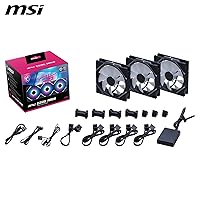
  • Pack Quantity: The kit includes 3 fans, along with a fan hub, magnetic connector blocks, and necessary mounting hardware.
  • LED Count: Each fan contains 33 addressable RGB LEDs arranged across the blade and frame for consistent illumination from multiple angles.
  • LED Zones: Each fan is divided into 3 independently controllable lighting zones, allowing separate color and effect assignments per zone via compatible software.
  • Bearing Type: The fans use a Fluid Dynamic Bearing (FDB) design with an additional nut-fixing structure to improve mechanical stability and reduce bearing noise over time.
  • Max Fan Speed: Each fan spins at up to 1800 RPM under full load, controlled via PWM signal from the motherboard or hub.
  • Noise Level: Rated noise output reaches up to 30 dB at maximum speed, with significantly lower noise levels at typical mid-range PWM curves.
  • Power Connector: Each fan uses a standard 4-pin PWM connector, compatible with any desktop motherboard header or PWM-capable fan hub.
  • Connection System: The kit uses MSI patented Magnetic Connector Blocks that transfer power, PWM speed signals, and ARGB lighting data through a single snap-together connection point.
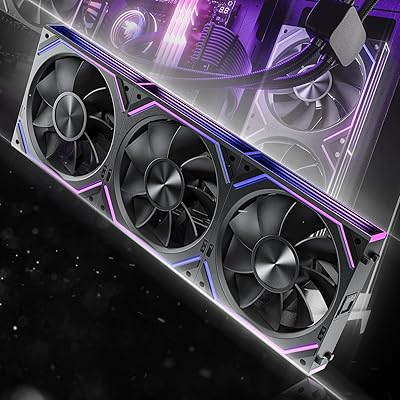
  • Daisy-Chain: Fans can be connected in a daisy-chain sequence using the magnetic blocks, eliminating the need for individual cables running to the motherboard or hub.
  • Fan Hub: The included hub provides 4 expansion ports and supports connection of up to 18 MPG EZ120 ARGB fans simultaneously through the daisy-chain architecture.
  • Software Support: Full lighting and fan curve control is available through MSI Mystic Light and MSI Cooling Wizard software on compatible MSI platforms.
  • Compatible Devices: Designed for standard desktop PC cases; full-feature software integration is optimized for MSI MPG and MEG series motherboards and MSI-branded cases.
  • Package Weight: The complete retail package weighs 2.31 pounds, inclusive of all three fans, hub, connector blocks, and mounting accessories.
  • Model Number: The official MSI model designation for this 3-fan pack is MPG EZ120 ARGB-3B.
  • Manufacturer: Designed and manufactured by MSI (Micro-Star International), a Taiwan-based company known for PC components and gaming hardware.
  • Package Dimensions: The retail box measures approximately 11.02 x 6.5 x 5.39 inches, sized to accommodate all three fans and bundled accessories.
  • Material: The fan frame and structural components are primarily constructed using copper and engineered plastics, consistent with premium 120mm fan manufacturing standards.

Related Reviews
Lian Li UNI Fan SL Wireless 120mm ARGB Fan
85%
91%
Cooling Performance
88%
Ease of Installation
84%
Noise Level
95%
RGB Customization
89%
Build Quality
More
Lian Li UNI Fan SL-INF 120 RGB Infinity Mirror ARGB 120mm Fan
86%
93%
Aesthetics and RGB Lighting
88%
Noise Level/Quiet Operation
91%
Build Quality and Durability
85%
Ease of Installation
87%
Cooling Efficiency
More
Asiahorse Nyota 120mm ARGB Case Fan
85%
88%
Cooling Performance
90%
Noise Level
85%
RGB Lighting Quality
84%
Build Quality
80%
Ease of Installation
More
Asiahorse Dawn 120mm ARGB Case Fan
88%
88%
Cooling Performance
92%
Noise Level
84%
RGB Customization
89%
Build Quality
91%
Ease of Installation
More
Lian Li UNI Fan TL Wireless 120mm Triple Pack
85%
88%
Performance
85%
Noise Levels
92%
RGB Lighting Customization
90%
Ease of Installation
87%
Cable Management
More
Wathai Dual Ball 3 x 120mm Computer Fan with AC Plug
87%
88%
Cooling Performance
90%
Ease of Installation
83%
Noise Level
91%
Build Quality
87%
Speed Adjustability
More
MSI MPG A1250GS PCIe 5.1 ATX 3.1 1250W Power Supply
89%
94%
Power Efficiency
89%
Build Quality
88%
Noise Levels
91%
Modular Design & Cable Management
92%
Compatibility with Latest Hardware
More
MSI MPG A850G 850W ATX Power Supply
83%
91%
Build Quality
88%
Power Delivery Stability
83%
Noise Level
93%
Modularity & Cable Management
86%
Efficiency & Thermal Performance
More
Lian Li UNI Fan SL-Infinity 140 ARGB Fan

86%
92%
Cooling Performance
95%
Visual Appeal & Lighting
87%
Noise Level
80%
Installation Ease
91%
Build Quality
More
Nivea for Men Post Shave Balm 3.3 oz 2-Pack
86%
88%
Soothing & Moisturizing Effect
91%
Absorption Speed
85%
Skin Sensitivity Compatibility
87%
Texture & Feel
83%
Fragrance Subtlety
More

FAQ

The fans will physically install and spin on any desktop motherboard with a 4-pin PWM header — that part is universal. However, the 3-zone ARGB lighting control and fan speed integration through MSI Cooling Wizard are designed around MSI Mystic Light, which does not sync with ASUS Armoury Crate or Gigabyte RGB Fusion. On a non-MSI board, the fans will still light up, but you will most likely be limited to a default rainbow cycle without per-zone customization.

They can physically mount on a 120mm AIO radiator, but they are not optimized for that role. These fans are built around airflow in open-case environments rather than pushing air through the restricted fin stacks of a radiator. If you are planning to use them as rad fans, expect noticeably lower thermal performance compared to high-static-pressure fans like Noctua NF-A12x25 or Arctic P12.

The included hub supports up to 18 MPG EZ120 ARGB fans connected through the daisy-chain system. In practical terms, most mid-tower builds run 3 to 6 fans, so the hub gives you significant room to expand without needing additional controllers or hubs. Just keep in mind that each fan needs to be physically close enough to the next for the magnetic connector block to bridge them cleanly.

This is a legitimate concern that comes up among buyers. Currently, MSI does not sell replacement magnetic connector blocks as standalone accessories, which means a damaged block requires either contacting MSI support directly or purchasing an additional fan unit. It is worth handling the connectors carefully during installation, particularly the first time.

Honestly, probably not at this price. The magnetic daisy-chain system is useful regardless of lighting preferences and does simplify cable management, but the per-fan cost is partly justified by the LED engineering. If lighting is irrelevant to your build and you just need solid 120mm airflow, fans like the Arctic F12 or be quiet! Pure Wings 3 will give you better performance-per-dollar without the ARGB premium.

Matching consistency is one of the most praised aspects of this fan kit. Buyers consistently report that the LEDs across all three fans produce very close color and brightness output, which matters a lot when the fans are visible together through a tempered glass panel. This kind of uniformity is not always guaranteed with ARGB fans sold in multi-packs, so it is a genuine quality point here.

At mid-range PWM speeds — which is where most systems run during everyday gaming — the fans are quiet enough that most users do not consciously notice them. The fluid dynamic bearing produces a smooth, low-pitched hum rather than a sharper whine. At full 1800 RPM they become audible, but reaching that speed requires either an aggressive fan curve or a high-heat scenario most mainstream builds would not sustain.

Yes, each fan has a standard 4-pin PWM connector and can plug directly into a motherboard fan header. The hub is optional and becomes useful when you have more fans than available headers, or when you want to manage multiple fans through a single connection point. For a basic 3-fan setup on a board with enough headers, the hub is a convenience rather than a requirement.

Yes — once clicked together, the magnetic connections hold firmly and do not loosen under vibration or normal operation. The concern that comes up more frequently is around repeated removal and reattachment over time rather than day-to-day reliability. For a system that stays assembled and running, the connectors are solid.

Yes, the package includes mounting screws and the necessary hardware for a standard installation. Most builders report they do not need to source additional components to mount all three fans. The one area where some users improvise is securing the fan hub inside the case, as the hub mounting options are somewhat limited and may require zip ties or adhesive pads depending on your case layout.

Where to Buy