

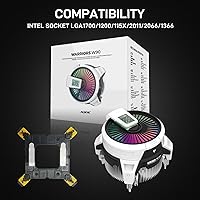
Overview
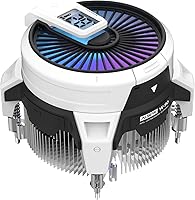
The ALSEYE W90 (Intel) is a compact tower-style air cooler built with one clear purpose: fitting into small cases where standard coolers simply won't. At 102×100×82mm, it slips into ITX and mATX builds that most aftermarket options can't touch. What makes this ALSEYE unit stand apart from typical budget alternatives is its real-time temperature display, powered by the proprietary BEM software. It's genuinely aimed at i3 and i5 users running stock speeds — the 135W TDP ceiling is real, and overclocking is explicitly off the table. Think of it as a meaningful upgrade over the stock Intel cooler, not a competitor to high-end towers.
Features & Benefits
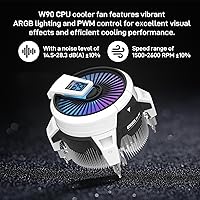
The W90 packs a 90mm ARGB PWM fan into a surprisingly small frame. The hydraulic bearing is rated for 40,000 hours, which is solid for this class of cooler. Fan speeds range from 1500 to 2600 RPM, and at lower loads it stays genuinely quiet, dipping under 28 dB(A). The 40mm copper column handles the thermal heavy lifting within that constrained footprint. Connectivity includes a 5V 3-pin ARGB header for lighting alongside a standard 4-pin PWM connector for fan control. Socket compatibility covers LGA1700, LGA1200, and LGA115X, spanning several recent Intel platforms without any adapters needed.
Best For
This compact cooler is purpose-built for situations where a larger aftermarket option physically cannot fit — think mini-ITX cases with strict CPU height limits or tight mATX mid-towers. If you're building a quiet home office machine or an HTPC around an i3 or i5 at stock speeds, the W90 is worth serious consideration. It's also a solid pick for first-time builders who want a clear upgrade over the bundled Intel cooler without tackling a complex installation. Anyone chasing ARGB lighting in a small chassis on a tighter budget will find this ALSEYE unit covers that ground quite well.
User Feedback
Buyers consistently highlight two things: the ARGB lighting looks sharp inside a small case, and the temperature display is a genuinely useful touch. That said, it's worth being clear — the display depends entirely on ALSEYE's BEM software to function, so it won't work out of the box without a software install. On the thermal side, most owners report real improvements over Intel's stock cooler under normal workloads. Push the system hard for extended periods, though, and temperatures climb faster than expected. A handful of users flag fiddly mounting hardware as a frustration point. Overall, satisfaction holds up well when buyers go in with realistic expectations.
Pros
- Fits into ITX cases where virtually no other aftermarket cooler will physically clear the lid.
- Delivers noticeably lower temperatures than Intel stock coolers on i3 and i5 chips at stock speeds.
- The built-in real-time temperature display is a practical and genuinely uncommon feature at this price tier.
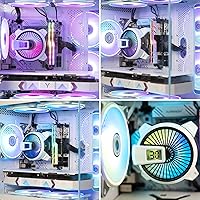
- ARGB lighting output is vivid and attractive — buyers consistently call it a visual highlight inside glass-panel cases.
- Fan noise at idle and light loads is low enough to disappear into a quiet room.
- Covers LGA1700, LGA1200, and LGA115X sockets without needing separate adapters.
- Hydraulic bearing fan is rated for 40,000 hours, offering solid expected lifespan for everyday use.
- Thermal paste comes pre-applied, reducing complexity for first-time builders.
- The W90 occupies a very small footprint — 102×100×82mm — while still using a tower heatsink design rather than a flat top-down layout.
Cons
- The temperature display does nothing without ALSEYE's BEM software installed — this is not made clear on the box.
- Mounting hardware feels underdeveloped; the clip system is fiddly and the instructions leave too much to guesswork.
- Thermals degrade faster than expected under sustained, all-core CPU loads.
- BEM software updates are infrequent, and compatibility issues have been reported on some Windows 11 systems.
- Tall RAM heatspreaders can conflict with fan clearance in particularly cramped board layouts.
- No AMD-compatible version ships in the same package — AMD builders need a separate product entirely.
- The plastic fan shroud feels noticeably cheaper than the copper column it surrounds.
- ARGB sync requires a 5V 3-pin header; older motherboards without one are stuck with a fixed, uncontrollable lighting mode.
- At higher fan speeds the hydraulic bearing produces a faint whine that some users in quiet environments find distracting.
Ratings
The scores below for the ALSEYE W90 (Intel) were generated by our AI engine after systematically analyzing verified purchaser reviews from multiple global markets, with spam, bot activity, and incentivized feedback actively filtered out. Every category reflects the honest spread of real buyer experiences — the wins and the frustrations alike. Nothing has been softened to protect the brand.
Thermal Performance
Noise Level
Build Quality
Installation Experience
ARGB Lighting
Temperature Display Feature
Value for Money
Compatibility Range
Case Clearance & Fit
Fan Longevity
Software Ecosystem
Packaging & Unboxing
Aesthetic Design
Suitable for:
The ALSEYE W90 (Intel) is built for a specific type of builder, and when matched correctly, it genuinely delivers. If you are assembling a mini-ITX or compact mATX system around an Intel Core i3 or i5 — running at stock speeds, no overclocking — this compact cooler covers the thermal needs without demanding valuable case real estate. Home office workers who want a quiet machine that stays cool during productivity workloads will find the low idle noise particularly welcome. It also appeals to budget-conscious RGB enthusiasts who want some visual personality inside a small chassis without paying a premium for it. First-time builders replacing a noisy stock Intel cooler will notice the temperature difference, and the built-in temperature display adds a genuinely useful monitoring feature that most coolers at this tier simply do not offer.
Not suitable for:
Anyone planning to push their CPU beyond stock settings should look elsewhere — the ALSEYE W90 (Intel) carries a firm 135W TDP ceiling, and overclocking headroom is effectively zero. Intel Core i7 and i9 processors from the 10th generation onward are explicitly not recommended by the manufacturer, and buyers who ignore that guidance risk thermal throttling under sustained loads. Power users running CPU-intensive workloads for hours at a time — video rendering, 3D modeling, heavy compilation — will hit the limits of this air cooler faster than expected. The temperature display feature, while attractive on paper, requires installing ALSEYE's proprietary BEM software to function at all, which may be a dealbreaker for users who prefer a clean software environment or run Linux-based systems. AMD platform builders are excluded entirely, as this version supports only Intel sockets.
Specifications
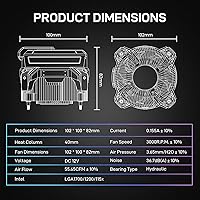
- Dimensions: The cooler measures 102×100×82mm, making it one of the more compact tower-style air coolers available for small form factor builds.
- Weight: Total unit weight is 1.1 pounds, light enough to avoid stressing standard Intel motherboard mounting points.
- Fan Size: The included fan measures 90×90×25mm and uses a PWM control signal for automatic speed adjustment based on system load.
- Fan Speed: Rotational speed ranges from 1500 to 2600 RPM (±10%), scaling dynamically with CPU temperature when connected to a 4-pin PWM header.
- Noise Level: Acoustic output is rated between 14.5 and 28.3 dB(A) (±10%), with the lower end achievable at light loads and idle states.
- Airflow: The fan moves between 20.2 and 52.5 CFM (±10%) depending on speed, providing adequate airflow for the cooler's intended thermal envelope.
- Static Pressure: Static pressure output ranges from 1.23 to 2.64 mm/H2O (±10%), sufficient to push air effectively through the heatsink fins.
- Heat Column: A single 40mm-height copper heat column is used for thermal transfer from the CPU contact base up through the aluminum fin stack.
- Bearing Type: The fan uses a hydraulic bearing with a manufacturer-rated lifespan of 40,000 hours under normal operating conditions.
- TDP Rating: Thermal design power support is rated at 135W, which covers Intel Core i3 and i5 processors running at stock speeds without modification.
- Voltage: The fan operates on a rated DC 12V supply with a current draw of 0.04 to 0.18A (±10%).
- ARGB Connector: RGB lighting is controlled via a 5V 3-pin ARGB header, compatible with standard motherboard ARGB sync software on supported boards.
- Fan Connector: Fan speed control uses a standard 4-pin PWM connector, compatible with any modern Intel motherboard CPU fan header.
- Socket Support: Compatible Intel sockets include LGA1700, LGA1200, and the LGA115X family (LGA1150, LGA1151, LGA1155, LGA1156).
- Cooling Method: Air cooling via a tower heatsink design with a direct-contact copper column and aluminum fin array.
- ARGB Lighting: The 90mm fan features addressable RGB LEDs with lighting effects configurable through compatible motherboard software or ALSEYE's BEM application.
- Temp Display: A real-time CPU temperature readout is supported via ALSEYE's proprietary BEM software, which must be installed separately on the host system.
- Recommended CPUs: ALSEYE recommends this cooler for Intel Core i3 and i5 processors; use with 10th-generation or newer i7 and i9 chips is explicitly not advised.
- Material: The primary heat transfer component is copper; the fin stack and housing incorporate aluminum and plastic elements.
- Thermal Paste: Thermal compound comes pre-applied to the copper base plate, removing the need to source or apply paste separately during installation.
Related Reviews
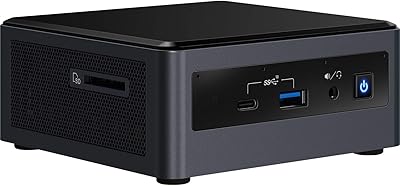
Intel NUC 10 i5 Mini PC Kit
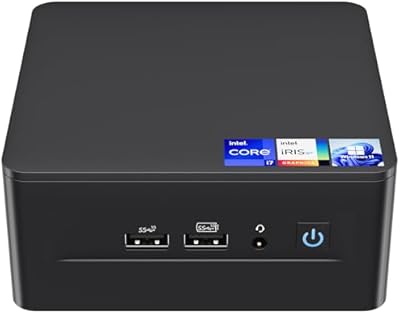
Intel NUC 12 Pro i7 Mini PC
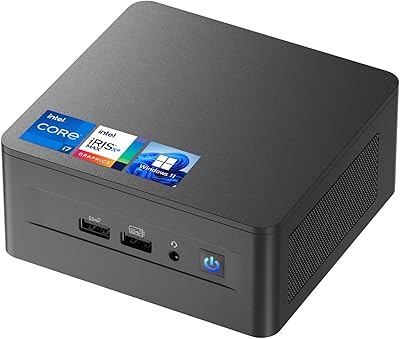
ASUS NUC 12 NUC12WSHi7 16GB/512GB
CyberPowerPC Gamer Xtreme VR Gaming Desktop

Intel Core i9-14900K

Intel Core i7-6700K Desktop Processor

Intel Core i5-13600KF 13th Gen Desktop Processor
Intel 670p 512GB SSD

Donerton W90 Wireless Earbuds