Overview

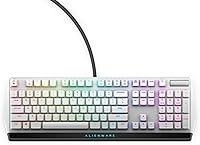
The Alienware AW420K Tenkeyless Gaming Keyboard arrived in early 2025 as a mid-range wired option from Dell's Alienware division, and it makes a noticeably different first impression than most gaming peripherals. The Lunar Light colorway is understated — almost business-like — which is a refreshing change from the aggressive black-and-neon aesthetic that dominates the category. Going TKL means you reclaim a meaningful chunk of desk space without losing any keys you actually use in-game. At this price point, the inclusion of a detachable paracord cable is a genuine practical bonus. One caveat worth noting upfront: if you're not already in the Alienware ecosystem, the software dependency could be a real friction point.
Features & Benefits

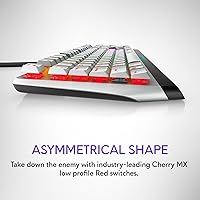
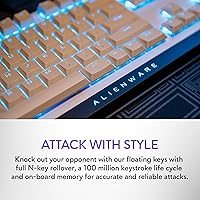
The Cherry MX Red switches are the headline spec here, and they hold up to their reputation. Linear and light to actuate, they make rapid keypresses feel effortless during tense in-game moments — though if you're primarily a typist, the minimal tactile feedback may take some adjustment. Full N-key rollover means the AW420K won't drop inputs no matter how many keys you hit simultaneously, which matters in clutch situations. The metal top plate keeps things looking clean and makes maintenance straightforward. Three-position risers cover most ergonomic preferences, and the underside cable routing is a small but thoughtful touch that stops your desk from turning into a cable disaster.

Best For

This Alienware TKL is a natural fit for PC gamers who want dependable performance without crossing into boutique-keyboard territory. FPS and battle royale players will particularly appreciate the linear switches combined with flawless input registration — every keypress lands when it needs to. The detachable cable design also makes it a practical choice for anyone who hauls gear to LAN events or moves between setups regularly. If you're already running Alienware Command Center for other peripherals, the per-key RGB sync is a genuine perk. And if desk space is tight, the TKL form factor alone is a compelling reason to consider this wired gaming keyboard over a full-size alternative.

User Feedback

The AW420K sits at a strong 4.5 out of 5 stars across more than 1,400 ratings, which puts it well above average for keyboards in this category. Buyers consistently highlight build quality and switch feel as standouts, and the RGB is frequently described as vivid and consistent across every key. That said, two pain points come up often enough to mention. At 1.74 pounds, the keyboard feels notably heavier than similarly sized TKLs — not a dealbreaker, but worth knowing. And Alienware Command Center draws repeated complaints about being slow or unstable, particularly on systems without other Alienware hardware. The detachable cable, by contrast, earns consistent praise for being both practical and well-constructed.

Pros

  • Cherry MX Red switches deliver smooth, fast keypresses with a rated 100-million-actuation lifespan.
  • Full N-key rollover ensures no dropped inputs, even during the most chaotic in-game moments.
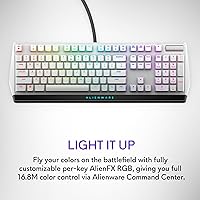
  • Per-key AlienFX RGB covers 16.8 million colors with genuine individual key customization.
  • The detachable paracord cable simplifies both transport and cable management at the desk.
  • A metal top plate keeps the board feeling solid and makes keycap removal refreshingly easy.
  • Three flip-up riser positions let you dial in a comfortable typing angle without compromise.
  • Integrated underside cable routing keeps your setup tidy without buying extra accessories.
  • The TKL layout reclaims meaningful desk space without sacrificing any keys that matter in-game.
  • A 4.5-star rating across more than 1,400 buyers reflects consistently strong real-world satisfaction.

Cons

  • Alienware Command Center is required for RGB customization and runs poorly on non-Alienware systems.
  • At 1.74 pounds, the AW420K is noticeably heavier than most competing TKL keyboards in this price range.
  • No wireless option exists — buyers who prefer cable-free setups will need to look elsewhere.
  • Cherry MX Red switches offer zero tactile feedback, making them a poor fit for heavy typists.
  • Lighting profiles rely entirely on software with no on-board memory, so settings don't travel with the board.
  • Only one color option is available, limiting buyers who prefer a darker or more customizable chassis look.
  • No USB passthrough port means one fewer connection point at what is often an already crowded desk.
  • Long-term usability depends on Dell continuing to actively maintain Command Center, which carries some risk.

Ratings

The Alienware AW420K Tenkeyless Gaming Keyboard scores below are generated by AI after analyzing thousands of verified buyer reviews from global markets, with spam, bot-submitted, and incentivized feedback actively filtered out before any category was scored. Every rating reflects a balanced synthesis of real buyer experience — both the aspects that consistently impressed owners and the pain points that surfaced repeatedly across the review base. The result is a transparent, category-by-category breakdown designed to show exactly where this Alienware TKL earns its reputation and where genuine trade-offs exist.
Build Quality
88%
The metal top plate is a genuine differentiator at this price point — it gives the AW420K a noticeably solid feel that buyers frequently describe as punching above its tier. Keycap removal is clean and straightforward thanks to the exposed switch mounting, and the chassis flexes very little under pressure during extended sessions.
A number of buyers noted that the bottom housing carries a plastic feel around the edges, creating a slight inconsistency next to the premium metal top. The 1.74-pound weight, while contributing to perceived solidity, is heavier than most competing TKL boards and becomes noticeable during LAN trips or regular transport.
Switch Performance
91%
Cherry MX Red switches are widely regarded as one of the most reliable linear options in competitive gaming, and the implementation here lives up to that reputation. The light actuation keeps fatigue low during extended sessions, and the smooth downstroke feels consistent from the first press to the last — no scratchy or inconsistent outliers across the board.
For users accustomed to tactile or clicky switches, the MX Red feel requires adjustment — there is no physical feedback to signal actuation, which can lead to occasional missed or unintended presses during typing-heavy tasks. Buyers looking for a heavier, more deliberate keystroke for precise inputs may find the 45g actuation too light for their preference.
Gaming Performance
93%
Full N-key rollover means every key registers — simultaneously pressing five or six keys in a chaotic FPS moment produces zero missed inputs, which is exactly what matters under pressure. The linear switch action paired with a 2mm actuation point keeps reaction times sharp without any mechanical resistance introducing unwanted friction.
There is no wireless option, so cable management at a tournament desk requires deliberate planning — the wired connection is reliable but adds a physical constraint some competitive players find limiting. The keyboard also lacks dedicated macro keys or an additional key cluster, which limits deep customization for MOBA or MMO players with complex keybinding requirements.
RGB Lighting
86%
Per-key RGB at this price point is a genuine win — the AlienFX implementation lights each key individually, producing crisp and vivid color that holds up even under brighter room lighting. Buyers consistently describe the colors as rich and evenly distributed, without the uneven brightness between keys that plagues cheaper boards.
The entire RGB experience is locked behind Alienware Command Center, meaning nothing can be adjusted without the software installed and actively running. On a travel machine or secondary PC without Command Center, the board reverts to a static default mode — a notable limitation for buyers who use this keyboard across more than one setup.
Value for Money
78%
22%
At this price tier, the AW420K bundles certified Cherry MX switches, a metal top plate, per-key RGB, and a detachable paracord cable — a combination that would cost meaningfully more through boutique brands. For Alienware ecosystem users in particular, the value holds up well since Command Center compatibility is already in place.
Outside the Alienware ecosystem, the software dependency chips away at that value — buyers end up managing a bloated proprietary app just to access features they paid for. Competing TKL boards from other established brands offer comparable switch quality with more stable software experiences at overlapping price points, making the decision less straightforward.
Software Experience
52%
48%
For users already embedded in the Alienware ecosystem, Command Center does consolidate RGB control across all AlienFX-compatible peripherals in one place, which reduces the number of separate apps cluttering the system. The lighting customization options are genuinely extensive once inside, with per-key configuration available for every individual key on the board.
On non-Alienware systems, Command Center is a recurring source of frustration — multiple buyers report it running slowly, failing to launch on startup, or behaving erratically following Windows updates. The absence of on-board memory means none of your settings survive without the software running, which is a meaningful design compromise for a keyboard at this price tier.
Typing Comfort
67%
33%
Cherry MX Red switches are smooth and low-fatigue for shorter typing bursts — casual messages, search queries, and in-game chat feel natural and effortless without any resistance buildup. The three-position risers provide enough tilt adjustment to reduce wrist strain across most standard sitting postures.
Extended typing sessions expose the core limitation of a purely linear switch — without tactile confirmation, error rates tend to creep up for touch typists who rely on physical feedback to self-correct in real time. Writers or coders spending several hours at this keyboard often report it as less satisfying than boards with tactile or clicky switches.
Portability
74%
26%
The TKL form factor fits into a backpack or gear bag far more easily than a full-size board, and the detachable paracord cable removes one of the most common transport frustrations — no more carefully coiling a fixed cable around the chassis. For regular LAN attendees, not worrying about cable damage during repeated transport is a practical daily relief.
At 1.74 pounds, this wired gaming keyboard is heavier than many TKL competitors, and that difference becomes noticeable after carrying it across a convention hall or in a packed laptop bag. No carrying case or sleeve is included in the box, so protecting it during transit means sourcing something separately.
Cable & Connectivity
84%
The detachable paracord cable is one of the most consistently praised features among real buyers — it is durable, flexible, and far less prone to developing kinks or memory bends than rubber-coated alternatives. The integrated underside routing channels let you direct the cord left, right, or straight back to match almost any desk arrangement without extra clips or ties.
The keyboard is strictly wired with no Bluetooth or wireless variant on offer, which rules it out entirely for buyers committed to a cable-free setup. USB passthrough would have been a welcome addition at this price — its absence means one fewer port option at what is often an already port-scarce desktop.
Ergonomics
76%
24%
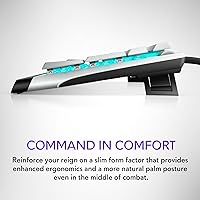
Three riser positions cover the majority of common sitting postures, and the feet click into place firmly without slipping during active use — a small but appreciated detail over extended sessions. Paired with the compact TKL footprint, most users settle into a comfortable wrist angle without needing to add a separate palm rest.
Three height settings is the baseline expectation at this price, and the available tilt range is modest compared to boards offering continuous angle adjustment or a reverse-tilt option for flat-desk typists. The keyboard includes no wrist rest, and the flat profile may require one for users with larger hands or existing wrist discomfort.
Noise Level
81%
19%
Cherry MX Red switches sit among the quieter mechanical options available — the linear travel produces a mild, low-pitched thud when keys bottom out rather than the sharp crack of tactile or clicky alternatives. In a home office or shared bedroom, the board is unlikely to draw complaints from people nearby during normal use.
It is still clearly a mechanical keyboard by sound — noticeably louder than membrane alternatives, which some users in open-plan offices or shared sleeping spaces find intrusive during late-night sessions. Damping the sound with O-rings or foam is possible but adds aftermarket cost and effort that the board does not account for out of the box.
Aesthetic Design
83%
The Lunar Light colorway is a refreshing contrast to the all-black angular aesthetic that saturates the gaming peripheral market — it reads as clean and understated, and sits comfortably in mixed-use or professional desk setups. The metal top plate contributes a premium visual impression that buyers consistently call out as a genuine highlight at this price.
Lunar Light is the only color option available, which limits buyers who prefer a darker palette or want to coordinate with a specifically themed build. Anyone committed to an all-black or monochrome desk setup will need to accept a color mismatch, as no dark colorway alternative currently exists for this model.
Keycap Quality
71%
29%
The keycaps use a standard Cherry MX cross stem, meaning the aftermarket upgrade path is wide open — virtually any popular keycap set drops onto this board without modification or adapter. The legends are well-centered and cleanly printed out of the box, with no smearing or misalignment issues flagged by buyers.
Stock keycaps are ABS plastic rather than the more durable PBT found on higher-end boards, meaning they will develop shine and feel noticeably slicker over months of heavy daily use. The shine-through legends are functional but unremarkable — buyers who invest in premium keycap aesthetics will likely replace the stock set within the first year.
Long-Term Durability
87%
Cherry MX Red switches carry a 100-million-actuation rating per key, which translates to years of intensive daily use before realistic switch wear becomes a concern — it is one of the most battle-tested mechanisms in the category. The metal top plate also resists the surface scratches and structural warping that plastic-only boards accumulate over time.
Long-term usability depends in part on Dell continuing to maintain and update Command Center — if software support lapses, the RGB and macro features tied to it may stop functioning reliably on future operating system versions. The ABS keycaps will show visible wear well before the switches do, adding a recurring replacement cost for buyers who care about how the board looks over time.

Suitable for:

The Alienware AW420K Tenkeyless Gaming Keyboard is a strong match for PC gamers who want a well-built, wired keyboard at a mid-range price without venturing into enthusiast-tier territory. FPS and battle royale players will get the most mileage from it — Cherry MX Red switches and full N-key rollover are genuinely well-suited to fast, reactive input under pressure. If desk space is tight, the TKL layout frees up real estate for wider mouse movement, which is a practical upgrade over full-size boards. Anyone already invested in the Alienware or Dell ecosystem — running Command Center for a monitor or headset — will find the per-key RGB integration works well without extra configuration headaches. LAN regulars and people who move gear between locations will also appreciate the detachable paracord cable, which makes transport noticeably less fiddly.
Not suitable for:

The Alienware AW420K Tenkeyless Gaming Keyboard is a harder sell for buyers outside the Alienware software ecosystem — Alienware Command Center is the only way to configure the RGB lighting, and on systems without other Alienware hardware it can run sluggishly or behave unpredictably. Dedicated typists who spend most of their keyboard time in documents or spreadsheets may find Cherry MX Red switches too light and imprecise for comfortable extended sessions, since the linear action offers no tactile confirmation of actuation. At 1.74 pounds, it also sits on the heavier end for a TKL, so anyone prioritizing ultraportability should weigh that carefully. Buyers who want wireless freedom will need to look elsewhere entirely — this is a strictly wired board with no wireless variant available. Those hoping to use it outside a Windows PC environment or who need Mac-compatible media key layouts will find limited support.
Specifications

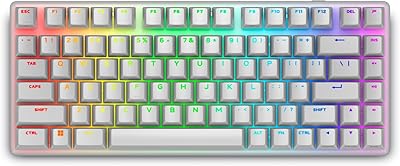
  • Form Factor: Tenkeyless (TKL) layout omits the numpad, reducing the overall footprint and freeing up desk space for wider mouse movement.
  • Switch Type: Cherry MX Red linear switches provide smooth, uninterrupted keystrokes with no tactile bump or audible click.
  • Actuation Force: Cherry MX Red switches actuate at 45g of force, making them among the lighter options in the mechanical switch market.
  • Actuation Point: Each switch actuates at 2mm with a full travel distance of 4mm, consistent with the Cherry MX Red specification.
  • Switch Lifespan: Cherry MX Red switches are rated for up to 100 million actuations per key under standard operating conditions.
  • Connectivity: Connects via wired USB with a detachable paracord cable that can be removed for storage or replaced with a preferred alternative.
  • Lighting: Per-key AlienFX RGB backlighting supports up to 16.8 million colors, fully configurable through Alienware Command Center software.
  • Anti-Ghosting: Full N-key rollover ensures every simultaneous keypress is registered independently, with no missed or phantom inputs.
  • Top Plate: The top plate is constructed from metal, providing structural rigidity, a smooth cleaning surface, and easier keycap removal.
  • Cable Routing: Integrated underside channels allow the USB cable to exit from three different directions to suit various desk configurations.
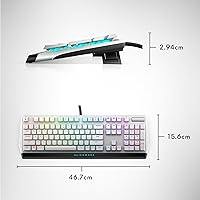
  • Height Risers: Three-position flip-up feet offer adjustable keyboard tilt to accommodate different typing angles and ergonomic preferences.
  • Dimensions: The keyboard measures 5.8″ (L) x 14.5″ (W) x 2.2″ (H), consistent with a standard compact TKL footprint.
  • Weight: At 1.74 pounds, the board is on the heavier end compared to most tenkeyless keyboards in the same price range.
  • Software: All RGB and macro customization is managed through Alienware Command Center, a Windows-only proprietary application.
  • Platform: Designed for PC use only; there is no official compatibility with Mac, Linux, or gaming consoles.
  • Colorway: Available exclusively in Lunar Light, a light grey finish that departs from the all-black aesthetic common in gaming peripherals.
  • Release Date: The keyboard was first made available in January 2025 as part of Alienware's updated peripheral lineup.

Related Reviews

Alienware Pro Wireless Gaming Keyboard
87%
93%
Connectivity
89%
Customization (Hot-Swappable Switches)
91%
Ergonomics and Layout
88%
RGB Lighting
85%
Battery Life
More
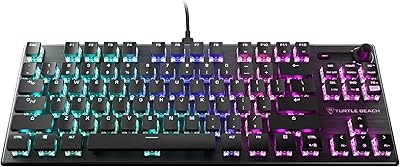
Turtle Beach Vulcan TKL Tenkeyless Mechanical Gaming Keyboard
85%
91%
Performance and Responsiveness
88%
Build Quality and Durability
92%
Portability and Tournament Suitability
85%
Customization and RGB Lighting
80%
Comfort and Ergonomics
More
Alienware X15 R1 Gaming Laptop
83%
94%
Gaming Performance
92%
Graphics Quality
90%
Display Quality
88%
Build Quality
62%
Battery Life
More
Alienware Pro Wireless Gaming Mouse
83%
91%
Precision and Performance
74%
Battery Life
88%
Ergonomics and Comfort
84%
Customization Options
90%
Build Quality
More
Kinesis Gaming TKO 60% Mechanical Keyboard
79%
91%
Build Quality
78%
Switch Feel & Sound
88%
Hotswap Experience
86%
Keycap Quality
84%
Portability & Travel Case
More
TECKNET TK-KB002 Wired RGB Gaming Keyboard
74%
91%
Value for Money
88%
Switch Noise Level
86%
RGB Lighting Quality
83%
Build Quality
79%
Typing Comfort
More
Alienware AW520H
Alienware AW520H
75%
88%
Wearing Comfort
83%
Audio Quality
74%
Positional Audio & Dolby Atmos
69%
Microphone Quality
77%
Build Quality & Durability
More
MONSGEEK FUN60 Pro 60% Gaming Keyboard
77%
93%
Rapid Trigger Performance
91%
Value for Money
89%
Input Latency & Polling Rate
86%
Switch Feel & Customization
84%
RGB Lighting Quality
More
MageGee Typewriter Mechanical Keyboard
77%
93%
Aesthetic & Visual Design
81%
Build Quality
78%
Typing Feel & Switch Performance
61%
Sound Level
83%
Keycap Quality & Durability
More
OHY K98 Wireless Membrane Gaming Keyboard
75%
71%
Typing Experience
78%
Wireless Performance
66%
Battery Life
73%
Build Quality
82%
Keycap Quality
More

FAQ

The Alienware AW420K Tenkeyless Gaming Keyboard functions as a standard plug-and-play device right out of the box — every key works without installing anything. That said, Alienware Command Center is required if you want to customize the RGB lighting or program macros. On systems without other Alienware hardware, the software can feel heavy or occasionally unstable, so it's worth knowing upfront rather than discovering it after purchase.

Yes, the cable is fully detachable and uses a standard connector, so any compatible USB cable will work as a replacement. The included paracord cable is well-made and should hold up to regular use, but having the flexibility to swap it out or remove it entirely during storage is a genuine practical advantage.

It handles everyday typing well enough, but Cherry MX Red switches are optimized for gaming rather than heavy document work. The linear action with no tactile feedback means typists who rely on feeling the actuation point to avoid errors may find them a bit too light and imprecise over extended sessions. Gamers who occasionally type will be fine, but dedicated writers or coders might prefer a switch with some tactile bump.

Basic input works — the board registers as a standard HID keyboard on most operating systems. However, Alienware Command Center is Windows-only, so Mac and Linux users lose access to all RGB customization and macro programming entirely. Some media keys may also behave unexpectedly or not function as labeled outside of Windows.

Yes, the switches use a standard Cherry MX cross stem, which means the vast majority of aftermarket keycap sets are compatible. The metal top plate also makes removal clean and straightforward — a standard keycap puller handles the job without any fuss.

It's genuinely impressive for the price tier. Per-key RGB means each key lights up individually, and the LEDs are bright enough to be clearly visible even in a well-lit room. Colors are vivid and consistent across the entire board without obvious hot spots between keys — it's one of the most consistently praised aspects among real buyers.

Cherry MX Red switches are on the quieter end of the mechanical spectrum since they have no tactile click — just a soft thud when keys bottom out. The AW420K is not silent, but it's far less intrusive than clicky switches, and most people sharing a bedroom or home office find it tolerable without any additional sound dampening.

There is no on-board memory for profiles, which is a notable limitation. If you plug this wired gaming keyboard into a PC without Alienware Command Center installed, the lighting reverts to a default static mode. For users who stick to a single Windows setup, this rarely causes problems day-to-day, but it is a genuine inconvenience if you move between machines.

Compared to the broader TKL market, yes — 1.74 pounds is noticeably above average for this form factor. At a fixed desk it makes no practical difference, but if you carry it to LAN events or pack it regularly, the weight adds up. The detachable cable helps with portability, but the chassis weight itself is something frequent travelers should factor in.

The box includes the keyboard and basic documentation — that's it. The detachable paracord USB cable comes pre-attached when it ships, so you can get started immediately without sourcing anything extra. There are no spare keycaps, keycap puller, or carrying case included, which is fairly typical for keyboards at this price point.

Where to Buy