ALAMENGDA V500 Mini-Tower mATX PC Case
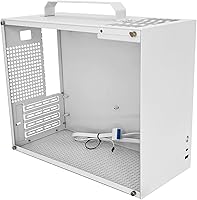
ALAMENGDA V500 Mini-Tower mATX PC Case — image 1
ALAMENGDA V500 Mini-Tower mATX PC Case — image 2
ALAMENGDA V500 Mini-Tower mATX PC Case — image 3
ALAMENGDA V500 Mini-Tower mATX PC Case — image 4
ALAMENGDA V500 Mini-Tower mATX PC Case — image 5
ALAMENGDA V500 Mini-Tower mATX PC Case — image 6
ALAMENGDA V500 Mini-Tower mATX PC Case — image 7
ALAMENGDA V500 Mini-Tower mATX PC Case — image 8
ALAMENGDA V500 Mini-Tower mATX PC Case — image 9
66%
34%

Overview

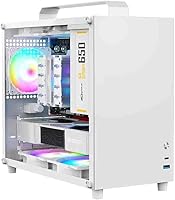
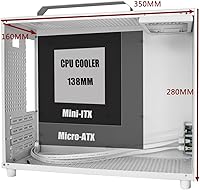
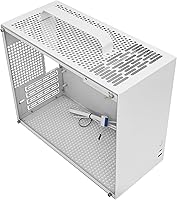
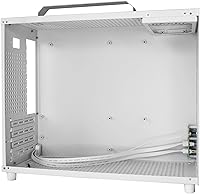
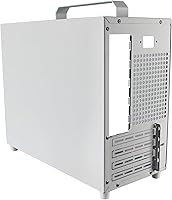
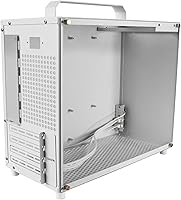
The ALAMENGDA V500 Mini-Tower mATX PC Case is a budget-oriented compact enclosure that launched in late 2024, targeting builders who want full component visibility without spending much. This 2.0 revision is a meaningful step up from its predecessor — the steel plate is now 1.0mm thick, the PSU port has moved to a more cable-friendly position, and there's a built-in carry handle that genuinely improves portability. At 350×160×280mm, it fits on most desks without dominating them, yet still leaves room for GPUs up to 320mm long. It supports both Micro-ATX and Mini-ITX boards, which gives it reasonable flexibility for the price.

Features & Benefits

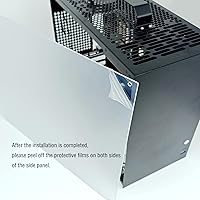
The acrylic side panels give this mini-tower case its biggest selling point — you can see every component once the build is done. One important heads-up: both panels ship with an opaque protective film that many people mistake for frosted acrylic. Peel it off after assembly and the transparency becomes obvious. GPU clearance reaches 320mm, which comfortably handles most popular mid-range cards. The front I/O includes a USB Type-C alongside a standard USB 3.0, a combination that feels current for a 2024 build. Cooling is air-only — two 120mm fan slots on top plus one 90mm at the rear. The 150mm PSU limit is the most restrictive spec here; standard ATX units won't fit, so plan to budget for an SFX or short ATX supply.

Best For

This compact acrylic build makes the most sense for builders who care more about how their PC looks than how it performs thermally. First-time builders and students on a budget will appreciate the transparent showcase without the premium price tag. The carry handle adds a practical angle — genuinely useful for LAN parties or moving between rooms. Pair it with a mid-range GPU under 320mm and a processor in the 65W to 125W range and you'll have a clean, capable little rig. What this case is not ideal for: water cooling enthusiasts, anyone running a power-hungry card, or builders who already own a standard full-length ATX supply and don't want to replace it.

User Feedback

With 129 ratings and a 3.5-star average, the V500 enclosure lands in that honest middle ground — people like it, but it's not without frustrations. The most consistent praise centers on the acrylic visibility and the case's compact desk presence. On the downside, buyers report the panels scratch more easily than expected and the rear 90mm fan can get noisy under load. Cable management in a 160mm-wide chassis is a recurring challenge that several builders flag as genuinely tedious. A few reviewers were also caught off guard by the PSU length restriction mid-build. That said, most conclude it represents solid value for the price — as long as you understand what you're buying into before you start.

Pros

  • Dual acrylic side panels offer full visibility into your build from both sides at a budget-friendly price point.
  • Supports both Micro-ATX and Mini-ITX motherboards, giving it genuine flexibility for different build configurations.
  • GPU clearance up to 320mm is impressive for a case this compact, covering most popular mid-range and upper-mid cards.
  • The integrated carry handle is a practical addition that makes transport to LAN parties or between rooms genuinely convenient.
  • The 2.0 revision bumped steel thickness to 1.0mm, making the chassis noticeably more rigid than its predecessor.
  • Front I/O includes both a USB 3.0 Type-A and a USB Type-C port, which is a thoughtful combo for a 2024 build.
  • At 350×160×280mm, the V500 enclosure takes up minimal desk space without feeling impossibly cramped inside.
  • The relocated rear-top PSU port in the 2.0 version makes cable routing cleaner and less frustrating than before.

Cons

  • The 150mm PSU length limit rules out most standard ATX power supplies and forces a potentially unplanned SFX or short ATX purchase.
  • Acrylic panels scratch easily — everyday handling during assembly or cleaning can leave visible marks fairly quickly.
  • The rear 90mm fan is on the smaller and louder side, which can become noticeable during sustained workloads.
  • Cable management inside a 160mm-wide chassis is genuinely tight and can be a frustrating experience, especially for first-time builders.
  • The CPU cooler height cap of 138mm eliminates most full-size tower coolers, limiting thermal headroom for higher-TDP processors.
  • Both acrylic panels ship with an opaque protective film that several buyers have mistaken for permanent frosted panels — easy to miss.
  • No water cooling support at all makes this a non-starter for anyone planning a liquid-cooled build now or in the future.
  • The 3.5-star average across 129 reviews reflects real inconsistency in buyer experience — quality control appears variable across units.

Ratings

The ALAMENGDA V500 Mini-Tower mATX PC Case was scored by our AI engine after deep analysis of verified buyer reviews collected across global marketplaces, with spam, bot activity, and incentivized submissions actively filtered out before scoring. The results surface a product with a clear identity — strong visual appeal and genuine portability at a budget price — but also real, recurring pain points around PSU compatibility, thermal headroom, and panel durability. Every score below reflects both sides honestly.

Value for Money
78%
22%
For builders on a tight budget, the V500 enclosure delivers a surprisingly complete package — dual acrylic panels, an integrated carry handle, front USB Type-C, and a solid 1.0mm steel frame. At this price tier, few competing cases offer the same level of visual impact and feature breadth without obvious corner-cutting on the chassis itself.
The practical value takes a real hit once buyers factor in that the 150mm PSU bay will require most people to purchase a new SFX or short ATX power supply separately. That unplanned expense can meaningfully erode the perceived savings for anyone who expected to reuse their existing hardware from a previous build.
Aesthetics
84%
Dual acrylic side panels make this mini-tower case one of the most visually open chassis available at this price range — builders genuinely enjoy seeing their components from multiple angles once the build is complete. The clean white colorway pairs well with RGB setups, and the compact silhouette sits on a desk without looking imposing.
The acrylic panels, while striking, lack the premium feel of tempered glass and show fingerprints and smudges more readily with everyday handling. Several buyers also experienced initial confusion when the panels appeared completely opaque out of the box, not realizing the pre-applied protective film was still in place and needed to be peeled off after assembly.
PSU Compatibility
43%
57%
Builders who already own or plan to buy a short ATX or SFX power supply will find the bottom-mounted bay works cleanly as intended. The relocated rear-top PSU connector in the 2.0 revision also makes plugging in cables somewhat less awkward than in the original version of the chassis.
The 150mm PSU length cap is the single most divisive aspect of this case — a significant share of buyers discovered mid-build that their existing power supply simply would not fit. This constraint effectively forces an unplanned PSU purchase for most builders, and the product listing does not make this limitation prominent enough to prevent the surprise.
Thermal Performance
57%
43%
For light to mid-range builds — a modest discrete GPU paired with an efficient 65W to 95W processor — the V500 enclosure manages temperatures acceptably under typical office or casual gaming loads. Builders running low-TDP systems report stable operation without thermal throttling in normal use conditions.
The absence of any front intake fan mounts, a small 90mm rear exhaust, and zero water cooling support make this case a poor thermal environment for high-performance hardware. Pushing power-hungry CPUs or high-TDP GPUs inside this chassis leads to heat accumulation that the limited fan layout cannot adequately address.
Hardware Compatibility
76%
24%
Supporting both Micro-ATX and Mini-ITX motherboards gives this compact acrylic build more configuration flexibility than many single-format rivals at this price. The 320mm GPU clearance is a genuinely impressive spec for a case only 160mm wide — most popular mid-range graphics cards drop in without any fitment issues.
The 138mm CPU cooler height restriction locks out a meaningful range of popular full-size tower air coolers, which can push builders toward less common or pricier low-profile alternatives. Anyone planning to carry over a tall cooler from a previous build will need to budget for a replacement.
Build Quality
71%
29%
The upgrade to 1.0mm steel in the 2.0 revision is noticeable — the frame feels more rigid and resists flex during assembly compared to thinner-walled alternatives in this price bracket. Once hardware is installed, the overall chassis structure holds its shape without creaking or shifting.
The acrylic side panels are the weakest element of the build quality equation — they scratch with minimal provocation, and a stray cable or screwdriver contact during assembly can leave permanent marks. A handful of buyers also noted minor panel alignment inconsistencies fresh out of the box.
Cable Management
48%
52%
The relocated PSU port at the rear-top in the 2.0 revision reduces one traditional routing headache, and builders using fully modular power supplies with sleeved or flat cables report noticeably cleaner results than those using standard non-modular units. Thoughtful PSU selection makes a real difference here.
At only 160mm wide, the internal space for hiding cables behind panels or routing them out of sight is genuinely minimal. Multiple experienced builders report that achieving a clean final result inside this chassis requires considerable patience, and even then the outcome rarely looks tidy when viewed through the transparent side panels.
Assembly Experience
62%
38%
Builders who have assembled a mini-tower before will find most installation steps follow familiar conventions, and the motherboard and front I/O header placements are straightforward. The case ships with all required screws and standoffs, and nothing about the core build process requires any unusual techniques.
First-time builders may find the narrow internal volume genuinely frustrating, particularly when trying to seat a full-size GPU while routing power cables in the same tight space. The acrylic panels also require constant vigilance during assembly to avoid accidental scratching, which adds a layer of care that slows the overall process down.
Portability
83%
The integrated carry handle is a standout practical feature for a case at this price — transporting a fully assembled build to a LAN event or moving between rooms is noticeably easier and more secure than lifting by the chassis edges. Builders who regularly take their PC to friends or events consistently name this as one of the best aspects of the design.
The handle works reliably for lighter builds, but heavier configurations featuring dense air coolers or large triple-fan GPUs add meaningful stress to the chassis during single-handed carry. The grip has no padding, which makes longer transport sessions mildly uncomfortable with a fully loaded build.
Front I/O
77%
23%
Pairing a USB 3.0 Type-A with a USB Type-C port on the front panel is a practical and current choice for a 2024 build — it covers the vast majority of everyday peripheral and storage connections without needing a separate hub. Buyers setting up portable workstations or gaming rigs particularly appreciate having Type-C accessible at the front.
The front panel omits a 3.5mm audio jack entirely, which inconveniences users who plug headsets directly into the case rather than the motherboard rear panel. Having only one port of each USB type also means simultaneous connections to two devices of the same type require an external adapter.
Noise Levels
61%
39%
At idle and light workloads, the case runs quietly enough to be unobtrusive in a home office or bedroom setup. Builders using the top 120mm fan slots with quality aftermarket fans report that noise levels at moderate system loads are perfectly acceptable for everyday use.
The stock 90mm rear exhaust fan is the primary noise concern — at higher RPMs it produces a noticeably shriller tone compared to 120mm fans, which can move equivalent airflow at lower, quieter speeds. Under sustained gaming or rendering sessions, fan noise becomes one of the most frequently mentioned complaints in buyer reviews.
Panel Durability
54%
46%
The acrylic panels fulfill their core purpose well — delivering clear, unobstructed component visibility — and their lighter weight compared to tempered glass reduces stress on the panel mounting clips over time. Buyers who handle them carefully during assembly and clean them with a soft microfiber cloth report that clarity holds up well with proper care.
Acrylic is considerably softer than tempered glass, and scratches from cables, tools, or even dry wiping accumulate quickly and are effectively impossible to remove cleanly. A number of owners report visible surface damage within the first few weeks of regular use, which directly undermines the showpiece aesthetic the case is built around.

Suitable for:

The ALAMENGDA V500 Mini-Tower mATX PC Case is a strong pick for budget-conscious builders who want their components on display without dropping serious money on a premium enclosure. Students building their first PC will find the acrylic panels genuinely rewarding — there's real satisfaction in seeing your work through both sides of the chassis. It also works well for home office setups or LAN-party regulars who appreciate the integrated carry handle as a practical transport feature rather than a gimmick. Builders planning a mid-range gaming rig around a compact GPU under 320mm and a processor in the 65W to 125W range will find the internal volume just sufficient. If you're already planning to use an SFX or short ATX power supply, the 150mm PSU bay constraint becomes a non-issue, making this a tidy, visually appealing choice for a compact secondary or desk build.

Not suitable for:

The ALAMENGDA V500 Mini-Tower mATX PC Case is not the right choice for anyone planning a high-performance or thermally demanding build. The air-only cooling system with a small 90mm exhaust fan and two 120mm top slots simply cannot keep pace with power-hungry CPUs or high-TDP graphics cards, and there is no radiator support whatsoever. Builders who already own a standard full-length ATX power supply will face an immediate compatibility wall — the 150mm PSU bay is a hard limit that forces an additional purchase. The 138mm CPU cooler height cap also rules out most full-size tower air coolers, which matters if you were planning to reuse existing cooling hardware. Acrylic panels, while attractive, are more prone to scratching than tempered glass, so anyone who wants a pristine-looking build over the long term may be better served by a case with glass panels. Finally, experienced builders who prioritize cable management, expansion flexibility, or radiator support will quickly feel constrained by this chassis.

Specifications

  • Form Factor: Mini-Tower chassis designed to house Micro-ATX and Mini-ITX motherboards in a compact footprint.
  • Dimensions: The case measures 350×160×280mm, keeping the overall desk footprint genuinely small without sacrificing internal GPU clearance.
  • Weight: The empty chassis weighs 3.25kg (7.15 lbs), which is typical for a steel-framed mini-tower of this size.
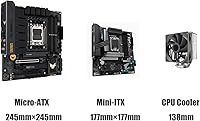
  • Motherboard Support: Officially compatible with Micro-ATX and Mini-ITX form factors only; standard ATX and E-ATX boards will not fit.
  • Side Panels: Both side panels are constructed from acrylic and arrive with a factory-applied opaque protective film that must be removed after assembly to reveal transparency.
  • GPU Clearance: Graphics cards up to 320mm in length can be installed, accommodating most mainstream and upper-mid-range discrete GPUs currently on the market.
  • CPU Cooler Height: Maximum supported CPU cooler height is 138mm, which rules out full-size tower coolers but allows most low-profile and mid-height air cooling solutions.
  • PSU Bay: The bottom-mounted PSU bay accepts power supplies with a maximum length of 150mm, which excludes most standard full-length ATX units.
  • PSU Port Location: In the 2.0 revision, the PSU connector has been moved to the rear-top position to make cable routing cleaner and less obstructed.
  • Fan Support: The chassis supports up to two 120mm fans on the top panel and one 90mm fan at the rear; there are no front intake fan mounts.
  • Cooling Method: Air cooling only — there are no radiator mounting points or clearance provisions for any form of liquid cooling.
  • Front I/O: The front panel provides one USB 3.0 Type-A port and one USB Type-C port for modern, high-speed peripheral and storage connectivity.
  • Steel Thickness: The 2.0 revision uses 1.0mm steel throughout the frame, a step up from the 0.8mm steel used in the original version.
  • Carry Handle: An integrated carry handle is built into the top of the chassis, enabling convenient transport without needing additional accessories.
  • Material: The main frame is steel, while both side panels are acrylic — a cost-effective choice that prioritizes visibility over the scratch resistance of tempered glass.

Related Reviews
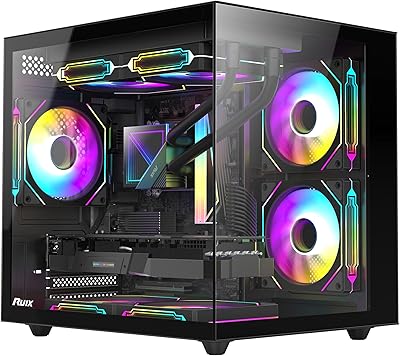
RUIX OV502 mATX Mini-Tower PC Case
68%
83%
Value for Money
86%
Aesthetic Design
79%
Glass Panel Quality
84%
Component Compatibility
71%
Airflow & Cooling
More
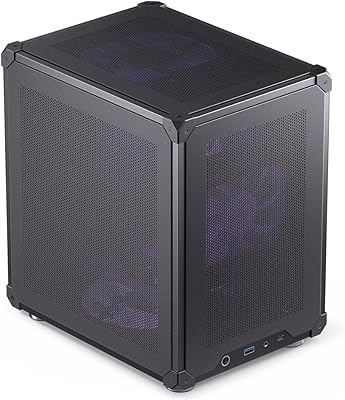
Jonsbo C6 Mini MATX Mesh PC Case
84%
91%
Airflow Performance
95%
Ease of Assembly
87%
Build Quality
88%
Cooling System Customization
65%
Cable Management
More
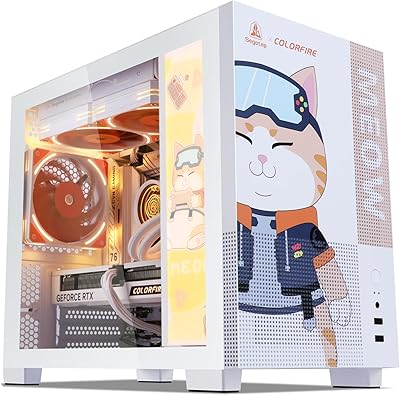
Segotep Memphis Micro-ATX Mini Tower PC Case
76%
83%
Build Quality
89%
Aesthetic Design
77%
Airflow Performance
86%
GPU Compatibility
61%
Cable Management
More
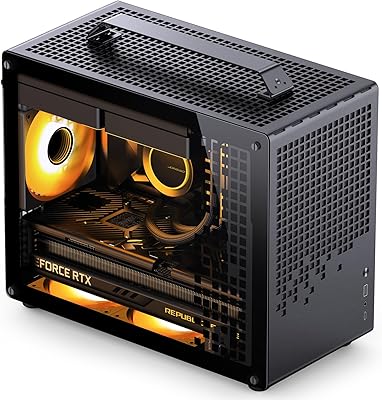
Jonsbo Z20 Micro-ATX Mini Tower Case
80%
93%
Build Quality & Materials
91%
Portability & Carrying Handle
78%
Internal Layout & Compatibility
89%
GPU Clearance & Large Component Support
87%
Cooling Support & Thermal Flexibility
More
MOROVOL V3 Micro-ATX Tower PC Case
78%
88%
Tempered Glass Quality
76%
Airflow & Thermal Performance
61%
Cable Management
73%
Build Quality & Materials
91%
Value for Money
More
SAMA V60 Mid Tower PC Case
80%
93%
Out-of-Box Cooling Value
78%
Airflow Performance
91%
AIO & Radiator Flexibility
88%
Tempered Glass & Aesthetics
71%
Build Quality & Materials
More
Fractal Design Ridge Mini-ITX PC Case
74%
93%
Aesthetic Design
88%
Build Quality
91%
Included Accessories
58%
Build Experience
67%
Thermal Performance
More
Cooler Master N200 Mini Tower Computer Case
78%
91%
Value for Money
84%
Airflow Performance
73%
Build Quality
88%
Storage Expandability
86%
Cooling Compatibility
More
MINISFORUM DeskMini UM690L Slim Mini PC
79%
91%
Processing Performance
88%
Multi-Monitor Support
58%
RAM Adequacy & Upgradeability
89%
Storage Speed & Expansion
73%
Integrated Graphics (Radeon 680M)
More
SZSKYING CMSVB-1 Mid-Tower PC Gaming Case
74%
91%
Value for Money
88%
Included Fans
86%
Aesthetics & RGB
61%
Build Quality
74%
Airflow Performance
More

FAQ

Most likely not. The ALAMENGDA V500 Mini-Tower mATX PC Case enforces a strict 150mm PSU length limit, and the majority of standard ATX power supplies measure 140mm to 160mm or longer — meaning many will not clear the bay. Before purchasing, measure your PSU or check its specifications, and factor in the cost of an SFX or short ATX replacement if yours exceeds that limit.

That is completely normal and not a defect. Both acrylic panels come with a factory-applied protective film to prevent scratches during shipping and assembly. Once your build is complete, simply peel the film off both panels and they will be fully transparent. A lot of buyers have been caught off guard by this, so it is worth knowing before you assume something is wrong.

The case officially supports graphics cards up to 320mm in length, which covers a broad range of popular mid-range and upper-mid-range cards. That said, always cross-check the exact length of your specific GPU model — some triple-fan variants of common chips can run slightly longer than their standard counterparts and may not fit cleanly.

No — the V500 enclosure is designed purely for air cooling and has no radiator mounting provisions anywhere in the chassis. If a custom loop or AIO cooler is part of your plan, you will need to look at a different case entirely.

Most low-profile and mid-height air coolers clear this limit comfortably — options like the Noctua NH-U12S, be quiet! Pure Rock 2, or Cooler Master Hyper 212 are all within range. Full-size dual-tower coolers are off the table entirely. Always verify the listed height of your cooler before buying, since some models list height without the fan attached.

This compact acrylic build supports two 120mm fans on the top panel and one 90mm fan at the rear. There are no front-panel fan mounts, which does limit intake airflow options. For the best thermal results, filling both top slots with 120mm fans is worth doing early — particularly if you are running a discrete GPU.

Mini-ITX boards are fully supported alongside Micro-ATX. If anything, going Mini-ITX gives you a little extra breathing room inside the chassis, which can make cable routing and GPU installation somewhat less cramped.

It is genuinely tight. At 160mm wide, there is not much hidden space to tuck cables, and a messy PSU cable bundle can quickly make things look chaotic behind your panels. A fully modular power supply helps a lot here — bring only the cables you actually need. Sleeved or flat ribbon cables also make routing through the tight gaps much more manageable.

It holds up well for casual moves — carrying the case between rooms or loading it into a car for a LAN party feels secure. That said, use common sense with heavier builds featuring large air coolers or heavy GPU cards, and avoid swinging or jerking the case while carrying it, as that puts stress on the motherboard standoffs and GPU bracket.

Acrylic is softer than tempered glass, so scratches are a genuine concern. During assembly, try to keep cables and tools away from the inner panel surfaces, and consider leaving the protective film on until the very end. For ongoing cleaning, use a soft microfiber cloth slightly dampened with water or a plastic-safe cleaner — avoid paper towels, dry cloths, and any abrasive sprays, all of which will leave fine surface marks over time.