

Overview

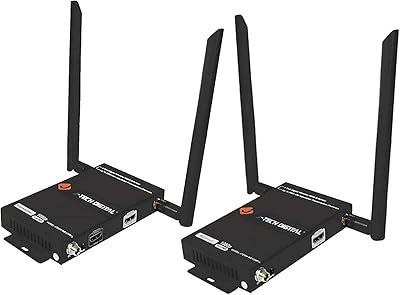
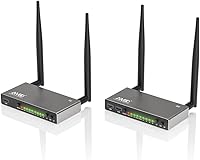
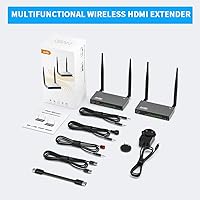
The AIMIBO A8 Wireless HDMI Extender is a transmitter-receiver kit built for people who want to send high-definition video across a room — or across a building — without pulling cable through walls. It runs on the 5.8GHz frequency band, which keeps it clear of the congestion caused by typical home Wi-Fi and Bluetooth devices. The claimed range hits 656 feet in open line-of-sight conditions, which is genuinely impressive for this price tier. Build quality leans toward the better end of the category, with aluminum alloy housing that feels more substantial than all-plastic competitors. First-timers to HDMI extenders should expect a short learning curve, but the pairing process is straightforward once you understand the two operating modes.

Features & Benefits

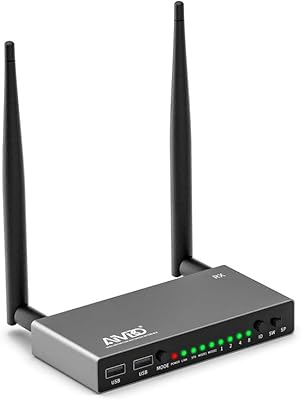
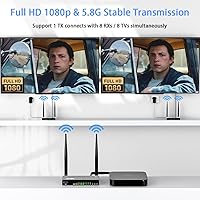
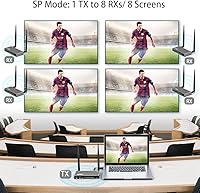
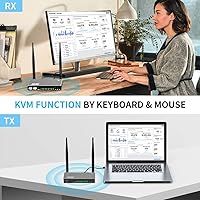
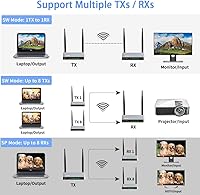
The operating modes are worth understanding before you buy. In SP mode, one transmitter can push video to up to eight receivers at once — handy for digital signage walls or multi-room installs. Flip to SW mode and the logic reverses: a single receiver accepts feeds from up to eight transmitters, which makes rotating presenter setups in conference rooms much cleaner. The KVM function adds genuine utility — plug a keyboard and mouse into the receiver's USB ports and you can control the source machine from across the building. It is not a full remote desktop environment, just input device passthrough. The IR blaster, loop-out port, and native 1080p at 60Hz round out a feature list that punches above its category.

Best For

This transmitter-receiver kit fits a specific kind of buyer well. If you have a cable or satellite box tucked in a living room cabinet and want the same feed playing in a kitchen or bedroom, this is exactly the type of solution designed for that problem. Home theater owners who want a clean look — no cable runs, no drilling — will appreciate the wireless approach. Corporate AV teams running multi-screen lobbies or training room displays can take real advantage of the one-to-eight splitter mode. Teachers and presenters connecting laptops to classroom projectors wirelessly are also a natural fit. Where it falls short: 4K content is not supported, and anyone expecting low latency for fast-paced gaming should look elsewhere.

User Feedback

With 88 ratings and a 4.2-star average, the AIMIBO A8 has a relatively thin review base — keep that in mind when weighing the feedback. That said, the pattern that emerges is reasonably consistent. Several buyers specifically call out easy initial setup and stable signals when the transmitter and receiver sit within a few rooms of each other. Complaints tend to cluster around two areas: the 656-foot range claim does not hold up when real walls and floors enter the picture, and the IR remote function can be hit-or-miss depending on room angle and layout. A handful of users also report occasional signal dropouts at longer distances. Broadly positive, but with real-world caveats worth knowing.

Pros

  • The 5.8GHz frequency keeps the signal largely free from interference caused by standard home Wi-Fi routers and Bluetooth devices.
  • Dual operating modes — one source to many displays, or many sources to one display — give this kit genuine versatility for different AV environments.
  • KVM support means you can control a remote PC using just a keyboard and mouse plugged into the receiver, which is a useful bonus for home office or server room setups.
  • The aluminum alloy housing feels noticeably more durable and professional than the plastic-bodied alternatives common at this price point.
  • IR passthrough lets you use a standard remote control on devices physically located in a different room, which is a convenience most competing units skip.
  • The loop-out port on the transmitter allows a local display to stay active simultaneously, so you do not lose your source monitor when broadcasting wirelessly.
  • Initial pairing is reportedly quick and does not require software installation or app configuration.
  • The unit is compatible with a wide range of source devices, including laptops, set-top boxes, Blu-ray players, and game consoles.

Cons

  • Real-world range through multiple walls falls well short of the 656-foot line-of-sight figure cited in the specs.
  • Maximum resolution is capped at 1080p, with no support for 4K or HDR content.
  • The IR remote passthrough can be unreliable depending on the angle and physical layout of the room.
  • With only 88 ratings, the review base is too thin to draw firm conclusions about long-term reliability.
  • Occasional signal dropouts have been reported at distances that should theoretically fall within the supported range.
  • The distinction between SP mode and SW mode is not intuitive, and the documentation does not do a great job explaining when to use each.
  • The KVM function only passes keyboard and mouse inputs — it is not a remote desktop solution and cannot replicate a full PC control experience.
  • Buyers in environments with dense wireless traffic or thick concrete walls may find the connection less stable than expected.

Ratings

The AIMIBO A8 Wireless HDMI Extender has been scored by our AI system after processing verified buyer reviews from global marketplaces, with spam, bot-generated, and incentivized feedback actively filtered out before analysis. The scores below reflect a balanced picture — genuine strengths are recognized alongside the real frustrations buyers have reported. Nothing is softened to protect the product's image.

Signal Stability
74%
26%
In typical home environments — one or two rooms apart, standard drywall construction — most buyers report a stable, uninterrupted signal. Several users specifically call out that it held up well through interior walls without the dropout issues they experienced with cheaper competitors.
Stability degrades noticeably with distance and denser materials. A recurring thread in buyer feedback involves unexpected dropouts in larger homes or older buildings with thicker walls, suggesting the unit is sensitive to environments that deviate from ideal conditions.
Range Accuracy
51%
49%
For close-to-mid-range deployments — think a living room to an adjacent bedroom — the wireless reach is more than adequate, and users in open-plan spaces report clean transmission without needing to position units carefully.
The 656-foot claim is a line-of-sight lab figure, and real-world performance falls well short once walls enter the picture. Multiple buyers flagged that the advertised range created expectations the product could not meet in real homes, which is a meaningful trust issue for a mid-range purchase.
Setup Experience
83%
The transmitter and receiver arrive pre-paired, and several buyers note they had video displaying on a second screen within minutes of unboxing. There is no software to install, no app to configure, and no account to create — plug in and power on is genuinely how it works for basic one-to-one setups.
The dual-mode system — SP mode versus SW mode — creates confusion for buyers who stumble into the wrong setting without reading the manual. A handful of reviewers spent considerable time troubleshooting what turned out to be a simple mode mismatch, and the included documentation does not explain the distinction clearly enough.
Video Quality
81%
19%
Native 1080p at 60Hz looks clean and sharp on modern TVs and projectors. Users running presentations, streaming video, or mirroring cable box content report that the image quality is indistinguishable from a direct HDMI cable connection under normal viewing conditions.
The 1080p ceiling is a genuine limitation in a market that has largely moved toward 4K displays. Buyers who purchased this expecting any upscaling or 4K passthrough were disappointed, and the lack of HDR support means high-dynamic-range content from Blu-ray or streaming services is downgraded before it reaches the screen.
Latency Performance
69%
31%
For its intended use cases — movie playback, satellite TV mirroring, and slide presentations — the approximately 0.1-second delay is effectively invisible to most viewers. Corporate users presenting in conference rooms and home theater owners watching streamed content rarely, if ever, notice it.
The latency is real and measurable, and it becomes a problem the moment a buyer tries to use this transmitter-receiver kit for gaming or any content where audio and fast on-screen action need to be tightly synchronized. It is not a product flaw per se, but the spec sheet undersells how noticeable 100 milliseconds can feel during interactive use.
KVM Functionality
67%
33%
The ability to plug a keyboard and mouse into the receiver and control a PC sitting in another room is a feature competitors at this price rarely offer. IT administrators and home office users running a secondary workstation have found it genuinely useful for basic remote input tasks.
The KVM function is limited strictly to passing keyboard and mouse signals — there is no audio, no webcam support, and no USB hub capability beyond those two input devices. Buyers expecting a fuller remote access experience, comparable to a KVM switch in a server room context, will find it underwhelming.
IR Remote Passthrough
62%
38%
When it works, the IR passthrough is a thoughtful inclusion — being able to change channels or pause a Blu-ray player housed in a closed cabinet from across the house is genuinely convenient, and it works without any extra pairing steps in most cases.
Buyer feedback consistently flags the IR function as the least reliable feature on the unit. Angle sensitivity is a recurring complaint — if the remote is not aimed fairly precisely at the receiver's IR window, commands are missed. Room layout and indirect pointing angles reduce the practical usefulness in real living spaces.
Build Quality
78%
22%
The aluminum alloy enclosures feel noticeably more solid than the plastic-shelled alternatives that dominate this category at lower price points. Several buyers commented that the units feel like they belong in a professional AV setup rather than a consumer gadget drawer.
Despite the quality housing, some buyers noted that the antenna connections feel less secure than the body of the unit suggests. There are isolated reports of antennas loosening over time, which can contribute to signal degradation that is easy to miss as a cause.
Multi-Display Capability
76%
24%
The one-to-eight splitter mode is a standout capability for buyers running digital signage, training rooms, or classroom setups. Being able to push one source to eight screens wirelessly — without a distribution amplifier or HDMI splitter box — simplifies installations that would otherwise require significant cable runs.
Expanding to more than one receiver requires purchasing additional units separately, and the total system cost adds up quickly. A few users also noted that adding more receivers to the chain introduced slight inconsistencies in signal quality across displays, particularly at greater distances.
Value for Money
71%
29%
For buyers whose use case fits squarely within its design parameters — one-room-to-another home video extension, multi-screen office setups — the AIMIBO A8 delivers a feature set that would cost considerably more through professional AV brands. The KVM, IR passthrough, and loop-out together represent solid bang for the category.
Buyers who purchased primarily for the 656-foot range or gaming performance felt the value proposition broke down quickly. When the headline spec does not hold up in real conditions, the overall price feels less justified — and the limited review base makes it harder to verify whether these disappointments are outliers or patterns.
Compatibility
82%
18%
The device works with a broad range of HDMI sources without driver installation — laptops, media players, game consoles, and set-top boxes all connect without issue in reported buyer experiences. Output compatibility with projectors is specifically mentioned positively by several educator and presenter buyers.
A small number of users encountered handshake issues with certain older displays or source devices, requiring them to cycle power to re-establish the HDMI connection. These appear to be edge cases rather than systemic problems, but they are worth noting for buyers with older AV equipment in their setup.
Audio Performance
73%
27%
Stereo and 5.1 surround audio transmits cleanly alongside the video signal without requiring a separate audio path. Home theater users running the output into a soundbar or AV receiver report no lip-sync issues during standard streaming and playback scenarios.
The audio handling is adequate but not exceptional. Buyers attempting to pass through high-bitrate audio formats — such as Dolby TrueHD or DTS-HD Master Audio from a Blu-ray source — may find the audio is downgraded or stripped, as lossless audio passthrough is not a confirmed feature of this unit.
Ease of Use (Daily)
79%
21%
Once installed, the unit essentially disappears into the background — it powers on with the source device and maintains the connection without requiring manual intervention. Home users report going weeks without needing to touch the hardware after the initial setup.
Mode switching and channel assignment are handled through a button interface rather than a companion app or web interface, which makes reconfiguring the system for a different layout feel less intuitive than it should be. There is no visual feedback display on the unit itself to confirm which mode is active.
Thermal Management
72%
28%
The aluminum alloy housing doubles as a passive heat sink, and the units run at a noticeably lower surface temperature than plastic-bodied competitors during extended use. This is relevant for buyers running the system continuously in enclosed AV cabinets.
In enclosed spaces with restricted airflow — tight equipment racks or sealed cabinets — some buyers reported that the transmitter unit became quite warm after several hours of continuous operation. No thermal shutdowns were widely reported, but the heat buildup in confined installations is worth monitoring.

Suitable for:

The AIMIBO A8 Wireless HDMI Extender is a strong fit for anyone who needs to send a 1080p video signal across a home or small commercial space without running cables through walls. Home theater owners who keep their media equipment in a cabinet but want output on a projector or a second TV in another room will find the setup refreshingly straightforward. It also works well for corporate AV managers who need a reliable multi-screen solution in lobbies or training rooms — the one-to-eight splitter mode means you can feed multiple displays from a single source without a rack full of distribution hardware. Educators and corporate presenters who regularly connect laptops to classroom or boardroom projectors wirelessly are another natural audience. Anyone with a satellite or cable box in one room who wants to watch the same feed in a bedroom or kitchen, without calling a technician to pull coax, will get real practical value from this transmitter-receiver kit.

Not suitable for:

The AIMIBO A8 Wireless HDMI Extender has meaningful limitations that certain buyers should take seriously before committing. Gamers should look elsewhere — the roughly 0.1-second latency is acceptable for passive video viewing and slide presentations, but it is noticeable enough to make fast-paced or competitive gaming frustrating. Anyone expecting 4K output will also be disappointed, as the maximum supported resolution tops out at 1080p. The advertised 656-foot range is a line-of-sight figure measured in open space; in a real home or office with concrete walls, steel framing, or multiple floor separations, that number drops considerably. Buyers in dense apartment buildings or environments with heavy wireless congestion may also encounter more signal instability than the spec sheet suggests. If your use case depends on rock-solid reliability at long distances through challenging materials, this wireless extender may not be the right tool.

Specifications

  • Wireless Frequency: The unit transmits on the 5.8GHz band, keeping it isolated from the 2.4GHz congestion caused by most home Wi-Fi routers and Bluetooth peripherals.
  • Max Range: Rated for up to 200m (656 ft) in open line-of-sight conditions; real-world range through walls and floors will be considerably shorter.
  • Video Resolution: Supports native 1920x1080p at 60Hz, with backward compatibility for 480p, 576p, and 720p source signals.
  • Latency: Signal transmission latency is approximately 0.1 seconds, suitable for video playback and presentations but not frame-sensitive gaming.
  • Video Encoding: Encodes and decodes video using H.264 and H.265/HEVC compression standards for efficient wireless transmission.
  • Audio Output: Delivers stereo surround sound with a 5.1 channel configuration via the connected display or audio system.
  • Splitter Mode: In SP mode, one transmitter can simultaneously send video to up to eight receivers for multi-screen or multi-room deployments.
  • Switch Mode: In SW mode, a single receiver can accept input from up to eight transmitters, enabling multi-source switching at a single display.
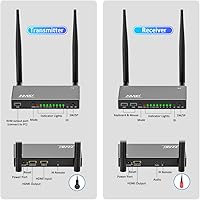
  • KVM Support: The receiver unit includes two USB-A ports that pass keyboard and mouse input back to the source device for remote control of the host machine.
  • IR Passthrough: Infrared remote signals captured at the receiver are relayed to the transmitter end, allowing remote control of source devices from a separate room.
  • Loop-Out: The transmitter includes an HDMI output port that feeds a local display simultaneously while the wireless signal is being broadcast.
  • Housing Material: Both the transmitter and receiver are enclosed in aluminum alloy shells, providing durability and passive heat dissipation.
  • Color & Finish: Both units ship in a silver finish that suits most home theater cabinet and AV rack environments.
  • Dimensions: Each unit measures 5.91 x 1.97 x 1.97 inches, making them compact enough to place behind or beside most source devices.
  • Weight: The combined kit weighs 1.96 pounds, inclusive of both the transmitter and receiver hardware.
  • Compatible Sources: Works with laptops, desktop PCs, Blu-ray players, cable and satellite set-top boxes, PS4 consoles, cameras, and DVD players via HDMI.
  • Compatible Displays: Output can be directed to any HDMI-equipped TV, computer monitor, or projector.
  • HDMI Ports: The transmitter includes one HDMI input and one HDMI loop-out output; the receiver includes one HDMI output to the display.
  • Model Number: This kit is manufactured under the model designation A8 by the AIMIBO brand.
  • Availability Date: The product was first listed for retail sale in February 2023.

Related Reviews
Weeryyi Wireless HDMI Extender Receiver
83%
91%
Value for Money
88%
Ease of Setup
85%
Signal Stability
83%
Range Performance
70%
Latency
More
AIMIBO Q3 Wireless HDMI Extender
75%
91%
Ease of Setup
73%
Signal Stability
67%
Transmission Range
71%
Video Quality
82%
Latency Performance
More
AIMIBO 1-to-8 Wireless HDMI Extender
71%
78%
Wireless Range & Stability
86%
Multi-Screen Distribution
71%
KVM Functionality
67%
Initial Setup Experience
73%
IR Remote Passback
More
J-Tech Digital Wireless HDMI Extender 1X2 (JTECH-WEX200V3)
85%
91%
Value for Money
95%
Setup & Installation
88%
Signal Strength
92%
Latency for Video Playback
80%
Range Performance
More
Mirabox Wireless HDMI Transmitter and Receiver Extender 1x4-1080P@60Hz
85%
88%
Signal Strength & Range
91%
Setup & Installation
85%
Latency & Performance
83%
Build Quality
89%
Multi-Screen Setup
More
Mirabox HDMI Extender 400ft
85%
94%
Signal Quality
85%
Ease of Setup
90%
Build Quality
91%
Transmission Range
89%
Audio Performance
More
OREI EX-500IR HDMI Extender
88%
94%
Transmission Distance
92%
Signal Quality
89%
Ease of Installation
85%
Build Quality
88%
Power over Cable (PoC) Functionality
More
AGPTEK LKV373A 1080P HDMI Extender
86%
93%
Signal Reliability
88%
Installation Ease
89%
Compatibility with Devices
85%
Build Quality
91%
Value for Money
More
TESmart HKE12MMA20 HDMI KVM Extender
71%
78%
Signal Stability
74%
Video Quality
71%
Multipoint Topology Support
83%
Build Quality
63%
IR Pass-Through Reliability
More
DxInvb Wireless HDMI Transmitter and Receiver Kit
75%
91%
Ease of Setup
58%
Device Compatibility
74%
Wireless Range & Stability
69%
Video Quality
83%
Build Quality & Portability
More

FAQ

It does work through typical interior walls — drywall and wood framing are generally fine. The 656-foot range figure, however, is a best-case open-air measurement. Expect real-world range to drop meaningfully if the signal has to pass through multiple walls, concrete, or a floor. Most buyers using it across one or two standard home rooms report stable results.

Yes, that is one of the most common use cases for this transmitter-receiver kit. You connect the transmitter to your cable box via HDMI and place the receiver near the bedroom TV. The IR passthrough feature also lets you use your standard cable remote from the bedroom, so you are not stuck with a fixed channel.

They are essentially opposite configurations. SP mode is for one source feeding multiple displays — for example, one laptop broadcasting to several TVs in different rooms. SW mode reverses that: one display receives input from multiple source devices, so you can switch between a laptop, a Blu-ray player, and a set-top box at a single screen. You would only ever use one mode at a time depending on your specific setup.

Honestly, it is not recommended for competitive or reaction-dependent gaming. The roughly 0.1-second delay is not something you will notice during a movie, but in a fast shooter it translates to noticeable input lag. If gaming is the primary use case, a wired HDMI run or a dedicated low-latency extender designed for gaming would serve you better.

Not exactly. The KVM function passes the physical signals from a keyboard and mouse plugged into the receiver back to the source device — so you can move the cursor, type, and click just as if you were sitting at the PC. What it does not do is stream the PC display back to you; for that you still need the HDMI video path. Think of it as a long wireless USB cable for your keyboard and mouse, not a full remote desktop replacement.

Yes, in SP mode you can connect up to eight receivers to a single transmitter, each displaying the same source video simultaneously. This is useful for things like hotel corridors, retail signage, or classroom environments where one signal needs to reach several screens at once. Note that additional receivers are typically sold separately.

The pairing process is fairly simple — the transmitter and receiver are usually pre-paired from the factory and connect automatically when powered on. Most users report being up and running within a few minutes. The part that can be confusing is choosing between SP and SW mode, but if you are doing a straightforward one-source-to-one-display setup, you do not need to think about that at all.

1080p at 60Hz is the ceiling. There is no 4K support on this wireless extender. If you are running a 4K TV or projector, the image will still display fine — the device will just output at 1080p and your screen will upscale it. For native 4K content delivery, you would need a different product category entirely.

The 5.8GHz band this unit uses is generally less congested than 2.4GHz, so standard Wi-Fi routers and Bluetooth speakers should not cause significant interference. That said, if you have many 5GHz Wi-Fi devices or neighboring networks operating heavily on that band, there is some potential for occasional instability. Most home environments will be fine, but dense office buildings or apartment complexes with heavy wireless traffic are worth factoring in.

The IR passthrough is designed to relay signals from a remote at the receiver location back to a device connected to the transmitter — so it controls the source device at the far end, not something plugged directly into the receiver. If your Fire TV Stick is plugged into the transmitter side in another room, you could theoretically use its remote from the receiver location. But if the streaming stick is plugged into the receiver itself, the IR relay is not designed for that direction of control.