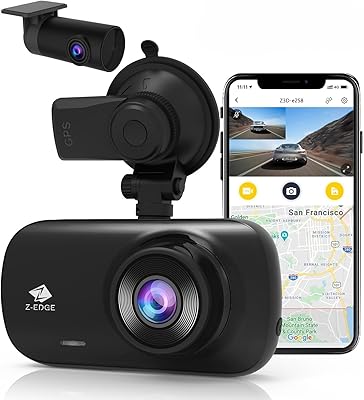
Overview

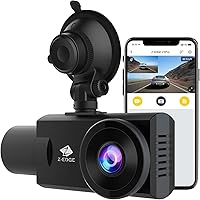
The Z-Edge Z3Pro Dual Dash Cam entered a crowded market back in 2019, and it carved out a specific niche: drivers who need to document both the road ahead and what is happening inside the cabin simultaneously. The front lens captures at 2K resolution while the interior camera records at 1080P, all handled by a single compact unit you mount via suction cup. A 2.0-inch LCD gives you a quick live view, and the built-in battery means the unit is self-contained from the moment you stick it up. Wi-Fi connectivity lets you pull footage straight to your phone, which matters more than it sounds on a busy day. With a 3.9-star average across over 560 ratings, expectations should be realistic rather than high.
Features & Benefits

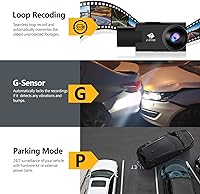
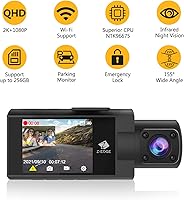
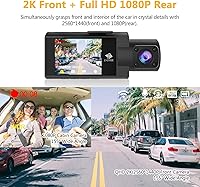
The front lens shoots 2560x1440 footage while the cabin-facing camera runs 1080P at the same time — no switching, no choosing. That interior lens carries four infrared LEDs, which is the practical detail that separates this cam from basic dual-channel options. In a pitch-dark parking lot the IR performance is modest, but on lit city streets at night it captures passenger faces clearly enough to matter. The NTK96675 processor and WDR technology help the front camera handle sunrise glare and tunnel exits reasonably well. A built-in G-sensor locks footage automatically during a collision, protecting those clips from being overwritten by loop recording. Parking mode surveillance is supported, though it demands an external battery pack or hardwire kit that does not come in the box.

Best For

This cabin-and-road camera makes the most sense for rideshare and taxi drivers who need verifiable documentation of every trip — both what happened outside and who was in the back seat. It also suits daily commuters who want a camera that simply starts when the car starts and stops when it does, without any manual fiddling. Reviewing footage on a phone via the Z-Dash Cam app is genuinely convenient if you do not want to deal with card readers. Anyone looking to avoid buying two separate cameras for front and interior coverage will find this a practical consolidation. It is less ideal for drivers who need GPS logging or a large touchscreen interface.

User Feedback

Buyers who are happy with the Z3Pro tend to highlight daytime video clarity and how straightforward the Wi-Fi app setup is — most report being up and running within minutes of mounting. The criticisms are worth taking seriously, though. App stability on recent Android and iOS versions comes up repeatedly, with some users reporting connection drops. SD card compatibility is another friction point; not every card works reliably, and since none is included in the package, that is a discovery some buyers make too late. The parking mode limitation — needing separate hardware to make it functional — frustrates buyers who assumed it worked out of the box. Mount durability over long periods gets mixed remarks as well.

Pros

  • Captures 2K front and 1080P interior footage at the same time with no manual switching required.
  • Four IR LEDs on the cabin lens provide usable interior night vision on lit streets and highways.
  • Auto-starts and stops with the ignition, requiring zero driver interaction on daily trips.
  • Wi-Fi app lets you pull and share clips directly from your phone without removing the SD card.
  • G-sensor crash detection automatically locks and protects collision footage from being overwritten.
  • WDR technology handles tricky lighting transitions like tunnel exits and bright morning glare reasonably well.
  • Supports microSD cards up to 256GB, giving serious drivers room for extended continuous recording.
  • Compact and lightweight at under 3 ounces, so it does not obstruct forward sightlines.
  • A single unit replaces the need for two separate cameras, simplifying wiring and dashboard clutter.

Cons

  • No SD card is included in the box, which is an easy oversight that delays first-time setup.
  • Parking mode sounds included but actually requires a hardwire kit or external battery sold separately.
  • App connectivity has been reported as unreliable on recent smartphone operating system versions.
  • Not all microSD cards are compatible; some users report recording errors or card read failures.
  • No built-in GPS means no speed or route data embedded in footage, which limits its use as legal evidence in some jurisdictions.
  • The suction mount has drawn mixed feedback regarding long-term hold, especially in hot climates.
  • Interior IR night vision performance drops significantly in genuinely dark environments like unlit parking garages.
  • The 2.0-inch screen is too small for comfortable in-car playback or menu navigation.
  • Customer support response times from Z-Edge have been flagged as slow by a subset of buyers.

Ratings

The Z-Edge Z3Pro Dual Dash Cam scores below are generated by AI after analyzing verified global buyer reviews, with spam, bot activity, and incentivized feedback actively filtered out. This dual dash cam has built a mixed but informative track record since 2019, and these ratings reflect both the genuine strengths that keep buyers satisfied and the recurring pain points that push others to leave critical feedback. Nothing has been softened or inflated — what you see here is an honest composite of real-world experience.
Video Quality (Day)
83%
Daytime 2K front footage is consistently praised for capturing license plates and road details with enough clarity to hold up as evidence after an incident. Commuters and rideshare drivers note that WDR handling around bright intersections and tunnel exits performs better than expected at this price level.
A small number of buyers notice slight barrel distortion at the edges of the 155-degree frame, which can make objects at the periphery look slightly warped. Footage quality also depends heavily on SD card speed — slower cards can introduce dropped frames even in ideal lighting.
Night Vision (Exterior)
67%
33%
On well-lit city streets and highway driving, the front lens holds its own after dark, capturing readable plates and road markings that would be invisible on cheaper single-lens cameras. WDR processing helps prevent the headlight glare that washes out footage on lower-spec processors.
In genuinely dark conditions — unlit rural roads or dim parking structures — the front camera struggles noticeably, producing grainy footage with limited detail beyond a few car lengths. Buyers expecting premium low-light performance comparable to higher-end models will likely be disappointed.
Interior IR Night Vision
74%
26%
The four IR LEDs give the cabin camera a meaningful edge for overnight rideshare work, capturing passenger seating area and facial features in low-ambience environments where a standard interior camera would record nothing useful. This is the Z3Pro's most differentiating feature for professional drivers.
IR coverage is concentrated in the center of the cabin and falls off toward the edges, so a passenger sitting against the far door may appear darker than ideal. In total darkness the image also carries a flat, greenish tint that reduces clarity compared to ambient-lit conditions.
Dual-Channel Recording
86%
Simultaneous front and cabin recording is the core selling point, and it works reliably — both streams activate together at ignition with no manual input required. For rideshare drivers documenting every trip, the confidence of knowing both views are always running is genuinely valuable.
The two recording streams cannot be independently configured at a granular level, so users who want different frame rates or resolutions per channel beyond the fixed defaults have no flexibility. Accessing dual footage simultaneously on the small 2.0-inch screen is also awkward in practice.
App & Wi-Fi Performance
58%
42%
Initial setup of the Z-Dash Cam app is straightforward for most users, and wirelessly pulling a short clip to share after a minor collision is genuinely faster than ejecting the SD card and finding a reader. The concept addresses a real everyday friction point well.
App stability is a persistent problem flagged across multiple recent reviews, particularly on newer Android and iOS versions where connection drops mid-download are common. Several buyers report having to reconnect multiple times to complete a single transfer, which undercuts the convenience the feature is meant to provide.
G-Sensor & Crash Lock
81%
19%
The G-sensor responds reliably to genuine impacts, locking the relevant clip before loop recording can overwrite it — a function that buyers have credited with preserving footage they later needed for insurance claims. Sensitivity calibration is accessible through the menu for drivers who find the default triggers too hair-trigger on bumpy roads.
On rough road surfaces or aggressive speed bumps, the G-sensor can trigger false locks and fill protected storage with irrelevant clips, which then require manual deletion. There is no mobile app shortcut to clear locked files, so managing this requires navigating the on-device menu.
Parking Mode
44%
56%
When properly set up with a hardwire kit or external battery, the parking mode does function as described — detecting motion or impact and recording short clips while the car is unattended, which is useful for vehicles left in street parking or commercial lots overnight.
The fundamental problem is that neither the hardwire kit nor an external battery is included, so buyers who purchase based on parking mode being listed as a feature often discover they need another purchase before it works at all. This is the single most common frustration expressed in critical reviews.
Build Quality
71%
29%
The camera body feels reasonably solid for its weight class, with buttons that click positively and a housing that does not flex or creak when handled. The suction mount mechanism is firm when first applied and holds adequately on smooth windshields in moderate climates.
Long-term suction cup reliability draws complaints, particularly from drivers in hot climates where repeated thermal cycling weakens the mount adhesion over weeks or months. The plastic housing also shows minor scratches from normal handling more readily than rubberized alternatives in this category.
Setup & Installation
79%
21%
Mounting the camera takes under five minutes for most drivers — attach the suction cup, plug in the USB power cable, insert a card, and it is running. The auto-start behavior means there is nothing to configure on an ongoing daily basis, which novice users particularly appreciate.
Routing the power cable cleanly along the headliner without loose wiring dangling in view requires patience and usually some additional cable management clips not included in the box. First-time dash cam buyers occasionally report confusion around which SD cards work reliably.
SD Card Compatibility
61%
39%
The camera supports up to 256GB microSD cards, giving frequent drivers room for extensive footage retention before the loop recording cycle begins. Users who do their research and select a high-endurance card from a reputable brand report stable, uninterrupted recording over extended periods.
Not all cards work equally well, and the packaging provides minimal guidance on what to buy. A notable subset of buyers report formatting errors, failed recordings, or cards the camera simply does not recognize — issues that often appear only after several days of use rather than immediately.
Value for Money
69%
31%
For a driver who needs simultaneous front and interior recording with IR cabin night vision and does not expect parking mode to work out of the box, the Z3Pro occupies a reasonable position relative to its segment — offering features that would otherwise require two separate cameras.
Once you factor in a quality SD card and a hardwire kit or external battery for parking mode, the total cost climbs noticeably beyond the initial price, which makes the value proposition feel thinner. Competing models in the same bracket have started offering GPS and better app stability, which puts pressure on this unit.
Loop Recording
78%
22%
Loop recording functions reliably and continuously, automatically overwriting the oldest unprotected files when storage is full. Most drivers report never needing to manually manage storage once a suitable card is installed, which is exactly the behavior you want for a set-and-forget setup.
The absence of a time-lapse or lower-bitrate recording option means storage fills faster than some users expect on longer daily drives without high-capacity cards. Users who do not understand loop recording sometimes report thinking footage was lost when it had simply been overwritten.
Display & Interface
55%
45%
The 2.0-inch LCD is functional for confirming the camera is recording and navigating basic settings during initial setup. Menu structure is logical enough that most buyers find their way around without consulting the manual for routine adjustments.
At 2.0 inches, the screen is too small for comfortable clip review or any detail-checking while mounted in a vehicle. Drivers who want to quickly verify footage quality or scrub through recordings without using the app will find the display genuinely frustrating to work with.
Customer Support
52%
48%
A portion of buyers report that Z-Edge did respond to their support requests and in some cases offered replacements or troubleshooting guidance for defective units, which is a baseline expectation for any electronics brand worth considering.
Response times draw consistent criticism, with multiple reviewers describing delays of several days or longer before receiving a reply. For buyers dealing with a failed unit during a time-sensitive situation — like needing footage for an insurance claim — slow support is a material problem, not just an inconvenience.

Suitable for:

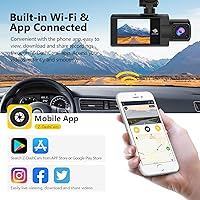
The Z-Edge Z3Pro Dual Dash Cam was built with a very specific driver in mind, and if you fit that profile, it delivers real value. Rideshare and taxi drivers are the clearest match — having simultaneous 2K front footage and 1080P IR cabin recording on a single device means you have documented evidence of both road incidents and passenger behavior without mounting multiple cameras. The ignition-triggered auto-start means there is genuinely nothing to remember each shift; it just runs. Commuters who review clips on a phone rather than a laptop will also appreciate the Wi-Fi app, which makes pulling a quick clip after a fender-bender far less of a hassle than fishing out an SD card. If you want dual-channel coverage without climbing into premium pricing territory, this cabin-and-road camera sits at a practical middle ground.
Not suitable for:

The Z-Edge Z3Pro Dual Dash Cam has real gaps that rule it out for certain buyers, and it is worth being direct about them. If you are counting on parking mode as a core feature, know upfront that it requires a separately purchased external battery pack or hardwire kit — neither is included, and this adds cost and installation effort the product page does not emphasize clearly. Drivers who want GPS route logging built in will need to look elsewhere entirely, as the Z3Pro does not offer it. If you rely on a large touchscreen for in-car interaction, the 2.0-inch display will feel cramped and limiting. Tech-sensitive buyers who keep their phones updated frequently should also note that the companion app has drawn criticism for inconsistent behavior on newer Android and iOS versions, which can make wireless footage access unreliable.
Specifications

  • Front Resolution: The front-facing lens records at 2560x1440 (2K) at 30 frames per second for sharp road footage.
  • Interior Resolution: The cabin-facing camera captures 1920x1080 at 30 frames per second simultaneously with the front lens.
  • Processor: Powered by the NTK96675 chipset, which handles dual-channel encoding and Wi-Fi transmission.
  • Lens Aperture: Both front and interior lenses feature an F/2.0 aperture to support low-light recording performance.
  • Field of View: Both lenses offer a 155-degree wide-angle field of view to minimize blind spots in the frame.
  • IR Night Vision: The interior lens is equipped with 4 infrared LEDs to enable low-light cabin recording in dark conditions.
  • Display: A 2.0-inch LCD screen on the unit provides live preview and basic menu navigation while mounted.
  • WDR Technology: Wide Dynamic Range processing helps balance exposure between bright and shadowed areas in a single frame.
  • G-Sensor: The built-in G-sensor detects sudden impacts and automatically locks the current recording clip to prevent overwrite.
  • Parking Mode: Parking surveillance is supported but requires a separately purchased external battery pack or hardwire kit to function.
  • Wi-Fi Connectivity: Built-in Wi-Fi pairs with the Z-Dash Cam app on Android and iOS for wireless footage preview and download.
  • SD Card Support: Compatible with microSD cards up to 256GB using loop recording; no memory card is included in the package.
  • Mount Type: The unit attaches to the windshield via a suction cup mount for tool-free installation and repositioning.
  • Battery: A built-in lithium polymer battery powers the unit during ignition off-states and short recording bursts.
  • Dimensions: The unit measures 3.74 x 2.05 x 1.24 inches, keeping windshield obstruction minimal.
  • Weight: At 2.72 ounces, the camera is light enough that the suction mount holds it without additional support under normal conditions.
  • Color: Available in grey with a compact form factor designed to blend into a standard vehicle interior.
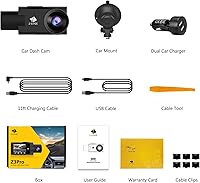
  • Power Input: The unit draws power via USB, typically connected to the vehicle through the included car mount and power cable.

Related Reviews

Z-Edge T4K Dual Dash Cam
73%
88%
Daytime Video Clarity
63%
Night Vision Performance
86%
Touchscreen Usability
71%
WiFi and App Experience
74%
Rear Camera Quality
More
Z-Edge Z3D Dash Cam
Z-Edge Z3D Dash Cam
81%
90%
Video Quality
75%
Ease of Installation
88%
Night Vision Performance
84%
Wi-Fi and Connectivity
80%
GPS Functionality
More
Z-Edge Z3D 4K Front and Rear Dash Cam
76%
88%
Daytime Video Quality
67%
Night Vision Performance
71%
Rear Camera Quality
84%
GPS Accuracy
74%
Wi-Fi and App Experience
More
Z-Edge R1 WiFi Dual Dash Cam
74%
84%
Daytime Video Quality
71%
Night Vision Performance
62%
Wi-Fi & App Experience
81%
Installation Ease
78%
G-Sensor Reliability
More
ORSKEY S800 Dual Dash Cam
73%
88%
Value for Money
82%
Front Camera Video Quality
53%
Rear Camera Video Quality
61%
Night Vision Performance
91%
Ease of Installation
More
70mai A410 Dual Dash Camera
78%
88%
Daytime Video Clarity
71%
Night Vision Performance
74%
Rear Camera Quality
67%
App & Wi-Fi Experience
84%
GPS Accuracy & Data Logging
More
Thinkware Q200 2-Channel Dash Cam
76%
84%
Front Camera Clarity
67%
Rear Camera Clarity
72%
Night Vision Performance
76%
Parking Mode
63%
GPS Alert Accuracy
More
Ecomoment S70 Dual Dash Cam
71%
88%
Value for Money
84%
Daytime Video Quality
61%
Night Vision Performance
91%
Ease of Installation
82%
Display & Playback
More
Sarmert M572 4K Dual Dash Camera
75%
84%
Video Clarity (Daytime)
71%
Night Vision & Low Light
63%
App Experience
58%
Parking Mode
89%
Supercapacitor Reliability
More
AZDOME M01 Pro Dual Dash Cam
64%
76%
Video Quality (Front)
54%
Video Quality (Rear)
67%
Night Vision
88%
Ease of Installation
58%
ADAS Performance
More

FAQ

Both channels record simultaneously with no switching required. The front lens runs at 2K and the cabin lens at 1080P, both active from the moment the camera powers on with the ignition.

No, and this catches some buyers off guard. The Z-Edge Z3Pro Dual Dash Cam does not come with a memory card. You will need to purchase a microSD card separately — Class 10 or UHS-1 cards are generally recommended for reliable dash cam use, and the camera supports up to 256GB.
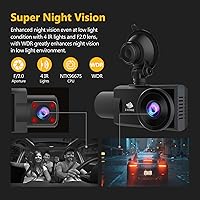
It depends on the environment. The four IR LEDs handle lit city streets and highway driving reasonably well, capturing passenger faces with enough clarity to be useful. In completely unlit parking structures or very dark rural areas, the image gets noticeably grainier. Do not expect miracles in total darkness, but for most rideshare scenarios it performs adequately.

Not really. Parking mode is a supported feature, but it requires continuous power when the ignition is off, which means you need either a hardwire kit or an external battery pack — neither of which comes in the box. Factor that additional cost and installation effort into your decision before purchasing.

The Z-Dash Cam app connects to the unit over Wi-Fi and lets you browse, preview, download, and share clips directly on your phone. Setup is straightforward for most users, though some have reported intermittent connectivity issues on newer Android and iOS versions.

The camera officially supports microSD cards up to 256GB. In practice, users have had the best results with well-known brands like Samsung Endurance, SanDisk High Endurance, or Lexar cards rated for dash cam use. Generic or unbranded cards are more likely to cause read errors or recording failures.

Suction mounts in general can weaken in high heat, and some buyers of this cabin-and-road camera have mentioned the mount loosening over time in hot climates. Parking in direct sunlight regularly will stress any suction mount. Keeping the windshield clean where the mount attaches helps, and occasional re-seating of the suction cup is a reasonable habit.

No, the Z3Pro does not include GPS logging. If you need speed data or route overlay embedded in your video footage — which can be important for insurance claims or legal purposes — you will need to look at a different model that includes a GPS module.

It starts automatically when it detects power from your vehicle ignition and stops when you switch the engine off. There is nothing to press. This auto-start behavior is one of the features commuters and rideshare drivers tend to appreciate most.

Yes, the Z-Dash Cam companion app is available for both Android and iOS. That said, a number of users have flagged app stability issues on more recent versions of both operating systems, so it is worth checking current app store reviews to gauge whether this has been addressed before you rely on it heavily.