Overview

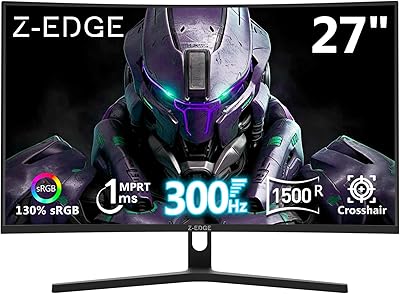
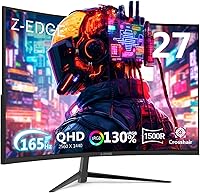
The Z-Edge UG27Q 27-inch Curved Gaming Monitor enters a crowded mid-range market with a spec sheet that punches well above its asking price. Z-Edge isn't a household name, but that's part of the appeal for value-focused buyers willing to look past the branding. The 1500R curvature is a genuine draw — it delivers a noticeably immersive experience without the desk space demands or price of an ultrawide. Connectivity is also surprisingly generous: dual DP 1.4 and dual HDMI 2.0 ports is a combination you rarely see at this price tier. Smart buyers, though, should temper expectations — panel type and build quality still warrant a close look before committing.
Features & Benefits

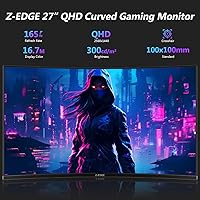
At 2560x1440 resolution on a 27-inch screen, the jump in sharpness over 1080p is immediately obvious — text is crisper, textures have more detail, and it's hard to go back once you've sat in front of it. The 165Hz refresh rate over DisplayPort (144Hz via HDMI) handles everything from fast-paced shooters to open-world titles without complaint. One thing worth clarifying: the advertised 1ms figure refers to MPRT, not GtG — it measures motion blur reduction, not pixel transition speed, so take that number in context. The 3000:1 contrast ratio produces notably deep blacks, a trait IPS panels typically can't match. Built-in FPS and RTS presets are a nice quick-start option, and the flicker-free backlight helps during long sessions.

Best For

This curved QHD monitor is a natural fit for PC gamers making the jump from 1080p who want noticeably sharper visuals without paying a premium brand tax. If you're running a mid-range GPU — think RTX 3060 or RX 6600 territory — you have more than enough headroom to push 1440p at high frame rates. The dual HDMI ports make it practical for anyone juggling a PC and a console, no cable swapping required. Students and remote workers who also game will appreciate having one display that handles both workloads reasonably well. Those drawn to curved screens for immersion but unwilling to commit to an ultrawide's price or footprint will find this a comfortable middle ground.

User Feedback

Buyers consistently praise the UG27Q's out-of-box image quality and the curved form factor, with many noting it feels more premium than the price suggests. The connectivity options get specific callouts from users running multi-device setups. Where things get mixed is ergonomics — the stand only tilts, with no height adjustment, which is a legitimate complaint. A portion of buyers have also flagged backlight bleed around the panel edges, though this appears unit-dependent rather than a universal flaw. Color accuracy feedback is lukewarm for creative tasks; photo editors and designers should probably look elsewhere. The OSD buttons, tucked behind the panel, draw some grumbles for being unintuitive. Against similarly priced rivals, most buyers still consider it a solid value pick.

Pros

  • QHD 1440p resolution delivers a sharp, detailed image that makes a real difference at 27 inches compared to 1080p.
  • The 1500R curve provides genuine immersion without the cost or desk space of an ultrawide monitor.
  • 165Hz via DisplayPort handles fast-paced gaming smoothly for both competitive and casual players.
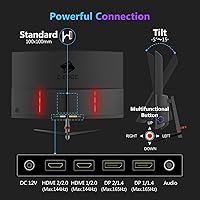
  • Four total ports — two DP and two HDMI — offer unusually flexible connectivity for this price range.
  • Out-of-box image quality consistently impresses buyers, with vibrant colors and a satisfying contrast ratio of 3000:1.
  • Built-in FPS and RTS game modes let you optimize quickly without manually adjusting settings.
  • The three-sided frameless design looks clean and modern, helping justify the price through visual appeal.
  • Flicker-free backlight and low blue light mode reduce eye fatigue during extended use.
  • VESA 100x100mm compatibility means you can ditch the stock stand and mount it easily if needed.
  • The matte anti-glare coating handles reflections well in typical room lighting conditions.

Cons

  • The stand only tilts — no height or swivel adjustment makes ergonomic positioning genuinely difficult for many users.
  • Backlight bleed has been reported across enough units to suggest it is not an isolated quality control issue.
  • The 1ms response time is MPRT, not GtG, which overstates pixel transition speed in a way that matters for competitive gaming.
  • OSD navigation buttons are tucked behind the panel and are awkward to locate and press without looking.
  • Color accuracy is unreliable enough for creative work that designers and photo editors should shop elsewhere.
  • Z-Edge's brand support infrastructure and warranty experience are harder to predict than established monitor manufacturers.
  • No built-in speakers means you need external audio, which is a minor but real inconvenience for casual setups.
  • Some buyers report panel uniformity inconsistencies, particularly in brightness across the screen at lower settings.

Ratings

The scores below for the Z-Edge UG27Q 27-inch Curved Gaming Monitor were generated by AI after analyzing thousands of verified global buyer reviews, with spam, bot activity, and incentivized feedback actively filtered out. Every category reflects what real users actually experienced — both what impressed them and what let them down. The results are intentionally transparent: strong where the hardware delivers, critical where it falls short.
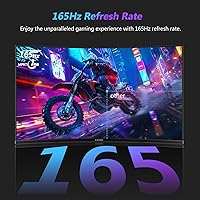
Image Quality
83%
Most buyers were genuinely surprised by how sharp and vivid the panel looks straight out of the box. The QHD resolution at 27 inches produces crisp text and fine texture detail in games that 1080p simply cannot match, and the 3000:1 contrast ratio gives dark scenes a depth that IPS monitors at this price cannot replicate.
Color accuracy is inconsistent when tested outside of gaming contexts — users attempting photo work or graphic design noticed visible color shifts and limited sRGB coverage. Panel uniformity also varies between units, with some users reporting slightly cooler or warmer tones toward the edges of the screen.
Refresh Rate & Smoothness
88%
At 165Hz via DisplayPort, motion in fast-paced shooters and racing games feels noticeably fluid compared to 144Hz displays, and the jump from 60Hz is dramatic enough that users consistently describe it as impossible to go back. Casual gamers using HDMI still get 144Hz, which covers the needs of the vast majority of players.
The 165Hz ceiling is only available over DisplayPort, so console gamers connecting via HDMI are locked to 144Hz regardless of the game or platform. A small number of users also reported difficulty getting their GPU drivers to detect the correct refresh rate automatically on first install.
Response Time
71%
29%
Motion blur in action-heavy games is well controlled, and most casual to mid-level competitive players will not notice any ghosting during normal gameplay sessions. The flicker-free backlight works in tandem with the motion handling to keep fast sequences looking clean rather than smeared.
The advertised 1ms figure is MPRT, not GtG, which is a distinction that matters for high-level competitive players — actual pixel transition speed sits closer to the 4–6ms range typical of VA panels. Buyers who assumed GtG 1ms performance and came from a fast TN panel have flagged this discrepancy in reviews.
Curvature & Immersion
86%
The 1500R curve consistently earns praise for making single-player and cinematic gaming feel more enveloping than a flat panel at the same size. Users switching from flat 27-inch monitors noted that the curve reduces the need to move their eyes to the corners of the screen, making long sessions feel less fatiguing.
A minority of users found the 1500R curve slightly distracting for productivity tasks like spreadsheets or document editing, where straight horizontal lines can appear subtly bowed. Those who sit closer than the recommended distance also reported that the curve effect feels more pronounced and occasionally disorienting.
Connectivity
91%
Four total ports — two DisplayPort 1.4 and two HDMI 2.0 — is genuinely rare at this price and buyers consistently call it out as a highlight. Multi-device users running a PC alongside a PS5 or Xbox can keep everything plugged in without an external switch, which simplifies desk cable management considerably.
There is no USB hub built into the monitor, which some buyers expected given the otherwise generous port layout. A few users also noted the port placement on the rear panel makes blind-connecting cables fiddly, particularly in tighter desk setups where the back of the monitor is hard to reach.
Stand & Ergonomics
44%
56%
The stand is stable enough for basic desktop use and holds the monitor at a reasonable height for average desk-and-chair combinations. Assembly is straightforward and requires no tools, which users appreciated during initial setup.
Tilt is the only adjustment available — no height, swivel, or pivot — which is a meaningful limitation for users who need precise monitor positioning for posture or accessibility reasons. Many buyers ended up purchasing a separate VESA arm specifically to work around the stand's limitations, which adds cost and complexity to what should be a ready-to-use product.
Build Quality
67%
33%
The three-sided frameless bezel looks clean and modern in person, and the overall finish feels more premium than the price might suggest. The panel itself feels solid, and buyers rarely reported physical damage out of the box during shipping.
The plastic housing, particularly around the stand connection point, feels noticeably thin and flexes more than expected. A handful of buyers noted minor wobble on the stand during desk vibrations from typing or nearby speakers, which was distracting enough to prompt stand replacements.
Eye Comfort
79%
21%
The flicker-free backlight is a genuine advantage during long work-from-home or study sessions, and several users with sensitivity to screen flicker specifically called it out as a reason they chose this display. The low blue light mode makes evening gaming sessions noticeably easier on the eyes over multiple hours.
The low blue light mode noticeably warms the color temperature in a way some users found too aggressive at higher settings, requiring manual tuning to get a balance between comfort and color fidelity. At maximum brightness, a small number of users reported mild eye strain after sessions exceeding three hours.
OSD & Controls
52%
48%
The OSD menu itself is logically organized once you are familiar with it, and the built-in FPS and RTS presets mean most gaming users rarely need to navigate deep into the settings at all. Switching inputs is quick once the button layout becomes second nature.
The physical buttons are mounted on the rear of the panel with no labels visible from the front, making initial navigation feel like guesswork. Users in darker setups found themselves repeatedly pressing the wrong button and accidentally cycling through inputs or menus, which is a frustration that appears consistently across buyer reviews.
Color Accuracy
58%
42%
For gaming and everyday media consumption, the colors look vibrant and engaging right out of the box, with punchy saturation that suits action games and streaming content well. The FPS and RTS presets do a decent job of keeping colors consistent across different game genres without manual calibration.
Measured color accuracy falls short for professional creative work — users doing photo editing or digital illustration noticed hue inaccuracies and a narrower color gamut than advertised. The panel also exhibits some color shift when viewed off-axis, which is expected for VA-type displays but can be noticeable during multi-person viewing.
Value for Money
89%
For the combination of QHD resolution, 165Hz refresh rate, 1500R curvature, and four video inputs, the UG27Q offers a genuinely hard-to-beat package at its price point. Buyers repeatedly compared it favorably against similarly priced options from Pixio and AOC, noting that the port selection alone tips the value equation in Z-Edge's favor.
The value proposition weakens slightly when stand limitations force buyers to purchase a VESA arm, adding meaningful cost to the total spend. Long-term ownership value is also harder to assess given Z-Edge's limited brand history and less established warranty support infrastructure compared to monitor market veterans.
Gaming Performance
84%
In practice, the combination of QHD resolution and high refresh rate makes gaming feel genuinely responsive and visually rewarding across genres, from open-world RPGs to online shooters. The built-in game modes are a simple but effective shortcut that most mid-level gamers appreciate during competitive sessions.
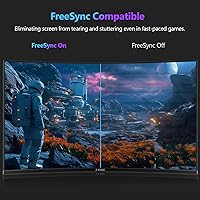
Without confirmed FreeSync or G-Sync support, users with compatible GPUs lose the benefit of adaptive sync, which can introduce occasional tearing in frame-rate-variable situations. The MPRT-based response time also means that technically demanding competitive players may find the panel underwhelming compared to fast TN or high-end IPS alternatives.
Setup & Installation
77%
23%
Physical assembly is simple and quick, taking most users under ten minutes from box to desk. The VESA compatibility means those who prefer a monitor arm can transition easily without needing proprietary hardware or adapters.
Initial software-side setup is occasionally frustrating — getting the full 165Hz recognized correctly requires navigating GPU driver settings, and the monitor provides no on-screen prompts to guide first-time users through this. The rear-button OSD also makes first-time configuration more tedious than it needs to be.

Suitable for:

The Z-Edge UG27Q 27-inch Curved Gaming Monitor is a strong match for PC gamers who are ready to leave 1080p behind but aren't prepared to spend heavily on a premium brand to do it. If you're running a mid-range GPU like an RTX 3060 or RX 6600, the 1440p resolution is well within reach at high frame rates, and the 165Hz refresh rate via DisplayPort gives you real headroom for competitive play. The 1500R curve adds genuine immersion for single-player and cinematic gaming without the desk footprint or price commitment of an ultrawide. Dual HDMI ports make this a practical pick for anyone switching between a PC and a console, eliminating the need for cable swapping. Students and hybrid workers who game in the evenings will also find the flicker-free backlight and low blue light mode useful during long mixed-use sessions. Anyone who values a feature-rich spec sheet and generous connectivity at an accessible price point is the core audience here.
Not suitable for:

The Z-Edge UG27Q 27-inch Curved Gaming Monitor has real limitations that certain buyers should weigh carefully before purchasing. The stand only offers tilt adjustment — no height, swivel, or pivot — which is a meaningful ergonomic compromise for anyone who sits at a desk for many hours and cares about proper monitor positioning. Buyers who do photo editing, graphic design, or color-sensitive creative work should look elsewhere; the color accuracy at this price and panel tier is adequate for gaming but falls short of what professionals need. The 1ms response time claim is based on MPRT, not the more meaningful GtG measurement, so competitive players who are ultra-sensitive to pixel transition speed should verify their expectations. Backlight bleed has appeared in a notable portion of user reports, which could be distracting in dark-room gaming or movie watching. If brand reputation and long-term after-sales support matter to you, Z-Edge's limited market presence compared to established names like LG, ASUS, or Samsung is worth factoring into your decision.
Specifications

  • Screen Size: The panel measures 27 inches diagonally, offering a comfortable viewing area well-suited to single-monitor desktop setups.
  • Resolution: Native resolution is 2560x1440 QHD, delivering noticeably sharper detail and text clarity compared to a standard 1080p display at the same size.
  • Refresh Rate: Supports up to 165Hz when connected via DisplayPort 1.4, and up to 144Hz when using either of the HDMI 2.0 ports.
  • Response Time: Rated at 1ms MPRT (Moving Picture Response Time), which measures motion blur reduction rather than actual pixel transition speed (GtG).
  • Curvature: Features a 1500R curved panel, meaning the screen's radius matches a circle of 1500mm, designed to better fill peripheral vision at typical desk distances.
  • Contrast Ratio: Specified at 3000:1, which is typical of VA-type panels and produces noticeably deeper blacks than IPS monitors in the same price range.
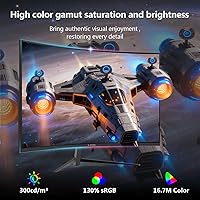
  • Color Depth: Supports 16.7 million colors, covering standard sRGB color reproduction suitable for gaming and everyday computing tasks.
  • Connectivity: Equipped with two DisplayPort 1.4 inputs and two HDMI 2.0 inputs, allowing up to four devices to be connected simultaneously.
  • VESA Mount: Compatible with standard 100x100mm VESA wall or arm mounts, allowing users to replace the stock stand with a third-party ergonomic solution.
  • Aspect Ratio: Uses a standard 16:9 widescreen aspect ratio, compatible with all major gaming platforms and operating systems without scaling issues.
  • Surface Finish: The panel uses a matte anti-glare coating that reduces reflections from ambient light sources, making it more practical in lit rooms.
  • Bezel Design: Three-sided frameless edge-to-edge design minimizes visible borders on the top and sides, giving the display a cleaner, more modern appearance.
  • Eye Care: Includes a flicker-free backlight and a low blue light mode to help reduce eye fatigue during extended gaming or work sessions.
  • Game Presets: Built-in FPS and RTS picture modes allow quick one-step optimization for specific game genres without navigating complex manual calibration menus.
  • Dimensions: The monitor measures 24.02 inches wide, 17.32 inches tall, and 7.09 inches deep with the stand attached.
  • Weight: Total weight with stand is 9.9 pounds, which is average for a 27-inch curved display and manageable for solo desk setup.
  • Power Input: Operates at 12 volts DC input; an appropriate power adapter is included in the box.
  • Model Number: The official model identifier is UG27Q, manufactured and sold under the Z-Edge (Z Z-Edge) brand.

Related Reviews

Z-Edge UG27H 27-inch Curved Gaming Monitor
73%
93%
Refresh Rate Performance
88%
Response Time & Motion Clarity
61%
Image Sharpness & Resolution
54%
Brightness & HDR
78%
Contrast & Color Accuracy
More
Z-Edge U27C 27-inch Curved Gaming Monitor
73%
88%
Value for Money
84%
Image Contrast & Depth
76%
Refresh Rate Performance
81%
Curvature & Immersion
79%
Eye Comfort & Fatigue
More
Z-Edge UG27PJ 27-inch 240Hz Gaming Monitor
74%
88%
Gaming Performance
76%
Color Accuracy
91%
Value for Money
89%
Connectivity
41%
Ergonomics & Stand
More
Z-Edge UG32 32-inch Curved Gaming Monitor
84%
91%
Gaming Performance
88%
Display Quality
85%
Design and Build Quality
84%
Ease of Setup
90%
Refresh Rate and Responsiveness
More
Z-Edge UG24 24-inch Curved Gaming Monitor
85%
88%
Gaming Performance
85%
Display Quality
81%
Build Quality
92%
Value for Money
89%
Ease of Setup
More
Z-Edge UG49W 49-inch Curved Gaming Monitor
73%
88%
Value for Money
81%
Image Quality
78%
Gaming Performance
86%
Productivity Use
74%
Build Quality
More
Skytech Gaming Moonshadow 27-inch Curved Gaming Monitor
83%
88%
Image Quality
91%
Refresh Rate Performance
86%
Adaptive-Sync
83%
VA Panel Contrast
84%
Stand & Ergonomics
More
Sealan 27-inch Curved Gaming Monitor
82%
85%
Display Quality
90%
Ease of Setup
91%
Value for Money
87%
Performance in Gaming
83%
Color Accuracy
More
GAMEPOWER F20 27-inch Curved Gaming Monitor
61%
83%
Value for Money
74%
Image Quality
69%
Gaming Performance
78%
Curve & Immersion
58%
Build Quality
More
GreBear BM27QA 27-inch Curved Gaming Monitor
65%
83%
Image Quality
78%
Gaming Performance
74%
Refresh Rate Value
61%
Build Quality
44%
Ergonomics & Adjustability
More

FAQ

Yes, both consoles connect via HDMI 2.0, and the UG27Q has two HDMI ports so you can keep a console and a PC plugged in at the same time. You will be capped at 144Hz over HDMI, which is still plenty smooth for console gaming. Keep in mind that neither console currently outputs 1440p natively by default, though the PS5 and Xbox Series X both support it in settings.

MPRT stands for Moving Picture Response Time and measures how long a pixel appears to the eye during motion, often achieved through backlight strobing. GtG, or gray-to-gray, measures how quickly a pixel actually transitions between shades. The 1ms figure here is MPRT, not GtG, so the actual pixel transition speed is likely closer to 4–6ms, which is perfectly fine for most gamers but worth understanding before you buy.

Absolutely. The Z-Edge UG27Q 27-inch Curved Gaming Monitor supports standard 100x100mm VESA mounting, so any compatible monitor arm or wall mount will work. Given that the included stand only tilts and offers no height or swivel adjustment, upgrading to a monitor arm is actually a popular choice among buyers who care about ergonomics.

At 27 inches, a 1500R curve is genuinely perceptible during normal use. It is not as dramatic as a tighter 1000R curve, but you will notice the wrap when gaming or watching movies. At typical desk viewing distances of around 24 to 30 inches, it feels immersive without being disorienting.

It handles everyday productivity work well enough. The QHD resolution means you can fit more content on screen without squinting, and text looks sharp at 27 inches. However, if color accuracy matters for your work, such as in photo editing or design, this curved QHD monitor is not the right tool — the color reproduction is gaming-grade rather than professional-grade.

No, this Z-Edge gaming display does not include built-in speakers. You will need external speakers or a headset for audio, which is fairly standard for monitors in this category.

Yes, those GPUs are a natural fit for 1440p gaming. In most modern titles you can expect frame rates comfortably between 80 and 120 fps at high settings, with lighter or older games pushing past 144fps. You will not always be maxing out the 165Hz ceiling, but in fast-paced or less demanding games you will certainly feel the benefit.

Some buyers have reported backlight bleed, particularly in the corners when viewing dark scenes. It appears to vary between units rather than being a consistent manufacturing flaw, but it is frequent enough that dark-room gamers or movie watchers should be aware of the risk. If you receive a unit with noticeable bleed, it is worth contacting the seller about a replacement.

The OSD is controlled by buttons located on the back of the panel, which some users find awkward to navigate by feel alone. Once you learn the button layout it becomes second nature, but the initial setup can be a bit frustrating. The built-in game presets help reduce how often you need to dig into the menu in the first place.

The product listing does not officially confirm FreeSync or G-Sync certification, so you should not assume compatibility if adaptive sync is a requirement for your setup. If variable refresh rate support is important to you, verify directly with Z-Edge support or check updated product documentation before purchasing.

Where to Buy