Yuan Smart Pen Digital Notebook Set

Overview
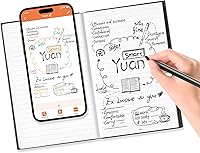
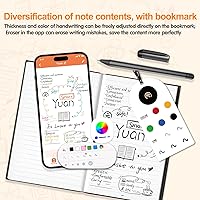
The Yuan Smart Pen Digital Notebook Set sits in an interesting middle ground — it gives you the tactile satisfaction of writing on real paper while automatically digitizing everything to your phone via a companion app for iOS and Android. That real-paper feel is genuinely the point here; this isn't a stylus scratching at glass. One important caveat worth knowing upfront: ink cannot be erased. Whatever you write is permanent on the page, so mistake-prone writers should factor that in. The pen and notebook also operate within a proprietary ecosystem — the smart pen only functions with Yuan-branded notebooks, meaning you're committed to their refills going forward.
Features & Benefits
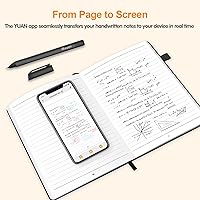
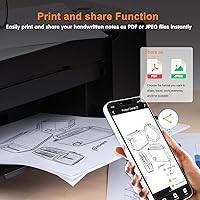
The pen captures writing at 360-degree angles, so you're not forced into an awkward upright grip — it reads your strokes naturally however you hold it. As you write, notes sync to the Yuan app in real time, and if your phone is out of reach or offline, the device stores everything locally and uploads automatically once you reconnect. A standout touch is the video playback feature, which lets you watch your notes build stroke by stroke — genuinely useful for reviewing study sessions or creative brainstorms. File management is practical too: you can name, tag, and categorize notes, then export them as PDFs or images to share via email or social media.
Best For
This digital writing kit makes most sense for students who prefer putting pen to paper in class but hate losing notes or fumbling with photos of scrawled pages. It's equally practical for professionals who take handwritten meeting notes and need to share them quickly without retyping. Sketchers and visual thinkers will appreciate having an automatic digital backup of brainstorming pages without changing how they work. It also makes a thoughtful gift — the box includes a mini notebook and four spare pen refills, so the recipient has everything ready to go. That said, if you need to edit or erase what you write, look elsewhere; this kit is built around permanence.
User Feedback
Among roughly 79 ratings, the Yuan pen-and-notebook combo holds a solid 4.2 out of 5. Users frequently praise sync reliability and how intuitive the app is to pick up, with several noting it works well right out of the box. The leather cover and overall build quality also receive positive mentions. Where things get more critical: the non-erasable ink frustrates users who expected a more flexible writing experience, and the proprietary notebook requirement draws complaints about ongoing refill costs. A handful of reviewers noted that app performance can vary depending on device and OS version. Battery life and pen comfort appear to generate few complaints, which is a reasonable sign for a kit at this price tier.
Pros
- Handwriting syncs to your phone in real time without any manual scanning or photographing.
- The 360-degree pen angle recognition lets you write naturally without adjusting your grip.
- Offline storage ensures notes are captured and saved even when your phone is out of reach.
- PDF and image export makes sharing meeting notes or class summaries fast and professional.
- The leather cover and overall packaging feel polished enough for workplace use.
- A complete kit out of the box — four pen refills, a mini notebook, and a charging cable are all included.
- Video playback lets you replay your writing session stroke by stroke, useful for study review.
- Lightweight at under 1.5 pounds, this smart notebook set slips easily into a standard backpack.
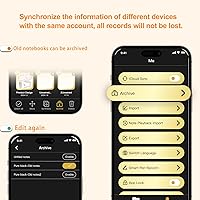
- Custom file naming, tagging, and categorization keep months of notes organized inside the app.
- Cross-device export means switching phones does not wipe your note archive.
Cons
- Ink cannot be erased — every mistake stays on the page permanently.
- The pen only works with Yuan-branded notebooks, creating an ongoing proprietary refill dependency.
- No native integration with Google Drive, Notion, OneDrive, or similar productivity platforms.
- App experience is inconsistent across Android devices, with crashes reported on some OS versions.
- Yuan does not publish a specific battery life rating, making it hard to plan for heavy-use days.
- The 5 x 8-inch page size fills up faster than expected for users who write large or diagram frequently.
- Playback video export quality is low-resolution and not suitable for sharing in presentations.
- In-app search cannot read or index handwritten content, only file names and tags.
- Notebook refill availability and pricing through Yuan are not always straightforward or well-communicated.
- Setup documentation is minimal, leaving some advanced features undiscoverable without trial and error.
Ratings
The Yuan Smart Pen Digital Notebook Set has been scored by our AI system after analyzing verified global buyer reviews, with spam, bot-submitted, and incentivized feedback actively filtered out. Ratings span every meaningful dimension of the experience — from how well the pen actually captures handwriting to the long-term cost of staying inside a proprietary notebook ecosystem. Both genuine strengths and recurring frustrations are reflected honestly in each score below.
Sync Accuracy & Real-Time Capture
App Usability
Pen Comfort & Handling
Build Quality & Notebook Feel
Offline Storage Reliability
Video Playback Feature
File Management & Organization
Sharing & Export Options
Proprietary Ecosystem & Lock-In
Non-Erasable Ink
Battery Life
Value for Money
Setup & Out-of-Box Experience
Portability & Size
Suitable for:
The Yuan Smart Pen Digital Notebook Set is a strong fit for anyone who writes better on paper but is tired of managing physical notebooks long-term. College students who handwrite lecture notes and need a searchable, shareable digital archive will find the real-time sync genuinely useful — no more photographing pages after class or transcribing into a laptop later. Working professionals who fill pages during client meetings and need to distribute notes immediately as a PDF will also get practical daily value from this kit. Creative types — illustrators, writers, brainstormers — who want a running digital backup of their sketchbooks without changing how they physically work will appreciate the automatic capture. It also makes a well-considered gift for a student or young professional, since the box arrives complete with refills, a mini notebook, and everything needed to start immediately.
Not suitable for:
If you rely on erasing and correcting as part of your natural writing process, the Yuan pen-and-notebook combo will frustrate you quickly — the ink is permanent on the page, full stop, and there is no workaround. Users who already live inside productivity ecosystems like Notion, Google Drive, or OneDrive should know upfront that direct integration does not exist; getting notes into those platforms requires a manual export step every time. Anyone price-sensitive about long-term costs should also think carefully before committing, because this digital writing kit locks you into buying Yuan-branded notebooks exclusively — no standard paper will work with the pen. People who need a larger writing surface for detailed diagrams or technical drawings may find the 5 x 8-inch page size restrictive. Finally, if app stability across different Android versions matters to you, it is worth reading recent reviews before purchasing, as the experience is not perfectly consistent across all devices.
Specifications
- Brand: Manufactured and sold under the Yuan brand, model number Y-HYB-SET.
- Dimensions: The full kit measures 9.4 x 1.6 x 7.8 inches when packaged.
- Weight: The complete set weighs 1.48 pounds, including the pen, notebook, and accessories.
- Page Size: Each notebook sheet measures 5 x 8 inches, equivalent to a compact personal notebook format.
- Sheet Count: The main notebook contains 94 sheets, providing 188 writable pages front and back.
- Cover Material: The notebook cover is constructed from leather, providing a structured and professional exterior.
- Pen Battery: The smart pen is powered by a built-in rechargeable Lithium Ion battery, which is included in the box.
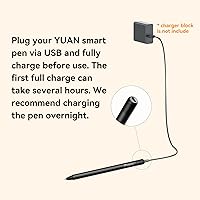
- Charging: The pen charges via the included cable; no separate adapter or proprietary dock is required.
- App Compatibility: The companion Yuan app is compatible with both iOS and Android smartphones.
- Offline Storage: The pen stores handwriting data locally when no phone connection is available and syncs automatically upon reconnection.
- Pen Angle Range: The smart pen recognizes and captures writing at any angle within a full 360-degree range.
- Export Formats: Notes can be exported and shared as PDF files or standard image formats directly from the app.
- Sharing Platforms: The app supports direct sharing via email, Facebook, Instagram, Twitter, and other social media platforms.
- Ink Type: The pen uses standard ballpoint-style ink refills; written marks are permanent and cannot be erased from the page.
- Refills Included: Four smart pen ink refills are included in the box alongside a refill removal tool.
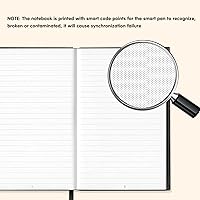
- Notebook Compatibility: The smart pen only functions with Yuan-branded coded notebooks; it will not capture writing on standard paper.
- Box Contents: The kit includes the smart pen, one full-size notebook, one mini notebook, four ink refills, a charging cable, a bookmark, and a refill tweezer tool.
- Color: The kit is available in black, covering both the pen body and the notebook cover finish.
- Playback Feature: The Yuan app supports video-format playback, allowing users to replay their writing and drawing sessions stroke by stroke.
- File Management: Users can assign custom names, add searchable tags, and organize notes into categories within the app.
Related Reviews

ATVFuture V019 Indoor TV Antenna
Yirkais BJ001 Indoor Outdoor TV Antenna

DEAGUI M9 8GB Quran Pen Reader
Ophayapen SMP-3 Smart Sync Pen
Qellaff 2025 Indoor/Outdoor Digital TV Antenna

Brookstone PhotoShare 8″ Smart Digital Picture Frame
SAVILAND 24-Color Nail Art Pen Set

HUION Note 2-in-1 Digital Notebook Tablet
Moonka 10.1-Inch Smart Family Calendar Display