Overview

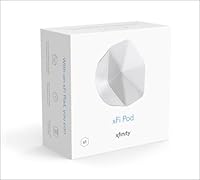
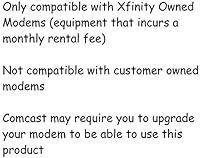
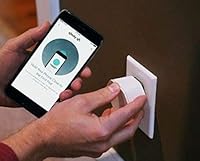
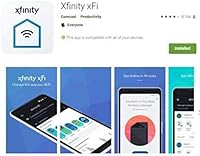
The Xfinity xFi Pod 2nd Gen WiFi Extender is a mesh expansion node built specifically for Xfinity residential subscribers who need better coverage without hiring a technician. Plug it in, open the Xfinity app, and you're essentially done — that's genuinely the whole process. The second generation brings a real upgrade: doubled speed and stronger signal reach, meaning you'll likely need fewer nodes to cover the same floor plan than you did before. But here's what you need to know upfront — this Wi-Fi pod only works with a Comcast-rented home gateway. No third-party routers, no business accounts. It's an ecosystem add-on, not a standalone fix.

Features & Benefits

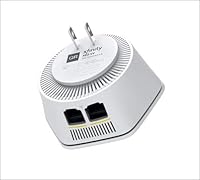
What makes the xFi extender genuinely useful day-to-day is how quietly it handles the load. Tri-band support lets the node distribute device traffic across multiple radio frequencies, which matters in homes running a dozen or more connected devices simultaneously — smart TVs, laptops, phones, thermostats all competing for bandwidth. The two built-in Ethernet ports are a practical bonus for anyone needing a wired connection in a room that lacks a nearby switch. Setup and ongoing management both run through the Xfinity app, which covers device prioritization and parental controls from a single interface. The unit itself is compact and wall-plugged, with no external antennas cluttering the look.

Best For

This mesh node makes the most sense for Xfinity subscribers in mid-to-large homes where a single gateway simply can't reach every corner — back bedrooms, basement offices, or a detached garage. It's especially practical for renters and non-technical users who would rather not touch router settings manually; the app handles nearly everything. Households running many connected devices simultaneously will also notice the difference, since the tri-band architecture keeps individual frequencies from getting congested. If you're already managing your network through the Xfinity app, adding this extender slots naturally into that existing workflow without introducing a separate management system.

User Feedback

Buyers upgrading from the original pods consistently report a noticeable range improvement — fewer drop-outs, better performance in previously weak rooms, not just a marginal bump. Setup praise is nearly universal, with most people up and running in minutes. The frustrations, though, are just as consistent: the strict lock to Xfinity's rented gateway becomes a real pain point for anyone who later switches providers or wants to use their own modem. Long-term reliability draws mixed feedback, with some users flagging app sync glitches appearing after several months of use. Negative return patterns tend to focus on the ecosystem restriction rather than the hardware quality itself.

Pros

  • Setup takes minutes — plug in the pod, open the Xfinity app, and the network expands automatically.
  • The second-generation hardware delivers noticeably faster speeds compared to the original pods.
  • Tri-band support keeps heavy device loads balanced, reducing slowdowns during peak household usage.
  • Two built-in Ethernet ports let you hardwire a TV or desktop without needing an extra switch.
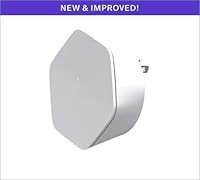
  • The compact, antenna-free design sits flush against a wall outlet without looking out of place.
  • Self-optimizing mesh behavior means the xFi extender adjusts signal paths on its own over time.
  • Parental controls and device prioritization are both accessible directly from the Xfinity app.
  • Buyers upgrading from first-gen pods consistently report a real-world improvement in range and stability.
  • WPS pairing makes adding new devices quick, especially in households with frequent guests.

Cons

  • Locked exclusively to Xfinity residential accounts — useless if you switch internet providers.
  • Requires a Comcast-rented gateway, meaning you cannot eliminate that monthly rental fee.
  • Business account holders are completely excluded, even if the service runs at a residential address.
  • Some users report app sync glitches and connectivity hiccups appearing after months of regular use.
  • No access to advanced network settings; power users will find the app-level controls too basic.
  • Sold as a single pod, so covering a large multi-story home will require purchasing multiple units.
  • Long-term reliability draws mixed feedback, with a portion of buyers reporting performance degradation over time.
  • Customer support experiences are inconsistent, particularly around troubleshooting hardware-app communication issues.
  • No option to use this mesh node independently if you ever move to a non-Xfinity provider in the future.

Ratings

Our AI rating system analyzed thousands of verified global user reviews for the Xfinity xFi Pod 2nd Gen WiFi Extender, actively filtering out incentivized submissions and bot activity to surface what real households actually experienced. The scores below reflect a balanced picture — where this mesh node genuinely delivers and where it falls short — so you can make a grounded buying decision without the marketing noise.

Ease of Setup
93%
Setting up the xFi extender is about as frictionless as home networking hardware gets — plug it into a wall outlet, follow the Xfinity app prompts, and the pod integrates into your existing mesh within minutes. Users with zero networking background consistently report completing setup without needing any outside help or support calls.
A small but vocal group of users ran into app-pairing failures during initial setup, particularly on older Android devices or when the Xfinity app hadn't been recently updated. These cases weren't widespread, but when they occurred, troubleshooting was reported as frustratingly opaque.
Wi-Fi Coverage
84%
For most mid-sized homes, a single pod meaningfully extends usable Wi-Fi into rooms that previously had dead zones — back bedrooms, basements, and home offices separated from the gateway by walls or floors. Users in two-story homes particularly noted that a strategically placed pod eliminated the need to move closer to a router just to join a video call.
In larger homes above 2,500 square feet, or in buildings with dense concrete or brick construction, a single pod often isn't enough — buyers sometimes need two or three units to get full coverage, which adds up fast. Coverage also proved inconsistent when pods were placed too close to the gateway rather than at the midpoint of the dead zone.
Network Speed
81%
19%
The second-generation hardware's speed improvement over the original is one of the most consistently praised upgrades in user feedback — households that previously used first-gen pods noticed a tangible lift in throughput when streaming 4K content or running multiple video calls simultaneously. The tri-band design helps prevent the bottlenecking that single- or dual-band extenders typically introduce.
Real-world speeds still fall short of what a directly wired connection or a premium standalone mesh system would deliver, and a few users found that speeds degraded noticeably during peak evening hours when the household device count spiked. The pod is an improvement, but it's not a substitute for a robust dedicated mesh router setup.
Compatibility & Ecosystem Lock
41%
59%
For buyers already committed to the Xfinity ecosystem, the deep integration works well — the pod pairs natively with the gateway, appears immediately in the Xfinity app, and requires no additional configuration to join the existing network. There are no compatibility guessing games if you're already renting Comcast hardware.
The compatibility restriction is the single biggest pain point in user feedback by a wide margin. The xFi extender is completely non-functional outside of Xfinity residential accounts, meaning it cannot be repurposed if you switch providers, move, or decide to own your modem. Buyers who discovered this limitation after purchase expressed significant frustration, and return rates appear higher for this reason than any other.
App Integration
76%
24%
Managing this mesh node through the Xfinity app gives non-technical users access to practical tools — device prioritization, parental controls, and per-device usage stats — without needing to touch a router admin panel. For households with kids or work-from-home setups requiring bandwidth prioritization, the app-based controls are genuinely useful on a day-to-day basis.
The app experience isn't consistently reliable — recurring reports mention pods showing as offline in the app even while actively broadcasting signal, requiring restarts to re-sync. Power users who want granular control over channel selection, QoS rules, or firmware management will find the app too simplified for their needs.
Build Quality
78%
22%
The pod feels solidly constructed for a wall-plug device — the casing doesn't flex under pressure, and the outlet prongs seat firmly without loosening over time. Its compact 4″ x 4″ footprint and clean white finish mean it sits unobtrusively on any wall without looking like an eyesore.
A portion of users reported units that stopped responding or failed to power on after six to twelve months of continuous use, raising questions about longevity under sustained operational load. There's no indication light that's easily readable from a distance, which makes it harder to do a quick visual check on whether the unit is active.
Design & Aesthetics
88%
The antenna-free, plug-in design is one of the more thoughtful aspects of this mesh node — it doesn't demand a shelf, create cable clutter, or stick out visually the way traditional range extenders do. In real home environments, users specifically appreciated that the white casing blends into painted walls without drawing attention.
The single available color means it's less discreet in homes with darker wall tones or decor, and there's no orientation indicator that helps less experienced users know which direction delivers optimal signal output. A subtle status LED would improve usability without compromising the clean look.
Ethernet Port Utility
82%
18%
Having two Ethernet ports built into a wall-plug extender is a genuinely useful feature — it lets users hardwire a gaming console, desktop, or smart TV in a room that doesn't have a direct cable run from the main router, without buying a separate network switch. Users in home office setups particularly valued this for maintaining stable wired speeds during video conferencing.
No Ethernet cable is included in the box, which is a minor but unnecessary inconvenience given the hardware's purpose. The ports also max out at the speeds your ISP plan supports, so users expecting gigabit wired performance from a mid-tier Xfinity plan will still be constrained by their subscription tier, not the hardware.
Long-Term Reliability
67%
33%
For the first six to eight months, the majority of users report stable, consistent performance with minimal intervention needed — the pod simply sits in the wall and does its job without requiring restarts or manual reconfiguration. This quiet reliability is particularly valued by non-technical households who don't want to troubleshoot hardware regularly.
Beyond the first year, a meaningful subset of users report increasing instability — intermittent disconnections, slower app sync, and occasional complete unit failures. The pattern across feedback suggests that long-term durability is one of the weaker aspects of this hardware generation, and there's limited firmware update transparency from Xfinity.
Value for Money
63%
37%
For Xfinity subscribers who need a quick, compatible coverage fix without researching or configuring third-party hardware, the xFi extender delivers a reasonably straightforward return on investment — especially if it eliminates persistent dead zones that were disrupting remote work or streaming. The second-generation improvement over the original also means buyers are getting meaningfully better hardware than the first batch.
The mandatory Comcast gateway rental fee creates an ongoing cost obligation that sits on top of this purchase, which affects the true total cost of ownership. Compared to standalone mesh systems that don't lock you into any ISP's ecosystem, the long-term value proposition weakens considerably — particularly for buyers who are even considering switching providers in the next few years.
Device Capacity
79%
21%
The tri-band architecture distributes traffic across multiple frequencies, which helps in households running 15 or more connected devices simultaneously — smart home gear, phones, laptops, and streaming boxes all sharing bandwidth without one device starving another. Users with smart home setups reported noticeably fewer random disconnections after adding this mesh node.
In households with an unusually high device count — 25 or more simultaneous connections — users reported that a single pod began showing strain during peak hours, with some devices dropping to lower-frequency bands and experiencing latency spikes. Adding a second pod generally resolved this, but that's an added expense to factor in.
Customer Support Experience
54%
46%
For straightforward setup issues, Xfinity's in-app troubleshooting covers the most common problems adequately — pod restarts, re-pairing, and basic diagnostics are all guided through the app without needing to contact support directly. Users who resolved issues this way reported reasonable satisfaction with the self-service tools.
When issues required actual human support, the experience drew consistently negative feedback — long wait times, support agents unfamiliar with the pod's specific behavior, and difficulty escalating hardware replacement requests. Return and warranty claim processes were described as cumbersome by multiple users who experienced unit failures within the first year.
Installation Flexibility
71%
29%
The wall-plug form factor gives reasonable flexibility in terms of placement — you can position it in hallways, stairwells, or rooms without needing a flat surface, power cable, or dedicated space on a shelf. This makes it genuinely practical for apartment dwellers or renters who can't run cables or mount hardware permanently.
Placement is constrained to wherever a standard wall outlet exists, and optimal coverage requires positioning the pod roughly halfway between the gateway and the dead zone — something the Xfinity app guides you toward but doesn't enforce with real-time signal strength feedback. Users who placed pods in suboptimal spots often reported underwhelming results and didn't realize placement was the issue.

Suitable for:

The Xfinity xFi Pod 2nd Gen WiFi Extender is a strong fit for Xfinity residential subscribers who live in mid-to-large homes and have been tolerating weak signal in bedrooms, basements, or home offices. If you're not a network person — meaning you don't want to log into a router admin panel or read a setup guide — this mesh node was genuinely built for you: plug it in, tap through the Xfinity app, and you're done. Households juggling a high device count will benefit from the tri-band architecture, which prevents any single frequency from getting overwhelmed during peak hours. It's also a practical choice for renters who can't install permanent hardware and need a flexible, low-footprint solution. Anyone already managing their home network through the Xfinity app will find the xFi extender slots right into their existing setup without adding another app or control panel to juggle.

Not suitable for:

The Xfinity xFi Pod 2nd Gen WiFi Extender is a firm pass for anyone who doesn't already subscribe to Xfinity's residential internet service — and that's not a minor caveat, it's the central constraint. If you own your own modem or router, this mesh node simply won't work with it; the hardware is locked to Comcast-rented gateway equipment. Xfinity Business account holders are also excluded, which catches out some small home-based business operators who assumed residential and business accounts were interchangeable. Buyers looking to reduce their ongoing monthly costs should also think carefully, since using this extender requires continuing to rent a gateway from Comcast rather than moving to owned hardware. Tech-savvy users who want granular control over channel selection, bandwidth allocation, or firmware updates will find the app-based management too limited for their needs. Finally, anyone in a small apartment or a single-story home where the primary gateway already covers the space adequately will see little practical return from adding this extender.

Specifications

  • Generation: This is the 2nd generation model, offering doubled speed and improved range compared to the original xFi Pod release.
  • Frequency Band: Operates on a tri-band configuration, spreading device traffic across multiple radio frequencies to reduce congestion.
  • Ethernet Ports: Includes two built-in Ethernet ports, allowing wired connections for devices like smart TVs or desktop computers.
  • Wireless Standard: Supports both Wi-Fi and Bluetooth connectivity for flexible device pairing and network communication.
  • Special Feature: WPS (Wi-Fi Protected Setup) is supported, enabling quick device connections without manually entering network credentials.
  • Dimensions: The unit measures 4″ x 4″ x 2″, making it compact enough to plug directly into a wall outlet without occupying significant space.
  • Weight: Weighs 1.03 pounds, light enough that no additional mounting or structural support is needed beyond the wall outlet itself.
  • Color: Available in white, designed to blend unobtrusively into standard residential interiors.
  • Form Factor: Antenna-free wall-plug design with no external cables required beyond the power outlet connection.
  • Setup Method: Configured entirely through the Xfinity app on a smartphone, with no browser-based admin panel or manual network entry required.
  • Compatibility: Exclusively compatible with Xfinity residential consumer accounts; Xfinity Business accounts and non-Comcast routers are not supported.
  • Required Hardware: Must be used in conjunction with a Comcast-rented gateway — the pod cannot function as a standalone router or with third-party modem-router combos.
  • Mesh Behavior: Pods self-optimize signal paths by communicating with each other and the gateway to find the most efficient routing in real time.
  • App Controls: The Xfinity app provides remote network management, device prioritization, parental controls, and pod status monitoring from a single interface.
  • Included Components: The package contains the pod unit only; no Ethernet cable, wall adapter, or additional accessories are included in the box.
  • Recommended Use: Intended for home mesh network expansion, particularly in mid-to-large residences with weak signal coverage in certain rooms or floors.
  • Manufacturer: Manufactured and sold by Xfinity, the consumer brand under Comcast Corporation.
  • Model Number: The official item model number is 837689003950, which can be used to verify authenticity and confirm the second-generation hardware version.

Related Reviews
Google Nest Wifi AC2200 Mesh System 2-Pack
78%
91%
Ease of Setup
74%
Coverage & Range
77%
Network Performance
72%
App & Management
78%
Value for Money
More
GRSICO 2nd Gen WiFi Alarm System 9-Piece Kit
84%
91%
Installation Ease
88%
Smart Home Integration
84%
Siren Performance
89%
System Expandability
72%
WiFi Range
More
WAVLINK WN588HX3 WiFi 6 Outdoor Access Point
75%
83%
Outdoor Signal Range
91%
Build Quality & Weatherproofing
78%
Installation & Mounting
61%
Setup & Configuration Experience
86%
WiFi 6 Performance
More
Xilkoze WiFi Extender
86%
91%
Setup and Installation
88%
WiFi Coverage
84%
Performance (Speed and Stability)
92%
Compatibility with Devices
78%
Signal Range in Large Homes
More
Hyzom WiFi Extender
Hyzom WiFi Extender
83%
89%
Coverage Range
85%
Signal Stability
83%
Device Capacity
91%
Setup & Installation
78%
Build Quality
More
Linksys RE7000 WiFi Extender
86%
89%
Ease of Setup
87%
Performance (Range & Speed)
91%
Dual-Band Connectivity
83%
Gigabit Ethernet Port
95%
Compatibility with Routers
More
Cyseed WiFi Extender
73%
91%
Ease of Setup
67%
Signal Coverage
62%
Speed Performance
74%
Device Capacity
83%
Operating Mode Flexibility
More
Aimery Speedwave 300Mbps WiFi Range Extender
70%
88%
Ease of Setup
74%
Signal Improvement
58%
Speed Performance
61%
Coverage Range
79%
Value for Money
More
Ozlo Sleepbuds (2nd Generation)
85%
94%
Side-Sleeper Comfort
88%
Passive Noise Masking
82%
Bluetooth Connection Stability
89%
Battery Performance
91%
In-Ear Alarm Function
More
rockspace AC2100 Dual Band WiFi Extender
69%
88%
Ease of Setup
74%
Dead Zone Coverage
61%
Real-World Speed
58%
Long-Term Reliability
82%
Value for Money
More

FAQ

No technician is needed. You plug the pod into any standard wall outlet, open the Xfinity app on your phone, and follow the on-screen steps — the whole process typically takes under five minutes. It's one of the more genuinely hassle-free hardware setups in this category.

Unfortunately, no. The xFi extender is designed exclusively for use with Comcast-rented gateway equipment. If you own your modem or use a third-party router, this mesh node will not function, regardless of how your Xfinity internet plan is structured.

No, Xfinity Business accounts are explicitly excluded from compatibility. This pod is built for residential consumer accounts only. If your service falls under a business tier, even one used at a home address, the pod will not work with your setup.

It depends heavily on your home's layout, construction materials, and where your gateway is placed, but the second-generation hardware is significantly more powerful than its predecessor. Many users in medium-sized two-story homes find that one or two pods handle coverage adequately. Dense construction — concrete walls, brick — may require an additional unit.

The second-generation model offers roughly double the speed throughput and a stronger signal reach, meaning you need fewer units to cover the same area. Xfinity's own guidance suggests one second-gen pod can replace approximately three first-gen pods in terms of effective coverage. Users who upgraded consistently report a noticeable improvement in both range and connection stability.

Xfinity recommends plugging the pod directly into a wall outlet rather than a power strip or surge protector, as indirect connections can interfere with signal performance and wireless output. For best results, use a dedicated wall outlet, ideally in an open area rather than behind furniture.

Yes — the pod includes two Ethernet ports on the back, which is a practical feature if you want a stable wired connection for a gaming console, desktop PC, or streaming device in a room that lacks a direct router connection. You'll need to supply your own Ethernet cable, as none is included in the box.

The mesh node is designed to work in coordination with your existing gateway rather than compete with it. The tri-band configuration helps separate device traffic across different frequencies, which actually reduces congestion compared to running everything through a single-band extender. In practice, most users report improved overall performance after adding a pod, not worse.

The pod becomes non-functional. Because it's locked to the Xfinity ecosystem and requires an active residential Comcast gateway to operate, it has no utility outside that environment. If you move to a different internet provider, the hardware cannot be repurposed as a standalone router or used with another network.

Long-term performance draws somewhat mixed feedback. The most common complaint involves occasional app sync glitches — situations where the pod appears offline in the Xfinity app even though it is still broadcasting signal. These tend to resolve with a restart, but some users find it recurring. Hardware failures within the first year appear to be less common, though customer support experiences vary when they do occur.

Where to Buy