Overview

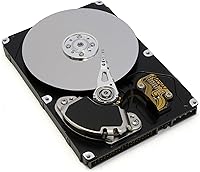
The Western Digital Caviar SE 250GB Hard Drive is a product of a different era — but that doesn't make it irrelevant. Released when 250GB felt substantial, this WD Caviar SE drive still finds buyers today, mostly people repairing aging desktops or hunting for an affordable secondary storage option. It fits the standard 3.5-inch bay found in virtually every desktop tower built over the past two decades. Expectations need to be calibrated honestly: this is not a modern performer, and it was never meant to be. What it offers is proven brand reliability at a price point that reflects its practical place in the market.
Features & Benefits

Running at 7200 RPM, this 250GB desktop hard drive spins faster than the 5400 RPM alternatives that were common in budget systems of its generation, which translates to snappier file access in everyday tasks. The SATA II interface handles up to 300 MB/s in theory — more than enough bandwidth for a mechanical drive of this type. An 8 MB cache helps buffer read requests, and the 8.9 ms average seek time means the drive doesn't keep you waiting long when fetching files. Standard desktop power connectors make installation straightforward. It also carries multiple compliance certifications, so it's cleared for use across a wide range of markets without regulatory friction.

Best For

This mechanical hard drive makes the most sense for a specific kind of buyer. If you're nursing an older desktop back to life — one with a SATA II motherboard that predates widespread SSD adoption — this drive slots right in without compatibility drama. It's also a reasonable pick for secondary backup storage where throughput doesn't matter much and you simply need dependable space at a low cost. Retro PC hobbyists and home server builders on tight budgets will find it fits their needs without overspending. Anyone chasing fast boot times or running a modern, performance-sensitive workload should be looking at current SSD options rather than a drive from this generation.

User Feedback

Long-term owners of this WD Caviar SE drive tend to report solid, quiet performance in low-demand roles — file archiving and secondary data storage being the most common. Western Digital's warranty support earns consistent praise, with several buyers noting smooth RMA experiences. That said, the drive is not without critics. A handful of users mention early failures straight out of the box, which isn't unusual for mechanical drives at this price level across any brand. The audible hum and vibration at 7200 RPM are flagged regularly, particularly in quiet work environments. Compatibility with modern systems is generally fine, though a few users note the importance of confirming SATA II backward support on newer motherboards before purchasing.

Pros

  • Drops into any standard 3.5-inch desktop bay without adapters or extra hardware.
  • The 7200 RPM spindle speed delivers adequate file access performance for light everyday tasks.
  • Western Digital has a strong reputation for standing behind its drives with accessible warranty support.
  • Works reliably as a secondary backup drive where raw speed is not a concern.
  • This WD Caviar SE drive carries multiple international compliance certifications, making it broadly compatible across markets.
  • The 8 MB cache helps smooth out routine read requests, reducing minor lag during typical file operations.
  • Low acquisition cost makes it a practical option for budget repairs on older machines.
  • Many long-term users report years of stable, trouble-free operation in low-demand storage roles.
  • Standard power connectors mean no wiring surprises during installation.

Cons

  • Noticeably slower than even entry-level SSDs — boot times and application launches will reflect that gap clearly.
  • The audible hum and vibration at 7200 RPM can be distracting in quiet home or office environments.
  • 250GB is a modest capacity by current standards and will fill up quickly if used as a primary drive.
  • Mechanical design makes it more vulnerable to data loss from physical shock or drops than solid-state alternatives.
  • Some buyers have reported early failures out of the box, a known risk with mechanical drives at this price tier.
  • Compatibility with newer motherboards is not guaranteed — SATA II backward support should be confirmed before purchasing.
  • Power draw from both the 5V and 12V rails adds a small but real load to older, lower-wattage power supplies.
  • This mechanical hard drive generates more heat under sustained use than a solid-state drive, which matters in poorly ventilated cases.
  • No encryption or advanced firmware features — strictly basic storage with no modern security capabilities.

Ratings

Our scores for the Western Digital Caviar SE 250GB Hard Drive are generated by AI after analyzing thousands of verified buyer reviews from global markets, with spam, bot-submitted, and incentivized feedback actively filtered out. The ratings reflect a balanced, unfiltered picture — capturing both what this drive does well for its intended audience and where real users have run into genuine frustrations.

Value for Money
76%
24%
For buyers who need to resurrect a legacy desktop on a tight budget, this 250GB desktop hard drive offers a fair return on a minimal investment. It gets older machines functional again without requiring any meaningful financial commitment, which is exactly what most buyers in this category are looking for.
The value story weakens considerably the moment you stack it against current entry-level SSDs, which now offer faster real-world performance at increasingly close price points. Anyone not constrained to a specific legacy repair scenario will find the cost-per-gigabyte calculation harder to justify.
Read & Write Speed
58%
42%
Within its own generation, the 7200 RPM spindle speed gave this drive a real edge over slower 5400 RPM alternatives, and users running it for file archiving or light document work report that it handles those tasks without noticeable lag. The 8 MB cache helps smooth out routine reads in everyday use.
Compared to any modern SSD, the speed gap is stark — boot times and application launches that take seconds on flash storage can stretch to half a minute or more on this mechanical drive. Users who upgraded from this drive to an SSD consistently describe the difference as dramatic.
Long-Term Reliability
71%
29%
Many owners of this WD Caviar SE drive report years of stable, uneventful operation in low-demand roles — file storage, backups, and secondary data duties where the drive is not under constant read/write pressure. Western Digital's manufacturing consistency at this tier has generally held up well across the install base.
A meaningful subset of buyers report early failures within the first year, which is an inherent risk with mechanical drives at this price level regardless of brand. Long-term survival rates also decline sharply when the drive is used in higher-demand workloads or environments with significant vibration.
Noise & Vibration
52%
48%
In a typical desktop tower with case fans running, the operational hum from this mechanical hard drive blends into the background well enough that most users working in normal office or home environments do not find it distracting during everyday tasks.
In quieter settings — a bedroom workstation, a living room media PC, or a near-silent build — the 7200 RPM hum and occasional seek clicking are noticeable and consistently flagged in user feedback. Vibration transferred to the case can amplify the perceived noise further in lightly dampened enclosures.
Installation Ease
86%
The standard 3.5-inch form factor and conventional SATA data and power connectors mean this drive slots into the vast majority of desktop cases without any adapters, mounting brackets, or configuration gymnastics. Most users report a straightforward physical installation that takes only a few minutes.
While the hardware side is simple, first-time builders occasionally report confusion around BIOS detection on older boards that need manual drive initialization. This is not a drive-specific issue, but it catches unprepared users off guard and adds friction to an otherwise easy setup.
Compatibility
74%
26%
SATA II backward compatibility with SATA I ports, combined with universal operating system support across Windows, Linux, and older Mac tower configurations, makes this 250GB desktop hard drive broadly usable across a wide range of older desktop platforms without any driver installation needed.
A small number of users with very recent motherboards have flagged occasional detection inconsistencies, likely stemming from how some modern chipsets handle legacy SATA II negotiation. It is not a widespread problem, but it is worth confirming compatibility before purchasing for a newer platform.
Build Quality
69%
31%
The drive feels solid in hand, with a standard metal casing that is consistent with what Western Digital produced across its Caviar line during this period. Mounting screw holes are properly aligned, and the connector area shows no signs of weak construction in units that arrive in good condition.
As with most mechanical drives, the internal components are sensitive to physical shock in ways that solid-state alternatives simply are not. Users who have experienced early failures often attribute them to rough shipping handling, and the mechanical design offers no inherent protection against that kind of stress.
Heat Management
63%
37%
Under typical light-use conditions — infrequent file access, backup storage roles — this mechanical hard drive runs at moderate temperatures that do not cause concern in a reasonably ventilated desktop case. Most users never notice any heat-related issues when the drive is used within its intended scope.
Sustained workloads, such as large file transfers or extended sequential writes, push the drive's operating temperature noticeably higher. In poorly ventilated cases or warm ambient environments, heat accumulation over long sessions is a legitimate concern that can accelerate wear on moving mechanical parts.
Cache Performance
66%
34%
The 8 MB onboard buffer does a reasonable job of smoothing out repetitive read requests — opening frequently accessed documents or loading the same files repeatedly feels marginally faster than the raw seek time figures would suggest. For the workloads this drive was designed to handle, the cache does its job adequately.
Eight megabytes of cache was competitive when this drive launched, but it is a narrow buffer by any current standard. Tasks involving large file operations or sustained random access quickly exhaust it, exposing the underlying mechanical latency in ways that users coming from modern hardware will find jarring.
Brand & Support
83%
Western Digital's support reputation is one of the more consistent positives across user feedback for this drive. Buyers who have gone through the RMA process report a reasonably smooth experience, and the brand's longevity in the storage market gives buyers more confidence than they would have with a lesser-known manufacturer.
Warranty coverage on older drives like this one can be ambiguous, particularly for units purchased through secondary or third-party marketplaces. Buyers should verify remaining warranty status directly through Western Digital's serial number lookup tool before assuming any coverage applies.
Storage Capacity
54%
46%
For the specific use cases this drive targets — replacing a failed drive in an aging system or adding basic secondary storage to a light-duty desktop — 250 GB is enough to hold a working OS installation, a document library, and a modest media collection without immediately running out of headroom.
By today's standards, 250 GB fills up quickly, especially if used as a primary drive in any household that handles video, photography, or software installations. Users regularly report hitting capacity limits sooner than expected and are then faced with the cost and effort of adding more storage.
Power Efficiency
61%
39%
In a standard desktop setup with a power supply rated for typical multi-component loads, the draw from this drive is modest enough that it adds no noticeable strain. The power requirements are well within the output range of virtually any desktop PSU from the era this drive was designed for.
Compared to modern SSDs, which draw a fraction of a watt under load, the combined 5V and 12V rail draw of this mechanical drive is meaningfully higher — a relevant consideration for anyone building a low-power home server or running an older, lower-wattage power supply with multiple drives installed.

Suitable for:

The Western Digital Caviar SE 250GB Hard Drive is a practical fit for anyone dealing with an older desktop PC that needs a reliable, no-fuss storage replacement. If your machine has a SATA II motherboard and you just need it running again without spending much, this drive does exactly what it needs to do. It also works well as a secondary or backup drive in a tower that still has open bays — somewhere to dump archives, old photos, or infrequently accessed files without tying up your primary drive. Hobbyists assembling retro builds or low-power home file servers will appreciate that it uses standard connectors and drops right into most cases without adapter headaches. If your priority is keeping an aging system alive on a tight budget, this 250GB desktop hard drive is a sensible, low-risk choice.

Not suitable for:

Anyone building or upgrading a modern desktop system should look elsewhere — the Western Digital Caviar SE 250GB Hard Drive belongs to a different generation, and pairing it with a current platform would be a step backward in both speed and efficiency. SSDs now offer dramatically faster boot and load times at prices that have dropped considerably, making a 7200 RPM mechanical drive a hard sell for anyone who values responsiveness. This mechanical hard drive is also not the right call for storing large media libraries or running applications that do frequent, heavy read and write cycles, as the mechanical design introduces both latency and long-term wear concerns under sustained load. Users who work in quiet environments may also find the operational hum and vibration more disruptive than expected. And if your motherboard is newer and lacks true SATA II backward compatibility, you may run into configuration headaches that make the purchase more trouble than it is worth.

Specifications

  • Storage Capacity: This drive offers 250 GB of total formatted storage capacity, suitable for archiving documents, media files, and application data on a desktop system.
  • Interface: It uses a SATA II (SATA/300) interface, which supports theoretical transfer speeds of up to 300 MB/s and is backward compatible with SATA I connections.
  • Spindle Speed: The drive platters spin at 7200 RPM, placing it in the higher-performance tier of mechanical hard drives from its generation.
  • Cache Buffer: An 8 MB onboard cache buffer helps the drive temporarily store frequently accessed data, reducing minor read delays during typical file operations.
  • Read Seek Time: The average read seek time is 8.9 ms, meaning the drive head locates requested data in under 9 milliseconds on average.
  • Average Latency: Rotational latency averages 4.20 ms, which represents the typical wait time for the correct sector to rotate under the read head.
  • Form Factor: The drive follows the standard 3.5-inch desktop form factor, fitting directly into any full-size internal drive bay without brackets or adapters.
  • Drive Type: This is a traditional mechanical hard disk drive (HDD), using spinning magnetic platters and a physical read/write head rather than flash memory.
  • Installation Type: Designed for internal installation only, it mounts inside a desktop tower case and is not intended for external or portable use without a separate enclosure.
  • Power Requirements: The drive draws power from standard desktop connectors, requiring +5V at 0.92A and +12V at 0.90A from the system power supply.
  • Dimensions: Physical dimensions measure 5.79 x 4 x 1.03 inches, consistent with the standard 3.5-inch internal hard drive specification used across desktop platforms.
  • Weight: The drive weighs 1.32 pounds, which is typical for a 3.5-inch mechanical hard drive and poses no mounting or vibration concerns in a standard case.
  • Model Number: The official Western Digital model number for this drive is WD2500JS, which can be used to verify compatibility, order replacement parts, or initiate warranty claims.
  • Compatible Devices: This drive is designed specifically for desktop computers and is not compatible with laptops or devices requiring a 2.5-inch form factor.
  • Certifications: The drive carries multiple international safety and regulatory certifications including cULus, CE, C-Tick, MIC, BSMI, TUV, and WEEE, confirming compliance across major global markets.
  • Brand: Manufactured by Western Digital, a company with decades of experience in consumer and enterprise storage products and an established global warranty and support network.

Related Reviews
Western Digital Caviar Green 500GB Hard Drive
73%
78%
Value for Money
47%
Read/Write Speed
88%
Noise Level
86%
Heat Output
61%
Long-Term Reliability
More
Western Digital WD2500JB 250GB Caviar SE EIDE HDD
85%
72%
Read/Write Performance
88%
Build Quality
90%
Operational Noise
85%
Durability/Lifespan
95%
Compatibility with Desktop Systems
More
Western Digital 750GB Caviar Black SATA Hard Drive
88%
88%
Performance
92%
Reliability
91%
Speed for Gaming
90%
Durability
65%
Noise Levels
More
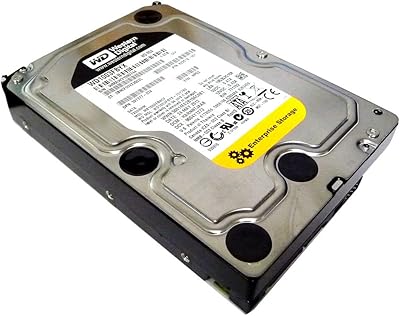
Western Digital WD15EARS 1.5TB Caviar Green SATA Hard Drive
84%
82%
Performance
90%
Energy Efficiency
88%
Noise Levels
85%
Storage Capacity
78%
Build Quality
More
Western Digital WD4000FYYZ 4TB Enterprise Hard Drive
72%
88%
Long-Term Reliability
91%
RAID Performance
83%
Value for Money
58%
Condition on Arrival
82%
Throughput Speed
More
Western Digital WD5000AAKX 500GB SATA Hard Drive
84%
82%
Performance
89%
Value for Money
85%
Reliability
91%
Ease of Installation
76%
Speed (7200 RPM)
More
Western Digital RE 3TB Enterprise Hard Drive
72%
76%
Long-Term Reliability
88%
RAID Performance
83%
Sequential Throughput
91%
Vibration Resistance
86%
NAS Compatibility
More
Western Digital EasyStore 2TB External Hard Drive
78%
88%
Value for Money
91%
Storage Capacity
67%
Transfer Speed
93%
Ease of Setup
84%
Portability
More
Western Digital Easystore 5TB Portable Hard Drive
75%
91%
Storage Value
88%
Ease of Setup
67%
Transfer Speed
72%
Portability
71%
Build Quality
More
Western Digital WD2500AAKX 250GB Caviar Blue HDD
84%
90%
Value for Money
85%
Performance
88%
Reliability
92%
Installation Ease
84%
Power Efficiency
More

FAQ

Almost certainly yes, provided your motherboard has a SATA connector, which has been standard on desktop boards since the mid-2000s. The SATA II interface on this WD Caviar SE drive is also backward compatible with SATA I ports, so even very early SATA systems should recognize it without issues.

Technically yes, but it is worth managing expectations. A 7200 RPM mechanical drive will boot Windows and run applications noticeably slower than even a budget SSD would today. If this is your only option for a cost-constrained repair, it will work — but if you can fit an SSD into your budget, that would make a more comfortable day-to-day experience.

At 7200 RPM, this mechanical hard drive produces an audible hum during operation and a faint clicking sound when the read head is actively seeking data. In a typical desktop tower with other components running, most people will not find it distracting. In a very quiet room with no fan noise to mask it, some users do notice it.

You will need a standard SATA data cable, which typically comes bundled with most desktop motherboards. The power connection uses a standard 15-pin SATA power connector from your power supply. No adapters are required for modern desktop setups.

No — this is strictly a 3.5-inch desktop drive and will not physically fit in a standard laptop bay, which requires a 2.5-inch form factor. Do not attempt to force it into a laptop enclosure.

That depends heavily on how it is used. In a light-duty role — storing backups or infrequently accessed files — many users report years of trouble-free operation. Like any mechanical drive, the risk of failure increases with heavy sustained use, physical vibration, and age. It is always wise to back up anything important, regardless of the drive brand.

Yes, both operating systems will recognize and work with this drive without any special drivers. It appears as a standard internal disk in Disk Management, and you can format it in NTFS or any other supported file system without complications.

Western Digital has historically offered limited warranties on its Caviar SE drives, though the coverage duration for this specific model may vary depending on when and where it was purchased. It is worth checking the serial number on Western Digital's official warranty lookup tool to confirm the remaining coverage, especially when buying from secondary markets.

This 250GB desktop hard drive can function in a basic home server or NAS enclosure, but it was not designed or rated for the continuous 24/7 operation that NAS workloads often demand. For occasional-use home servers it can be a reasonable fit; for anything running around the clock, a drive rated for NAS duty would be a more reliable long-term choice.

First, double-check the SATA and power connections, and confirm that your BIOS detects the drive on startup. If the drive is genuinely non-functional out of the box, contact the seller about a return or replacement. If it is within Western Digital's warranty window, their support team can guide you through an RMA process — the brand has a generally solid reputation for handling these situations professionally.