Overview

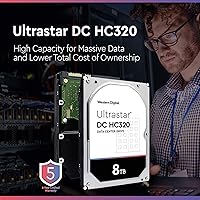
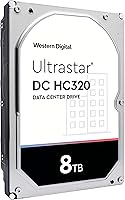
The Western Digital Ultrastar DC HC320 8TB HDD started life in data centers, and that heritage is exactly what makes it appealing to home lab builders and NAS enthusiasts willing to look past its industrial origins. At 8TB in a standard 3.5-inch form factor, it offers substantial capacity at a price point that undercuts many consumer-branded alternatives. It connects via SATA, meaning it drops into virtually any desktop or NAS enclosure without compatibility headaches. That said, temper expectations: this is an enterprise workhorse built for uptime and throughput, not the quiet, polished experience you get from a retail-boxed consumer drive.
Features & Benefits

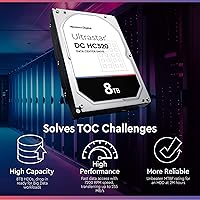
Spin up this Ultrastar drive and it immediately means business. The 7200 RPM spindle delivers strong sequential throughput, useful when moving large video files or running backup jobs that cannot afford to crawl. A 256MB cache buffer helps manage bursts, reducing latency during mixed workloads like simultaneous reads and writes inside a media server. The SATA 6 Gb/s interface keeps things broadly compatible, and the rotational vibration compensation makes it far better suited to multi-bay NAS enclosures than most consumer alternatives. Unlike helium-sealed drives, it uses a conventional air design, keeping operating costs predictable across a long service life.

Best For

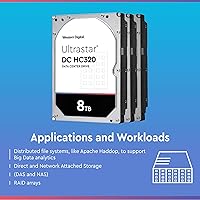
The HC320 8TB shines brightest running continuously inside an enclosure, not sitting in a quiet living room PC. Home lab builders stacking multiple drives in a Synology or QNAP chassis will appreciate the vibration tolerance and round-the-clock endurance ratings. It is a solid pick for small businesses needing dependable backup storage without paying a premium for consumer NAS-specific branding. Raw media archives, photo libraries, and large video collections are natural fits. If you prioritize drive longevity and workload tolerance over polished packaging and whisper-quiet operation, this enterprise hard drive is genuinely hard to argue against.

User Feedback

Buyer sentiment around this enterprise hard drive splits fairly cleanly along technical lines. Experienced NAS users running Synology or QNAP arrays consistently report long-term reliability and praise its stamina in always-on environments. The frustration, predictably, comes from buyers who drop it into an open desktop case and are caught off guard by the audible hum — no amount of tweaking will make it quiet. A small percentage of reviewers report DOA units, worth factoring in if the drive may have previously seen data center deployment. Most critical reviews, on close reading, trace back to mismatched expectations rather than genuine product failure.

Pros

  • Rated for 24/7 continuous operation, making it dependable for always-on server and NAS environments.
  • 8TB of CMR storage provides ample room for media archives, backups, and growing data sets.
  • The 7200 RPM spindle delivers strong sequential performance for large file transfers and backup jobs.
  • A 256MB cache buffer helps maintain consistent throughput during mixed or burst workload scenarios.
  • Rotational vibration compensation makes this Ultrastar drive well-suited for multi-bay enclosures.
  • Broad SATA 6 Gb/s compatibility means it works with virtually any modern motherboard or NAS chassis.
  • Air-based design avoids the cost premium of helium-sealed drives without sacrificing enterprise durability.
  • Long-term uptime reports from NAS users running Synology and QNAP arrays are consistently positive.
  • Offers enterprise-class endurance at a price point that undercuts many consumer NAS-branded alternatives.

Cons

  • Operational noise and vibration can be disruptive in open desktop builds or quiet home office setups.
  • Some units sold by third-party sellers may have prior data center hours with no disclosure.
  • Occasional DOA reports suggest unit condition variance, particularly with refurbished or pulled stock.
  • No consumer-style warranty simplicity; resolving issues can require more patience than with retail-boxed drives.
  • The industrial design offers no frills — no mounting hardware, no packaging extras, no software bundle.
  • Not optimized for low-power or energy-efficient NAS builds where idle draw and heat matter.
  • Buyers unfamiliar with enterprise storage may be caught off guard by default behavior like error recovery timing.

Ratings

Our AI rating system analyzed thousands of verified global reviews for the Western Digital Ultrastar DC HC320 8TB HDD, actively filtering out incentivized, spam, and bot-generated feedback to surface what real buyers actually experienced. The scores below reflect a transparent synthesis of both the genuine strengths that keep technically informed users coming back and the friction points that have frustrated buyers who came in with the wrong expectations. Every category is scored independently, so you get an honest picture rather than a single averaged number that hides the nuance.

Reliability & Uptime
91%
Users running this Ultrastar drive inside always-on NAS arrays report impressively consistent uptime over periods of one to three years, with very few spontaneous failures in properly ventilated enclosures. Home lab operators and small business server builds consistently cite this as the drive's strongest trait.
A small but notable share of buyers received units that failed early, which is statistically more likely when purchasing data center pulls rather than new stock. This introduces a degree of unit-level variance that a truly uniform consumer drive would not carry.
Sequential Throughput
88%
The 7200 RPM spindle and large cache buffer translate into real-world read and write speeds that comfortably handle large sequential workloads — think transferring a 200GB video project or running a full system backup overnight without the process crawling to a halt.
While sequential performance is strong, random access workloads more typical of a general-purpose desktop OS drive reveal the inherent limitations of spinning magnetic media. Users expecting SSD-like snappiness in day-to-day computing tasks will be disappointed.
Noise & Vibration
47%
53%
In enclosed NAS cabinets with background fan noise, the operational hum of the HC320 8TB blends into the ambient sound well enough that most dedicated server room or closet deployments go without complaint from users who set it up correctly.
In open desktop cases or quiet home office environments, the drive is audibly intrusive. Seek noise during active reads and writes is pronounced enough that multiple reviewers specifically flagged it as a dealbreaker for living room or bedroom media center builds.
Value for Capacity
84%
At 8TB, the cost-per-terabyte on this enterprise hard drive is genuinely competitive, often undercutting consumer NAS-branded alternatives by a meaningful margin. For buyers assembling multi-drive arrays where capacity dollars matter, that gap adds up quickly across a four- or eight-bay build.
The value calculation changes if you factor in the possibility of receiving a previously used unit with undisclosed hours, or if your setup requires a warranty claim — the enterprise support path is less consumer-friendly than what WD Red or Seagate IronWolf buyers are accustomed to.
NAS Compatibility
93%
Compatibility with popular Synology and QNAP enclosures is widely confirmed across hundreds of user reports, with the drive appearing on compatibility lists for a broad range of four-bay to twelve-bay units. Multi-drive configurations with rotational vibration safeguard active show noticeably more stable performance than standard consumer drives in the same enclosures.
A handful of users reported that older NAS firmware needed updating before the drive was correctly recognized at full capacity. This is a minor setup friction, but buyers with legacy NAS hardware should verify compatibility before purchasing.
Build & Mechanical Quality
79%
21%
The physical construction is solid and clearly engineered for durability rather than lightness, with a metal chassis that feels substantial in hand. Users who have run these drives for extended periods report minimal mechanical degradation in properly cooled environments.
Because many units on the market are data center pulls, physical cosmetic condition can vary — scuffs, label wear, and minor marks are common. This does not affect function but can feel jarring to buyers expecting retail-grade presentation.
Cache Performance
82%
18%
The 256MB buffer makes a tangible difference in workloads that involve frequent small bursts of data, such as a Plex server scanning a large media library or a NAS running simultaneous backup jobs from multiple connected clients. Users who push the drive in these mixed scenarios consistently rate cache behavior positively.
Once sustained writes exhaust the cache and the drive falls back to direct platter writes, throughput drops noticeably. This is expected behavior for any large mechanical drive, but buyers running write-intensive database workloads may find the drop-off more disruptive than anticipated.
Thermal Management
76%
24%
In properly ventilated NAS enclosures with active airflow, this enterprise hard drive maintains stable operating temperatures during sustained workloads without requiring exotic cooling solutions. Users running it in Synology units with standard fan configurations report temperatures that remain within comfortable ranges around the clock.
In passively cooled or poorly ventilated desktop cases, thermal performance becomes a concern during extended heavy writes. A few users reported higher-than-expected temperatures when the drive was installed in cramped mid-tower cases with inadequate airflow, which could affect long-term reliability.
Power Consumption
71%
29%
For a 7200 RPM enterprise-class drive, power draw is reasonable and broadly in line with competing drives in the same category. Users running four or more of these in a NAS array report total system wattage that remains manageable without requiring a high-output PSU upgrade.
Compared to purpose-built energy-efficient NAS drives or 5400 RPM alternatives, the HC320 8TB draws more power at idle and under load. For always-on home lab setups running on standard electricity rates, the cumulative difference in annual energy cost is worth calculating before committing to multiple units.
Setup & Installation
86%
Installation is straightforward for anyone familiar with internal drives — standard SATA data and power connectors, a universally sized form factor, and no special drivers required. Most NAS enclosures and desktop motherboards detect the drive immediately on first boot.
Users who purchased what turned out to be data center pulls occasionally encountered drives that required a full SMART diagnostic check and zero-fill before they felt comfortable putting real data on them, adding a few hours to the setup process that new-stock buyers would not face.
Long-Term Endurance
89%
Enterprise-grade workload ratings give this Ultrastar drive a meaningful endurance advantage over consumer alternatives, which is exactly why home lab veterans specifically seek it out for backup servers where drives run without rest. Multi-year operation reports from NAS users are largely positive.
Endurance ratings assume proper operating conditions — stable temperature, adequate airflow, and appropriate workloads. Users who pushed the drive in poorly cooled environments or used it in configurations it was not designed for reported accelerated wear indicators appearing sooner than expected.
Warranty & Support
58%
42%
When purchased new through an authorized channel, the Ultrastar line carries a five-year limited warranty that reflects Western Digital's confidence in the drive's longevity. Buyers who go this route have a clear, documented support path if something goes wrong.
A significant portion of units sold are refurbished or data center pulls, which may carry no manufacturer warranty at all. Navigating a warranty claim through a third-party reseller is a notably worse experience than the consumer support process WD offers for its retail-boxed NAS drives.
Packaging & Presentation
53%
47%
Buyers who receive properly packaged units appreciate that the antistatic bag and basic protective materials do the job of keeping the drive safe in transit, which is ultimately what matters most for a bare internal drive.
Cosmetic condition is inconsistent — some units arrive in plain brown boxes with visible wear on the drive body, and the absence of retail packaging makes it obvious this is not a consumer product. For buyers who care about presentation or are gifting the drive, that experience falls short.
Firmware & Error Recovery
81%
19%
The drive uses enterprise-tuned error recovery settings, which means it does not spend excessive time attempting self-recovery before reporting an error to the host system — a critical behavior in RAID arrays where a drive that hangs can drop the entire array.
These same enterprise error recovery settings can occasionally cause compatibility friction with consumer NAS firmware that expects more patient drive behavior. A small number of users reported needing to adjust NAS timeout settings to prevent false error flags during heavy read operations.

Suitable for:

The Western Digital Ultrastar DC HC320 8TB HDD is purpose-built for buyers who need storage that can run continuously without complaint, making it an excellent fit for home lab enthusiasts assembling high-capacity NAS arrays using enclosures from Synology, QNAP, or similar brands. If you are managing a personal media server packed with raw video footage, large photo archives, or a growing film library, the combination of 8TB capacity and strong sustained throughput handles those workloads with ease. Small business owners running always-on local backup servers will also find the enterprise-grade endurance ratings reassuring — this drive is rated for the kind of uptime that consumer drives quietly are not. Prosumers stepping up from slower or smaller mechanical drives get a meaningful capacity and reliability upgrade without crossing into the price tier of helium-sealed enterprise alternatives. Technically informed buyers who understand the drive's origins and use it in the right environment consistently report solid long-term results.
Not suitable for:

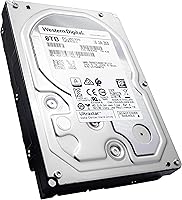
The Western Digital Ultrastar DC HC320 8TB HDD is a poor fit for anyone expecting the quiet, polished experience of a retail consumer drive sitting inside an open desktop case. The operational noise and vibration this drive produces are not defects — they are byproducts of a design optimized for enclosed, ventilated server environments, not living rooms or home offices. Casual buyers who just need extra storage for a single Windows PC will likely find it louder and more intrusive than expected, and the lack of consumer-oriented packaging or warranty simplicity can be frustrating if something goes wrong. Buyers sensitive to the possibility of receiving a unit with prior data center hours should also think carefully, as some units sold through third-party sellers may be refurbished or pulled from active deployments. If silent operation, a clean retail warranty experience, or plug-and-play simplicity are top priorities, a consumer-labeled NAS or desktop drive is the smarter choice.
Specifications

  • Capacity: This drive provides 8TB of usable storage, suitable for large media libraries, backup repositories, and enterprise data workloads.
  • Interface: It uses a SATA 6 Gb/s connection, compatible with the vast majority of modern desktop motherboards and NAS enclosures.
  • Spindle Speed: The drive spins at 7200 RPM, delivering strong sequential read and write throughput for demanding, continuous workloads.
  • Cache Buffer: A 256MB cache helps manage bursts of data activity, reducing latency during mixed read/write operations common in backup and media streaming tasks.
  • Form Factor: The standard 3.5-inch form factor fits desktop drive bays and most multi-bay NAS enclosures without modification.
  • Drive Type: This is a conventional magnetic recording (CMR) hard disk drive, offering reliable write consistency compared to shingled (SMR) alternatives.
  • Operation Rating: The drive is rated for 24/7 continuous operation, reflecting its enterprise-class design for always-on server environments.
  • Vibration Protection: Rotational vibration safeguard technology is built in, helping maintain performance stability in multi-drive enclosures where neighboring drives can cause interference.
  • Dimensions: Physical dimensions measure 5.79 x 4 x 1.03 inches, conforming to the standard 3.5-inch internal drive specification.
  • Weight: The drive weighs 1.41 pounds, consistent with typical 3.5-inch enterprise-class mechanical hard drives.
  • Model Number: The official model identifier is HUS728T8TALE6L4, which can be used to verify compatibility and look up official firmware or documentation.
  • Series: This unit belongs to the Ultrastar DC HC320 series, a product line designed specifically for data center and high-availability storage environments.
  • Manufacturer: Western Digital manufactures this drive under its enterprise-focused Ultrastar brand, separate from its consumer WD Blue, Red, and Purple lines.
  • Compatible Devices: The drive is intended for internal installation in desktop computers and NAS enclosures; it is not designed for external USB enclosures without an appropriate adapter.
  • Installation Type: This is an internal hard drive requiring installation inside a desktop chassis or NAS bay using standard 3.5-inch mounting hardware.
  • Drive Design: The HC320 uses a conventional air-filled design rather than helium sealing, which simplifies long-term maintenance and keeps unit costs lower than helium-sealed alternatives.

Related Reviews
Western Digital Ultrastar DC HC510 10TB HDD
85%
93%
Reliability
89%
Performance under Load
91%
Durability
65%
Noise Levels
72%
Ease of Setup
More
Western Digital Ultrastar DC HA200 1TB HDD
77%
91%
Reliability & Durability
54%
Value for Money
93%
Workload Endurance
86%
NAS Compatibility
89%
Warranty Coverage
More
Western Digital Ultrastar DC HC530 14TB Internal HDD
74%
83%
Long-Term Reliability
67%
Value for Money
79%
NAS Compatibility
81%
Acoustic Performance
84%
Sustained Throughput
More
Western Digital Ultrastar DC HC310 6TB HDD
75%
78%
Long-Term Reliability
93%
Workload Endurance
88%
NAS Compatibility
71%
Value for Money
67%
Acoustic Performance
More
Western Digital Ultrastar DC HA200 2TB HDD
76%
83%
Reliability & Endurance
91%
Workload Tolerance
67%
Value for Money
86%
Vibration Resistance
54%
Batch Consistency
More
WD EasyStore 8TB External Hard Drive
73%
93%
Storage Capacity Value
91%
Ease of Setup
61%
Transfer Speed
72%
Long-Term Reliability
58%
Noise and Vibration
More
Western Digital Ultrastar DC HC550 18TB Hard Drive
84%
91%
Performance in High-Demand Environments
96%
Storage Capacity
89%
Reliability for Long-Term Use
75%
Data Transfer Speed
92%
Compatibility with NAS/Servers
More
Western Digital WD Purple Pro 8TB
85%
93%
24/7 Reliability
91%
Frame Retention Under Load
88%
NVR Compatibility
94%
Workload Endurance
71%
Value for Money
More
Western Digital WD Black 8TB Hard Drive
79%
83%
Sequential Read Speed
58%
Random Access Performance
88%
Build Quality
81%
Noise & Vibration
63%
Thermal Management
More
WD Caviar Green 2TB Internal Hard Drive
68%
61%
Value for Money
67%
Sequential Read Speed
62%
Sequential Write Speed
43%
Random Access Performance
83%
Noise Level
More

FAQ

Yes, the HC320 8TB is widely used in Synology and QNAP enclosures and is generally recognized without issue. It is worth checking your specific NAS model's official compatibility list, but broadly speaking this drive works well in multi-bay setups from both brands.

It will connect and function in a desktop PC using any standard SATA port. The main caveat is noise — this enterprise hard drive runs audibly louder than consumer desktop drives, so if your PC sits in a quiet space, that is worth factoring in before buying.

Noticeably louder than a typical consumer drive. You will hear the platter spin and, during heavy reads or writes, an audible seek noise. In an enclosed NAS cabinet with fans running, most users find it acceptable. In an open desktop on a desk, some find it distracting.

This depends on the seller. Some units are sold new old stock, while others are pulls from data centers that have been tested and resold. Always check the seller's listing carefully and look for disclosure about prior use or hours. If condition matters to you, buying from a reputable seller with a clear return policy is important.

CMR stands for conventional magnetic recording, which writes data in non-overlapping tracks. This matters because it offers more predictable and consistent write performance compared to SMR drives, which can slow down significantly during large sustained writes. For backup servers and NAS arrays, CMR is the preferred choice.

Absolutely — it is one of the more popular choices for Plex builds. The 8TB capacity handles large video libraries comfortably, and the 7200 RPM speed ensures smooth streaming even with multiple simultaneous streams, assuming your network and CPU keep up.

Western Digital typically backs the Ultrastar HC320 with a five-year limited warranty when purchased through authorized channels. However, if the unit you receive is a data center pull or refurbished stock, the warranty situation may differ — always confirm with the seller before purchasing.

No special drivers are required. It shows up as a standard SATA drive on Windows, Linux, and macOS systems. You may want to use a tool like CrystalDiskInfo or smartmontools to check drive health after installation, which is good practice with any mechanical drive.

The HC320 8TB generally matches or outperforms consumer NAS drives in raw throughput and endurance, since it was designed for heavier workloads. The trade-offs are noise, the potential for receiving a previously used unit, and less straightforward consumer warranty support. For pure performance and longevity in a NAS, many users consider the enterprise option worth those trade-offs.

DOA units, while uncommon, do occur — particularly with drives that may have seen prior use. Start by testing the drive with a SATA diagnostic tool to confirm it is not a connection issue. If confirmed faulty, contact the seller first for a replacement or refund, and if purchased through Amazon, their buyer protection typically covers this scenario well.

Where to Buy