



Overview

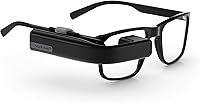
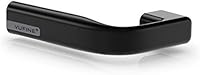
The Vufine VUF-110 Wearable Display is a clip-on monocular screen built for one specific job: giving you hands-free access to a display without tying you to a desk or a traditional monitor. It launched in 2017 and found its audience largely among FPV drone pilots, field technicians, and hardware hobbyists — people who need data in their line of sight while their hands stay busy. Connectivity is strictly HDMI only, which keeps things simple but rules out any wireless or Bluetooth sources from the start. At its price point, this wearable display sits in mid-range territory, and buyers should come in with grounded expectations. This is a utility tool, not a consumer AR headset.

Features & Benefits

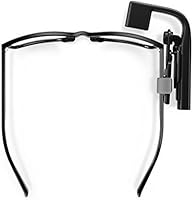
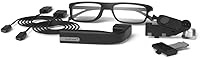
The physical screen measures just 0.195 inches yet projects a virtual 4-inch image when positioned roughly 12 inches from your eye — genuinely usable for reading text and checking data feeds. It accepts 720p HDMI input, so compatibility with laptops, Raspberry Pi boards, and most portable media devices is straightforward. The magnetic docking station is one of the more thoughtful design choices: snap it on when you need it, pull it off when you don't. Charging runs through Micro USB at 5V, which is convenient. At under one ounce, it barely registers on your head. The adjustable lens arm also lets you shift it in or out of your direct sightline as needed.

Best For

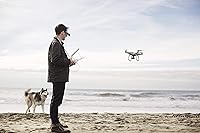
Use case is genuinely everything with this wearable display, so it pays to be honest about who benefits most. FPV drone pilots are probably the most natural fit — having a lightweight display clipped near your eye while monitoring a ground-station feed is exactly the kind of task it was built around. Field engineers who need reference data visible while both hands stay occupied will also get real value from it. Makers building custom rigs around a Raspberry Pi or similar single-board computer will appreciate the simple HDMI hookup. If wireless connectivity is a must, though, look elsewhere — the Vufine monocular is strictly wired, full stop.

User Feedback

With 425 ratings averaging 3.0 out of 5, the Vufine monocular sits in genuinely mixed territory — and that split deserves an honest explanation rather than a brush-off. Buyers who understood what this clip-on display actually does tend to leave satisfied, consistently praising the compact build quality and the magnetic dock's convenience. The frustration clusters around two recurring issues. First, the roughly 90-minute battery life runs short for extended field sessions — this is a real workflow limitation, not just a number on a spec sheet. Second, dialing in the optic for your eye takes patience. Some reviewers also flag that image quality holds up well for text and data but falls short with fast-moving video.

Pros

  • At under one ounce, this clip-on display is among the lightest wearable screens you can actually buy.
  • The magnetic docking station makes attaching and removing the unit genuinely quick and fuss-free.
  • HDMI compatibility means it works with laptops, Raspberry Pi boards, and most portable media devices right away.
  • 720p resolution is more than sufficient for reading text, terminal output, and data feeds in the field.
  • The adjustable lens arm lets you position the screen in or out of your direct sightline depending on the task.
  • Build quality draws consistent praise from real buyers — it feels solid despite its tiny footprint.
  • Micro USB charging at 5V means you can top it up with virtually any standard power bank.
  • For FPV drone pilots needing a lightweight ground-station display, this wearable delivers a genuinely practical solution.

Cons

  • The 90-minute battery life is a real workflow limitation, not just an acceptable trade-off for extended outdoor sessions.
  • Getting the optic aligned correctly for your eye takes patience and frustrates a notable share of first-time users.
  • There is no wireless connectivity at all — no Bluetooth, no Wi-Fi — which narrows its compatibility significantly.
  • Image quality is adequate for static data but falls noticeably short when displaying fast-moving or color-rich video.
  • The 0.195-inch physical screen can feel visually restrictive if you expected a more immersive viewing experience.
  • No carrying case or protective pouch is included, which is a small but annoying omission given the unit's portability pitch.
  • Users with stronger prescriptions may find eye alignment uncomfortable or difficult to sustain over time.
  • The mixed 3.0-star rating reflects real frustration among buyers who purchased this without fully understanding its niche scope.

Ratings

The scores below for the Vufine VUF-110 Wearable Display were generated by our AI after analyzing hundreds of verified buyer reviews from global markets, with spam, incentivized, and bot-flagged submissions actively filtered out. Ratings reflect the full spectrum of real ownership experiences — not just the highs. Where this wearable display earns genuine praise and where it consistently frustrates buyers, both are represented transparently in the categories below.

Portability
94%
At under one ounce and roughly the size of a USB stick, this clip-on display is genuinely pocketable in a way almost no other wearable screen is. FPV pilots and field technicians consistently mention that its weight is never a factor, even after hours of wear — it simply disappears on the face.
The compact size does mean the HDMI cable becomes the most cumbersome part of the whole setup. A few users noted that managing cable routing while staying mobile can undercut the otherwise excellent portability story.
Build Quality
83%
Buyers are consistently surprised by how solid this wearable display feels given its tiny footprint. The housing resists minor drops and casual handling well, and the magnetic docking mechanism shows no meaningful signs of wear even after extended daily use, which earns repeated praise in long-term reviews.
A handful of users have reported that the adjustable arm can loosen over time, reducing the precision of lens positioning. Nothing structurally catastrophic, but it is a friction point that surfaces often enough to be worth noting.
Battery Life
41%
59%
The internal lithium polymer cell is sufficient for short, defined tasks — a 30-minute drone session, a quick field inspection, or a brief hands-free monitoring window. Users who treat it as a task-specific tool rather than an all-day wearable tend to work around the limitation reasonably well.
Ninety minutes is a hard ceiling that frustrates a significant portion of buyers in real-world conditions. Field workers doing extended shifts and makers running long prototyping sessions repeatedly flag this as the single most limiting aspect of the Vufine monocular, and it is the most common driver of low ratings.
Image Clarity
67%
33%
For text-heavy use cases — terminal windows, sensor data feeds, map overlays, instrument readouts — the 720p virtual image is genuinely sharp enough to be useful at 12 inches from the eye. Drone pilots monitoring flight telemetry and engineers checking reference data report that clarity meets their needs.
Push the display toward richer content — streaming video, color-graded footage, fast-moving graphics — and the optics show their limits clearly. The small physical panel and fixed 720p input mean this clip-on display is not a substitute for any screen where image fidelity actually matters.
Ease of Setup
58%
42%
Connecting the device to an HDMI source is straightforward with no drivers or software needed — plug it in and it registers as a standard display. Users with compatible setups like Raspberry Pi boards or laptops with HDMI out report a smooth, frustration-free first-use experience most of the time.
Eye alignment is where setup becomes genuinely tricky. Finding the right position for the optic relative to your pupil takes patience, and a notable share of first-time users spend considerable time adjusting the arm before the image snaps into comfortable focus. Users with glasses face additional alignment complexity.
Mounting System
81%
19%
The magnetic docking station is one of the most practically thoughtful features on this device. The snap-on, snap-off action works reliably, and users appreciate being able to pocket the display unit within seconds rather than fumbling with clips or screws during fieldwork or drone sessions.
The mounting system is designed around Vufine's own frame accessories, and compatibility with non-standard eyewear or third-party headgear varies. Some users found they needed additional adapters or improvised solutions to get the dock to sit securely on their preferred frames.
Compatibility
73%
27%
HDMI-only connectivity is actually a strength for a wide range of source devices — laptops, Raspberry Pi, HDMI-capable media players, and many Android phones with the right adapter all work without configuration. The universality of the HDMI standard means fewer compatibility surprises than a proprietary connection would bring.
The total absence of wireless connectivity is a meaningful limitation. Users who hoped to pair this wearable display with a smartphone wirelessly or connect it to a Bluetooth-only source were out of luck, and the adapter requirement for phones without native HDMI output adds friction to mobile setups.
Comfort
62%
38%
The sub-ounce weight means physical fatigue from wearing the unit is not a common complaint, particularly for sessions under an hour. Users doing drone flights or brief field checks report that the display stays put without causing noticeable discomfort during the activity.
Extended wear beyond an hour surfaces more complaints, particularly around the pressure point where the magnetic mount sits on the frame. Users with sensitive ear or nose bridges, or those wearing the device for 90-plus minutes continuously, report growing discomfort that limits real-world session length independently of battery constraints.
Value for Money
55%
45%
For buyers who land squarely in the target use case — FPV pilots, makers, field engineers — the Vufine monocular delivers a genuinely unique capability that few alternatives match at any price. In those scenarios, the asking price feels justified against the lack of direct competition.
For general buyers drawn in by the concept but without a specific hands-free use case, the price is harder to justify given the 90-minute battery, limited image quality for video, and the learning curve involved in setup. A significant share of low ratings come from buyers who feel the device underdelivered on its implied promise relative to cost.
Field Use Performance
77%
23%
In its intended environments — outdoor drone sessions, workshop benches, equipment inspection — the Vufine monocular performs well above average. Brightness holds up adequately in partially shaded conditions, and the adjustable arm allows practical repositioning without removing the unit entirely.
Direct sunlight washes out the display noticeably, which is a real issue for outdoor drone pilots working at midday. Users in bright field conditions consistently mention needing to shade the optic manually, which breaks the hands-free utility the device is supposed to provide.
Software & Firmware
69%
31%
The embedded firmware does exactly what it needs to do without any user-facing configuration required. There are no menus to navigate, no firmware update headaches to deal with, and no driver installations — the unit simply processes the HDMI signal and displays it, which is exactly the right approach for a utility peripheral.
The flip side of the no-frills firmware is a total lack of adjustability. There are no brightness controls, no contrast settings, and no on-screen display options, which means users in challenging lighting conditions have no way to compensate through software and must rely entirely on physical repositioning.
Durability Over Time
74%
26%
The majority of long-term owners report that the unit holds up well under regular field use over months of ownership. The solid housing and straightforward internal design mean there are few mechanical points likely to fail with normal handling, and build-quality complaints tend to appear early rather than after extended use.
The adjustable arm is the most commonly cited long-term weak point, with some users noting gradual loosening after repeated repositioning. The Micro USB charging port also draws occasional concern about wear from daily plug cycles, though outright port failures are not a dominant complaint in the review data.
Packaging & Accessories
52%
48%
The unit arrives with the magnetic docking station included, which is the most critical accessory for getting started. The core out-of-box experience is clean and the included components are enough for users with already-compatible frames or headgear to get up and running.
The absence of a carrying case or protective pouch is a recurring complaint that feels like an oversight for a device marketed on portability. Several users also noted that mounting accessories for non-standard frames are sold separately, adding to the real-world cost beyond the advertised price.

Suitable for:

The Vufine VUF-110 Wearable Display was built for a specific kind of user, and those people tend to love it. FPV drone pilots are the most obvious fit — having a clip-on HDMI display near your eye while monitoring a ground-station feed is exactly the kind of hands-free utility this device delivers well. Field technicians and engineers who need to reference schematics, sensor readouts, or terminal data while keeping both hands free will find real practical value here. Hobbyist makers building custom wearable rigs around a Raspberry Pi or similar single-board computer will appreciate how straightforward the HDMI hookup is, with no driver headaches or wireless pairing to wrestle with. If your work or hobby puts you in situations where glancing at a screen mid-task is genuinely disruptive, this wearable display addresses that problem in a package that barely registers on your head.

Not suitable for:

The Vufine VUF-110 Wearable Display is not the right tool for buyers who picture it as a general-purpose AR headset or a consumer media device. The 90-minute battery life is a hard ceiling that rules it out for all-day field deployments without access to a power bank for recharging. Anyone hoping to stream video or consume rich media through this clip-on display will likely come away disappointed — image quality holds up for text and data, but it is not optimized for fast-moving or color-critical content. The strictly wired HDMI-only connection means there is no Bluetooth, no Wi-Fi, and no way to pair it directly with a smartphone without an adapter setup. Users who need prescription lens compatibility or a wide field of view for immersive visuals should also look at purpose-built alternatives, as this monocular is a utility instrument, not an entertainment device.

Specifications

  • Physical Screen: The actual display panel measures 0.195 inches, making it one of the smallest wearable screens available on the consumer market.
  • Virtual Image Size: When positioned approximately 12 inches from the eye, the optic projects a virtual image that appears as roughly 4 inches across.
  • Resolution: The display accepts a 720p HD signal via HDMI, suitable for text, data readouts, and standard-definition video content.
  • Connectivity: Input is handled exclusively through a full-size HDMI port, compatible with any device capable of outputting a 720p signal.
  • Wireless: This wearable display has no wireless capability whatsoever — there is no Bluetooth, no Wi-Fi, and no IrDA data transfer supported.
  • Battery Type: An internal lithium polymer cell powers the unit, keeping the overall weight low and eliminating the need for replaceable batteries.
  • Battery Life: On a full charge, the internal battery provides approximately 90 minutes of continuous operation before requiring a recharge.
  • Charging: The unit recharges via a standard Micro USB cable at 5V, compatible with most common phone chargers and portable power banks.
  • Weight: The display assembly weighs approximately 0.96 ounces (around 27g), making it one of the lightest wearable displays in its category.
  • Dimensions: The unit measures 0.6 x 3.8 x 0.8 inches, keeping its physical footprint minimal when mounted or stored.
  • Mounting System: A magnetic docking station is included, allowing the display module to be attached or detached quickly without screws or clips.
  • Lens Position: The lens arm is adjustable, letting the user shift the display into or out of their direct line of sight depending on the task.
  • Screen Shape: The display panel is rectangular in orientation, optimized for standard widescreen HDMI output from computers and media devices.
  • Manufacturer: The Vufine VUF-110 Wearable Display is designed and manufactured by Vufine, a company focused on compact wearable display technology.
  • Release Date: This product was first made available in January 2017 and remains an active listing with no discontinuation notice from the manufacturer.
  • GPS: No GPS module is included in this device; it functions purely as a display output peripheral with no positioning capability.
  • Operating System: The unit runs a customized embedded operating system that handles display signal processing and requires no configuration from the user.
  • Item Model: The official model number for this unit is VUF-110, which distinguishes it from any other display accessories in the Vufine lineup.

Related Reviews

ASUS ProArt Display PA169CDV 15.6” 4K Pen Display
87%
94%
Color Accuracy
89%
Portability
90%
Touchscreen Responsiveness
85%
Build Quality
92%
Wacom Pen Precision
More
Calibrite Display 123 Colorimeter
74%
88%
Ease of Setup
76%
Color Accuracy Improvement
61%
Software Quality
79%
Dual-Display Support
73%
Value for Money
More
KAOLALI A401 GPS+OBD2 Car Head-Up Display
72%
91%
Ease of Installation
67%
GPS Mode Accuracy
83%
OBD2 Data Accuracy
71%
Display Readability
58%
Build Quality
More
Wiiyii C500 OBD2 Car HUD Speedometer
79%
93%
Ease of Installation
74%
Display Clarity
88%
Data Range
81%
Alert System
57%
Build Quality
More
Epson WorkForce WF-110 Wireless Mobile Printer
70%
91%
Portability & Form Factor
67%
Battery Performance
84%
Wireless Setup & Connectivity
83%
Print Quality
58%
Print Speed
More
Calibrite Display Plus HL Display Calibrator
79%
93%
Calibration Accuracy
91%
HDR Performance
74%
Software Usability
86%
Software Features
78%
Build Quality
More
PRUNUS J-110 Portable AM/FM Bluetooth Radio
77%
84%
FM Reception Quality
91%
Ease of Use
88%
Power Flexibility
86%
Design & Aesthetics
73%
Bluetooth Performance
More
ZOEVA 110 Face Contour Brush
78%
93%
Bristle Softness
88%
Blending Performance
86%
Precision & Shape
84%
Build Quality
71%
Shedding & Durability
More
SmartSee Miracast 1080P Wireless Display Adapter
66%
71%
Ease of Setup
83%
Android Compatibility
44%
iOS Compatibility
51%
Windows Compatibility
58%
Streaming Stability
More
LANPOWAE Motorized Rotating Display Stand
84%
88%
Performance
91%
Ease of Use
85%
Stability under Load
87%
Rotation Customization
90%
Portability/Size
More

FAQ

It depends on your phone. The clip-on display only accepts HDMI input, so you would need a phone that supports video-out over USB-C or a compatible adapter that outputs a true 720p HDMI signal. Many modern Android phones support this via a USB-C to HDMI adapter, but iPhones require a Lightning Digital AV Adapter. Always verify your phone outputs actual video signal and not just charging through the adapter.

Some users with glasses manage to use the Vufine monocular, but the experience varies significantly depending on prescription strength and frame style. The adjustable arm gives you some flexibility in positioning, but users with stronger prescriptions or thick frames have reported difficulty getting comfortable eye alignment. It is worth managing expectations here — this device does not have built-in diopter adjustment.

Vufine does not publish an official recharge time, but given the small lithium polymer cell capacity, most users report a full recharge in under two hours using a standard 5V Micro USB charger. Using a power bank while operating the device is a practical workaround for the 90-minute runtime limitation.

Yes, for text and data readouts the image is genuinely usable. The virtual 4-inch image at 12 inches from the eye is sharp enough to read terminal output, instrument data, or simple UI elements without straining. Where it falls short is with fast-moving video or color-rich content, where the small optic and 720p resolution start to show their limits.

Technically yes, as long as your laptop has an HDMI output and can mirror or extend its display at 720p. The Vufine VUF-110 Wearable Display will appear as a standard HDMI monitor to your operating system. Keep in mind that the small virtual screen size makes it best suited for monitoring a single app or window rather than full desktop use.

The magnetic docking station attaches to the frame of your eyewear or a compatible mount, and the display module snaps on magnetically. It holds firmly enough for normal head movement during field use, and the snap-off action is intentionally easy so you can pocket the unit quickly when not needed. Users generally praise this design as one of the more practical features of the device.

Absolutely — this is actually one of the more popular use cases for the Vufine monocular. Raspberry Pi boards output HDMI natively, so the connection is plug-and-play. Many makers use it as a lightweight heads-up display for Pi-based projects, robotics rigs, or custom wearable computing setups.

The magnetic docking station is included in the box, but the mounting arrangement for your specific eyewear or headgear may require additional accessories. Vufine offered optional mounting clips for different frame types, so it is worth checking what is compatible with your setup before assuming everything you need is in the box.

The mixed rating is largely a case of mismatched expectations rather than a defective product. Buyers who understood this is a niche utility display for specific hands-free tasks tend to leave positive reviews. The frustration mostly comes from people who expected a more immersive AR-style experience or all-day battery life — neither of which this device was designed to deliver. Use-case fit matters enormously with this one.

For most practical purposes, lag is minimal and not a significant issue for static or slow-moving content like data dashboards or terminal windows. Users doing FPV drone monitoring have noted it is usable, though for truly latency-sensitive applications you should factor in any delay introduced by your HDMI source device as well, since the display itself processes signal at standard HDMI speeds.

Where to Buy