Overview

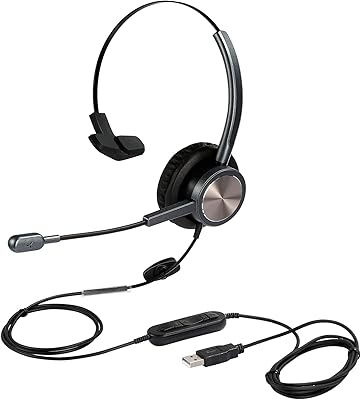
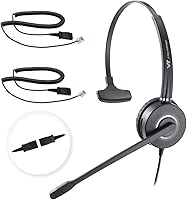
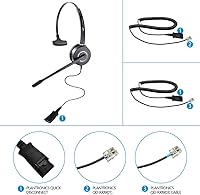
The VT VT6932 Mono QD Telephone Headset is a straightforward, no-frills wired headset built for office workers and call center agents who spend most of their day on a desk phone. One important caveat upfront: it is not compatible with Cisco IP phones, so check your phone model before ordering. The single-ear design is intentional — keeping one ear free helps you stay tuned in to what is happening around you, whether that is a colleague stopping by or a second line ringing. A quick-disconnect plug lets you step away from your desk fast without fumbling with cables. The stainless steel headband and leatherette cushion feel noticeably solid for the price.
Features & Benefits

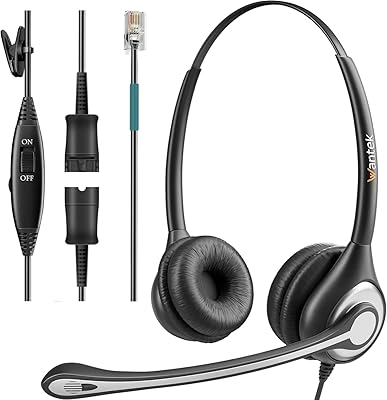
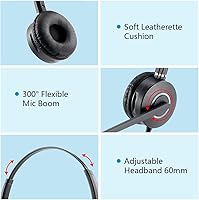
The noise-cancelling boom microphone is the standout feature here. It will not isolate your voice the way a studio mic would, but it does a decent job cutting down the hum of an open office — air conditioning, keyboard clatter, background chatter. The boom rotates a full 300 degrees, so whether you prefer the mic on the left or right side, it adapts without a fight. Two RJ09 cable variants come in the box, which matters because different IP phone brands use slightly different pinouts. At just 140 grams, the VT6932 sits lightly on your head through long shifts, and the Plantronics-style QD connector adds flexibility with compatible third-party adapters if you ever need them.

Best For

This QD desk phone headset is a natural fit for small businesses running Yealink, Polycom, Grandstream, or Fanvil IP phones — essentially anyone who is not on Cisco. Reception desks and open-plan offices benefit most from the monaural setup, since staff need to catch walk-in customers or nearby team conversations without removing a headset. Call center agents who cycle through headsets regularly will appreciate that the quick-disconnect mechanism reduces wear on the phone port over time. IT managers equipping a full team on a fixed budget will find the per-unit cost hard to argue with. Worth noting: this is not designed for laptop conference calls or mobile use.

User Feedback

With a 4.1-star average across 176 reviews, this mono call center headset earns its rating without being perfect. Buyers consistently praise how quickly it gets up and running — plug in the right cable, put it on, done. Call clarity gets frequent mentions too, with many users noting that callers on the other end sound cleaner than expected. On the downside, cable durability is the most cited concern, with some reporting fraying near the connector after several months of daily use. A handful note that mic sensitivity varies across phone models. Compared to Plantronics and Jabra options at significantly higher prices, most buyers feel the value holds up well for everyday office use.

Pros

  • Plug-and-play setup with no software or configuration — just connect and start taking calls.
  • Two RJ09 cable variants included in the box, covering a wider range of compatible IP phones immediately.
  • The quick-disconnect mechanism is smooth and reduces wear on the desk phone port over time.
  • At 140 grams, this mono call center headset is light enough to wear through a full shift without neck fatigue.
  • Stainless steel headband feels substantially more durable than the plastic frames common at this price point.
  • The 300-degree rotating mic boom works well for both left- and right-side placement without loosening over time.
  • Call clarity is consistently praised by reviewers, with callers on the other end rarely struggling to hear.
  • Replaceable ear cushion included in the box extends usable life without a separate accessory purchase.
  • Plantronics-style QD connector adds flexibility for use with compatible third-party adapters if needed.
  • Compares favorably in value against leading brands that cost two to three times more for similar core functionality.

Cons

  • No inline mute or volume control on the cable — muting requires reaching back to the desk phone itself.
  • Cable durability is the most reported long-term complaint, with fraying near the connector after months of daily use.
  • Leatherette ear cushion retains heat and can feel uncomfortable during extended sessions in warm offices.
  • Mic sensitivity is inconsistent across phone models, with some Grandstream and older Fanvil users reporting lower volume output.
  • Completely incompatible with Cisco IP phones, with no adapter solution available to bridge the gap.
  • The ear cushion shows cosmetic peeling at the edges after roughly six to nine months of continuous use.
  • Noise cancellation is functional but limited — it struggles in genuinely loud environments beyond a standard open office.
  • The QD connection can develop slight looseness over time, occasionally causing brief audio dropouts if the cable is nudged.
  • Maximum headband extension may still feel snug for users with larger-than-average head sizes during long shifts.
  • No warranty or after-sales support details are clearly communicated, which creates uncertainty for business buyers.

Ratings

The VT VT6932 Mono QD Telephone Headset has been scored by our AI rating system after analyzing verified buyer reviews from multiple global markets, with spam, bot-generated, and incentivized feedback actively filtered out before scoring. The result is an honest, data-driven breakdown that reflects both what real office workers and call center agents genuinely appreciate about this headset and where it falls short. Strengths and frustrations are weighted equally so you can make a confident, informed decision.
Value for Money
88%
Buyers repeatedly note that this QD desk phone headset punches well above its price bracket, especially when compared side by side with Plantronics and Jabra options that cost significantly more. For IT managers outfitting a team of five or ten agents, the per-seat savings are hard to dismiss without a compelling reason.
A small but vocal group of reviewers feel the long-term durability does not fully justify even the modest investment, particularly if the cable shows wear within six months of daily use. The value equation shifts if you end up replacing it sooner than expected.
Call Audio Clarity
83%
For a wired RJ9 headset at this price, call clarity comes up consistently as a genuine strength. Agents report that customers on the other end rarely ask them to repeat themselves, and the dynamic driver handles voice frequencies cleanly without the tinny quality common in budget alternatives.
Audio performance is not entirely uniform across all compatible phone models. Some users on Grandstream or older Fanvil units noted a slight volume drop or muddiness compared to peers using Yealink phones, suggesting the headset is more optimized for certain hardware combinations.
Microphone Noise Cancellation
71%
29%
In moderately busy office environments, the noise-cancelling boom mic does a reasonable job filtering out background hum — air conditioning, distant keyboard noise, and general office chatter get attenuated noticeably. Agents working in shared spaces appreciate that callers are not distracted by ambient sounds during normal conversations.
This is not studio-grade or AI-powered noise cancellation. In louder environments — open warehouses, busy reception areas, or call floors with many simultaneous agents — background bleed becomes apparent. Buyers expecting Jabra-level isolation will be disappointed; the noise reduction is functional but clearly budget-tier.
Comfort During Extended Wear
81%
19%
At just 140 grams, the VT6932 sits lightly enough that many users forget they are wearing it after the first hour. The adjustable stainless steel headband accommodates a range of head sizes without pressure points, and the leatherette ear cushion provides enough padding for full-day shift use.
The leatherette cushion, while soft initially, can feel warm and slightly sticky after several hours in heated offices. A handful of reviewers with larger heads noted that even at maximum extension the band feels snug, which becomes noticeable during back-to-back calls.
Build Quality & Durability
67%
33%
The stainless steel headband is a genuine differentiator at this price point — it flexes without feeling like it will snap, and the overall assembly feels more considered than many plastic-only budget competitors. The rotating mic boom also moves smoothly without feeling loose.
Cable durability is the most frequently cited complaint across reviews. The QD-RJ09 cable tends to show wear near the connector end after months of daily plug-in and removal cycles. The plastic housing around the ear cup is functional but thinner than it appears in product images.
Setup & Compatibility
79%
21%
Including two RJ09 cable variants in the box is a smart, practical decision that most competitors skip. Most users report a true plug-and-play experience — connect the cable, clip it to the phone, and the headset works immediately with Yealink, Polycom, Snom, and other supported brands.
Cisco incompatibility trips up a meaningful number of buyers who skim the listing without checking the fine print. There is no adapter solution that bridges this gap, meaning a return is the only option. Compatibility with a few less common IP phone brands can also be hit or miss.
Quick-Disconnect Mechanism
84%
The Plantronics-style QD connector clicks in and releases cleanly, which matters more than it sounds when you are disconnecting and reconnecting dozens of times a week. It also reduces stress on the phone port itself over time, which IT staff managing aging hardware tend to appreciate.
A few buyers noted the QD connection can feel slightly loose after extended use, occasionally causing a brief audio dropout if the cable is nudged. It is not a common complaint, but worth monitoring if the headset is used in a high-movement environment.
Microphone Placement Flexibility
77%
23%
The 300-degree rotating boom is genuinely useful for agents who switch between left and right ear preferences, or who share headsets across shifts. The mic holds its position without drifting during calls, which removes a small but real annoyance that cheaper boom designs often introduce.
The boom arm itself is fairly short relative to some competitors, which means users with specific mic placement habits may find it does not reach exactly where they want it. Left-side placement works better for most wearers due to the cable routing design.
Ear Cushion Quality
69%
31%
The included spare ear cushion is a thoughtful addition that extends the usable life of the headset without requiring a separate purchase. The cushion provides adequate acoustic isolation for voice calls and is straightforward to replace when it eventually shows wear.
The leatherette material is not breathable, and in warmer climates or heated offices, users report it becoming uncomfortable during longer calls. The cushion also begins to show cosmetic peeling on the edges after roughly six to nine months of continuous daily use.
Weight & Portability
86%
At under 150 grams, this mono call center headset is among the lighter options in its category. Agents who wear it for six or more hours a day consistently mention that neck and ear fatigue are minimal, which is a meaningful practical advantage over heavier corded alternatives.
The lightweight construction is partly a product of the thinner plastic used in the ear cup housing. Some buyers associate the lightness with fragility, and in drop or impact scenarios the housing is not especially forgiving. It is designed for desk use, not for being knocked around.
Headband Adjustability
74%
26%
The sliding adjustment mechanism is smooth and locks reliably, which is important in shared headset environments where multiple agents with different head sizes use the same unit across shifts. The stainless steel construction means the adjustment slider does not loosen over time the way plastic equivalents often do.
The adjustment range, while adequate for most adults, skews toward average head sizes. Buyers on either end of the size spectrum — particularly those with larger heads — report that the maximum extension still feels slightly tight after extended sessions.
Ease of Use
91%
There is almost no learning curve. Plug the cable into the phone, connect the headset via the QD connector, and you are ready to take calls. Non-technical users and first-time headset buyers specifically call out how refreshingly simple the setup is with no software, no pairing, and no configuration required.
The absence of any inline controls — no mute button, no volume adjustment — is a real limitation for users accustomed to more featured headsets. Muting requires going back to the phone itself, which interrupts call flow and is a genuine inconvenience during active conversations.
Inline Controls & Mute Access
41%
59%
For users whose desk phones have a dedicated mute key within easy reach, the lack of inline controls is a non-issue. Some agents actually prefer a headset without buttons to accidentally press, and the simplicity keeps the cable lighter and less prone to failure points.
The absence of any inline mute or volume control is the most common functional complaint across reviews. Agents on busy call floors who need to mute quickly between calls find the workflow noticeably more disruptive without a cable-mounted button. At this price tier, even a basic mute switch would have been a meaningful addition.
Cable Quality & Longevity
58%
42%
The two included cables cover a wider range of phone models than single-cable competitors, and the cable length is adequate for standard desk setups without excess slack getting tangled. For occasional use, the cables hold up without issue.
Heavy daily users report that the QD-RJ09 cable begins to fray or lose connection reliability near the connector ends within four to eight months. This is the most consistent durability complaint in the review base and suggests the cable is a weak point relative to the more robust headset body itself.
Monaural Design Practicality
82%
18%
The single-ear design is a deliberate, practical choice for the target environment. Reception staff, office assistants, and agents who need to stay aware of walk-up customers or secondary phone lines find it far more workable than a closed binaural headset that cuts them off from the room.
Users coming from binaural headsets sometimes find the monaural format less immersive for calls, particularly in noisier rooms where the open ear picks up too much background sound. It is not a flaw in execution, but a genuine trade-off that some buyers only realize after purchase.

Suitable for:

The VT VT6932 Mono QD Telephone Headset is purpose-built for office workers and call center agents who spend the bulk of their day on a wired desk phone and need a reliable, comfortable headset without paying premium-brand prices. It fits naturally into small and medium business environments running Yealink, Polycom, Grandstream, Fanvil, Snom, or Mitel IP phones, where plug-and-play simplicity is more valuable than advanced features. Reception staff and front-desk workers will find the single-ear design particularly practical, since staying aware of walk-up customers or nearby colleagues is part of the job. IT managers tasked with equipping an entire team on a fixed budget will appreciate that the per-unit cost is low enough to stock a spare without budget drama. Anyone who regularly swaps headsets between shifts or workstations will also benefit from the quick-disconnect mechanism, which makes handoffs fast and keeps the phone port from wearing out prematurely.
Not suitable for:

The VT VT6932 Mono QD Telephone Headset is a firm no for anyone using a Cisco IP phone — there is no workaround or adapter that bridges this incompatibility, and it catches more buyers off guard than it should. It is equally unsuitable for laptop-based softphone users, remote workers on video calls, or anyone hoping to use it with a mobile phone, since the RJ9 connection is strictly for desk phones. Users who rely on inline mute or volume controls during fast-moving calls will find the complete absence of cable buttons a real operational frustration, not a minor inconvenience. Power users in extremely loud environments — warehouse floors, high-density call centers, or noisy trading desks — should look at higher-tier noise cancellation solutions, as this headset reduces moderate background noise but struggles in genuinely chaotic acoustic conditions. Finally, buyers expecting Plantronics or Jabra build longevity, particularly in the cables, may find themselves replacing this QD desk phone headset sooner than anticipated under heavy daily use.

Specifications

  • Model: This headset is manufactured by VT Headset under the model designation VT6932.
  • Design Type: Monaural (single-ear) on-ear design, intended to keep one ear free for situational awareness during calls.
  • Weight: The headset weighs 140g (4.9 oz), keeping it light enough for all-day wear without significant fatigue.
  • Connection Type: Connects to desk phones via an RJ9 interface using a Plantronics-style quick-disconnect (QD) plug.
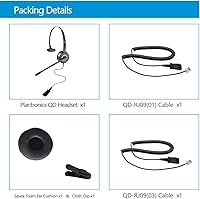
  • Included Cables: Two QD-RJ09 cables are included in the box — a QD-RJ09(01) and a QD-RJ09(03) — to support a broader range of compatible IP phone models.
  • Microphone: Features a noise-cancelling boom microphone with 300-degree rotation, allowing placement on either the left or right side of the mouth.
  • Driver Type: Uses a dynamic audio driver to reproduce voice frequencies clearly for telephone communication.
  • Impedance: Rated at 32 Ohm impedance, which is standard for wired telephone headsets in office and call center applications.
  • Sensitivity: The headset has a sound isolation sensitivity rating of 98 dB, suitable for focused voice call listening in office environments.
  • Headband Material: The headband is constructed from adjustable stainless steel, providing flexibility and resistance to deformation over extended use.
  • Ear Cushion: Fitted with a soft leatherette ear cushion; a spare replacement cushion is included in the package.
  • Compatible Brands: Works with IP desk phones from Yealink, Polycom, Grandstream, Fanvil, Snom, Mitel, Aastra, ShoreTel, Sangoma, Digium, NEC, Toshiba, and Nortel.
  • Incompatible Devices: Not compatible with Cisco IP phones, mobile phones, or computers in any configuration.
  • Wireless: Fully wired; does not support Bluetooth or any other wireless communication technology.
  • Inline Controls: No inline controls are present on the cable — there is no mute button or volume adjustment on the headset itself.
  • Package Contents: The box includes one QD headset, one QD-RJ09(01) cable, one QD-RJ09(03) cable, one spare ear cushion, and one clothing clip.
  • Package Dimensions: The retail packaging measures 7.3 x 5.6 x 2 inches, making it compact for desk storage or bulk shipment.
  • Body Materials: The headset body is constructed from a combination of plastic and stainless steel components.
  • Ear Placement: On-ear placement style, resting against the outer ear rather than fully enclosing it.
  • First Available: This model was first made available for purchase in September 2019 and has not been discontinued by the manufacturer.

Related Reviews

Wantek 602QS2 Telephone Headset
87%
89%
Comfort for Extended Use
93%
Audio Clarity & Noise Cancellation
85%
Build Quality & Durability
91%
Compatibility with Office Phones
87%
Fit & Adjustability
More
Yealink UH35 USB Headset
80%
83%
Microphone Clarity
88%
Wearing Comfort
79%
Build Quality
63%
Ear Pad Durability
93%
Plug-and-Play Setup
More
Logitech USB Headset Mono H650e
86%
88%
Audio Clarity
90%
Comfort for Extended Use
86%
Noise Cancellation
95%
Setup and Installation
82%
Build Quality
More
KEMEILE KML03USB Mono USB Headset
87%
89%
Sound Quality
91%
Comfort for Long Sessions
85%
Microphone Quality
88%
Noise Cancellation
96%
Ease of Setup
More
Yealink BH70 Mono Wireless Bluetooth Headset
86%
92%
Comfort for Long Wear
89%
Noise Cancellation Performance
75%
Bluetooth Connectivity
91%
Battery Life
88%
Sound Quality for Calls
More
Poly EncorePro 510 QD Wired Headset
87%
88%
Comfort for Long Usage
91%
Noise Cancellation Performance
89%
Sound Clarity & Microphone Quality
72%
Build Quality & Durability
95%
Ease of Use & Setup
More
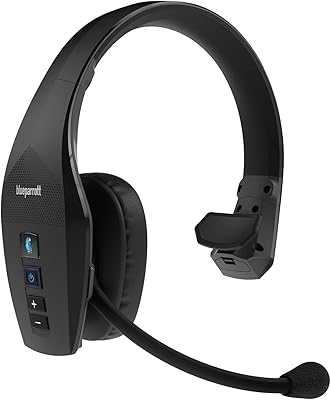
BlueParrott B650-XT Mono Bluetooth Headset
87%
96%
Noise Cancellation Performance
89%
Comfort for Long Usage
92%
Battery Life
85%
Build Quality & Durability
87%
Wireless Range
More
Jabra Engage 65 Mono Wireless Headset
82%
88%
Wireless Range & Stability
91%
Microphone Clarity
93%
Battery Life
74%
Comfort Over Long Shifts
67%
Value for Money
More
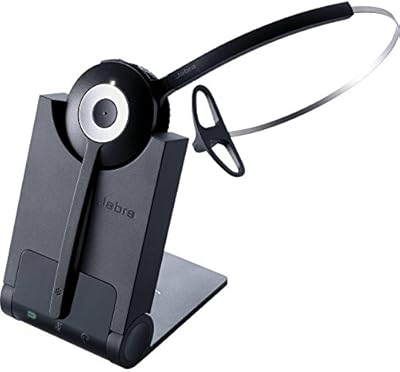
Jabra PRO 920 Mono Wireless Desk Headset
79%
91%
Wireless Range & Stability
88%
Microphone Clarity
72%
Comfort & Wearability
84%
Call Audio Quality
89%
Peak Stop & Hearing Protection
More
Yealink WH66 DECT Wireless Headset
77%
91%
Call Audio Clarity
88%
DECT Wireless Range
79%
Battery Life
74%
Touch Screen Usability
83%
Comfort During Extended Wear
More

FAQ

Yes, the VT6932 is compatible with Yealink IP phones. Two RJ09 cable variants are included in the box, and one of them should work with your T46S. Just connect the appropriate cable to the headset port on the phone and you should be ready to go without any configuration.

Unfortunately, no. The VT VT6932 Mono QD Telephone Headset is explicitly not compatible with Cisco IP phones, including the 7900 series. There is no adapter available that bridges this gap, so if you are on Cisco hardware you will need to look for a headset specifically designed for Cisco phones.
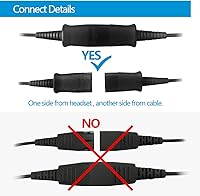
The quick-disconnect (QD) plug sits between the headset and the RJ09 cable that goes into your phone. It lets you detach the headset from the cable with a single pull — no unscrewing, no unplugging from the phone itself. This is especially useful if you need to step away from your desk quickly during a call, or if multiple agents share the same phone and swap headsets between shifts.

No, this is strictly a desk phone headset. It uses an RJ9 connector, which is only found on physical IP desk phones. There is no 3.5mm, USB, or Bluetooth option on this model, so it will not connect to a computer, tablet, or mobile phone in any configuration.

It is solid for a wired office headset at this price tier, but be realistic about expectations. It handles moderate background noise well — things like HVAC hum, keyboard sounds, and general office chatter get noticeably reduced. In a genuinely loud environment, like a busy call floor or warehouse setting, some background bleed will still come through. It is not the same level of noise isolation you would get from a Jabra Evolve or a dedicated active noise-cancelling headset.

Not necessarily — it depends on your work environment. Single-ear designs are standard in many call centers and reception desks precisely because they let you stay aware of what is happening around you while still hearing callers clearly. If your job involves both phone calls and face-to-face interactions, it is actually more practical than a closed binaural headset. If you prefer total audio immersion, a two-ear headset might suit you better.

The boom rotates a full 300 degrees, so you can position it on either the left or right side of your mouth depending on your preference. It holds its position reliably during calls and does not drift back over time, which is a common issue with cheaper boom designs.

The stainless steel headband and overall construction are genuinely solid for the price, and the headset body holds up well. The weak point flagged most often by heavy users is the RJ09 cable, which can show wear near the connector end after several months of daily plug-and-unplug cycles. If you use the quick-disconnect frequently, consider treating the cable connection point carefully to extend its life.

Different IP phone brands use slightly different RJ9 pinouts, and the two cables — QD-RJ09(01) and QD-RJ09(03) — accommodate these variations. Try the (01) cable first; if audio is low or absent, switch to the (03). Your phone's manual or a quick search for your specific model and RJ9 headset compatibility will confirm which one applies to your setup.

Yes, and VT includes a spare cushion in the box for exactly this reason. When your original cushion starts to peel or flatten — which typically happens after several months of daily use — swapping it out is straightforward. Replacement cushions compatible with the Plantronics-style QD form factor are also widely available from third-party suppliers if you need more down the line.