Overview

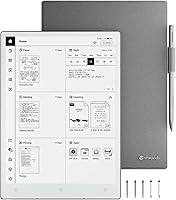
The VIWOODS AiPaper 10.65″ AI E Ink Tablet enters a competitive space with a clear pitch: a distraction-free writing surface that doesn't compromise on screen real estate or portability. At just 4.5mm thin and weighing about as much as a paperback novel, the physical package is genuinely impressive for a 10.65-inch device. Running Android 13, it sits in an interesting middle ground — more flexible than the reMarkable 2's locked-down ecosystem, but that openness comes with trade-offs in software cohesion. It launched in early 2025, so long-term reliability data is still thin. Buyers at this price point should factor that newness into their decision.
Features & Benefits

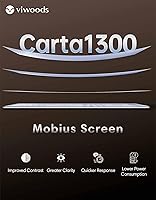
The Carta 1300 Mobius display is the headline spec here, and it earns attention. Unlike standard E Ink panels, the Mobius substrate is plastic rather than glass, which contributes directly to the AiPaper's featherweight build without sacrificing contrast or sharpness. At 300 pixels per inch, text is crisp enough that fine handwriting looks clean rather than pixelated. The pen-to-ink distance of 750 µm is notably close — you're not drawing on top of glass, and the difference is palpable for long writing sessions. The octa-core processor handles page flips and tool switching without the maddening lag common in this category. Storage at 128GB is ample, and cloud sync across major platforms keeps files accessible. The AI summarization tools show promise but feel early-stage — don't buy this notebook solely for those features.

Best For

This digital notebook is a natural fit for graduate students and researchers who spend their days marking up dense PDFs or drafting notes they'll need to search later. Legal and medical professionals will appreciate the combination of organized note structures and calendar sync with Google or Outlook. It also works well for avid readers who want a large-format E Ink screen without giving up light productivity. Travelers who are tired of hauling heavy devices will notice the slim profile. And if you've been meaning to ditch paper notebooks but can't quite give up the physical writing feel, the AiPaper's textured surface and cloud backup make that switch far less painful.

User Feedback

With around 97 ratings and a 4.1-star average, early reception to the AiPaper leans positive — but that pool is small enough that a handful of enthusiastic early adopters can skew the numbers. The most repeated praise centers on writing feel and screen clarity, both of which align with what the hardware promises on paper. On the critical side, reviewers surface the usual E Ink frustrations: palm rejection isn't always consistent, the app ecosystem feels limited compared to a standard Android tablet, and software polish is still catching up. A few buyers question whether the added Android flexibility justifies the cost over the more established reMarkable 2. VIWOODS appears responsive to firmware feedback, which is encouraging for a young product.

Pros

  • The close pen-to-ink distance makes handwriting feel more like real paper than almost anything else in this category.
  • A 10.65-inch screen displays full A4 documents without awkward zooming — a real advantage for PDF-heavy workflows.
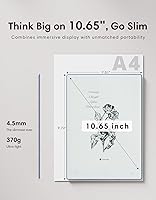
  • At roughly the weight of a paperback and just 4.5mm thin, the AiPaper is exceptionally portable for its screen size.
  • The Carta 1300 Mobius display delivers sharp, high-contrast text that holds up well under varied lighting conditions.
  • 128GB of onboard storage is among the most generous in the E Ink tablet category.
  • Android 13 support means you are not locked into a single proprietary app ecosystem the way reMarkable users are.
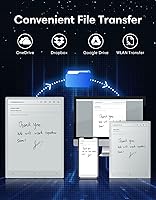
  • Cloud sync with Google Drive, OneDrive, and Dropbox keeps notes accessible across all your devices without extra steps.
  • The bundled stylus requires no charging and ships with multiple replacement nibs — a practical, well-considered accessories package.
  • Google and Outlook calendar integration makes the daily planner genuinely useful for professionals managing complex schedules.
  • Multi-day battery life under typical note-taking and reading conditions reduces the anxiety of forgetting a charger.

Cons

  • Palm rejection inconsistencies frustrate users with non-standard grip styles during longer writing sessions.
  • The software experience still feels unpolished in places — navigation quirks and app compatibility gaps are common complaints.
  • AI summarization tools are inconsistent in quality and not yet reliable enough to build core workflows around.
  • ViTransfer adds unnecessary friction for users who would prefer standard Android file-sharing methods.
  • The review pool is still very small for a 2025 launch, making it hard to assess long-term durability with confidence.
  • Wi-Fi and AI processing drain the battery significantly faster than pure note-taking use does.
  • The organizational structure for notes is fairly rigid, which frustrates users with non-linear or freeform note-taking habits.
  • Heavy Bluetooth file transfers are slower than buyers expect, particularly with large PDF batches.
  • New users to E Ink devices face a real adjustment period that onboarding does not adequately prepare them for.
  • At this price tier, more mature competitors offer proven software ecosystems that the AiPaper has not yet caught up to.

Ratings

The VIWOODS AiPaper 10.65″ AI E Ink Tablet arrives as one of the more ambitious entries in the digital notebook space for 2025, and the scores below reflect what real buyers around the world are actually experiencing — filtered for authenticity, with bot activity and incentivized reviews actively excluded. Our AI synthesized verified global feedback to surface both the genuine strengths and the friction points that matter most at this price tier. Nothing is glossed over: where the AiPaper earns its praise, the data shows it; where buyers are frustrated, that is reflected too.

Writing Feel & Pen Response
88%
The combination of a close pen-to-ink distance and high pressure sensitivity makes handwriting feel remarkably natural — users transitioning from paper notebooks consistently highlight this as the AiPaper's strongest selling point. Annotation sessions on dense academic PDFs feel fluid rather than mechanical.
A small but vocal group of users reports inconsistent palm rejection during longer writing sessions, which breaks concentration. It is not a dealbreaker for most, but people with non-standard grip styles tend to notice it more.
Display Quality
91%
The Carta 1300 Mobius panel draws consistent praise for its contrast and sharpness. Readers and annotators working under varied lighting conditions — from dim dorm rooms to bright office environments — report that text stays crisp without the eye fatigue that backlit screens cause.
Some users coming from OLED or LCD tablets find the inherent E Ink refresh behavior jarring at first, especially when scrolling. The display excels for static content but the technology has a ceiling that no software update can fully overcome.
Build Quality & Portability
86%
At 4.5mm thin and roughly the weight of a trade paperback, the AiPaper genuinely impresses in-hand. Frequent travelers and commuters repeatedly note that it slips into a bag without adding noticeable bulk, which is rare for a device with this screen size.
The plastic Mobius substrate that keeps weight down also raises questions about long-term scratch and flex resistance. A few early buyers report minor flex when gripping the device with one hand — nothing critical, but worth monitoring over months of daily use.
Software & Android Ecosystem
67%
33%
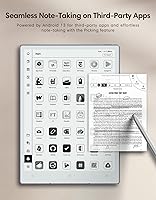
Running Android 13 gives the AiPaper genuine app flexibility that locked-down competitors like the reMarkable 2 simply cannot match. Users who want to run their preferred PDF reader, cloud storage client, or third-party note app genuinely can, which opens up real workflow possibilities.
The trade-off for that openness is a software experience that still feels unpolished in places. Navigation optimized for E Ink refresh rates, app compatibility inconsistencies, and the occasional UI lag remind users that this is not a mature platform. Several reviewers mention hoping firmware updates close these gaps.
AI Note Features
62%
38%
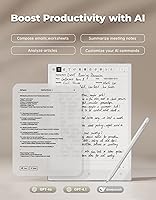
The summarization and daily planning tools are a genuinely interesting differentiator — users who lean into the calendar sync with Google or Outlook find the automatic date-sorting of notes surprisingly useful for weekly review workflows.
Honest feedback from buyers makes clear that the AI features feel like version 1.0 at best. Summarization quality is inconsistent, and several users describe the tools as a nice bonus rather than a reason to choose this notebook over alternatives. Expectations should be calibrated accordingly.
Processor Performance
79%
21%
Page flips on large documents and tool switching happen quickly enough that the usual E Ink frustration — waiting for the device to catch up — is mostly absent here. Heavy PDF users with 400-plus page documents report a noticeably smoother experience than on competing hardware.
It is still an E Ink processor, and anyone expecting tablet-grade responsiveness will be disappointed. Multitasking between multiple apps pushes its limits, and the performance ceiling becomes apparent if you try to use it for anything beyond its intended note-taking and reading use cases.
Storage & File Management
84%
128GB of onboard storage is genuinely generous for this category — most users will never come close to filling it even after years of notes, PDFs, and ebooks. Cloud sync with Google Drive, OneDrive, and Dropbox rounds out the file accessibility story well.
The file transfer app, ViTransfer, works but adds an extra step that some users find unnecessary when standard USB or Bluetooth transfer would suffice. A handful of reviewers report occasional sync hiccups with Dropbox specifically, though these appear intermittent.
Stylus & Accessories
81%
19%
The bundled EMR stylus Gen2 is well-balanced and requires no charging, which is a practical daily advantage over active stylus systems. The inclusion of five replacement nibs — including a long-lasting tip variety — signals that VIWOODS thought through the accessories bundle thoughtfully.
The stylus lacks physical buttons, which limits shortcut options that power users rely on for erasing or switching tools without lifting their hand. Buyers who have used Wacom-backed styli on other devices will likely notice the absence of that feature fairly quickly.
Battery Life
77%
23%
E Ink's inherent low power consumption means the AiPaper lasts through multiple days of typical use — reading, annotating, and occasional cloud syncing — without needing a charge. For students in all-day seminar environments, this is a genuine practical advantage.
Wi-Fi heavy usage and AI feature processing drain the battery noticeably faster than pure note-taking does. Users who keep Wi-Fi on continuously and rely on cloud sync throughout the day report that the battery advantage shrinks considerably under that real-world load.
Value for Money
63%
37%
For buyers whose daily workflow centers on handwriting, PDF annotation, and distraction-free reading, the combination of hardware quality and screen size does offer a reasonable case for the price relative to category alternatives.
At this price point, the AiPaper competes against the reMarkable 2 and Kobo Elipsa 2E, both of which have more mature software ecosystems and established track records. Several reviewers explicitly question whether the software immaturity and AI features that are still finding their footing justify the premium over those proven rivals.
Screen Size & Layout
89%
The 10.65-inch canvas genuinely changes the writing and reading experience in a positive way — full A4 documents display without awkward zoom-and-scroll, and users who sketch diagrams or write margin-heavy notes find the extra real estate makes a tangible difference compared to smaller E Ink devices.
The larger footprint means one-handed use is less comfortable than on compact competitors. Users who specifically want a pocket-friendly device or who annotate while standing will find the size slightly unwieldy compared to 7-to-8-inch alternatives.
Connectivity & Sync
76%
24%
Wi-Fi, Bluetooth, and USB connectivity covers all practical bases, and the QR-code-based sharing is genuinely convenient for quickly pushing notes to a phone or colleague without digging through menus. WLAN transfer for large file batches is fast and reliable in testing.
Bluetooth file transfer is slower than users expect for large PDF batches, and the ViTransfer app — while functional — is not as intuitive as native OS-level sharing. A few Android power users note they would prefer a cleaner, more standard Android file-sharing experience.
Note Organization & Planning Tools
71%
29%
The daily planner interface with automatic date-based note sorting is a thoughtful feature that professionals managing multiple projects genuinely appreciate. Google and Outlook calendar integration works reliably and saves real context-switching time for people already embedded in those ecosystems.
The organizational structure is somewhat rigid, and users with non-linear note-taking habits — mind maps, freeform linking between documents — find the system constraining. The interface does not yet match the organizational depth of established apps like Notability or GoodNotes on competing platforms.
Setup & Learning Curve
73%
27%
Most users report getting the core writing and PDF workflows running within an hour of unboxing. The included cover and stylus mean there is nothing essential to buy before getting started, and Android familiarity helps existing Android users orient quickly.
Users new to E Ink tablets often underestimate the adjustment period — the display behavior, the refresh quirks, and the Android-on-E-Ink experience all require recalibration of expectations. The onboarding experience could do more to walk first-time E Ink users through what to expect.

Suitable for:

The VIWOODS AiPaper 10.65″ AI E Ink Tablet is built for people whose daily lives revolve around reading, writing, and annotating — and who are tired of the distraction and eye strain that come with standard backlit screens. Graduate students and academics who spend hours marking up research papers will find the large canvas and sharp display a genuine upgrade over smaller E Ink devices or paper-based workflows. Legal and medical professionals who need organized, searchable handwritten notes with reliable cloud backup will appreciate the Google and Outlook calendar integration alongside broad cloud platform support. Travelers and remote workers who carry a bag all day will notice how little the AiPaper weighs relative to its screen size — it genuinely disappears in a bag in a way that heavier tablets do not. If you are actively trying to move away from paper notebooks but cannot stomach losing the physical writing feel, the pen-to-ink distance and textured surface make that transition far more convincing than most digital alternatives on the market.
Not suitable for:

The VIWOODS AiPaper 10.65″ AI E Ink Tablet is not the right tool for buyers who need a general-purpose Android tablet for video streaming, gaming, or browser-heavy workflows — the E Ink display is fundamentally unsuited for those use cases, regardless of how capable the processor is. Buyers who rely on a rich third-party app ecosystem and expect a polished, mature software experience will likely find the current Android-on-E-Ink implementation frustrating, especially compared to established platforms like GoodNotes running on an iPad. If AI-powered note features are the primary reason you are considering this device, you should wait — the tools are promising but early-stage, and building a purchasing decision around them is premature. People who want a proven, long-track-record device with years of firmware refinement behind it will be better served by more established competitors like the reMarkable 2 or Kobo Elipsa 2E, which have had time to iron out the rough edges the AiPaper is still working through. Finally, one-handed commuter users who need something truly pocketable should look at smaller-format E Ink notebooks instead.
Specifications

  • Screen Size: The display measures 10.65 inches diagonally, providing a writing surface close to A4 paper size.
  • Display Technology: Uses a Carta 1300 Mobius E Ink panel, which offers improved contrast and faster refresh compared to older Carta generations, while the flexible Mobius substrate reduces overall device weight.
  • Resolution: The screen renders at 2560x1920 pixels at 300 pixels per inch, delivering sharp text and fine line detail suitable for handwriting and document annotation.
  • Dimensions: The device measures approximately 246.5mm x 178mm x 4.5mm, making it one of the slimmest large-format E Ink tablets currently available.
  • Weight: The AiPaper weighs 370g, which is notably light for a 10.65″ device and comparable in hand to a slim paperback book.
  • Processor: Powered by a MediaTek MT8788 octa-core processor running at 2.0 GHz, which is well-suited for E Ink workloads including page turning, PDF loading, and note-taking.
  • Operating System: Ships with Android 13, allowing installation of compatible third-party apps beyond the pre-loaded VIWOODS software suite.
  • Storage: Includes 128GB of onboard flash storage, which is generous for this category and sufficient for thousands of PDFs, ebooks, and handwritten notebooks.
  • Stylus: Bundled EMR Gen2 stylus supports 8192 levels of pressure sensitivity and requires no battery or charging.
  • Pen-to-Ink Distance: The pen-to-ink distance is 750 µm, meaning the gap between the stylus tip and displayed ink is minimal, contributing to a natural writing feel.
  • Connectivity: Supports Wi-Fi, Bluetooth, and USB connectivity for data transfer, peripheral pairing, and charging.
  • File Transfer: Files can be moved via WLAN Transfer, Bluetooth, USB, QR code sharing, or the proprietary ViTransfer app.
  • Cloud Support: Natively integrates with Google Drive, OneDrive, and Dropbox for automatic file synchronization across devices.
  • Calendar Integration: The daily planner feature syncs with both Google Calendar and Microsoft Outlook to consolidate scheduling and note organization.
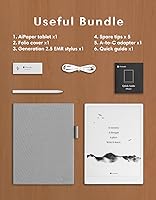
  • In-Box Contents: Each unit includes the tablet, a PU leather protective cover, the EMR Gen2 stylus, and five replacement nibs comprising one long-lasting tip and four smooth-writing tips.
  • Voltage: The device operates at 5 volts and charges via USB, compatible with standard USB-C power adapters.
  • Availability Date: The AiPaper became publicly available in March 2025, making it a recent market entrant with limited long-term user data at this time.

Related Reviews
Bigme inkNote Color+ Lite 10.3″ E-ink Tablet
72%
83%
Display Clarity
61%
Color Reproduction
81%
Note-Taking Experience
88%
Build Quality
58%
Software & App Compatibility
More
BOOX Note Air 4C 6GB/64GB
81%
93%
Display Quality (B/W)
67%
Color Display Quality
88%
Writing & Stylus Experience
91%
Build Quality & Design
84%
Android Openness & App Ecosystem
More
Bigme B751C 7-Inch Color E-Ink Tablet
73%
72%
Color Display Quality
84%
Writing & Stylus Experience
81%
Note-Taking & Annotation Features
69%
Portability & Form Factor
78%
Battery Life
More
Geniatech KloudNote Mini 9.7″ E-Ink Tablet
68%
74%
Display Quality
81%
Stylus Performance
78%
Battery Life
41%
Software & App Compatibility
79%
Note-Taking Experience
More
iFLYTEK AINOTE Air 2 E Ink Tablet

76%
88%
Writing Experience
83%
AI Transcription Accuracy
86%
Display Quality
91%
Portability & Design
79%
Multilingual Support
More
ITMEIPC T-10 Android Tablet 10.1-inch, 6GB RAM, 64GB Storage
80%
91%
Value for Money
85%
Display Quality
74%
Battery Life
78%
Build Quality
88%
Performance for Light Use
More
ATOZEE 10 Inch Tablet
83%
92%
Value for Money
89%
Display Quality
85%
Battery Life
83%
Performance for Everyday Use
90%
Expandable Storage
More
NovoJoy NVYQ10S 10-inch Tablet 64GB
84%
92%
Value for Money
90%
Expandable Storage
85%
Battery Life
75%
Display Quality
80%
Performance (General Use)
More
CWOWDEFU 10-inch Kids Tablet 128GB
86%
87%
Performance
92%
Battery Life
88%
Build Quality
82%
Display Quality
91%
Ease of Use
More
TWTNVOF Kids Tablet 10 inch, 32GB
86%
89%
Educational Features
94%
Parental Controls
90%
Durability & Build Quality
82%
Battery Life
85%
Performance (Processor Speed)
More

FAQ

It is closer to paper than most E Ink tablets on the market, primarily because the pen-to-ink distance is very small and the screen has a subtle texture rather than a slick glass surface. That said, it still feels like writing on a plastic screen at its core — if you go in with realistic expectations rather than expecting a perfect paper replica, most users come away impressed.

Because the AiPaper runs Android 13, you can sideload compatible apps or access them through supported app stores. Keep in mind that not every Android app is optimized for E Ink displays — apps with heavy animations or video will look poor on this screen. Standard reading and productivity apps like Kindle and Google Keep generally work fine.

The reMarkable 2 has a more mature, refined software experience built specifically for writing and reading, but it runs a locked-down proprietary OS with very limited app support. The AiPaper offers Android flexibility and a larger screen with more storage, but the software is less polished at this stage. If ecosystem control and proven reliability matter most to you, reMarkable still has an edge; if you want more openness and screen real estate, the AiPaper makes a credible case.

No — the bundled EMR stylus is passive, meaning it draws power from the tablet's electromagnetic field rather than its own battery. You never need to charge it or pair it via Bluetooth, which is one less thing to worry about in daily use.

It integrates with Google Drive, OneDrive, and Dropbox. Sync behavior depends on your settings, but the device is designed to keep files updated in the background when connected to Wi-Fi. A few users have reported occasional hiccups with Dropbox specifically, so it is worth testing your preferred service during any return window.

Honest answer: it is useful in a limited way but should not be the primary reason you buy this notebook. The summarization tools work reasonably well for shorter, clearly structured notes, but they produce inconsistent results on dense academic or technical content. Think of the AI features as a bonus that may improve with firmware updates rather than a core differentiator.

For typical use — handwriting notes, reading ebooks, and occasional cloud syncing with Wi-Fi turned off between sessions — most users get several days between charges. If you keep Wi-Fi on continuously and use the AI features regularly, expect the battery to drain faster, possibly requiring a charge every day or two under heavy use.

Palm rejection works for the majority of users but is one of the more commonly mentioned friction points in early reviews. Left-handed writers and people with non-standard grip styles report more accidental touches than right-handed users with conventional grips. VIWOODS has been pushing firmware updates, so this may improve over time, but it is worth being aware of if you write with your hand resting heavily on the screen.

Yes, this is actually one of the AiPaper's stronger points relative to competitors. The octa-core processor handles large multi-hundred-page PDFs noticeably better than entry-level E Ink tablets, and page flips stay responsive even in dense documents. Very large annotated files with lots of embedded images can still cause occasional slowdowns, but day-to-day academic or professional PDF workflows run smoothly.

Not at all. Notes and documents can be exported via USB, shared through cloud sync, transferred wirelessly using WLAN or Bluetooth, or sent via email and QR code. The ViTransfer app adds another option for moving files to a phone or computer. The variety of transfer methods is genuinely practical, even if some users find the proprietary ViTransfer step slightly redundant alongside standard Android sharing options.