Overview

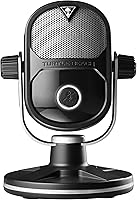
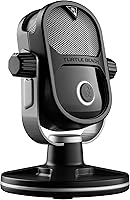
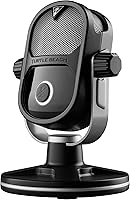
The Turtle Beach TruSpeak USB Streaming Microphone arrived in 2016 with a specific mission: give console streamers a proper desktop mic without forcing them through the usual tangle of audio interfaces and mixer cables. Turtle Beach had spent years earning trust in the gaming headset space, so branching into standalone microphones made sense. The appeal is straightforward — plug into your Xbox One, PS4, or PC via a single USB cable and you are live. That simplicity comes at a premium price point, though, so buyers should know upfront they are paying for console-native convenience, not necessarily the best raw audio per dollar.
Features & Benefits

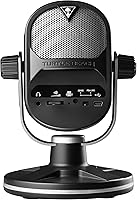
The TruSpeak mic's most practical trick is its adaptive mic patterns — use it flat on a desk in tabletop mode or mounted on a boom arm, and the pickup adjusts accordingly. Onboard processing handles EQ, gain, and compression automatically, which means your voice sounds reasonably polished without touching any audio settings. The built-in headphone output lets you hear your game and your own voice together at zero latency, genuinely useful during live streams. A high signal-to-noise ratio keeps background hiss impressively low, and the companion software adds voice presets for those who want a bit more personality dialed into their stream audio.

Best For

This streaming mic is a strong fit for console streamers — specifically those on Xbox One or PS4 — who want a dedicated microphone without buying a separate audio interface. If you have been getting by with a headset mic and want a noticeable step up, this is a reasonable path forward. Beginner and intermediate PC streamers who would rather skip the learning curve of XLR setups will also find it approachable. It performs best in a quiet or semi-quiet room, since the onboard noise management has its limits. Existing Turtle Beach headset owners get the bonus of a familiar, compatible monitoring ecosystem right out of the box.

User Feedback

Across roughly 460 ratings, Turtle Beach's desktop microphone sits at 3.8 out of 5 stars — solid, but the mixed signals are worth unpacking. Most buyers highlight easy console setup and clean out-of-the-box voice clarity; the zero-latency headphone monitoring draws consistent praise from streamers who depend on it. Criticism clusters around two areas: companion software that behaves inconsistently on certain systems, and a price that feels hard to justify when competing USB mics deliver comparable audio for less. A handful of reviewers also flagged concerns about long-term build quality. That said, a fair share of negative feedback appears to come from buyers whose use case simply did not match what this mic was designed to do.

Pros

  • True plug-and-play setup on Xbox One and PS4 — no audio interface or mixer required.
  • Onboard processing automatically balances EQ, gain, and compression so your voice sounds polished from the start.
  • The built-in headphone amplifier lets you monitor game audio and your own voice simultaneously with no audible delay.
  • Flexible placement options with both tabletop and boom-mounted mic modes built in.
  • Exceptionally low background noise capture keeps your stream audio clean during long sessions.
  • Companion software offers voice presets that are easy to apply without any audio engineering knowledge.
  • Single USB cable handles both power and audio routing, keeping your desk setup uncluttered.
  • Turtle Beach's established reputation in gaming audio means solid driver support and brand accountability.

Cons

  • The asking price is hard to justify when newer USB microphones offer comparable audio quality for significantly less.
  • Companion software has been reported as unreliable on some systems, with stability issues affecting a portion of users.
  • Several buyers raised concerns about build durability, suggesting the physical construction may not match the premium price.
  • Onboard noise management has real limits — this streaming mic struggles in louder or echo-prone environments.
  • Audio output is mono only, which restricts post-production flexibility for creators who edit their stream recordings.
  • The product launched in 2016, and the competitive USB mic market has moved on considerably since then.
  • Voice preset customization in the companion app is relatively shallow compared to what standalone audio software can offer.
  • Console compatibility, while a key selling point, may require firmware checks or updates that some users find frustrating.

Ratings

The scores below reflect our AI-powered analysis of verified global buyer reviews for the Turtle Beach TruSpeak USB Streaming Microphone, with spam, bot activity, and incentivized feedback actively filtered out to ensure accuracy. Each category is scored independently based on what real streamers and gamers actually reported — the strengths that earned genuine praise and the friction points that kept this mic from universal acclaim. Nothing is softened or inflated: both the wins and the frustrations are represented as honestly as the data allows.

Ease of Setup
91%
This is where the TruSpeak mic earns its most consistent praise across reviews. Console streamers in particular highlighted how refreshing it was to plug in via USB and be live within minutes, with no driver installation headaches, no mixer configuration, and no audio routing puzzles to solve before going live.
A small number of PC users reported that Windows occasionally misidentified the device on first connection, requiring a manual input source switch in system settings. It is a minor issue, but worth knowing if you are switching between multiple audio devices regularly.
Voice Clarity
78%
22%
Out of the box, the TruSpeak mic produces a noticeably cleaner and fuller voice than typical headset boom mics, which is exactly what most buyers were upgrading from. The automatic EQ and compression processing does a solid job of making voices sound present and broadcast-ready without any manual tuning.
Compared to similarly priced standalone condenser microphones on PC, the voice capture can sound slightly processed or compressed in a way that more experienced listeners notice. The onboard processing, while helpful for beginners, removes some of the natural character that audiophile-minded streamers prefer.
Console Compatibility
83%
For Xbox One and PS4 streamers, this mic fills a genuine gap in the market — most USB microphones simply do not work cleanly with consoles, and the TruSpeak mic was specifically engineered to handle audio routing through a single USB connection on both platforms without workarounds.
Compatibility with newer consoles like Xbox Series X and PlayStation 5 is not officially confirmed, and user reports on those platforms are mixed. Buyers on current-generation hardware should verify support directly with Turtle Beach before purchasing, as this remains an unresolved grey area.
Value for Money
54%
46%
For the narrow audience of console-first streamers who genuinely need USB plug-and-play on Xbox One or PS4, the convenience factor does carry real practical value that cheaper alternatives simply cannot match on those platforms.
For most buyers — especially PC streamers — the price is difficult to defend given how the USB microphone market has evolved since 2016. Competing options offer comparable or superior audio quality at meaningfully lower prices, making the value case for Turtle Beach's desktop microphone a tough sell today.
Noise Rejection
67%
33%
In a quiet or semi-controlled room, the onboard processing keeps background noise at a respectable level, and several reviewers noted that mechanical keyboard sounds and light ambient noise were handled better than they expected from a mic in this form factor.
Streamers in louder environments — open rooms, near desktop tower fans, or with street noise — reported audible bleed-through that the onboard noise management could not fully suppress. This mic is not a replacement for acoustic treatment if your setup space is less than ideal.
Headphone Monitoring
86%
The built-in headphone amplifier was a genuine highlight for streamers who want to hear both their game audio and their own voice in real time without any perceptible lag. Reviewers specifically appreciated being able to monitor their voice level during streams without needing a separate headphone amp or mixer.
The headphone output volume ceiling is adequate for most users but a few reviewers with higher-impedance headphones found it underpowered at maximum gain. It works well with standard gaming headsets but may leave audiophile headphone users wanting more drive.
Build Quality
61%
39%
The mic has a solid, weighted feel on the desk and does not wobble or tip easily during use, which reviewers appreciated given that it sits at a premium price point. The physical construction feels intentional rather than hollow.
A recurring thread in critical reviews involved concerns about long-term durability — particularly around the USB connection point and the stand mechanism. Some buyers reported signs of wear or loosening after months of daily use, which is a concern for a mic positioned at this price tier.
Software Experience
49%
51%
When the companion app works correctly, the voice preset system is genuinely accessible for beginners who want to add some personality to their stream audio without learning audio engineering. Installation is straightforward on most standard Windows configurations.
Software reliability was one of the most frequently cited pain points in negative reviews, with users reporting crashes, presets failing to save, and the app refusing to launch after Windows updates. For a product at this price, the software experience falls noticeably short of what buyers reasonably expect.
Mic Pattern Flexibility
72%
28%
Having both tabletop and boom-mounted modes available without needing to purchase accessories gives the mic genuine versatility across different desk configurations, and streamers who relocated the mic between setups appreciated not being locked into a single placement style.
The pattern options are limited to two fixed modes, and there is no cardioid-only or omnidirectional setting for more nuanced recording scenarios. Streamers whose setups evolve over time may eventually find the fixed dual-mode approach restrictive.
PC Compatibility
79%
21%
On Windows and Mac, the mic behaves like a standard USB audio device, which means it integrates cleanly with OBS, Streamlabs, Discord, and other common streaming tools without requiring special configuration or third-party drivers.
PC users who tried to use the mic alongside professional DAWs or multi-input audio setups occasionally ran into conflicts, particularly around ASIO driver compatibility. It functions well as a simple input device but was not designed with complex PC audio chains in mind.
Onboard Processing
74%
26%
The automatic EQ, gain, and compression management is a real convenience for streamers who have no interest in learning audio post-processing. It keeps voice levels consistent across a session and removes the need to manually ride gain during longer streams.
The lack of manual override for individual processing parameters frustrates more experienced streamers who want to bypass or selectively disable the compression. Once you outgrow the automatic processing, there is no way to work around it without external software.
Physical Design
71%
29%
The mic has a clean, understated aesthetic that fits unobtrusively into a gaming desk setup without drawing attention away from the rest of the battlestation. Its compact footprint was noted positively by streamers with limited desk real estate.
Some reviewers felt the physical design looked somewhat dated compared to newer desktop microphones that have more refined or RGB-accented aesthetics. For streamers who show their desk on camera, the visual appeal may not match the price paid.
Brand Support
66%
34%
Turtle Beach has an established customer support infrastructure built around gaming products, and most buyers reported being able to reach support when needed. The brand's history in gaming audio gives some confidence around parts availability and firmware updates.
Given that this mic launched in 2016, several reviewers expressed uncertainty about how long active support and software updates will continue. The companion app has not received visible updates in some time, which raises reasonable questions about long-term ecosystem investment.

Suitable for:

The Turtle Beach TruSpeak USB Streaming Microphone was built for a specific type of streamer, and it delivers best when used by that person. If you are gaming on an Xbox One or PS4 and want a real desktop mic — not just a headset boom — without buying a separate audio interface or learning to use mixing software, this is one of the few options designed with that exact scenario in mind. Beginner and intermediate streamers who want their voice to sound clean and processed straight out of the box, without touching EQ sliders or fiddling with gain staging, will appreciate how much the onboard processing handles automatically. PC streamers who prioritize simplicity over maximum audio control will also find it a comfortable fit. If you already own Turtle Beach headsets and want a unified monitoring setup that keeps your game audio and mic feed in one place, the built-in headphone amplifier makes that effortless.
Not suitable for:

Buyers who are serious about audio quality and willing to put in the setup work should probably look elsewhere before committing to the Turtle Beach TruSpeak USB Streaming Microphone. At this price tier, a dedicated condenser microphone paired with a budget audio interface can offer more flexibility and often better raw sound — a real consideration for anyone planning to grow their channel long-term. If you stream in a noisy environment, the onboard noise management will only take you so far, and you may find yourself fighting background sounds the mic cannot fully suppress. Power users who want granular control over their audio chain — custom EQ curves, multi-pattern switching, or compatibility with professional DAW workflows — will hit the limits of this mic's companion software quickly. The 2016 release date also means the competitive landscape has shifted considerably; there are newer USB microphones on the market that offer comparable or stronger performance at lower prices, which makes the value case harder to justify today.

Specifications

  • Manufacturer: Made by Turtle Beach, a gaming audio brand with an established history in headsets and peripherals for console and PC gaming.
  • Model Number: The official model identifier is TBS-0400-01, useful for warranty registration, driver downloads, and support requests.
  • Connection Type: Connects via a single USB cable that simultaneously powers the mic and handles all audio routing — no mixer or audio interface required.
  • Compatible Platforms: Works with Xbox One, PlayStation 4, PC, and Mac via USB, covering the main platforms used by console and desktop streamers.
  • Mic Pickup Modes: Supports two adaptive pickup configurations: a tabletop mode for desk placement and a boom-mounted mode for arm attachment, with the pattern adjusting to the setup.
  • Signal-to-Noise Ratio: Rated at 120 dB, meaning the mic captures voice with very little background hiss or electronic interference bleeding into the recording.
  • Frequency Response: Covers a range up to 20 kHz, which encompasses the full spectrum of human speech and most vocal nuance relevant to streaming.
  • Audio Channels: Records in mono (single channel), which is standard for voice-focused streaming microphones and sufficient for live broadcast use.
  • Onboard Processing: Includes built-in digital processing that automatically manages EQ, gain, and compression to deliver consistent voice output without manual adjustment.
  • Headphone Output: Features a zero-latency 3.5mm headphone jack that allows real-time monitoring of both microphone input and game audio simultaneously.
  • Power Source: Bus-powered entirely through the USB connection, drawing power directly from the console or PC — no external power adapter or batteries needed for the mic itself.
  • Companion Software: A downloadable companion app provides access to voice presets and basic output customization for streamers who want to personalize their audio profile.
  • Weight: The unit weighs 1.8 pounds, giving it a solid desk presence without being heavy enough to cause stability issues in tabletop mode.
  • Dimensions: Physical dimensions are 0.43″ x 0.63″ x 0.43″, making it a compact desktop unit suited for standard streaming desk setups.
  • Release Date: Originally released on October 23, 2016, positioning it as an early entrant in the console-focused standalone streaming microphone category.
  • Average Rating: Holds a 3.8 out of 5 star average across 460 customer ratings on Amazon, reflecting generally positive but occasionally mixed buyer experiences.
  • Discontinuation Status: As of available product data, this mic has not been officially discontinued by Turtle Beach and remains listed as an active product.

Related Reviews

Razer Seiren X USB Streaming Microphone
87%
88%
Sound Quality
90%
Noise Reduction
95%
Ease of Setup
85%
Build Quality
78%
Microphone Sensitivity
More
Trust Gaming GXT 241 Velica USB Microphone
76%
78%
Audio Clarity
83%
Build Quality
89%
Value for Money
94%
Ease of Setup
34%
Onboard Controls
More
Neat Microphones Skyline USB Desktop Condenser Microphone
89%
94%
Audio Quality
91%
Ease of Use
89%
Build Quality
90%
Mute Button Functionality
92%
Value for Money
More
CMTECK XM600 USB Microphone
81%
91%
Value for Money
94%
Ease of Setup
72%
Audio Clarity
83%
Build Quality
89%
Mute Button & LED
More
JLab Talk USB Microphone
72%
83%
Sound Clarity
88%
Polar Pattern Versatility
93%
Ease of Setup
61%
Background Noise Rejection
58%
Build Quality
More
RØDE NT-USB Microphone
87%
94%
Sound Quality
92%
Ease of Setup
89%
Build Quality
85%
Noise Isolation
87%
Mic Sensitivity
More
Samson Meteor USB Microphone
86%
89%
Audio Quality
95%
Ease of Use
83%
Build Quality
91%
Portability
94%
Setup Process
More
ROCCAT Torch USB Microphone
86%
92%
Audio Quality
88%
Ease of Use
85%
Microphone Sensitivity
89%
Versatility (Pickup Patterns)
91%
RGB Lighting & Visual Feedback
More
AUDIOPRO X5
AUDIOPRO X5
77%
94%
Ease of Setup
78%
Voice Clarity
67%
Background Noise Rejection
82%
Build Quality
88%
Onboard Controls
More
Logitech USB Desktop Gooseneck Microphone
73%
93%
Ease of Setup
79%
Voice Clarity
71%
Noise Isolation
68%
Build Quality
82%
Gooseneck Flexibility
More

FAQ

No, and that is genuinely one of the strongest reasons to consider it. The TruSpeak mic connects directly to your console via USB and handles everything through that single cable — power, audio input, and headphone monitoring — without any additional hardware in between.

The mic was designed and tested for Xbox One and PS4, and compatibility with newer-generation consoles is not officially confirmed by Turtle Beach. Some users have reported it working via backward-compatible USB ports, but you should verify current compatibility with Turtle Beach support before purchasing if you own a next-gen console.

Both. The built-in headphone amplifier mixes your game audio and your own microphone feed together so you can monitor everything through one output in real time, with no audible delay between what you say and what you hear.

The mic functions as a plug-and-play device without the software — you will get the onboard automatic processing straight away. The companion app is optional and mainly useful if you want to experiment with voice presets or tweak your output profile beyond the defaults.

Honestly, a dedicated condenser mic paired with a budget audio interface at a similar combined price will often give you more control and comparable or better raw sound quality on PC. Where the Turtle Beach TruSpeak USB Streaming Microphone has an edge is console compatibility and simplicity — if you are on Xbox One or PS4, most condenser and interface combos simply will not work at all.
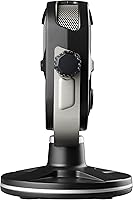
Tabletop mode optimizes the pickup pattern for when the mic is sitting on your desk in front of you, while boom-mounted mode adjusts it for when the mic is on an arm positioned to the side or above. You select the mode based on how you physically set up your desk — there is no automatic switching.

The onboard noise management does a reasonable job in a quiet or moderately quiet room, but this streaming mic is not going to perform miracles in a loud environment. If you have a noisy mechanical keyboard, a loud PC fan, or an open window near a street, you will likely hear some of that bleed through in your recordings.

Yes — since it shows up as a standard USB audio device, any streaming or recording software that accepts system audio inputs will recognize it without needing special drivers or configuration. On PC it is essentially treated like any other plug-and-play USB microphone.

A portion of buyers have reported that the companion app can be temperamental, including issues with it not launching correctly or failing to save preset changes on certain Windows configurations. The core mic functionality works independently of the software, so it is mainly an issue if you rely heavily on the voice preset features.

That depends almost entirely on whether you need USB console compatibility. For PC-only streamers, the honest answer is that the market has caught up and there are strong competitors offering better value today. For Xbox One or PS4 streamers who want a dedicated desktop mic with zero setup friction, the console-native USB functionality still makes this streaming mic a genuinely practical option that most rivals cannot match.

Where to Buy