Overview

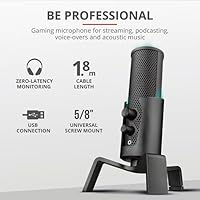
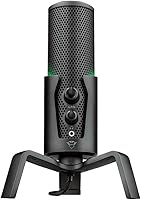
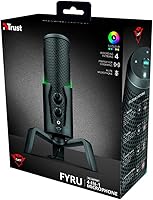
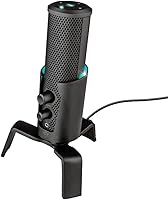
The Trust Gaming GXT 258 Fyru USB Microphone sits in an interesting spot — it's priced accessibly enough for first-time streamers, yet it arrives with an all-metal build and adjustable LED lighting that you wouldn't normally expect at this tier. Plug it in via USB-C, and your PC, Mac, PS4, or PS5 recognizes it instantly — no driver installation needed. The included tripod stand and cable mean you're ready to record straight out of the box. Trust markets it as near-studio quality, which is a stretch, but for bedroom streaming and casual podcasting, it punches reasonably above its weight.
Features & Benefits

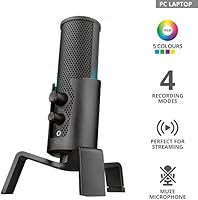
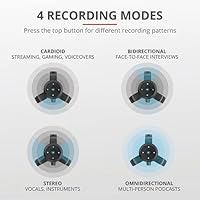
The Fyru mic gives you four polar patterns, and each one has a real job to do. For solo streaming or voice-overs, cardioid keeps the focus on you. Sit two people face-to-face for an interview and switch to bidirectional. Recording an acoustic guitar in stereo or capturing a small group? Those modes are covered too. Physical knobs for gain, mute, and headphone volume mean you never have to dig through software mid-session — a small thing that matters a lot under pressure. The zero-latency monitoring port lets you hear yourself in real time, and the built-in pop filter handles most plosives, though a dedicated external filter still has the edge for critical recordings.

Best For

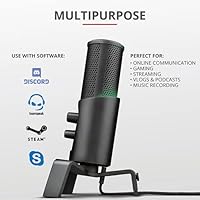
This USB condenser mic makes the most sense for a specific kind of buyer. Solo streamers coming from a headset mic will notice the clarity jump right away, especially in a reasonably quiet room. Podcasters who want to record solo, do an interview, or occasionally capture ambient sound without buying multiple mics will find the pattern options genuinely useful. PS4 and PS5 owners benefit from the native USB compatibility — no adapters, no fuss. ASMR creators are well-served by the high-sensitivity condenser capsule. The RGB lighting is a real draw if your desk is on camera, though it adds nothing to audio performance.

User Feedback

Buyers consistently praise the GXT 258 Fyru for feeling more substantial than its price suggests — the metal housing draws a lot of positive comments. The LED lighting divides opinion neatly: gamers appreciate the ambiance, while podcasters tend to switch it off and forget it's there. The most repeated criticism is predictable for any condenser at this level: it picks up everything in an untreated room, including keyboard clicks, fans, and street noise. A handful of users have noted minor tripod wobble on uneven desks, and a small number reported brief setup friction on older Windows versions. Overall, satisfaction runs high among buyers who understood what they were getting.

Pros

  • All-metal construction feels premium and durable well above what the price bracket typically delivers.
  • Four polar patterns cover a wide range of recording scenarios without needing additional gear.
  • Plug-and-play USB-C setup works instantly on PC, Mac, PS4, and PS5 — no drivers, no configuration.
  • Physical knobs for gain, mute, and headphone volume let you make adjustments mid-session without touching any software.
  • Zero-latency headphone monitoring means you can hear your own voice in real time while recording.
  • The Fyru mic includes a tripod stand, USB-C to USB-A cable, and user guide right out of the box.
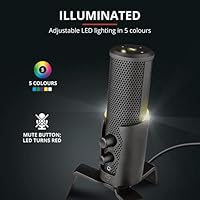
  • Adjustable RGB LED lighting across five colours is a genuine visual asset for streamers with on-camera desk setups.
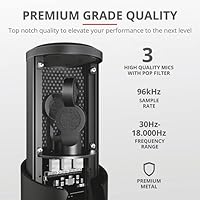
  • The internal pop filter reduces plosive harshness adequately for casual streaming and podcasting use.
  • Compact footprint keeps desk clutter minimal compared to larger condenser microphone setups.

Cons

  • High condenser sensitivity captures background noise aggressively in untreated or busy rooms.
  • The included tripod stand lacks vibration isolation, so keyboard and desk movement bleeds into recordings.
  • No XLR output means there is no upgrade path to an audio interface without replacing the microphone entirely.
  • The near-studio quality marketing claim oversells real-world performance in less-than-ideal environments.
  • RGB lighting cannot be fully disabled on some firmware versions, which may distract in professional or low-light settings.
  • Tripod stability on uneven or soft desk surfaces has drawn repeated complaints about wobble and tipping risk.
  • A small number of users report intermittent recognition issues on older Windows operating system versions.
  • The internal pop filter is adequate for light use but insufficient for close-mic vocal recording without an external shield.
  • At 2.27 lbs, the GXT 258 Fyru is heavier than it looks, which can stress the tripod base on extended use.

Ratings

Our AI-generated scores for the Trust Gaming GXT 258 Fyru USB Microphone are based on a systematic analysis of verified global buyer reviews, with spam, incentivized posts, and bot-generated feedback actively filtered out before scoring. The ratings reflect the full picture — genuine strengths praised by real users alongside the recurring frustrations that show up consistently across thousands of reviews. Both sides are represented honestly so you can make a confident, informed decision.

Audio Clarity
76%
24%
In a quiet room, the Fyru mic captures voice with a level of warmth and presence that genuinely surprises buyers upgrading from a headset. Streamers consistently note that their audience comments on the improvement, and solo podcast recordings come through with solid intelligibility and minimal harshness.
The high-sensitivity condenser capsule is unforgiving in less-than-ideal environments — keyboard noise, fan hum, and room reverb all make their way into recordings noticeably. Users in open-plan spaces or untreated rooms frequently report that post-production noise reduction becomes a necessary step rather than an optional one.
Build Quality
88%
The all-metal housing and metal grille give this USB condenser mic a heft and rigidity that feel genuinely out of place at its price point, in the best way. Buyers repeatedly describe picking it up for the first time and being surprised — it does not flex, creak, or feel hollow like many plastic competitors in the same bracket.
While the main body is solid, the tripod stand draws consistent criticism for feeling like a weak point — particularly where the legs meet the base, which can loosen over time with regular repositioning. A few users have also noted minor paint wear on the control knobs after several months of daily use.
Ease of Setup
93%
Plug the cable in and it works — on PC, Mac, PS4, or PS5 — with zero configuration required in virtually every reported case. This is one of the most consistently praised aspects of the GXT 258 Fyru, especially among console users who have struggled to find USB mics that are instantly recognised by their PS5.
A small but recurring subset of Windows users, particularly those on older OS builds, have reported brief recognition failures or the mic appearing and disappearing from device manager after waking from sleep. These issues tend to resolve with a reconnect, but they are annoying enough to be worth noting.
Polar Pattern Versatility
81%
19%
Having four usable patterns on a mic at this price is a genuine differentiator, and buyers who actually rotate between them find real value. Podcasters doing occasional two-person interviews in bidirectional mode, or musicians wanting a rough stereo take of an acoustic guitar, get a lot more flexibility than competing single-pattern mics offer.
Switching between patterns requires physically rotating a selector on the mic, and there is no on-screen indicator — so in a low-light streaming setup, confirming which pattern is active can be awkward. Users also note that the omnidirectional pattern, while functional, amplifies room noise to a degree that limits its real-world usefulness in home environments.
Background Noise Rejection
54%
46%
In cardioid mode, the directional pickup does a competent job of reducing sounds from behind and to the sides of the mic, which is useful for streamers sitting in front of a relatively quiet desk. Users with basic acoustic treatment — even just a carpeted room with bookshelves — report acceptable results for casual content creation.
This is the most common dealbreaker cited in negative reviews: the condenser capsule picks up mechanical keyboard noise, computer fan hum, and ambient room sounds with little mercy. Buyers in noisy apartments or shared spaces frequently feel misled by the promotional material and wish they had opted for a dynamic microphone instead.
Headphone Monitoring
84%
The zero-latency 3.5 mm monitoring port is a feature many buyers do not expect at this price, and those who use it regularly consider it one of the mic's underrated strengths. Hearing yourself in real time while recording prevents volume-compensating behaviour and makes live streaming commentary feel noticeably more controlled.
A handful of users note that the maximum headphone output volume is on the quieter side for high-impedance headphones, meaning those using studio-grade cans may find the monitoring level unsatisfyingly low. The headphone volume knob also sits physically close to the gain knob, leading to accidental adjustments during sessions.
On-Mic Controls
79%
21%
Having physical knobs for gain, mute, and headphone volume directly on the microphone body is a practical advantage that saves time mid-session — no alt-tabbing through a mixer app or hunting through system settings. Streamers in particular appreciate being able to mute instantly with one button press when a distraction arises.
The knobs feel functional rather than precise — gain adjustments in particular lack a satisfying detent feel, making fine-tuning incremental input levels a slightly fiddly process. A few users have also noted that the mute button does not provide clear tactile or visual feedback to confirm whether the mic is actually muted.
RGB Lighting
71%
29%
For streamers whose desk is visible on camera, the five-colour adjustable LED glow adds a layer of visual personality that integrates naturally with broader RGB setups. Gamers with colour-coordinated peripherals frequently single it out as a nice aesthetic touch that feels intentional rather than tacked on.
Buyers who have no interest in RGB — podcasters, voice-over artists, and home office users — feel they are subsidising a feature they will never use. There are also reports that the lighting cannot be fully disabled on certain unit firmware versions, which is a frustrating limitation for those who want a cleaner, distraction-free workspace.
Tripod Stand Stability
58%
42%
The included tripod stand keeps the footprint compact and gets the microphone to a workable height without requiring any additional accessories out of the box. For users with a flat, hard desk surface, it holds its position reliably under normal conditions.
On soft surfaces like thick mouse mats, or desks with any unevenness, the stand wobbles and can tip — a concern that comes up with notable frequency in user reviews. The connection between the tripod legs and the base also loosens for some users over time, and the stand provides no vibration isolation, so desk movement transfers directly into recordings.
Console Compatibility
89%
Native plug-and-play support for both PS4 and PS5 is one of this mic's clearest practical advantages, and buyers who have spent time hunting for console-compatible USB microphones know how rare genuinely hassle-free compatibility is. Users report it being recognised instantly on PS5 with no trips into audio settings required.
Compatibility is limited to PlayStation consoles — there is no confirmed support for Xbox, which runs on a different audio stack, and Nintendo Switch compatibility is inconsistent based on user reports. This is not a knock against the mic per se, but buyers hoping for universal console use across multiple platforms may need to verify their specific setup.
Value for Money
82%
18%
The combination of metal construction, four polar patterns, on-mic controls, and headphone monitoring in a single package represents strong value relative to what comparable money buys from competing brands. Buyers who research the market before purchasing consistently land on the Fyru mic as offering more tangible features per pound spent than most rivals at this tier.
The value calculation shifts for buyers who end up needing to purchase an external pop filter and a more stable stand separately — accessories that arguably should not be necessary given the included options. Users in acoustically poor rooms also feel the investment does not pay off without additional treatment, which adds to the real total cost.
Pop Filter Effectiveness
63%
37%
For everyday streaming and casual voice recording, the built-in internal pop filter does enough to prevent the most jarring plosive bursts from making it into the final audio. Users who record at a sensible working distance — around 15 to 20 centimetres — generally find it adequate for non-critical content.
Anyone recording close-up vocal content, narration, or anything where a clean, polished sound is the expectation will find the internal filter falls short fairly quickly. Multiple reviewers recommend pairing this USB condenser mic with an inexpensive external pop shield regardless, which suggests the built-in solution is more of a baseline measure than a reliable feature.
Software & Driver Experience
77%
23%
The driver-free experience is consistently praised — buyers appreciate that there is no companion software to install, update, or troubleshoot, and the mic is simply treated as a standard audio device by the OS. This makes it particularly accessible for less technically confident users who want something that just works.
The absence of any dedicated software also means there is no equalisation, noise gate, or compression available from the manufacturer side — everything beyond basic gain adjustment requires third-party tools. A small number of users on Windows have experienced intermittent dropout behaviour following OS updates, which took time to diagnose without official driver support documentation.
Portability & Footprint
74%
26%
At under 7.2 inches tall and with a self-contained tripod stand, the GXT 258 Fyru takes up very little desk space and can be tucked away or repositioned without much effort. Users who record in shared spaces or need to clear their desk between sessions appreciate that the whole setup packs down quickly.
At just over 2.27 lbs, it is heavier than most buyers expect from something this size, which makes carrying it in a bag feel slightly impractical compared to lighter plastic-bodied competitors. The all-metal construction is a durability win, but it does mean this is more of a stay-on-your-desk option than a genuinely portable one.

Suitable for:

The Trust Gaming GXT 258 Fyru USB Microphone is a strong fit for anyone taking their first real step beyond a headset mic without wanting to spend heavily or wrestle with complicated setup. Solo Twitch and YouTube streamers will get the most out of cardioid mode, which isolates the voice cleanly in a quiet room and delivers a noticeable upgrade over built-in headset audio. Beginner podcasters benefit from the flexibility of four polar patterns — cardioid for solo episodes, bidirectional for two-person interviews, omnidirectional for roundtable recordings — without needing to buy separate microphones for each scenario. PS4 and PS5 owners in particular will appreciate the plug-and-play USB-C connection, since native console compatibility is genuinely hard to find at this price point. ASMR creators who rely on a sensitive condenser capsule to capture fine detail will find the Fyru mic accommodating, provided their recording space is reasonably controlled. If your desk setup is visible on camera and RGB aesthetics matter to you, the adjustable LED lighting is a legitimate bonus rather than an afterthought.
Not suitable for:

Anyone recording in a noisy or acoustically untreated space should think carefully before committing to this USB condenser mic, because high-sensitivity condensers at this level pick up everything — fans, air conditioning, keyboard noise, and ambient room reverb will all make it into your recordings. Professional podcasters or musicians who need consistent, studio-grade output will find the Trust Gaming GXT 258 Fyru USB Microphone falls short of what dedicated XLR setups or higher-tier USB condensers can deliver. Content creators who need a boom arm or shock-mounted suspension rig should know the included tripod stand offers no vibration isolation, so desk thumps and typing will transfer directly to the audio. The built-in pop filter handles light plosives reasonably well, but vocalists with a strong delivery or anyone recording close-proximity narration will likely still need an external pop shield. If RGB lighting genuinely has no place in your workflow, you're paying for a feature you will never use, and there are competing mics at similar prices that skip it in favour of other audio-focused refinements.
Specifications

  • Polar Patterns: Supports four selectable pickup patterns: cardioid, bidirectional, stereo, and omnidirectional, covering solo recording, interviews, instrument capture, and group sessions respectively.
  • Connectivity: Connects via USB-C to USB-A cable with true plug-and-play operation — no drivers or software installation required on any supported platform.
  • Compatible Devices: Natively compatible with Windows and macOS computers, Mac laptops, PlayStation 4, and PlayStation 5 without additional adapters.
  • Signal-to-Noise Ratio: Rated at 130 dB SNR, indicating a low noise floor relative to the captured signal for a microphone in this price category.
  • Impedance: Output impedance is 200 Ohm, suitable for direct USB connection to a computer or console without requiring an external audio interface.
  • Dimensions: The microphone body measures 2.91 x 2.48 x 7.2 inches (L x W x H), forming a compact desktop footprint when seated on its included tripod stand.
  • Weight: The unit weighs 1030 g (approximately 2.27 lbs), which is moderately heavy for a desktop USB microphone and contributes to its solid, stable feel.
  • Build Material: The microphone housing and grille are constructed from metal, providing greater durability and resonance damping compared to plastic-bodied competitors at a similar price.
  • LED Lighting: Features adjustable RGB LED lighting with five selectable colour options, controlled directly on the microphone body without requiring companion software.
  • Headphone Output: Includes a 3.5 mm headphone monitoring port delivering zero-latency playback, allowing the user to hear their live input without any audible delay.
  • On-Mic Controls: Physical controls on the microphone body include a microphone gain knob, a mute button, and a dedicated headphone volume knob for hands-on adjustments during sessions.
  • Pop Filter: An internal pop filter is built into the microphone capsule housing to reduce plosive bursts, though it is not a substitute for a dedicated external pop shield in demanding vocal applications.
  • Power Source: Draws power entirely through its USB connection — no batteries, external power supply, or phantom power unit is required.
  • Number of Channels: Operates as a single-channel (mono) input device when using cardioid, bidirectional, or omnidirectional patterns, and switches to two-channel stereo capture in stereo mode.
  • In-Box Contents: Package includes the microphone with integrated tripod stand, one USB-C to USB-A cable, a printed user guide, and a Trust Gaming branded sticker.
  • Form Factor: Designed as a table-array desktop microphone that sits upright on its own tripod stand, requiring no separate boom arm or shock mount for standard use.
  • Manufacturer: Designed and produced by Trust International B.V., a Netherlands-based peripherals brand that markets this model under its Trust Gaming sub-brand.

Related Reviews

Trust Gaming GXT 212 Mico USB Microphone
71%
83%
Value for Money
94%
Ease of Setup
67%
Audio Quality
58%
Build Quality
72%
Noise Rejection
More
Trust Gaming GXT 241 Velica USB Microphone
76%
78%
Audio Clarity
83%
Build Quality
89%
Value for Money
94%
Ease of Setup
34%
Onboard Controls
More
Trust Gaming GXT 252 Emita Streaming Microphone
76%
76%
Audio Clarity
88%
Build Quality
93%
Ease of Setup
61%
Background Noise Rejection
82%
Value for Money
More
Trust Gaming GXT 144 Rexx Vertical Ergonomic Gaming Mouse
85%
89%
Ergonomics & Comfort
92%
Precision & Performance
85%
RGB Customization
78%
Software & Configuration
84%
Build Quality & Durability
More
Movo UM700
Movo UM700
82%
83%
Audio Clarity
89%
Polar Pattern Versatility
94%
Ease of Setup
81%
Build Quality
86%
Gain Control & Mute Function
More
UHURU UM2S
UHURU UM2S
79%
78%
Sound Quality
71%
Noise Cancellation
94%
Ease of Setup
66%
Build Quality
88%
Value for Money
More
KingSom Mic-1
KingSom Mic-1
76%
91%
Value for Money
74%
Audio Clarity
94%
Ease of Setup
58%
Build Quality
66%
Boom Arm Usability
More
HyperX SoloCast
HyperX SoloCast
84%
89%
Audio Clarity
97%
Ease of Setup
93%
Mute Functionality
42%
Vibration Isolation
86%
Build Quality
More
Neat Microphones Skyline USB Desktop Condenser Microphone
89%
94%
Audio Quality
91%
Ease of Use
89%
Build Quality
90%
Mute Button Functionality
92%
Value for Money
More
Logitech USB Desktop Gooseneck Microphone
73%
93%
Ease of Setup
79%
Voice Clarity
71%
Noise Isolation
68%
Build Quality
82%
Gooseneck Flexibility
More

FAQ

Yes, the Fyru mic connects directly to a PS5 via the included USB-C to USB-A cable and is recognised instantly — no settings menus to dig through, no drivers to install. It is one of the more straightforward plug-and-play options available for console streamers.

No drivers or companion software are needed on either platform. Plug the cable in and your operating system registers it as a standard USB audio device within a few seconds.

You can cycle through the lighting colours using the control on the mic body, but some users have found that fully disabling the LEDs depends on the firmware version their unit shipped with. If a completely dark setup is important to you, it is worth checking recent user reports for your specific unit before purchasing.

Cardioid is the right choice for solo use — it focuses the pickup in front of the mic and rejects sound from the sides and rear, which keeps background noise to a minimum. Switch to bidirectional only if you are recording a face-to-face interview, or omnidirectional if you want to capture a group around a table.

It depends heavily on your room. The Trust Gaming GXT 258 Fyru USB Microphone is a condenser microphone, and condensers are inherently sensitive — that sensitivity is what makes voices sound clear and detailed, but it also means air conditioning, mechanical keyboards, and street noise will make their way into recordings. In a quiet, carpeted room it performs well; in a live, reverberant space it can be a real problem.
The stand is reasonably stable on a flat, hard desk surface. A recurring concern among buyers is that on soft surfaces — like a thick mouse mat — or on desks with slight unevenness, the mic can rock or tip. If your desk surface is irregular, placing a firm, flat coaster or small board underneath the tripod helps considerably.

Yes, there is a 3.5 mm headphone port on the mic body that delivers zero-latency monitoring — meaning you hear your own voice in real time with no audible delay. There is also a dedicated volume knob on the mic to control the headphone level independently of your system volume.

The internal filter does a decent job reducing everyday plosive sounds for casual streaming and podcasting. If you speak loudly, record close to the capsule, or do any kind of vocal performance recording, a standalone external pop shield will give you meaningfully better control. For streaming and gaming commentary, the built-in filter is usually sufficient.

It works on macOS as a class-compliant USB audio device, so no drivers are required and it should function correctly across most macOS versions. A small number of users have reported brief recognition hiccups after major OS updates, but these tend to resolve after reconnecting the cable or restarting the machine.

It can work well for ASMR in the right environment. The high-sensitivity condenser capsule picks up fine detail and subtle sounds effectively, and the omnidirectional pattern is useful for capturing ambient textures around the mic. The caveat is the same as for any sensitive condenser: any background noise in your room will be captured too, so a quiet recording space is essentially a requirement for that kind of content.

Where to Buy