
Overview
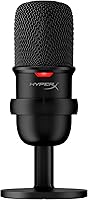
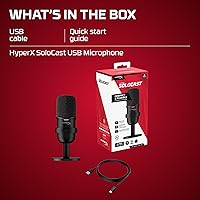
Finding a reliable audio solution should not require a complex setup or a massive budget, and the HyperX SoloCast proves that point immediately. It is an entry-level condenser microphone that strips away the fluff to focus on core performance and extreme simplicity. This compact USB mic utilizes a modern USB-C connection for a true plug-and-play experience that works right out of the box. Its minimalist design is a breath of fresh air for those with crowded desks, as it takes up very little space while looking professional on camera. If you are currently relying on a built-in laptop mic or a flimsy headset, moving to this cardioid condenser represents a massive step up in vocal presence and clarity without the headache of complicated software.
Features & Benefits
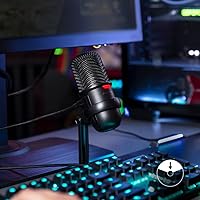
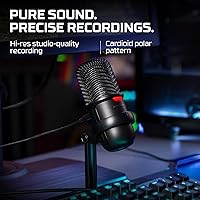
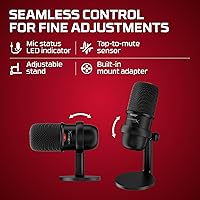
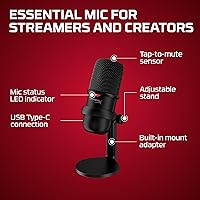
Despite its small stature, the SoloCast packs impressive technical specs, including high-resolution 24-bit/96kHz recording capabilities. This level of depth ensures your voice sounds full and professional, catching nuances that cheaper hardware misses. One of the standout physical features is the tap-to-mute sensor located right on top; a quick touch silences the stream instantly, while a bright LED indicator ensures you never forget your status. The included swivel stand is highly adjustable, allowing it to tilt or even sit low enough to slide under the bottom edge of a monitor. For those who prefer a more permanent setup, the built-in threading makes it compatible with most standard boom arms. Its cardioid pattern is specifically tuned to capture front-facing audio while naturally dampening distracting background noise.
Best For
This compact USB mic is an ideal starting point for new streamers and YouTubers who need high-quality audio without a steep learning curve. Its straightforward nature also makes it a perfect tool for remote professionals who want to sound clear and authoritative during Discord calls or Zoom meetings. Because it works natively with consoles, it is a plug-and-play solution for PS4 and PS5 players who want to move away from bulky headsets. If your desk space is at a premium, you will appreciate how this cardioid condenser provides a minimalist footprint that stays out of your way while you work or play. It effectively balances portability with performance, serving anyone who values audio fidelity but lacks the patience for intricate mixing boards or external interfaces.
User Feedback
Real-world users frequently highlight the impressive sound quality, noting that the SoloCast often sounds as good as microphones costing twice as much. The intuitive mute button is a crowd favorite, cited for its reliability and silent operation during live sessions. However, it is important to note that the basic stand lacks a built-in shock mount. This means desk vibrations or accidental bumps can occasionally be picked up as thuds in your recording. Most buyers solve this by eventually moving to a boom arm, but the sheer ease of use right out of the box remains its biggest selling point. While it lacks some advanced features like physical gain knobs, the consensus is that the straightforward, high-fidelity performance far outweighs the minor trade-offs for the price.
Pros
- Offers impressive 24-bit/96kHz audio resolution that competes with much more expensive mid-range studio equipment.
- The top-mounted tap-to-mute sensor is remarkably responsive and provides an instant visual status update via the LED.
- This cardioid condenser features a tiny footprint that easily fits under monitors or in cluttered workspaces.
- Built-in threading for both 3/8-inch and 5/8-inch mounts allows for a seamless transition to most standard boom arms.
- Plug-and-play USB-C connectivity ensures the SoloCast works immediately across PC, Mac, and modern gaming consoles.
- The cardioid pickup pattern effectively isolates the user"s voice while dampening distracting noises from the sides and back.
Cons
- The rigid plastic stand transmits every desk bump and keyboard vibration directly into your audio stream as a loud thud.
- Without an onboard gain knob, you are forced to rely entirely on software settings to adjust your input levels.
- This compact USB mic lacks a 3.5mm headphone jack, preventing users from monitoring their own voice with zero latency.
- The high sensitivity of the condenser capsule can pick up significant room echo in untreated or sparsely furnished spaces.
- Its low-profile height often requires users to prop the microphone up to keep it closer to their mouth for optimal clarity.
- The mute status LED can be quite bright and distracting when positioned directly in the user"s line of sight during late-night sessions.
Ratings
Our team analyzed thousands of verified global reviews to see how the HyperX SoloCast performs in real-world setups, filtering out incentivized feedback to ensure a transparent look at its strengths and flaws. These AI-driven scores reflect actual buyer experiences, ranging from professional home offices to late-night gaming sessions. We have carefully weighed consistent praise against common technical gripes to give you a clear picture of what to expect.
Audio Clarity
Ease of Setup
Mute Functionality
Vibration Isolation
Build Quality
Desk Footprint
Value for Money
Mounting Versatility
Background Noise Rejection
Portability
Suitable for:
The HyperX SoloCast is a standout choice for aspiring content creators and remote professionals who prioritize effortless setup and clear vocal performance over complex settings. Its compact frame makes it perfect for students or gamers with limited desk space who need a reliable microphone that doesn't obstruct their view. Because it functions natively with PlayStation consoles, it is an excellent upgrade for console players looking to move away from low-quality controller or headset mics. Those who frequently jump in and out of meetings will particularly value the instant tactile feedback of the top-mounted mute sensor.
Not suitable for:
Professional studio engineers or veteran podcasters requiring granular hardware controls and XLR connectivity should likely look past the HyperX SoloCast. The lack of a built-in shock mount means it is a poor fit for users with thin, resonant desks or those who tend to type heavily while recording. Because it is highly sensitive to physical vibrations, it may frustrate users who aren't willing to invest in an additional boom arm to isolate the capsule. Additionally, those who require real-time headphone monitoring directly from the microphone body will find this model's lack of an output jack a significant drawback.
Specifications
- Microphone Type: This is an electret condenser microphone featuring a single 14mm capsule.
- Polar Pattern: The device utilizes a cardioid pickup pattern designed to capture sound from the front while reducing background noise.
- Sampling Rate: The microphone supports high-resolution recording at 96kHz for professional audio quality.
- Bit Depth: Audio is processed at a 24-bit depth to provide high-fidelity sound reproduction.
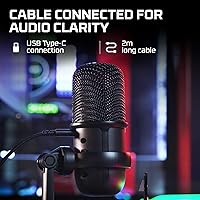
- Connection Type: Power and data are supplied through a USB Type-C to USB-A interface.
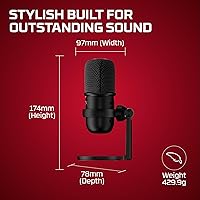
- Dimensions: The unit measures approximately 6.85 x 3.82 x 3.07 inches when assembled.
- Weight: The total weight including the stand is 261 grams, or roughly 9.2 oz.
- Thread Support: A built-in mount adapter supports both 3/8-inch and 5/8-inch threading for various stands.
- Signal-to-Noise: The hardware maintains a signal-to-noise ratio of 95 dB at 1kHz.
- Compatibility: This hardware is natively compatible with Windows PC, macOS, PlayStation 4, and PlayStation 5 systems.
- Cable Length: The included detachable USB cable measures 2 meters in length.
- Mute Function: A touch-sensitive sensor on the top of the body provides instant muting capability.
- Status Indicator: A red LED light indicates whether the microphone is currently active or muted.
- Stand Adjustment: The provided desktop stand swivels to allow for varied positioning and angles.
Related Reviews
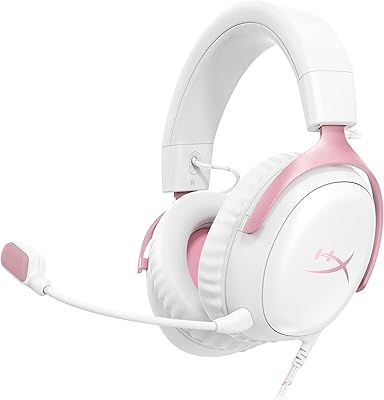
HyperX Cloud III Wired Gaming Headset
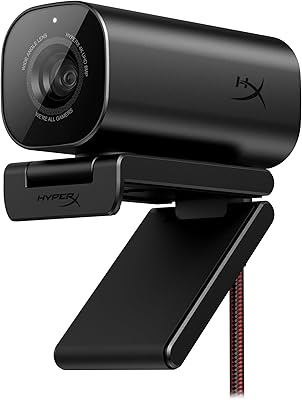
HyperX Vision S Webcam 4K
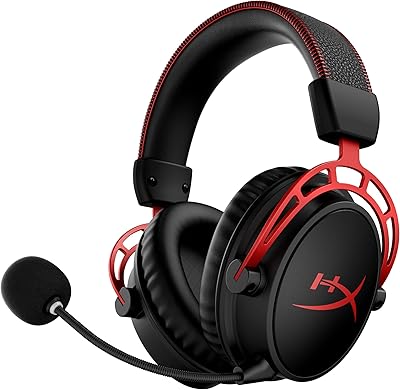
HyperX Cloud Alpha Wireless
HyperX QuadCast S
HyperX Cloud Stinger 2 Core Gaming Headset