Overview

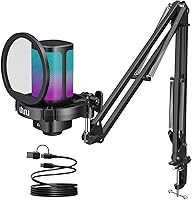
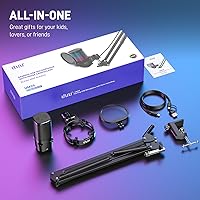
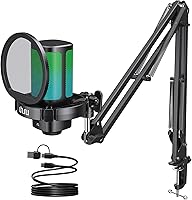
The UHURU UM2S arrived on the market in early 2024 and wasted little time earning a spot among the top 50 best-selling computer microphones on Amazon — not a small achievement for a newer brand. It's a gooseneck-style cardioid condenser mic with RGB lighting, and it ships with everything you need to get started: boom arm, shock mount, pop filter, and a dual USB-A/C cable. Plug-and-play setup means no driver installation, no fiddling with software. The honest framing here is that this streaming microphone targets beginners and budget shoppers, not podcasters chasing studio-quality audio. Set realistic expectations and it delivers real value.

Features & Benefits

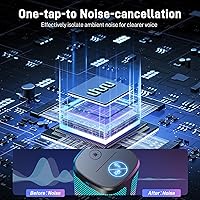
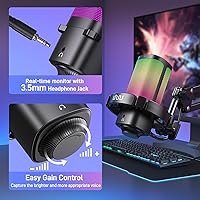
The one-tap noise cancellation is where many buyers will spend most of their attention, and it's worth explaining what it actually does: it filters ambient background noise — keyboard clatter, fan hum, street sounds — so your voice comes through cleaner on the other end. It works best in moderately noisy spaces; don't expect it to silence a loud household. The cardioid pattern helps by rejecting audio from the sides and rear. A physical gain knob at the base lets you adjust input volume without hunting through software menus — a small but appreciated touch. The 3.5mm headphone jack allows real-time monitoring so you hear exactly what your audience hears, lag-free.

Best For

This USB gaming mic is a natural fit for beginner streamers on Twitch, YouTube, or Discord who want a ready-to-use rig without separately sourcing a boom arm, pop filter, and shock mount — those accessories alone can cost nearly as much as the mic itself. PS4 and PS5 users will appreciate that it connects and works immediately with no drivers; Xbox, however, is not supported, so console buyers should verify their platform first. Home office workers dealing with moderate ambient noise will find the noise suppression a genuine help. If your desk already has RGB lighting, the three lighting modes let this mic fit in visually, not just functionally.

User Feedback

Buyers consistently point to easy setup and solid vocal clarity as the standout strengths — at this price, most feel they're getting more than expected. The RGB lighting earns particular praise from people building themed desktop rigs. On the downside, some users note the boom arm feels lightweight and less rigid than a dedicated standalone unit, and the ENC processing can occasionally add a faint artificial quality to voices when pushed hard. A handful of reviewers flag the Xbox incompatibility as a frustrating post-purchase discovery — worth repeating here so no one is caught off guard. Brand support response times are generally rated positively, with most concerns resolved quickly.

Pros

  • Complete out-of-the-box kit: boom arm, shock mount, pop filter, and dual USB-A/C cable all included.
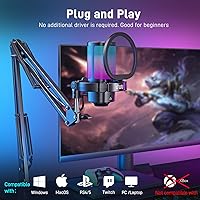
  • Plug-and-play setup works immediately on Windows, macOS, PS4, and PS5 — no drivers needed.
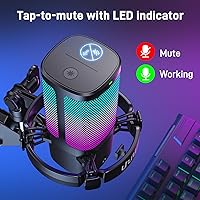
  • The UHURU UM2S tap-to-mute button with a clear green/red LED is genuinely useful during live streams and calls.
  • One-tap ENC noticeably reduces steady ambient noise like fans and air conditioning in real use.
  • Physical gain knob on the mic body makes input adjustments fast without diving into system settings.
  • 3.5mm headphone jack enables real-time, zero-latency monitoring so you hear exactly what your audience hears.
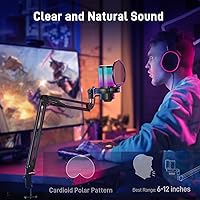
  • Cardioid polar pattern naturally rejects sound from the sides and rear, keeping off-axis noise out of recordings.
  • RGB lighting modes look polished on camera and integrate well into themed desktop setups.
  • Strong value proposition for budget buyers: replicating this bundle with separate purchases would cost more.
  • Brand support response times are generally prompt, with most hardware issues addressed within a reasonable window.

Cons

  • The bundled boom arm loses joint tension over time and feels noticeably flimsy under daily use.
  • Xbox Series X/S and Xbox One are not supported — a dealbreaker that is easy to miss before buying.
  • ENC processing can add a faint artificial quality to your voice when pushed hard in louder environments.
  • No dedicated volume control for the headphone monitoring output; it is tied to system-level volume only.
  • The pop filter material feels thin and is unlikely to hold up as a long-term accessory.
  • Gain range at the extremes is limited — very quiet voices or unusually loud rooms can stretch it past its comfort zone.
  • RGB lighting cannot sync with popular third-party ecosystems like ASUS Aura or Corsair iCUE.
  • The mute button placement at the top of the housing makes accidental mutes possible during active sessions.
  • This streaming microphone will likely need replacing sooner than expected for anyone developing more serious audio goals.
  • No companion software means there is no visual input level meter to help dial in gain settings precisely.

Ratings

The UHURU UM2S has been evaluated by our AI system after analyzing thousands of verified global user reviews, with spam, bot activity, and incentivized feedback actively filtered out to ensure the scores reflect genuine buyer experiences. From first-time streamers setting up their Twitch rigs to remote workers battling noisy home offices, this streaming microphone attracted a wide range of buyers — and their feedback tells a nuanced story. Both the genuine strengths and the real frustrations are reflected honestly in the categories below.

Sound Quality
78%
22%
For a sub-$60 USB mic, most users were genuinely impressed by how clean and intelligible the voice pickup is during Discord calls, casual streaming, and game chat. The cardioid pattern does a solid job keeping off-axis noise out of the signal, which helps voices cut through clearly without heavy post-processing.
The UM2S is not going to satisfy anyone comparing it side-by-side with mid-range XLR condensers. Some users noticed a slightly thin or compressed quality in the high frequencies, and the 78 dB signal-to-noise ratio, while adequate, leaves a little self-noise in quieter recording environments.
Noise Cancellation
71%
29%
The one-tap ENC works noticeably well at suppressing steady background noise like PC fans, air conditioning hum, and ambient street noise. For anyone streaming from a busy apartment or a room without acoustic treatment, this single button makes a real, audible difference in how polished the stream sounds.
Heavy or irregular noise — kids in the background, loud music, or a mechanical keyboard right next to the mic — still bleeds through with some clarity. A handful of users also noted that aggressive ENC use adds a faint processed quality to their voice, which is a fair trade-off to be aware of before relying on it heavily.
Ease of Setup
94%
Plug it in and it works — genuinely no caveats here for Windows, macOS, PS4, and PS5 users. The dual USB-A/C cable is a practical touch that covers older and newer ports without needing an adapter, and the mic is recognized instantly by every major platform without any driver installation.
Xbox users are out of luck entirely, and the product packaging does not make this incompatibility obvious. A small number of buyers discovered this only after unboxing, which is frustrating enough that it is worth flagging clearly before purchase.
Build Quality
66%
34%
The microphone capsule itself feels reasonably solid, and the RGB housing has a clean, purposeful look that holds up well on camera. The shock mount attaches firmly and does its job reducing vibration and desk thumps from reaching the mic.
The boom arm is the most consistent criticism in user reviews — it tends to feel flimsy, has limited weight capacity, and some users found the joint tension loosens after a few weeks of regular repositioning. It works for light daily use but does not feel like a long-term solution.
Value for Money
88%
The bundle alone justifies a large portion of the asking price. Buying a boom arm, shock mount, and pop filter separately — even inexpensive ones — would cost roughly the same or more than the whole UM2S package. For a first streaming setup, this represents genuinely smart spending.
As users upgrade their audio knowledge, the limitations start to show more clearly. Buyers who outgrow the mic within a year may realize the bundled accessories are also too lightweight to pair with a better replacement, meaning the value equation shifts if you plan to level up quickly.
RGB Lighting
83%
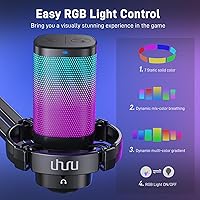
The three lighting modes — solid color, breathing, and gradient — are well-executed for the price point. The sound-reactive behavior, where the light pulses in response to audio input, is a crowd-pleaser for streamers who keep their mic on camera. Users building themed RGB desks appreciated having a mic that visually fits the setup.
The lighting cannot be synced with third-party RGB ecosystems like ASUS Aura or Corsair iCUE, so if your setup uses those platforms, the UM2S lights will run independently. A small number of users also found the long-press required to turn off the lights non-intuitive at first.
Mute Functionality
91%
The tap-to-mute button works reliably and the green/red LED status indicator is clear and visible even at a glance during an active stream or call. Streamers and remote workers consistently praised this as one of the most practical features — especially for quick muting during coughing, background interruptions, or off-mic conversations.
The mute button sits at the top of the mic housing, which means it is easy to knock accidentally if you reach across your desk near the mic. A couple of users reported unintentional mutes mid-stream before adjusting their positioning habits.
Gain Control
82%
18%
Having a physical gain dial on the mic body is more convenient than navigating into Windows sound settings or a companion app. Users found it quick to dial in a comfortable input level without interrupting their session, and the knob has enough resistance to avoid accidental adjustments.
The gain range is fairly limited at the extremes — users with very quiet voices or in unusually loud environments found the dial did not offer enough range to fully compensate. There is also no accompanying software that shows input levels numerically, so dialing in is done by ear.
Headphone Monitoring
76%
24%
Real-time monitoring through the 3.5mm jack is a feature that many budget mics skip entirely, and having it here gives new streamers a significant advantage in catching audio problems before they go live. The monitoring is effectively zero-latency, which makes it genuinely usable rather than a tacked-on checkbox feature.
There is no independent volume control for the headphone output — it is tied to system volume — which limits fine-tuning during a live session. Users who prefer a dedicated monitoring mix found this restrictive, particularly when running multiple audio sources simultaneously.
Bundled Accessories Quality
63%
37%
Having a complete kit in one box is undeniably convenient, and for beginners, the boom arm and pop filter perform well enough to get up and running immediately. The included cable is a genuine highlight — the dual USB-A/C design means it works across a wider range of devices without needing a separate adapter.
The boom arm in particular draws repeated complaints about feeling light and losing its rigidity over time. The pop filter does its job passably but the material feels thin. Most experienced users view the accessories as functional starters, not keepers — useful for the first few months but likely to be upgraded.
Compatibility
74%
26%
The broad plug-and-play support across Windows, macOS, PS4, PS5, and most tablets makes this a genuinely versatile pick for households with mixed devices. PS4 and PS5 users in particular highlighted how rare it is to find a budget USB mic that just works on console without any workarounds.
Xbox Series X/S and Xbox One are explicitly not supported, and this limitation is not prominently communicated at the point of sale. Several buyers left negative reviews specifically because they assumed cross-console compatibility and discovered otherwise after unboxing — a clear expectation gap.
Design & Aesthetics
81%
19%
The matte black housing with RGB accents strikes a clean, modern look that photographs well and holds up on streaming camera angles. At 1.9 pounds with the mount, it has enough weight to feel substantial on the boom arm without being cumbersome to reposition.
The gooseneck form factor can attract fingerprints and dust fairly visibly on the matte finish. Users who prefer a more traditional mic-on-stand orientation found the gooseneck positioning slightly awkward to dial in at the exact angle needed.
Customer Support
79%
21%
UHURU's stated 24-hour response commitment is largely backed up in the user feedback, with a number of buyers noting that defective units or missing accessories were addressed fairly quickly. The brand appears attentive to negative reviews and follows up, which builds confidence for a newer entrant.
Resolution speed varies — some users reported fast replacements while others described longer back-and-forth exchanges before a solution was reached. The support experience seems inconsistent enough that it is reliable on average but not uniformly excellent.

Suitable for:

The UHURU UM2S is a strong pick for anyone just starting out in streaming, gaming, or content creation who wants a complete, functional audio setup without the hassle of sourcing individual accessories. Beginner Twitch and YouTube streamers will appreciate that the boom arm, shock mount, and pop filter are already in the box — it is genuinely ready to use within minutes of opening. PS4 and PS5 gamers in particular will find it refreshingly straightforward: plug it in via USB and it works immediately, no drivers or settings menus required. Home office workers dealing with fan noise, HVAC hum, or light ambient sounds will find the one-tap noise suppression a practical everyday tool that noticeably cleans up calls and recordings. If you are building or maintaining an RGB desktop setup, this streaming microphone fits the aesthetic naturally without requiring a separate controller or software sync. Anyone spending under $60 and wondering whether they can get a full mic rig at that price — the answer with this one is yes, with caveats.

Not suitable for:

The UHURU UM2S is not the right choice for buyers who need professional or near-professional audio quality — podcasters editing for a polished final product, voice-over artists, or musicians recording demos will quickly feel constrained by its sonic ceiling. The bundled boom arm, while convenient, is not a long-term keeper; if you already own or plan to invest in a sturdy articulating arm, the bundle adds less value and you may be better served by a different mic at the same price point. Xbox users should stop here — this streaming microphone does not support Xbox Series X/S or Xbox One, and there is no workaround. Buyers in very loud environments, such as households with young children or thin-walled apartments near busy streets, should be realistic about what the ENC can handle: it reduces steady background noise effectively, but it is not a substitute for acoustic treatment or a directional mic with strong off-axis rejection. Finally, anyone who anticipates upgrading their audio setup within six to twelve months may find they outgrow this mic faster than expected, and the bundled accessories are unlikely to carry over usefully to a higher-tier replacement.

Specifications

  • Connectivity: Connects via USB Type-C to host devices, with a included 5.9ft dual-ended cable supporting both USB-A and USB-C host ports.
  • Polar Pattern: Cardioid (unidirectional) pattern captures audio primarily from the front of the mic while rejecting sound from the sides and rear.
  • Signal-to-Noise Ratio: Rated at 78 dB, which provides clean audio capture for voice in typical home or office environments.
  • Channels: Single-channel mono recording, optimized for voice-centric use cases such as streaming, gaming chat, and video calls.
  • Power Source: Bus-powered entirely via USB — no external power adapter or batteries required.
  • Form Factor: Gooseneck-style condenser microphone designed to mount on the included boom arm stand for flexible desk positioning.
  • Noise Cancellation: Equipped with ENC (Environmental Noise Cancellation) activated by a single tap, designed to suppress steady ambient background noise in real time.
  • Mute Control: Tap-to-mute button on the mic body with a green (active) and red (muted) LED indicator for immediate visual status feedback.
  • Gain Control: Physical rotary dial knob at the base of the mic adjusts microphone input sensitivity without requiring any software.
  • Headphone Output: 3.5mm analog headphone jack enables real-time zero-latency monitoring of live audio input directly from the microphone.
  • RGB Lighting: Three selectable lighting modes: 7-color solid static, mix-color breathing, and mix-color gradient, with sound-reactive behavior across all modes.
  • Compatible Platforms: Plug-and-play compatible with Windows, macOS, PS4, PS5, and most tablets; Xbox consoles are explicitly not supported.
  • Included Accessories: Package includes a boom arm stand, shock mount, pop filter, and a 5.9ft USB-A and USB-C to USB-C 2-in-1 cable.
  • Item Weight: Complete unit weighs 1.9 pounds including mounting hardware, making it manageable on a standard desk boom arm.
  • Package Dimensions: Retail packaging measures 16.65 x 6.46 x 3.78 inches, sized to accommodate the bundled boom arm and accessories.
  • Driver Requirement: No third-party drivers or companion software installation required on any supported platform.
  • Cable Length: Included USB cable measures 5.9 feet (approximately 1.8 meters), providing comfortable reach from mic to PC or console.
  • Availability Date: First made available for purchase in April 2024, making it a relatively recent entry in the budget USB microphone category.

Related Reviews
Behringer U-PHORIA UM2 USB Audio Interface
86%
87%
Sound Quality
92%
Ease of Setup
90%
Portability
85%
Latency
80%
Build Quality
More

FAQ

Yes, it does. Just plug it into a USB port on your PS4 or PS5 and the console recognizes it automatically. You may need to set it as the default input device in the console audio settings, but there are no drivers or apps to install.

No — the UHURU UM2S is not compatible with Xbox consoles, and there is no workaround available. This is one of the more important things to check before purchasing, since the packaging does not always make this limitation obvious.

It handles steady, consistent background sounds — fan noise, air conditioning, light street traffic — quite well. Where it starts to struggle is with irregular or loud noises like voices in another room, a mechanical keyboard, or a television nearby. It is genuinely useful for casual streaming and calls, but it is not a substitute for a quiet room when audio quality really matters.

Yes, and it works with effectively zero latency, which makes it practical rather than just a checkbox feature. You plug any standard 3.5mm headphones directly into the mic body and hear your voice in real time as the mic captures it. The one limitation is that the monitoring volume is controlled through your system volume settings rather than a dedicated knob on the mic itself.

You need to long-press the lighting button rather than tap it — a quick tap just cycles through the lighting modes. Holding the button down for a couple of seconds will switch the lights off entirely. It is a bit non-obvious the first time, but once you know the gesture it is simple.

The included boom arm works fine for light daily use, especially if you set it in one position and leave it there. If you frequently reposition the mic during sessions, you may notice the joint tension loosening over several weeks. It is functional as a starter arm, but serious streamers who adjust their mic position often will likely want to upgrade to a dedicated articulating arm eventually.

No companion software is required or available. All controls — gain, mute, ENC, and RGB lighting — are handled physically on the mic body itself. This keeps setup simple but also means there are no advanced customization options beyond what the buttons and knob offer.

It is capable enough for casual podcast recordings and voice content, especially in a reasonably quiet room. The cardioid pattern and 78 dB signal-to-noise ratio produce clear, intelligible voice audio at this price point. That said, if you are producing content where audio quality is a primary selling point — dedicated podcast shows, voice-over work, music — you will likely outgrow this streaming microphone fairly quickly and want something with a wider dynamic range and richer low-end response.

The mic itself uses a USB-C connector on the microphone end, but the included cable is dual-ended, meaning it has both a USB-A plug and a USB-C plug on the host side. So whether your PC, Mac, or console has USB-A or USB-C ports, the included cable has you covered without needing an adapter.

Start by trying a different USB port, as some ports deliver inconsistent power. If it still does not appear, go into your operating system sound settings and check whether the mic shows up as an input device but is not set as the default. On Windows, right-clicking the sound icon and opening Sound Settings usually surfaces it. Since no drivers are needed, a simple replug or system restart resolves the issue for most users. If problems persist, the brand offers direct support with a stated 24-hour response window.