

Overview

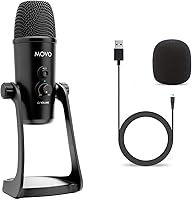
The Movo UM700 is a mid-range USB condenser microphone aimed squarely at content creators, streamers, and gamers who want meaningful audio quality without the complexity of an audio interface. What sets it apart from the crowded USB mic field is its tri-capsule array and four selectable polar patterns — a feature typically reserved for pricier hardware. Plug it into a PC, Mac, or PS5 and it works immediately; no drivers needed, no software configuration. The metal construction feels solid for the price, and Movo's Los Angeles design roots give the brand real credibility in a market full of throwaway peripherals. Just be clear-eyed: this is a strong value pick, not a professional studio microphone.

Features & Benefits

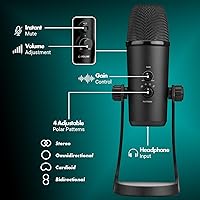
The standout capability here is the four polar patterns — cardioid for solo voice work, bidirectional for two-person interviews, omnidirectional to capture a whole room, and stereo for immersive ASMR or instrument recordings. Switching between them is handled directly on the mic body, which keeps your workflow clean. Audio is captured at 48kHz/24-bit across a 20Hz–20kHz frequency range, which translates to clear, detailed recordings in practice. The physical gain knob lets you adjust sensitivity on the fly, and the LED mute indicator is a small but genuinely useful touch. A 3.5mm headphone jack provides zero-latency monitoring so you can hear exactly what you sound like while recording.

Best For

This multi-pattern microphone is an especially good fit for solo podcasters and streamers who want one mic that can adapt to different recording scenarios without buying multiple devices. Gamers on PS5 or PC will appreciate the effortless plug-and-play setup — connect the USB-A cable and you are recording within seconds, no audio interface required. ASMR creators will find the omnidirectional and stereo modes genuinely useful for spatial, immersive content. Remote workers who spend long hours on video calls also get a noticeable upgrade over any built-in laptop microphone. It is a particularly strong choice for beginners entering content creation who want tactile, hands-on controls rather than navigating software mixers.

User Feedback

Across several hundred reviews, this USB condenser mic holds a 4.4-star average — a score that reflects consistent satisfaction rather than hype. Buyers frequently highlight how easy it is to set up and praise the solid, metal feel of the hardware. The polar pattern selector gets particular attention from reviewers who say it genuinely changes how they record different content. That said, the 58 dB signal-to-noise ratio is modest, and users in very quiet rooms sometimes notice a faint noise floor at higher gain settings. A handful of buyers have also mentioned the included desk mount could feel more stable. Overall, value for the price is the phrase that surfaces most consistently across the feedback.

Pros

  • Four switchable polar patterns in one mic offer flexibility that most rivals in this price range simply do not.
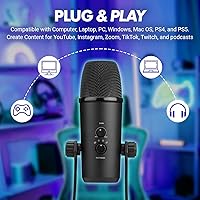
  • Plug-and-play setup works immediately on PC, Mac, PS4, and PS5 — no drivers, no configuration headaches.
  • The all-metal body feels genuinely solid and does not wobble or flex during daily desk use.
  • 48kHz/24-bit audio resolution captures noticeably clearer voice detail compared to budget USB mics.
  • The physical gain knob lets you adjust sensitivity on the fly without touching your computer or streaming software.
  • Zero-latency headphone monitoring lets you catch audio issues in real time before they reach your audience.
  • The LED mute indicator removes any uncertainty about whether your mic is live — a small feature that matters.
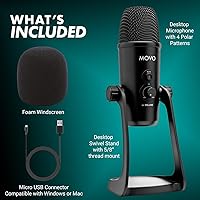
  • Foam windscreen and USB-A cable are included, so you can start recording the moment it arrives.
  • Works cleanly across both Windows and Mac without compatibility issues or driver conflicts.
  • Strong value proposition: the feature set at this price point would cost significantly more with separate components.

Cons

  • The 58 dB signal-to-noise ratio exposes a faint noise floor in quiet, untreated rooms at higher gain settings.
  • The included desk stand lacks stability and vibration damping — most serious users will want an aftermarket boom arm.
  • No shock mount is included, so desk vibrations and keyboard rumble can bleed into recordings.
  • Headphone output volume may feel inadequate for users with higher-impedance studio headphones.
  • The gain knob can be oversensitive at the high end, making fine adjustments near maximum trickier than expected.
  • No companion app means zero onboard EQ, compression, or preset options for users who want mic-level tuning.
  • No USB-C cable is included, which limits compatibility with newer laptops that lack USB-A ports without an adapter.
  • The base mount pivot can loosen over time with frequent angle adjustments, reducing long-term positioning reliability.
  • Not officially supported on mobile devices, so smartphone recording requires third-party adapters with no guarantee of compatibility.

Ratings

The Movo UM700 has been scored by our AI system after processing hundreds of verified purchase reviews from global buyers, with spam, bot submissions, and incentivized feedback actively filtered out. These ratings reflect where real users found genuine satisfaction — and where they ran into honest frustrations — so you get a transparent picture before you buy. Both the standout strengths and the recurring pain points are weighted into every score below.

Audio Clarity
83%
Most buyers noticed an immediate and meaningful improvement over their built-in laptop or headset microphones. Voices come through with presence and warmth at 48kHz/24-bit, which translates well in podcast recordings, Zoom calls, and Twitch streams without needing post-processing.
The 58 dB signal-to-noise ratio is modest for a condenser mic at this price point, and users recording in very quiet environments sometimes pick up a faint background hiss, particularly when the gain is pushed above halfway.
Polar Pattern Versatility
89%
Having four usable pickup modes in a single mic is a genuine advantage. Cardioid handles solo recording cleanly, stereo opens up for ASMR and instrument work, and omnidirectional works well for group conversations or capturing room ambience — all switchable directly on the body.
A small number of users felt the pattern switching could be clearer in the indicator labeling, and a few noted that the bidirectional mode picked up more room reflection than expected when their space was not acoustically treated.
Ease of Setup
94%
Plug-and-play genuinely works here. Buyers on PS5, Windows, and Mac all reported the mic being recognized instantly without installing drivers or configuring anything. For gamers and streamers who just want to start recording, that zero-friction setup is a real practical benefit.
A handful of users on older Windows systems reported needing to manually select the mic as the default input device, which is a minor but occasionally confusing extra step for first-time USB mic users.
Build Quality
81%
19%
The all-metal body gives the mic a noticeably premium feel for its price tier. It sits firmly and does not feel plasticky or fragile, which matters when it is sitting on your desk daily. Several buyers specifically mentioned they were pleasantly surprised by the weight and solidity.
The included desk mount attracted some criticism for being less stable than the mic body deserves — a few users reported minor wobble on smooth surfaces and suggested the base could benefit from rubber grip pads or a heavier counterweight.
Gain Control & Mute Function
86%
The physical gain knob is one of the features buyers mention most positively. Being able to dial sensitivity up or down without touching your computer is genuinely useful mid-stream or mid-call. The LED mute indicator removes any guesswork about whether your mic is live.
At very high gain settings, some users found the knob slightly sensitive — small adjustments could introduce audible noise jumps. The mute button also requires a deliberate press rather than a light tap, which a few users found awkward under pressure.
Headphone Monitoring
78%
22%
Zero-latency monitoring through the 3.5mm jack is a practical feature that helps streamers and podcasters catch clipping or background noise in real time. The independent volume wheel for the headphone output means you can turn down monitoring without affecting your recording level.
The headphone output volume tops out lower than some users expected, which can be an issue with high-impedance headphones. A few users with studio-style cans reported the monitoring level felt too quiet to be reliably useful at the maximum wheel setting.
Noise Handling
67%
33%
In a reasonably treated room — even just a home office with soft furnishings — the mic handles background noise well at moderate gain settings. The included foam windscreen does a decent job reducing plosives and light breath noise for spoken-word content.
In untreated rooms or near HVAC vents, the noise floor becomes more noticeable. The 58 dB SNR specification is the limiting factor here, and users expecting studio-grade silence will be disappointed unless they pair it with noise gate software.
Compatibility
92%
Wide platform support — Windows, Mac, PS4, PS5 — covers most buyers without any extra configuration. Content creators who switch between a MacBook for editing and a PS5 for gaming sessions appreciated being able to use a single mic across both without any adapter hassle.
There is no official mobile support, and while a few users managed to get it working with USB-C adapters on Android, that is not an advertised or guaranteed use case. iPhone compatibility is not reliably achievable.
Value for Money
88%
For a mic that ships with four polar patterns, a metal build, physical controls, and headphone monitoring, the price-to-feature ratio is hard to argue with in this segment. Buyers upgrading from entry-level clip-on or headset mics consistently felt the audio jump justified the spend.
At the higher end of its price range, it starts competing with single-pattern mics that have better SNR specs and more refined capsule tuning. If pure audio fidelity is the priority over versatility, those alternatives may offer a better deal.
Included Accessories
71%
29%
The foam windscreen and USB-A cable mean you can actually use the mic out of the box without a trip to a third-party accessory shop. The windscreen fits snugly and provides a reasonable layer of plosive protection for everyday speech recording.
The stand mount received the most criticism in this area — several users found it undersized for the mic body and replaced it fairly quickly with an aftermarket boom arm. A shock mount is also absent, which would have meaningfully reduced desk vibration noise.
Physical Design & Aesthetics
79%
21%
The clean, cylindrical metal design looks professional on camera without being flashy. Streamers and video creators appreciated that it does not dominate the frame or look cheap in wide shots. The LED ring for mute adds a subtle visual cue without turning into a distracting light show.
The footprint is fairly substantial for a desk mic — at over two pounds and with a wide base, it takes up more real estate than some compact competitors. Users with small desks or tight streaming setups found it slightly inconvenient to position optimally.
Frequency Response Accuracy
76%
24%
The 20Hz to 20kHz range captures a full audio spectrum, which benefits both voice recording and any light musical use. Buyers who tested it for acoustic instrument recording noted the high-frequency detail came through cleanly without harsh sibilance in normal room conditions.
Low-end handling can be a double-edged quality — desk rumble and keyboard vibrations feed into the recording more than some users expected, particularly in the cardioid pattern. A dedicated shock mount would address much of this, but it is not included.
Software & Driver Experience
84%
The complete absence of required software is a genuine selling point. No companion app means no background processes, no update prompts, and no compatibility issues with operating system upgrades. It simply shows up as a standard audio input device and behaves predictably.
The flip side of no software is no EQ, no onboard effects, and no pattern-specific tuning. Users who wanted to apply mic-level adjustments beyond gain found themselves relying entirely on third-party DAW or streaming software, which adds steps for less technical users.
Durability & Longevity
74%
26%
Early feedback from buyers who have owned the mic for over a year was largely positive regarding build longevity. The all-metal construction holds up well to daily desk use, and the USB connector showed no reported issues with repeated plugging and unplugging over extended periods.
The base mount pivot and thread showed some wear-related loosening in long-term user reports, particularly for those who frequently adjust the mic angle. It is not a dealbreaker, but a tighter tolerance on the adjustment joint would improve the overall durability picture.

Suitable for:

The Movo UM700 is a well-matched choice for content creators, streamers, and gamers who want a genuine audio upgrade without the learning curve of an audio interface setup. Solo podcasters will appreciate having four polar patterns in a single device — the ability to switch from cardioid for a tight solo recording to omnidirectional for a roundtable conversation means you are not buying a second mic when your format changes. Gamers on PS5 or PC get a plug-and-play experience that actually works as advertised, with physical controls they can reach without alt-tabbing out of a game. ASMR creators benefit specifically from the stereo and omnidirectional modes, which add spatial depth that a standard cardioid-only mic simply cannot replicate. Remote workers who spend hours on video calls will notice clearer voice capture compared to any built-in laptop microphone, and the zero-latency headphone monitoring makes it easy to catch audio problems before they become embarrassing on a live call. Beginners entering content creation for the first time will find the tactile gain knob and LED mute indicator intuitive and reassuring — no software menus to wrestle with.

Not suitable for:

The Movo UM700 is not the right tool for professional studio recording or anyone whose primary goal is the lowest possible noise floor. Its 58 dB signal-to-noise ratio is modest by condenser mic standards, which means in acoustically bare rooms — think hard floors, bare walls, no soft furnishings — the recording will reveal background hiss at higher gain settings. Voiceover artists, musicians tracking acoustic instruments, or anyone whose work will be professionally mastered should look at purpose-built large-diaphragm condenser mics with 70 dB SNR or better. The included desk stand also lacks the stability and vibration isolation that heavy daily use demands, so buyers who want a complete out-of-the-box solution without purchasing an aftermarket boom arm may feel underserved. If you need mobile recording with a smartphone and no adapters, this USB-A mic will not fit your workflow without workarounds. And if you prefer a companion app for onboard EQ, compression, or presets, the completely driverless design — while convenient for most — offers nothing in that department.

Specifications

  • Connectivity: Connects via a standard USB-A cable, which is included in the box and works with any full-size USB port on a laptop or desktop.
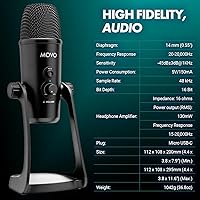
  • Sample Rate: Records at 48kHz with a 24-bit depth, delivering broadcast-level audio resolution suitable for podcasting, streaming, and voice-over work.
  • Frequency Response: Captures audio across the full 20Hz to 20kHz spectrum, covering everything from deep bass tones to the highest audible frequencies.
  • Polar Patterns: Offers four selectable pickup patterns — cardioid, bidirectional, omnidirectional, and stereo — switchable directly on the microphone body.
  • Capsule Design: Uses a tri-capsule array to achieve the four polar patterns without sacrificing audio quality in any individual mode.
  • Signal-to-Noise Ratio: Rated at 58 dB, which is adequate for typical home recording environments but falls below the 70+ dB standard of professional studio condensers.
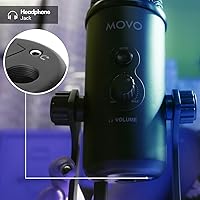
  • Headphone Output: Features a 3.5mm headphone jack with zero-latency direct monitoring and an independent volume control wheel on the mic body.
  • Impedance: Headphone output impedance is rated at 16 ohms, which pairs well with standard consumer and gaming headphones but may underpower high-impedance studio cans.
  • Build Material: The microphone housing is constructed from metal, giving it a noticeably solid feel and better longevity than comparable plastic-bodied competitors.
  • Weight: Weighs approximately 2.2 pounds (1 kg) including the desk mount, which contributes to its stable desk presence but limits portability.
  • Package Dimensions: Ships in a box measuring 10.63 x 5.94 x 5.87 inches, sized to accommodate the mic, mount, cable, and windscreen together.
  • Compatibility: Officially compatible with Windows, Mac OS, PS4, and PS5 as a plug-and-play USB audio device requiring no driver installation.
  • Power Source: Powered entirely via the USB connection — no batteries, no external power supply, and no wall adapter required.
  • Included Accessories: Ships with a foam windscreen and pop filter, a USB-A output cable, and a desk stand mount.
  • Controls: Physical controls include a gain adjustment knob, an LED-lit mute button, and a dedicated headphone monitoring volume wheel.
  • Number of Channels: Outputs a 2-channel stereo signal to the host device, with the active channel configuration determined by the selected polar pattern.
  • Mic Form Factor: Side-address condenser microphone in a cylindrical body designed to sit vertically on the included desk mount.
  • Stand Compatibility: Threaded mount base is compatible with standard mic stand adapters, allowing use with third-party boom arms or floor stands beyond the included desk base.

Related Reviews
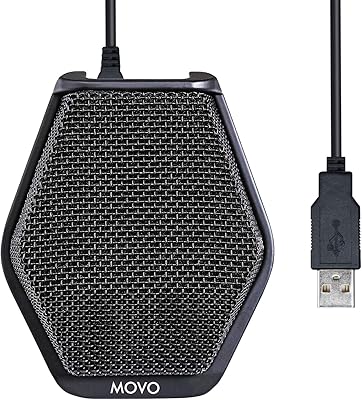
Movo VXR10
Movo VXR10
88%
92%
Build Quality
87%
Vocal Clarity
94%
Value for Money
96%
Portability
91%
Ease of Use
More
Movo X3-II Shotgun Microphone
86%
86%
Audio Quality & Focus
93%
Value for Money
89%
Handling Noise Reduction
92%
Power Flexibility
83%
Build Quality & Durability
More
Movo MC1000
Movo MC1000
75%
84%
Pickup Range & Coverage
67%
Audio Clarity
93%
Ease of Setup
81%
Headphone Monitoring
54%
Background Noise Rejection
More
Movo Wireless Mini UC with WMX-HM
85%
96%
Portability
93%
Ease of Setup
89%
Interview Versatility
84%
Vocal Clarity
87%
Battery Performance
More
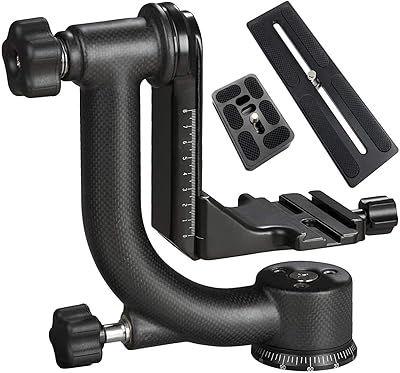
Movo WMX-1 Wireless Lavalier Microphone System
87%
88%
Audio Quality
94%
Ease of Use
85%
Wireless Range
91%
Battery Life
93%
Portability
More
Movo WMX-7-TH
Movo WMX-7-TH
80%
82%
Audio Clarity for Speech
93%
Setup & Ease of Use
78%
Build Quality & Ergonomics
89%
Value for Money
67%
Signal Stability
More
Movo GH800 MKII Carbon Fiber Gimbal Tripod Head
86%
91%
Performance in Wildlife Photography
89%
Build Quality & Durability
85%
Ease of Use
87%
Portability/Weight
92%
Stability Under Load
More
Movo LED-WP Underwater High-Power LED Video Light
85%
86%
Overall Performance
90%
Build Quality
88%
Battery Life
84%
Ease of Use
93%
Waterproof Capability
More

FAQ

No, the Movo UM700 is fully plug-and-play. Just connect it via the included USB-A cable and your computer or PS5 will recognize it automatically as a standard audio input device. No companion app, no driver downloads, nothing extra to configure.

Cardioid is the right choice for solo recordings — it focuses directly in front of the mic and rejects sound coming from the sides and rear, which helps cut down on background noise like keyboard clicks or room echo. Switch to omnidirectional only if you want to capture the full room, or to stereo for ASMR-style content.

Yes, it connects directly to the PS5 via USB-A and is recognized immediately as an audio input. No adapters are needed, and you do not have to touch any settings beyond selecting it as your input device in the PS5 audio menu.

This mic has a 58 dB signal-to-noise ratio, which is decent but not class-leading for a condenser. In quiet, acoustically bare rooms the noise floor can become audible, especially at higher gain settings. Try positioning the mic closer to your mouth, keeping gain at 50 to 60 percent, and using a noise gate in your recording or streaming software — that combination clears up most of the hiss.

Yes, the 3.5mm monitoring jack bypasses your computer entirely and feeds audio directly from the mic capsule, so there is genuinely no latency. This is real hardware monitoring, not a software passthrough, which makes it actually useful for live recording and gaming.

The included mount is functional for casual use, but many users find it a bit wobbly on smooth surfaces and lacking rubber grip underneath. If you type heavily while recording or want to easily reposition the mic during a session, an aftermarket boom arm with a shock mount is a worthwhile addition. It is not a must-have from day one, but most regular users end up upgrading it.

The mic ships with a USB-A cable, so you will need a USB-A to USB-C adapter or a USB hub with a full-size port — neither is included. Once connected through an adapter, it works on Mac OS without any driver installation.

There is a physical selector on the mic body itself — no software required. You simply turn or press it to cycle through cardioid, bidirectional, omnidirectional, and stereo modes. The pattern you select is active immediately.

It can produce decent results for casual demos or home practice recordings, particularly in the stereo or cardioid mode. That said, the 58 dB SNR and tri-capsule design are optimized for voice rather than musical nuance — if you are tracking vocals or instruments for a serious mix, a dedicated large-diaphragm condenser with a higher SNR will give you cleaner, more detailed results.

Yes — switch to the bidirectional pattern and position the mic between both speakers, facing each person from opposite sides. This setup picks up sound from the front and rear while rejecting the sides, which works reasonably well for face-to-face interviews. Keep in mind that room acoustics will affect both voices equally in this mode, so a quiet, softly furnished space helps considerably.