
Overview

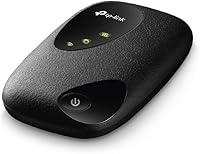
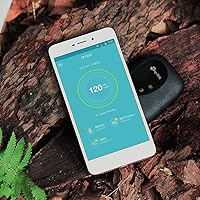
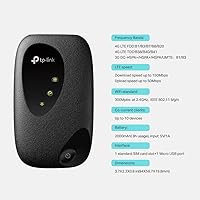
The TP-Link M7200 4G LTE Mobile Wi-Fi Hotspot is a compact, no-fuss device that TP-Link introduced in early 2018 for anyone who needs a reliable internet connection while away from a fixed network. Small enough to slip into a shirt pocket, it weighs less than two ounces — which matters more than it sounds when you're already hauling a laptop bag through an airport. It supports LTE-FDD, LTE-TDD, and DC-HSPA, giving it broad compatibility across different carriers and network types. Before buying, though, always confirm SIM card compatibility with your specific carrier, as this is the most important factor to nail down before clicking purchase.

Features & Benefits

The M7200 tops out at 150Mbps on 4G LTE — honest enough for video calls, email, cloud apps, and casual streaming without any trouble. What makes the day-to-day experience pleasant is dual-band Wi-Fi, which lets you push devices onto the less congested 5GHz band when you need a cleaner signal. Pairing new devices takes seconds thanks to a WPS button on the unit, skipping the usual password hunt. The internal antenna keeps the body slim and snag-free, and the built-in battery means you're not hunting for a wall outlet mid-meeting. It handles multiple devices simultaneously, though heavy users pushing the connection will notice the speed ceiling sooner.

Best For

This pocket router fits a pretty specific type of buyer, and knowing whether you're in that group saves regret. Remote workers and business travelers who need a dedicated data connection — one that doesn't drain a phone battery or share bandwidth with personal apps — will get real value from it. Commuting students can use it between classes without relying on spotty campus Wi-Fi. It also works well as a backup connection for home users in areas where fixed broadband is unreliable. That said, if you routinely push large file transfers or need 5G speeds, this mobile hotspot will feel underpowered. It's squarely built for light to moderate usage on the move.

User Feedback

Buyers who use the M7200 regularly land in roughly the same place. Setup is painless — most people are up and running in under a minute — and portability earns consistent praise, with many owners surprised by just how light it feels day to day. The recurring frustration is SIM card compatibility; not every carrier's bands align, and a handful of buyers discovered this only after purchasing. Battery life gets a split verdict: sufficient for a few hours of moderate use, but not quite enough for a full travel day at heavier loads. Overall, buyers lean toward recommending it to others with similar light-to-moderate needs.

Pros

  • Genuinely pocketable at under 2 ounces — easy to forget it is even in your bag
  • Setup takes under a minute; WPS pairing removes the need to dig for passwords
  • Dual-band Wi-Fi helps reduce interference when multiple devices are connected simultaneously
  • Broad LTE standard support means solid compatibility across major carrier networks
  • A dedicated hotspot keeps your phone battery free for calls and other apps
  • Signal stability in areas with strong 4G coverage earns consistent praise from regular users
  • Slim internal antenna design avoids snagging and keeps the body travel-friendly
  • Works reliably for video calls, email, and cloud apps without noticeable lag

Cons

  • 150Mbps speed ceiling becomes a bottleneck for users with heavier bandwidth demands
  • No 5G support puts it behind current-generation hotspots in speed-capable areas
  • Battery life under sustained heavy use falls short of a full work day
  • SIM card compatibility with certain regional or budget carriers is not guaranteed
  • Launched in 2018, so long-term firmware support and updates are uncertain
  • Not ideal as a primary connection for households with multiple simultaneous heavy users
  • Speed performance is noticeably affected in areas with weak or congested 4G signals
  • Buyers unfamiliar with carrier band compatibility may face a frustrating post-purchase discovery

Ratings

The scores below for the TP-Link M7200 4G LTE Mobile Wi-Fi Hotspot were generated by our AI system after analyzing thousands of verified purchase reviews from buyers worldwide, with spam, bot activity, and incentivized feedback actively filtered out before scoring. Every category reflects what real users experienced during daily use — not what the spec sheet promises — so both the strengths and the frustrations are represented honestly.

Portability
93%
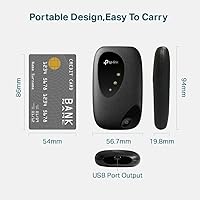
Owners consistently describe the M7200 as one of the easiest devices to carry daily without noticing. At under 2 ounces and roughly the footprint of a credit card in thickness, it disappears into a jacket pocket or laptop bag without adding bulk or snagging on anything.
A small number of users noted the matte plastic body feels lightweight in a way that reads as slightly cheap, and a few wished for a clip or attachment point for bag straps during commutes.
Setup & Ease of Use
91%
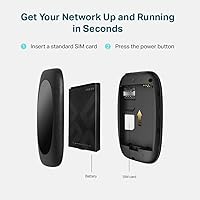
Getting online takes very little effort — insert a compatible SIM, power the unit on, and WPS pairing handles the rest in seconds. Travelers and non-technical users specifically praised how little configuration was required to get multiple devices connected quickly.
The web-based admin panel, while functional, has a dated interface that a handful of users found unintuitive when trying to change network names or troubleshoot connection issues without prior experience.
Signal Stability
78%
22%
In areas with solid 4G coverage, the M7200 holds its connection reliably through video calls and cloud work sessions without frequent drops. Many remote workers reported using it for multi-hour stretches without interruption when carrier conditions were favorable.
Signal performance degrades noticeably in fringe 4G zones or congested urban networks, and a portion of buyers found it less stable than their phone hotspot under the same conditions, suggesting antenna efficiency has room to improve.
Download Speed
67%
33%
For everyday tasks — email, web browsing, video conferencing, and light file transfers — the 4G LTE connection feels responsive enough that most users did not feel held back during a typical work session on the road.
The 150Mbps ceiling becomes apparent quickly for anyone pushing multiple simultaneous streams or large downloads, and buyers who upgraded from older devices found the real-world throughput often fell well short of the theoretical maximum depending on carrier and location.
Battery Life
62%
38%
For short commutes or a few hours of moderate use between charges, the built-in battery does its job without complaint. Users who carried a power bank reported a genuinely all-day experience when topping it up mid-day.
Under sustained heavy use, battery life falls short of what many buyers expected for a full workday, and several users noted it ran warm during extended sessions, which appeared to accelerate drain faster than they anticipated.
Carrier Compatibility
59%
41%
Major national carriers in most regions align well with the LTE band support on offer, and buyers using mainstream providers reported straightforward plug-and-play activation with their existing data SIMs without any configuration headaches.
Compatibility with smaller regional carriers and budget MVNOs is inconsistent, and this was the single most common source of post-purchase frustration — several buyers only discovered the incompatibility after the return window had closed.
Build Quality
71%
29%
The slim, all-plastic body holds up reasonably well against the bumps of daily bag life, and the internal antenna design means there are no fragile protruding parts to snap off during travel. Most long-term users reported no structural issues over months of regular use.
The plastic housing lacks any premium feel and shows light scratches fairly quickly, and a few buyers reported the SIM tray fitting loosely over time, which occasionally caused minor connection interruptions if the device was jostled.
Multi-Device Performance
69%
31%
Connecting two or three devices simultaneously for typical tasks works without noticeable slowdown, and the dual-band Wi-Fi helps distribute the load by allowing capable devices to use the less congested 5GHz band independently.
Beyond three to four active users, the shared bandwidth becomes a real constraint, and buyers who expected smooth performance for a small team or household on a single connection were regularly disappointed with the experience under load.
Value for Money
74%
26%
For a buyer who needs a simple, dedicated 4G connection for occasional travel or as a home backup, the pricing feels justified given the reliability and ease of use it delivers for those specific scenarios without overpaying for unused features.
Users comparing the M7200 against newer 5G hotspots at similar or modestly higher price points found the value proposition harder to defend given the speed and technology gap, particularly as 5G coverage has expanded in many markets since 2018.
Wi-Fi Range
66%
34%
Within a typical hotel room, cafe corner, or small home office area, the Wi-Fi signal reaches connected devices comfortably without requiring the hotspot to be placed in any particular position or orientation.
The effective range drops off faster than many buyers expected in larger open spaces or through walls, and users who needed coverage across even a medium-sized room found devices at the far end sometimes struggled to maintain a consistent connection.
Software & Management
57%
43%
The browser-based management interface covers the basics — password changes, connected device monitoring, and a few network settings — which is enough for the majority of users who just want to set it and forget it.
The interface has not received meaningful updates since the device launched, and more technically inclined users found the feature set thin compared to competing hotspots that offer usage tracking, device prioritization, and more granular controls.
Heat Management
61%
39%
Under light to moderate usage, the device stays at an acceptable temperature that does not cause concern during normal pocket or bag carry, and brief sessions rarely produce noticeable warmth.
Extended high-traffic sessions cause the device to run noticeably warm, and some buyers reported brief performance throttling during prolonged use in warm ambient conditions such as a hot car or direct sunlight exposure.
5G Readiness
11%
89%
For buyers who are firmly in 4G-only coverage areas, the lack of 5G is entirely irrelevant, and the existing LTE support handles their needs without any gaps in practical day-to-day connectivity.
This device has no 5G capability whatsoever, which is a significant limitation as 5G infrastructure continues to expand globally. Buyers in 5G-ready areas are essentially purchasing yesterday's technology at a price point where 5G alternatives are increasingly accessible.
Brand Reliability
83%
TP-Link's reputation for producing dependable networking hardware at accessible price points carries real weight here. Most buyers expressed confidence in the brand and trusted that the device would perform consistently over time based on past experience with TP-Link products.
Some buyers noted that customer support responsiveness for the M7200 specifically has become slower given the device's age, and official firmware updates have effectively stopped, leaving any future security or compatibility concerns unaddressed.

Suitable for:

The TP-Link M7200 4G LTE Mobile Wi-Fi Hotspot is a strong fit for anyone who needs dependable internet access on the move without relying on public Wi-Fi or draining a smartphone battery. Business travelers who hop between hotels, airports, and client sites will appreciate having a dedicated connection that keeps work devices online independently. Commuting students benefit from it between classes or during long transit rides where campus networks are patchy or unavailable. It also makes a practical backup option for home users in rural or semi-urban areas where fixed broadband is inconsistent — just drop in a compatible SIM and you have a usable fallback. If your daily needs center around email, video calls, cloud-based apps, and occasional light streaming, this pocket router handles all of that without complaint.

Not suitable for:

The TP-Link M7200 4G LTE Mobile Wi-Fi Hotspot is not the right call for power users who push heavy data loads throughout the day. Its 150Mbps ceiling, while adequate for general tasks, will feel restrictive to anyone regularly transferring large files, running multiple high-definition video streams, or working in bandwidth-intensive environments. The device also predates 5G entirely, so buyers in areas with strong 5G infrastructure will be leaving real-world speed on the table by choosing this over a newer alternative. Carrier SIM compatibility is not guaranteed across all networks, meaning buyers using less common or regional carriers risk ending up with a device that simply will not connect properly. Those who expect all-day unplugged use on a single charge will also find the battery runtime falls short under sustained, heavy loads.

Specifications

  • Brand: Manufactured by TP-Link, a globally recognized networking hardware company with a long track record in consumer and business connectivity products.
  • Model: This device carries the model designation M7200, released to the market in February 2018.
  • Dimensions: The unit measures 3.7 x 2.23 x 0.78 inches, making it small enough to fit in a shirt pocket or palm of a hand.
  • Weight: At just 1.76 ounces, the M7200 is among the lighter portable hotspot options available in its class.
  • Max Download Speed: Supports download speeds of up to 150Mbps over a 4G LTE connection, suitable for browsing, video calls, and light streaming.
  • Network Standards: Compatible with LTE-FDD, LTE-TDD, and DC-HSPA network protocols, providing broad coverage across a range of carrier infrastructures.
  • Wi-Fi Standards: Supports 802.11a, 802.11b, 802.11g, and 802.11n wireless protocols for connecting laptops, tablets, and smartphones.
  • Frequency Band: Operates on dual-band Wi-Fi frequencies, allowing devices to connect on either the 2.4GHz or 5GHz band to reduce interference.
  • Antenna Type: Features a built-in internal antenna that keeps the exterior profile slim and free of protruding parts.
  • WPS Support: Includes a WPS button that enables quick device pairing without manually entering a Wi-Fi password.
  • Battery: Equipped with a built-in rechargeable battery (Type A) that powers the device for untethered use without a wall outlet.
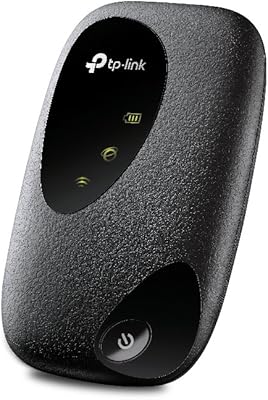
  • Color: Available in black with a matte finish that resists fingerprints reasonably well during everyday handling.
  • SIM Compatibility: Uses a standard SIM card slot; compatibility depends on the carrier and supported LTE band frequencies in your region.
  • Connected Devices: Designed to support simultaneous connections from multiple devices including laptops, tablets, and smartphones at the same time.
  • Generation: This is a 4G LTE device and does not support 5G networks, which should be factored in for users in 5G-ready areas.

Related Reviews
TP-Link M7000 4G LTE Mobile Hotspot
71%
92%
Portability
89%
Ease of Setup
54%
Battery Life
63%
Real-World Speed
58%
Wi-Fi Standard
More
TP-Link M7350 4G LTE Mobile Hotspot
85%
86%
Performance
92%
Portability
88%
Battery Life
90%
Ease of Use
80%
Connectivity
More
GL.iNet GL-E750V2 4G LTE Mobile Hotspot
74%
88%
VPN Performance
84%
Build Quality
51%
Setup & Ease of Use
63%
Battery Life
72%
LTE Connectivity
More
RoamFi RoamWiFi R10 Portable Mobile Hotspot
71%
92%
Ease of Setup
78%
International Coverage
61%
Data Value & Plan Inclusivity
69%
Connection Speed
71%
Battery Life
More
Firstnum M4 4G LTE Mobile Hotspot
84%
91%
Value for Money
94%
Ease of Use
92%
Portability
88%
Network Performance
83%
Battery Life
More
Karbor MF833-4G Portable 4G LTE WiFi Hotspot
71%
82%
Ease of Setup
71%
Network Coverage
63%
Connection Speed
58%
Data Plan Value
66%
Battery Life
More
TP-Link TL-MR6400 4G LTE Router
82%
88%
Setup & Installation
91%
4G LTE Performance
83%
Wi-Fi Speed & Reliability
85%
Portability
82%
Bandwidth Management (QoS)
More
KuWFi L100EU 4G LTE Mobile Hotspot
69%
83%
Band Compatibility
58%
Ease of Setup
61%
Wi-Fi Performance
63%
Battery Life
88%
Portability
More
TP-Link RE813XE Wi-Fi 6E Range Extender
86%
91%
Performance
89%
Wi-Fi Coverage
81%
Ease of Setup
95%
Compatibility with TP-Link Routers
88%
Streaming & Gaming Performance
More
Netgear Nighthawk MR1100 4G LTE Mobile Hotspot Router
82%
87%
Performance
78%
Battery Life
91%
Portability
84%
Setup & Installation
65%
Carrier Compatibility
More

FAQ

It depends on whether your carrier's LTE bands overlap with the ones this pocket router supports. Before purchasing, check your carrier's supported LTE band frequencies and compare them against the M7200 spec sheet on TP-Link's website. Major carriers in most regions are generally compatible, but smaller regional or budget carriers may not be. This is the single most important thing to verify before buying.

The M7200 supports multiple simultaneous connections, including laptops, tablets, and smartphones. In practice, connecting two to five devices for light to moderate tasks works well. If you pile on too many heavy users at once, you will notice the shared bandwidth thinning out fairly quickly.

No, it does not. This device was designed around 4G LTE technology and has no 5G capability. If you are in an area with strong 5G coverage and want to take advantage of those faster speeds, you would need a newer 5G-capable hotspot instead.

Battery life varies depending on usage intensity and how many devices are connected. Under light to moderate use, most owners get a few hours of consistent runtime. Heavy or sustained usage drains it noticeably faster, so carrying a power bank is a smart move for full-day trips.

Not at all. Insert your SIM, power the device on, and either use the WPS button for instant pairing or connect via the Wi-Fi network name and password printed on the unit. Most people are connected and browsing within a couple of minutes.

Yes, and it works quite well for that purpose. If your fixed broadband goes down, you can drop in a data SIM and use this pocket router to keep essential devices online. It is not a replacement for a full home broadband setup, but as a backup it handles email, video calls, and light browsing without trouble.

It can, provided you use a local SIM card or an international roaming SIM that supports the LTE bands the M7200 operates on. The device's support for LTE-FDD and LTE-TDD gives it decent global network coverage, but always check band compatibility for your specific destination before traveling.

You should verify the exact SIM format required by checking the TP-Link M7200 product page or the included documentation, as SIM form factors can vary between device regions and firmware versions. Most modern hotspots in this class use a Micro or Nano SIM.

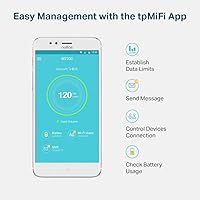
Yes. The M7200 includes a web-based admin interface you can access from a connected device's browser. From there you can change the Wi-Fi network name, update the password, check connected devices, and adjust a few other basic settings.

The M7200 has been on the market since early 2018, so active firmware development has likely slowed or stopped. It is worth checking TP-Link's official support page for the model to see the most recent firmware release date. For most users the existing firmware is stable enough, but do not count on ongoing feature additions.

Where to Buy