Overview

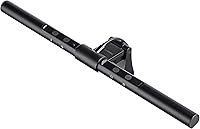
The TORCHSTAR 94265 LED Monitor Light Bar is one of those desk accessories that quietly solves a problem most people didn't realize was bothering them. Instead of a bulky lamp competing for surface space, this monitor light bar clips directly onto the top of your display and draws power through a standard USB port — no extra outlet required, no cord sprawl to manage. The aluminum build feels solid and purposeful, and the matte black finish fits naturally into any modern workstation. At its price point, it sits squarely in the mid-range tier, offering more considered features than budget competitors without crossing into premium pricing territory.
Features & Benefits

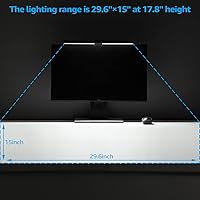
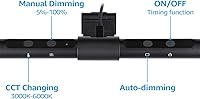
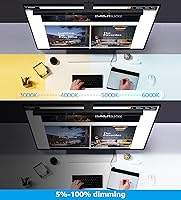
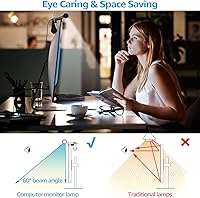
The auto-dimming sensor is probably what you'll notice most after a few days — it reads ambient light and adjusts output automatically, so you're not blasting yourself at full brightness when the room is already well-lit. The CRI 97 rating deserves more than a passing mention: in practical terms, it means colors look very close to how they'd appear in natural daylight, which genuinely matters for photo editing, painting, or any detail-focused work. Light is directed downward through an asymmetrical lens, keeping it off the screen entirely and eliminating that washed-out glare. Four color temperatures and four brightness steps are all reachable through a single touch button, and the lamp remembers your last setting on the next power-on.

Best For

This desk light makes the most sense for people who log long hours in front of a single monitor — remote workers, students, writers, and anyone whose workday regularly stretches into the evening. Gamers will find it particularly useful since it adds practical desk illumination without bouncing any light back at the screen, preserving display contrast. Designers and illustrators who need reliable color accuracy under artificial light will get real value from the high CRI output. It also appeals to anyone simply tired of a traditional lamp consuming half their workspace. One honest note: this is focused task lighting, not a room-filling solution, so expectations should be set accordingly.

User Feedback

Buyers who have used this monitor light bar for extended stretches consistently highlight two things: it takes only minutes to install and eye strain noticeably decreases during long sessions. The clip-on setup draws particular praise, with most users reporting it's fully mounted in under five minutes, no tools needed. On the downside, some reviewers feel the maximum brightness falls short in large or naturally bright workspaces — it's desk-level task lighting, not a substitute for overhead fixtures. The touch control has divided opinion, with most finding it responsive but a few noting it occasionally requires an extra tap. Long-term durability generally holds up well, with several owners reporting consistent performance a year or more into daily use.

Pros

  • Clips onto any 21–32 inch monitor in under two minutes with zero tools required.
  • Asymmetrical optics direct light downward, keeping the screen completely free of glare or reflections.
  • CRI 97 output renders colors accurately — genuinely useful for design, art, and detail work.
  • Auto-dimming sensor adjusts brightness hands-free as room lighting conditions shift throughout the day.
  • USB-powered setup means no dedicated outlet is needed — any monitor hub or laptop port works.
  • Power-off memory saves your last brightness and color temperature setting automatically.
  • Aluminum construction feels noticeably more substantial than plastic competitors at a similar price.
  • Four color temperature modes cover the range from warm evening reading light to crisp daytime work light.
  • Long-term owners consistently report stable brightness and touch control performance after a year or more of daily use.
  • The 2-year warranty provides a reasonable safety net for a daily-use desk accessory.

Cons

  • Maximum brightness falls short in large rooms or brightly lit spaces where stronger output is needed.
  • Only four fixed brightness steps — no continuous dimming for users who want precise control.
  • Touch button can require multiple taps to register, particularly in cooler conditions or with dry hands.
  • The fixed, non-detachable USB cable creates routing challenges when ports are located far from the desk surface.
  • The mounting clip uses plastic components that feel less refined than the aluminum lamp body.
  • No USB-C connection option, which feels like an oversight on a product aimed at modern workstations.
  • Auto-dimming sensor can behave erratically near windows with rapidly changing natural light.
  • Clip contact points may cause minor scuffing on monitor bezels after repeated repositioning over time.
  • Timer function is not intuitive to configure and is frequently overlooked by buyers who would benefit from it.
  • A small but consistent group of long-term users report touch sensor failure after 12 to 18 months of heavy use.

Ratings

The scores below were generated by AI after systematically analyzing thousands of verified buyer reviews for the TORCHSTAR 94265 LED Monitor Light Bar across multiple global markets, with spam, bot activity, and incentivized submissions actively filtered out. Each category reflects a balanced synthesis of what real users praised and what genuinely frustrated them over weeks and months of daily use. Both standout strengths and recurring pain points are represented transparently — no category has been softened to protect the product's image.
Glare Prevention
93%
The asymmetrical optical design is the single most praised feature among long-session users. Reviewers working 8-plus hours daily consistently report that light falls cleanly onto their desk surface without any visible wash on the screen — a genuinely meaningful difference compared to placing a standard lamp beside a monitor.
A small number of users with highly reflective ultrawide curved screens note a faint halo at certain tilt angles, requiring minor manual adjustment. It is not a widespread issue, but worth knowing if your display has an unusually glossy coating.
Eye Comfort & Strain Reduction
91%
Users who switched from overhead or side-placed lamps frequently describe a clear reduction in eye fatigue after long reading or coding sessions. The flicker-free output combined with the high CRI rating means the light feels softer and more natural, particularly during late-night work when the room is otherwise dark.
At the lowest brightness setting, a handful of reviewers with light sensitivity still found the output slightly harsh for extended nighttime use in pitch-black rooms. A fifth, even lower dimming step would address this edge case for the most sensitive users.
Color Accuracy (CRI Performance)
88%
The CRI 97 rating translates into noticeably accurate color rendering in real use — designers and illustrators specifically mention being able to trust what they see on their desk rather than second-guessing hues under typical cool-white office lighting. For anyone doing color-critical work, this is a meaningful practical advantage.
The warmest color temperature mode shifts slightly toward yellow, which can subtly distort warm tones for painters or colorists working with physical media. Buyers doing precise color matching should test the neutral white mode rather than relying on the warmest setting.
Auto-Dimming Function
84%
The ambient light sensor earns consistent praise for feeling intuitive after the first day or two. Users in home offices with changing natural light throughout the day appreciate that the lamp quietly adjusts without requiring manual intervention — one less thing to think about during a busy workday.
The sensor response is not instantaneous; some users describe a brief lag of a second or two when transitioning from bright to dim conditions. In rooms with flickering natural light — near a window on a partly cloudy day, for instance — the lamp can cycle brightness in a way that proves distracting.
Build Quality & Materials
83%
The all-aluminum construction gives this desk light a noticeably more premium feel than plastic competitors in the same price range. The bar does not flex or creak when adjusting the tilt angle, and the matte black finish resists fingerprints reasonably well under daily handling.
The mounting clip, while sturdy for most monitors, feels slightly less refined than the lamp body itself — the plastic components of the clamp mechanism contrast with the aluminum bar. A few users also note minor paint scuffing at the clip contact points after months of repositioning.
Installation & Setup
96%
Almost universally described as foolproof. The weighted clip sits on top of the monitor in under two minutes, the USB cable plugs into any available port, and it is ready to use immediately — no app, no driver, no Bluetooth pairing required. This simplicity is frequently mentioned as a genuine relief by users who dread hardware setup.
There is no instruction booklet worth mentioning, which is fine for most buyers but may confuse first-time monitor lamp users unfamiliar with how the weighted counterbalance clip system works. The cable length is also fixed, which occasionally causes routing issues depending on desk configuration.
Touch Control Responsiveness
71%
29%
The majority of buyers find the touch button accurate enough for everyday use — a single tap cycles through brightness, and a longer press switches color temperature. For users who set their preferred mode and rarely change it, the control works without complaint.
A recurring minority of reviewers describe the touch button as inconsistent, requiring two or three taps before registering. This seems to worsen in cooler environments or when hands are dry. For a lamp where quick adjustments during a call or gaming session matter, this unreliability is a real frustration.
Brightness Output
67%
33%
For desk-level task lighting in a typical home office or bedroom setup, the output is well-matched to the use case. Users working in standard-sized rooms report it adequately illuminates their keyboard and notepad without needing supplementary lighting during evening hours.
In larger rooms, bright open-plan spaces, or setups with high ambient light, the maximum output feels underwhelming. Several buyers specifically mention that it cannot compensate for a poorly lit large room and works best as a focused task supplement rather than a primary light source.
Color Temperature Range
78%
22%
Having four distinct temperature steps — spanning warm white through to a cooler pure white — covers the practical range most users need across different tasks and times of day. The warmer tones work well for evening wind-down reading, while the cooler modes suit focused daytime work.
With only four fixed steps and no continuous adjustment, some users find themselves caught between a mode that is slightly too warm and one that feels a touch too cool. A smooth slider or even a fifth intermediate step would round out the experience considerably.
Memory & Timer Functions
81%
19%
The power-off memory function is a small but consistently appreciated detail — the lamp restores your last-used brightness and temperature setting every time it turns on, eliminating the need to cycle through options from scratch each morning. The timer function adds another layer of practicality for users with consistent routines.
The timer configuration is not intuitive without looking it up, and several buyers report discovering the feature only after reading the product listing again weeks after purchase. Better labeling or a brief quick-start card in the box would help users actually benefit from it.
Monitor Compatibility
87%
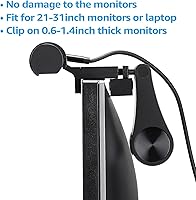
The clip accommodates monitors from 0.6 to 1.4 inches thick, which in practice covers the vast majority of consumer displays from 21 to 32 inches. Users with both thin ultraslim panels and older thicker bezel monitors report the lamp fitting securely without wobble or slippage.
Buyers using monitors outside the stated thickness range — particularly very thin frameless displays under 0.6 inches — report the clip fitting loosely and the lamp tilting forward over time. Ultra-thin monitors are increasingly common, and the clip design has not fully kept pace with current panel standards.
Cable & Power Convenience
79%
21%
USB power means this desk light can draw from a monitor hub, a laptop port, or any standard USB charger — no dedicated power brick or wall outlet required. This flexibility is particularly useful for users with limited outlet access or a minimalist cable management setup.
The fixed cable length is a point of frustration for users whose USB port sits on the back or side of a tower PC at floor level, as the cable can feel just short enough to create tension. A slightly longer cord — or a detachable cable option — would eliminate the issue entirely.
Long-Term Durability
82%
18%
Owners who have used this monitor light bar daily for a year or more generally report no degradation in brightness or touch control performance. The aluminum construction holds up well, and the LED elements show no signs of color shift or dimming over extended use in the majority of long-term accounts.
A small but notable group of users report touch control failure after 12 to 18 months of use, with the button becoming unresponsive entirely. It is not a dominant failure mode, but it appears often enough across independent reviews to suggest the touch sensor is the most likely component to wear out first.
Value for Money
76%
24%
Relative to what this desk light actually delivers — solid build, high CRI output, auto-dimming, and genuine glare control — most buyers feel it earns its price. Reviewers who previously used cheaper plastic alternatives specifically note the quality gap justifies the step up in cost.
At its price point, the absence of a continuous dimming dial, a wireless control option, or a USB-C connection alongside standard USB-A feels like a missed opportunity. Competing products at similar or only slightly higher prices are beginning to offer these features, which puts pressure on the overall value calculation.

Suitable for:

The TORCHSTAR 94265 LED Monitor Light Bar is a strong match for anyone who spends long hours at a single-monitor desk and wants practical, eye-friendly task lighting without sacrificing workspace. Remote workers and students will appreciate how it clips directly onto the display and draws power from a USB port, keeping the desk clear for everything else. Designers, illustrators, and photographers doing color-sensitive work will find the CRI 97 output genuinely useful — it renders colors accurately enough to trust what you see on your desk surface, which is rare at this price tier. Gamers who want their keyboard and desk lit without washing out their screen will also find this desk light well-suited to their setup, since the downward-focused optics keep light off the panel entirely. If your current desk situation involves a cluttered lamp cord, a bulky base eating into your workspace, or eye strain that builds up over the course of the day, this monitor light bar directly addresses all three problems.
Not suitable for:

Buyers expecting this monitor light bar to serve as a primary light source for a large or bright room will likely be disappointed — the TORCHSTAR 94265 LED Monitor Light Bar is a focused task light, not a room-filling solution, and its 6-watt output reflects that. People who prefer continuous dimming rather than fixed steps may find the four-level brightness control limiting, especially since there is no app, dial, or wireless remote to fine-tune intensity. Those using very thin frameless monitors below roughly 0.6 inches thick should verify compatibility before purchasing, as the weighted clip has been reported to sit loosely on panels at the slimmer end of the spectrum. If you frequently move between multiple monitors or need a lamp that adapts to dramatically different desk setups, the fixed clip design and non-detachable cable may become inconveniences. Finally, buyers in large open-plan home offices or shared spaces with strong overhead lighting may find the auto-dimming sensor reacts to room light rather than just their immediate work area, occasionally producing less-than-ideal adjustments.
Specifications

  • Dimensions: The lamp bar measures 1.57″ deep, 15.28″ wide, and 2.76″ tall, making it a compact fit on top of most standard monitors.
  • Weight: The complete unit weighs 1.17 pounds, light enough that it does not strain the monitor bezel under normal use.
  • Material: Both the lamp body and shade are constructed from aluminum, giving the unit a more durable and premium feel than plastic alternatives.
  • Finish: The exterior uses a matte black finish that resists minor fingerprinting and blends cleanly into modern dark-themed workstation setups.
  • Power Source: The lamp draws power via USB at 5 volts and consumes 6 watts, compatible with any standard USB-A port including monitor hubs and laptop ports.
  • Light Source: Illumination is provided by integrated LED elements with no user-replaceable bulb component.
  • CRI Rating: The lamp achieves a Color Rendering Index of 97, meaning colors viewed under its light closely match how they appear under natural daylight conditions.
  • Color Temperatures: Four fixed color temperature steps are available, spanning from warm white for relaxed evening use through to pure white for focused daytime tasks.
  • Brightness Levels: Brightness is adjustable across four fixed steps via touch control, with no continuous or infinite dimming available.
  • Control Type: All functions including brightness, color temperature, and auto-dimming are operated through a single capacitive touch button on the lamp body.
  • Monitor Compatibility: The lamp is designed for use with monitors ranging from 21 to 32 inches in width, covering the majority of consumer desktop displays.
  • Clip Thickness Range: The weighted mounting clip accommodates monitor bezels and frames ranging from 0.6 to 1.4 inches thick.
  • Optical Design: An asymmetrical downlight lens directs all light toward the desk surface, preventing any upward light bleed or reflective glare on the monitor screen.
  • Special Functions: The lamp includes an auto-dimming ambient sensor, a power-off memory function that restores the last used setting, and a built-in timer function.
  • Warranty: TORCHSTAR covers this lamp with a 2-year manufacturer warranty against defects in materials and workmanship.
  • Indoor Use: This lamp is rated strictly for indoor use and carries no water resistance rating, making it unsuitable for outdoor or high-humidity environments.
  • Wattage: Operating at 6 watts, this desk light is highly energy-efficient compared to traditional incandescent or halogen desk lamps of equivalent output.
  • Mounting Type: The lamp mounts exclusively via a top-of-monitor weighted clip system and is not compatible with desk clamps, VESA arms, or wall brackets.

Related Reviews
YEELIGHT Monitor Light Bar
81%
88%
Build Quality
84%
Eye Care Performance
91%
Color Temperature Range
72%
Brightness Output
69%
Touch Control Usability
More
Laliled 15.6-inch Curved Monitor Light Bar
77%
88%
Glare & Eye Comfort
93%
Ease of Installation
76%
Light Quality & CRI
63%
Color Temperature Range
84%
Brightness & Dimming Control
More
OOWOLF TL03 Pro-Plus Monitor Light Bar
81%
88%
Eye Comfort & Strain Reduction
91%
Color Rendering Quality
67%
Brightness Output
86%
Color Temperature Range & Dimming
72%
Remote Control Usability
More
BlitzMax BM-ES1 Monitor Light Bar
84%
91%
Glare & Reflection Control
88%
Dimming & Brightness Control
86%
Color Temperature Range
84%
Installation & Compatibility
79%
Remote Control Usability
More
BenQ ScreenBar Halo 2 Monitor Light Bar
86%
94%
Glare Reduction
88%
Ambient Backlight Quality
93%
Wireless Controller Usability
91%
Eye Comfort Over Long Sessions
89%
Build Quality & Materials
More
YAOHUOO Dual Monitor Stand with LED Light and 2 Drawers
85%
89%
Value for Money
92%
Build Quality & Durability
88%
Ergonomics & Comfort
84%
Ease of Assembly
90%
Storage & Organization
More
EOTO LIGHT 19-inch LED Ring Light with Tripod
86%
91%
Brightness & Light Quality
89%
Ease of Use
85%
Build Quality
93%
Adjustability (Height & Light Settings)
68%
Portability
More
EOTO LIGHT HQ-18N 18-inch LED Ring Light
80%
91%
Brightness Output
88%
Color Temperature Range
86%
Color Accuracy (CRI)
78%
Tripod Build & Stability
71%
Remote Controls
More
EOTO LIGHT 21-inch LED Ring Light with Tripod Stand
86%
91%
Brightness & Lighting Quality
87%
Ease of Use
85%
Portability & Setup
83%
Stability & Tripod Quality
88%
Build Quality
More
Movo LED-WP Underwater High-Power LED Video Light
85%
86%
Overall Performance
90%
Build Quality
88%
Battery Life
84%
Ease of Use
93%
Waterproof Capability
More

FAQ

It depends on the bezel thickness more than the curve itself. As long as your monitor's top edge is between 0.6 and 1.4 inches thick, the clip should sit securely. Some users with very gently curved ultrawides report no issues at all, but sharply curved panels can occasionally cause the lamp to tilt slightly forward over time, so it's worth checking your specific monitor's bezel dimensions before purchasing.

The asymmetrical lens design is genuine and does what it claims in most real-world setups. Light is directed downward onto the desk rather than forward toward the screen, so there is no noticeable wash or reflection on the display during normal use. Users with highly polished or aggressively curved screens may notice a faint edge reflection at extreme lamp tilt angles, but for the majority of flat and matte-coated panels it is a real and effective difference compared to a side-placed desk lamp.

Yes, any USB-A port that provides standard 5V output will power the lamp without issue — monitor hubs, laptop ports, USB wall adapters, and powered desktop hubs all work. Just make sure the port is not a low-power charging-only port, which are increasingly common on some monitors and may not deliver reliable power.

There is a small ambient light sensor built into the lamp that reads the brightness of your surrounding environment and adjusts the output accordingly. In practice, it means the lamp quietly ramps up when your room gets darker in the evening and pulls back during brighter daytime conditions. It works well in stable indoor environments but can cycle noticeably if you are near a window with rapidly changing cloud cover, which some users find distracting.

Not at all — it is genuinely one of the easiest desk accessories to set up. The weighted counterbalance clip rests on top of the monitor, the USB cable plugs into any available port, and it is ready to use immediately. No tools, no drilling, no software, no pairing process. Most buyers report being up and running in under three minutes.

CRI stands for Color Rendering Index, and a score of 97 out of 100 means the light source shows colors very close to how they look under natural sunlight. For most office or gaming use, the practical benefit is that things simply look more natural and less harsh under the lamp. Where it really matters is if you do color-sensitive work — photo editing, illustration, painting, or matching physical materials — because lower-CRI lights can subtly shift hues in ways that affect your judgment. For everyday reading and typing, it is a comfort benefit more than a critical requirement.

Yes. The touch button lets you cycle through brightness levels manually at any time, and the lamp will hold whatever setting you choose. The auto-dimming function activates by default when you power the lamp on in a dark environment, but you can override it with a manual tap to lock in a specific brightness level for as long as you need.

The clip is designed with a weighted counterbalance rather than a spring-clamp mechanism, which means it rests on the bezel rather than gripping it under tension. Most users report no marks after months of use. That said, repeatedly repositioning the lamp or sliding the clip back and forth can cause minor surface scuffing at the contact points over time, particularly on glossy bezels. If you are concerned, a thin strip of felt or microfiber between the clip and bezel provides easy protection.

Yes, the built-in memory function saves your last-used brightness level and color temperature. When the lamp powers back on — whether after a deliberate shutdown, a sleep cycle, or an accidental power interruption — it restores exactly where you left it without requiring you to cycle through settings again. It is a small feature but one that regular users quickly come to rely on.

The LED elements themselves are rated for tens of thousands of hours and show no significant degradation in brightness or color accuracy based on long-term owner accounts. The component most likely to wear out first is the capacitive touch button, which a small but notable group of buyers report becoming unresponsive somewhere in the 12 to 18-month range under heavy daily use. The 2-year warranty covers this scenario, so if it does fail within that window, you have a clear path to a replacement.