Overview

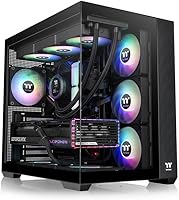
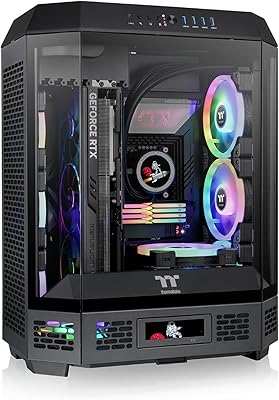
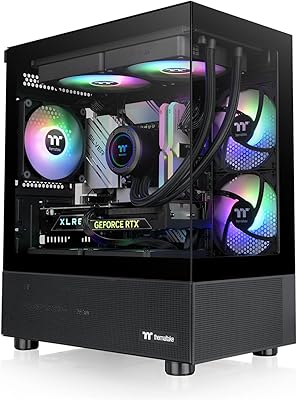
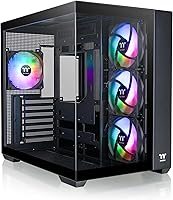
The Thermaltake View 380 ARGB Mid Tower Case is built squarely around one idea: making your components the centerpiece of the build. The internal layout uses a dual-chamber design to physically separate the power supply and cables from the main motherboard area, so what you see through the glass is clean and intentional. It also supports hidden-connector motherboards — boards that move all power and data connections behind the rear panel, leaving the front face completely wire-free. Out of the box, four pre-installed ARGB fans and a solid airflow foundation make this mid-tower a strong pick for builders who want impressive aesthetics at a realistic price.
Features & Benefits

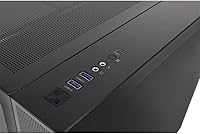
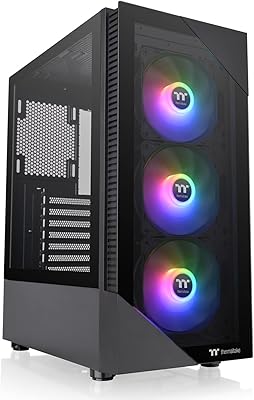
What immediately stands out about the View 380 is the pillarless tempered glass on both the front and side — without structural bars interrupting the view, you get a wide, unobstructed look at the interior from two angles. The four included 120mm hydraulic-bearing fans deliver airflow and ARGB lighting right out of the box, with no extra purchases needed. Hardware clearance is generous: the case supports 360mm radiator capacity and GPUs up to 415mm, so high-end cooling setups have room to breathe. The I/O panel packs a USB 3.2 Gen 2 Type-C port, two USB 3.0 ports, and HD Audio — inputs that hold up well even against newer mid-tower competition.

Best For

This Thermaltake case is a natural fit for anyone building around a hidden-connector motherboard — platforms like Asus BTF or MSI Project Zero route every cable out the back, and the View 380 is one of the few mid-towers explicitly designed for that workflow. It also suits enthusiasts who want their RGB components on full display without the cost of a full-tower chassis. Builders planning a custom water loop will appreciate the 360mm radiator support. And for first-time builders, the included fans and intuitive interior layout lower the barrier to putting together a visually striking rig from the start.

User Feedback

Across a large pool of buyer reviews, the View 380 lands consistently high marks, with most praise aimed at the pillarless glass panels and the quality of the ARGB lighting out of the box. Owners of hidden-connector build platforms frequently single out this mid-tower as one of the better-suited chassis for that setup. On the downside, a handful of users note that at over 15 pounds, this Thermaltake case is not ideal for frequent transport or LAN events. A few also caution that the frameless panels need careful handling during removal. Neither issue is a dealbreaker, but both are worth knowing before you commit.

Pros

  • Four 120mm ARGB fans come pre-installed, saving a real and meaningful extra purchase at build time.
  • Pillarless dual tempered glass panels create a wide, unobstructed view of internals from two angles.
  • Hidden-connector motherboard support keeps the entire visible chamber completely wire-free.
  • 360mm radiator clearance and up to 415mm GPU support accommodate serious high-end hardware.
  • The dual-chamber layout separates cables and the PSU from the main compartment by design, not just by effort.
  • Front I/O includes a USB 3.2 Gen 2 Type-C port, which many competitors omit at this price.
  • The steel chassis feels solid and rigid throughout assembly with no noticeable panel flex.
  • A three-year warranty provides meaningful long-term coverage for a case expected to last multiple builds.
  • Overall buyer sentiment is strongly positive across a large review base, reflecting consistent real-world satisfaction.

Cons

  • The tempered glass front panel limits intake airflow compared to mesh alternatives, which matters under heavy load.
  • At over 15 pounds empty, this mid-tower is genuinely cumbersome to move or transport once fully built.
  • Frameless glass panels require careful handling during removal — edge damage is a real risk if rushed.
  • The rear cable management space is functional but tight with high-wattage PSUs and thick modular cables.
  • No dedicated ARGB controller is included, so motherboards without ARGB headers need a separate purchase.
  • Hydraulic-bearing fans produce a noticeable hum at higher speeds during sustained gaming or rendering sessions.
  • Micro-ATX and Mini-ITX boards look visually undersized inside the chamber, undermining the showcase aesthetic.
  • Internal plastic components like the fan hub feel noticeably less premium than the steel exterior suggests.
  • Top radiator installations can conflict with tall RAM kits, requiring compatibility checks before committing to a build layout.

Ratings

The Thermaltake View 380 ARGB Mid Tower Case earns its place near the top of the mid-tower market, and these scores reflect exactly that — generated by AI after analyzing thousands of verified global buyer reviews, with spam, bot activity, and incentivized feedback actively filtered out. Ratings span everything from panel quality to cable management, capturing both the genuine strengths and the friction points that real builders encounter. Nothing is glossed over here; the numbers reflect the full picture.
Aesthetic Design
93%
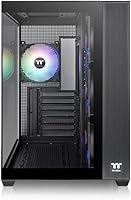
Buyers are consistently struck by how striking the case looks once a build is complete. The pillarless glass on both the front and side creates a wide, gallery-like view of the components inside, and the ARGB lighting from the included fans fills the chamber with color in a way that looks intentional rather than gaudy.
The all-black exterior with no accent trim can feel plain from the outside when the system is off. A small number of buyers expected more visual interest on the chassis itself, not just through the glass.
Tempered Glass Quality
88%
The frameless tempered glass panels are thick and feel solid, giving the case a premium look that buyers say rivals cases at higher price points. The dual-panel setup in particular gets repeated praise for the unobstructed sightlines it creates from two directions simultaneously.
Because the panels are frameless, removing them requires a careful grip and some confidence — a few users reported minor edge chips or handling anxiety, particularly on the front panel. It is not fragile, but it does reward patience during assembly.
Hidden-Connector Compatibility
91%
For builders using hidden-connector motherboards like Asus BTF or MSI Project Zero platforms, the View 380 is widely called one of the most purpose-fit mid-towers available. The routing cutouts align well, and the dual-chamber design means cables disappear completely from the front-facing chamber.
Builders using standard motherboards get less mileage from this feature set, and some feel the case is slightly over-engineered for traditional cable management. The rear chamber, while functional, can get tight with thick modular cables.
Included Fan Bundle
89%
Getting four 120mm ARGB hydraulic-bearing fans pre-installed is genuinely useful — buyers consistently note that sourcing equivalent fans separately would add real cost to the build. Airflow coverage out of the box is solid for most standard configurations.
Hydraulic-bearing fans are not the quietest option under sustained load. Users running prolonged workloads or gaming sessions at high fan speeds report a noticeable hum compared to higher-end fluid-dynamic or magnetic-bearing alternatives.
Airflow Performance
82%
18%
The four-fan default configuration pushes enough air through the case to keep mid-range and high-end components within comfortable thermal ranges in most room conditions. Builders adding a front 360mm radiator report even better thermal headroom with minimal noise trade-off.
The front tempered glass panel, while beautiful, does restrict intake airflow compared to mesh-front alternatives. Buyers running hot CPUs and GPUs simultaneously may want to add a fifth fan or swap the front panel for better sustained cooling.
Radiator & Cooling Support
87%
Supporting a 360mm radiator at the front and accommodating GPUs up to 415mm long gives this mid-tower serious flexibility for high-performance builds. Liquid-cooling enthusiasts specifically call out that this capacity is hard to find without moving to a full tower.
Top radiator clearance is more limited depending on RAM height, so tall memory kits can complicate top-mount radiator installations. Checking compatibility with specific cooler and RAM combinations before purchasing is advisable.
Cable Management
78%
22%
The dual-chamber layout does most of the heavy lifting — power supply cables, storage connections, and fan headers all stay behind the rear divider and out of sight. The rear chamber includes routing holes with rubber grommets that make the process straightforward.
The rear cable management space is workable but not generous. Builders using thick or numerous PSU cables from higher-wattage units sometimes struggle to close the rear panel flush, and tie-down anchor points could be more plentiful.
Build Quality & Materials
83%
The steel chassis feels sturdy and holds its shape well during assembly, with no flex in the panel mounts or floor. Buyers note that the overall fit and finish is above average for the price tier, with clean edges and consistent panel alignment.
Some internal plastic components — particularly the fan hub and a few clip-based mounts — feel less robust than the steel shell suggests. They function fine under normal use but do not inspire confidence if the case is disassembled and reassembled repeatedly.
I/O Port Selection
79%
21%
Having a USB 3.2 Gen 2 Type-C port on the front I/O is a genuine convenience that many competing cases at this price skip entirely. Combined with two USB 3.0 ports and HD Audio, the front panel covers daily connectivity needs without reaching for the rear motherboard I/O.
There is no USB 2.0 port on the front panel, which occasionally frustrates users with older peripherals or wireless receivers. The HD Audio implementation is functional but some users report minor static depending on the motherboard audio codec.
Motherboard Compatibility
86%
ATX is well-supported as the primary form factor, and the standoff layout accommodates a wide range of board sizes. Buyers note that installation is uncomplicated, with enough clearance around the board for cooler mounting without removing panels repeatedly.
Micro-ATX and Mini-ITX users will find the case proportionally large for their boards, leaving visible empty space in the chamber that undercuts the showcase aesthetic. The case is clearly optimized for full ATX builds.
Assembly Experience
81%
19%
Most builders describe the assembly process as intuitive, helped by the tool-free expansion slot covers and clearly routed cable paths. First-time builders in particular appreciate that the pre-installed fans reduce one of the more confusing early steps.
The front glass panel can be tricky to remove without a suction cup or careful finger placement along the edge. Instructions included in the box are minimal, and builders unfamiliar with dual-chamber layouts may need a tutorial for the first pass.
Portability & Weight
58%
42%
For a stationary desktop build that stays on a desk, the weight is largely a non-issue — the case sits firmly and does not shift during use. The dimensions are standard enough that it fits under most desks without difficulty.
At over 15 pounds empty, this mid-tower becomes a genuine burden to move once fully built. Buyers who attend LAN events or need to transport their system regularly find the weight a consistent frustration, and there are no integrated handles to help.
Value for Money
88%
Given the dual tempered glass panels, four included ARGB fans, hidden-connector support, and 360mm radiator clearance, the View 380 packs a lot of capability into its price bracket. Most buyers feel they received more than the price implied, especially factoring in the saved fan cost.
Buyers primarily interested in airflow-first performance can find mesh-front mid-towers with similar fan counts at a lower price point. The premium here is for the aesthetic package, and those who do not value the showcase design may find cheaper alternatives adequate.
ARGB Lighting Quality
85%
The ARGB output from the included fans is bright, evenly distributed, and controllable via standard ARGB headers on compatible motherboards. The effect inside the dual-chamber layout looks noticeably more polished than budget ARGB fans typically deliver.
The fans do not come with a dedicated controller, so builders with motherboards lacking ARGB headers will need to purchase one separately. Lighting synchronization across mixed-brand components also requires some software configuration patience.
Warranty & Brand Support
80%
20%
Thermaltake backs the View 380 with a three-year warranty, which is on the stronger end for case manufacturers and signals reasonable confidence in the product. Brand support is accessible for most buyers in major markets.
Warranty claim experiences vary noticeably by region, with some international buyers reporting slower response times and limited replacement part availability. Domestic buyers in major markets tend to have smoother interactions overall.

Suitable for:

The Thermaltake View 380 ARGB Mid Tower Case is purpose-built for PC enthusiasts who treat their build as something worth displaying, not just running. If you are assembling a system around a hidden-connector motherboard — boards like those in the Asus BTF or MSI Project Zero lineup that route all power and data cables behind the rear panel — this mid-tower is one of the most thoughtfully matched chassis available at this price. The dual-chamber interior keeps the PSU and wiring completely out of sight, so the main compartment stays clean without heroic cable management effort. Gamers and creators who want 360mm radiator support without committing to a full-tower footprint will also find this case hits a practical sweet spot. First-time builders benefit from the four included ARGB fans, which remove a common early purchase and simplify the initial setup considerably. Anyone who wants a visually striking, well-specced system at a mid-range budget will find the View 380 punches well above what its price bracket typically delivers.
Not suitable for:

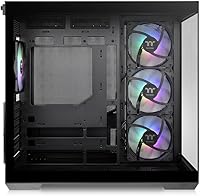
The Thermaltake View 380 ARGB Mid Tower Case is a harder sell for buyers whose priorities sit outside aesthetics and showcase builds. If maximum airflow is your primary concern, a mesh-front mid-tower will outperform this case thermally — the tempered glass front panel, as beautiful as it is, restricts intake airflow in a way that matters under sustained heavy workloads. Builders who attend LAN parties or regularly transport their system should know upfront that this case weighs over 15 pounds empty, and that number climbs fast once a full build is inside; there are no handles or carrying aids to soften that burden. Micro-ATX and Mini-ITX users will technically fit inside the case, but the proportions leave the chamber looking sparse, which undercuts the entire visual premise. Anyone indifferent to ARGB lighting or tempered glass aesthetics will likely find cheaper alternatives that offer comparable internal space and build quality without paying for the showcase features. And builders who disassemble and reconfigure their systems frequently should handle the frameless glass panels carefully, as repeated removal increases the risk of edge damage over time.

Specifications

  • Form Factor: The case is a Mid Tower designed to accommodate ATX motherboards as the primary supported form factor.
  • Dimensions: The chassis measures 17.4″ long by 11.22″ wide by 16.14″ tall, fitting comfortably under most standard desks.
  • Weight: The empty case weighs 15.28 pounds, which is on the heavier side for a mid-tower and worth factoring in if transport is a consideration.
  • Front Panel: The front features a pillarless tempered glass panel with no structural bars interrupting the view of the internal components.
  • Side Panel: The left side panel is tempered glass, providing a clear view into the main chamber from the standard display angle.
  • Interior Layout: A dual-chamber design physically separates the PSU and cabling from the main motherboard compartment, keeping the visible area clean.
  • Pre-Installed Fans: Four 120mm ARGB hydraulic-bearing fans come installed at the factory, providing immediate airflow and lighting without any additional purchases.
  • Radiator Support: The case supports radiators up to 360mm, making it compatible with high-performance all-in-one and custom liquid-cooling loops.
  • GPU Clearance: Maximum GPU length supported is 415mm, accommodating virtually all current consumer and enthusiast-grade graphics cards.
  • CPU Cooler Clearance: The case supports tower CPU coolers up to approximately 170mm in height, covering the vast majority of air cooler options on the market.
  • Front I/O Ports: The front I/O panel includes one USB 3.2 Gen 2 Type-C port, two USB 3.0 Type-A ports, and one HD Audio combo jack.
  • PSU Mounting: The power supply mounts at the bottom of the case behind the shroud, keeping it out of the main visual chamber entirely.
  • Hidden-Connector Support: The case includes routing provisions specifically designed to support hidden-connector motherboards, which move all power and data cables to the rear of the board.
  • Material: The primary chassis is constructed from alloy steel, providing structural rigidity without the premium weight of aluminum.
  • Drive Bays: The case supports multiple 2.5″ SSD mounts and at least one 3.5″ drive bay, located within the secondary chamber behind the main compartment.
  • Expansion Slots: Seven expansion slots are available along the rear of the case, supporting standard ATX motherboard configurations and multi-GPU or large add-in card setups.
  • Motherboard Support: While optimized for ATX, the case is also physically compatible with Micro-ATX and Mini-ITX boards using the same standoff layout.
  • Color: The case is available in Black, with a black-painted steel interior and exterior finish throughout.
  • Warranty: Thermaltake provides a three-year manufacturer warranty covering defects in materials and workmanship from the date of purchase.
  • ARGB Connectivity: The included fans connect via standard ARGB headers, compatible with most modern motherboards that support 5V 3-pin ARGB control.

Related Reviews

Thermaltake View 200 TG ARGB Mid Tower Case
71%
78%
Build Quality
53%
Airflow Performance
67%
Included Fans
84%
RGB & Lighting
62%
Cable Management
More
Thermaltake Tower 600 Mid-Tower ATX Case
79%
91%
Build Quality
93%
Aesthetic Design
88%
Cable Management
94%
Cooling Capacity
71%
Installation Experience
More
Thermaltake View 600 TG Full Tower Case
87%
92%
Cooling Performance
89%
Build Quality
85%
Ease of Installation
93%
Aesthetics
88%
Cable Management
More
Thermaltake Versa H21 ATX Mid Tower Case
69%
91%
Ease of Assembly
86%
Interior Space
73%
Airflow & Ventilation
58%
Build Quality & Materials
67%
Cable Management
More
AMANSON H9 Mid-Tower ATX Gaming PC Case
76%
88%
Value for Money
81%
Airflow Performance
67%
Pre-Installed Fan Quality
63%
Build Quality
79%
Tempered Glass Panels
More
PCCOOLER C3D310 BK ARGB Mid Tower PC Case
86%
87%
Build Quality
91%
Ease of Installation
90%
Airflow Performance
85%
Design and Aesthetics
89%
Cooling Options (Air & Water)
More
Corsair 3500X ARGB Mid-Tower ATX PC Case
84%
92%
Cooling Performance
87%
Build Quality
90%
Design & Aesthetics
85%
Ease of Installation
89%
Airflow Support
More
Thermaltake View 51 TG ARGB Edition Gaming Case
85%
92%
Design and Aesthetics
88%
Cooling and Airflow Performance
85%
Ease of Assembly
90%
Space and Expandability
89%
Build Quality and Durability
More
Thermaltake View 170 TG ARGB Micro-ATX Case
88%
91%
Build Quality
89%
Cooling Performance
94%
Design & Aesthetics
72%
Cable Management
88%
Ease of Assembly
More
Antec C5 ARGB
Antec C5 ARGB
84%
93%
Out-of-Box Value
88%
Build Quality
84%
Airflow & Thermal Performance
86%
Cable Management
91%
ARGB Lighting Quality
More

FAQ

Yes, the View 380 is designed with hidden-connector compatibility built in. The routing cutouts and dual-chamber layout are set up to accommodate boards like those in the Asus BTF and MSI Project Zero lineup without any modifications. No adapter or extra bracket is needed — just make sure your motherboard itself supports the hidden-connector standard before purchasing.

The front panel takes a bit of confidence the first time since it is frameless and has no handle. Most builders recommend using a suction cup for a secure grip, or pressing gently against the lower edge to release the magnetic or push-pin retention. Take your time and avoid twisting — the glass is durable but the edges can chip if forced.

You will need to swap out the front fans when installing a 360mm radiator, since the radiator takes up the same front mounting positions. The good news is the included fans can be relocated to other positions or kept as spares. Plan your cooling layout before assembly to avoid unnecessary disassembly later.

Potentially, yes. Top radiator clearance can be tight depending on RAM height and the thickness of the radiator plus fans combined. If you are running memory kits taller than around 40mm, it is worth checking your specific radiator dimensions against the case clearance before committing to a top-mount configuration.

For a first build, the Thermaltake View 380 ARGB Mid Tower Case is a reasonable choice. The dual-chamber layout makes it easier to understand where cables should go, and having four fans already installed removes one of the more confusing early steps. The only caveat is the tempered glass panels, which need careful handling — but with patience, most first-time builders manage without any issues.

Hydraulic-bearing fans are generally quiet at low and medium speeds, but they do produce a noticeable hum at higher RPMs during heavy gaming or rendering workloads. In terms of longevity, hydraulic bearings are decent but sit below sleeve and fluid-dynamic bearings in terms of lifespan. For a standard gaming setup they will last years without issue, but if whisper-quiet operation is a priority you may eventually want to upgrade to higher-end fans.

It works perfectly fine with a standard ATX motherboard. The hidden-connector support is an optional feature, not a requirement. With a regular board, you manage cables the traditional way behind the rear panel — the dual-chamber layout still helps keep things tidy. You just will not get the completely wire-free front chamber look that hidden-connector boards enable.

Yes, the case has solid custom loop potential. The 360mm front radiator support is the biggest asset, and the dual-chamber rear area can house a reservoir and pump with some planning. It is not purpose-built for custom loops the way some enthusiast cases are, but builders have completed clean custom-loop builds in the View 380 without major compromises.

Honestly, it is not ideal for frequent transport. At over 15 pounds empty — and considerably more once fully built — the case becomes a real burden to carry, especially since there are no built-in handles. If LAN portability is important to you, a lighter or handle-equipped case would be a more practical choice. For occasional moves, it is manageable but not comfortable.

The included fans use standard 5V 3-pin ARGB connectors, so if your motherboard lacks a compatible header you will need a separate ARGB controller to manage the lighting. These controllers are widely available and inexpensive, and they typically include a remote or button for cycling through effects. It is an extra purchase to factor in, but not a complicated one.

Where to Buy