
Overview

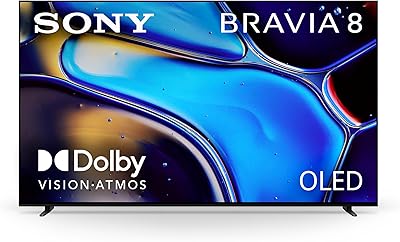
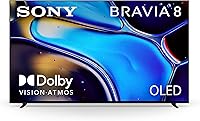
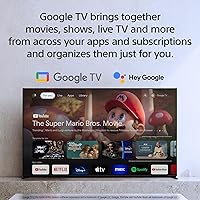
The Sony Bravia 8 65-inch OLED 4K TV positions itself as a serious living-room display for people who care about picture quality — whether that means watching films late at night or running a PS5 at 120 frames per second. The 65-inch size hits a practical sweet spot: large enough to feel cinematic in a mid-sized room, without pushing into the pricing territory of Sony's top-tier sets. What separates this Sony OLED from competing OLED panels is the XR Cognitive Processor, which analyzes and adjusts picture in real time rather than applying blanket filters. Google TV handles daily navigation, and it's worth evaluating honestly. The Bravia 8 excels in controlled lighting — expect its best performance after the sun goes down.

Features & Benefits

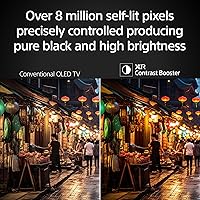
Where this 65-inch panel really distinguishes itself is in black level performance. Every pixel on an OLED screen produces its own light and can switch completely off, so dark scenes don't look washed-out gray — they look genuinely dark. Sony's XR Contrast Booster 15 extends this by widening the gap between deep blacks and bright highlights. The Triluminos Pro color engine makes skin tones and natural textures look accurate without over-saturation — a detail that matters during nature documentaries or HDR films. The Acoustic Surface Audio+ system is genuinely unusual: it vibrates the screen itself to produce sound, tying audio position to what's on screen. Add a native 120 Hz panel with HDMI 2.1, and the TV handles both cinematic frame rates and fast-paced gaming without compromise.

Best For

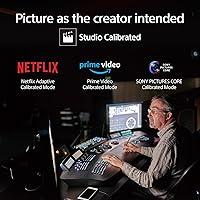
The Bravia 8 is a strong fit for PS5 owners above anyone else — Sony has built genuinely useful console integration that goes beyond marketing. It also suits dedicated film watchers who care more about contrast depth and color accuracy than raw brightness numbers. If you're upgrading from a mid-range LCD, the difference in picture quality will be immediately obvious, not subtle. Heavy streamers will appreciate the studio-calibrated modes for Netflix and Prime Video, which take the guesswork out of picture settings. This Sony OLED is less suited for bright, sun-drenched living rooms where a high-brightness MiniLED panel would perform better. But for anyone with reasonable light control who wants an integrated smart TV experience without extra hardware, this 65-inch panel is a compelling option.

User Feedback

Owners consistently praise the out-of-box picture quality — most report being impressed from the moment setup is complete, without needing to dig into settings. The PS5 auto-switching feature earns specific appreciation from gamers, who note the TV shifts into game mode reliably and without fuss. On the critical side, buyers in bright living rooms have noted that peak brightness falls short compared to MiniLED or QD-OLED rivals like the Samsung S90C. A smaller number of users mention the Google TV interface feeling slightly sluggish during the first year of use, though software updates have addressed some of this. Burn-in anxiety is common in buyer questions, but long-term owners — most using the TV for varied content — report no issues after twelve-plus months.

Pros

  • Black levels are genuinely class-leading — dark scenes look like the screen is switched off behind the image.
  • PS5 owners benefit from unique auto-optimization features not available on any other brand's display.
  • Studio-calibrated streaming modes for Netflix and Prime Video remove the need to fiddle with picture settings.
  • Color accuracy in HDR content is among the best in this price range, with natural skin tones and realistic textures.
  • The Acoustic Surface Audio+ system produces more immersive sound than any conventional speaker-bar setup at this size.
  • 120 Hz native refresh with HDMI 2.1 handles both high-frame-rate gaming and cinematic 24p content cleanly.
  • Google TV covers every major streaming app natively, so there is no need for a separate streaming device.
  • Long-term owners consistently report no burn-in with normal mixed viewing habits after 12-plus months of use.
  • The slim OLED build and minimal bezel design look noticeably more refined than similarly priced LCD alternatives.
  • AirPlay 2 support makes content sharing from iPhones and iPads genuinely straightforward for Apple households.

Cons

  • Peak brightness falls short of QD-OLED and high-end MiniLED rivals in daylight or bright-room conditions.
  • The Google TV home screen pushes content recommendations aggressively, which some owners find cluttered and intrusive.
  • Remote control wastes physical button space on dedicated streaming service shortcuts most users never press.
  • Xbox Series X owners miss out on the console-specific features that make this panel especially compelling for PS5 users.
  • App switching and interface navigation can feel sluggish, especially compared to a dedicated Roku or Fire TV device.
  • Bass output from the built-in audio system is limited — action-heavy content will still benefit from a separate subwoofer.
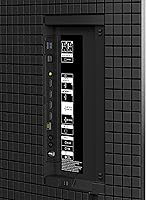
  • The back panel offers limited cable management options, making clean wall-mount installations more effort than expected.
  • Buyers sensitive to motion smoothing will need to turn off the default processing to preserve a natural cinematic look.
  • The Google account requirement during initial setup is mandatory and cannot be bypassed for privacy-conscious buyers.
  • The Bravia 8 carries a price premium over comparable OLED options like the LG C3 that is harder to justify without a PS5.

Ratings

The Sony Bravia 8 65-inch OLED 4K TV earns its scores from an AI-driven analysis of thousands of verified global owner reviews, with spam, incentivized posts, and bot activity actively filtered out before any scoring is applied. The ratings below reflect where real buyers consistently agree — covering everything from first-week impressions to long-term reliability — and neither the strengths nor the friction points have been softened. Expect an honest look at what this panel does exceptionally well and where it asks you to make a genuine trade-off.

Picture Quality
93%
Owners repeatedly describe the image as the most natural-looking TV they have ever had in their home — not the brightest, but the most convincing. Dark scenes in films like slow-burn thrillers or nature documentaries draw the most praise, with blacks that genuinely disappear rather than glowing a dim gray.
In rooms with large windows or overhead lights left on during the day, the picture loses some of its impact compared to high-brightness MiniLED panels. A handful of reviewers specifically switching from a Samsung QD-OLED noted the Bravia 8 felt slightly less punchy in HDR highlights.
Contrast & Black Levels
96%
This is the single most praised aspect across all feedback segments. Viewers watching anything from classic cinema to dark fantasy series consistently call out how the black areas of the screen look like the display is simply off — a tangible, immediate improvement over any LCD upgrade path.
The exceptional black performance is most noticeable in dim environments; in bright rooms the advantage over a high-quality LCD narrows significantly. There is also a very faint halo artifact some users noticed around bright subtitles on dark backgrounds, though most describe it as minor.
Color Accuracy
88%
Skin tones are a frequent talking point in positive reviews — people watching live sports broadcasts and interview-format content note how natural faces look without any orange push or oversaturation. HDR films in particular benefit from the Triluminos color engine, with foliage, water, and textiles looking grounded rather than digitally vivid.
A small number of calibration-minded buyers report that the default color settings skew slightly cool out of the box, requiring a manual adjustment to reach their preferred warm-neutral balance. This is a minor issue but worth noting for viewers who prefer not to touch settings.
Peak Brightness
71%
29%
For evening and night viewing — which covers the majority of how most households actually use their main TV — the brightness is more than adequate and HDR content looks genuinely impressive. Buyers coming from older LCD panels rarely raise brightness as a concern.
This is the most consistent criticism from buyers who compared the Bravia 8 directly against QD-OLED competitors or high-end MiniLED sets before purchasing. Afternoon viewing in a sun-facing room can make HDR specular highlights feel underwhelming, and the TV does not hit the peak nit numbers of its closest rivals.
Gaming Performance
91%
PS5 owners represent a large portion of the most satisfied buyers, with many specifically citing how the TV recognizes the console and adjusts picture settings automatically without any manual input. Response times are fast, motion is clean at 120 Hz, and the overall low-latency experience in titles like action RPGs and first-person games draws consistent praise.
Xbox Series X owners get a solid 120 Hz HDMI 2.1 experience but miss out on the PS5-specific Auto HDR Tone Mapping features, which some Xbox users describe as a missed opportunity. A few users also noted that the Game Menu overlay, while useful, takes slightly longer to appear than expected.
Smart TV & Interface
74%
26%
Google TV covers every major streaming app without needing a separate stick, and the Google Assistant integration works reliably for voice search across apps and basic smart home commands. AirPlay 2 support is a genuine convenience for households using Apple devices to share photos or mirror content.
The interface draws the most divided feedback of any software aspect — some users find it intuitive, while others describe the home screen as cluttered with content recommendations they did not ask for. A recurring complaint in the first year of ownership involves occasional sluggishness when switching between apps, though software updates have partially addressed this.
Audio Quality
79%
21%
The Acoustic Surface Audio+ system genuinely surprises buyers who expected thin built-in TV sound. The practical effect — where dialogue appears to come from the mouth of whoever is speaking rather than from a speaker bar below — is consistently noticed and appreciated, particularly during films and streaming drama series.
Low-frequency performance is limited, as expected for a flat-panel audio system. Bass-heavy content like action sequences or music concerts leaves many buyers wanting a subwoofer. This is not unique to the Bravia 8, but at this price point, some buyers expect more.
Motion Handling
86%
Sports viewers and gaming-focused buyers report clean, blur-free motion that holds up well during fast-paced action. The 120 Hz panel handles both high-frame-rate gaming and standard broadcast content without producing the artificial soap-opera effect that trips up some competing sets on default settings.
Some users who watch a lot of 24p film content note that the default motion smoothing settings need to be turned off to preserve the intended cinematic look. It is a one-time adjustment, but the out-of-box motion processing is heavier-handed than purists prefer.
Setup & Ease of Use
82%
18%
The physical setup process is described as straightforward by most buyers, with the stand attaching securely and the Google TV onboarding guiding users through Wi-Fi and streaming account sign-ins efficiently. PS5 users specifically appreciate that the console is recognized instantly with no additional configuration.
A subset of buyers found the initial Google account requirement during setup unwelcome, preferring to use the TV without tying it to a Google profile. The remote control also receives occasional criticism for having too many dedicated streaming service buttons that take up space without adding utility.
Build Quality & Design
84%
The slim OLED panel and minimal bezel design draw consistent positive remarks, with buyers noting it looks more expensive than similarly priced competing sets. The stand is stable and does not wobble on furniture, which sounds basic but gets called out positively in reviews from buyers who have dealt with flimsy stands on previous TVs.
The back panel shows cable management limitations that a few users find frustrating in wall-mount scenarios. Some buyers also wished the stand offered a wider footprint option for smaller media consoles where the default configuration leaves the TV feeling top-heavy.
Remote Control
67%
33%
The remote is compact and the voice search button is genuinely used by a meaningful portion of owners for quick app navigation and content discovery. Backlighting on the keys would be a nice addition but the layout is logical enough for most users to learn quickly.
The dedicated streaming service shortcut buttons are the most criticized physical design choice — multiple reviewers mention that buttons for services they do not use take up prime real estate. A few users also report occasional Bluetooth pairing dropouts requiring a re-sync after power cycles.
Burn-in Risk
77%
23%
Long-term owners — those with 12 to 18 months of regular use — overwhelmingly report no visible burn-in, even among users who watch significant amounts of news or sports with static on-screen graphics. Sony's built-in pixel maintenance routines appear to be doing their job for typical mixed-use households.
Users who leave static content on screen for extended periods — such as paused video games or news channels running for hours daily — raise this concern more frequently. It is not a widespread reported issue, but buyers planning heavy gaming sessions with static HUD elements should be aware of the standard OLED care guidelines.
Value for Money
81%
19%
The consensus among buyers who did their research before purchasing is that the Bravia 8 delivers genuinely premium picture quality at a price that does not require the same financial commitment as Sony's top-tier A95L series. For PS5 owners especially, the exclusive features make the premium over a budget OLED feel justified.
Buyers who did not compare models beforehand occasionally feel surprised by the brightness limitations relative to the price, particularly after seeing QD-OLED or high-end MiniLED panels at a similar cost. The included Sony Pictures Core movie credits are appreciated but do not meaningfully shift the value calculation for most buyers.
App & Streaming Ecosystem
85%
Every major streaming service is available natively, and the studio-calibrated picture modes for Netflix and Prime Video are a practical convenience that removes the need to hunt for optimal settings. Chromecast built-in is actively used by a large share of buyers who cast content from mobile devices.
A small number of users report that less mainstream apps take longer to load than on a dedicated streaming stick, and a few niche international streaming services are absent from the Google TV store entirely. Updates have improved responsiveness, but the platform still trails a dedicated Roku or Fire TV stick in raw speed.

Suitable for:

The Sony Bravia 8 65-inch OLED 4K TV is built for buyers who are serious about what they watch and how they watch it. PS5 owners will get more out of this display than virtually any other TV at this price — the console-specific Auto HDR Tone Mapping and automatic genre switching are not gimmicks; they make a noticeable difference in everyday play sessions without requiring any technical setup. Film enthusiasts who watch in a dedicated media room or a living room with decent light control will find the contrast depth and color accuracy genuinely satisfying, particularly for HDR content and darker cinematic material. Heavy streamers across Netflix, Prime Video, and Disney+ also benefit from studio-calibrated picture modes that deliver what the director intended without manually tweaking settings. If you are upgrading from a mid-range or older LCD television, the difference on day one will be immediately obvious — not the kind of subtle improvement you need to convince yourself to see.

Not suitable for:

The Sony Bravia 8 65-inch OLED 4K TV is a harder sell for buyers whose living rooms get significant natural daylight for most of the day. In bright environments, the panel's peak brightness limitations become a real practical issue — competing MiniLED sets and QD-OLED panels from Samsung push noticeably more light output, which matters when sunlight is washing across the screen. Buyers who leave news channels or sports broadcasts running for many hours daily — with static score bugs or ticker graphics on screen — should also approach any OLED purchase with realistic expectations around static image retention, even if long-term burn-in remains uncommon with normal mixed use. Those looking for the most feature-rich Google TV experience at maximum speed may find a dedicated streaming stick snappier for day-to-day navigation. Xbox-focused gamers will get a great display overall, but they will not have access to the PS5-specific integration features that represent a meaningful part of this panel's value proposition.

Specifications

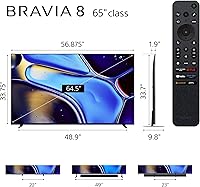
  • Screen Size: The panel measures 65 inches diagonally, making it well-suited for living rooms where seating is roughly 8 to 12 feet from the display.
  • Display Type: Uses an OLED panel where each of the over 8 million pixels produces its own light and can switch fully off for absolute black.
  • Resolution: Outputs native 4K Ultra HD at 3840 x 2160 pixels, delivering four times the pixel density of a standard 1080p display.
  • Refresh Rate: Features a native 120 Hz panel, supporting smooth motion for both high-frame-rate gaming and standard broadcast content without interpolation.
  • HDR Support: Compatible with Dolby Vision and HDR10, covering the two most widely used high dynamic range formats across streaming platforms and physical media.
  • Processor: Powered by Sony's XR Cognitive Processor, which analyzes picture content in real time to adjust color, contrast, and clarity on a scene-by-scene basis.
  • Contrast Tech: XR Contrast Booster 15 extends the perceived difference between the panel's deepest blacks and its brightest highlights for more dimensional HDR images.
  • Color Engine: XR Triluminos Pro expands the range of reproducible colors, with a particular focus on natural accuracy in skin tones, foliage, and textured surfaces.
  • Audio System: Acoustic Surface Audio+ vibrates the screen panel itself to produce sound, so dialogue and effects appear to originate from the position of the action on screen.
  • Smart Platform: Runs Google TV with built-in Google Assistant, providing access to all major streaming apps, voice search, and Chromecast functionality out of the box.
  • Wireless: Supports Wi-Fi, Bluetooth, AirPlay 2, and Chromecast built-in, covering both Apple and Android device ecosystems for wireless streaming and screen mirroring.
  • Wired Connectivity: Includes HDMI, USB, and Ethernet ports, with at least one HDMI 2.1 port supporting 4K at 120 Hz for compatible gaming consoles and PC graphics cards.
  • PS5 Features: Offers Auto HDR Tone Mapping and Auto Genre Picture Mode exclusively for PlayStation 5, automatically optimizing picture settings when switching between games and media.
  • Dimensions: The set measures 9.88″ deep, 56.88″ wide, and 33.75″ tall with the stand attached; wall-mount depth will be shallower depending on bracket choice.
  • Weight: Weighs 51.2 pounds with the stand, which is within the range most two-person installation teams can manage without specialized equipment.
  • Model Number: The official model designation is K-65XR80, part of Sony's Bravia XR8B series which also includes 55-inch and 77-inch size options.
  • Power: Operates at approximately 110 volts AC and draws around 50 watts during typical use, which is energy-efficient relative to comparably sized LCD panels.
  • Included Items: The box contains the TV panel, stand hardware, power cable, voice remote control with included AAA batteries, and printed setup documentation.

Related Reviews
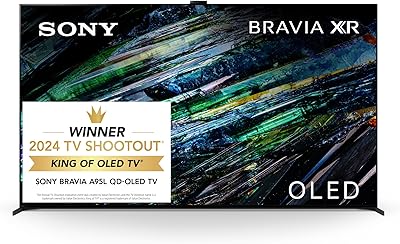
Sony XR65A95L 65-inch QD-OLED 4K TV
84%
97%
Picture Quality
94%
Gaming Performance
74%
Brightness & HDR Impact
96%
Color Accuracy
89%
Motion Handling
More
Sony XBR-65A9G 65-inch OLED 4K Smart TV
87%
96%
Picture Quality
94%
Gaming Performance
88%
Smart TV Features
89%
Ease of Setup
90%
Design and Build Quality
More
Sony A80L 83-inch OLED 4K TV
81%
94%
Picture Quality
97%
Contrast & Black Levels
91%
Color Accuracy
88%
Motion Handling
89%
Gaming Performance
More
Sony BRAVIA 8 77-inch OLED TV
81%
93%
Picture Quality
96%
Contrast & Black Levels
61%
Peak Brightness
91%
Gaming Performance
67%
Built-in Audio
More
Sony BRAVIA XR A95L 77-inch 4K QD-OLED TV
88%
96%
Picture Quality
89%
Sound Quality
92%
HDR Performance
93%
Gaming Features (PS5 Optimization)
85%
Ease of Setup
More
Sony BRAVIA 8 55-inch 4K OLED TV
82%
93%
Picture Quality
91%
Gaming Performance
96%
Contrast & Black Levels
89%
Color Accuracy
74%
Smart TV Platform
More
Sony XBR65Z9F 65-Inch 4K Ultra HD Smart BRAVIA LED TV
87%
94%
Picture Quality
92%
Color Accuracy
89%
Motion Clarity
86%
Smart Features
70%
Sound Quality
More
Sony 65-Inch Mini LED QLED 4K Ultra HD TV BRAVIA 7
88%
93%
Picture Quality
95%
Gaming Performance (PS5 Features)
87%
Value for Money
90%
Display Brightness
82%
User Interface
More
Sony X950G 65-Inch 4K Smart TV
85%
93%
Picture Quality
82%
Sound Quality
75%
Ease of Setup
88%
Smart TV Features
90%
Gaming Performance (HDR)
More
Sony X90L 65-inch 4K Smart TV
80%
88%
Picture Quality
91%
Gaming Performance
84%
HDR Performance
79%
Smart TV Experience
76%
Build Quality & Design
More

FAQ

It depends on your setup. If you own a PS5, the Sony-exclusive gaming features alone close a significant part of the price gap. For pure movie watching, the XR processor does produce more natural-looking images than the LG C3 in most side-by-side comparisons, though the difference is subtler than the marketing suggests. If you have no PS5 and are primarily a casual viewer, the LG C3 is a very strong alternative at a lower cost.

Honestly, this is the Bravia 8's biggest practical limitation. OLED panels as a category produce less peak brightness than high-end MiniLED or QD-OLED displays, and this Sony is no exception. In a room with direct afternoon sunlight, HDR highlights will look less punchy than on a Samsung S90C or a high-brightness LCD. If your room has heavy curtains or you watch primarily in the evening, this is a non-issue — but bright-room buyers should seriously consider alternatives before committing.

Yes, it includes HDMI 2.1 connectivity which enables 4K resolution at 120 Hz for compatible devices. This is the port you want to plug your PS5 or Xbox Series X into for the best gaming performance. It also supports Variable Refresh Rate (VRR) and Auto Low Latency Mode (ALLM), which reduce input lag automatically when gaming.

For most households, no — but it deserves an honest answer rather than a dismissal. Burn-in occurs when static image elements stay on screen for very long periods repeatedly over months or years. Watching varied content — films, streaming, sports, gaming — poses very little real-world risk, and long-term owners of this panel consistently report no issues. Where it becomes a genuine concern is if you plan to use it as a dedicated monitor with a static taskbar visible for hours daily, or if you leave news channels on constantly. Sony's built-in pixel maintenance routines help, but standard OLED care habits are still worth following.

The A95L uses a QD-OLED panel which delivers significantly higher peak brightness and more vivid color volume — a meaningful difference in bright rooms and with very high-brightness HDR content. The Bravia 8 uses a standard WRGB OLED panel, which produces slightly lower brightness but still delivers exceptional blacks and natural color accuracy. For most buyers in typical home environments, the Bravia 8 represents better value, but the A95L is worth the premium if peak brightness and the absolute best HDR performance are your priorities.

For most people, the Calibrated Dark mode is the best starting point for evening viewing and requires no further adjustments — it is genuinely well-tuned for movies and streaming right away. If you watch mostly in daylight, the standard Calibrated mode is a better default. One setting worth turning off early is the motion smoothing processor, which is enabled by default and gives films an unnatural look that many viewers find distracting.

The Acoustic Surface Audio+ system is better than most built-in TV audio — the effect of sound appearing to come from the screen rather than a speaker below it is genuinely noticeable during dialogue-heavy content. For casual streaming and everyday TV, it is perfectly acceptable. That said, if you watch a lot of action films, play games with immersive audio, or listen to music through the TV, a soundbar or external speakers will deliver a noticeably fuller experience, particularly in the low end.

Yes, AirPlay 2 is built in. You can mirror your iPhone or iPad screen directly to the Bravia 8, or stream compatible apps like Apple TV, Photos, and supported third-party services without any additional hardware. It works reliably and does not require a shared Apple account — just make sure both devices are on the same Wi-Fi network.

When you power on your PS5 with it connected via HDMI, the TV detects the console automatically and switches into a dedicated picture mode optimized for gaming — adjusting tone mapping for HDR games and enabling low-latency settings. When you switch the PS5 input to a streaming app or the PS5's media player, the TV also shifts its picture mode to something more appropriate for that content. It all happens without any manual input, which is more useful day-to-day than it sounds on paper.

It sits somewhere in between, and your tolerance for it will depend on how you use the TV. The home screen surfaces content recommendations from your streaming accounts prominently, which some people appreciate and others find busy. App loading is smooth for major services like Netflix and YouTube, though less popular apps can take a few extra seconds. If you are someone who likes to go straight to a specific app and stay there, the experience is straightforward enough. If you prefer a clean, minimal interface, the home screen may feel busier than you'd like.

Where to Buy