
Overview

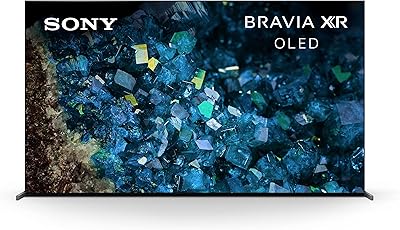
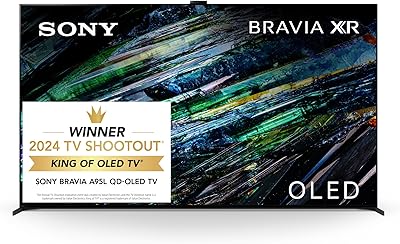
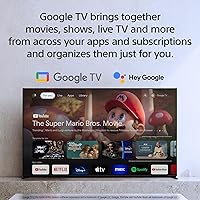
The Sony BRAVIA 8 77-inch OLED TV sits in a compelling spot within Sony's lineup — premium enough to deliver a genuinely cinematic picture, but not at the rarefied tier of the QD-OLED A95L. At 77 inches, the screen size alone makes a strong case for anyone building a dedicated home theater setup. Sony's XR Cognitive Processor is the real differentiator here, doing a credible job of distinguishing this set from similarly specced OLED panels from LG or Samsung. Google TV handles the smart platform duties reliably, with broad app support and a well-organized interface. Expect outstanding picture quality, decent built-in audio, and strong gaming credentials right out of the box.

Features & Benefits

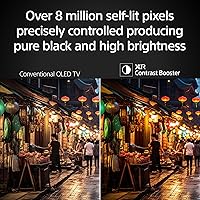
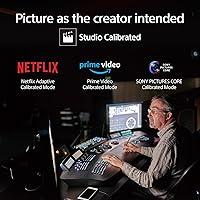
The self-lit OLED pixels do what they are known for: when a scene calls for black, you get actual black, not dark gray. XR Contrast Booster 15 builds on that foundation to keep bright elements — a flame, a streetlight — punchy without looking overblown. XR Triluminos Pro renders skin tones and natural textures with a subtlety that cheaper panels simply cannot match. Acoustic Surface Audio+ vibrates the screen itself to produce sound, which is a genuinely clever trick, though it will not replace a soundbar for critical listening. PS5 owners benefit from Auto HDR Tone Mapping, which adjusts the picture based on the game's actual HDR output rather than a fixed preset. Studio Calibrated modes round things out for streaming purists.

Best For

This 77-inch Sony set makes the most sense if your room can actually get dark. OLED's contrast advantage disappears fast in a sun-drenched living room, and competing MiniLED panels from Samsung or TCL will outshine it — literally — in those conditions. Where it excels is in controlled environments: a blacked-out home theater, evening TV watching, or a dedicated gaming room. PS5 owners get tangible benefits beyond just resolution, since Auto Genre Picture Mode switches picture settings automatically when you toggle between a game and a streaming app on the console. If you dislike fiddling with picture settings, the out-of-the-box calibration is genuinely among the best available at this tier.

User Feedback

Owners of the BRAVIA 8 tend to rave about picture consistency — the image holds up well whether they are watching a blockbuster, a Premier League match, or grinding through a long gaming session. The PS5 integration draws consistent praise, with many noting how the TV handles the handoff automatically without any menu digging. On the less positive side, buyers in bright living rooms report disappointment with peak brightness, which is a fair and expected limitation for OLED. The Google TV interface earns mostly good marks, though some users mention occasional slowdowns. Build quality and the stand design are well-regarded, but a few buyers note that cable management at the back could be tidier for a set at this price.

Pros

  • OLED contrast produces genuinely deep blacks that make dark scenes in films and games look exceptional.
  • Auto HDR Tone Mapping on PS5 adjusts picture settings per game automatically, removing manual guesswork.
  • Studio Calibrated modes for major streaming platforms deliver accurate, creator-intended color with no setup required.
  • XR Triluminos Pro renders natural textures and skin tones with impressive subtlety compared to most competing panels.
  • Google TV provides clean, fast access to all major streaming platforms in a single organized interface.
  • At 77 inches, the screen size creates a strong sense of immersion for movie watching and gaming alike.
  • Auto Genre Picture Mode on PS5 switches between gaming and streaming picture presets without any input from the user.
  • Build quality and stand design receive consistent praise from owners, with a premium feel that matches the price tier.
  • Dolby Vision and HDR10 support ensures compatibility with the widest range of high-quality streaming and disc content.
  • AirPlay 2 and Chromecast built-in make it easy to push content from phones and tablets without extra hardware.

Cons

  • Peak brightness falls noticeably behind MiniLED rivals in well-lit rooms, which is a real limitation for daytime viewing.
  • The built-in speakers, while clever in design, lack the bass and volume headroom that a soundbar delivers easily.
  • Google TV can occasionally feel sluggish during heavy multitasking, which some owners have reported as a persistent annoyance.
  • At nearly 75 pounds, installation is a two-person job and wall-mounting requires careful hardware planning.
  • The Sony Pictures CORE app feels like a secondary benefit — most buyers already have preferred streaming subscriptions.
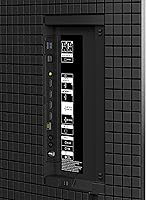
  • Cable management at the rear of the set is awkward for a display at this price, with limited routing options.
  • OLED panels carry a theoretical burn-in risk with static on-screen elements, which is worth noting for heavy news or sports viewers.
  • The price premium over competing OLED options is hard to justify unless PS5 integration or Sony's processing pipeline are specific priorities.

Ratings

The scores below for the Sony BRAVIA 8 77-inch OLED TV were generated by our AI after analyzing thousands of verified owner reviews from global markets, with spam, bot-submitted, and incentivized responses actively filtered out. The results reflect a clear consensus: this is an outstanding display for the right environment, but one with specific real-world limitations that informed buyers should weigh carefully. Both the strengths and the recurring pain points are transparently represented in each category score.

Picture Quality
93%
Owners consistently describe the image as the most cinematic they have experienced from a home display, particularly during dark scenes in films where the OLED blacks make the picture look almost three-dimensional. Color accuracy out of the box receives strong praise, with many noting that skin tones and natural textures look unusually true-to-life without any manual adjustment.
A recurring minority complaint involves scenes with simultaneously very bright and very dark elements — some users notice a slight brightness reduction across the panel when the image contains a lot of dark content, a known OLED behavior called ABL. It does not ruin the experience, but purists will notice it.
Contrast & Black Levels
96%
This is the single most praised aspect across buyer feedback worldwide. Viewers watching space scenes, night-time dramas, or dark horror films describe the black levels as genuinely unlike anything a non-OLED panel can produce — shadows look like actual darkness rather than dark gray. The consistency of this performance across different content types is what earns the high score.
The contrast advantage narrows significantly in brighter viewing environments, where reflections on the screen surface compete with the panel's ability to display deep blacks. A handful of owners in glass-walled rooms or sun-facing living rooms report that the contrast benefit they paid for effectively disappears during daylight hours.
Peak Brightness
61%
39%
For evening and nighttime viewing, the brightness is more than adequate — HDR highlights like flames, explosions, and sunlit exteriors pop convincingly without looking artificially overblown. Most owners watching in controlled lighting report they never feel the panel is dim.
This is the most frequently cited disappointment in user reviews, and it is a structural limitation of OLED technology rather than a Sony-specific flaw. Buyers who switched from a high-nit Samsung QLED or a MiniLED panel consistently report that the BRAVIA 8 looks noticeably dimmer in bright rooms, and some feel the brightness spec gap is larger than they expected at this price point.
Gaming Performance
91%
PS5 owners represent some of the most enthusiastic reviewers of this set, specifically calling out how Auto HDR Tone Mapping makes games like Horizon and Spider-Man look noticeably richer compared to a standard HDR preset. The 120 Hz refresh rate and low input lag make fast-paced titles feel sharp and responsive, and the Game Menu puts every relevant setting in one accessible place.
The PS5-specific features, while genuinely impressive, only benefit PlayStation owners — Xbox and PC gamers get a strong but more generic gaming experience without the same level of automatic optimization. A small number of users also report occasional handshake delays when switching between 4K 120 Hz game sources.
Built-in Audio
67%
33%
The Acoustic Surface Audio+ approach earns genuine appreciation from users who were expecting the typical downward-firing speaker experience from a flat-panel TV. Sound feels anchored to the on-screen action in a way that standard TV speakers simply do not, and dialogue clarity is frequently praised for everyday streaming and news watching.
Bass response is the primary complaint — action sequences, music performances, and explosive game audio expose the system's physical limits quickly. A significant portion of reviewers recommend budgeting for a soundbar alongside this TV, noting that the built-in audio, while better than average, does not come close to matching the quality of the picture.
Smart TV Platform
78%
22%
Google TV receives broadly positive feedback for its organized content discovery, particularly the way it aggregates recommendations across multiple streaming services into a single home screen. AirPlay 2 and Chromecast support are highlighted as genuinely useful additions that reduce the need for external streaming devices.
Interface lag is the most consistent criticism — not enough to be a dealbreaker, but noticeable when switching between apps or navigating deep into settings menus. A subset of users also report that the home screen feels increasingly cluttered with content recommendations over time, which some find intrusive.
PS5 Integration
89%
Buyers who purchased this set specifically for PlayStation 5 use express high satisfaction with how automated the experience is — Auto Genre Picture Mode switching between Cinema and Game presets without any user input is something owners describe as a feature they quickly come to rely on. The dedicated Game Menu makes accessing HDR calibration and VRR settings fast and intuitive.
Setting up the full range of PS5-exclusive features requires navigating both the TV and console menus to ensure everything is properly enabled, which a few buyers found confusing initially. The benefit gap between PS5 and other gaming sources is wide enough that multi-platform gamers may feel they are only getting partial value from the TV's capabilities.
Build Quality
84%
The physical construction draws consistent praise — owners describe the bezels as slim and premium, the materials as solid, and the overall presence as appropriate for a high-end living room or dedicated media room. The stand design is stable and well-regarded, with no complaints about wobble even on larger furniture surfaces.
Cable management at the rear of the set is the primary build criticism, with multiple reviewers noting that the port layout makes organized cable routing genuinely difficult. For a TV at this price tier, several buyers felt the back-panel design felt like an afterthought compared to the polish of the front face.
Setup & Installation
72%
28%
The on-screen setup process through Google TV is guided and accessible, and most buyers report being up and running within 30 minutes including account sign-in and app downloads. Wall-mount hardware compatibility is broadly confirmed, and the included stand hardware is straightforward to assemble.
The 74.9-pound weight makes any installation a mandatory two-person job, and some buyers underestimated this before delivery. Wall mounting requires careful planning around both the weight and the rear port positions, and a handful of professional installers in user reviews flag the cable exit points as awkward for clean in-wall installations.
Color Accuracy
88%
XR Triluminos Pro earns specific mentions from color-sensitive viewers — photographers and videographers who use the set as a reference display comment that natural tones, particularly greens and human skin, render more realistically than on competing panels they have owned. Studio Calibrated modes for Netflix and Prime Video are praised for removing the need for third-party calibration.
The color performance gap between the Studio Calibrated modes and the default out-of-box settings is noticeable enough that some casual buyers who never explore picture modes miss out on what the set is actually capable of. A few reviewers also note that very saturated, stylized content can occasionally look slightly oversaturated in certain presets.
HDR Performance
86%
Dolby Vision content in particular draws strong praise — owners watching Dolby Vision-mastered films on Apple TV+ and Netflix describe the highlight rendering and shadow detail as working together in a way that feels genuinely film-like. HDR10 content also performs well, with the XR processor doing a credible job of tone-mapping sources that were not mastered specifically for this panel.
The peak brightness ceiling limits how dramatically highlights can pop in HDR scenes compared to higher-nit MiniLED competitors, which is a real trade-off that some owners only fully appreciate after seeing a side-by-side comparison. Buyers coming from a high-brightness HDR display may find the transition underwhelming in certain HDR showcase moments.
Value for Money
71%
29%
Owners who use the full range of features — particularly PS5 gaming, Dolby Vision streaming, and calibrated picture modes — tend to feel the price is justified by the combined package. The lack of a need for an external streaming device or calibration service is cited as a meaningful cost offset by several buyers.
The price premium over competing OLED panels from LG is difficult to ignore for buyers who do not own a PS5 or care deeply about Sony's processing pipeline. A recurring theme in lower-rated reviews is that the real-world picture difference versus a less expensive OLED is subtle enough to feel insufficient at this price point.
Remote Control
74%
26%
The backlit remote is well-regarded for its build quality and the inclusion of dedicated streaming service buttons that launch apps instantly. Voice search via Google Assistant through the remote is praised as fast and accurate for content discovery across platforms.
Several users find the remote overly minimalist — the reduced button count that makes it look premium also means some functions require navigating menus rather than pressing a dedicated key. A subset of buyers who switched from other TV brands report a short adjustment period to the button layout.
Motion Handling
82%
18%
Sports and action film viewers give consistently positive feedback on motion clarity, with the 120 Hz panel handling fast camera pans and live sports content without the stuttering that lower refresh rate panels produce. Most buyers report that the default motion settings strike a good balance without introducing the overly processed soap-opera effect.
At the more aggressive motion smoothing settings, a minority of users report that certain content takes on an artificially smooth look that feels unnatural for cinematic material. Finding the right middle ground in the motion settings requires some experimentation, which not all buyers take the time to do.

Suitable for:

The Sony BRAVIA 8 77-inch OLED TV is built for people who take their home viewing seriously and want a display that performs well across multiple use cases without requiring a calibration technician. Home theater enthusiasts who watch a lot of films in a darkened room will get the most out of the OLED panel's contrast characteristics — the kind of image depth that makes a well-shot movie feel genuinely different from a budget screen. PS5 owners in particular have real, practical reasons to choose this set over a generic OLED, since features like Auto HDR Tone Mapping and Auto Genre Picture Mode work directly with the console to optimize the picture automatically. Streaming households will appreciate the Google TV platform, which keeps Netflix, Prime Video, Disney+, and dozens of other services in one well-organized interface without relying on a separate streaming stick. Buyers who want accurate color and contrast right out of the box, without spending hours in the settings menu, will also find the Studio Calibrated picture modes immediately satisfying.

Not suitable for:

The Sony BRAVIA 8 77-inch OLED TV is not the right choice for every room or every buyer. If your living room gets a lot of direct sunlight or you tend to watch TV with all the lights on, the OLED panel will struggle to compete with the sheer brightness output of MiniLED alternatives from Samsung or TCL at a similar or even lower price point. Buyers who prioritize raw brightness for daytime sports watching or gaming in a well-lit room should genuinely consider those alternatives before committing here. The built-in Acoustic Surface Audio+ is an interesting engineering solution, but anyone who expects reference-quality sound from the TV alone will be disappointed — a soundbar or full AV setup is still necessary to do the picture justice. The 77-inch footprint and 74.9-pound weight also demand careful planning around wall mounting or stand placement, which can be a logistical hurdle for some buyers. Finally, those who game across multiple platforms or use older AV equipment should verify HDMI port compatibility before purchasing.

Specifications

  • Display Type: The panel uses OLED technology, where each pixel produces its own light and can switch off completely to achieve true black.
  • Screen Size: The viewable screen measures 77 inches diagonally, making it well-suited for larger living rooms and dedicated home theater spaces.
  • Resolution: Native resolution is 4K Ultra HD at 3840 x 2160 pixels, delivering approximately four times the pixel density of a 1080p panel.
  • Refresh Rate: The display runs at a native 120 Hz refresh rate, which reduces motion blur during fast-moving sports and gaming content.
  • Processor: Sony's XR Cognitive Processor handles real-time scene analysis to adjust color, contrast, and clarity on a per-frame basis.
  • HDR Support: The set is compatible with Dolby Vision, HDR10, and HLG, covering the full range of HDR formats used across streaming, disc, and broadcast sources.
  • Audio System: Acoustic Surface Audio+ uses actuators mounted behind the OLED panel to vibrate the screen itself and produce sound that appears to come directly from on-screen action.
  • Smart Platform: Google TV serves as the operating system, providing access to Netflix, Prime Video, Disney+, YouTube, and thousands of additional apps via the Google Play store.
  • Voice Control: Google Assistant is built in and accessible via the remote, allowing voice-based search, smart home control, and general queries without a separate device.
  • Wireless: The TV supports dual-band Wi-Fi and Bluetooth for wireless streaming, headphone pairing, and smart home integration.
  • Wired Ports: Physical connectivity includes HDMI, USB, and Ethernet ports, with HDMI inputs supporting the bandwidth needed for 4K 120 Hz sources.
  • AirPlay & Cast: AirPlay 2 and Chromecast are both built in, allowing direct casting from Apple and Android devices without an external dongle.
  • PS5 Features: When connected to a PlayStation 5, the TV unlocks Auto HDR Tone Mapping, Auto Genre Picture Mode, and a dedicated Game Menu not available on other consoles.
  • Color Technology: XR Triluminos Pro expands the color palette to reproduce a wider range of natural shades with greater accuracy than standard OLED color processing.
  • Contrast Tech: XR Contrast Booster 15 is Sony's processing layer that manages the relationship between peak brightness and shadow detail across the OLED panel.
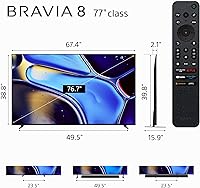
  • Dimensions: With the stand attached, the set measures 67.5″ wide, 39.88″ tall, and 16″ deep.
  • Weight: The TV weighs 74.9 pounds with the stand, requiring two people and careful planning for both wall mounting and stand-based placement.
  • Included Items: The box contains a power cable, remote control, stand hardware, and printed manuals; two AAA batteries for the remote are also included.
  • Model Number: The official model number is K-77XR80, which identifies the 77-inch variant within the BRAVIA XR80 series.
  • Availability Date: This model was first made available for purchase in May 2024 and is confirmed as an active, non-discontinued product.

Related Reviews
Sony BRAVIA XR A95L 77-inch 4K QD-OLED TV
88%
96%
Picture Quality
89%
Sound Quality
92%
HDR Performance
93%
Gaming Features (PS5 Optimization)
85%
Ease of Setup
More
Sony A80L 83-inch OLED 4K TV
81%
94%
Picture Quality
97%
Contrast & Black Levels
91%
Color Accuracy
88%
Motion Handling
89%
Gaming Performance
More
Sony Bravia 8 65-inch OLED 4K TV
82%
93%
Picture Quality
96%
Contrast & Black Levels
88%
Color Accuracy
71%
Peak Brightness
91%
Gaming Performance
More
Sony XR65A95L 65-inch QD-OLED 4K TV
84%
97%
Picture Quality
94%
Gaming Performance
74%
Brightness & HDR Impact
96%
Color Accuracy
89%
Motion Handling
More
Sony BRAVIA 8 55-inch 4K OLED TV
82%
93%
Picture Quality
91%
Gaming Performance
96%
Contrast & Black Levels
89%
Color Accuracy
74%
Smart TV Platform
More
Sony BRAVIA 5 65-inch Mini LED TV
78%
88%
Picture Quality
91%
Gaming Performance
86%
Brightness & HDR Performance
83%
Color Accuracy
79%
Smart TV & Interface
More
Sony A90K 42-inch OLED TV
81%
96%
Picture Quality
94%
Gaming Performance
97%
Contrast & Black Levels
91%
Color Accuracy
93%
Input Lag & Responsiveness
More
Sony XBR-65A9G 65-inch OLED 4K Smart TV
87%
96%
Picture Quality
94%
Gaming Performance
88%
Smart TV Features
89%
Ease of Setup
90%
Design and Build Quality
More
LG C3 77-Inch OLED Smart TV
82%
96%
Picture Quality
93%
Gaming Performance
98%
Black Levels & Contrast
67%
Smart TV Interface
78%
HDR Performance
More
Sony BRAVIA 2 II 50-inch 4K LED Smart TV
74%
81%
Picture Quality
62%
Refresh Rate & Motion
74%
PS5 Gaming Integration
86%
Smart TV Platform
63%
Brightness
More

FAQ

The PS5 integration is genuinely practical. Auto HDR Tone Mapping reads the HDR metadata from each individual game and adjusts the panel's tone curve to match, rather than applying a one-size-fits-all setting. Auto Genre Picture Mode detects when you switch from a game to a streaming app on the console and changes the picture preset automatically. These are real, working features that save you from digging through menus every time you switch activities.

Both are strong OLED panels, but they take different approaches. The LG G4 uses a MLA layer that pushes peak brightness higher, which gives it an edge in bright rooms. The BRAVIA 8 tends to produce slightly more natural color rendering and benefits from Sony's XR processing, which many users find more film-like. If your room gets a lot of sunlight, the G4's brightness advantage is worth serious consideration. In a darker environment, it largely comes down to personal preference and ecosystem — Google TV versus webOS.

Honestly, it is not the strongest choice for that scenario. OLED panels, including this one, have measurable peak brightness limits compared to MiniLED TVs from Samsung or TCL. In a room with direct sunlight or constant overhead lighting, you may find the picture looking washed out during the day. If most of your viewing happens in the evening or you can control your room lighting, it performs excellently. For a genuinely bright room, a high-nit MiniLED set would be a more practical choice.

For casual TV watching, the built-in Acoustic Surface Audio+ is surprisingly decent — sound appears to come from the screen itself, which is a real improvement over downward-firing speakers. That said, it lacks meaningful bass and will not fill a large room at high volume with any authority. If you watch a lot of action films or want proper home theater sound, a soundbar or AV receiver setup will make a significant difference. Think of the built-in audio as a solid baseline, not a final solution.

Yes, it supports Dolby Atmos passthrough, so if you have a soundbar or AV receiver that decodes Atmos, the TV will pass the signal through correctly. The built-in speakers do not produce true spatial Atmos audio on their own, but the decoding chain works properly for external audio setups.

It is a theoretical risk worth knowing about, but modern OLED panels have significantly improved compared to early generations. Everyday mixed-use viewing — streaming, gaming, sports — carries very low risk. Where burn-in becomes a more realistic concern is with extended static content, like leaving a news ticker or a game HUD on screen for many hours every day over years. Sony includes pixel shift and panel refresh features to help mitigate this. For normal home use, most people will never encounter a problem.

The stand-based setup is straightforward for two people, though the 74.9-pound weight means you definitely do not want to attempt it alone. Wall mounting requires a VESA-compatible bracket and careful stud placement — again, a two-person job minimum. Cable management at the rear of the set is a common complaint; the port layout is not the most installer-friendly, so plan your cable routing before you commit to a mounting position.

Google TV comes with Netflix, Prime Video, Disney+, YouTube, and the Apple TV app pre-installed, among others. Because this runs full Google TV rather than a locked-down smart platform, you can install virtually any app available on the Google Play store. The interface organizes content across apps into a unified home screen, so you do not have to jump between separate app menus to find something to watch.

Yes. AirPlay 2 is built in, so you can mirror or cast directly from an iPhone, iPad, or Mac without any additional hardware. It also works with HomeKit, meaning you can add it to the Apple Home app and control basic functions like power and volume through Siri or automations.

For the most part, yes. The interface is responsive and the app load times are reasonable. A small but consistent number of owners report occasional slowdowns, particularly when switching between apps rapidly or after extended uptime. A quick restart usually resolves it. It is not a dealbreaker, but it is worth knowing that no smart TV platform — including this one — is entirely lag-free in everyday use.