Overview

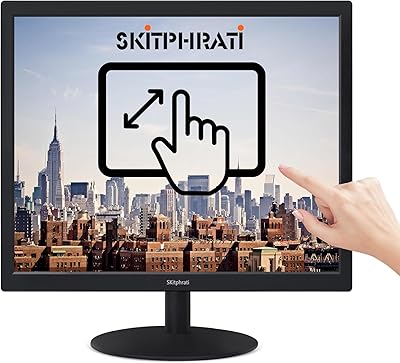
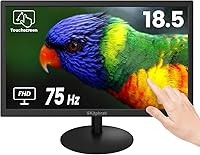
The SKitphrati 18.5-Inch HD Touchscreen Monitor entered the market in late 2024, positioning itself as a practical, no-fuss option for anyone who wants touch capability without spending heavily. At 18.5 inches, it occupies a comfortable middle ground — large enough to be genuinely useful, compact enough for crowded desks or tight workstations. SKitphrati is a newer name in the monitor space, so tempered expectations are fair, but the core proposition is straightforward: VESA wall-mount support and multi-touch functionality at an entry-level price. It works with PCs, laptops, and select gaming consoles, giving it a flexibility that buyers in this price range will appreciate.
Features & Benefits

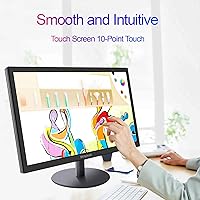
The 10-point multi-touch panel is the headline feature here, and it delivers more than the spec number suggests. In practice, two-handed gestures work reliably — pinch-to-zoom in a browser, sketch with one finger while stabilizing with another, or navigate a touch interface without the jitter that plagues cheaper single-touch panels. The 75Hz refresh rate keeps everyday scrolling and window management feeling fluid, though this is not a display built for fast-paced gaming. Connectivity covers both HDMI and VGA, genuinely useful if you run older hardware alongside a newer machine. One honest caveat: the 1366x768 resolution falls below Full HD, and text-heavy work or high-resolution media will reveal that limitation quickly.

Best For

This budget touchscreen monitor makes the most sense for a specific kind of buyer. If you need a secondary touch display in a home office — something to pull up a reference browser, annotate notes, or handle video call controls without cluttering your main screen — it fits that role well. Small retail counters, cafe ordering stations, and hospitality setups will find the VESA mounting and touch responsiveness useful without the cost of commercial-grade hardware. Makers building Raspberry Pi projects or compact mini-PC stations will also appreciate the VGA fallback and lightweight footprint. That said, if you are a video editor, a designer, or anyone whose work depends on accurate color and sharp pixel density, look elsewhere.

User Feedback

Because the SKitphrati touch monitor only launched in late 2024, the pool of real-world feedback is still small — worth keeping in mind when weighing opinions. Early buyers tend to highlight easy plug-and-play setup and touch accuracy that holds up well for the price tier. On the critical side, some users flag that the stand feels less rigid than expected, and touch calibration can occasionally need a reset after extended use — a common issue with budget touch panels, not unique to this one. The viewing angle, listed at 95 degrees, can feel narrower in practice once you shift off-axis. Overall sentiment leans cautiously positive, with most complaints tied to expectations mismatched with the hardware category.

Pros

  • 10-point multi-touch support enables two-handed gestures and pinch-to-zoom without lag for everyday tasks.
  • VESA wall-mount compatibility makes this 18.5-inch touch display genuinely flexible for kiosk and space-saving installs.
  • Both HDMI and VGA ports mean you can connect legacy and modern hardware without an adapter.
  • The 75Hz refresh rate keeps scrolling and window navigation noticeably smoother than standard 60Hz panels.
  • At under six pounds, this budget touchscreen monitor is easy to reposition or transport between workspaces.
  • Plug-and-play setup is consistently praised — most users report no driver headaches on Windows.
  • The 18.5-inch screen size hits a practical sweet spot for desks where space is genuinely limited.
  • Touch responsiveness at this price tier surprises many buyers accustomed to poor-quality budget panels.
  • Wide device compatibility with PCs, laptops, and select consoles adds versatility beyond a typical desktop setup.

Cons

  • The 1366x768 resolution falls short of Full HD, making text and fine detail look noticeably soft on modern content.
  • The stand has been flagged by early users as less rigid than expected, which can be frustrating during touch interactions.
  • Touch calibration occasionally drifts after extended use and may require a manual reset — a known budget panel drawback.
  • The 95-degree viewing angle can feel narrower in real-world use once you move off-center.
  • At 250 cd/m² brightness, this display struggles in well-lit rooms or near windows with direct sunlight.
  • The glossy screen surface picks up reflections easily, compounding brightness issues in brighter environments.
  • As a brand new market entrant with limited reviews, long-term reliability data simply does not exist yet.
  • Only one USB port is included, which restricts connectivity for users who need multiple peripheral connections.
  • The SKitphrati brand carries no established service or warranty track record, making post-purchase support an open question.

Ratings

The scores below for the SKitphrati 18.5-Inch HD Touchscreen Monitor were produced by our AI review engine after processing verified global buyer feedback, with spam, bot-generated reviews, and incentivized submissions actively identified and excluded from the analysis. Each category reflects a balanced synthesis of real ownership experiences — both the aspects buyers genuinely appreciated and the frustrations that surfaced repeatedly across independent reviews. No score has been softened or inflated; the strengths and pain points are reported exactly as the data shows them.
Touch Responsiveness
74%
26%
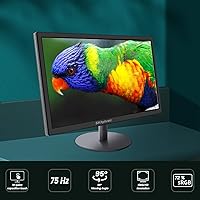
For a display in this price bracket, the 10-point touch panel handles everyday interactions — tapping icons, dragging windows, two-finger scrolling — with satisfying accuracy. Home office users running annotation software or touch-based dashboards report that it responds quickly enough for casual and semi-professional use without noticeable lag on initial contact.
Touch drift after extended sessions is a recurring complaint, with some users needing to recalibrate every few hours of continuous use. Accuracy also degrades toward screen edges, which affects drawing apps and fine-input tasks more than general navigation work.
Display Resolution
51%
49%
For low-demand tasks like browsing simple web pages, watching standard-definition video, or running kiosk interfaces with large text elements, the 1366x768 panel delivers a functional, readable image. Users setting this up as a secondary information display or a dedicated control panel find the resolution workable for those narrow use cases.
The sub-HD resolution is the most consistently criticized aspect in buyer feedback. Text looks noticeably soft compared to Full HD panels at similar prices, and modern websites, streaming content, and productivity interfaces designed for higher pixel densities all reveal the limitation quickly and frustratingly in real-world use.
Value for Money
78%
22%
Getting multi-touch capability, VESA mounting, and dual video inputs — HDMI and VGA — at this price point is a genuinely competitive offering. Buyers building kiosks, Raspberry Pi stations, or basic secondary touch setups consistently point to the price-to-feature ratio as the primary reason they chose this display over alternatives.
The value equation weakens for buyers who discover post-purchase that the resolution and stand quality fall short of their expectations. Several reviewers note that spending a little more on a competing Full HD touch panel would have been the smarter call for anything beyond the most basic use cases.
Setup & Installation
83%
Plug-and-play behavior under Windows 10 and 11 is a consistent bright spot — connect the HDMI and USB cables and touch activates within seconds on most systems without any driver hunting. Users integrating this budget touchscreen monitor with Raspberry Pi setups also report a straightforward configuration process with minimal troubleshooting.
A notable subset of buyers encountered initial touch registration issues requiring a manual calibration pass before accurate input was possible. macOS and Linux users report a steeper setup experience compared to Windows, with some needing additional configuration steps to enable full touch functionality.
Brightness & Visibility
61%
39%
In a typical home office or indoor workspace with controlled ambient lighting, the 250 cd/m² brightness is sufficient for comfortable daily use. Users working in windowless rooms or lower-light environments report that the display looks perfectly acceptable at default brightness settings without constant manual adjustments.
Place this monitor near a window or under strong overhead lighting and its limitations show immediately. The glossy panel surface compounds the issue by reflecting light sources directly onto the screen, making it genuinely difficult to use in brighter environments — a complaint that appears frequently across buyer feedback.
Build Quality
58%
42%
The slim 0.78-inch depth and sub-6-pound weight make the display easy to handle, reposition, and mount. Buyers who plan to wall-mount the unit using a VESA bracket rather than relying on the stand report that the construction feels appropriately solid for that permanent installation scenario.
The overall chassis and stand materials feel noticeably budget-grade under hands-on use. Multiple users describe the casing as lightweight plastic that flexes slightly under touch pressure, and the back panel finish attracts scuffs easily — which matters more for desk-mounted units that get handled and adjusted regularly.
Connectivity
82%
18%
The combination of HDMI, VGA, and USB Type-B in a single budget display is genuinely unusual and practical. Users running older desktop towers with VGA-only outputs alongside newer laptops with HDMI can swap sources without adapters, making this a flexible option for mixed hardware environments in small offices or maker setups.
There is only one USB port and it is dedicated to touch data, not general-purpose peripheral use. Buyers who hoped for hub functionality or charging passthrough will be disappointed. There is also no DisplayPort or USB-C input, which limits compatibility with modern ultrabooks and compact computing devices.
Viewing Angle
57%
43%
Head-on viewing quality is adequate for single-user productivity tasks, and colors remain reasonably consistent when seated directly in front of the display. For solo desk use in a fixed, centered position, the rated 95-degree specification causes no meaningful problems during a standard working session.
The practical viewing angle falls noticeably short of the 95-degree specification once you shift off-axis by even a moderate amount. Color shift and brightness drop-off are visible at relatively shallow angles, making this a poor choice for shared screens, collaborative workspaces, or setups where multiple viewers watch from different positions.
Refresh Rate & Motion
72%
28%
The 75Hz refresh rate delivers a tangible improvement over standard 60Hz panels for everyday use — scrolling through long documents, dragging windows, and navigating busy interfaces all feel slightly crisper and less stuttery. For the productivity-focused audience this display targets, the panel handles motion well enough to avoid complaints.
Gamers and users sensitive to display latency will find 75Hz underwhelming, and the panel is not optimized for fast-moving content. Action sequences in video and rapid on-screen movements show mild blur that a higher-refresh or faster-response display at a comparable price would handle more cleanly.
VESA & Mounting
84%
VESA compatibility is a standout practical feature for this size and price tier, and buyers consistently praise how easily the monitor integrates with standard mounting hardware. Kiosk builders, retail counter installers, and DIY enthusiasts setting up Raspberry Pi wall stations highlight the VESA support as a decisive factor in choosing this display.
The specific VESA hole pattern is not clearly documented by the manufacturer, which has caused some buyers to purchase incompatible mounting brackets. Without confirmed dimensions in the product listing, users need to verify compatibility before ordering a mount — an unnecessary friction point that adds risk to the purchase.
Device Compatibility
79%
21%
The display works reliably across a wide range of Windows PCs, laptops, and mini-computers like the Raspberry Pi, making it a versatile pickup for buyers with mixed device environments. Gaming consoles and set-top boxes that output via HDMI can also drive the display for basic video output, adding flexibility beyond desktop use.
Touch functionality is unavailable on consoles, smart TVs, and streaming sticks since it requires a USB connection to a host computer. macOS support works for display output but touch integration requires additional configuration steps that not all users are willing to navigate, narrowing the practical device compatibility more than the spec sheet implies.
Stand Stability
53%
47%
The stand keeps the monitor upright and adequately positioned for light desk use where touch pressure is minimal. For casual browsing or video playback where touch is used only occasionally, the base holds the display in place without drawing attention to itself.
Under active touch use — repeated tapping, drawing, or extended navigation sessions — the stand wobbles noticeably and disrupts the interaction experience. Several buyers specifically reported that the base rocks backward when pressing with any meaningful force, making stand instability one of the most cited physical shortcomings in real-world feedback.
Touch Calibration
66%
34%
Out of the box, factory calibration is accurate enough for general navigation and basic touch tasks without any adjustment needed on most systems. The initial setup holds well for the first several hours of use, covering typical light-interaction scenarios like kiosk browsing or dashboard monitoring comfortably.
Calibration drift after extended continuous use is a recurring theme, with touch inputs gradually registering off-target over time. While recalibrating through OS settings fixes it quickly, users relying on the display for precision tasks — handwriting, detailed annotation, or point-of-sale input — find the drift frequency genuinely disruptive to their workflow.
Screen Surface & Glare
55%
45%
The glossy finish gives colors a slightly richer, more saturated appearance in ideal controlled lighting conditions, which some buyers in dimly lit or fully enclosed environments prefer over the flatness of matte alternatives. For dedicated indoor kiosk use with consistent, low-glare lighting, the surface quality is a non-issue.
In any environment with overhead lighting, windows, or ambient light sources, the glossy surface becomes a persistent frustration — reflections are strong enough to interfere with screen readability throughout the day. Combined with the moderate brightness ceiling, glare is one of the most persistent complaints from buyers who placed this display in a typical home or office setting.

Suitable for:

The SKitphrati 18.5-Inch HD Touchscreen Monitor is a solid pick for buyers who need functional touch capability without committing to a high-end budget. Home office users who want a dedicated secondary screen for annotating documents, managing a quick-access dashboard, or handling video call controls will find the size and touch responsiveness more than adequate. Small business owners running a simple retail counter, cafe ordering point, or front-desk check-in station will appreciate the VESA wall-mount option and broad device compatibility, which make installation flexible without specialized hardware. DIY enthusiasts and makers building Raspberry Pi kiosks or compact mini-PC setups will also get solid value here, especially given the rare inclusion of a VGA port alongside HDMI, which keeps older hardware in the picture. If your primary goal is adding touch interaction to an existing workstation on a tight budget, this display covers the basics reliably.
Not suitable for:

Buyers with professional or detail-oriented workflows should think carefully before choosing this budget touchscreen monitor. The 1366x768 resolution is a genuine constraint — video editors, graphic designers, photographers, and anyone working with fine text or high-resolution content will find it noticeably limiting compared to even entry-level Full HD alternatives available at similar prices. Competitive or fast-paced gamers should also look elsewhere, since the panel is not built for the refresh rates or response times that demanding titles require. The 95-degree viewing angle sounds reasonable on paper, but users in shared-viewing scenarios or multi-person environments may find off-axis image quality underwhelming in practice. Anyone who values a robust, stable stand for heavy daily use should be aware that build quality at this price tier often involves trade-offs in physical rigidity. If your workflow depends on color accuracy, pixel sharpness, or structural durability, the SKitphrati 18.5-Inch HD Touchscreen Monitor is not the right tool for the job.
Specifications

  • Screen Size: The display measures 18.5 inches diagonally, compact enough for tight desk setups while still providing usable screen real estate.
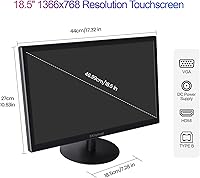
  • Resolution: Native resolution is 1366x768 pixels (SVGA Wide), which falls below Full HD and is best suited to general productivity rather than high-definition media work.
  • Aspect Ratio: The panel uses a standard 16:9 widescreen aspect ratio, compatible with most modern content and video formats.
  • Touch Technology: Supports 10-point capacitive multi-touch, enabling two-handed gestures such as pinch-to-zoom and simultaneous multi-finger input across the full screen surface.
  • Refresh Rate: Operates at 75Hz, providing noticeably smoother motion than a standard 60Hz panel for everyday tasks like scrolling, browsing, and document navigation.
  • Brightness: Panel brightness is rated at 250 cd/m², adequate for standard indoor lighting conditions but insufficient for bright or sunlit environments.
  • Viewing Angle: Specified at 95 degrees, though real-world off-axis image quality tends to degrade more noticeably than the rated figure suggests.
  • Screen Surface: The panel has a glossy surface finish, which enhances color vibrancy but increases susceptibility to reflections and visible fingerprints during touch use.
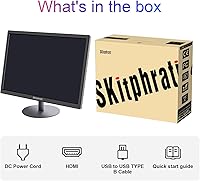
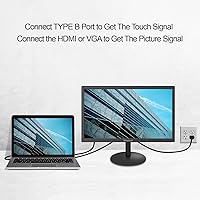
  • Connectivity: Includes one HDMI port, one VGA port, and one USB Type-B port, where the USB carries touch data separately from the video signal.
  • VESA Support: VESA wall-mount compatible, allowing installation on standard mounting brackets for kiosk builds, under-cabinet setups, or space-saving wall configurations.
  • Dimensions: Physical dimensions are 17.32 x 12.2 x 0.78 inches (width x height x depth), offering a slim profile that fits most standard desk environments.
  • Weight: The monitor weighs 5.94 pounds, light enough for straightforward repositioning or wall installation without requiring heavy-duty mounting hardware.
  • Model Number: The official manufacturer model designation is HD-185-TOUCH, as listed by SKitphrati in product documentation.
  • Market Launch: This display became available in December 2024, making it a newly released product with a limited real-world track record at the time of review.
  • Device Compatibility: Compatible with Windows and Linux PCs, laptops, and select gaming consoles via HDMI or VGA, with touch functionality active only when the USB Type-B cable is also connected to a host device.

Related Reviews

Feelworld F5 ProX 5.5″ Field Monitor
78%
91%
Screen Brightness
83%
Image Clarity & Resolution
86%
Monitoring Tools
67%
Touchscreen Responsiveness
58%
Build Quality & Durability
More
CoolHood 18.5-inch Portable Monitor
88%
94%
Portability
88%
Display Quality
91%
Ease of Setup
85%
Gaming Performance
89%
Color Accuracy
More
Cocopar T185FHLS 18.5-inch Portable Monitor
75%
83%
Display Quality
76%
Color Accuracy
58%
Brightness Performance
81%
Refresh Rate & Motion
69%
Build Quality
More
Qunub 18.5-inch Portable Monitor
85%
89%
Display Quality
94%
Portability
85%
Gaming Performance
90%
Setup & Installation
88%
Build Quality
More
HotYeah 18.5-inch 1080P Portable Monitor
75%
83%
Display Clarity
78%
Color Vibrancy
81%
Refresh Rate & Motion
57%
Brightness & Outdoor Use
67%
USB-C Connectivity
More
SKitphrati HD-190 19-Inch Monitor
66%
83%
Value for Money
91%
Port Variety
67%
Display Clarity
52%
Color Accuracy
63%
Build Quality
More
Motyeowe 18.5 Inch Portable Monitor
86%
89%
Display Quality
94%
Portability & Design
88%
Connectivity
84%
Performance (Gaming)
91%
Ease of Setup
More
Upperizon U185C 18.5″ Portable Monitor
75%
91%
Screen Size & Impact
84%
Image Quality
82%
Refresh Rate & Motion
58%
USB-C Compatibility
79%
Included Magnetic Cover
More
CUIUIC 18.5″ Portable Monitor
74%
83%
Display Quality
88%
Screen Size & Real Estate
58%
Portability & Weight
61%
USB-C Connectivity
72%
Build Quality & Materials
More
Pisichen HD-215TS 21.5-inch Touchscreen Monitor
69%
74%
Touch Responsiveness
79%
Display Clarity
51%
Viewing Angle
88%
Setup & Plug-and-Play
62%
Build Quality
More

FAQ

For most Windows 10 and Windows 11 systems, touch activates automatically once you connect the USB Type-B cable alongside your video cable — no separate driver download is required. Some users see a brief calibration prompt on first connection, which takes about a minute to complete. If touch stops responding after extended use, unplugging and reconnecting the USB cable usually resets it.

No — the video signal travels through HDMI or VGA, but touch data is handled separately by the USB Type-B connection. Both cables need to be connected at the same time for touch to function. This is standard practice for touchscreen monitors at this price level, so keep a USB Type-B cable on hand when setting it up.

Yes, and this is genuinely one of the stronger use cases for this 18.5-inch touch display. Connect via HDMI for video output and USB for touch input, then configure your Raspberry Pi OS to recognize the touch controller. Expect minor calibration adjustments depending on your OS version, but it functions well as a compact interactive station for projects and kiosk builds.

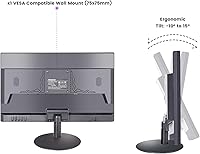
The SKitphrati 18.5-Inch HD Touchscreen Monitor is confirmed as VESA wall-mount compatible, but the manufacturer does not explicitly state the hole pattern in published specifications. For monitors in this size range, 75x75mm or 100x100mm are the most common patterns — verify with the seller before purchasing a bracket to avoid a mismatch.
For general productivity — email, web browsing, spreadsheets, and video calls — the resolution works acceptably. Text is readable and navigation feels smooth. Where it starts to feel limiting is with modern HD video content or any task requiring fine detail, such as photo editing or working in interfaces designed with Full HD in mind.

It can display content from consoles that output via HDMI, so basic video works. However, touch will not function with consoles since that requires a USB connection to a host computer. The resolution and refresh rate are also modest compared to displays built for console gaming, so this is better suited to casual portable play than a dedicated gaming screen.

Touch drift after extended sessions is a known behavior with budget capacitive panels and is not unique to this monitor. Running the built-in touch calibration tool in your operating system — on Windows, search for calibrate the screen for pen or touch input — usually corrects it. If drift recurs regularly, a full USB cable reconnect often resets the touch controller without needing a full recalibration.

The manufacturer does not detail a tilt range in the product specifications, and early buyer feedback suggests the stand offers limited adjustability with a rigidity that feels modest under touch pressure. If precise angle control or a stable base for frequent touch use matters to you, pairing this display with a VESA monitor arm is worth the additional investment.

The combination of 250 cd/m² brightness and a glossy panel surface makes this budget touchscreen monitor a poor fit for bright or sunlit rooms. Overhead fluorescent lighting will cause visible reflections, and direct sunlight washes out the image significantly. Positioning the display away from direct light sources, or adding an anti-glare screen protector, helps considerably.

For a basic interactive learning setup running child-friendly apps or browser-based educational tools, it holds up reasonably well. The 10-point touch is responsive enough for drawing, tapping, and drag interactions, and the compact footprint suits a smaller workspace. One practical note: the glossy surface collects fingerprints heavily during active touch use, so a microfiber cloth nearby becomes essential.