Overview

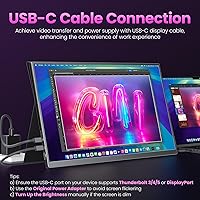
The Upperizon U185C 18.5″ Portable Monitor enters a crowded mid-range market with a screen size that immediately sets it apart from most portable rivals. Most competitors top out at 15 or 16 inches, so those extra inches make a real difference when working with spreadsheets, code, or side-by-side windows. Upperizon is a relatively young brand, but this travel monitor shows clear intent — offering a 100Hz refresh rate and an included magnetic cover at a price where rivals often skip both. One important caveat upfront: single-cable USB-C operation requires a Thunderbolt or full-featured port on your device, not just any USB-C socket.
Features & Benefits

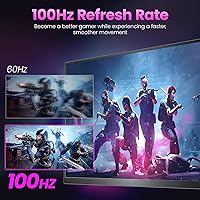
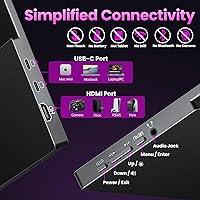
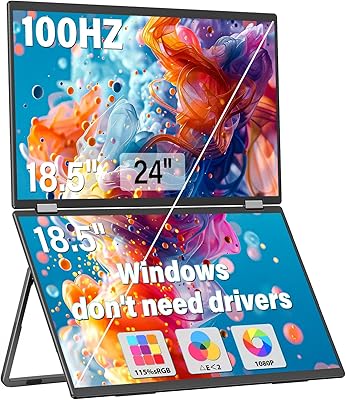
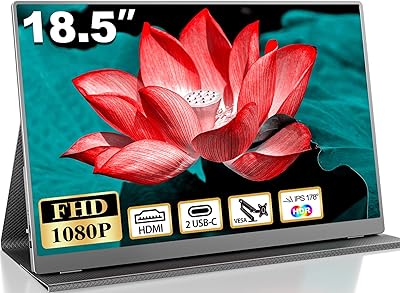
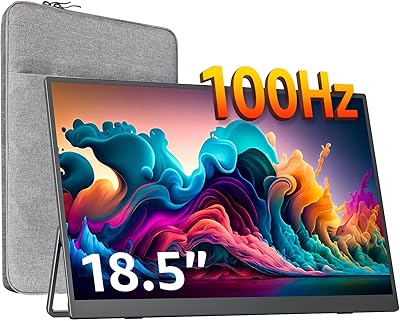
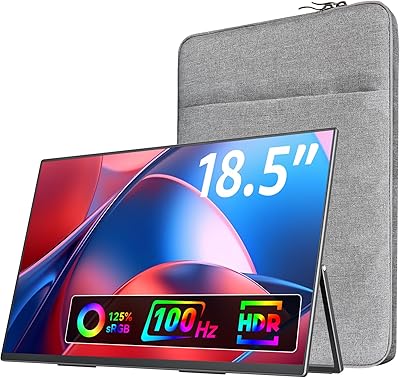
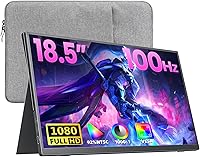
The 18.5-inch IPS panel delivers FHD 1080p visuals with wide color coverage that makes photos and videos look genuinely rich — noticeably better than cheaper TN or VA panels at this price. The 100Hz refresh rate is a meaningful step up for anyone who has squinted at stuttery motion on a standard 60Hz portable screen. Connectivity is flexible: two USB-C ports and an HDMI input cover most laptops, MacBooks, and consoles without extra adapters. The built-in speakers are modest — fine for a quick video call or background audio, not for serious listening. Add VESA mount support and a matte anti-glare coating, and this display handles more use cases than its price suggests.

Best For

This portable display is a natural fit for remote workers and nomads who find standard 15-inch portables too cramped for real productivity. Students moving between dorms, libraries, and coffee shops will appreciate how quickly it sets up — one cable and you have a second screen. Console gamers connecting a PS5 or Xbox will get a more fluid experience than a typical 60Hz portable allows, though a desk or hotel table helps given the physical size. MacBook and Surface users with Thunderbolt ports get the cleanest single-cable setup. The included cover means you are not hunting for a separate sleeve before tossing it in a backpack.

User Feedback

Buyers consistently praise the screen size and color accuracy for the price, with many noting it feels like a meaningful upgrade over compact 15-inch alternatives. The magnetic cover earns solid marks as both a stand and a protector — it holds the display at a usable angle and feels well-built for what you pay. That said, power delivery issues come up regularly; users with older or non-Thunderbolt USB-C laptops have run into flickering screens or no signal at all. Portability impressions are genuinely split — the net weight is manageable, but the larger footprint does demand more bag space than a typical slim portable.

Pros

  • At 18.5 inches, this portable display offers noticeably more screen real estate than most rivals in the same price range.
  • The 100Hz IPS panel produces smooth, fluid motion that makes a real difference for both gaming and fast-scrolling productivity work.
  • Wide color coverage makes photos, videos, and design work look vivid and accurate without any manual calibration fuss.
  • Dual USB-C ports plus HDMI mean you are covered across MacBooks, Windows laptops, and consoles without carrying extra adapters.
  • The included PU leather magnetic cover doubles as a functional stand, saving you the cost and hassle of a separate accessory.
  • Matte anti-glare coating holds up well in bright environments like coffee shops or near windows, where glossy screens struggle badly.
  • VESA mount compatibility makes this travel monitor surprisingly usable as a semi-permanent desk display when you are not on the road.
  • The flicker-free panel with a blue light filter is a genuine comfort improvement during long work or study sessions.
  • Built-in speakers handle video calls and casual video watching without needing to unpack a Bluetooth speaker every time.
  • Setup is genuinely fast for users with compatible hardware — plug in one cable and the display is ready within seconds.

Cons

  • Single-cable USB-C use is restricted to Thunderbolt or full-featured USB-C ports, which excludes many common Windows laptops.
  • Screen flickering has been reported when connected to hosts that cannot supply adequate power through the USB-C cable.
  • Weighing over four pounds with the cover, it takes up meaningfully more bag space than compact portable alternatives.
  • The brand is relatively new with limited long-term reliability data, which may concern buyers who want an established track record.
  • Built-in speakers are thin and low-volume — adequate for calls, but not a substitute for even a basic portable Bluetooth speaker.
  • No built-in kickstand means you are dependent on the magnetic cover to prop it up, limiting your angle adjustment options.
  • At 300 nits brightness, outdoor use in direct sunlight is uncomfortable and visibility drops off noticeably.
  • The heavier total weight may feel like a trade-off that is not worth it for minimalist travelers prioritizing bag weight above all.
  • No touch screen support may disappoint users who have grown accustomed to touch-enabled portable displays at similar price points.

Ratings

The scores below reflect an AI-driven analysis of verified global buyer reviews for the Upperizon U185C 18.5″ Portable Monitor, with spam, bot activity, and incentivized submissions actively filtered out before scoring. Each category captures both what real users consistently praised and the friction points that surfaced across multiple markets and use cases. Nothing is glossed over — the ratings reflect the full picture, strengths and frustrations alike.

Screen Size & Impact
91%
Buyers repeatedly called out the 18.5-inch panel as the single biggest reason they chose this display over competitors. Remote workers mentioned how much easier it is to keep a reference document open alongside a main workspace, and students praised the extra room for multi-tab browsing without constant switching.
A handful of users found the larger footprint awkward in tight spaces like airplane tray tables or small café tables, where a more compact 15-inch model would have been easier to position. It is a real trade-off that some buyers only fully appreciated after the fact.
Image Quality
84%
The IPS panel with wide color coverage impressed users coming from budget TN-panel portables, with several noting that photos and YouTube content looked noticeably richer and more natural. The matte coating kept reflections under control in bright offices and near windows, which many buyers specifically mentioned as a daily comfort improvement.
A few users with calibrated monitor experience felt the out-of-box color accuracy was slightly warm and could benefit from manual adjustments in the OSD settings. At 300 nits, brightness headroom is modest, and a small number of buyers found it underwhelming when used near a sunny window.
Refresh Rate & Motion
82%
18%
Users who upgraded from 60Hz portable monitors were noticeably enthusiastic about how much smoother scrolling, cursor movement, and gaming felt at 100Hz. Console gamers connecting via HDMI mentioned the display made fast-paced games feel more responsive than their previous portable setup.
The 100Hz advantage is most visible in gaming and fast scrolling; for standard office tasks, the improvement over 60Hz is subtle enough that some non-gaming buyers did not notice a meaningful difference in their daily use. A small number of users also noted that achieving 100Hz required confirming the correct refresh rate setting in their OS display preferences.
USB-C Compatibility
58%
42%
For buyers with Thunderbolt 3 or 4 equipped MacBooks, Surfaces, or premium Windows laptops, the single-cable setup worked exactly as advertised — plug in, display appears, no fuss. That experience earned genuine praise from users who specifically needed a clean, minimal-cable workflow on the road.
This is the most common complaint category in real-world reviews. Users with standard USB-C ports lacking DisplayPort Alt Mode were caught off guard when the single-cable connection did not work, requiring an HDMI cable plus a separate power source instead. Upperizon does document the requirement, but buyers repeatedly wished it were communicated more prominently at the point of purchase.
Included Magnetic Cover
79%
21%
The bundled PU leather magnetic cover was consistently called out as a genuine value-add — buyers appreciated not having to track down a compatible sleeve separately, and several noted that the stand function held the display at a comfortable angle for desk use without wobbling.
The cover only offers one or two fixed viewing angles when used as a stand, which frustrated users who prefer to tilt their screen more aggressively or work on uneven surfaces. Over extended use, a few buyers reported that the magnetic hold felt less secure and the cover showed wear earlier than expected for the material quality.
Portability & Weight
71%
29%
At its bare net weight, this travel monitor is manageable for backpack carry, and users who brought it to co-working spaces or client offices appreciated having a large second screen without checking a bag. The slim profile means it slides into most laptop compartments without adding visible bulk to the bag.
Once the cover is included, the total weight climbs to over four pounds, which several frequent flyers and minimalist travelers described as noticeably heavier than they expected based on the product listing. Buyers used to lighter 15-inch portables mentioned it was a real adjustment for all-day carry.
Build Quality
74%
26%
The monitor body feels solid and the thin bezel gives it a premium appearance that belies the mid-range price. Most users reported no flex or screen distortion when handling it carefully, and the overall fit and finish earned positive remarks from buyers comparing it to more expensive branded portables.
A small but consistent group of reviewers flagged the plastic chassis as feeling slightly lightweight under pressure, raising concerns about long-term durability with frequent travel. The screen bezel is notably thin, which looks great but does make some users cautious about dropping or sliding it against hard surfaces in a bag.
Connectivity Options
81%
19%
Having two USB-C ports plus a full-size HDMI input gives this portable display a flexibility advantage over rivals that offer only a single USB-C connection. Users with HDMI-only laptops or game consoles appreciated not needing a dongle, and the dual USB-C setup allowed one port to handle video while the other managed power delivery.
There is no DisplayPort input, which limits options for users with older workstations or specific professional setups. A small number of buyers also noted that the HDMI cable was not included in the box, which meant an unexpected trip to find one on arrival at a hotel or client site.
Built-in Speakers
53%
47%
For video calls, quick YouTube clips, or background audio while working, the built-in speakers do the job without needing to unpack anything extra. Buyers who used this travel monitor primarily for productivity tasks found the speakers a convenient bonus rather than a dealbreaker in either direction.
Buyers expecting any real audio quality were consistently let down — the speakers are thin, lack bass, and distort at higher volumes. Multiple reviewers explicitly recommended pairing this display with even a basic Bluetooth speaker if audio quality matters at all, and several wished the speaker grille space had been used for other features instead.
Eye Comfort
83%
The combination of a flicker-free backlight and blue light filter earned consistent praise from users who work long hours in front of screens, with several noting reduced eye fatigue compared to their previous portable display. The matte coating also helped cut harsh reflections during evening work sessions under artificial lighting.
The blue light filter does add a slight warm tint to the display that some color-sensitive users found distracting, particularly when editing photos or watching content with cool tones. It is adjustable through the OSD menu, but new users sometimes did not realize the filter was active by default and assumed the color balance was off.
Setup & Plug-and-Play Experience
67%
33%
For users with fully compatible hardware, setup is genuinely fast — connect the cable, the OS detects the display, and it is ready in seconds with no driver installation required. MacBook and Surface users with Thunderbolt ports had a particularly smooth out-of-box experience that matched the marketing claims.
The setup experience drops significantly for users who discover mid-setup that their USB-C port is not full-featured, requiring them to reconfigure their cable arrangement on the fly. A meaningful portion of negative reviews trace back to this moment of discovery, suggesting the compatibility barrier creates disproportionate frustration relative to the hardware limitation itself.
Value for Money
78%
22%
Considering the screen size, refresh rate, and the included cover case, most buyers felt the price-to-feature ratio was strong compared to similarly priced alternatives that offer smaller panels or no accessories. Buyers who needed a portable second screen for work found it difficult to identify a better-equipped option at the same cost.
Buyers who encountered USB-C compatibility issues or speaker disappointment felt the value proposition weakened considerably, since those friction points shifted the perceived cost-benefit ratio. A few users also noted that newer rivals entering the market are starting to close the gap, making the value case more competitive but less uniquely compelling than it was at launch.
VESA & Desk Mounting
76%
24%
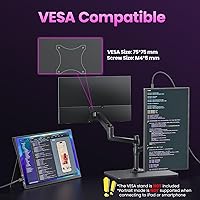
The inclusion of VESA 75x75mm mounting on the back was a genuine surprise for buyers who wanted to use this as a semi-permanent secondary monitor at home without paying for a dedicated desktop panel. Users with monitor arms called it an underrated feature that extended the product’s usefulness well beyond travel scenarios.
The VESA mount requires sourcing the correct M4 screws separately, which a few buyers found annoying since the screws were not included in the box. Some users also noted that the cover case needs to be removed entirely for mounting, which means the stand functionality is lost in desk-mounted configurations.

Suitable for:

The Upperizon U185C 18.5″ Portable Monitor makes the most sense for people who genuinely feel cramped on a single laptop screen and need a second display they can carry without renting a moving van. Remote workers who hop between co-working spaces, home offices, and client sites will find the larger panel size a real productivity boost compared to the compact 15-inch portables that dominate this price bracket. Students juggling research, writing, and reference windows across multiple locations will appreciate how quickly this travel monitor gets up and running — especially with a single USB-C cable on a compatible MacBook or Surface. Console gamers who want a portable screen for PS5 or Xbox sessions at a friend's place or in a hotel room get a noticeably smoother experience than most sub-100Hz alternatives allow. The included magnetic cover removes one friction point that rivals often leave as an afterthought, making this a practical grab-and-go package for buyers who hate hunting for accessories separately.
Not suitable for:

The Upperizon U185C 18.5″ Portable Monitor is genuinely not the right call for everyone, and it is worth being honest about where it falls short. If your laptop only has a basic USB-C port without Thunderbolt 3, 4, or 5 support, single-cable connectivity will not work — and that rules out a surprising number of Windows machines and older devices. Buyers who prioritize ultralight travel above all else should think twice; at nearly 4.2 lbs with the cover, it is noticeably heavier than compact 15-inch alternatives, and its footprint does not disappear easily into a slim daypack. Creative professionals who need color-critical accuracy for photo editing or video grading should look at higher-end panels with factory calibration, since this display is tuned for vibrant everyday visuals rather than studio precision. Anyone expecting meaningful audio from the built-in speakers will be disappointed — they are functional for calls and background sound, but nothing more. Finally, buyers who need a touch screen or built-in kickstand without any external cover will find the feature set incomplete.

Specifications

  • Screen Size: The display measures 18.5 inches diagonally, making it one of the larger options available in the portable monitor category.
  • Resolution: Native resolution is 1920x1080 FHD, delivering a sharp and detailed image suitable for productivity, media, and casual gaming.
  • Panel Type: Uses an IPS panel, which provides consistent colors and wide viewing angles compared to TN alternatives at a similar price.
  • Refresh Rate: Runs at 100Hz, offering smoother motion rendering than the 60Hz panels that are standard across most portable displays in this tier.
  • Color Gamut: Covers 130% sRGB (approximately 92% NTSC), producing vibrant and relatively accurate colors for everyday content consumption and creative work.
  • Color Depth: Supports 8-bit color depth with a palette of 16.7 million colors for smooth gradients and natural-looking imagery.
  • Brightness: Peak brightness reaches 300 cd/m², which is adequate for indoor use but may feel limited in very bright or outdoor environments.
  • Ports: Equipped with two USB-C ports and one full-size HDMI port, covering connection to most modern laptops, desktops, and gaming consoles.
  • Dimensions: The monitor body measures 16.6 x 9.9 x 0.59 inches, keeping it slim enough to slide into most laptop backpack sleeves.
  • Weight: Net weight is 2.34 lbs; with the included magnetic cover attached, the total carrying weight rises to approximately 4.15 lbs.
  • Surface Finish: Features a matte anti-glare coating that reduces reflections and eye strain during extended use in mixed-lighting environments.
  • Eye Care: Incorporates both a flicker-free backlight and a blue light filter to reduce visual fatigue during long work or study sessions.
  • Audio: Includes built-in stereo speakers suitable for calls, video playback, and background audio, though not intended as a primary sound system.
  • VESA Mount: The rear panel supports VESA 75x75mm mounting using M4 screws (5mm or 6mm length recommended), enabling desk arm or wall mount use.
  • Included Accessory: Comes with a PU leather magnetic cover case that also functions as a display stand when folded into a support position.
  • Aspect Ratio: Standard 16:9 widescreen aspect ratio, compatible with all common video formats and operating system display configurations.
  • Input Voltage: Operates at 5V, meaning it can draw power from a standard USB-C port or adapter without requiring a proprietary power supply.
  • Compatibility: Designed to work with MacBooks, Windows laptops, Surface devices, and game consoles including PS5 and Xbox via USB-C or HDMI.

Related Reviews
CUIUIC 18.5″ Portable Monitor
74%
83%
Display Quality
88%
Screen Size & Real Estate
58%
Portability & Weight
61%
USB-C Connectivity
72%
Build Quality & Materials
More
Motyeowe 18.5 Inch Portable Monitor
86%
89%
Display Quality
94%
Portability & Design
88%
Connectivity
84%
Performance (Gaming)
91%
Ease of Setup
More
HotYeah 18.5-inch 1080P Portable Monitor
75%
83%
Display Clarity
78%
Color Vibrancy
81%
Refresh Rate & Motion
57%
Brightness & Outdoor Use
67%
USB-C Connectivity
More
Cocopar T185FHLS 18.5-inch Portable Monitor
75%
83%
Display Quality
76%
Color Accuracy
58%
Brightness Performance
81%
Refresh Rate & Motion
69%
Build Quality
More
InnoView INVPM509 18.5″ Dual Portable Monitor
73%
88%
Display Clarity
83%
Refresh Rate & Motion
79%
Color Accuracy
61%
Portability
84%
Build Quality
More
CoolHood 18.5-inch Portable Monitor
88%
94%
Portability
88%
Display Quality
91%
Ease of Setup
85%
Gaming Performance
89%
Color Accuracy
More
Qunub 18.5-inch Portable Monitor
85%
89%
Display Quality
94%
Portability
85%
Gaming Performance
90%
Setup & Installation
88%
Build Quality
More
VisionOwl 18.5-Inch 1080p Portable Monitor
77%
91%
Screen Size & Real Estate
83%
Display Clarity & Sharpness
78%
Color Accuracy & Vibrancy
81%
Refresh Rate & Motion Performance
89%
Connectivity & Setup Ease
More
Ingnok 18.5-inch FHD Portable Monitor
72%
83%
Value for Money
91%
Setup & Ease of Use
78%
Display Quality
61%
Brightness
59%
Build Quality
More
Usparkle GS185CM1 18.5-inch Portable Monitor
77%
83%
Display Quality
88%
Refresh Rate Performance
91%
Portability & Form Factor
84%
Build Quality & Materials
76%
Connectivity & Compatibility
More

FAQ

Yes, but only if your MacBook has a Thunderbolt 3 or Thunderbolt 4 port, which covers most MacBook Pro and MacBook Air models from 2018 onward. A single full-featured USB-C cable handles both video signal and power delivery simultaneously. If you are unsure about your specific model, check Apple’s port specs before purchasing.

Not necessarily. Many Windows laptops include USB-C ports that only support charging or data transfer, not video output. You need a port with DisplayPort Alt Mode or Thunderbolt support for single-cable use. If your laptop lacks that, you can still connect via the HDMI port using a separate cable and power the monitor through one of the USB-C ports with a charger.

Flickering almost always points to insufficient power delivery from the connected device. Try using the original USB-C cable that came with the monitor, or plug in a separate USB-C power adapter alongside the video connection. Cheap or third-party cables are a common culprit in these situations.

The magnetic cover folds into a stand position and holds the display at a reasonable working angle. It is stable enough for desk use on flat surfaces, though it does not offer adjustable tilt the way a dedicated monitor stand would. For occasional travel use, it works well; for permanent desk setups, a monitor arm using the VESA mount might be more comfortable.

Yes, the HDMI port makes this straightforward. Just run a standard HDMI cable from your console to the monitor and power it separately via one of the USB-C ports connected to a charger or power bank. The 100Hz panel is a nice bonus for console gaming, though PS5 and Xbox output at 60Hz for most titles at 1080p anyway.

The size difference is real and worth thinking about before you buy. This travel monitor is noticeably wider and taller than a 15-inch display, and with the cover it weighs over four pounds — more than a slim ultrabook. It fits in larger laptop backpacks but may not slide into every sleeve pocket. If you travel light with a small bag, a 15-inch model might suit your lifestyle better.

It is a reasonable option for casual editing and color-aware work, offering wide color coverage that looks vibrant and natural. However, it is not factory-calibrated and lacks the hardware precision expected by professional colorists or photographers. If accurate color grading is your primary need, a calibrated panel at a higher price point is a better investment.

The PU leather cover wraps around the front of the panel and holds magnetically, which provides decent scratch and bump protection inside a bag. It is not a hard-shell case, so it will not absorb serious impacts. For most everyday commuting and travel scenarios, the protection level is practical and sufficient.

Yes, the display supports both landscape and portrait orientations. You can rotate the image output through your operating system’s display settings and reposition the monitor accordingly. The magnetic cover may need some creative propping to hold portrait orientation stably, depending on the angle you prefer.

It can, as long as your power bank supports USB-C Power Delivery output at sufficient wattage — generally 18W or higher is recommended for stable operation. Lower-output power banks may not supply enough power, which can cause screen instability. If you plan to use this portable display on the go without a wall outlet, test your specific power bank first to confirm compatibility.