Overview

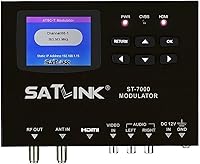
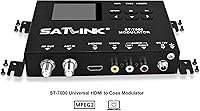
The SatLink ST-7000 HDMI to RF Modulator solves a problem that comes up constantly in coax-wired buildings: you have an HDMI source — a media player, a satellite receiver, a laptop — and you need to get that signal to multiple TVs without running new cables. This unit converts the HDMI feed into an RF signal that travels over existing coaxial wiring, appearing on connected TVs as a tunable channel. It supports both ATSC and QAM J.83B output standards, covering most TV tuner types in use today. Critically, it handles 1080p input, which separates it from cheaper modulators that cap out at 720p. That said, this is not a device you plug in and forget — it expects a certain level of technical familiarity from whoever sets it up.
Features & Benefits

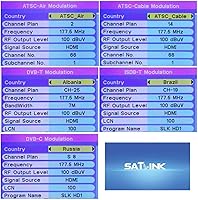
The ST-7000's most practical advantage is that it preserves 1080p quality as the signal moves through coax — something budget modulators often cannot claim. You can select which RF channel the signal broadcasts on, which matters in environments where cable or antenna sources already occupy certain channels; picking a clear channel avoids interference and keeps distribution tidy. It outputs in either ATSC format (the standard used by over-the-air broadcasts) or QAM J.83B (used by cable systems), so most modern TVs can tune to it without additional hardware. The metal enclosure is compact enough to fit beside a rack or mount discreetly, and front-panel controls let you adjust settings without needing a laptop or separate software.

Best For

This HDMI-to-coax unit makes the most sense for anyone managing a space where coaxial cabling is already in place and HDMI runs simply are not practical. Think small hotels or motels pushing a single satellite or streaming source to all guest room TVs, churches routing a stage camera or presentation PC to screens in overflow areas, or waiting rooms and sports bars that need one consistent feed across multiple displays. It also fits residential situations where the coax network is built into the walls and rewiring is not an option. AV installers and integrators will feel comfortable with the configuration options, though a technically inclined homeowner can certainly work through it with some patience.

User Feedback

With a 4.2-star average across 72 ratings, the ST-7000 holds up reasonably well, particularly given that its audience skews toward professionals who tend to evaluate more critically. Most reviewers highlight signal stability and consistent picture quality as genuine strengths — the kind of reliable output that matters when you are responsible for a client installation. The more common complaints center on setup: documentation is not always clear, and users without prior RF or AV experience report a steeper learning curve than expected. A handful of longer-term owners mention the unit runs warm under load during extended use, though no widespread failure patterns emerge. It earns its rating, but go in knowing configuration takes real effort.

Pros

  • Maintains 1080p HD quality through the coax distribution chain — a genuine edge over budget alternatives.
  • Supports both ATSC and QAM J.83B output, so it works with nearly any modern TV without extra hardware.
  • Assignable RF output channel prevents interference with existing cable or antenna signals on the same coax network.
  • Solid metal enclosure feels built for professional installs, not a flimsy consumer-grade shell.
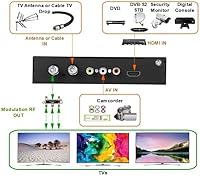
  • One unit can feed an entire property worth of TVs over existing coaxial wiring — no new cable runs needed.
  • Front-panel controls allow on-site adjustments without needing a laptop or separate configuration device.
  • Compact form factor fits neatly in utility closets or alongside rack equipment without consuming excessive space.
  • Most reviewers in commercial installs report stable, consistent signal performance over sustained periods of use.

Cons

  • Setup is genuinely difficult for non-technical users — sparse documentation leaves real gaps in the process.
  • No guided setup wizard or intuitive quick-start flow; first-time installers often troubleshoot for hours.
  • Runs noticeably warm during extended continuous operation, raising concern in unventilated equipment spaces.
  • Not a standard rack-mount form factor out of the box, and mounting hardware is not included.
  • Long coax runs require external signal amplifiers to maintain quality — an added cost the unit does not offset.
  • With only 72 reviews at this price tier, long-term reliability data is still limited and inconclusive.
  • Selecting the wrong output standard (ATSC vs. QAM) produces no picture and can be frustrating to diagnose without prior RF knowledge.
  • Older or off-brand TVs occasionally struggle to scan and hold the channel, requiring additional trial and error.

Ratings

The SatLink ST-7000 HDMI to RF Modulator has been scored below by our AI system after analyzing verified buyer reviews from multiple global sources, with spam, bot-generated, and incentivized feedback actively filtered out. Scores reflect the honest distribution of real-world experiences — including the friction points that often get glossed over — so you can weigh both the strengths and the trade-offs before committing to a purchase at this price tier.
Signal Quality & HD Retention
88%
Most reviewers who tested the ST-7000 in hotel or church installs noted that 1080p content arrived at the TV looking clean and stable, without the compression artifacts or color banding that show up on cheaper modulators. The signal held up well even when split across multiple coax drops in a building.
A small number of users reported minor softening of fine detail compared to a direct HDMI connection, which is expected in any RF conversion but still worth noting for critical display environments. Very long coax runs without proper amplification did produce some degradation.
Ease of Setup
57%
43%
Installers with prior RF or AV experience generally found the front-panel controls and channel assignment process straightforward once they understood the menu structure. For those comfortable with broadcast concepts like ATSC and QAM, initial configuration typically took under 30 minutes.
Non-technical buyers consistently flagged the setup process as the biggest hurdle — the included documentation is sparse, and there is no guided wizard or intuitive quick-start flow. Several reviewers spent hours troubleshooting before getting a stable output channel, which is a real problem if you are not already familiar with RF distribution basics.
Output Standard Compatibility
91%
The ability to switch between ATSC and QAM J.83B output means the ST-7000 works with virtually any modern TV that has a coax input, whether it expects an over-the-air signal or a cable-style feed. Reviewers installing across mixed TV brands and ages appreciated not needing additional adapters or converters.
Selecting the wrong output standard for your TV type produces no picture and can be confusing to diagnose without knowing what to look for. The documentation does not always make the ATSC vs. QAM distinction clear enough for buyers who are unfamiliar with the difference.
Build Quality & Enclosure
83%
The metal chassis feels solid and purposeful — noticeably more substantial than plastic-shell competitors at lower price points. Several professional installers noted it fits cleanly beside rack equipment or mounts discreetly in utility closets without looking out of place.
Some reviewers observed the unit runs noticeably warm during extended operation, and the enclosure has no active cooling. For installations that run content continuously for many hours, this raised concern about long-term thermal stress, though no widespread failure reports emerged.
RF Channel Assignment Flexibility
86%
Being able to assign a specific RF output channel is genuinely useful in environments where cable boxes or antenna signals already occupy certain channel numbers. Installers working in MDUs or hospitality settings praised this as essential for avoiding interference and keeping the distribution system organized.
The range of assignable channels, while adequate, is not as wide as some competing enterprise-grade units. A few users in dense signal environments reported needing to experiment across several channels before finding one with no interference.
Documentation & Support Resources
48%
52%
Users who contacted SatLink directly reported getting useful responses from technical support, and some found community forum posts and third-party video walkthroughs that filled in the gaps left by the manual.
The included documentation is widely considered inadequate for the product's complexity. Multiple reviewers specifically called out missing or unclear instructions for initial channel scan, QAM vs. ATSC selection, and coax loop configuration — all critical steps for a first-time install.
Value for Money
74%
26%
For professional or semi-pro buyers who need reliable 1080p RF distribution without stepping up to enterprise hardware, the ST-7000 occupies a reasonable position. Installers who compared it against alternatives noted it delivers performance that justifies its price in multi-TV commercial installs.
Casual or residential buyers may find the cost difficult to justify, especially given the setup complexity. If your use case is a single TV or a simple two-room setup, lower-cost options may serve you just as well without the configuration overhead.
Long-Term Reliability
77%
23%
A reasonable share of reviewers who had used the unit for six months or more reported no degradation in performance, and several commercial installers noted it had been running continuously in hospitality settings without issues.
The sample size of 72 reviews limits confidence in long-term reliability conclusions. Thermal management concerns from extended continuous use were mentioned by a handful of buyers, and it remains unclear how the unit holds up across multiple years of daily operation.
Multi-TV Distribution Performance
84%
In real-world hotel and church installs, reviewers confirmed that one ST-7000 could feed a meaningful number of TVs across a coax network with consistent results across all sets. The signal chain held up well with standard passive splitters for moderate-sized properties.
Larger installations with many drops required adding external signal amplifiers to maintain quality at the far ends of the coax run, which adds cost and complexity not always made obvious upfront. The unit itself does not compensate for significant coax line loss.
Physical Footprint & Install Flexibility
81%
19%
At 10 x 6 x 3 inches and just over three pounds, the ST-7000 is compact enough to tuck into a utility closet, head-end rack, or AV cabinet without dominating the space. Its form factor was praised by installers working in tight equipment rooms.
It is not a rack-mount unit out of the box, and mounting hardware is not included, which adds a small but real inconvenience for professional rack installs. Users who expected a standard 1U rack form factor were occasionally surprised.
Channel Scan & TV Compatibility
79%
21%
Once the output channel is correctly set, most modern TVs found and locked onto the signal without issue during a standard channel scan. Reviewers working with brand-name TVs from major manufacturers reported no unusual compatibility problems.
Older TV models and some off-brand sets occasionally had difficulty scanning or holding the channel, particularly in QAM mode. A few reviewers found that switching to ATSC output resolved compatibility issues, but this trial-and-error process was not intuitive.
Front-Panel Usability
66%
34%
Having physical controls on the unit itself means you can adjust settings without needing a connected computer, which is genuinely convenient during on-site installs. Experienced users found the menu navigation acceptable once they had worked through it once.
The front-panel display is small and the menu hierarchy is not particularly intuitive for first-time users. Several reviewers described navigating the settings as tedious, especially when making fine adjustments or troubleshooting signal issues on the fly.
Thermal Management
62%
38%
Under normal operating conditions with reasonable ambient temperatures, the ST-7000 stays within acceptable heat ranges and does not cause any operational disruptions. Most users in climate-controlled spaces reported no heat-related concerns.
In warmer environments or enclosed cabinets without ventilation, the unit runs hot enough to warrant concern. Some reviewers recommended leaving clearance around it or adding a small ventilation fan nearby for installs that run content around the clock.

Suitable for:

The SatLink ST-7000 HDMI to RF Modulator is purpose-built for anyone managing a coax-wired property who needs to distribute a single HD source to multiple TVs without rewiring. Small hotel and motel operators will find it particularly practical — instead of running individual HDMI cables to every guest room, one unit at the head end pushes the signal across existing coaxial infrastructure, and each TV simply tunes to the assigned channel. Churches and houses of worship benefit in a similar way, routing a stage camera or presentation feed to overflow rooms or lobby screens that already have coax drops. Sports bars, waiting rooms, and small offices with shared displays on a common coax network are also natural fits. AV integrators and technically confident homeowners who understand basic RF concepts — and are comfortable spending time on initial configuration — will get the most out of this unit without frustration.
Not suitable for:

The SatLink ST-7000 HDMI to RF Modulator is not the right choice for buyers expecting a simple plug-and-play experience. If you have never worked with RF channel assignments, coax signal distribution, or broadcast standards like ATSC and QAM, the setup process will likely feel overwhelming — the included documentation does not bridge that knowledge gap reliably. It is also a poor fit for single-TV households or anyone who just wants to move a signal from one room to another; far simpler and cheaper options exist for that use case. Buyers on tighter budgets who are comparing it to entry-level modulators should weigh whether the 1080p capability and dual-standard output actually match their needs, since paying for features you will not use does not make financial sense. Finally, if your installation environment runs hot or lacks ventilation in the equipment space, the unit's passive cooling design may introduce long-term concerns worth factoring in before you buy.
Specifications

  • Brand: Manufactured by SatLink Electronics Co., Ltd., a company focused on professional broadcast and signal distribution equipment.
  • Model: The unit carries the model designation ST-7000, positioned as a mid-to-upper-tier RF modulator within the SatLink product line.
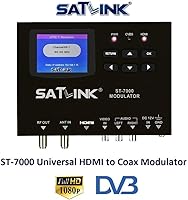
  • Video Input: Accepts a single HDMI input supporting video resolutions up to 1080p full HD.
  • Output Standards: Supports two RF output standards: ATSC (the digital over-the-air broadcast format) and QAM J.83B (the digital cable channel format used widely in North America).
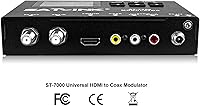
  • Output Connector: Delivers the modulated RF signal via a standard coaxial (F-type) output connector compatible with conventional coax infrastructure.
  • RF Channel: The output RF channel is user-assignable, allowing the installer to select a channel number that avoids conflict with existing cable or antenna signals on the same coax network.
  • Dimensions: The unit measures 10 x 6 x 3 inches (length x width x height), making it compact enough for rack-adjacent or closet installations.
  • Weight: The ST-7000 weighs 3.23 lbs, light enough for flexible mounting options without requiring heavy-duty support hardware.
  • Enclosure: The chassis is constructed from metal, providing durability and basic passive thermal dissipation during continuous operation.
  • Cooling: The unit relies on passive (fanless) cooling, meaning heat dissipation depends on adequate ventilation in the installation environment.
  • Configuration: Settings including output standard selection and channel assignment can be adjusted via front-panel controls directly on the unit.
  • Compatible Devices: Designed to work with televisions that have a coaxial (antenna or cable) input and support either ATSC or QAM J.83B digital tuning.
  • Use Case: Intended for distributing a single HDMI source across multiple TVs in coax-networked environments such as hotels, houses of worship, sports bars, and multi-room residential installs.
  • Market Tier: Positioned as a professional to semi-professional grade device, suited for AV integrators, installers, and technically capable end users rather than casual consumers.
  • Average Rating: Holds a 4.2 out of 5 star average based on 72 verified ratings as of the time of this review.
  • Availability: First listed for sale in January 2022, making it a relatively recent entry in the RF modulator segment with limited long-term reliability data publicly available.
  • Best Sellers Rank: Ranked number 16 in the RF Modulators category on Amazon, indicating a strong niche position despite a modest overall electronics ranking.

Related Reviews

MYPIN Mini 1080p HDMI Media Player
78%
91%
Ease of Setup
83%
Format Compatibility
78%
Build Quality & Portability
76%
Video Playback Quality
58%
Remote Control & Navigation
More
BolAAzuL HDMI Multiviewer 4x2
85%
85%
Overall Performance
91%
Ease of Setup
88%
Image Quality
83%
Viewing Modes
80%
Compatibility with Older Devices
More
Mirabox HDMI Extender 400ft
85%
94%
Signal Quality
85%
Ease of Setup
90%
Build Quality
91%
Transmission Range
89%
Audio Performance
More
Arvitek 1x8 HDMI Splitter
82%
92%
Ease of Setup
88%
Build Quality
87%
Compatibility with Devices
85%
Performance (Resolution & Speed)
84%
Durability
More
Osee GoStream Deck
Osee GoStream Deck
74%
83%
Value for Money
78%
Build Quality
61%
Ease of Setup
86%
Direct Streaming Reliability
74%
Audio Processing
More
Panasonic RF-2400D AM/FM Portable Radio
76%
83%
AM/FM Reception Quality
91%
Ease of Use
78%
Build Quality
61%
Speaker & Audio Output
86%
Value for Money
More
Bytebridges 4K HDMI Capture Card (affd05f3)
88%
94%
Ease of Setup
88%
Build Quality
91%
Video Fluidity
87%
Input Latency
83%
Audio Versatility
More
FxyxGyc 4K01 4K HDMI Media Player
82%
88%
4K Playback Performance
92%
File Format Compatibility
86%
External Storage Support
74%
Interface Navigation
91%
Digital Signage Reliability
More
Qonakism Dual HDMI Capture Card with Switcher
76%
88%
Ease of Setup
83%
Dual-Source Switching
76%
Video Quality
71%
Layout Modes
84%
Latency Performance
More
DuboCam S01 Mini Hidden Spy Camera
70%
78%
Video Clarity
84%
Ease of Setup
51%
Battery Life
62%
App Performance
73%
Build Quality
More

FAQ

Honest answer: you will want some prior familiarity with RF signal distribution, or at least the patience to research concepts like ATSC vs. QAM and RF channel assignment before you start. The SatLink ST-7000 HDMI to RF Modulator is not a plug-and-play consumer device — the documentation is functional but lean, and buyers without a background in AV or broadcast installs have reported a frustrating initial setup experience. If you are technically confident and willing to troubleshoot, it is very manageable; if not, consider budgeting time to learn the basics first.
ATSC is the standard used by over-the-air digital broadcasts in the US, while QAM J.83B is the format used by digital cable systems. Most modern TVs support both, but if your TV is tuned to expect cable channels, use QAM; if it is set up to scan for antenna channels, use ATSC. When in doubt, try ATSC first since it is more universally supported, and switch to QAM if your TVs do not find the channel during a scan.

The unit itself does not impose a strict limit on the number of TVs — that is determined by your coax splitter setup and the length of your cable runs. In practice, passive splitters work fine for smaller installs of around four to eight TVs, but larger properties will need a coax signal amplifier to maintain quality at the far end of long runs. A good rule of thumb: if you are distributing to more than six drops, plan for amplification.

It is very good for an RF distribution system, but it is not identical to a direct HDMI connection. Any signal that goes through RF conversion and travels over coax will lose a small amount of fine detail compared to a native HDMI feed. That said, most viewers watching distributed content on a TV in a hotel room or overflow space will not notice the difference — the ST-7000 handles 1080p noticeably better than cheaper modulators that cap out at 720p.

Yes, but you will need to assign the RF output to a channel number that is not already occupied by your cable feed. That is exactly what the adjustable channel assignment feature is for — you pick a vacant channel, and the modulated signal shows up there alongside your regular cable channels. Just make sure your TVs can tune to that channel in the correct mode (QAM for most cable-connected installs).

The unit does run warm, which is normal for a passively cooled modulator under continuous load. In a well-ventilated space or open rack, this is generally not an issue. Where it can become a concern is in enclosed cabinets or equipment closets with poor airflow — a few long-term users have flagged heat as something to watch. If your install location gets warm, leaving clearance around the unit or adding a small ventilation fan is a sensible precaution.

Any device with a standard HDMI output should work as a source, including streaming media players, satellite and cable receivers, Blu-ray players, gaming consoles, and media PCs. The key requirement is that the source outputs at a resolution the unit supports (up to 1080p). Note that 4K sources will typically need to be downscaled or output at 1080p from the source device, as 4K is not supported.

It should work with most TVs that have a digital coax tuner, whether ATSC or QAM. Older analog-only TVs — the kind that predate the digital TV transition — will not be able to tune a digital RF signal, so those would need an external digital-to-analog converter box. Most flat-screen TVs manufactured after 2009 in the US have digital tuners and should be compatible.

Based on product listings and buyer reports, the unit ships with the modulator itself and a power adapter, but you should plan to supply your own HDMI and coax cables for the install. This is standard practice for professional-grade distribution equipment, so it is worth having the appropriate cables on hand before you start the installation.

SatLink typically offers a limited manufacturer warranty, though the exact terms should be confirmed at the time of purchase as they can vary by seller and region. On the support side, buyers who have reached out directly to SatLink report reasonably helpful technical responses, which is encouraging given how thin the included documentation can be. If you run into setup issues, reaching out to their support team or searching for community-posted install guides is often the fastest path to a solution.