Overview

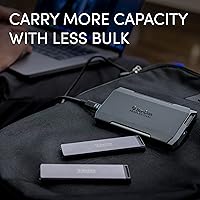
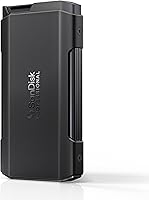
The SanDisk Professional PRO-Blade Transport 4TB NVMe SSD takes a genuinely different approach to portable storage — instead of a fixed drive, you get a chassis that accepts swappable SSD mags, letting you expand capacity without hauling a bag full of separate drives. It's aimed squarely at working photographers, videographers, and creative professionals who treat storage as part of their production kit rather than an afterthought. The build quality feels intentional: solid, compact, and dense in the hand without being heavy. For anyone tired of juggling multiple enclosures on location, the modular concept is a real shift in how you think about field storage.
Features & Benefits

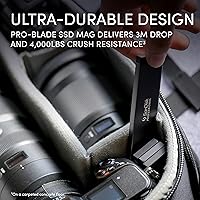
Speed is the headline, and the PRO-Blade Transport delivers where it matters most. Connected to a USB 3.2 Gen 2x2 host, transfers hit up to 2000MB/s in both directions — that's enough to offload an hour of ProRes footage in the time it would take most drives to warm up. The aluminum heat sink keeps the mag from throttling during long sessions, which matters more than most buyers realize. The SSD mag itself survives 3-meter drops and 4,000-lb crush loads, so it can handle a hard day on set. At 7.4 ounces and roughly the size of a thick card wallet, genuine portability is not a compromise here.

Best For

This modular SSD is built for professionals whose workflow puts storage at the center of the job. If you're pulling RAW stills or cinema-grade video off camera cards at the end of a long shoot day, the speed headroom genuinely changes how quickly you can wrap and move. It also makes strong sense for studio or agency use, where a single chassis shared across multiple mags means scaling capacity without buying redundant hardware. Windows users should know upfront that the drive ships formatted for Mac and needs a quick reformat before first use. Casual or budget-conscious buyers will likely find the premium hard to justify — this is a tool for people who work at volume regularly.

User Feedback

Among verified buyers, the dominant sentiment is that the PRO-Blade Transport performs as advertised — real-world speeds hold close to the rated figures when paired with a compatible host. The modular mag system earns consistent praise as something that actually changes how professionals organize and pack for jobs, not just a marketing feature. The most common friction point is the host device requirement: users with older USB-C laptops hit a speed ceiling well below the drive's capability. A handful of reviewers noted heat buildup during very long continuous transfers, though most found it manageable. The sharpest criticism is the price-per-terabyte gap versus conventional portable SSDs, which is real — buyers who don't need the modular flexibility should look elsewhere.

Pros

  • Real-world transfer speeds consistently match the advertised figures when paired with a compatible host.
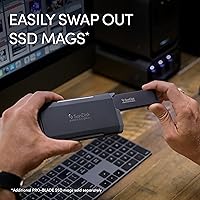
  • The swappable SSD mag system genuinely reduces the number of cables and enclosures you carry on a job.
  • At under 7.5 ounces, the PRO-Blade Transport is easy to pocket or toss in a camera bag without adding bulk.
  • The aluminum heat sink keeps sustained transfers running fast without throttling, even during long offload sessions.
  • SSD mags survive 3-meter drops and 4,000-lb crush loads — serious durability for location work.
  • One chassis plus multiple mags scales capacity without buying redundant hardware each time your storage needs grow.
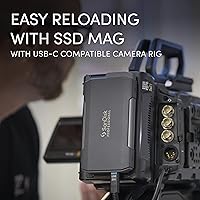
  • USB-C connectivity works across Mac, PC, tablets, and USB-C recording cameras with no adapter needed.
  • Build quality feels premium and purposeful, not plasticky or fragile like many portable drives at lower price points.

Cons

  • Full speed requires a USB 3.2 Gen 2x2 host — most older laptops will cap performance well below what the drive can deliver.
  • Price-per-terabyte is noticeably higher than non-modular portable SSDs, which is hard to justify without the workflow need.
  • Ships formatted for Mac (APFS), so Windows users must reformat before first use — not difficult, but an unexpected first step.
  • The modular mag system only pays off if you actually buy additional mags; a single-mag purchase narrows the value proposition.
  • Some users report heat buildup during very long continuous transfers, even with the aluminum heat sink in place.
  • No hardware encryption is included, which may matter for professionals handling sensitive client data.
  • No IP rating means it handles physical drops well but offers no protection against rain or dust ingress.
  • The ecosystem lock-in is real — you are committing to SanDisk's mag format, not a universal standard.

Ratings

Our AI rating engine processed verified global buyer reviews for the SanDisk Professional PRO-Blade Transport 4TB NVMe SSD, actively filtering out incentivized, bot-generated, and outlier feedback to surface what real professionals actually experience day-to-day. Scores reflect an honest synthesis of both the genuine strengths that keep working creatives coming back and the friction points that have caused frustration — nothing is smoothed over to flatter the product.

Transfer Speed
91%
Professionals offloading multi-gigabyte RAW files or ProRes footage on location consistently report speeds that hold close to the advertised ceiling when paired with a capable host. For a videographer wrapping a long shoot day, the difference between this and a mid-range portable SSD is measurable in saved minutes per card dump.
The headline speeds are real, but they are entirely contingent on having a USB 3.2 Gen 2x2 port — a requirement a surprising number of buyers discover only after purchase. Users on older Intel MacBooks or standard USB 3.1 laptops see roughly half the rated throughput, which changes the value calculation significantly.
Modular System Design
88%
The swappable SSD mag concept earns genuine praise from photographers and video crews who juggle multiple projects simultaneously. Being able to pull one mag, slot in another, and keep moving — all without unplugging enclosures or relabeling drives — is the kind of workflow improvement that sounds minor until you actually use it under time pressure.
The system creates a degree of ecosystem lock-in that not everyone is comfortable with. You are committing to SanDisk's mag format, and if the product line is ever discontinued or pricing on mags shifts, your chassis investment becomes less flexible than owning several independent drives.
Build Quality
86%
The aluminum chassis feels solid and purposeful in hand — not the hollow plasticky sensation that plagues cheaper portable drives. The SSD mag's rated resistance to 3-meter drops and 4,000-lb crush loads gives location shooters genuine confidence when tossing it into a camera bag alongside lenses and grip equipment.
The chassis itself carries no IP rating, so a sudden downpour or a spilled water bottle on a shoot is a real risk. For a product pitched at outdoor and travel-heavy workflows, the absence of at least minimal moisture resistance is a notable gap that competitors at this price tier have started to address.
Value for Money
62%
38%
For studios or agencies buying multiple mags to share across a single chassis, the long-term cost math starts to favor the modular approach over purchasing several standalone enclosures. Professionals who routinely need to scale capacity quickly see the premium as justifiable given the workflow savings.
For anyone buying a single mag and chassis, the price-per-terabyte is noticeably higher than conventional portable NVMe SSDs that deliver comparable raw speeds. Casual users or those with straightforward backup needs will likely feel the cost disparity acutely, making this a tough recommendation outside professional production contexts.
Thermal Management
74%
26%
The integrated aluminum heat sink does its job well under typical workloads — offloading a few hundred gigabytes of footage keeps temperatures in a comfortable range, and most users report no throttling during standard field use. The passive cooling solution adds no noise, weight penalty, or complexity.
During extended back-to-back write sessions — the kind a busy studio might run when ingesting several full shoots consecutively — users report the chassis getting noticeably warm, with occasional speed dips on prolonged transfers. It is manageable with short pauses but can be frustrating during high-volume production days.
Portability
89%
At just over 7 ounces and roughly the dimensions of a thick wallet, the PRO-Blade Transport disappears into a jacket pocket or sits flat in any camera bag without claiming meaningful space. For photographers already carrying bodies, lenses, and cards, the weight is a genuine non-issue.
The chassis dimensions, while compact for its speed class, are slightly bulkier than the slimmest pocket-oriented portable SSDs on the market. Users wanting the absolute smallest footprint for ultralight travel setups may find marginally thinner alternatives, though usually at lower performance levels.
Host Compatibility
67%
33%
The USB-C connector and broad USB 3.2 standard mean the drive physically connects to a very wide range of modern devices — Macs, Windows laptops, Android tablets, and USB-C recording cameras all work without adapters. For buyers with current-generation hardware, compatibility is rarely a problem.
The gap between physical compatibility and speed compatibility trips up a meaningful portion of buyers. The drive will connect and function on nearly any USB-C device, but achieving the rated 2000MB/s requires specific Gen 2x2 host support that is far from universal, especially among laptops sold before 2022.
Out-of-Box Experience
71%
29%
Mac users can plug in and start transferring files within seconds — the drive is recognized immediately and the APFS formatting is ready to go for modern macOS workflows. The included USB-C cable is good quality and long enough for desk use without feeling like an afterthought.
Windows users consistently flag the APFS formatting as a friction point that should be disclosed more prominently in the packaging. Needing to reformat before first use is a minor task, but discovering it mid-project or assuming the drive is broken is a real and recurring complaint in user feedback.
Software & Ecosystem
58%
42%
The drive works natively as a plug-and-play device with no mandatory software installation on either Mac or PC. There are no forced account registrations or bundled apps cluttering the setup process, which working professionals generally appreciate.
Beyond the modular hardware, the ecosystem lacks standout software tools — no included backup utility, no encryption management software, and no companion app for drive health monitoring. At this price point, rivals in the professional storage space often bundle more useful software alongside the hardware.
Durability Over Time
79%
21%
NVMe SSDs as a category have strong long-term reliability track records, and the PRO-Blade mag's physical toughness ratings suggest it should hold up well under the mechanical stresses of regular location work. Users who have owned the drive for a year or more report no unexpected failures.
The longer-term durability of the chassis connector and mag insertion mechanism — components that get cycled repeatedly if you are regularly swapping mags — has not yet been tested across a large enough user base to draw firm conclusions. A few users mention the mag slot feeling slightly less snug after heavy repeated use.
Security Features
41%
59%
The drive functions reliably as a straightforward storage device, and users who manage their own encryption through OS-level tools like FileVault or BitLocker can layer security on top without any hardware conflicts. For buyers who handle their own security workflows, the lack of built-in features is not a blocker.
There is no hardware encryption on this model, which is a genuine gap for professionals handling sensitive client footage, proprietary content, or work under data protection obligations. Competing professional drives at similar or lower price points offer AES hardware encryption, making this omission harder to overlook for security-conscious buyers.
Cable & Accessory Quality
77%
23%
The included USB-C to USB-C cable feels sturdy and is not the thin throwaway type often found in the box with storage products. It handles repeated pack-and-unpack cycles from a camera bag without showing obvious wear, which matters for gear that travels constantly.
No USB-C to USB-A adapter or cable is included, meaning users with older laptops or desktop setups face an extra purchase immediately. Given the target audience likely owns a mix of port generations across their equipment, including a USB-A cable or adapter would have been a practical addition.
Professional Workflow Fit
87%
The combination of high sustained speeds, physical toughness, and the modular mag system maps well onto how working photographers and video crews actually operate — fast offloads, organized labeled mags per project, minimal cable clutter on location. It slots into a professional kit in a way that generic portable drives simply do not.
The strong professional focus means the drive is somewhat over-engineered and over-priced for anyone using it in a casual or semi-professional capacity. Hobbyist photographers, YouTubers with modest output volumes, or general consumers backing up home files will pay a steep premium for capabilities they rarely or never push.

Suitable for:

The SanDisk Professional PRO-Blade Transport 4TB NVMe SSD was built with working creative professionals in mind, and it shows in every design decision. If you're a videographer regularly offloading 4K or 8K ProRes footage on location, the ability to hit near-2000MB/s transfer speeds means card dumps that used to eat 20 minutes of your turnaround time now take a fraction of that. Photographers managing multi-terabyte wedding, commercial, or editorial shoots will appreciate that a single chassis paired with multiple SSD mags replaces a pocket full of individual drives — you swap the mag, not the cable or the enclosure. Studios and production agencies scaling storage across multiple projects without constantly buying new hardware will find the modular system genuinely cost-effective over time. Anyone working in physically demanding environments — outdoor shoots, events, travel-heavy production schedules — benefits from a drive rated to survive real-world abuse rather than lab-condition handling.

Not suitable for:

The SanDisk Professional PRO-Blade Transport 4TB NVMe SSD is a harder sell the moment you step outside professional production workflows. If your laptop or workstation only supports standard USB 3.2 Gen 1 or Gen 2 (10Gbps), you will never access the drive's top speeds — you're paying a premium for headroom your hardware can't reach. Windows users need to be aware the drive ships formatted for Mac and requires a reformat before it's usable, which is a minor but real friction point out of the box. Casual users backing up family photos or home videos have no practical need for this level of speed or modularity, and the price-per-terabyte is significantly higher than conventional portable SSDs that would serve those needs just as well. Budget-conscious buyers or anyone who only needs a single fixed-capacity drive should look at simpler, less expensive options — the modular system only pays for itself when you're actually buying and swapping multiple mags.
Specifications

  • Storage Capacity: The drive ships with a 4TB NVMe SSD mag pre-installed in the transport chassis.
  • Read Speed: Sequential read speeds reach up to 2000MB/s when connected to a USB 3.2 Gen 2x2 host.
  • Write Speed: Sequential write speeds also reach up to 2000MB/s under the same Gen 2x2 host conditions.
  • Interface: The chassis uses USB 3.2 Gen 2x2, delivering up to 20Gbps of bandwidth over a USB-C connector.
  • Drive Type: Storage is provided by a removable NVMe SSD mag, not a fixed internal drive.
  • Connector: A single USB-C port on the chassis handles both data transfer and power draw from the host device.
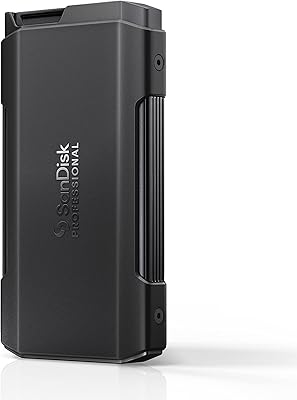
  • Dimensions: The chassis measures 5.13 x 2.82 x 0.63 inches, roughly the footprint of a thick card wallet.
  • Weight: The complete unit weighs 7.4 oz, making it practical to carry in a jacket pocket or camera bag.
  • Drop Resistance: The PRO-BLADE SSD mag is rated to survive drops from up to 3 meters onto a carpeted concrete floor.
  • Crush Resistance: The SSD mag is tested to withstand up to 4,000 lbs of crush force for protection against equipment pressure.
  • Cooling System: An integrated aluminum heat sink in the chassis helps dissipate heat from the SSD mag during sustained transfers.
  • Default Format: The drive ships formatted as APFS for Mac; Windows users must reformat to exFAT or NTFS before first use.
  • Compatible Platforms: Works with Mac, Windows PC, tablets, and USB-C recording cameras that support the USB 3.2 interface.
  • Encryption: No hardware encryption is included on this model; data security relies entirely on software-level solutions.
  • IP Rating: The chassis carries no official IP rating for water or dust resistance, so it should be kept away from wet conditions.
  • Color: The chassis is finished in dark grey with an aluminum construction that gives it a professional, tool-like appearance.
  • Manufacturer: Designed and sold by SanDisk Professional, a brand owned and operated by Western Digital Technologies, Inc.
  • Modular System: The PRO-BLADE ecosystem allows multiple SSD mags to be swapped into the same chassis without additional enclosures or cables.

Related Reviews
SanDisk Professional PRO-Blade Transport 1TB Portable SSD
80%
88%
Transfer Speed
74%
Sustained Performance
91%
Build Quality
86%
Durability & Ruggedness
79%
Modular Ecosystem
More
SanDisk Professional 4TB PRO-Blade SSD Mag
85%
94%
Performance
90%
Durability
88%
Portability
92%
Transfer Speed
85%
Ease of Use
More
SanDisk Professional PRO-G40 4TB SSD
76%
93%
Transfer Speed (Thunderbolt 3)
89%
Build Quality & Durability
82%
Thermal Management
67%
USB-C Compatibility
61%
Value for Money
More
SanDisk Professional 2TB PRO-BLADE SSD Mag

77%
83%
Transfer Speed
91%
Build Quality
88%
Durability
58%
Value for Money
93%
Portability
More
SanDisk Creator Pro 4TB Portable SSD
79%
88%
Transfer Speed
91%
Build Quality
93%
Durability & Protection
89%
Portability
71%
Compatibility
More
SanDisk Professional G-Drive SSD 4TB External SSD
79%
93%
Transfer Speed
91%
Build Quality
88%
Durability & Ruggedness
94%
Mac Compatibility
52%
Windows Compatibility
More
SanDisk Professional PRO-G40 1TB SSD
87%
91%
Performance
93%
Build Quality/Durability
75%
Compatibility
88%
Portability/Size
95%
Water and Dust Resistance
More
SanDisk Professional PRO-Blade Station 4-Bay SSD Enclosure
79%
91%
Transfer Speed Performance
88%
Build Quality & Materials
86%
Thermal Management
78%
Ecosystem Compatibility
62%
Value for Money
More
SanDisk Professional PRO-G40 2TB SSD
89%
94%
Performance (Read/Write Speeds)
92%
Build Quality & Durability
88%
Portability & Size
85%
Ease of Setup & Use
90%
Connectivity & Compatibility
More
Corsair MP600 PRO NH 4TB NVMe SSD
81%
91%
Sequential Read Performance
71%
Sustained Write Performance
63%
Thermal Management
94%
Storage Capacity
88%
Build & Endurance
More

FAQ

It depends on which MacBook Pro you have. Models with M1 Pro, M1 Max, M2 Pro, or newer chips support USB 3.2 Gen 2x2 and can reach close to the full 2000MB/s. Earlier Intel MacBook Pros typically top out at 10Gbps (Gen 2), which cuts the maximum throughput roughly in half. Check your Mac's USB-C specs before assuming you will get the advertised speeds.

The 4TB version ships with a 4TB PRO-BLADE SSD mag already installed in the chassis, so you are ready to use it straight out of the box. Additional mags are sold separately if you want to expand capacity by swapping drives rather than buying a second enclosure.

Yes, and it is worth doing this before your first shoot. The drive ships formatted as APFS, which Windows cannot read or write to natively. You will need to reformat it to exFAT (for cross-platform use) or NTFS (Windows only) using Disk Management. The process takes a few minutes, but do it before you need the drive in a hurry.

The aluminum heat sink in the chassis does a reasonable job under normal workloads — offloading a few hundred gigabytes of footage should not cause any throttling. For very long continuous writes, some users report the chassis getting noticeably warm to the touch, though most find performance stays consistent. If you are doing multi-terabyte back-to-back transfers in a hot environment, giving it short breaks is a reasonable precaution.

No, the SSD mag is not a standalone USB drive — it requires the transport chassis to connect to a computer. The mag is the storage component; the chassis provides the USB interface, connector, and cooling. SanDisk does make other PRO-BLADE accessories like the Station dock, but the mag alone has no direct connectivity.

It can be, but it depends heavily on how your camera connects. USB-C recording cameras that support the drive's interface can write directly to it at high speeds. However, most cameras that record to external drives use slower USB protocols, so you may not see the drive's top-end performance in that workflow — it is more optimized for post-shoot offloading than live recording in most setups.

The 3-meter drop rating applies specifically to the SSD mag, not the chassis. The mag houses the actual NAND storage and is engineered with durability in mind. The chassis is built solidly but does not carry an independent drop rating, so treat it with the same care you would any precision aluminum device.

If you are regularly shooting large volumes and need to label, organize, and swap storage on the fly, multiple mags with one chassis is a genuinely cleaner system — less clutter, one cable, one pocket-sized enclosure. If you only ever need one drive at a time and do not mind carrying separate enclosures, the cost math may favor standard portable SSDs. The modular approach pays off most when you are actively juggling several drives per project.

SanDisk Professional backs this product with a 5-year limited warranty, which is standard for their professional storage lineup. Keep your proof of purchase and register the product on the WD or SanDisk Professional website to make any future claims straightforward.

The PRO-Blade Transport includes a USB-C to USB-C cable in the box. If your computer only has USB-A ports, you will need a USB-C to USB-A adapter or a separate cable — just be aware that USB-A connections max out at USB 3.2 Gen 1 speeds (5Gbps), which significantly limits what this portable NVMe drive can actually deliver.