Overview

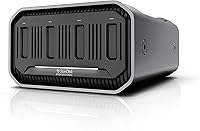
The SanDisk Professional PRO-Blade Station 4-Bay SSD Enclosure is a desktop hub built for creative professionals who move large media files as part of their daily routine. It sits at the center of a modular ecosystem — but here is what you need to know upfront: no drives are included. The SSD mags are sold separately, which explains the puzzling 0TB listing that confuses many first-time buyers. This desktop SSD enclosure connects via Thunderbolt 3 or USB-C, covering both high-bandwidth and standard setups. At its price point, it is an investment that pays off most when you are already committed to, or actively building, a professional media workflow.
Features & Benefits

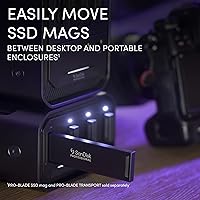
The PRO-Blade Station's four hot-swappable bays are the core of its appeal. You can pull a drive mid-session and slot in a fresh one without interrupting your workstation — a real advantage when cycling through project-specific storage. Over Thunderbolt 3, the throughput is fast enough to handle multi-stream 8K RAW editing without straining; USB-C at 10Gbps provides a capable fallback for systems without Thunderbolt. Active flow-through ventilation keeps SSD mags cool during sustained transfers, quietly running in the background. The unit is also surprisingly compact for something that houses four drives, and it pairs directly with the PRO-Blade Transport for a desk-to-field workflow that holds together in practice.

Best For

This 4-bay Thunderbolt hub makes the most sense for video editors and cinematographers working with high-resolution RAW formats at a fixed desk. Mac users on Thunderbolt 3 or 4 systems will get the full performance benefit without any configuration headaches. Freelancers who shoot on location and hand off drives to an editor — or shuttle between portable and desktop rigs — will find the PRO-Blade ecosystem genuinely practical for that use case. That said, if you are starting from scratch, add up the full cost of the SSD mags before committing. The value proposition is real, but it is most apparent for those who prioritize sustained throughput and reliability over upfront savings.

User Feedback

Sitting at 4.1 stars across nearly 200 ratings, the PRO-Blade Station earns consistently positive marks in a few key areas. Buyers frequently highlight the build quality and thermal control — the enclosure runs cool even during extended transfers, something budget alternatives often struggle with. Real-world speeds hold up well for demanding editing tasks. The loudest complaint is cost: once you factor in multiple SSD mags, the total outlay climbs fast. Windows users occasionally report Thunderbolt compatibility quirks that Mac owners rarely encounter. A smaller group pushes back on ecosystem lock-in — you are committed to PRO-Blade drives, no exceptions. For those already invested in the system, that is a non-issue; for newcomers, it deserves careful consideration before purchase.

Pros

  • Thunderbolt 3 throughput is fast enough for uncompressed 8K RAW editing directly from the drive.
  • Hot-swappable bays let you pull and replace project drives mid-session with zero downtime.
  • Active ventilation keeps SSD mags cool even during sustained multi-bay transfers.
  • Works seamlessly with the PRO-Blade Transport, making desk-to-field drive handoffs genuinely friction-free.
  • Instant plug-and-play recognition on Mac — no drivers, no authorization headaches after initial setup.
  • USB-C fallback at 10Gbps keeps the enclosure usable on systems without Thunderbolt.
  • Compact enough to sit alongside a monitor without crowding a professional desk setup.
  • Build quality is solid and dense — feels built to last under daily studio use.
  • Thunderbolt 3 cable and USB-C power supply included, so you are ready to connect without extra purchases.

Cons

  • No drives included — buyers must purchase PRO-Blade SSD mags separately, adding significant cost immediately.
  • Total ecosystem investment climbs fast; a fully loaded four-bay setup requires a substantial additional outlay beyond the enclosure price.
  • Locked to proprietary SSD mags — no support for third-party NVMe or standard M.2 drives whatsoever.
  • Thunderbolt compatibility on Windows PCs varies by motherboard and chipset, causing intermittent issues for some users.
  • The fan is audible at full load, which can be disruptive in quiet home office environments.
  • Only one Thunderbolt host port limits daisy-chain flexibility for users with complex peripheral setups.
  • The quick-start guide is too sparse to properly orient first-time PRO-Blade ecosystem buyers.
  • USB-C performance is noticeably weaker — not a viable option for direct high-resolution editing workflows.
  • No manual fan speed control, making it impossible to prioritize silence over cooling in lighter workloads.

Ratings

The SanDisk Professional PRO-Blade Station 4-Bay SSD Enclosure has been scored by our AI system after parsing hundreds of verified global buyer reviews, actively filtering out incentivized submissions and suspicious patterns to surface what real professionals actually experience. Scores reflect both where this desktop SSD enclosure genuinely delivers and where it falls short — no category has been softened to protect the brand. Whether you are considering it for a high-throughput editing bay or evaluating the total ecosystem cost, the ratings below give you an honest, unvarnished picture.
Transfer Speed Performance
91%
Professionals editing multi-camera 8K RAW projects report that the PRO-Blade Station holds its peak throughput remarkably well over extended sessions, with no mid-transfer throttling that plagues cheaper enclosures. Thunderbolt 3 users consistently describe scrubbing through high-resolution timelines as fluid and responsive.
The headline speeds are only achievable with compatible SSD mags over Thunderbolt 3 — users on USB-C see a significant drop that makes the performance gap feel jarring. A small number of Windows users report inconsistent speeds tied to chipset-level Thunderbolt implementation differences.
Build Quality & Materials
88%
The enclosure feels deliberately over-engineered for a product at this tier — solid, dense, and free of flex or rattle even when all four bays are loaded. Several buyers noted it sits firmly on the desk without any vibration during sustained transfers, which matters in quiet studio environments.
A few users felt the matte plastic accents on the chassis look slightly less premium than the metal-dominant competition at a similar price. Fingerprints accumulate visibly on the dark surfaces, which is a minor but recurring aesthetic complaint in longer-term reviews.
Thermal Management
86%
The active flow-through ventilation genuinely earns its keep during long copy sessions — drives maintain consistent temperatures even when all four bays are transferring simultaneously. Buyers migrating from passive enclosures specifically call out the temperature difference as a meaningful reliability improvement.
The fan is audible in a quiet room, which some editors working in home offices find distracting. It is not loud, but noticeable — a trade-off that most users accept given the thermal benefit, though a silent passive option at this price point would be preferable for some.
Ecosystem Compatibility
78%
22%
For buyers already using PRO-Blade SSD mags, the interoperability between the Station and the PRO-Blade Transport portable unit is a standout practical benefit — drives slot in identically, and there is no reformatting or reconfiguration when moving between rigs at a shoot.
The system is fully closed to third-party drives, which is the single largest frustration among critical reviewers. If you are not committed to purchasing SanDisk Professional SSD mags, this enclosure offers no flexibility — and the per-drive cost compounds quickly as you scale.
Value for Money
62%
38%
For studios already running PRO-Blade workflows, the Station is viewed as a logical and cost-effective central hub rather than a standalone purchase. The build quality and sustained performance justify the enclosure price in isolation for buyers who need this level of throughput reliably.
The true cost of ownership is steep once you price out a full set of SSD mags — a reality that blindsides buyers who did not research the ecosystem before purchasing. The 0TB listing also creates genuine confusion, and several reviewers felt misled before understanding how the modular system works.
Setup & Ease of Use
83%
On a Mac with Thunderbolt 3 or 4, the Station is recognized instantly with zero driver installation — plug in, slot a mag, and you are working within seconds. The included Thunderbolt 3 cable and USB-C power supply mean most users can start immediately without hunting for additional accessories.
PC users occasionally encounter a less smooth experience, with some needing to confirm Thunderbolt device authorization in system settings before drives mount correctly. The quick-start guide is sparse and does not adequately explain the ecosystem structure to first-time PRO-Blade buyers.
Drive Bay Design
84%
The hot-swap mechanism feels precise and deliberate — mags click in with a satisfying solidity and release cleanly without requiring force. Editors who swap project drives multiple times per day appreciate the zero-downtime workflow this enables compared to traditional USB-connected drives.
With all four bays in use, the cable management around the unit can become cluttered depending on desk layout. A small number of users also noted minor wobble on individual bays after extended insertion cycles, though structural failure has not been a common complaint.
Thunderbolt 3 Connectivity
89%
The 40Gbps Thunderbolt 3 connection delivers bandwidth that genuinely keeps pace with the SSD mags it is designed for, making it viable for demanding multi-stream editorial work that would overwhelm a USB 3.2 enclosure. Mac users on Apple Silicon report rock-solid stability across long working days.
The enclosure only has a single Thunderbolt port for the host connection, which limits daisy-chain flexibility for users with complex desk setups. Those wanting to pass Thunderbolt through to additional peripherals will need a separate hub or dock.
USB-C Fallback Performance
67%
33%
Having a 10Gbps USB-C option is genuinely useful as a backup connection or for use with systems that lack Thunderbolt — the enclosure does not become a paperweight when plugged into a USB-C-only laptop.
The performance drop from Thunderbolt 3 to USB-C is stark enough that several buyers question whether USB-C is practical for anything beyond file archival or basic transfers. Trying to edit directly from an SSD mag over USB-C with demanding footage is a frustrating experience by most accounts.
Physical Footprint & Portability
76%
24%
For a four-bay enclosure, the Station occupies a modest amount of desk real estate — it fits comfortably alongside a monitor without dominating the workspace. The weight distribution feels balanced, and it does not shift or tip when inserting or removing drives.
Despite its relatively compact form, this is firmly a desktop unit — not something you relocate often. Users hoping to move it between desks or offices regularly find the power brick and cable setup adds more friction than the hardware itself suggests.
Mac Compatibility
93%
Apple Silicon and Intel Mac users consistently report the best experience with this enclosure — instant recognition, full-speed performance, and zero stability issues across macOS versions. For Mac-centric studios, it behaves exactly as advertised without any configuration effort.
There are virtually no Mac-specific complaints, making this category one of the enclosure's clearest strengths. The only marginal note is that macOS Thunderbolt security prompts occasionally appear after system updates, requiring a one-time re-authorization click.
Windows & PC Compatibility
61%
39%
Windows users with certified Thunderbolt 3 or 4 controllers report largely positive experiences, and the enclosure does function well on compatible systems once properly initialized. Those with high-end workstations and discrete Thunderbolt add-in cards tend to report fewer issues.
Compatibility is noticeably less consistent on the PC side — some Thunderbolt implementations on mid-range motherboards cause intermittent connection drops or require manual driver updates. This is an infrastructure-level problem more than a flaw in the enclosure itself, but it affects real buyers.
Noise Level
71%
29%
Under normal single or dual-bay workloads, the fan noise stays at a level most professionals would describe as background — present but not distracting. In open-plan studio environments or alongside other equipment, it blends in without drawing attention.
At full load with four active mags, the fan ramps up noticeably — enough that home office users working in silence find it intrusive during overnight copy jobs. There is no option to manually control fan speed, which limits adaptation to different working environments.
Long-Term Reliability
79%
21%
Buyers who have used the PRO-Blade Station for over a year generally report no hardware degradation — bay mechanisms remain snug, and the enclosure continues to perform consistently. The SanDisk Professional brand carries a credible track record in professional storage reliability.
The sample size of long-term reviews is still relatively limited given the product launched in early 2023. A handful of users reported bay contact issues appearing after heavy daily use, though warranty support through Western Digital is generally described as responsive when issues arise.

Suitable for:

The SanDisk Professional PRO-Blade Station 4-Bay SSD Enclosure is purpose-built for working professionals who treat storage as an active part of their creative pipeline rather than a passive archive. Video editors cutting 4K, 6K, or 8K RAW footage will get the most tangible benefit — the throughput over Thunderbolt 3 is fast enough to handle multi-stream playback without proxy workarounds, which alone can save hours across a project. Cinematographers and photographers who already use PRO-Blade SSD mags on location will find the Station a natural extension of that workflow, letting them move drives directly from a portable rig to a full desktop setup without any reformatting or file shuffling. Mac users on Apple Silicon or Thunderbolt-equipped Intel systems will experience the smoothest compatibility, with zero-configuration drive mounting that just works. Studios managing multiple simultaneous projects will also appreciate the ability to dedicate individual SSD mags to specific jobs and hand them off cleanly between team members.

Not suitable for:

If you are shopping for external storage on a budget or just need somewhere to keep backups and archived files, the SanDisk Professional PRO-Blade Station 4-Bay SSD Enclosure is almost certainly the wrong tool for the job. The enclosure ships with no drives whatsoever — the 0TB listing is not a typo — and once you price out even two or three PRO-Blade SSD mags, the total investment climbs steeply. Casual users or hobbyist creators who transfer files occasionally will never extract enough value from this level of performance to justify the spend. Windows users should also approach with caution: Thunderbolt implementation varies significantly across PC motherboards, and compatibility issues that Mac users never encounter can make the experience inconsistent on certain desktop and laptop configurations. Anyone hoping to use third-party NVMe drives or generic SSDs will be disappointed — this is a closed ecosystem, and there is no workaround. If you are not already committed to the PRO-Blade format, there are more flexible and cost-effective four-bay enclosures worth considering first.
Specifications

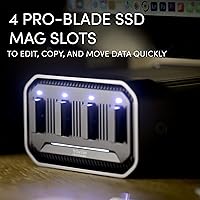
  • Drive Bays: Houses 4 PRO-Blade SSD mag slots, each independently hot-swappable without powering down the enclosure.
  • Primary Interface: Thunderbolt 3 at 40Gbps provides the main host connection for maximum throughput to compatible Mac and PC systems.
  • Secondary Interface: USB-C at 10Gbps offers a fallback connection for systems without native Thunderbolt support.
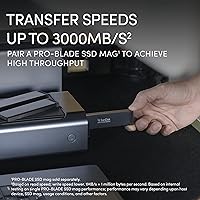
  • Max Read Speed: Capable of up to 3000MB/s read when used with a compatible PRO-Blade SSD mag over Thunderbolt 3.
  • Max Write Speed: Supports up to 2600MB/s write throughput per SSD mag under optimal Thunderbolt 3 conditions.
  • Dimensions: The enclosure measures 7.1 × 5.24 × 3.06 inches, keeping the desktop footprint compact relative to its four-bay capacity.
  • Weight: Weighs 3.08 pounds without any SSD mags installed, sitting solidly on a desk without being cumbersome to reposition.
  • Cooling System: Uses active flow-through ventilation with an internal fan to regulate SSD mag temperatures during sustained high-speed transfers.
  • Color & Finish: Finished in matte black with a mix of metal and plastic construction suited to a professional studio environment.
  • Included Items: Ships with a Thunderbolt 3 cable (USB-C compatible), a USB-C power supply and cable, and a printed quick-start guide.
  • Compatible Drives: Exclusively compatible with SanDisk Professional PRO-Blade SSD mags; standard NVMe or M.2 drives are not supported.
  • Compatible Devices: Works with desktop computers, laptops, and is designed to pair with the PRO-Blade Transport portable enclosure.
  • Storage Included: Ships with zero storage capacity — SSD mags must be purchased separately before the enclosure can store or transfer any data.
  • Manufacturer: Designed and sold under the SanDisk Professional brand, a division of Western Digital Technologies, Inc.
  • Ecosystem: Part of the broader PRO-Blade modular storage system, which includes the PRO-Blade Transport portable enclosure and PRO-Blade SSD mags.
  • Power Supply: Powered via the included USB-C power adapter; the enclosure does not draw bus power from the host Thunderbolt connection alone.
  • Availability: First listed for sale in February 2023, making it a relatively recent addition to the professional desktop storage enclosure market.
  • Market Rank: Holds a Best Sellers Rank of approximately #372 in the Enclosures category on Amazon, reflecting steady professional adoption.
  • User Rating: Carries a 4.1-out-of-5-star average based on approximately 190 verified ratings across global Amazon listings.
  • Warranty: Western Digital typically covers SanDisk Professional products with a limited 3-year warranty; buyers should confirm current terms at purchase.

Related Reviews

SanDisk Professional 2TB PRO-BLADE SSD Mag
77%
83%
Transfer Speed
91%
Build Quality
88%
Durability
58%
Value for Money
93%
Portability
More
SanDisk Professional 4TB PRO-Blade SSD Mag
85%
94%
Performance
90%
Durability
88%
Portability
92%
Transfer Speed
85%
Ease of Use
More
SanDisk Professional PRO-Blade Transport 1TB Portable SSD
80%
88%
Transfer Speed
74%
Sustained Performance
91%
Build Quality
86%
Durability & Ruggedness
79%
Modular Ecosystem
More
SanDisk Professional PRO-Blade Transport 4TB NVMe SSD
85%
92%
Performance
89%
Durability
90%
Modularity
88%
Portability
91%
Data Transfer Speed
More
SanDisk Professional PRO-G40 1TB SSD
87%
91%
Performance
93%
Build Quality/Durability
75%
Compatibility
88%
Portability/Size
95%
Water and Dust Resistance
More
SanDisk Professional PRO-G40 2TB SSD
89%
94%
Performance (Read/Write Speeds)
92%
Build Quality & Durability
88%
Portability & Size
85%
Ease of Setup & Use
90%
Connectivity & Compatibility
More
SanDisk Professional PRO-G40 4TB SSD
76%
93%
Transfer Speed (Thunderbolt 3)
89%
Build Quality & Durability
82%
Thermal Management
67%
USB-C Compatibility
61%
Value for Money
More
SanDisk Professional G-DRIVE Pro 1TB External SSD
73%
93%
Transfer Speed
88%
Build Quality
91%
Portability
89%
Mac Compatibility
41%
Windows Compatibility
More
MAIWO M.2 NVMe SSD Cloner Duplicator 4 Bay Docking Station
86%
89%
Cloning Speed
92%
Ease of Setup
87%
Build Quality
90%
Heat Dissipation
93%
Compatibility with M.2 Sizes
More
Sabrent DS-4SSD 4-Bay 2.5” SATA SSD/HDD Docking Station
88%
91%
Value for Money
96%
Ease of Setup
85%
Cooling Performance
77%
Drive Compatibility
89%
Build Quality
More

FAQ

No — and this is probably the most common point of confusion. The SanDisk Professional PRO-Blade Station 4-Bay SSD Enclosure ships with zero storage. The 0TB in the product name is literal. You will need to purchase PRO-Blade SSD mags separately before you can store or transfer anything. Make sure to budget for those drives on top of the enclosure cost.
Unfortunately, no. The PRO-Blade Station is a closed ecosystem and will only accept SanDisk Professional PRO-Blade SSD mags. There is no adapter or workaround that lets you use third-party drives. If drive flexibility matters to you, this enclosure is probably not the right fit.

It works with Windows, but the experience is less consistent than on Mac. Mac users on Thunderbolt 3 or 4 ports get instant, zero-configuration drive mounting. On Windows, compatibility depends heavily on your motherboard's Thunderbolt implementation — some chipsets work perfectly, others require manual authorization steps or produce intermittent connection drops. If you are on a PC, check that your system has a certified Thunderbolt controller before buying.

It will still work — the enclosure supports USB-C at 10Gbps as a fallback. That is a usable speed for file transfers and archiving, but it is a significant drop from the Thunderbolt 3 ceiling. If you are planning to edit high-resolution footage directly from the drive over USB-C, you will likely run into performance limitations. Thunderbolt 3 is really where this enclosure earns its place.

Yes, hot-swapping is one of the core design features. You can eject a mag from the operating system, physically pull it, and slot in a different one without shutting down or restarting — the new drive mounts automatically. This is particularly useful for editors who cycle between project-specific drives throughout the day.

It depends on your workload. Under light use with one or two drives transferring at moderate speeds, the fan noise stays fairly quiet and blends into the background. At full load with all four bays active during a sustained transfer, the fan spins up noticeably. It is not aggressively loud, but in a very quiet room you will hear it. There is no manual fan control to reduce noise during lighter tasks.

Yes, and this is actually one of the most compelling reasons to choose the PRO-Blade ecosystem. The SSD mags slot into both the portable Transport and the desktop Station identically, so you can shoot on location, come back to your desk, and move the exact same drives directly into the Station without any file copying or reformatting. It is a genuine workflow advantage for professionals who move between locations regularly.

If your MacBook has Thunderbolt 3 or Thunderbolt 4 ports — which all Apple Silicon and most recent Intel models do — the PRO-Blade Station will work without any setup. Mac users consistently report the smoothest out-of-box experience, with drives appearing on the desktop within seconds of being slotted in. MacBook Air users should note that bus-powered operation is not supported; the Station needs to be plugged into its own power supply.

Honest answer: yes, it adds up. The enclosure itself sits at a premium price point, and the PRO-Blade SSD mags are not inexpensive either. A fully loaded four-bay setup with high-capacity mags represents a significant investment. For professionals billing client work and needing reliable, fast storage daily, many find the value justifies the cost. For casual users or those on tighter budgets, there are more affordable multi-bay options that accept standard drives.

All four bays can be active at the same time. In practice, the total Thunderbolt 3 bandwidth is shared across all connected mags, so running four drives simultaneously during parallel transfers will distribute the available throughput rather than each drive hitting peak speed independently. For most editorial workflows involving one or two active drives at a time, this is a non-issue. Parallel batch transfers to all four bays at once will see per-drive speeds reduced.

Where to Buy