Overview

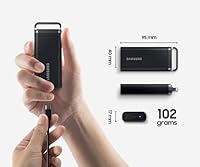
The Samsung T5 EVO 4TB Portable SSD is built for anyone who needs serious storage capacity without sacrificing portability — photographers hauling raw files between studios, gamers archiving large libraries, or remote workers keeping full backups close at hand. At just 102 grams, this Samsung portable drive slips into a jacket pocket without a second thought. It runs on USB 3.2 Gen 1, which delivers 460 MB/s read and write — respectable, but worth knowing upfront that newer Gen 2 drives at comparable prices can push significantly faster. Think of this as a capacity-first drive: it prioritizes how much you can carry over how fast you can move it.

Features & Benefits

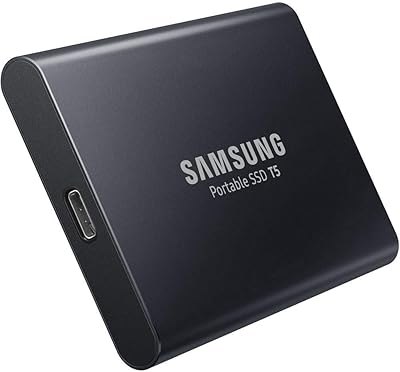
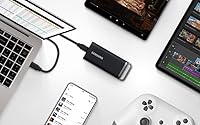
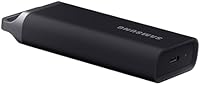
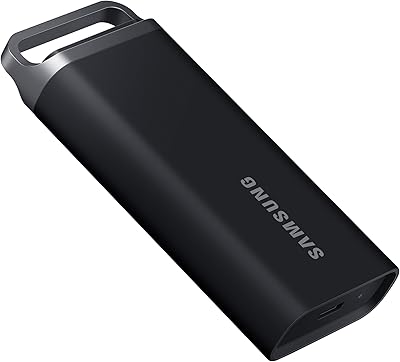
The T5 EVO 4TB packs a lot of practicality into its compact metal frame. That small loop on the body is genuinely useful — clip it to a bag strap and it stays secure through a full travel day. USB-C comes ready out of the box with a cable included, so there's no rummaging for adapters when you need to plug in fast. The free Samsung Magician software handles firmware updates, drive health monitoring, and performance tuning in one tidy place. Compatibility is impressively broad — macOS, Windows, Android, PS5, and most smart TVs all recognize this external SSD without reformatting.

Best For

This Samsung portable drive makes most sense for people who need lots of storage more than they need blazing speeds. Landscape photographers and videographers who shoot in 4K will find the transfer rates plenty fast for moving footage to and from a laptop; the bottleneck is rarely the drive itself. Console gamers looking to expand PS5 storage without investing in an internal NVMe upgrade will find it a practical, plug-and-play option. It also works well as an on-the-go backup solution for Android users. If raw throughput is your priority — say, you're editing uncompressed 6K or 8K footage — the Gen 1 speed cap will eventually show, and a faster drive would serve you better.

User Feedback

With a 4.6-star average across over a hundred ratings, the T5 EVO 4TB earns its reputation through consistent reliability rather than flashy specs. Buyers regularly mention how easy it is to set up and how well it works across different devices without any fuss. The build quality draws particular praise — it feels solid, not cheap. The most common complaint is predictable: at this price point, some buyers expected faster transfer speeds, and a handful of USB 3.2 Gen 2 alternatives do deliver noticeably quicker throughput. A small number of users have flagged mild warmth during prolonged transfers, though none have reported failure. Overall, this external SSD seems to deliver exactly what it promises — no surprises in either direction.

Pros

  • 4TB of storage in a pocket-sized enclosure is genuinely rare and practical for heavy users.
  • At just 102 grams, the T5 EVO 4TB is light enough to forget it is even in your bag.
  • Plug-and-play compatibility across macOS, Windows, Android, PS5, and smart TVs saves real time.
  • The included USB-C cable means you are ready to use it the moment it arrives — no extras needed.
  • Build quality feels solid and professional, not like a budget drive dressed up in premium packaging.
  • Samsung Magician software makes firmware updates and health monitoring straightforward, even for non-technical users.
  • The metal attachment loop is a small but genuinely thoughtful touch for travelers and commuters.
  • A 4.6-star average from real buyers reflects consistent, dependable day-to-day performance.
  • 460 MB/s read and write speeds handle 4K video playback and large file transfers without issue.

Cons

  • USB 3.2 Gen 1 speeds lag noticeably behind Gen 2 competitors available at similar price points.
  • Power users doing intensive, sustained transfers may notice the drive warming up over time.
  • No hardware encryption is advertised, which may concern buyers with sensitive data needs.
  • The price per terabyte is higher than some competing drives offering faster interfaces.
  • No water or dust resistance rating is mentioned, which matters for outdoor or rugged use cases.
  • Windows users need to reformat for some Android or TV use cases, which can catch buyers off guard.
  • The Samsung Magician software is Windows and macOS only — Android users get no drive management tools.
  • Buyers expecting NVMe-tier speeds based on the premium price tier will likely come away disappointed.

Ratings

The scores below reflect our AI-powered analysis of verified global buyer reviews for the Samsung T5 EVO 4TB Portable SSD, with spam, incentivized feedback, and bot activity actively filtered out before any scoring took place. We evaluated this external SSD across 12 categories that real buyers consistently care about — from raw transfer performance to long-term reliability — and both the strengths and the genuine frustrations are represented without sugarcoating.

Storage Capacity
94%
Four terabytes in a pocket-sized enclosure is the single biggest reason most buyers choose this drive, and the satisfaction around it is near-universal. Photographers carrying RAW libraries, gamers archiving dozens of titles, and travelers keeping full laptop backups all report that 4TB covers their needs with room to spare.
A small number of power users working with very large video or data science projects note that even 4TB fills up faster than expected over time. For those users, the 8TB variant may be the smarter long-term investment despite the higher price.
Transfer Speed
67%
33%
For everyday workloads — moving photo batches, copying game installs, backing up documents — 460 MB/s feels responsive and gets the job done without frustrating waits. Users doing standard 4K video transfers and large folder copies consistently report satisfactory real-world times.
Tech-savvy buyers who researched before purchasing frequently flag that USB 3.2 Gen 2 competitors offer roughly double the throughput at comparable price points. Those editing multi-stream 4K or working with high-bitrate RAW formats can feel the ceiling, especially during sustained back-to-back transfers.
Build Quality
89%
The rigid enclosure and matte black finish give this Samsung portable drive a reassuringly solid feel that buyers notice immediately out of the box. The metal attachment loop is a frequently praised detail — it feels integrated rather than tacked on, and holds up well after months of daily bag use.
A few users have noted that the matte surface picks up light scratches over time, particularly when stored loosely alongside keys or other objects. There is no official drop or shock resistance rating published, which leaves some buyers uncertain about its durability limits in rugged conditions.
Portability
92%
At 102 grams and smaller than most smartphones, the T5 EVO 4TB disappears into a bag or pocket without adding any meaningful weight. Remote workers and frequent travelers in particular highlight how easy it is to carry every day without planning around it.
The drive has no water or dust resistance rating, which limits confidence for buyers who work outdoors or in unpredictable environments. Without a protective pouch included in the box, it is easy to scratch or expose it to moisture unless you source your own case.
Device Compatibility
88%
Out-of-the-box compatibility across macOS, Windows, Android, PS5, and smart TVs is a genuine strength that saves users real time and frustration. Console gamers and smart TV users in particular report that the drive is recognized instantly with no setup required.
Users on older devices with only USB-A ports need a separate adapter, since only a USB-C cable is included. A small number of Android users with older or budget devices encountered OTG recognition issues, suggesting compatibility is not quite universal despite broad official support.
Ease of Setup
93%
Almost every buyer mentions that setup was immediate — plug it in, and it works. There is no software to install, no driver hunting, and no formatting prompts on the most common platforms, which makes it genuinely accessible even for less technical users.
Mac users who want to use it as a Time Machine destination do need to reformat the drive first, which is a standard macOS requirement but can still catch some buyers off guard. The process is straightforward, but it is not as frictionless as the plug-and-play experience on Windows.
Software & Firmware
74%
26%
Samsung Magician is a well-regarded utility that handles firmware updates and drive health monitoring clearly and without bloat. Users who keep it installed report peace of mind from the health diagnostics, especially when using the drive for critical backup data.
Magician is only available for Windows and macOS, leaving Android users with no management tools whatsoever. Some users also noted that Magician occasionally prompts for firmware updates at inconvenient times, and the interface, while functional, feels dated compared to newer storage management apps.
Thermal Performance
71%
29%
Under typical usage — intermittent file transfers, light backup tasks, media playback — the drive stays cool and there are no reports of performance throttling in everyday conditions. Most buyers never notice heat as an issue during normal use.
During prolonged, sustained transfers such as large overnight backups or bulk video ingestion, a noticeable warmth builds in the enclosure. A handful of users in warm climates or enclosed workspaces reported more pronounced heating, though no failures were attributed to thermal issues in the reviewed feedback.
Value for Money
72%
28%
For buyers who specifically need 4TB of portable SSD storage from a trusted brand with good software support, the price is defensible and the package feels complete. The included cable, Samsung's reliability reputation, and broad compatibility all contribute to a sense of getting something well-rounded.
The recurring criticism in buyer reviews is that faster Gen 2 alternatives exist at similar or only slightly higher price points, making the value proposition feel weaker for speed-conscious buyers. If raw throughput matters to you, the cost-to-performance ratio of this external SSD does not lead its category.
Long-Term Reliability
81%
19%
Samsung's track record in consumer storage is strong, and buyers who have owned previous T-series drives tend to express high confidence in the brand's durability over multi-year use. The solid state design with no moving parts is correctly seen as a meaningful reliability advantage over portable hard drives.
Because this drive only launched in late 2023, long-term failure rate data is still limited. A small number of early buyers have flagged concerns about sustained write endurance over years of heavy use, though these remain anecdotal at this stage rather than a documented pattern.
Cable & Accessories
76%
24%
Including a USB-C cable in the box is a practical touch that removes one immediate purchasing step, and buyers consistently appreciate not having to hunt for compatible cables on day one. The cable quality is described as adequate for daily use.
The absence of a USB-C to USB-A cable or adapter is a common complaint, particularly among buyers who still use older laptops or desktop towers with standard USB ports. No carrying pouch or protective sleeve is included, which feels like an oversight at this price tier.
Gaming Console Use
84%
PS5 owners using this Samsung portable drive for extended PS4 game storage report a smooth, reliable experience with fast loading times that comfortably beat internal HDD speeds. Smart TV users storing and playing media files also rate the experience highly.
The drive cannot run native PS5 titles, which some console buyers discovered only after purchase despite it being a Sony platform limitation rather than a flaw in the drive itself. Clearer communication of this limitation at the point of sale would prevent disappointment.

Suitable for:

The Samsung T5 EVO 4TB Portable SSD is a strong fit for anyone whose primary need is carrying a lot of data reliably without lugging around something heavy or bulky. Travel photographers and videographers who shoot high-resolution stills or 4K footage will appreciate having four terabytes at their fingertips in something that weighs barely more than a deck of cards. Console gamers — particularly PS5 owners — looking for a no-fuss way to expand their game library storage will find this external SSD works straight out of the box, no reformatting required. Remote workers and frequent flyers who rely on local backups rather than cloud storage will value the combination of capacity and the practical metal loop that lets the drive clip securely to a bag. Android users who regularly back up large photo and video archives to external storage will also find the broad device compatibility genuinely useful in day-to-day life.

Not suitable for:

The Samsung T5 EVO 4TB Portable SSD is not the right call for professionals whose workflows demand maximum transfer throughput. If you are editing uncompressed 6K or 8K video and shuttling massive files constantly, the USB 3.2 Gen 1 interface will become a real bottleneck — competing drives on Gen 2 can offer nearly double the sustained speeds at comparable price points. Buyers who are primarily after raw performance and treat capacity as secondary should look elsewhere before committing. Similarly, those who need NVMe-class speeds for intensive work — such as running large software environments or databases directly off the drive — will find this external SSD falls short of what those use cases demand. If your budget allows, the speed gap versus Gen 2 alternatives is significant enough to warrant serious consideration before purchasing.

Specifications

  • Storage Capacity: The drive offers 4TB of usable NAND flash storage, suitable for large media libraries, game archives, and full system backups.
  • Read Speed: Sequential read speeds reach up to 460 MB/s under ideal conditions using a USB 3.2 Gen 1 connection.
  • Write Speed: Sequential write speeds also reach up to 460 MB/s, matching read performance for balanced transfer workloads.
  • Interface: The drive connects via USB 3.2 Gen 1 (formerly USB 3.1 Gen 1), with a maximum theoretical bandwidth of 5 Gbps.
  • Connector Type: A USB-C port is built into the drive body; a USB-C to USB-C cable is included in the box.
  • Dimensions: The enclosure measures 95 mm x 40 mm x 17 mm, making it small enough to fit comfortably in a shirt or jacket pocket.
  • Weight: The drive weighs 102 grams (approximately 3.6 oz), which is light enough to carry daily without adding meaningful bulk to a bag.
  • Form Factor: Classified as a 2.5-inch external solid state drive with a rigid enclosure and an integrated metal loop for bag or lanyard attachment.
  • Drive Type: Uses NAND flash solid state storage — no moving parts — which improves shock resistance compared to traditional spinning hard drives.
  • Compatible Platforms: Works with macOS, Windows, Android devices, PlayStation 5, and most smart TVs that support USB storage without requiring reformatting on primary platforms.
  • Included Accessories: The retail box contains one USB-C to USB-C cable; no USB-A adapter is included in the standard package.
  • Companion Software: Samsung Magician software is available as a free download for Windows and macOS, providing firmware updates, health diagnostics, and performance monitoring.
  • Color: Available in Black; the enclosure has a matte finish with minimal branding for a professional, understated appearance.
  • Model Number: The official Samsung model number is MU-PH4T0S/EU, as listed on the product packaging and Samsung's support documentation.
  • Release Date: The T5 EVO 4TB was first made available in late December 2023, making it a relatively recent addition to Samsung's portable storage lineup.
  • Warranty: Samsung typically covers the T5 EVO series with a 3-year limited warranty, though buyers should verify coverage terms for their region at time of purchase.

Related Reviews
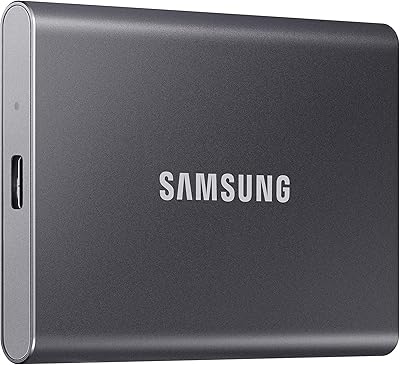
Samsung T5 EVO 2TB Portable SSD
82%
76%
Transfer Speed
83%
Build Quality
93%
Portability
91%
Compatibility
94%
Ease of Setup
More
Samsung T9 Portable SSD 4TB
87%
92%
Transfer Speed
89%
Build Quality
88%
Portability
90%
Compatibility
85%
Durability
More
Samsung T7 4TB Portable SSD
82%
91%
Transfer Speed
93%
Build Quality
94%
Portability
67%
Value for Money
63%
Thermal Management
More
SAMSUNG T5 Portable SSD 500GB
87%
94%
Performance & Speed
89%
Build Quality & Durability
92%
Portability & Size
88%
Data Security
91%
Ease of Use & Setup
More
Samsung T5 Portable SSD 1TB
87%
94%
Performance
90%
Build Quality & Durability
92%
Portability & Size
88%
Data Security (Encryption)
85%
Ease of Use
More
Samsung 870 EVO 4TB Internal SATA SSD
86%
83%
Read & Write Performance
94%
Long-Term Reliability
96%
Storage Capacity
78%
Value for Money
92%
Installation & Setup
More
Samsung 990 EVO Plus 4TB SSD
92%
98%
Sequential Read Speed
96%
Sequential Write Speed
91%
Thermal Management
94%
Reliability/Durability
89%
Compatibility with Systems
More
ORICO C5 4TB Portable SSD
82%
93%
Storage Capacity
71%
Transfer Speed
91%
Portability & Size
84%
Build Quality
96%
Ease of Setup
More
Samsung T1 Portable 500GB SSD
85%
91%
Performance
89%
Data Transfer Speed
88%
Build Quality & Durability
94%
Portability & Size
84%
Setup & Installation
More
Crucial X6 4TB Portable SSD
87%
92%
Read Speed
90%
Portability
85%
Value for Money
88%
Durability
95%
Setup/Installation
More

FAQ

It works with the PS5 straight away for storing and playing PS4 games, which is the most common use case for expanded console storage. If you want to use it for PS5 native titles, Sony requires an internal NVMe SSD slot for that — no external USB drive, including this one, can run PS5 games directly. For PS4 game storage and media files, though, you just plug it in and the console recognizes it immediately.

Yes, as long as your Android device supports USB OTG (On-The-Go), which most modern smartphones do. You will likely need a USB-C to USB-C cable — conveniently, one is included in the box. Once connected, your phone should recognize the drive and allow you to move files directly through a file manager app.

For most 4K editing workflows — H.264, H.265, and even some ProRes formats — 460 MB/s is genuinely sufficient. Where you might start to feel a squeeze is with very high-bitrate formats like uncompressed 4K RAW or multi-stream 4K timelines in DaVinci Resolve. For standard production work, the T5 EVO 4TB handles it well; for heavy-duty post-production, a USB 3.2 Gen 2 or Thunderbolt drive would serve you better.

The drive ships with a USB-C cable only, so if your laptop has standard USB-A ports, you will need a USB-C to USB-A adapter or cable, which is not included. These adapters are inexpensive and widely available. Note that when used on a USB-A 3.0 port, the drive still operates at USB 3.2 Gen 1 speeds, so you will not lose performance — the bottleneck would be the adapter quality rather than the drive itself.

Samsung has not published an official IP rating or drop-resistance specification for this drive. Because it uses solid state storage with no moving parts, it is inherently more tolerant of bumps and vibration than a traditional hard drive. That said, it is not rated for water exposure, so you should keep it in a protective case or dry bag if you are taking it into the field in wet conditions.

Some users have noted that the enclosure gets moderately warm during extended, sustained transfers — which is normal for a drive this compact at these speeds. It is not reported to throttle meaningfully under typical usage, but if you are running prolonged backups in an enclosed, warm environment, giving it some airflow would not hurt.

It is fully plug-and-play on Windows, macOS, and most Android devices — no software installation required to simply use it as a storage drive. The Samsung Magician app is optional, but worth installing if you want to monitor drive health or keep firmware current. Smart TVs and consoles also recognize it without any setup beyond plugging it in.

The T7 and T9 models use USB 3.2 Gen 2, which allows speeds up to around 1,050 MB/s and 2,000 MB/s respectively — significantly faster than this external SSD. The trade-off is that the T5 EVO comes in higher capacities (up to 8TB) at a more competitive price per terabyte. If speed matters more than capacity, the T7 or T9 are worth the extra cost; if you need lots of storage in a portable form, the T5 EVO line makes more practical sense.

Yes. The drive will need to be formatted as Mac OS Extended or APFS before Time Machine will accept it, which macOS guides you through automatically the first time you select it as a backup destination. The 4TB capacity is very well suited for Time Machine, giving you deep backup history even on a large Mac internal drive.

Like all storage devices, the formatted capacity will be slightly less than the advertised 4TB due to how manufacturers calculate gigabytes versus how operating systems report them. In practice, you can expect roughly 3.6 to 3.7 TB of usable space after formatting, which is consistent with industry norms and not specific to this drive.

Where to Buy