Overview

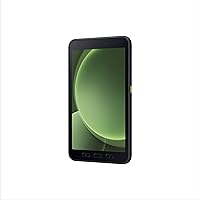
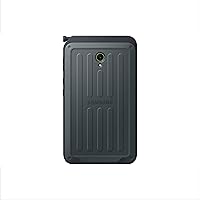
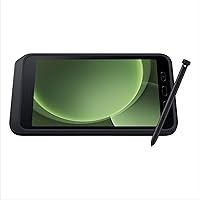
The Samsung Galaxy Tab Active5 128GB Android Tablet is Samsung's 2024 answer to a very specific question: what does a field worker actually need from a tablet? Not a media powerhouse, not a thin-and-light showpiece — a device that survives the job and still runs modern Android without compromise. The 8-inch form factor is deliberate; compact enough to fit in a work vest pocket or mount in a vehicle, yet large enough to navigate enterprise apps comfortably. Backed by IP68 and MIL-STD-810H certifications, this rugged Android tablet is built for water, dust, and drops. Just don't expect a Netflix companion.
Features & Benefits

What separates the Tab Active5 from consumer tablets isn't just the rubber bumpers — it's the thinking behind how it handles real work. The replaceable 5050mAh battery means a dead battery doesn't end a shift; swap it out and keep going, or activate No Battery Mode when plugged into a fixed power source. The glove-touch display — an 8″ WUXGA panel at 120Hz and 600 nits — stays readable outdoors and responds even with thick work gloves on. The Exynos 1380 chip and 6GB of RAM handle multi-app enterprise workflows without hesitation. The included S Pen and Wireless DeX support let teams annotate documents or extend to a monitor without hauling a laptop.

Best For

Samsung's field-ready tablet makes the most sense for enterprise and industrial buyers — not consumers browsing for a weekend device. If your team works in warehouses, on construction sites, or in healthcare settings where tablets get dropped, sprayed, or wiped down with disinfectant daily, the Tab Active5 fits naturally. Organizations running Samsung Knox for device management will find it slots right into existing infrastructure. The guaranteed Android 14 support with four OS updates also matters for IT teams planning a multi-year deployment. One thing to flag upfront: this SKU is Wi-Fi only, so factor that in if your workers operate in areas without reliable wireless coverage.

User Feedback

Buyers who put this rugged Android tablet through real field conditions tend to report one consistent thing: it holds up. Drop stories are common, and most users seem genuinely surprised the device keeps functioning. The replaceable battery draws consistent praise — reviewers say it's a feature they didn't realize they'd miss until they actually had it. On the flip side, the display gets mixed remarks; functional and readable outdoors, but nobody is raving about color reproduction. Worth noting: the spec listing on some retail pages shows conflicting resolution figures, causing brief confusion — Samsung's official spec sheet is the cleaner reference. The S Pen sees moderate field use, mostly for signatures and quick annotations.

Pros

  • Replaceable battery lets field teams swap power mid-shift without hunting for a charging station.
  • IP68 and MIL-STD-810H certification holds up in real-world drops, rain, and dust exposure.
  • Glove-touch mode works reliably with standard nitrile and latex work gloves in practice.
  • Samsung Knox integration simplifies enterprise MDM enrollment and remote device management.
  • Android 14 with four guaranteed OS updates gives IT teams a credible multi-year deployment window.
  • The 8-inch form factor fits vest pockets and vehicle mounts without requiring dedicated carrying equipment.
  • S Pen is included in the box — no extra purchase needed for field signing and annotation tasks.
  • No Battery Mode allows continuous operation when the tablet is connected to a fixed power source.
  • Wireless DeX support enables desktop-style workflows when connected to a monitor, reducing laptop dependency.
  • Backward compatibility with existing Galaxy Tab Active accessories helps enterprises avoid costly accessory replacement.

Cons

  • This SKU has no LTE — a significant gap for field workers in areas with inconsistent Wi-Fi coverage.
  • Display brightness can struggle in direct sunlight, limiting outdoor readability in harsh conditions.
  • At 1.83 lbs with its chassis, extended one-handed use causes hand fatigue during long inspection walkthroughs.
  • Knox Suite is not included with purchase, catching enterprise buyers off guard during deployment planning.
  • The spec listing on some retail pages shows conflicting resolution figures, creating pre-purchase confusion.
  • Replacement batteries are not widely available through local retail channels, complicating procurement for field teams.
  • The S Pen lacks precision for detailed annotation work beyond basic signatures and quick field notes.
  • Low-light camera performance is weak, making it unreliable for documentation in poorly lit warehouse environments.
  • Consumer buyers comparing specs to similarly priced tablets will find the value proposition difficult to justify.
  • Heavy or loose-fitting gloves reduce touchscreen reliability, limiting glove-mode utility for certain PPE configurations.

Ratings

The Samsung Galaxy Tab Active5 128GB Android Tablet earns its ratings from our AI-driven analysis of verified global user reviews, with spam, bot activity, and incentivized feedback actively filtered out before scoring. What you see below reflects how real field workers, IT administrators, and enterprise buyers actually experienced this rugged Android tablet — strengths and frustrations alike, with nothing glossed over.
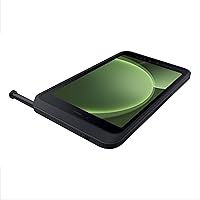
Build Quality & Durability
93%
Field users consistently report that the Tab Active5 takes punishment that would sideline a consumer tablet without complaint. Drops onto concrete floors, exposure to rain, and dusty warehouse environments come up repeatedly in reviews — and the device keeps working. The IP68 and MIL-STD-810H credentials appear to hold up in actual deployment, not just in lab conditions.
A handful of users noted that the protective bumper around the chassis, while effective, adds noticeable bulk and makes one-handed use uncomfortable over extended periods. A small number of reviews mentioned minor scuffing on the corners after sustained rough handling, though functional damage was rarely reported.
Battery Life & Replaceability
91%
The replaceable battery is consistently called out as the single feature that justifies choosing this tablet over consumer alternatives for shift work. Logistics teams especially appreciate being able to swap batteries between shifts rather than hunting for a charging station mid-day. No Battery Mode, while niche, gets genuine praise from users with fixed installation setups.
The 5050mAh capacity, while adequate for a typical shift, can fall short during intensive days involving constant scanning, GPS, or video-calling. Replacement batteries are not always easy to source locally, and a few buyers noted that third-party battery options are limited compared to more mainstream tablet models.
Display Visibility
74%
26%
At 600 nits with a 120Hz refresh rate, the screen performs reasonably well outdoors in partly shaded environments. Warehouse workers and technicians working under overhead lighting generally find it readable without having to cup the screen. The 8-inch size hits a practical sweet spot for most field applications and form-filling tasks.
Direct sunlight remains a struggle at maximum brightness, and several outdoor users wish the nits were higher. The spec listing inconsistency — some retail pages show 800x400 while Samsung's own documentation points to WUXGA resolution — created pre-purchase confusion for buyers doing due diligence, even if the actual panel performs better than the lower figure implies.
Glove-Touch Performance
88%
This is one of the more genuinely useful features for buyers in healthcare, construction, and cold-storage environments. Users wearing standard nitrile or latex gloves report reliable touch response without needing to remove them, which adds up to real time savings over a full shift. Thick winter gloves present more of a challenge, but standard work gloves perform well.
Glove touch sensitivity is not infinitely adjustable, and a few users working with thicker PPE gloves noted occasional missed taps or accidental inputs. The feature works best with snug-fitting gloves; loose or heavily textured gloves reduce reliability somewhat.
Processing Performance
81%
19%
The Exynos 1380 paired with 6GB of RAM handles typical enterprise workloads — inventory apps, document management, video calls, barcode scanning — without visible lag. IT administrators managing app deployments report smooth multitasking even with several enterprise applications running simultaneously. Android 14 runs cleanly on this hardware.
The Tab Active5 is not designed for graphically intensive tasks, and it shows if you push it in that direction. A small number of users running particularly heavy custom enterprise software noted occasional slowdowns, and the chip is not a standout performer compared to flagship consumer tablets at comparable price points.
S Pen Usability
69%
31%
Having an S Pen included without an upcharge is appreciated, and field users working in delivery, healthcare, or inspection roles find it genuinely useful for quick signatures and form annotations. The pen fits securely in its silo and does not feel like an afterthought the way stylus accessories often do on other rugged devices.
The S Pen sees light use compared to how prominently it is marketed. Most field workers do not use it regularly beyond basic signing tasks, and a few reviewers noted the tip lacks the precision they expected for detailed annotation work. It is a useful bonus, but probably not a primary purchase driver for most buyers.
Wi-Fi Connectivity
62%
38%
In fixed environments — warehouses, clinics, distribution centers — the Wi-Fi performance is described as reliable and consistent. Buyers using the Tab Active5 within a well-covered enterprise network rarely raise connectivity as a concern, and the 802.11 implementation appears stable under normal enterprise conditions.
The absence of LTE on this SKU is a recurring sore point, particularly for buyers who assumed a rugged tablet in this price range would include cellular connectivity as standard. Field technicians working in areas with patchy Wi-Fi coverage feel the limitation acutely, and several reviewers explicitly recommend confirming network availability before deploying this model in outdoor settings.
Samsung Knox Security
89%
Enterprise IT teams deploying the Tab Active5 at scale consistently praise the Knox integration as one of the strongest reasons to choose this over competing rugged tablets. Device enrollment, policy enforcement, and remote wipe work as expected, and Knox compatibility with major MDM platforms reduces integration headaches considerably.
Knox is largely invisible to end users who are not in enterprise IT roles, and for smaller businesses or individuals, the security layer adds complexity without obvious day-to-day benefit. A few reviewers also noted that the Knox Suite is not included with the standard purchase, which surprised buyers who expected it bundled.
Software & OS Longevity
86%
Android 14 out of the box with a confirmed four-OS-update commitment is a meaningful selling point for organizations planning multi-year deployments. IT departments appreciate knowing the device will receive security patches and major Android versions without an early refresh cycle. This kind of update clarity is not common across the rugged tablet market.
Some users noted that Samsung's pre-installed app layer adds bloat that can be annoying to manage, especially in consumer or small-business contexts. The update schedule, while generous, still means the device will eventually age out of support, which matters for the longest-horizon enterprise buyers.
Portability & Form Factor
83%
The 8-inch size draws consistent praise from users who need a device that can be carried on a person rather than carted around. Vehicle mounting, vest pockets, and tool belt clips are all mentioned as practical carrying methods. Workers transitioning from larger rugged tablets frequently mention the size reduction as a quality-of-life improvement.
At 1.83 lbs with the standard case, the Tab Active5 is not light for its screen size, and extended one-handed use — common during inspection walkthroughs — causes hand fatigue for some users. Those expecting a thin-and-light feel will be caught off guard by how substantial the device is in hand.
Value for Money
72%
28%
Buyers who deploy this tablet in the environment it was designed for generally conclude the price is justified, particularly given the battery replaceability, Knox security, and durability certifications. For enterprise procurement teams comparing total cost of ownership against cheaper tablets that fail in the field, the math often works out in the Tab Active5s favor.
Individual buyers and small businesses tend to balk at the price when comparing raw specs to consumer tablets available at a fraction of the cost. The Wi-Fi-only limitation stings more at this price point, and some reviewers felt the display quality did not match their expectations for what they paid.
Wireless DeX Support
77%
23%
Wireless DeX appeals to a subset of power users who want to connect the tablet to a monitor and work in a desktop-like layout without carrying a laptop. Reviewers who use it regularly — primarily in hybrid office-field roles — find it genuinely capable for document editing and data entry tasks.
Most field workers never use Wireless DeX at all, which means it is a feature that adds to the marketing story but delivers limited real-world value for the core buyer. Setup requires compatible displays and a stable Wi-Fi connection, adding friction that casual users find discouraging.
Backward Compatibility with Accessories
79%
21%
Organizations already invested in the Galaxy Tab Active ecosystem appreciate that existing accessories — cases, vehicle mounts, docking stations — carry over to the Active5. This reduces the cost of refreshing a fleet and simplifies logistics for procurement teams standardizing on a single form factor across multiple tablet generations.
The compatibility story is not perfectly seamless; some older accessories require adapters or have minor fit issues with the Active5s updated chassis dimensions. Buyers assuming full plug-and-play compatibility with every prior-generation accessory may need to verify compatibility on a case-by-case basis.
Camera Practicality
71%
29%
The 13MP rear camera is more than adequate for its intended field use cases — capturing defects, scanning documents, photographing site conditions, or logging visual records. Reviewers using it for inspection documentation generally find the output clear and usable without any special setup or adjustments.
Photo quality is workmanlike rather than impressive, and low-light performance draws occasional criticism from users capturing images in poorly lit warehouses or storage areas. No one should buy this tablet for photography, and buyers expecting consumer-grade camera performance will be disappointed.

Suitable for:

The Samsung Galaxy Tab Active5 128GB Android Tablet was built for people whose workplace would destroy a regular tablet within a month — and it shows in every design decision. Field technicians, warehouse supervisors, logistics coordinators, and construction site managers will find a device that genuinely keeps pace with shift demands without needing to be babied. Healthcare workers operating in environments where tablets are regularly disinfected with harsh cleaning agents can do so without worry, thanks to the sanitization-safe housing. Enterprises already running Samsung Knox for device management will find the Tab Active5 slots into existing infrastructure with minimal friction, and IT teams will appreciate the confirmed Android 14 support with four OS updates for long-horizon fleet planning. Organizations replacing aging rugged hardware — particularly older Zebra or Panasonic units — will find the Active5 brings a meaningful jump in modern Android capability without sacrificing the durability they depend on. Workers who cannot or should not remove gloves mid-task will also find this one of the few tablets that actually delivers on glove-touch responsiveness in practice.
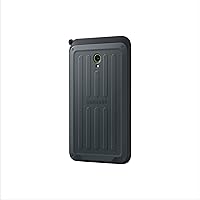
Not suitable for:

The Samsung Galaxy Tab Active5 128GB Android Tablet is genuinely the wrong tool for buyers outside of professional or enterprise contexts, and purchasing it for personal or general use is likely to leave you underwhelmed relative to what you spent. Consumers looking for a media tablet for streaming, gaming, or casual browsing will find the display competent but unremarkable, and the bulk and weight make it uncomfortable for extended leisure use on a couch or in bed. The Wi-Fi-only configuration on this SKU is a real limitation for anyone expecting cellular connectivity in the field — if your team works in areas without reliable wireless coverage, this device will frustrate rather than enable. Small businesses or individual buyers comparing raw hardware specs to consumer tablets will likely feel the price is hard to justify, since the premium is tied almost entirely to durability engineering and enterprise software integration rather than display quality or multimedia performance. Anyone expecting the S Pen to function as a precision creative tool will be disappointed — it serves signing and annotation duties adequately, but nothing beyond that. If Knox Suite integration, MIL-STD certification, or industrial deployment are not part of your buying criteria, there are better-value options at this price point.
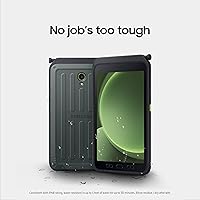
Specifications

  • Display: The tablet features an 8″ WUXGA TFT panel running at 120Hz with a peak brightness of 600 nits, designed for readability across varied lighting conditions.
  • Processor: Powered by the Samsung Exynos 1380 chipset, which handles multi-app enterprise workloads without the thermal or performance compromises common in lower-tier rugged hardware.
  • RAM: 6GB of RAM is included, providing enough headroom for simultaneous enterprise applications, MDM agents, and background processes without noticeable slowdown.
  • Storage: 128GB of onboard storage is available for apps, documents, and field data, with the option to expand via microSD depending on deployment configuration.
  • Battery: A user-replaceable 5050mAh battery powers the device, with Fast Charging support and a No Battery Mode for continuous operation when connected to a fixed power source.
  • Operating System: Ships with Android 14 and carries a confirmed commitment to four major OS updates, extending the viable deployment life for enterprise fleet planning.
  • Durability Rating: Certified to IP68 for water and dust resistance and MIL-STD-810H for shock absorption, covering drops, temperature variation, humidity, and vibration scenarios.
  • Connectivity: This Wi-Fi SKU supports 802.11 wireless networking only; there is no integrated LTE or 5G cellular modem on this specific model.
  • Rear Camera: A 13MP rear-facing camera handles document capture, site photography, and visual field logging with adequate detail for most industrial documentation tasks.
  • Front Camera: A 5MP front-facing camera supports video conferencing and remote assistance workflows commonly used in field service and healthcare environments.
  • S Pen: An S Pen stylus is included in the box at no additional cost, supporting field signatures, form annotation, and basic note-taking directly on the display.
  • Wireless DeX: Wireless DeX is supported, allowing the tablet to project a desktop-like interface onto a compatible external display without requiring a physical docking cable.
  • Security: Samsung Knox is integrated at the hardware and software level, enabling enterprise-grade encryption, secure boot, and compatibility with major MDM platforms.
  • Glove-Touch Mode: The touchscreen is configured to respond to input from standard work gloves, including nitrile and latex, without requiring screen unlock or settings changes.
  • Programmable Key: A dedicated programmable hardware key on the chassis can be assigned to custom functions or shortcuts, useful for frequently repeated field actions.
  • Weight: The device weighs 1.83 lbs with its integrated protective chassis, which is heavier than consumer tablets of comparable screen size.
  • Sanitization: The exterior materials and sealed design are rated safe for cleaning with standard hospital-grade disinfectants, making it suitable for healthcare and food-handling environments.
  • Warranty: A one-year Samsung Manufacturer's warranty is included with purchase; Knox Suite subscription and voice call capability are not included with this model.

Related Reviews
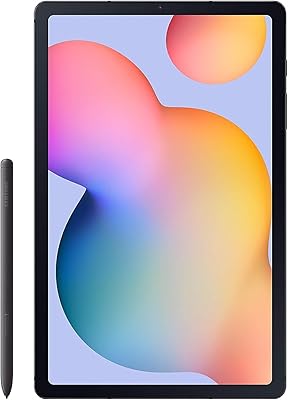
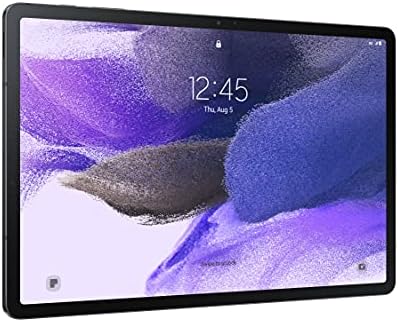
Samsung Galaxy Tab S7 FE 64GB Tablet
76%
84%
Display Quality
88%
S Pen Experience
91%
Battery Life
71%
Performance
58%
Storage Value
More
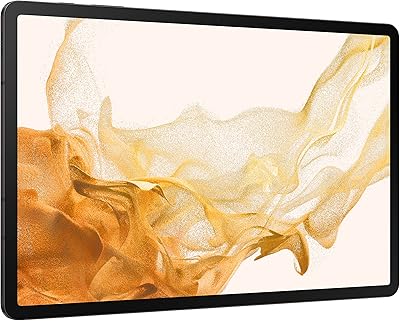
Samsung Galaxy Tab S6 Lite (2024) Tablet
73%
83%
Value for Money
81%
Display Quality
79%
S Pen Experience
63%
Performance & Speed
88%
Battery Life
More
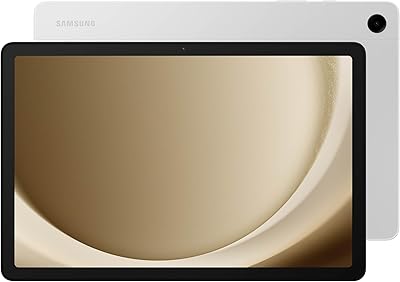
Samsung Galaxy Tab S8 Ultra 14.6″ Tablet
78%
96%
Display Quality
89%
Performance & Speed
67%
Battery Life
51%
Portability & Weight
73%
Value for Money
More
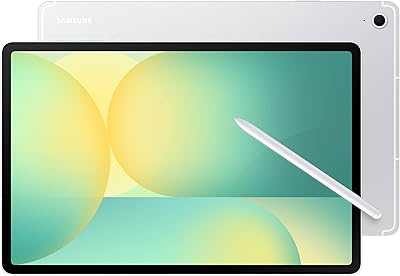
Samsung Galaxy Tab S8+ 5G 128GB Tablet
77%
93%
Display Quality
89%
S Pen Experience
86%
Performance & Speed
72%
Samsung DeX Usability
68%
Battery Life
More
Samsung Galaxy Tab A9+ 11″ 128GB Tablet
76%
76%
Display Quality
88%
Audio Performance
71%
Performance & Speed
67%
Battery Life
63%
Build & Design
More
Samsung Galaxy Tab S6 128GB 10.5″ Tablet
81%
93%
Display Quality
89%
S Pen Performance
86%
Performance & Speed
84%
Battery Life
91%
Build Quality
More
ApoloSign EP1095T 11-inch Android Tablet
73%
84%
Value for Money
78%
Display Quality
61%
Performance
57%
RAM & Multitasking
81%
Battery Life
More
Samsung Galaxy Tab S9 11” 128GB WiFi
87%
94%
Performance
91%
Display Quality
89%
Battery Life
87%
Build Quality
92%
S Pen Functionality
More
Samsung Galaxy Tab A8 128GB 10.5-inch Tablet
75%
76%
Display Quality
63%
Performance
83%
Battery Life
88%
Storage Value
67%
Build Quality
More
Samsung Galaxy Tab S8 11-inch 128GB Tablet
78%
88%
Display Quality
91%
S Pen Experience
86%
Performance & Speed
74%
Battery Life
89%
Build Quality
More

FAQ

No, this specific Wi-Fi SKU does not include a cellular modem, so it cannot accept a SIM card or connect to LTE or 5G networks. It relies entirely on Wi-Fi for internet connectivity. If you need cellular capability, Samsung does offer LTE variants of the Active5, but you would need to purchase that model separately.

You can replace it yourself — that is the point. The back panel is designed to be removed without special tools, and a fresh battery can be swapped in within minutes. For enterprise deployments, this means a dead battery stops a shift for about two minutes rather than half a day.

For standard nitrile, latex, or thin cotton work gloves, it works reliably in real conditions. Thicker or loose-fitting gloves introduce more missed taps, so fit matters. The feature is enabled by default and does not require any special setup, which field teams appreciate.

There has been some confusion because certain retail listings show 800x400, which appears to be a data entry error. Samsung's official specification sheet lists the display as WUXGA resolution on an 8″ TFT panel running at 120Hz. Trust the official Samsung product page over third-party listings for this one.

Knox Suite is not included with the standard purchase — the tablet ships with Knox hardware security integrated, but the full Knox Suite enterprise management subscription requires a separate license. If your organization is planning an MDM deployment, factor that cost into your budget before ordering.

The MIL-STD-810H certification covers a range of temperature conditions, including cold environments, so it holds up better than consumer tablets in cold-chain logistics settings. That said, extreme sustained cold can affect battery performance, so battery life may be shorter in freezer environments than under normal conditions.

Not quite at that level. The S Pen included with the Tab Active5 is solid for signing documents and quick annotations, but it lacks the pressure sensitivity and precision you get from the S Pen on Samsung's consumer or professional tablet lines. For field work it is more than adequate; for creative or detailed technical drawing, it falls short.

The Tab Active5 is rated safe for cleaning with commonly used hospital-grade disinfectants, including alcohol-based wipes. Samsung specifically designed the chassis seals and materials to withstand regular sanitation cycles, which is why it is a popular choice in healthcare and food-handling settings.

Many will, yes — Samsung designed the Active5 with backward compatibility in mind, maintaining a consistent form factor with previous Active series tablets. That said, some accessories may have minor fit differences due to small chassis updates, so it is worth confirming compatibility for critical accessories like vehicle mounts or docking stations before a full fleet rollout.

Yes, and that is largely who it is designed for. The Exynos 1380 with 6GB of RAM handles most enterprise application stacks without trouble, and Android 14 with Knox makes it straightforward to enroll in MDM systems and push custom app configurations. Organizations with bespoke warehouse management, inspection, or logistics apps generally find the Tab Active5 a capable host platform.

Where to Buy