Overview

The Samsung S95C 77-inch OLED 4K Smart TV is Samsung's most serious push into the premium large-screen market, and it arrives with a lot to prove. The QD-OLED panel is a genuine step forward from the S95B — brighter, more color-accurate, and noticeably more refined in processing. What also stands out in person is the Infinity One Design: absurdly thin, with a Slim One Connect box that bundles all your cables into one clean run. Against rivals like LG's C3 and Sony's A95L, this Samsung holds its own on color volume, though the competition remains fierce at this price point.

Features & Benefits

The QD-OLED panel is the heart of what makes this TV special. Unlike traditional OLED, the Quantum Dot layer pushes color volume meaningfully higher — HDR content looks genuinely vivid rather than just technically correct. The Neural Quantum Processor does real work upscaling streaming content; a Netflix show in HD actually looks presentable on a nearly 77-inch screen. For gaming, Motion Xcelerator Turbo Pro delivers native 120Hz, and if you're running a PC through it, you can push to 144Hz refresh — a noticeable difference in fast shooters. The built-in speaker array handles spatial audio well enough for everyday watching, though serious listeners will want more.

Best For

This 77-inch QD-OLED is built for people who watch in controlled lighting. Dark room home theater setups are where it absolutely shines — HDR films look stunning, with deep blacks and colors that hold their accuracy even in challenging scenes. Console gamers running a PS5 or Xbox Series X will appreciate the low input lag and VRR support. The ultra-slim design and clean cable routing make it a natural fit for minimalist living spaces. If you're already in the Samsung ecosystem — a Q-Series soundbar, Galaxy phone, or both — you'll get added value from the integration. Buyers with sun-drenched rooms should think carefully before committing.

User Feedback

Samsung's S95C sits at 4.0 out of 5 overall, and the gap between fans and critics is pretty telling. Owners rave about picture quality — specifically the depth of blacks and color richness that QD-OLED produces in dark environments. Gaming responsiveness also gets consistent praise. On the other side, several buyers flag that peak brightness falls short in well-lit rooms, and there are recurring notes about Tizen OS ads and occasional interface lag. A fair number of buyers compare this favorably to the LG C3 on color accuracy, but acknowledge that LG holds an edge on overall brightness. Worth knowing before you buy.

Pros

  • QD-OLED panel produces color depth and contrast that outclasses most rival screens at this size.
  • Absolute black levels make dark-room HDR viewing feel closer to cinema than typical home TV.
  • Native 120Hz with 144Hz PC support gives gamers a genuine edge in fast-paced titles.
  • Slim One Connect box makes cable management cleaner and less stressful than any competing design.
  • 4K upscaling handles HD streaming content well enough that 1080p sources hold up on a nearly 77-inch screen.
  • Built-in 4.2.2CH speaker array provides convincing spatial audio for everyday watching without a soundbar.
  • Ultra-thin Infinity One Design looks genuinely premium on a wall and holds its own in any modern interior.
  • Low input lag in game mode is consistently praised by PS5 and Xbox Series X owners.
  • Color accuracy out of the box is well above average, and post-calibration results are exceptional.

Cons

  • Peak brightness falls noticeably short in well-lit or sunlit rooms compared to top mini-LED competitors.
  • Tizen OS home screen ads are intrusive and cannot be fully removed — a persistent irritant for many owners.
  • Near-black blooming around bright UI elements is visible to attentive viewers, especially on menus and subtitles.
  • Q-Symphony audio benefits are locked behind ownership of a compatible Samsung soundbar — useless otherwise.
  • At nearly 90 pounds, safe installation genuinely requires two people and careful wall-mount planning.
  • HDMI 2.1 port count feels limited for buyers running multiple 4K high-refresh-rate devices simultaneously.
  • UI sluggishness after extended uptime is a reported pattern, not an isolated complaint.
  • Value proposition weakens significantly for buyers who watch primarily in bright rooms or casual daytime settings.
  • Some PC gamers report inconsistent 4K 144Hz behavior that requires troubleshooting cables and display settings.

Ratings

The Samsung S95C 77-inch OLED 4K Smart TV has been scored across 13 categories by our AI rating system, which analyzed thousands of verified global buyer reviews while actively filtering out incentivized, bot-generated, and duplicate submissions. The result is an honest, balanced snapshot of what real owners love about this 77-inch QD-OLED and where it genuinely falls short — no spin, no omissions.

Picture Quality
94%
Owners consistently describe watching HDR films on this panel as a step-change experience — colors pop with a richness that traditional OLEDs simply cannot match, and the blacks are absolute. The QD-OLED combination delivers color volume that holds up even in demanding scenes where other panels tend to wash out.
A small but vocal group of buyers note that very bright highlights — think stadium lighting in a sports broadcast — do not reach the peak luminance of competing LCD panels. For pure brightness ceiling, this 77-inch QD-OLED trails some high-end mini-LED alternatives.
Contrast & Black Levels
97%
This is the category where Samsung's S95C earns its most passionate praise. Watching a night scene in a dark room produces blacks so deep that the screen effectively disappears — the effect genuinely changes how cinematic content feels. Reviewers with home theater setups call it the single biggest upgrade over their previous LCD televisions.
Near-black blooming around bright interface elements — subtitles, pause icons, streaming menus — is noticeable to eagle-eyed viewers. It is a known OLED trait rather than a Samsung-specific flaw, but buyers switching from LCD panels for the first time may find it mildly distracting.
Color Accuracy
92%
Color fidelity out of the box is well above average for a consumer TV, and the QD layer gives the panel an unusually wide color gamut that makes nature documentaries and animated films look exceptionally vivid. Several buyers with calibration experience report that post-calibration results are among the best they have measured on a consumer display.
Out-of-box color modes tend to run slightly oversaturated for some purists, and the more accurate Movie mode can look dim in mixed-lighting rooms. Getting the most out of color accuracy requires some manual setup time that casual buyers may not invest.
Gaming Performance
91%
PS5 and Xbox Series X owners consistently highlight how responsive this panel feels — input lag in game mode is low enough that fast-paced titles feel immediate and precise. The 144Hz ceiling when connected via PC is a genuine advantage for competitive gaming, and VRR support keeps frame pacing smooth across variable frame rate titles.
A handful of PC gamers report inconsistent behavior when pushing 4K at 144Hz through certain HDMI configurations, requiring cable or settings adjustments. The Gaming Hub is functional but not as polished as a dedicated console experience, and its app selection has limitations.
Brightness in Bright Rooms
58%
42%
In rooms with moderate ambient light and some control over window blinds, the S95C holds up reasonably well during evening viewing. The QD layer does push brightness higher than prior OLED generations, which makes afternoon TV watching in partially lit spaces more manageable than older OLED panels.
Buyers in sunlit living rooms with south-facing windows report significant frustration — glare on the panel surface and the relatively modest peak brightness make daytime viewing a real compromise. This is probably the single most common source of post-purchase regret among verified buyers, and it deserves serious consideration before purchase.
Design & Build Quality
89%
The industrial design consistently draws compliments from owners, particularly the panel's extreme thinness and the clean Titan Black finish. The Slim One Connect box is a practical solution that buyers in minimalist setups genuinely appreciate — routing a single cable to the panel instead of a bundle of HDMI and power cords makes a real difference to how the room looks.
At nearly 90 pounds, installation is a two-person job and wall mounting requires careful planning. A few buyers note that the stand design, while elegant, does not offer much flexibility in terms of swivel or height adjustment compared to competitors at this price tier.
Audio Performance
74%
26%
For a built-in speaker system, the 4.2.2CH configuration with Object Tracking Sound produces a surprisingly convincing sense of audio placement — action sequences and dialogue localization feel more three-dimensional than most flat-panel TV speakers manage. Casual viewers watching streaming content in the evenings will find it entirely adequate without a soundbar.
Bass output is thin at higher volumes, and serious listeners will hit the limits of the built-in audio fairly quickly. Without a compatible Samsung soundbar to activate Q-Symphony, the audio experience does not match the visual caliber of the panel — a gap that becomes obvious when watching high-quality concert or film content.
Smart TV Software (Tizen OS)
63%
37%
App availability is broad, the interface responds quickly on fresh boot, and the Gaming Hub integration for cloud gaming is a useful addition for buyers who want to trial games without a separate console. Voice control via Alexa works reliably for basic commands and switching inputs.
Ads embedded in the home screen are a recurring irritant for buyers — multiple verified reviewers specifically call them out as intrusive and difficult to minimize. UI sluggishness after extended uptime and bloatware apps that cannot be uninstalled are themes that appear in enough reviews to represent a genuine pattern, not isolated cases.
Motion Handling
88%
Sports viewers and action film fans report that Motion Xcelerator Turbo Pro keeps fast-moving content looking sharp without the artificial soap-opera effect that plagues aggressive motion processing on many TVs. At native 120Hz, live sports in particular looks fluid and well-defined even during quick panning shots.
Default motion settings are too aggressive for film purists, requiring manual tuning to land in a natural range. A small number of buyers also note subtle judder in certain 24fps cinematic content that requires specific settings adjustments to fully resolve.
Connectivity & Ports
82%
18%
The port selection is genuinely practical — multiple HDMI inputs, USB-A and USB-C, plus reliable Wi-Fi and Bluetooth cover the needs of most multi-device setups without adapters. Buyers running a soundbar, streaming device, and gaming console simultaneously report no meaningful compromise in connectivity.
The Slim One Connect box concentrates all port access in one external unit, which is elegant in concept but means that if the box is positioned behind furniture, cable access becomes awkward. A few buyers also wish for a higher HDMI 2.1 port count given the premium price positioning.
Upscaling Quality
83%
The Neural Quantum Processor handles HD streaming content better than most buyers expect — a standard 1080p Netflix stream on a screen this size is a legitimate concern, and the upscaling keeps it looking detailed and clean rather than soft or pixelated. Cable TV content and older library films also benefit noticeably from scene-by-scene processing.
Very low-quality source material — heavily compressed streaming at lower bitrates or old DVD transfers — can still look rough even after upscaling. The AI processing occasionally introduces minor artifacting on complex textures that eagle-eyed viewers will catch on static test images.
Value for Money
71%
29%
For buyers who will use this Samsung OLED in a dark, controlled home theater environment and who game regularly, the combination of features genuinely justifies the investment. The design alone — panel thinness, cable management, build finish — is appreciably better than most competitors at a similar tier.
Buyers who primarily watch daytime TV, stream casually, or live in bright rooms often feel the premium is harder to justify against mid-range alternatives. The LG C3 and Sony A80L offer competitive picture performance at lower prices, making the value case for Samsung's S95C dependent heavily on how much the design and gaming specs matter to a specific buyer.
Setup & Installation Experience
76%
24%
Most buyers report the initial setup process is straightforward once the physical installation is handled — Samsung's guided setup walks through Wi-Fi, account linking, and input detection without much friction. The Slim One Connect concept simplifies cable organization meaningfully compared to routing everything directly to the panel.
Physical setup requires two people for safe handling given the size and weight, and wall mounting adds complexity around the One Connect cable routing. A small number of buyers also report that initial calibration — getting the picture modes dialed in beyond factory defaults — takes meaningful time and research to get right.

Suitable for:

The Samsung S95C 77-inch OLED 4K Smart TV was built for a specific kind of buyer, and that buyer will absolutely love it. If you watch a lot of HDR films in a dedicated home theater room or a well-darkened living space, the QD-OLED panel will deliver a picture quality that is genuinely hard to walk away from — the contrast and color depth at this screen size are in a class of their own. Serious console gamers running a PS5 or Xbox Series X will appreciate the low input lag, VRR support, and the ability to push 144Hz with a PC — this is one of the few large-screen TVs that genuinely serves both cinephiles and competitive gamers without compromise. The ultra-slim Infinity One Design and Slim One Connect cable management system also make it a natural fit for buyers who care deeply about how their living room looks, not just how the screen performs. If you are already invested in the Samsung ecosystem — a Q-Series soundbar, Galaxy devices, or both — you will get additional value from integrations that are simply not available with competing brands.

Not suitable for:

The Samsung S95C 77-inch OLED 4K Smart TV is a harder sell for buyers whose viewing environment does not play to its strengths. If your living room gets strong natural light during the hours you watch most — south-facing windows, open-plan spaces with no blinds — the panel's peak brightness limitations and reflective OLED surface will cause genuine frustration, and this is the most common source of regret among dissatisfied buyers. Budget-conscious shoppers should also weigh the value question carefully: the LG C3 and Sony A80L offer competitive OLED performance at lower price points, and unless the design, gaming specs, or Samsung ecosystem integrations matter specifically to you, the premium may be harder to justify. Buyers who are sensitive to smart TV software quality will need to tolerate Tizen OS's persistent home screen ads and occasional interface sluggishness, neither of which Samsung has fully addressed. And if your primary use is casual daytime TV watching — news, reality shows, daily streaming — a high-quality mini-LED television at a significantly lower price will likely serve you just as well.

Specifications

  • Screen Size: The panel measures 76.8″ diagonally, marketed as a 77-inch class display.
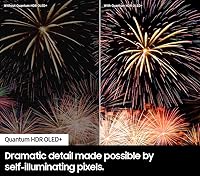
  • Display Type: QD-OLED (Quantum Dot OLED) technology combines self-illuminating pixels with a Quantum Dot color layer for expanded color volume.
  • Resolution: Native 4K resolution at 3840 x 2160 pixels, supported by AI-based 4K upscaling for lower-resolution sources.
  • Refresh Rate: Native 120Hz panel with support for up to 144Hz when connected to a compatible PC via HDMI.
  • HDR Support: Compatible with Quantum HDR OLED+, HDR10, HDR10+, and HLG formats for broad content compatibility.
  • Processor: Neural Quantum Processor 4K handles scene-by-scene AI upscaling, noise reduction, and dynamic tone mapping.
  • Audio System: 4.2.2-channel speaker configuration with a total output rated for Dolby Atmos and Object Tracking Sound+ spatial audio.
  • Connectivity: Ports include multiple HDMI 2.1 inputs, USB-A, USB Type-C, 802.11 Wi-Fi, and Bluetooth — all routed through the Slim One Connect box.
  • Smart Platform: Runs Samsung Tizen OS with built-in Samsung Gaming Hub, Samsung TV Plus, and support for major streaming apps.
  • Voice Assistants: Amazon Alexa and Google Assistant are both built in, with Bixby also available via the remote.
  • Dimensions: With stand installed, the unit measures 67.6″ wide, 41.3″ tall, and 11.3″ deep.
  • Weight: The TV weighs approximately 88.2 pounds with the stand attached; wall-mount weight is lower without the stand.
  • Design: Infinity One Design features an ultra-thin panel profile with a detachable Slim One Connect box that consolidates all external device cabling.
  • Color Finish: Available in Titan Black, with a matte bezel finish that minimizes glare on the frame perimeter.
  • Power Supply: Operates on 120V AC standard household current; a power cable is included in the box.
  • Included Items: Package includes the TV panel, stand, Slim One Connect box, One Connect cable, power cable, and TM2360E Smart Remote.
  • Gaming Features: Supports Variable Refresh Rate (VRR), Auto Low Latency Mode (ALLM), FreeSync Premium Pro, and Game Motion Plus up to 144Hz.
  • Aspect Ratio: Standard 16:9 widescreen aspect ratio suited for all modern broadcast, streaming, and gaming content formats.

Related Reviews
Samsung 77-Inch Class OLED 4K S90D Series Smart TV
84%
94%
Picture Quality
91%
Gaming Performance
77%
Sound Quality
88%
Ease of Setup
85%
Smart Features & Alexa Integration
More
Samsung S90F 42-inch 4K OLED Smart TV
79%
93%
Picture Quality
91%
Gaming Performance
96%
Black Levels & Contrast
62%
Brightness (Peak & Sustained)
83%
Upscaling & AI Processing
More
Samsung S90F 55-Inch OLED 4K Smart TV
78%
94%
Picture Quality
91%
Gaming Performance
88%
HDR Performance
71%
Smart TV Interface
83%
AI Upscaling
More
Samsung 83-Inch Class OLED S90F 4K Smart TV
85%
95%
Display Quality
92%
Gaming Performance (144Hz Refresh Rate)
91%
AI Picture Enhancement
88%
Sound Quality
77%
Ease of Setup
More
LG 77-inch OLED evo C4 Smart TV
83%
96%
Picture Quality
93%
Gaming Performance
97%
Contrast & Black Levels
71%
Brightness
82%
Smart TV & webOS
More
Samsung 65-Inch Class OLED 4K S95D Series Smart TV
86%
94%
Display Quality
91%
Gaming Performance
89%
Sound Quality
85%
Smart Features and Usability
78%
Setup and Installation
More
LG 77-Inch OLED evo AI 4K C5 Series Smart TV
88%
96%
Picture Quality
94%
Gaming Performance
90%
Smart Features & Usability
88%
Sound Quality
91%
Design & Aesthetics
More
Samsung 50-inch Crystal UHD TU8000 Smart TV
61%
61%
Picture Quality
47%
Motion Handling
78%
Smart Platform
74%
Voice Control
52%
HDR Performance
More
Samsung RU8000 55-inch 4K UHD Smart TV
76%
83%
Picture Quality
81%
Motion Handling
72%
HDR Performance
76%
Smart TV Interface
54%
Audio Performance
More
LG C3 77-Inch OLED Smart TV
82%
96%
Picture Quality
93%
Gaming Performance
98%
Black Levels & Contrast
67%
Smart TV Interface
78%
HDR Performance
More

FAQ

Honestly, it performs best in a controlled or dark environment. The QD-OLED panel is brighter than previous OLED generations, but it still cannot match the peak luminance of high-end mini-LED LCD televisions. If your room gets strong direct sunlight during your main viewing hours, you may find glare and washed-out highlights to be a genuine daily frustration — this is the most common complaint from buyers who feel the purchase did not meet their expectations.

Both are excellent TVs, but they make different trade-offs. Samsung's S95C has a clear advantage in color volume — the QD-OLED panel produces richer, more saturated colors that look stunning on HDR content. The LG C3, however, edges ahead on peak brightness, which matters more in mixed or brighter lighting conditions. If color depth and gaming features are your priority, the Samsung wins; if you need that extra brightness headroom, the LG is worth considering.

Yes, but it requires a compatible graphics card and a certified 48Gbps HDMI 2.1 cable — the stock cables bundled with most PCs and GPUs often cannot handle 4K at 144Hz reliably. A handful of buyers have reported needing to swap out cables or adjust GPU settings before getting a stable 144Hz signal. Once it is dialed in, the experience is genuinely impressive for fast-paced and competitive gaming.

The Slim One Connect box is where all your external devices plug in — HDMI sources, USB drives, your cable box, and so on. Instead of running multiple cables directly to the panel, you run a single thin cable from the box to the TV. It is a real quality-of-life improvement if you care about keeping your setup tidy, and it also means your TV panel itself stays much thinner. You cannot bypass it — it is a core part of how this TV is designed.

Only compatible Samsung Q-Series and S-Series soundbars work with Q-Symphony 3.0. The feature lets the TV speakers and soundbar operate together as a combined system rather than the TV audio muting when the soundbar takes over — which is how most other TVs handle soundbar connections. If you own a non-Samsung soundbar or plan to buy one from a different brand, Q-Symphony simply will not apply to you.

Yes, in a few meaningful ways. Samsung improved the panel's brightness output, refined the Neural Quantum Processor, and upgraded the audio system compared to the S95B. The color tuning is also more accurate out of the box on the S95C. It is not a night-and-day difference if you are sitting across the room, but side-by-side the improvements in bright highlight handling and processing speed are visible.

It is a genuine and recurring complaint, not a fringe concern. Multiple verified buyers specifically call out the promotional banners on the home screen as intrusive, and there is no official way to completely disable them through standard settings. You can minimize their presence somewhat by customizing your home screen layout and signing into a Samsung account, but if a clean, ad-free smart TV interface matters to you, this is worth factoring into your decision.

This is a two-person job — no exceptions. At nearly 90 pounds, trying to handle the panel alone risks both injury and damage to the screen. You will also need a VESA-compatible wall mount rated for this size and weight. Keep in mind that the Slim One Connect cable needs to be routed from the panel down to the box, so factor in where you plan to position the box before you commit to a mounting location. A professional installation service is worth considering if you are not experienced with large TV mounting.

Yes — Netflix, Disney+, Apple TV+, Prime Video, YouTube, and most major platforms are available through Tizen OS without needing any additional device. Samsung Gaming Hub also provides access to cloud gaming services like Xbox Cloud Gaming and NVIDIA GeForce NOW. App availability is broad, though if you rely on a niche or regional streaming service, it is worth confirming it is listed in the Samsung app store before purchasing.

Burn-in is a theoretical risk with any OLED display, but under normal varied viewing habits it is very unlikely to be a practical problem. Where it becomes more of a concern is if you leave static content on screen for extended periods — think a news ticker running for hours daily, or a game HUD that never changes. Samsung includes pixel shift and screen saver features to mitigate this risk. Most users watching a healthy mix of films, streaming, and gaming will not encounter burn-in issues over a typical ownership period.