

Overview

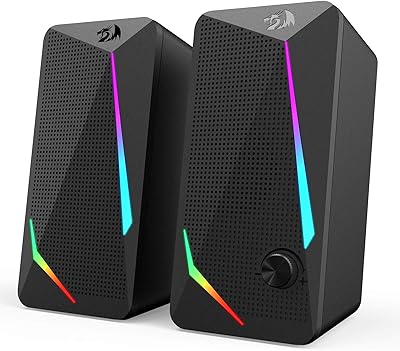
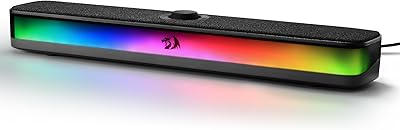
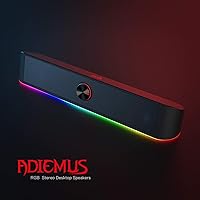
The Redragon GS560 is a compact RGB desktop soundbar that landed on the market in early 2021 and has quietly built a loyal following among budget-conscious gamers and everyday desk users. At around $25, it sits in a crowded category, but its audio-synced lighting and clean 16-inch profile help it stand out. It plugs in via USB for power and connects audio through a standard 3.5mm cable — no drivers, no software, no setup headaches. With a 4.3-star average across nearly 5,000 reviews and a top-15 ranking in Computer Speakers, this RGB soundbar has earned its spot on a lot of desks.

Features & Benefits

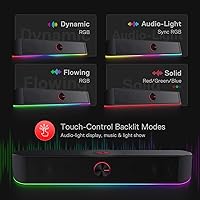
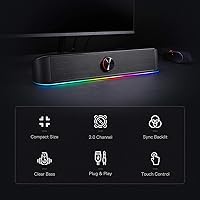
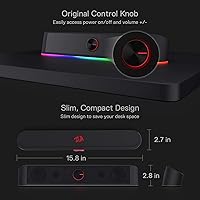
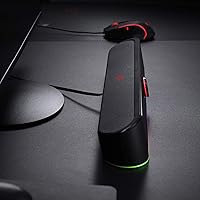
The headline feature here is the real-time light sync, which pulses the RGB bar in response to whatever audio is playing — music, game sounds, video. It genuinely reacts to the audio rather than just looping a preset animation, which makes it more engaging than most lighting gimmicks at this price. There are four backlit modes to cycle through, all accessible without any app. Controls are handled through a touch-sensitive panel and a physical volume knob, which is a nice combination. Sound-wise, the 2.0 stereo setup puts out 4W per channel — honest desktop-level output, clear enough for casual listening, with modest bass that reflects the no-subwoofer design.

Best For

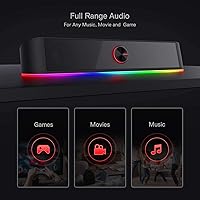
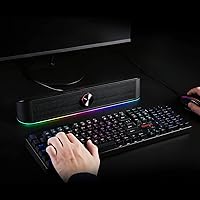
This desktop speaker bar makes the most sense for gamers who want RGB aesthetics without paying a premium, and for students or remote workers who are tired of their laptop's built-in audio but aren't ready to spend $80 on a speaker. If your current setup already has RGB peripherals, the GS560's lighting integrates visually without any configuration. It's also a practical pick for tight desk spaces — the slim profile slides neatly under a monitor. Compatibility is wide: PC, laptop, TV, or smartphone all work through the standard 3.5mm jack. Plug it in, and it works. That simplicity genuinely matters for a lot of buyers.

User Feedback

The general consensus among buyers is positive, with the RGB lighting quality drawing consistent praise — people are genuinely impressed by how responsive the light sync is for the price. Sound quality gets a fair rating rather than a glowing one; most reviewers agree it's a clear step up from built-in speakers, but bass-heavy listeners will find it thin without a subwoofer. A few users flag the touch controls as oversensitive, where brushing the panel accidentally changes settings. The 3.5mm cable length occasionally gets mentioned as limiting for certain desk configurations. On durability, the majority report no issues after a year or more of daily use — reassuring for a $25 unit.

Pros

  • Plug-and-play setup takes under two minutes — no drivers, no app, no account required.
  • The RGB audio-sync lighting genuinely reacts to sound in real time, not just looping a preset animation.
  • Stereo separation is a noticeable step up from any built-in laptop or monitor speaker.
  • Slim 16-inch profile slides neatly under most monitors without claiming meaningful desk space.
  • Works across PC, laptop, TV, and smartphone through a universal 3.5mm connection.
  • Physical volume knob gives precise, tactile control that touch-only speakers simply cannot match.
  • Four lighting modes cover everything from ambient study sessions to active gaming atmospheres.
  • Durability holds up well — the majority of long-term users report no issues after one to two years of daily use.
  • At around $25, the GS560 offers a level of completeness that rivals costing twice as much struggle to beat.
  • Metal and plastic hybrid build feels more substantial than the price tag would suggest.

Cons

  • Bass response is thin and hollow — a real limitation for anyone who listens to bass-heavy music genres.
  • Touch controls are oversensitive and can trigger accidental mode changes from nearby desk movement.
  • The included 3.5mm cable is too short for desk setups where the audio source sits more than a few feet away.
  • No wireless or Bluetooth option means you are permanently tethered to wherever the cables reach.
  • RGB customization is locked to four presets — no custom colors, no software integration, no per-zone control.
  • At higher volumes, some audio distortion creeps in and undercuts the otherwise clean mid-range.
  • USB-C-only laptop users will need a separate adapter that is not included in the box.
  • LED sections on some units have been reported to dim unevenly after extended daily use at high brightness.
  • The matte black finish is the only available option, which limits fit for non-standard or light-themed desk setups.

Ratings

The Redragon GS560 has been scored by our AI system after analyzing thousands of verified global buyer reviews, with spam, bot activity, and incentivized feedback actively filtered out. Scores reflect the honest distribution of real user experiences — strengths and frustrations alike — so you get a clear picture before buying. Both where this desktop speaker bar excels and where it falls short are transparently captured below.

Value for Money
91%
At roughly $25, buyers consistently feel they are getting more than they paid for. The combination of functional stereo audio and a genuinely reactive RGB light show at this price tier is hard to match, and most users express surprise at how complete the package feels out of the box.
A small segment of buyers who expected near-Bluetooth-speaker performance feel slightly let down once the novelty wears off. The value equation holds only if expectations are anchored to the budget desktop category — push beyond that framing and the score would look different.
RGB Lighting Quality
88%
The audio-reactive light sync is the most praised feature across reviews, with users noting it responds noticeably faster and more dynamically than competing budget options. Gaming and music sessions both benefit, and the four modes give enough variety to keep the effect from feeling repetitive.
The lighting, while impressive for the price, lacks the fine-grained customization that RGB enthusiasts expect from dedicated software ecosystems. Users who want per-zone control or custom color profiles will find the four preset modes limiting over time.
Sound Quality
67%
33%
For desk use at moderate volumes, the audio is clean and detailed enough to handle casual gaming, video calls, and background music comfortably. Most buyers upgrading from built-in laptop or monitor speakers report an immediately noticeable improvement in clarity and stereo separation.
At 4W per channel, this is entry-level output and should be treated as such. Bass response is thin — a known limitation of the 2.0 configuration with no subwoofer — and at higher volumes, some users report mild distortion that undercuts the otherwise decent mid-range performance.
Bass Performance
53%
47%
For spoken-word content, podcasts, and lighter music genres like pop or acoustic, the low-end is adequate and unobtrusive. Users who do not expect punchy bass from a slim, driver-only soundbar generally report satisfaction with the tonal balance for everyday listening.
Bass-heavy music genres — EDM, hip-hop, cinematic game soundtracks — expose the GS560's limits quickly. Without a subwoofer in the chain, the low frequencies feel hollow, and several reviewers specifically note this as the biggest gap between the speaker's visual appeal and its audio delivery.
Ease of Setup
94%
Plug the USB into any available port for power, connect the 3.5mm cable to your audio source, and the speaker is live — no drivers, no app installation, no pairing sequence. Reviewers across skill levels describe setup as taking under two minutes, which genuinely matters for this audience.
The only minor friction reported involves cable management on compact desks, where running both the USB and 3.5mm cables neatly can be slightly awkward depending on port placement. This is a desk-setup issue rather than a product flaw, but worth noting for tidiness-focused buyers.
Build Quality
72%
28%
The metal and plastic hybrid construction gives the unit a more solid feel than its price suggests, and the weight of 885g provides enough stability that it does not shift during use. Most buyers report no structural issues after extended daily use spanning a year or more.
Up close, the plastic sections show their budget origins — seams are visible and the finish attracts fingerprints. A handful of reviewers mention that the touch panel surround shows wear after several months, which is not a durability failure but does affect the premium look over time.
Touch Controls
63%
37%
The touch panel handles basic functions — power, mode cycling — without requiring physical force, which users appreciate when making quick adjustments mid-session. The combination of touch controls alongside a dedicated volume knob gives the unit a more considered control layout than many rivals at this price.
Sensitivity calibration is the recurring complaint: accidental touches while adjusting nearby items on the desk can trigger mode changes or power-off events. Several reviewers specifically mention this as a daily annoyance rather than an occasional issue, suggesting the sensitivity threshold is set slightly too high.
Volume Knob Usability
83%
The physical knob is the preferred control method for most users, offering precise, incremental volume adjustment without looking away from the screen. Its placement and resistance feel deliberate, and reviewers frequently contrast it favorably with the touch panel when discussing day-to-day usability.
The knob doubles as an on/off switch, and a few users report accidentally switching the unit off when they intended only to reduce volume slightly. It is a minor UX issue, but one that surfaces often enough in reviews to be worth flagging for buyers who frequently adjust volume.
Compatibility
89%
The 3.5mm plus USB combination covers virtually every modern device — desktop PCs, laptops, TVs, tablets, and smartphones all work without adapters in most standard configurations. Reviewers testing across multiple device types consistently report clean audio handoff with no hum or interference.
Users with USB-C only laptops need an adapter for power, which is not included. Additionally, devices that route audio exclusively through Bluetooth or proprietary connectors will require their own workaround, limiting true plug-and-play convenience to devices with a standard headphone jack.
Desk Footprint & Placement
86%
The 16-inch width and slim 2.8-inch height make this desktop speaker bar a natural fit beneath most monitors without blocking screen real estate or crowding the desk. Users with dual-monitor setups also note it centers well between displays, which adds to the visual cohesion of an RGB rig.
At 15.8 inches wide, it may be slightly large for very compact desk configurations or setups with a keyboard pushed all the way forward. A small number of reviewers with sub-24-inch monitors mention the soundbar width slightly exceeds their display, which disrupts the aesthetic they were going for.
Lighting Mode Variety
74%
26%
Having four distinct modes — Wave, Disco, Rain, and a static option — covers the main use-case spectrum from ambient study lighting to more active gaming atmospheres. The static mode is particularly appreciated by users who want RGB presence without the distraction of constant motion.
Four modes is a reasonable starting point, but power users who have explored dedicated RGB ecosystems will find the selection thin. There is no way to adjust individual color hues or create custom patterns, which limits long-term personalization for buyers who plan to use the unit across different themed setups.
Cable Length & Management
61%
39%
For most standard desk configurations — monitor at arm's length, PC tower within two to three feet — the included 3.5mm cable reaches comfortably without excess slack. Users in straightforward setups rarely raise cable length as a concern at all.
Reviewers with tower PCs positioned under the desk, or with audio sources more than three feet from the soundbar's resting position, consistently find the cable too short. Since there is no wireless option, cable length is a hard constraint and one that a meaningful minority of buyers encounter as a genuine limitation.
Durability Over Time
79%
21%
The majority of long-term reviewers — those reporting back after six months to two years of daily use — describe the unit as holding up well with no driver degradation, lighting failures, or control malfunctions. For a $25 product, this longevity feedback is above average for the category.
A smaller but notable share of reviews describe LED sections dimming unevenly after extended use, particularly with the unit running eight or more hours daily. This is not a universal experience but appears more often than would be expected from a product with otherwise strong durability feedback.
Aesthetic Design
81%
19%
The clean rectangular silhouette and understated matte black finish work well across a wide range of desk setups, from minimalist workstations to full RGB gaming rigs. The lighting bar runs the full width of the unit, which gives it a polished, intentional look rather than the stuck-on appearance common in cheaper alternatives.
Design personalization is essentially zero — the black finish is the only available option, and the overall form is strictly functional. Users building setups around specific color themes may find the fixed aesthetic slightly rigid, though this is a minor complaint given the price point.

Suitable for:

The Redragon GS560 is a smart buy for anyone who wants a meaningful audio upgrade without spending serious money — and who appreciates a bit of visual flair on their desk. Gamers building out an RGB setup on a budget will find it fits naturally alongside lit keyboards, mice, and monitors, adding a cohesive glow without requiring any software configuration. Students living in dorms or small apartments will appreciate how little desk space it claims and how instantly it works across a laptop, PC, or even a phone. Remote workers who spend all day on video calls and are tired of tinny built-in laptop audio will find the stereo separation alone justifies the price. If your goal is plug-and-play simplicity — something you connect once and forget about — this desktop speaker bar delivers exactly that without asking anything of you in return.

Not suitable for:

The Redragon GS560 is the wrong tool if audio quality is your primary concern rather than a secondary one. At 4W per channel with no subwoofer in the chain, this desktop speaker bar simply cannot produce the kind of bass response or dynamic range that music enthusiasts, film watchers, or immersive gamers tend to demand. Anyone who listens seriously to bass-heavy genres — EDM, hip-hop, orchestral game soundtracks — will find the low-end noticeably hollow and unsatisfying. Buyers looking for fine-grained RGB customization, such as per-zone color control or software-synced lighting profiles that integrate with platforms like Razer Synapse or iCUE, will also be disappointed by the four fixed presets on offer. If your desk setup involves a PC tower positioned more than a few feet from the speaker, the fixed cable length may also create a frustrating constraint with no wireless fallback to solve it.

Specifications

  • Dimensions: The unit measures 2.7″ deep, 15.8″ wide, and 2.8″ tall, making it compact enough to sit beneath most standard monitors.
  • Weight: The soundbar weighs 885g (approximately 1.95 lbs), giving it enough heft to stay stable on a desk without being cumbersome to reposition.
  • Power Output: Each channel delivers 4W of output power, totaling 8W across the 2.0 stereo configuration.
  • Channel Config: The speaker operates in a 2.0 stereo channel configuration with no built-in subwoofer.
  • Connectivity: Audio input is handled via a 3.5mm analog cable, while power is supplied through a standard USB-A connection.
  • Input Voltage: The unit requires 5V DC input, drawn directly from any standard USB port without an external power adapter.
  • Frequency Response: The dynamic driver covers a frequency response range up to 20 kHz, suited to mid and high-range audio reproduction.
  • Signal-to-Noise: The signal-to-noise ratio is rated at 65 dB, which is adequate for desktop listening distances in typical home or office environments.
  • Driver Type: Audio is produced by a dynamic driver design, which prioritizes clarity in the mid-range frequencies at this output level.
  • RGB Modes: Four backlit lighting modes are available: Wave, Disco, Rain, and a static option, all selectable without any software installation.
  • Light Sync: The RGB bar features audio-light synchronization that reacts in real time to the audio signal being played through the speaker.
  • Controls: User controls consist of a touch-sensitive panel for power and mode selection, combined with a physical rotary volume knob that doubles as an on/off switch.
  • Compatible Devices: The speaker is compatible with PCs, laptops, televisions, tablets, and smartphones — any device with a standard 3.5mm headphone output.
  • Speaker Size: The full speaker bar spans 16 inches in width, designed to align visually beneath monitors in the 24-inch to 27-inch range.
  • Material: The enclosure is constructed from a combination of metal and plastic, with a matte black finish across all external surfaces.
  • Mounting Type: The unit is designed exclusively for tabletop placement and does not include wall-mount hardware or VESA compatibility.
  • Waterproofing: The GS560 carries no waterproof or splash-resistant rating and should be kept away from liquids at all times.
  • Warranty: Redragon provides a limited warranty on this product; buyers should confirm current terms directly with the seller at time of purchase.
  • In the Box: The package includes the GS560 soundbar unit and a printed user manual; no additional cables beyond those built into the unit are included.
  • Max Range: The maximum operational range is listed at 10 meters, which applies to the wired cable reach rather than any wireless signal.

Related Reviews
Redragon BK7114 Wireless Keyboard
85%
91%
Typing Experience
89%
Connectivity Options
85%
Design and Build Quality
93%
Quietness of Keypress
88%
Compatibility with Multiple Devices
More
Redragon GS550 PC Speakers
78%
91%
Value for Money
74%
Sound Quality
52%
Bass Performance
63%
Build Quality
82%
Design & Aesthetics
More
Redragon GW800
Redragon GW800
76%
78%
Image Quality
74%
Microphone Performance
55%
Focus & Depth
91%
Value for Money
93%
Plug-and-Play Ease
More
Redragon GS500 Stentor PC Speakers
76%
78%
Sound Clarity
54%
Bass Performance
91%
Value for Money
63%
Build Quality
94%
Setup & Ease of Use
More
Redragon GS510 Waltz
85%
78%
Acoustic Clarity
94%
Ease of Setup
86%
Lighting Customization
79%
Build Quality
91%
Volume Control
More
Redragon GS515 RGB Desktop Soundbar
84%
87%
Sound Quality
90%
RGB Lighting Customization
82%
Bluetooth Connectivity
92%
Ease of Setup
68%
Control Dial Sensitivity
More
Redragon GS814
Redragon GS814
75%
71%
Sound Quality
58%
Bass Performance
83%
Bluetooth Connectivity
88%
RGB Lighting
67%
Touch Controls
More
Redragon CA606 Gaming PC Case
86%
94%
Cooling Performance
88%
Build Quality
92%
Aesthetic Appeal
89%
Ease of Installation
86%
Cable Management
More
Redragon M915WL Wireless Gaming Mouse
86%
88%
Performance
91%
Build Quality
94%
Battery Life
85%
Ergonomics/Comfort
89%
Precision & DPI Control
More
Redragon K710 Wireless Typewriter Mechanical Keyboard
76%
88%
Build Quality
84%
Wireless Reliability
81%
Typing Experience
52%
Noise Level
77%
RGB & Lighting
More

FAQ

No, none at all. The Redragon GS560 is completely plug-and-play — connect the USB for power and the 3.5mm cable to your audio source, and it works immediately. Your operating system recognizes it as a standard audio output device without any additional setup.

It syncs automatically the moment audio is playing through the speaker — no configuration needed. The light bar reacts directly to the audio signal in real time, so whether you are gaming, streaming music, or watching a video, the lighting responds on its own without any software or app involvement.

Honestly, the bass is on the lighter side, which is expected from a compact 2.0 soundbar at this price. For casual listening, video calls, or lighter music genres, it sounds fine. If you regularly listen to bass-heavy music like EDM or hip-hop, you will likely notice the low-end gap — pairing it with a separate subwoofer would help, but that adds cost and complexity.

Yes, any device with a 3.5mm headphone jack works — smartphones, tablets, laptops, and televisions included. If your device only has a USB-C port, you will need a USB-C to 3.5mm adapter, which is not included in the box.

This is a genuine concern flagged by a number of buyers. The touch panel sensitivity is set fairly high, which means accidentally brushing it while reaching across your desk can change the lighting mode or trigger the power function. If precise, intentional control is important to you, the physical volume knob is more reliable for day-to-day use.

The cable length is a common pain point for buyers with tower PCs positioned on the floor or at a distance from the desk surface. If your audio output port is more than roughly two to three feet from where the speaker sits, the included 3.5mm cable may fall short. An inexpensive 3.5mm extension cable solves this, but it is worth measuring your setup before assuming the stock cable will reach.

Yes, the static lighting mode gives you a consistent, non-animated glow, and cycling through the modes will eventually let you land on a low-key look. Whether a fully off state is achievable depends on how you cycle through the modes — check the user manual for the exact sequence, as the touch panel controls this directly.

The weight of just under 900g gives it a solid enough footprint that it stays put during normal use. It does not come with rubber feet pads on every unit, so on very smooth glass desks it may shift slightly if bumped, but for standard desk surfaces it holds its position well.

The step up from built-in laptop speakers is immediately noticeable — the stereo separation alone makes a real difference when gaming or watching content. Clarity in the mid-range is meaningfully better, and the overall volume ceiling is higher. Just keep expectations calibrated to the budget category; this desktop speaker bar is not competing with a $100 bookshelf setup.

Most long-term reviewers report no problems after one to two years of daily use, which is a solid track record for a product at this price. A smaller portion of buyers have noted uneven LED dimming after prolonged high-brightness use over many months, so if you plan to run it at full brightness for eight or more hours a day, that is worth keeping in mind.