
Overview

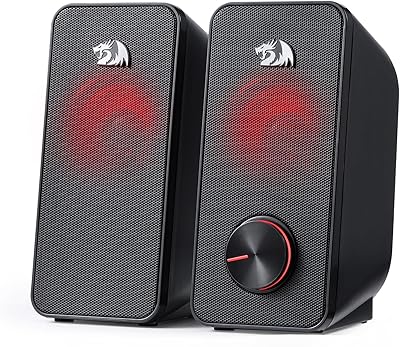
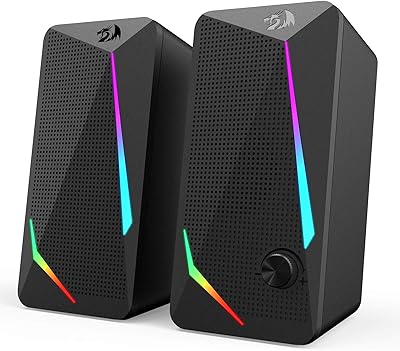
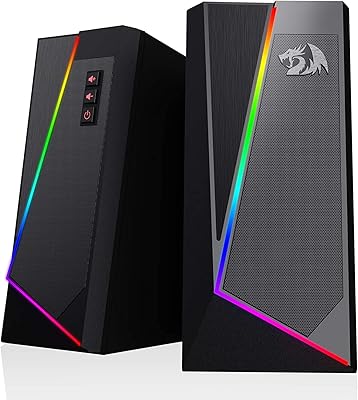
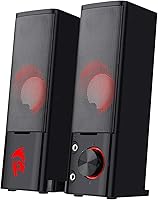
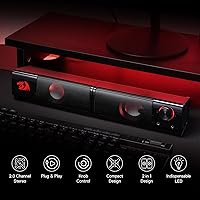
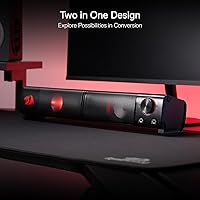
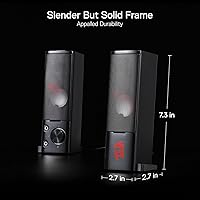
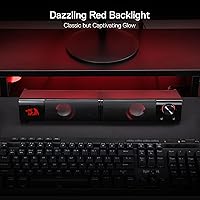
The Redragon GS550 PC Speakers are a straightforward entry-level option from a brand that has carved out a solid reputation in the gaming peripheral space. These desktop speakers come in a compact dual-unit format — each unit can stand upright flanking your monitor or lie flat underneath, which is a small but genuinely useful design touch for cramped desks. They run off USB power and connect via 3.5mm aux, so there are no drivers to install and no wall adapter to track down. The red LED glow is subtle enough that it fits a gaming desk without looking overdone.

Features & Benefits

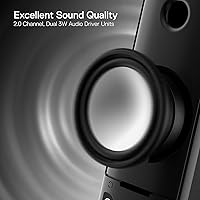
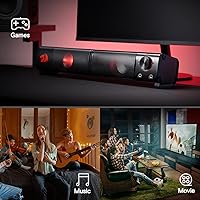
At 3 watts per channel, this compact sound bar won't shake walls, but it handles music, video, and casual gaming audio with enough clarity for a small desk environment. The inline volume knob is one of those features you don't think about until you actually use it — it also cuts power entirely, which keeps things simple. A headphone and mic jack built into the unit is a genuine convenience, letting you swap to headphones without reaching behind your PC. The 31-inch cable linking both speakers gives you enough slack to position them where they actually make sense, not just where the wire forces you to.

Best For

These desktop speakers hit a sweet spot for people who just want something better than built-in laptop audio without overthinking it. Students, home office workers, and anyone putting together a first gaming desk will find the value hard to argue with. The compact footprint is a real advantage for tight setups — two small units take up far less space than a traditional speaker bar. If you regularly switch between speakers and headphones, the front-facing jack saves you a lot of unnecessary fumbling. That said, if you need rich, room-filling bass or plan to run audio in a larger space, these will feel underpowered.

User Feedback

The response from buyers is mostly positive, with sound quality for the price being the most repeated compliment — people are genuinely surprised by what they get. The red LED aesthetic gets called out often as a nice fit for gaming setups, which makes sense given Redragon's audience. On the flip side, the volume knob draws some criticism for feeling cheap, and there's a recurring note that bass output is limited — which is honest, not a flaw exactly, just a physical reality of small drivers at this price. Durability is where things get mixed; some owners report years of trouble-free use, while others have had issues crop up sooner than expected.

Pros

  • Plug-and-play setup works instantly on PC, laptop, TV, and phone — no drivers or configuration needed.
  • USB power means one less adapter cluttering your desk or power strip.
  • Sound quality consistently impresses buyers who are upgrading from built-in laptop speakers.
  • The front-facing headphone and mic jack makes switching peripherals fast and effortless.
  • Compact dual-unit design fits comfortably on tight desks without sacrificing both speakers.
  • The GS550 delivers a noticeable stereo separation that single-bar alternatives at this price cannot match.
  • Red LED lighting is subtle and well-diffused — it adds atmosphere without being distracting.
  • The inline volume knob doubles as a power switch, keeping daily use simple and tactile.
  • 31-inch inter-speaker cable gives enough slack for most standard monitor widths.
  • Broad compatibility means these desktop speakers will work with virtually any device you already own.

Cons

  • Bass output is genuinely limited — there is no workaround or physical control to compensate.
  • The volume knob has a hollow, plasticky feel that does not inspire confidence in long-term use.
  • Long-term durability is inconsistent; a meaningful share of buyers report hardware issues within the first year.
  • The red LED cannot be dimmed or switched off without cutting power to the speakers entirely.
  • Audio distortion becomes noticeable when pushing the volume near its upper limit.
  • No Bluetooth or wireless option — strictly wired via 3.5mm aux only.
  • The inter-speaker cable is fixed and non-removable, making damage to it a unit-level problem.
  • Output level is insufficient for larger rooms or spaces with significant ambient background noise.
  • No EQ, bass boost, or software control of any kind — what you hear is what you get.

Ratings

The Redragon GS550 PC Speakers have been evaluated by our AI system after analyzing thousands of verified global user reviews, with spam, bot-generated, and incentivized feedback actively filtered out. What you see here reflects the honest range of buyer experience — the genuine strengths that keep these desktop speakers ranked near the top of their category, alongside the real frustrations that some users run into. Both sides of the story are represented in every score below.

Value for Money
91%
For the asking price, buyers consistently report being caught off guard by how much usable performance these speakers deliver. Students and first-time desk builders especially cite the GS550 as one of the few budget audio options that didn't feel like a compromise right out of the box.
A small number of users who compared these to slightly pricier competitors felt the gap in audio refinement was noticeable enough to justify spending more. Value perception drops if buyers come in expecting performance well beyond the product's clear market tier.
Sound Quality
74%
26%
For casual listening — YouTube, lo-fi playlists, game audio, video calls — these desktop speakers hold up better than their spec sheet suggests. Dialogue clarity and midrange presence are frequently praised, particularly by users upgrading from built-in laptop speakers.
Audiophiles or anyone who has used even a mid-range speaker system will find the overall sound profile thin and a bit flat. The dynamic range is limited, and at higher volumes some users report a slight harshness creeping into the high frequencies.
Bass Performance
52%
48%
For background music or casual gaming where bass isn't critical, the low-end output is just enough to feel present. Users who primarily listen to podcasts, ambient tracks, or voice-heavy content rarely raise bass as an issue.
This is the most consistently cited limitation. The 3W drivers physically cannot produce meaningful bass, and there is no dedicated bass control to compensate. Buyers who enjoy bass-heavy genres or use their speakers for immersive gaming will find this noticeably underwhelming.
Build Quality
63%
37%
The aluminum accents give the GS550 a slightly more premium look than most speakers in this price range, and the overall shell feels reasonably solid when placed on a desk. Many users report zero issues over extended daily use.
The volume knob is the most-criticized component — it has a plasticky, hollow feel that undermines confidence in long-term reliability. A portion of reviewers also noted that the connection points and cable joints show wear faster than the enclosure itself.
Design & Aesthetics
82%
18%
The compact dual-unit format is genuinely practical — each speaker is small enough to sit comfortably beside a monitor without eating into workspace. The red LED glow is consistent and well-diffused, adding a low-key gaming aesthetic without being distracting during late-night sessions.
The LED cannot be dimmed or turned off independently, which bothers some users who prefer a cleaner desk look or work in darker environments where even subtle lighting is unwanted. The all-black colorway with red accents is specifically tuned for gaming desks and may feel out of place in neutral home office setups.
Ease of Setup
96%
Plug-and-play via USB and 3.5mm means there is genuinely nothing to configure — users across all platforms report being up and running in under a minute. No driver downloads, no pairing steps, no software; it just works on PC, laptop, and TV alike.
The simplicity is also a ceiling — there are no EQ settings, no software controls, and no way to fine-tune the audio output. Users who want any level of customization beyond the physical volume knob will need to handle that at the system or software level.
Volume & Output Level
71%
29%
For a small to medium desk in a quiet room, the maximum output is more than sufficient. Most users report that they rarely push the volume knob past halfway during normal use, leaving headroom to spare for louder moments in games or media.
In shared spaces, open-plan rooms, or anywhere with ambient noise, the speakers struggle to project clearly without distortion creeping in near the upper end of the volume range. They are not well-suited for filling a room or competing with background noise.
Headphone Jack Convenience
88%
Having a 3.5mm headphone and mic jack directly on the speaker unit is one of those features that sounds minor until you use it daily. Gamers and remote workers who frequently switch between speakers and a headset cited this as one of their top reasons for choosing the GS550 over competing options.
The jack placement and build feel functional but not refined — a couple of users noted it felt slightly loose after extended use. It is a convenience feature, not a high-fidelity audio output, so audiophiles routing critical listening through it may notice some signal degradation.
Cable Management
77%
23%
The 31-inch inter-speaker cable gives enough slack for most standard desk widths, letting users position the two units naturally without the cable pulling tight. USB power consolidation means fewer cords overall compared to adapter-powered alternatives.
The cable between the two speakers is not removable or replaceable, so if it gets damaged, the entire unit is affected. Users with very wide monitors or unconventional desk layouts may find the fixed cable length restrictive.
Compatibility
93%
The standard 3.5mm aux input means these desktop speakers work with practically anything that has a headphone output — PC, Mac, gaming console via adapter, TV, or smartphone. No platform-specific limitations have been reported across the user base.
While compatibility is broad, the analog-only connection means no digital audio passthrough and no Bluetooth. Users who have moved to a setup where their device lacks a 3.5mm port will need a separate adapter, which adds a small layer of friction.
LED Lighting Quality
79%
21%
The red LED backlight is even, consistent, and stays on without flickering — something cheaper RGB peripherals often get wrong. Users building a red-accented gaming desk find it matches well with other Redragon products, giving the setup a cohesive look without extra effort.
There is only one color and no brightness control, so the aesthetic is fixed. Users who want RGB cycling or the ability to match a different color theme are out of luck, and those who want no lighting at all cannot disable it without cutting power to the speakers entirely.
Durability & Longevity
61%
39%
A meaningful share of buyers report using these desktop speakers daily for a year or more without any hardware failure, which speaks reasonably well to the core construction for its price tier. Units that survive the first few months tend to hold up consistently.
Long-term reliability is genuinely inconsistent. A notable minority of reviewers experienced failures — primarily with the volume knob or audio output degrading — within the first year. The variance in longevity is wide enough that it is a real consideration before purchasing.
Footprint & Portability
85%
The small physical size is a meaningful advantage for cramped desks, dorm rooms, and laptop setups where space is at a premium. Each unit is light enough to reposition easily, and the whole setup can be packed away without hassle.
The lightweight build that makes them easy to move also means they shift around slightly under their own cable tension. Users without a cable management solution may find the speakers creeping out of position over the course of a day.

Suitable for:

The Redragon GS550 PC Speakers are a strong fit for anyone who wants a meaningful audio upgrade over built-in laptop or monitor speakers without spending a lot or dealing with complicated setup. Students setting up a dorm room workstation, remote workers who need clear audio for video calls and background music, and budget-conscious gamers building their first desk will all find these desktop speakers hit a practical sweet spot. The plug-and-play design makes them approachable even for people who have never bought external speakers before — plug in the USB, connect the 3.5mm cable, and you're done. The compact dual-unit format works especially well on smaller desks where a bulky soundbar simply isn't an option. If you regularly switch between speakers and headphones, the front-facing jack on the unit is a genuinely useful daily convenience that many competing options at this price skip entirely.

Not suitable for:

The Redragon GS550 PC Speakers are not the right call for buyers who care seriously about audio fidelity or bass performance. At 3 watts per channel with no dedicated bass control, this compact sound bar simply cannot reproduce the low-end depth that music enthusiasts, home theater setups, or bass-heavy gaming experiences demand. Anyone accustomed to even a moderately priced bookshelf speaker system will notice the difference immediately — the sound stage is narrow and the dynamic range is limited. Users who need Bluetooth connectivity or want to connect wirelessly from a phone or tablet will also be disappointed, as these are strictly wired. If you're outfitting a larger room, a shared living space, or a setup where the speakers need to project clearly across distance, the output level will fall short. Finally, buyers who want full control over their audio aesthetic — RGB lighting, dimmable LEDs, or a neutral look — will find the fixed red backlight a non-starter.

Specifications

  • Brand: Manufactured by Redragon, a brand specializing in gaming peripherals and accessories.
  • Model: GS550 Orpheus, part of Redragon's entry-level desktop speaker lineup.
  • Configuration: 2.0 channel stereo with one dynamic driver per speaker unit, no subwoofer included.
  • Power Output: Each speaker delivers up to 3 watts, for a combined maximum output of 6 watts RMS.
  • Power Source: USB-powered at 5V DC, drawing power directly from a PC, laptop, or USB wall adapter.
  • Audio Connection: Connects to the audio source via a standard 3.5mm auxiliary cable.
  • Headphone Jack: A 3.5mm combined headphone and microphone jack is built into the primary speaker unit.
  • LED Backlight: Fixed red LED backlight with no brightness adjustment or color customization options.
  • Inter-Speaker Cable: A fixed, non-removable cable of 31 inches (80 cm) links the two speaker units.
  • Dimensions: Each unit measures 7.28 x 6.69 x 4.33 inches, designed for tabletop placement.
  • Weight: The complete two-unit setup weighs approximately 1.5 pounds (680 grams) in total.
  • Materials: Enclosures are constructed from ABS plastic with aluminum accenting for a semi-premium finish.
  • Mounting Type: Designed for freestanding tabletop use; no wall-mount or VESA compatibility is provided.
  • Compatibility: Works with any device that has a 3.5mm headphone output, including PCs, laptops, TVs, and phones.
  • Driver Requirement: Fully plug-and-play with no software drivers required on any supported platform.
  • Volume Control: An inline rotary volume knob on the primary unit also functions as the on/off power switch.
  • Frequency Response: Rated up to 20 kHz; no lower frequency cutoff is officially specified by the manufacturer.
  • Warranty: Covered by a limited warranty from Redragon; duration and terms should be confirmed at point of purchase.

Related Reviews
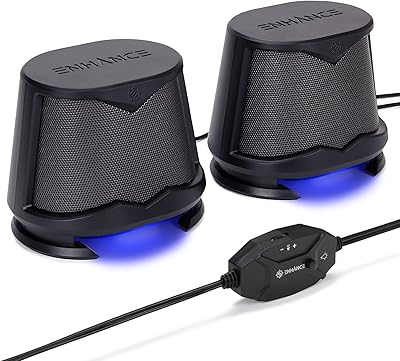
ENHANCE SB2 PC Speakers
84%
85%
Sound Quality
89%
LED Lighting Effect
92%
Ease of Setup
87%
Value for Money
81%
Bass Response
More
Redragon GS500 Stentor PC Speakers
76%
78%
Sound Clarity
54%
Bass Performance
91%
Value for Money
63%
Build Quality
94%
Setup & Ease of Use
More
Redragon GS814
Redragon GS814
75%
71%
Sound Quality
58%
Bass Performance
83%
Bluetooth Connectivity
88%
RGB Lighting
67%
Touch Controls
More
Redragon GS510 Waltz
85%
78%
Acoustic Clarity
94%
Ease of Setup
86%
Lighting Customization
79%
Build Quality
91%
Volume Control
More
XKX XKX112A USB Computer Soundbar
82%
96%
Space Efficiency
93%
Setup Simplicity
88%
Vocal Clarity
84%
Volume Ceiling
82%
Clamp Security
More
FUNLOGY Speaker
FUNLOGY Speaker
81%
83%
Sound Clarity
61%
Bass Performance
88%
Noise Floor & Signal Purity
96%
Setup & Ease of Use
71%
Build Quality
More
Redragon CA606 Gaming PC Case
86%
94%
Cooling Performance
88%
Build Quality
92%
Aesthetic Appeal
89%
Ease of Installation
86%
Cable Management
More
LITTOAK GM03 Bluetooth PC Speakers
84%
92%
Value for Money
85%
Audio Performance
88%
RGB Lighting Effect
90%
Setup & Ease of Use
87%
Connectivity Options
More
Edifier R19BT
Edifier R19BT
78%
93%
Ease of Setup
78%
Sound Quality
66%
Bass Performance
88%
Bluetooth Reliability
61%
Volume Output
More
Redragon GS520 Anvil
82%
94%
Value for Money
86%
Sound Clarity (Mids & Highs)
58%
Bass Performance
89%
RGB Lighting & Aesthetics
88%
Space Efficiency
More

FAQ

No, none at all. The Redragon GS550 PC Speakers are fully plug-and-play — plug the USB into any open port for power, connect the 3.5mm cable to your audio output, and they start working immediately. Windows, macOS, and most smart TVs will recognize them without any setup steps.

Not independently, no. The red LED is always on whenever the speakers have power. The only way to turn the lighting off is to switch the speakers off entirely using the volume knob. If you need a speaker with adjustable or disableable lighting, this one is not the right fit.

They can work with a console as long as you have a way to output audio through a 3.5mm connection. Some controllers have a 3.5mm jack you could use, or you could connect via your TV's headphone output. These desktop speakers are not designed specifically for console use, so your experience may vary depending on your setup.

Honestly, the bass is modest at best. The small drivers physically cannot produce deep, thumping low-end, and there is no bass boost knob or control to compensate. For casual listening they are fine, but if bass is important to your music experience, you will likely find them underwhelming for hip-hop or EDM.

It is convenient rather than audiophile-grade. The 3.5mm jack on the primary speaker unit is great for quickly switching to a headset without reaching behind your PC, but it is a pass-through output, not a dedicated DAC. For casual headphone use it works well; for critical listening, routing audio directly from your PC or a dedicated headphone amp will sound noticeably better.

Unfortunately, no. The cable connecting the two units is fixed and not removable or replaceable. At 31 inches (80 cm), it is long enough for most standard monitor widths, but if you have a very wide ultrawide setup or need the speakers positioned far apart, you may find the reach limiting with no easy fix.

Yes, without any issues. The 3.5mm aux connection works with any Mac that has a headphone jack, and the USB port handles power from the MacBook directly. No driver installation is needed on macOS — it will treat this compact sound bar as a standard audio output device automatically.

They get reasonably loud for a quiet to moderately noisy room, but they are not going to overpower significant background noise. If you share a space with others, run a fan, or have any meaningful ambient sound competing, you may find yourself pushing the volume near its upper limit, where some distortion starts to creep in. For a quiet personal workspace they are more than sufficient.

Both units contain active dynamic drivers, and together they produce true 2.0 stereo audio. The left and right channels are separated properly, which gives a noticeably wider sound stage than single-unit desktop bars or built-in laptop speakers.

User experience is genuinely mixed on this. Many buyers report using the GS550 daily for two or more years without any problems, while others have run into issues — usually with the volume knob or audio output — within the first year. The core enclosure holds up well, but the internal components and connection points seem to be where variance in longevity shows up most. They are solidly built for the price, but it would be unrealistic to expect the same reliability as a speaker costing three or four times as much.