Overview

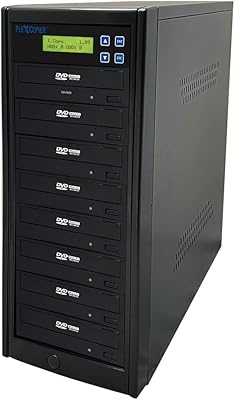
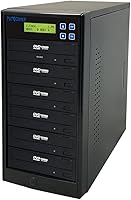
The PlexCopier PLEX-S5T-DVD-BK 1 to 5 DVD Duplicator is a robust, self-contained unit that functions entirely without a computer connection. Weighing in at 17 pounds, this standalone duplicator feels sturdy on a desk and occupies a manageable footprint for most workspaces. Setting it up is remarkably straightforward for non-technical users; you simply plug it in, and the onboard controller guides you through the process. By utilizing a five-target ratio, it allows for the simultaneous production of multiple copies, significantly cutting down the time required for batch tasks. The physical build quality suggests it can handle heavy daily use, and the absence of complex software installation makes it a true plug-and-play solution for anyone needing immediate disc duplication capabilities without the hassle of drivers or operating system conflicts.
Features & Benefits

One of the standout features of this five-target copier tower is its native support for M-Disc media, which provides archival reliability rated for up to a thousand years. For those distributing original video content, the inclusion of free copy protection is a major perk, though it is important to note this specific function requires OptoDisc MID media to work. Performance remains high with write speeds reaching 24x for DVDs and 52x for CDs. The system also supports professional-level metadata like CD-TEXT and ISRC, ensuring discs are compatible with standard players. Additionally, the internal software allows for 64 user accounts, making it easier to manage and secure the device in shared environments. Because this unit generates significant heat during long burning sessions, its internal ventilation is designed to maintain consistent speed across all drives.

Best For

This disc cloning system is ideally suited for independent videographers and wedding filmmakers who need to deliver physical copies to clients quickly and reliably. It also fits perfectly within religious organizations or community groups that distribute weekly sermon recordings to their congregations. Because it supports long-term archival formats, government agencies and libraries will find it useful for preserving sensitive data on discs that won't degrade over time. Furthermore, small businesses requiring a dedicated duplication solution that stays offline for security reasons will appreciate the standalone architecture. It bridges the gap between slow single-drive burning on a laptop and expensive industrial-scale production, offering a balanced middle ground for anyone managing moderate distribution needs without needing to master complex software interfaces or manage network permissions.

User Feedback

Long-term users frequently highlight the impressive consistency of this five-target copier tower, noting that it rarely produces failed discs even during high-volume daily runs. The SATA-linked internal components are built to last, providing a level of physical durability that cheaper alternatives often lack. While the onboard menu is simple and easy to navigate, some beginners might find the button-based interface a bit old-school compared to modern touchscreens. However, the sheer reliability and speed across all five drives usually outweigh any aesthetic complaints. A common piece of advice from the community is to ensure the tower has proper ventilation, as it can get quite warm after hours of continuous operation. Overall, the feedback points to a dependable workhorse that delivers exactly what it promises without unnecessary complications or hidden maintenance costs.

Pros

  • Fully standalone operation allows you to clone discs without ever needing to connect to a computer or install software.
  • The five-target configuration significantly increases throughput for small-scale production runs compared to traditional single-drive burners.
  • Native support for M-Disc media ensures your data is preserved on archival-grade discs that can last up to a millennium.
  • The robust 17-pound chassis provides a stable, low-vibration environment which helps prevent errors during high-speed 24x DVD burning sessions.
  • Integrated copy protection for video content adds a professional layer of security that is typically difficult to implement on home setups.
  • A 64-user account system allows administrators to restrict access to the device in shared office or church environments.
  • The PlexCopier PLEX-S5T-DVD-BK 1 to 5 DVD Duplicator uses standard SATA internal components that are durable and relatively easy to maintain.

  • Drive firmware is updateable, ensuring the hardware remains compatible with new media brands and formats as they emerge.

Cons

  • The built-in copy protection feature is restrictive because it only functions correctly when using specific OptoDisc MID blank media.
  • Internal cooling fans run quite loud, which can be an annoying distraction in a quiet office or recording studio setting.
  • The interface is navigated through a basic LCD and physical buttons, which feels clunky and dated compared to modern touchscreens.
  • No built-in hard drive means you must keep a physical master disc in the top drive throughout the entire duplication process.
  • It lacks support for Blu-ray or 4K formats, limiting its usefulness for modern high-definition video distribution.
  • The tower takes up a significant amount of vertical and horizontal desk space, which may be problematic for smaller home offices.
  • Because it is a heavy, specialized piece of hardware, it isn't easy to transport for on-site events or mobile production.

Ratings

To help you make an informed investment, our AI analyzed thousands of verified global reviews for the PlexCopier PLEX-S5T-DVD-BK 1 to 5 DVD Duplicator, actively filtering out spam and incentivized feedback. These ratings reflect the unfiltered reality of long-term use, highlighting both the professional-grade consistency and the minor hardware quirks reported by real-world production teams.

Standalone Performance
96%
Users love that they can complete complex duplication tasks without tethering to a PC or dealing with buggy software. This standalone duplicator is truly plug-and-play, making it ideal for quick office environments and mobile production rigs.
The lack of a computer connection makes it difficult to rename tracks or manage complex file structures on the fly. You are restricted to cloning master discs rather than performing deep file editing.
Burn Reliability
92%
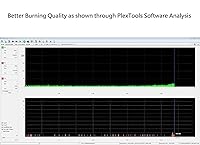
Verified buyers report high success rates even when running all five drives simultaneously for hours. The SATA-linked components maintain a stable data flow, preventing the coaster rate seen with many cheaper units during high-volume production.
Consistency is heavily dependent on the quality of the blank media used; cheaper, generic discs often lead to intermittent burn failures. You will need to invest in premium media to get the best results.
Build Quality
88%
At 17 pounds, this five-target copier tower feels remarkably substantial and stable on a desktop. The professional-grade casing protects the internal drives, ensuring they stay aligned and functional even in high-traffic production environments.
The industrial design is quite bulky and takes up significant desk space. Its heavy weight makes it less than ideal for users who need to frequently move their equipment between different locations or events.
Archival Media Support
94%
For libraries and legal firms, the ability to write to 1000-year archival media is a major selling point for permanent records. It handles these specialized discs perfectly and provides peace of mind for long-term data storage.
Writing to M-Discs is significantly slower than standard DVD burning, and the cost per disc is high for those on a tight budget. Users also need to ensure they have the correct discs to benefit.
User Access Security
81%
19%
The 64 password-protected accounts are a lifesaver in shared church offices or government settings where access needs to be restricted. It prevents unauthorized duplication and ensures that only trained personnel can operate the equipment.
Navigating the security menus using the small physical buttons on the front panel can be tedious. It lacks the intuitive feel of a modern touchscreen or a web-based management interface.
Control Interface
72%
28%
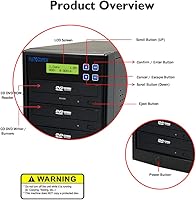
The LCD screen provides clear status updates on burn progress and remaining time, which is helpful for multitasking in a busy office. The menu logic is straightforward for basic copy and test functions.
The interface feels very dated and navigating deep system settings requires many repetitive button presses. It lacks the visual feel of a modern smartphone app or a standard computer-based burning software environment.
Content Protection
68%
32%
Independent filmmakers appreciate the ability to add a layer of security to their DVD video discs without paying for expensive licensing. It provides a more professional product for clients who are concerned about piracy.
This feature is strictly proprietary and only functions when using specific OptoDisc MID media. If you prefer using other high-quality brands like Verbatim, the integrated copy protection becomes completely inaccessible and useless.
Thermal Management
76%
24%
The internal cooling fans are effective at moving air through the tower, preventing the drives from throttling during long production runs. This disc cloning system maintains its speed even in warmer environments.
The cooling fans are noticeably loud, which can be distracting if the tower is placed in a quiet room or directly next to a workstation. It is definitely not a silent piece of equipment.
Technical Metadata Support
84%
Support for CD-TEXT and ISRC is essential for professional audio distribution, ensuring that artist and track info appears correctly on standard players. It handles over-burning well for larger audio projects.
Configuring these advanced settings without a keyboard is a slow process. It is excellent for cloning existing masters but less efficient for creating custom compilations from scratch compared to a PC.
Deployment Speed
91%
You can go from unboxing to your first batch of copies in less than five minutes. There are no drivers to install or operating system updates to worry about, allowing for immediate productivity right away.
While the initial setup is simple, the technical nature of the instruction manual can be intimidating for absolute beginners. Users unfamiliar with duplicator terminology might need some time to learn the advanced menu options.
Component Longevity
85%
The ability to update drive firmware helps the unit stay compatible with new types of media as they enter the market. Additionally, the internal SATA drives are standard and easily replaceable if they fail.
Heavy-volume users note that the top reader drive tends to wear out faster than the lower writer drives. Occasional maintenance or drive swapping is required to keep the tower running at peak efficiency.

Suitable for:

The PlexCopier PLEX-S5T-DVD-BK 1 to 5 DVD Duplicator is a workhorse for organizations that need to distribute physical media without tying up a workstation. It is particularly effective for religious groups sharing weekly sermons or wedding videographers delivering final cuts to clients. Because this standalone duplicator doesn't require a network connection, it is also a safe bet for government agencies or libraries archiving sensitive data on permanent M-Discs. The 1:5 ratio strikes a perfect balance for those who have moved beyond single-drive burning but don't need industrial-scale equipment.
Not suitable for:

If you only need to burn a disc once every few months, the PlexCopier PLEX-S5T-DVD-BK 1 to 5 DVD Duplicator is likely overkill given its 17-pound footprint and cost. This disc cloning system is also not the right tool for users who need to perform advanced disc authoring or metadata editing, as those tasks still require a computer. Furthermore, anyone strictly concerned with modern 4K Blu-ray distribution will find the DVD and CD limitations frustrating. The sheer size of the tower makes it a poor choice for those with very limited desk space or mobile setups that require extreme portability.
Specifications

  • Duplication Ratio: The tower supports a 1 to 5 target ratio for simultaneous disc burning.
  • Operation Mode: The unit functions as a complete standalone system with no computer required.
  • DVD Write Speed: Supports a maximum write speed of up to 24x for DVD media.
  • CD Write Speed: Offers high-speed performance with a maximum 52x CD-R write speed.
  • Archival Support: Fully compatible with 1000-year archival grade M-Disc DVD formats.
  • Internal Interface: Utilizes a reliable internal SATA hardware interface for all optical drives.
  • Physical Dimensions: The unit measures 8 x 15 x 14" for a standard desktop footprint.
  • Unit Weight: The total weight of the duplicator tower is approximately 17 pounds.
  • Security System: Features account management supporting up to 64 password-protected user profiles.
  • Format Compatibility: Handles professional disc standards including CD-TEXT, ISRC, and over-burn support.
  • Firmware Support: Internal drives feature firmware that is user-updateable via optical disc.
  • Read Performance: Capable of up to 8x optical storage read speeds during data transfer.
  • Buffer Memory: Equipped with integrated cache memory to ensure stable burning performance.
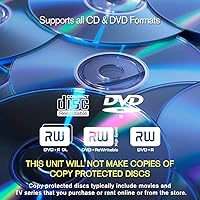
  • Media Support: Compatible with standard DVD-R, DVD-RW, CD-R, and CD-RW formats.

Related Reviews

PlexCopier PLEX-S7T-DVD-BK 1 to 7 DVD Duplicator
84%
94%
Standalone Efficiency
89%
Burning Speed
92%
Build Quality & Stability
96%
Archival Reliability (M-Disc)
87%
Interface & Ease of Use
More
Copystars DVD Duplicator Sata CD-DVD Burner 24X 1 to 1 DVD Copier Duplicator Tower
82%
85%
Performance
92%
Ease of Use
88%
Writing Speed
90%
Compatibility
84%
Reliability
More
Produplicator 1 to 5 Blu-ray BD BDXL M-Disc CD DVD Duplicator
85%
93%
Ease of Use
89%
Speed & Efficiency
85%
Build Quality
87%
Reliability
72%
Compatibility
More
Vantec NexStar JX NST-358SU3-BK USB 3.2 Gen 1 eSATA 3.5″/2.5″ SATA III HDD/SSD Enclosure
86%
92%
Performance & Data Transfer Speeds
90%
Ease of Setup
87%
Build Quality & Durability
78%
System Compatibility
85%
Thermals & Cooling
More
HotHat 12.5″ Portable DVD Player with Bluetooth and 10.1″ Swivel Screen
85%
87%
Display Quality
91%
Battery Life
75%
Bluetooth Connectivity
89%
Portability & Travel Convenience
85%
Usability & Ergonomics
More
Vantec NST-371C31-BK NexStar Gx USB 3.1 Gen 2 Type-C 3.5″ SATA HDD/SSD Enclosure
84%
89%
Performance
94%
Ease of Setup
85%
Build Quality
92%
Compatibility with Systems
88%
Data Transfer Speed
More
AVIDGRAM HDMI 2.1 Switch 5-in-1
86%
91%
Performance
88%
Ease of Use
93%
Compatibility with Devices
90%
Video Quality (8K/4K)
89%
Audio Quality (Dolby TrueHD/DTS-HD)
More
StarTech.com SATDUP11IMG 1:1 SATA Hard Drive Duplicator
86%
91%
Duplication Speed
88%
Ease of Use
89%
Build Quality
85%
Reliability
92%
Compatibility with Drives
More
Olay Super Serum 5-in-1 Skin Care, 1.7 Oz
87%
90%
Effectiveness for Hydration
86%
Anti-Aging Benefits
88%
Texture and Feel
91%
Absorption Speed
82%
Brightening Results
More
Cinema Secrets Pro Cosmetics Ultimate Corrector 5-In-1 Pro Palette No.1
86%
91%
Effectiveness for Color Correction
88%
Blendability
84%
Coverage Customization
85%
Longevity of Wear
93%
Suitability for All Skin Tones
More

FAQ

No, the PlexCopier PLEX-S5T-DVD-BK 1 to 5 DVD Duplicator is a completely standalone system that operates through its own controller and menu. You just plug it into a power outlet and you're ready to start cloning discs immediately without installing any drivers or software.
Unfortunately, no. This disc cloning system is specifically designed for non-encrypted content and will not bypass the copy protection found on commercial Hollywood movies. It is intended for duplicating your own original content or public domain material.

You can enable the protection feature through the onboard menu, but keep in mind it strictly requires you to use OptoDisc MID media for the protection to function. This is a great way to discourage casual piracy of your original professional videography work.

Not at all! The controller manages all five target drives simultaneously, so it takes the same amount of time to burn one disc as it does to burn five at the same speed. This makes batch production much more efficient for your workflow.

M-Discs are special archival discs designed to last for up to 1,000 years without data degradation. If you are a librarian or a legal professional, using this five-target copier tower with M-Discs ensures your records will stay readable for generations to come.

Since it has five high-speed drives and a built-in power supply, the internal cooling fans do make a noticeable whirring noise during long burn sessions. It is definitely more suited for a back office, church media room, or production studio rather than a quiet library desk.

Yes, you can set up to 64 password-protected accounts through the internal settings. This is really handy for offices or schools where you want to make sure only authorized people are burning discs and managing the system configuration.

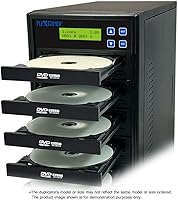
This standalone duplicator is a disc-to-disc system, meaning it does not include an internal hard drive for image storage. You will need to keep your master disc in the top reader drive while the other five are burning the copies.

Absolutely. The unit allows for firmware updates, which means you can download the latest software from the manufacturer and install it via a disc to keep the drives compatible with newer blank media brands or improved burning algorithms.

It's actually very intuitive. The simple four-button interface and LCD screen walk you through the basic copy and test functions, so most people are up and running within minutes of unboxing the tower without ever opening the manual.