
Overview

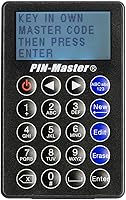
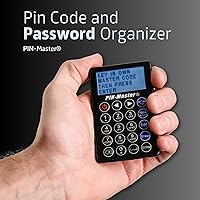
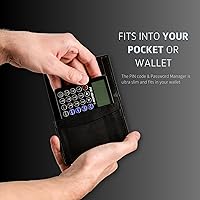
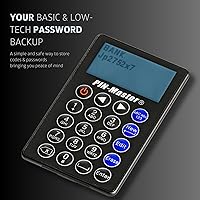
The PIN-Master PM-150 Password Keeper Device takes a refreshingly different approach to credential storage — no apps, no cloud, no subscriptions. It is a physical, fully offline device the size of a credit card, thin enough to slide into any wallet slot without a second thought. That alone sets it apart from the crowded field of software-based password managers. The metal alloy casing gives it a solid, purposeful feel — not flimsy like you might expect from something this small. For anyone who has grown tired of trusting sensitive data to servers they cannot see, this pocket password organizer offers a compelling low-tech alternative built around simplicity and physical control.

Features & Benefits

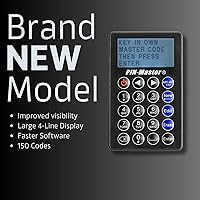
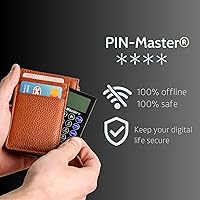
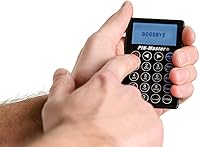
The wallet-sized keeper stores up to 150 password entries, each accepting up to 60 characters — plenty of room for long, complex credentials. The 4-line display is genuinely readable for a device this compact, though entering passwords via the small keypad does take patience, especially for lengthy ones. A single master code unlocks everything, and after four wrong attempts the device wipes itself clean. That auto-erase mechanism is the cornerstone of its security model. There is no Bluetooth, no Wi-Fi — nothing to intercept remotely. It runs on a lithium battery that comes included, so you are ready to set it up immediately without hunting for accessories.

Best For

This pocket password organizer makes the most sense for people who want something tangible rather than another subscription app. It is a natural fit for older adults or anyone who finds password manager interfaces confusing — the concept here is straightforward: type in a code, save it, done. Frequent travelers will appreciate having credentials on hand without needing a phone signal or a charged device. It also works well as an emergency backup for people who already use a digital manager but want a physical safety net in case of a forgotten master password or a locked account. Small households sharing a handful of access codes will find it practical as a shared offline record.

User Feedback

Buyers who have adopted this wallet-sized keeper tend to split into two clear camps. Those who love it praise the easy initial setup and many mention gifting it to elderly parents previously overwhelmed by digital tools. The metal body holds up well under daily wallet use, and durability gets consistent marks. The friction points are real, though. Entering credentials through a small keypad is slow, and users with long or complex passwords report the process requires genuine patience. The auto-erase protection divides opinion most sharply — many buyers find it genuinely reassuring, but a handful admit that fear of accidental lockout leads them to write their master code down elsewhere, which undercuts the premise a little.

Pros

  • Completely offline operation eliminates any risk of remote hacking or cloud data breaches.
  • Genuine credit-card dimensions mean it actually fits in a wallet slot without bulk.
  • Stores up to 150 entries with 60 characters each, covering most people’s full credential library.
  • Metal alloy build holds up well to the wear and tear of daily wallet use.
  • Auto-erase after four failed attempts provides a meaningful physical security safeguard.
  • Runs on an included battery with no charging cable required, ready to use out of the box.
  • Setup is approachable enough for non-technical users, including older adults with no prior experience.
  • No subscription fees or recurring costs after purchase.
  • Slim 0.16-inch profile makes it far less intrusive than carrying a small notebook.
  • Works independently of any phone, laptop, or internet connection.

Cons

  • Entering long or complex passwords via the small keypad is a slow, tedious process.
  • No backlight makes the 4-line display difficult to read in dim or low-light environments.
  • A forgotten master code means permanent, unrecoverable loss of all stored credentials.
  • No password generation feature, so users must create and vet their own strong passwords elsewhere.
  • Single-device storage means there is no built-in redundancy if the device is lost or damaged.
  • Manual data entry becomes a real chore when migrating a large existing password library onto the device.
  • The auto-erase feature, while useful, creates anxiety for users who fear accidental lockouts.
  • No way to export or back up stored data digitally if the battery dies unexpectedly.
  • Character input interface has a noticeable learning curve that some buyers find frustrating early on.

Ratings

The scores below for the PIN-Master PM-150 Password Keeper Device were generated by our AI rating engine after analyzing verified purchase reviews from buyers worldwide, with spam, bot-submitted, and incentivized feedback actively filtered out before any scoring was applied. The results reflect a transparent picture of where this pocket password organizer genuinely delivers and where real users have run into friction. Both the strengths and the recurring pain points are weighted equally so you can make a clear-eyed decision.

Portability
93%
Users consistently single out the form factor as the device's strongest attribute — it genuinely fits in a standard card slot without stretching the wallet. Travelers and commuters in particular appreciate having credentials on hand without needing to unlock a phone or find a signal.
A small number of buyers with slim cardholders note that even at 0.16 inches, it adds just enough thickness to make a tight wallet feel noticeably stiffer over time. It is a minor gripe, but worth knowing if you carry a minimalist card case.
Offline Security
88%
The fully offline design is the core reason many buyers choose this over app-based alternatives. With no Bluetooth or Wi-Fi, there is simply no remote attack surface, and that peace of mind resonates strongly with users who have experienced or read about cloud data breaches.
It is important to understand that offline storage does not equal foolproof security — physical loss or theft of the device itself remains a real risk. The auto-erase feature helps, but it only activates after four attempts, not instantly.
Auto-Erase Protection
79%
21%
For the majority of buyers, the four-attempt auto-erase is one of the most reassuring features on the device. Knowing that a stolen or found unit cannot be brute-forced into revealing credentials gives users genuine confidence when carrying it daily.
A meaningful minority of buyers find the same feature anxiety-inducing rather than reassuring. The fear of accidentally triggering the wipe — particularly for users who occasionally mistype their master code — leads some to store their master code elsewhere, which partially undermines the security model.
Ease of Setup
82%
18%
Non-technical buyers, including older adults setting up the device without help, consistently report that the initial configuration is more approachable than expected. There are no apps to pair, no accounts to register, and no wireless handshake to troubleshoot — just a master code and a keypad.
The navigation logic for editing or deleting existing entries has a steeper learning curve than the initial setup. Several buyers noted they needed to re-read the manual more than once before the menu structure clicked for them.
Build Quality
86%
The metal alloy casing earns consistent praise from buyers who carry the device every day. Unlike plastic alternatives, it shows minimal signs of surface wear after months of wallet use, and it does not flex or creak under normal handling pressure.
A few buyers reported that the keypad buttons feel slightly shallow in their travel, which can lead to occasional missed inputs when typing quickly. The casing itself holds up well, but the tactile feedback on the keys is not quite as premium as the housing suggests.
Display Readability
67%
33%
For a 4-line screen on a credit-card-sized device, the display is clearer than most buyers anticipate. In good ambient light — at a desk, in a cafe, or outdoors during the day — reading stored entries is comfortable and the text size is workable.
The absence of a backlight is a genuine limitation that surfaces repeatedly in feedback. Trying to read the display in a dim restaurant, a dark car, or a hotel room with the lights off requires angling the device toward a light source, which feels awkward in practice.
Data Entry Speed
51%
49%
Once familiar with the keypad layout, experienced users find a rhythm for entering shorter codes like PINs and short passwords. Entry of simple 4-to-8 character codes is fast enough to not be a real barrier in everyday use.
Entering long, complex passwords — the kind that actually provide strong security — is genuinely slow and error-prone on the small physical keypad. Multiple buyers with 20-plus character credentials describe the entry process as tedious enough that they opted to store only simplified versions, which is not ideal from a security standpoint.
Storage Capacity
89%
One hundred and fifty entries with 60 characters each covers the full credential library for the vast majority of home users. Buyers who switched from a physical notebook or sticky notes find the capacity more than sufficient for everything they need to store.
Power users managing credentials for large teams or extensive account portfolios may bump against the 150-entry ceiling faster than expected. There is no way to expand storage or offload entries to an archive, so the limit is absolute.
Value for Money
72%
28%
For buyers who want a one-time purchase with no subscription, the pricing compares favorably against years of password manager fees. The metal build and the included battery add to the sense that you are getting a durable object rather than a disposable gadget.
At its price point, some buyers expect a backlight, faster key response, or some form of data export as standard features. Compared to free or low-cost password manager apps that offer far more functionality, the value calculation depends entirely on how much you prioritize offline operation.
Master Code System
74%
26%
Using a single master code to protect all stored credentials is a clean, understandable security model that non-technical users grasp immediately. There is no tiered access, no secondary authentication to configure, and no recovery email — just one code you need to remember.
The single-code system also means there is no fallback if that code is forgotten. Unlike software managers that offer account recovery flows, this wallet-sized keeper offers no second chances, which places a real cognitive burden on users who are not accustomed to memorizing security codes.
Battery Performance
83%
Because the device has no wireless radios and uses a simple monochrome display, the included lithium battery lasts considerably longer than buyers typically expect. Most users report months of regular use before needing a replacement, which keeps ongoing costs minimal.
When the battery does eventually die, any unsaved or recently added entries may be at risk depending on how the device handles sudden power loss. There is also no battery level indicator, so the first sign of a dying battery is often the device simply failing to turn on.
Durability Over Time
84%
Daily wallet users report that the metal alloy body holds its shape and finish well over six or more months of consistent carry. It resists the minor bending forces that would crack a plastic card and does not pick up deep scratches from normal pocket contact.
The display, while protected by the casing, is not covered by any advertised scratch resistance rating. A handful of long-term users noted fine surface marks on the screen area after extended carry alongside coins or keys in a pocket.
Low-Light Usability
44%
56%
The device works perfectly well in well-lit environments, and the 4-line display provides adequate contrast for daytime use in most settings. For users who only ever access their credentials at a desk or in a bright room, the lighting situation is a non-issue.
Without any backlight, the device is nearly unusable in truly dark or low-light conditions without a secondary light source. This is one of the most frequently cited frustrations in buyer feedback and it is a notable gap for a device intended for travel and on-the-go use.
Manual Entry Reliability
63%
37%
The keypad is responsive enough under normal conditions, and short entries like 4-to-6 digit PINs can be typed in quickly once the user is comfortable with the layout. Most buyers adapt to the input method within the first week of use.
Longer entries expose the keypad’s limitations more clearly — miskeys are common when typing quickly, and there is no autocorrect or visual cursor feedback that makes catching errors easy. Reviewing a freshly entered 30-character password character by character on a 4-line screen is not a comfortable experience.

Suitable for:

The PIN-Master PM-150 Password Keeper Device is a strong fit for anyone who wants a tangible, no-nonsense way to store credentials without depending on an app, a subscription, or an internet connection. It is particularly well-suited to older adults or less tech-savvy users who find password manager software confusing or stressful — the concept here is simple enough to explain in one sentence. Frequent travelers benefit from having all their codes accessible without needing a charged phone or a data connection, which can matter more than people expect when crossing time zones or dealing with roaming issues. It also works well as a physical backup layer for people who already use a digital password manager but want a failsafe they can hold in their hand. Anyone who has grown genuinely uneasy about cloud breaches or data harvesting will find the fully offline design a practical, low-anxiety alternative to trusting servers they cannot control.

Not suitable for:

The PIN-Master PM-150 Password Keeper Device is not the right choice for users who manage a high volume of frequently changing passwords and expect quick, frictionless access — entering credentials through a small physical keypad is slow by design, and that will frustrate anyone used to autofill. It is also a poor fit for people who need to sync credentials across multiple devices or share access with remote team members, since there is no connectivity whatsoever. Power users who rely on features like password generation, breach alerts, or secure notes will find this pocket password organizer far too bare-bones for their needs. The auto-erase function, while a genuine security measure, is a real liability for users prone to forgetting codes — losing your master code means losing everything stored on the device with no recovery option. If you are already happy with a reputable software-based password manager, this wallet-sized keeper adds redundancy but probably not enough utility to justify a place in your daily carry.

Specifications

  • Model Number: The device is officially designated as model PM-150 by the manufacturer PIN-Master.
  • Dimensions: The unit measures 3.37″ wide by 2.125″ tall by 0.16″ thick, matching a standard credit card footprint.
  • Weight: The device weighs 2.11 ounces, light enough to sit in a wallet without noticeable bulk.
  • Body Material: The outer casing is constructed from a metal alloy, providing rigidity and resistance to everyday pocket and wallet wear.
  • Display: A 4-line screen displays stored entries and menu options, offering readable output for a device of this size.
  • Storage Capacity: The device holds up to 150 individual password or PIN entries, each supporting up to 60 characters.
  • Security Method: Access is protected by a single user-defined master code, with all stored data permanently erased after four consecutive incorrect entry attempts.
  • Connectivity: The device operates entirely offline with no Bluetooth, Wi-Fi, USB data transfer, or any form of wireless communication.
  • Battery Type: One lithium metal battery is required and is included in the package, so the device is ready to use upon arrival.
  • Form Factor: The credit-card profile allows the device to slide into a standard wallet card slot without modification or added bulk.
  • Manufacturer: PIN-Master is the manufacturer and brand responsible for the design and production of this device.
  • Release Date: The product was first made available for purchase in December 2023.
  • Data Recovery: There is no data recovery or backup mechanism; if the master code is lost or the auto-erase triggers, all stored entries are permanently deleted.
  • Input Method: Passwords and codes are entered manually using the device’s built-in physical keypad.
  • Power Source: The device is battery-powered only and does not support USB charging or any wired power input.

Related Reviews
AWOL Vision MW-150 150″ Projector Screen
77%
88%
Image Flatness
83%
Build Quality
61%
Shipping & Packaging
67%
Assembly Experience
79%
Matte White Performance
More
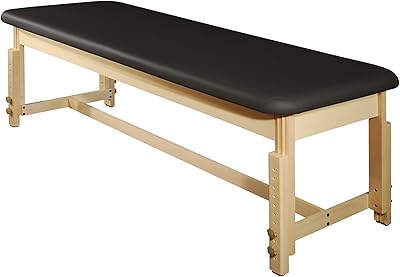
Master Massage Tables Master Harvey Treatment Stationary Table
88%
88%
Overall Comfort
93%
Build Quality
85%
Ease of Assembly
90%
Stability & Support
91%
Durability
More
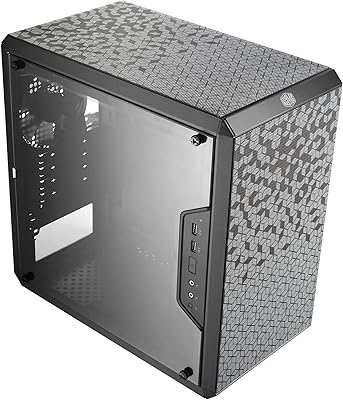
Cooler Master Q300L
Cooler Master Q300L
79%
92%
Airflow & Thermal Performance
61%
Build Quality & Materials
94%
Value for Money
88%
Ease of Assembly
76%
Cable Management
More
Cooler Master CMP510 Case
87%
91%
Cooling Performance
88%
Build Quality
85%
Cable Management
89%
Modularity & Customization
93%
Airflow & Ventilation
More
COSRX Master Patch Intensive
87%
88%
Effectiveness in Reducing Blemishes
91%
Skin Sensitivity and Comfort
93%
Discreetness and Visibility
90%
Ease of Use
85%
Patch Adhesion and Durability
More
Intermatic AG3000 HVAC Surge Protective Device
82%
88%
Surge Protection Effectiveness
91%
TPMOV Technology Reliability
84%
Build Quality & Enclosure
86%
Ease of Installation
73%
LED Status Indicator
More
GIGABYTE Z790 AORUS Master X Motherboard
81%
93%
VRM & Overclocking Performance
88%
BIOS Usability
91%
M.2 Storage Flexibility
89%
Build Quality & Component Feel
54%
Case Compatibility
More
Cooler Master HAF 700 EVO E-ATX Case
81%
93%
Airflow Performance
91%
Build Quality & Materials
84%
LCD Front Panel (IRIS Display)
94%
Interior Space & Layout
72%
Cable Management
More
GIGABYTE Z590 AORUS Master Motherboard
88%
92%
Performance
95%
Networking Speed
88%
Build Quality
85%
Ease of Setup
91%
Power Delivery Stability
More
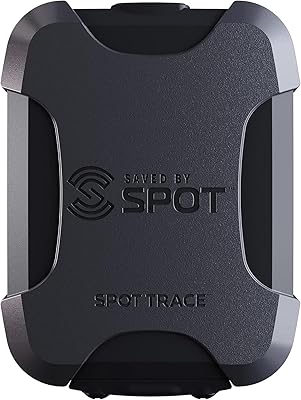
Spot Trace Satellite Tracking Device
81%
90%
Tracking Accuracy
95%
Global Coverage
92%
Battery Life
88%
Ease of Setup
94%
Portability
More

FAQ

Unfortunately, there is no recovery option. If you forget your master code and exhaust your four attempts, all stored data is permanently wiped. It is worth keeping your master code written somewhere extremely secure, separate from the device itself, precisely for this reason.

No, and that is intentional. The PIN-Master PM-150 Password Keeper Device has no wireless connectivity and no data port, so it never connects to any external device. Everything is self-contained and managed directly on the unit.

Battery life will vary depending on usage frequency, but because the device has no wireless radios and a simple display, the included lithium battery tends to last a long time under normal use. PIN-Master does not publish an official battery life estimate, but most users report months of use before needing a replacement.

Absolutely. Each entry holds up to 60 characters, so it is perfectly suited for Wi-Fi passwords, alarm PINs, safe combinations, bank codes, or any short credential you want to keep accessible. The device does not distinguish between entry types.

Setup is relatively straightforward. You choose a master code, then begin adding entries one by one using the keypad. There are no apps to install, no accounts to create, and no wireless pairing to troubleshoot. Most non-technical users are up and running within a few minutes, though getting comfortable with the keypad navigation does take a little practice.

This is one of the more common criticisms from buyers. The display does not have a backlight, so reading it in dim environments like a dark restaurant or a car at night can be tricky. If you frequently need to access credentials in low-light situations, that is worth factoring into your decision.

You can edit or delete individual entries directly on the device through its menu system. It is not as fast as tapping a touchscreen, but the process is manageable once you are familiar with the navigation.

Not exactly. This wallet-sized keeper is best understood as a physical backup or an offline alternative for people who prefer not to use software-based solutions. It does not generate passwords, check for breaches, or sync across devices. If you need those features, a dedicated password manager app will serve you better. That said, for users who want simplicity and offline security above all else, it holds its own.

The metal alloy body gives it more resilience than a plastic card, but no credit-card-sized device is indestructible. Carrying it in a front wallet pocket rather than a back trouser pocket is the safer habit, especially over the long term.

Technically yes — the device stores up to 150 entries, so a household could theoretically dedicate sections of storage to different family members, all accessed under the same master code. Keep in mind that this means everyone sharing the device also shares access to all entries, so it works best in situations where mutual access is acceptable, such as a couple or small family managing shared accounts.