Overview

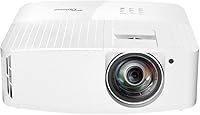
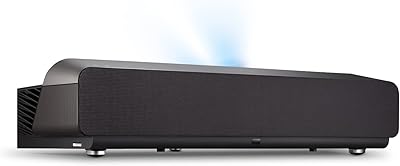
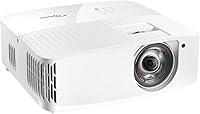
The Optoma UHD35STX Short Throw 4K Projector is built for people who want a genuinely large screen without dedicating an entire room to the setup. That short throw ratio is the real selling point here — you can place this Optoma unit just a couple of feet from the wall and still fill it with a sizable image. Optoma has a solid reputation in the projector space, and this model leans firmly into gaming and casual home theater use. At its price tier, buyers reasonably expect sharp visuals and low input lag, and for the most part, this short-throw projector delivers — though brightness in well-lit spaces is a genuine trade-off worth knowing about upfront.
Features & Benefits

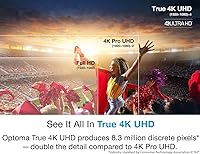
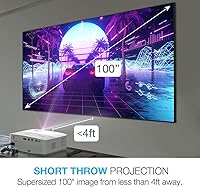
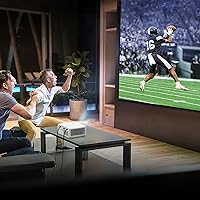
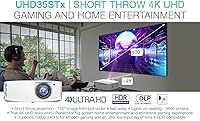
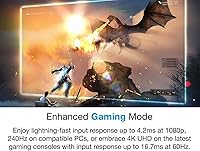
The short throw capability lets you project a 100-inch-plus image from just a few feet back, which practically eliminates the problem of people walking through the beam. True 4K UHD resolution at 3840x2160 makes a noticeable difference when watching detailed film content or noticing fine textures in games. Four-corner keystone correction is genuinely useful for imperfect rooms — you are not locked into a perfectly perpendicular setup. The Enhanced Gaming Mode is where this Optoma unit earns credibility with console players; input lag drops enough that fast-paced gameplay feels responsive rather than sluggish. Connectivity covers HDMI and USB, so plugging in a PS5, streaming stick, or laptop is straightforward. Lights-on performance is passable but works noticeably better with curtains drawn.

Best For

This short-throw projector makes the most sense for a specific type of buyer: someone who wants a big screen but lacks a blacked-out home theater room or sufficient throw distance to work with. Apartment dwellers in particular tend to find that the UHD35STX solves a real problem — limited room depth stops most projectors from being practical, and this one sidesteps that entirely. Console gamers running a PS5 or Xbox Series X will appreciate the responsiveness available in Gaming Mode. It is also a strong pick for anyone upgrading from 1080p, since the jump to true 4K is immediately visible on screen. Less ideal for buyers who watch frequently in bright, sunlit rooms during daytime hours.

User Feedback

With a 3.8 out of 5 from over 400 reviewers, the UHD35STX sits in honest middle ground — well-regarded but not universally praised. Buyers consistently highlight image sharpness and the convenience of the short throw distance as genuine strengths, and gamers mention that input lag in Gaming Mode feels noticeably better than typical projector experiences. On the downside, fan noise comes up regularly as a real annoyance in quiet environments, and several reviewers note that color accuracy out of the box needs adjustment before the picture looks its best. Some buyers who compared it to long-throw models at a similar price felt the brightness trade-off was not worth it. Setup is manageable but not entirely hands-off.

Pros

  • Large-screen projection from just a couple of feet away solves real space constraints most projectors cannot.
  • True 4K UHD resolution produces noticeably sharp detail in both films and games.
  • Enhanced Gaming Mode delivers low enough input lag to make fast-paced console gameplay feel genuinely responsive.
  • Four-corner keystone correction makes placement flexible without requiring a perfectly aligned room setup.
  • HDMI and USB connectivity covers modern consoles, PCs, and streaming sticks without needing adapters.
  • Short throw design eliminates shadow interference and keeps cable runs short and manageable.
  • The UHD35STX is a strong upgrade path for anyone coming from a 1080p projector — the difference is immediately visible.
  • Acceptable lights-on viewing performance for casual use when combined with modest room dimming.
  • Compact footprint and reasonable weight make repositioning between rooms practical.
  • Optoma's established presence in the projector market means firmware support and documentation are generally reliable.

Cons

  • Fan noise is a recurring complaint, particularly noticeable during quiet scenes or in silent rooms at night.
  • Out-of-the-box color calibration often needs manual adjustment before the image looks accurate and balanced.
  • Brightness in fully lit daytime rooms is a real limitation that frustrates buyers who did not expect the trade-off.
  • Some buyers feel the brightness-to-price ratio is less competitive compared to long-throw models at a similar spend.
  • Setup is not entirely plug-and-play — achieving optimal image quality requires time and some technical comfort.
  • The 3.8 out of 5 average rating across hundreds of reviews reflects genuine inconsistency in buyer satisfaction.
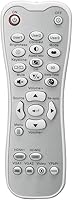
  • Remote control and menu navigation have drawn criticism for being less intuitive than expected at this price tier.
  • No lens shift means physical placement and keystone correction have to do more of the alignment work.

Ratings

The scores below for the Optoma UHD35STX Short Throw 4K Projector were generated by our AI engine after analyzing verified purchase reviews from buyers worldwide, with spam, bot-submitted, and incentivized feedback actively filtered out. Each category reflects the genuine distribution of praise and frustration found across hundreds of real ownership experiences. Both the strengths that make this unit stand out and the pain points that hold it back are represented transparently.
Short Throw Performance
88%
Owners consistently describe the short throw capability as the single biggest reason they chose this unit, and most feel it delivers on that promise. Being able to fill a wall from just a few feet away genuinely changes what is possible in a standard apartment or living room setup.
A small number of buyers found the minimum throw distance still too limiting for very small rooms, particularly when targeting screen sizes above 120 inches. Edge sharpness at the widest projection angles has also drawn occasional criticism from more demanding viewers.
Image Sharpness & 4K Detail
83%
The jump to true 4K UHD resolution is immediately noticeable when coming from a 1080p projector, particularly in detailed game environments and high-bitrate film content. Reviewers frequently call out fine textures and crisp on-screen text as highlights of the viewing experience.
Achieving the sharpest possible image requires manual focus adjustment and often some time spent in the settings menu — out-of-the-box sharpness is good but not fully optimized. A handful of users also noted softness toward the corners of the projected image at larger sizes.
Gaming Responsiveness
84%
Console gamers using PS5 and Xbox Series X report that the dedicated Gaming Mode produces a genuinely responsive feel during fast-paced gameplay, with input lag low enough that most players notice no disadvantage compared to a flat-panel TV. This is one of the most consistently praised aspects across gaming-focused reviews.
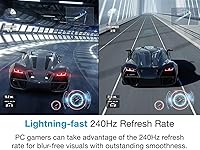
Gaming Mode does require manual selection in the menu — it is not automatically detected or applied when a console is connected. Some PC gamers also noted that higher refresh rate support could be better, and a few experienced minor visual trade-offs when Gaming Mode was enabled alongside HDR content simultaneously.
Brightness & Ambient Light Handling
61%
39%
In moderately dimmed rooms with blinds drawn, the brightness is adequate for an enjoyable viewing experience and holds up reasonably well for evening movie sessions. The lights-on mode does provide a usable picture in controlled ambient light conditions better than older projector generations.
Full daylight viewing with open windows is where this Optoma unit falls noticeably short of buyer expectations, especially given its price tier. Multiple reviewers specifically mentioned disappointment after comparing brightness output to long-throw projectors at similar price points, making room light control essentially non-optional for a satisfying image.
Color Accuracy
67%
33%
After calibration, reviewers describe the color reproduction as rich and cinematic, with DLP technology providing consistent hues across the projection area. Gamers in particular appreciated how vibrant game environments looked once color temperature and saturation were dialed in.
Out-of-the-box color accuracy is a recurring complaint — default settings tend to push saturation too high and skin tones can look unnatural without adjustments. Buyers who lack confidence in display calibration may find the default picture mode underwhelming and not representative of what the projector can actually produce.
Fan Noise
54%
46%
During loud gaming sessions or action-heavy films, the fan noise blends into the background enough that most users report it does not significantly detract from the experience in those specific contexts. Some owners in louder households have noted it was never a meaningful concern for their use case.
Fan noise is one of the most frequently mentioned disappointments in the review pool, particularly for users who watch quiet dramas, late-night content, or use the projector in bedrooms. The consistent hum is audible during low-volume scenes and has been described by several buyers as distracting enough to affect overall satisfaction with the unit.
Setup & Ease of Use
69%
31%
Physical setup is straightforward — the unit is compact enough to place on a shelf or table without specialized mounting, and connecting a console or streaming stick via HDMI is simple. The four-corner keystone correction provides enough flexibility to get a usable image even in imperfect room configurations.
Getting to a truly optimized picture requires navigating a menu system that multiple reviewers described as unintuitive and slow to respond. First-time projector buyers in particular noted that the overall configuration process took considerably longer than expected before they were satisfied with the results.
Remote & Interface Usability
62%
38%
Basic remote functions like input switching, volume, and mode selection work reliably, and the layout covers the core controls buyers use most frequently during daily operation. The included remote feels reasonably solid in hand compared to some projectors in lower price brackets.
The remote and on-screen interface have drawn consistent criticism for feeling dated relative to the projector's price tier, with menu navigation described as sluggish and the button layout as non-intuitive. Several reviewers expressed frustration that adjusting settings mid-session required more steps than felt necessary.
Build Quality & Design
77%
23%
The physical construction feels appropriately solid for a unit at this price level, with a finish and weight that suggest durability for long-term tabletop or shelf use. Most owners report no issues with the housing, port placements, or physical controls after extended periods of use.
A few reviewers noted that the ventilation design contributes to the fan noise issue, and some felt the overall industrial aesthetic does not blend naturally into living room decor. The lens placement and port layout on certain sides can also make cable management slightly awkward depending on room configuration.
Connectivity & Compatibility
79%
21%
HDMI and USB port coverage handles the majority of real-world use cases without requiring adapters, and the unit recognized modern consoles and streaming sticks without driver or format issues in most reported cases. Plug-and-play compatibility with PS5 and Xbox Series X specifically was frequently confirmed by console-focused reviewers.
Buyers looking for wireless connectivity or built-in smart TV functionality will find this unit lacking, as there is no integrated streaming platform or Wi-Fi streaming support. The port count is functional but minimal, and users running multiple HDMI sources simultaneously will need an external switch.
Value for Money
66%
34%
For buyers whose primary constraint is limited throw distance, the UHD35STX delivers a capability that genuinely justifies a premium over standard projectors — and that specific value proposition is difficult to replicate at a lower price point. Reviewers who bought it for that exact reason tend to rate it favorably on value.
Buyers who evaluated it purely on brightness, out-of-box usability, or price-to-lumen output relative to long-throw competitors frequently felt the value proposition was weaker than expected. The 3.8 out of 5 aggregate rating reflects a segment of buyers who feel the price demands more consistent performance than the unit currently delivers.
Keystone & Image Geometry
74%
26%
Four-corner correction gives users meaningful flexibility when the projector cannot be positioned perfectly perpendicular to the screen, which is a common real-world scenario in furnished living rooms and bedrooms. Most owners found it sufficient to achieve a well-shaped image without significant hassle.
Heavy reliance on digital keystone correction can introduce minor image quality degradation compared to optical alignment, and purists who prefer zero digital processing will find the trade-off unsatisfying. Extreme correction angles produce noticeably softer edges that reviewers with perfectionist tendencies consistently flagged.
HDR Performance
71%
29%
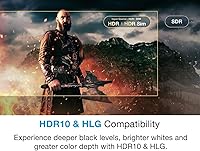
For HDR-mastered content on supported streaming platforms and 4K Blu-ray, the projector produces a visible improvement in highlight and shadow detail compared to standard dynamic range sources. Reviewers who specifically tested HDR game titles noted that the expanded range adds meaningful depth to visually complex scenes.
HDR performance is constrained by the projector's peak brightness, which limits how dramatically the dynamic range can be expressed compared to premium flat-panel displays. Some reviewers noted that HDR content occasionally looked washed out in anything other than a fully darkened room, reducing the perceived benefit of the format.
Long-Term Reliability
73%
27%
Given the product has been on the market since mid-2022, a reasonable number of long-term owners have weighed in, and the majority report no significant hardware failures or noticeable lamp degradation over extended use periods. Optoma's brand consistency in the projector space provides a degree of confidence in component longevity.
A smaller subset of reviews mentions lamp or optics issues emerging after 12 to 18 months of regular use, and warranty support experiences described in reviews have been mixed. Buyers planning heavy daily use should factor in long-term lamp replacement costs when evaluating the overall ownership cost of this unit.

Suitable for:

The Optoma UHD35STX Short Throw 4K Projector was clearly designed with a specific buyer in mind, and if you fit that profile, it is genuinely hard to beat at this tier. It works best for apartment and condo dwellers who simply do not have the room depth that a standard projector demands — being able to place the unit just a couple of feet from the wall and still get a large, sharp image is a practical problem solved. Console gamers running a PS5 or Xbox Series X will find the low-latency Gaming Mode makes a real difference in fast-paced titles where display responsiveness matters. It is equally well-suited for someone building a first home theater setup who wants true 4K detail without the hassle of ceiling mounting, long cable runs, or total room blackout. Buyers upgrading from a 1080p projector will notice the resolution improvement immediately, particularly on detailed film content and open-world games.
Not suitable for:

The Optoma UHD35STX Short Throw 4K Projector is the wrong choice for buyers who regularly watch content in bright, sunlit living rooms without the option to draw curtains or dim the space. At its price point, some buyers reasonably expect brightness to match or exceed what long-throw projectors in the same range can deliver — and this unit falls short of that bar in well-lit conditions. If fan noise is a dealbreaker for you, particularly during quiet films or late-night sessions, reviews suggest this is a persistent issue worth taking seriously before purchasing. Buyers who expect a perfectly calibrated, ready-to-use picture straight out of the box may find the default color settings disappointing, as some tuning is typically needed to get the image looking its best. Those who plan to use it primarily in a large, dedicated home theater room with a proper throw distance would likely get more value and brightness from a standard long-throw model at a comparable price.
Specifications

  • Brand: Manufactured by Optoma, a brand with an established track record in DLP projection technology for both consumer and professional use.
  • Model: The model designation is UHD35STX, part of Optoma's gaming-focused short throw projector lineup.
  • Resolution: Native display resolution is 3840x2160, delivering true 4K UHD image detail across the full projection area.
  • Display Technology: Uses DLP (Digital Light Processing) technology, which typically produces sharp edges, reliable color consistency, and good motion handling.
  • Throw Type: Short throw design allows a large projected image to be produced from a significantly closer distance than standard projectors require.
  • Keystone Correction: Four-corner keystone correction lets users digitally adjust each corner of the image independently to compensate for angled or uneven placement.
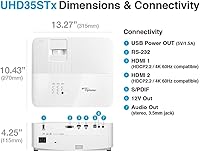
  • Connectivity: Includes HDMI and USB ports, supporting direct connection to modern gaming consoles, PCs, laptops, and streaming devices.
  • Gaming Mode: Enhanced Gaming Mode reduces input lag to levels suitable for responsive console and PC gameplay on both PS5 and Xbox Series X.
  • Lights-On Viewing: The projector includes brightness features intended to support viewing in ambient light conditions, though performance improves noticeably in dimmed rooms.
  • Dimensions: Physical footprint measures 12.4 x 10.63 x 4.53 inches, making it compact enough for shelf or table placement in most living spaces.
  • Weight: Unit weighs 10.25 pounds, which is manageable for repositioning but worth noting if you plan to ceiling mount it.
  • Aspect Ratio: Supports standard 16:9 widescreen aspect ratio, matching the native output of modern consoles, Blu-ray players, and streaming content.
  • Color Technology: Optoma's DLP-based color processing is designed to reproduce a wide color range suitable for HDR-compatible content in gaming and film.
  • HDR Support: The UHD35STX is compatible with HDR content formats, allowing high dynamic range source material to be displayed with expanded contrast detail.
  • Audio Output: Includes a built-in speaker for basic audio output, though most users at this level will connect external sound systems for a better experience.
  • Availability: First listed on Amazon in August 2022, with the product having accumulated over 400 customer ratings since launch.
  • Best Sellers Rank: Ranked #517 in the Video Projectors category on Amazon, reflecting steady sales performance within a competitive product segment.
  • Warranty: Optoma typically provides a limited warranty on this class of projector; buyers should verify current warranty terms directly with Optoma at time of purchase.

Related Reviews
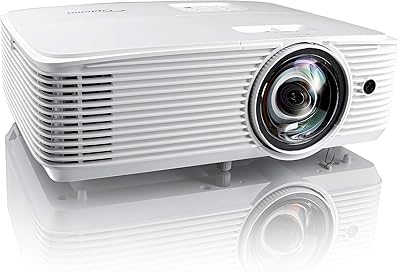
KOGATA GC355 Short Throw Smart Projector
77%
88%
Short-Throw Performance
84%
Auto-Focus & Keystone Correction
79%
Image Quality & Clarity
63%
Brightness & Ambient Light Handling
74%
Built-in Smart OS & App Ecosystem
More
Optoma GT1090HDR Short Throw Laser Projector
82%
89%
Brightness & Ambient Light Performance
82%
Image Quality
93%
Short-Throw Convenience
91%
Laser Longevity & Maintenance
73%
Value for Money
More
Optoma EH412ST Short Throw 1080P Projector
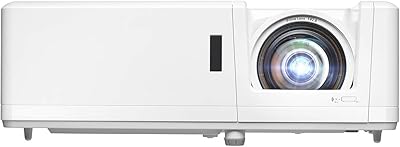
86%
88%
Brightness in Well-Lit Environments
91%
Setup and Installation Ease
84%
Image Quality and Clarity
89%
Portability and Weight
72%
Sound Quality (Built-In Speaker)
More
ViewSonic X1000-4K Ultra-Short Throw Projector
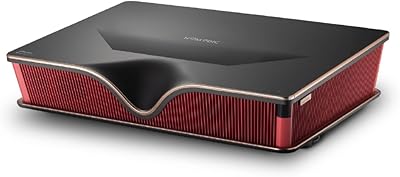
87%
92%
Image Quality
70%
Brightness in Well-Lit Rooms
85%
Sound Quality
95%
Space-Saving Design
88%
Ease of Setup
More
Formovie Theater Ultra Short Throw 4K Laser Projector
86%
94%
Picture Quality
88%
Ease of Setup
85%
Audio Performance
77%
Brightness
90%
Connectivity
More
NOMVDIC P2000 Ultra Short Throw Projector
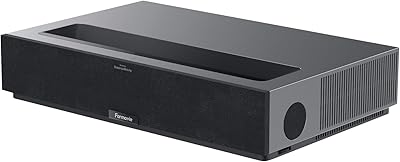
75%
91%
Image Quality
73%
Brightness Performance
89%
Color Accuracy
93%
Ultra Short Throw Placement
77%
Built-in Audio
More
Hisense L9Q Ultra Short Throw Laser Projector
80%
93%
Image Brightness
91%
Color Accuracy
67%
Black Level & Contrast
74%
Setup & Installation
82%
Smart Platform (Google TV)
More
Hisense PX3-PRO Ultra Short Throw Projector
79%
93%
Picture Quality
94%
Color Accuracy
49%
Ambient Light Handling
88%
Gaming Performance
71%
Value for Money
More
Optoma ML1080ST Ultra-Portable Short Throw Full HD Laser Projector
84%
91%
Display Quality
94%
Portability
88%
Ease of Setup
85%
Connectivity Options
92%
Gaming Performance
More
AWOL VISION LTV-2500 UST Laser Projector
78%
93%
Picture Quality
91%
Color Accuracy
88%
HDR Performance
63%
Setup & Installation
61%
Screen Compatibility & Requirements
More

FAQ

That is really the headline feature of the UHD35STX. You can typically get a 100-inch image from roughly 4 to 5 feet away from the screen or wall, though the exact distance depends on your screen size target. This makes it genuinely practical in standard living rooms and bedrooms where a traditional projector would require you to place it halfway across the room.

The Gaming Mode is legitimate and makes a real practical difference. Input lag in that mode drops to levels where fast-paced games — shooters, sports titles, action games — feel responsive rather than sluggish. If you are coming from a TV and are worried about noticeable lag, the dedicated mode addresses that concern meaningfully.

Honestly, with curtains fully open and direct sunlight in the room, you will struggle. This short-throw projector performs best when ambient light is at least partially controlled. Closing blinds or waiting until evening makes a significant difference in picture quality and contrast. It is not a dealbreaker, but do not expect TV-level brightness in fully lit conditions.

Yes, you just connect via HDMI and it works. Both consoles are recognized without any complicated setup. For the best experience, switch to Gaming Mode in the projector menu and make sure your console output resolution is set to 4K if your content supports it.

Fan noise is one of the more consistent complaints from real-world owners. It is audible in quiet rooms, particularly during scenes with low audio volume or late at night. It is unlikely to bother you during loud action sequences or gaming sessions, but if you watch quiet dramas or are sensitive to background hum, it is worth factoring in before buying.

Most owners find the out-of-the-box color calibration a bit off — often too saturated or with inaccurate white balance. Spending 20 to 30 minutes adjusting brightness, contrast, and color temperature through the menu will noticeably improve the image. It is not a difficult process, but do not expect a perfectly calibrated picture the moment you plug it in.

Yes, it supports ceiling mounting, and the four-corner keystone correction helps with alignment once it is up. That said, at just over 10 pounds it is not ultralight, so make sure your mount is rated for the weight. Ceiling installation also typically requires longer HDMI cable runs, which adds a bit of setup complexity.

This Optoma unit can project images ranging from roughly 28 inches up to around 300 inches diagonally, depending on throw distance. For typical living room use, most owners set it up in the 100 to 120-inch range, which is where the image sharpness and brightness both hold up well at 4K resolution.

That depends entirely on your room situation. If you have a long room and do not mind the distance, a comparable long-throw projector will often give you more brightness for the money. But if your space genuinely limits how far back you can place a projector, the short throw design solves a real problem that brightness specs simply cannot fix. Buy it for the placement flexibility, not as a straight brightness-per-dollar comparison.

A plain white or light gray wall works fine for casual use, and many owners start that way. A proper projector screen will improve contrast and sharpness noticeably, especially in any ambient light. If image quality matters to you, even a basic fixed-frame screen is worth the additional investment alongside this unit.

Where to Buy