Overview

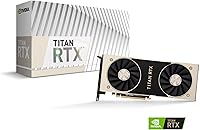
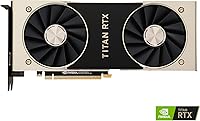
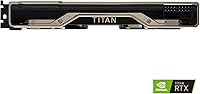
The NVIDIA Titan RTX 24GB Graphics Card occupies a specific and deliberate niche — it's a workstation-class GPU built for professionals who push compute boundaries, not a card chasing gaming benchmarks. Released in late 2018 on NVIDIA's Turing architecture, this Titan RTX was positioned squarely between consumer enthusiast cards and full Quadro workstation hardware. Its most striking credential is 24 GB of VRAM, which remains rare even by today's standards. The dual-slot design measures 12.95 x 3.66 x 6.89 inches, so case compatibility needs checking before purchase. Set expectations accordingly: this is a tool for creators and researchers, not a pure gaming rig.
Features & Benefits

At the core of the Turing-based workstation card sit 4608 CUDA cores boosting up to 1770 MHz, which translates into serious parallel processing muscle for compute-heavy tasks. The 24 GB GDDR6 memory runs at 14 Gbps, delivering up to 672 GB/s of bandwidth — critical when loading massive textures or large training datasets entirely on-card. The 72 RT cores handle real-time ray tracing in applications like Blender Cycles or V-Ray, while the 576 Tensor Cores accelerate AI inference in frameworks like PyTorch. NVLink support allows pairing two cards for a combined 48 GB memory pool, and HDMI 4K output rounds out a well-considered feature set.

Best For

NVIDIA's professional GPU was built for people who regularly hit VRAM walls — 3D artists rendering complex scenes in Redshift, VFX teams juggling multi-layer compositing, and architects visualizing large building models in real time. Video editors cutting multi-stream 4K or 8K timelines in DaVinci Resolve will find the massive memory headroom genuinely useful, not theoretical. Machine learning researchers running mid-scale PyTorch or TensorFlow experiments can load more of the model and data on-card, reducing iteration time. It also serves scientific computing workflows where CUDA-accelerated simulations are the bottleneck. If you need a stable, certified workstation GPU rather than the latest consumer card, this Titan RTX fits.

User Feedback

Across 107 ratings averaging 4.3 out of 5, the clearest theme from owners is satisfaction with the on-card VRAM capacity — professionals report it handles workloads that simply crash or stall on 8 or 16 GB cards. Thermal behavior is a recurring practical note: the card runs warm under sustained load, and users in compact cases recommend ensuring strong airflow or active exhaust management. A small number of Linux users have encountered driver quirks, though most report stable operation once properly configured. On the gaming front, buyers expecting consumer-level performance per dollar were sometimes disappointed — newer RTX cards outpace it there. Long-term build quality feedback is consistently positive.

Pros

  • 24 GB of GDDR6 memory eliminates the VRAM bottlenecks that cripple most professional rendering and ML workflows.
  • Memory bandwidth of 672 GB/s keeps large dataset transfers moving fast during sustained compute tasks.
  • NVLink support allows two cards to pool into a 48 GB on-device memory environment when needed.
  • Long-term build quality is consistently praised — this Turing-based workstation card holds up well over years of daily use.
  • Hardware-accelerated RT cores deliver real value in professional offline and semi-interactive rendering tools like V-Ray and Octane.
  • Driver stability on Windows with NVIDIA Studio Drivers is reliable across major DCC and video production applications.
  • 576 Tensor Cores accelerate AI inference and mid-scale model training meaningfully in PyTorch and TensorFlow workflows.
  • Workstation-adjacent driver maturity reduces application-level compatibility friction compared to consumer GeForce cards.
  • Dual-slot form factor keeps the physical footprint manageable for standard full-tower workstation builds.

Cons

  • Power efficiency lags well behind current-generation GPUs, raising operating costs for always-on compute workloads.
  • Linux driver setup involves meaningful configuration friction that can derail time-sensitive production environments.
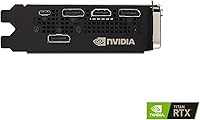
  • Single HDMI output limits multi-monitor configurations without additional adapters — a genuine inconvenience for many professionals.
  • Gaming performance per dollar is poor relative to modern consumer cards; buyers should not factor gaming into their justification.
  • Thermal output under sustained load requires deliberate case airflow planning, particularly in compact or semi-enclosed enclosures.
  • Raw compute throughput has aged compared to Ampere and Ada Lovelace architectures, especially in tensor-heavy AI tasks.
  • Sourcing warranties or manufacturer support for a 2018-era card is less straightforward than for current-generation hardware.
  • No DisplayPort output is a frustrating omission for professionals who rely on DP-native monitors or multi-display setups.

Ratings

The NVIDIA Titan RTX 24GB Graphics Card earns its scores from our AI-driven analysis of verified global buyer reviews, with spam, bot-submitted, and incentivized feedback actively filtered out before any score is calculated. What remains reflects the honest experience of professionals — 3D artists, ML researchers, video editors, and scientific computing users — who put this Turing-based workstation card through real production workflows. Both the genuine strengths and the frustrations that show up repeatedly in verified feedback are transparently reflected in every category below.
VRAM Capacity
96%
The 24 GB GDDR6 memory pool is the single most praised attribute across verified owner feedback. Professionals working in Blender Cycles, Redshift, or DaVinci Resolve report being able to load entire high-poly scenes or multi-stream timelines fully on-card, eliminating the slowdowns that plague 8 or 16 GB alternatives.
While 24 GB was extraordinary at launch, a small number of users running cutting-edge generative AI pipelines note that even this capacity can feel constrained for very large diffusion models. It remains exceptional for most professional workloads, but the frontier has moved.
Compute Performance
83%
With 4608 CUDA cores boosting to 1770 MHz, owners running CUDA-accelerated simulations and PyTorch training loops report strong, consistent throughput for mid-scale workloads. Scientific computing users in particular highlight stable sustained performance during long computation runs without significant throttling.
Compared to newer Ampere and Ada Lovelace architectures, raw compute performance per watt has aged noticeably. Users who upgraded from this card to an RTX 3090 or 4090 observed meaningful generational gaps in sheer throughput, especially in tensor-heavy tasks.
AI & Machine Learning Suitability
78%
22%
The 576 Tensor Cores handle inference acceleration and mid-scale model training in PyTorch and TensorFlow effectively. Researchers training convolutional networks or running computer vision pipelines on-device appreciate keeping large batches fully resident in VRAM, cutting iteration time compared to cards with half the memory.
This card is not suited for training large language models or frontier-scale AI workloads — that requires data center hardware. A minority of ML users who purchased expecting more headroom for newer model architectures found the Turing-generation Tensor Core throughput to be a bottleneck relative to current alternatives.
Ray Tracing Capability
74%
26%
The 72 RT cores deliver hardware-accelerated ray tracing in supported DCC tools like V-Ray and Octane, which architects and product visualization artists find genuinely useful for interactive viewport previews. For professional rendering rather than real-time gaming, the quality output is consistently praised.
Ray tracing performance trails significantly behind second and third-generation RT core implementations found in RTX 30 and 40 series cards. Users expecting game-level real-time ray tracing performance will be disappointed; this card's RT strengths are firmly in offline and semi-interactive rendering contexts.
Thermal Management
67%
33%
Under moderate workloads the card runs at acceptable temperatures, and owners in well-ventilated tower workstations report no issues during typical rendering sessions. The dual-slot cooler handles everyday compute tasks without drawing attention.
Under sustained heavy load — long Blender renders or overnight training runs — multiple reviewers note the card runs noticeably warm and benefits from deliberate case airflow planning. Users in compact or poorly ventilated enclosures reported thermal throttling, which is a real consideration for workstation builders.
Build Quality & Longevity
91%
Long-term owners consistently report that this Turing-based workstation card holds up well over years of daily professional use. The PCB and cooler construction feel substantially more robust than consumer-tier cards, which aligns with its workstation-adjacent positioning and gives buyers confidence in multi-year deployments.
A handful of users noted the card's age means sourcing replacements or warranties is less straightforward than with current-generation hardware. There are no widely reported failure patterns, but the product's vintage is a practical consideration for buyers building mission-critical systems.
Multi-GPU Scaling (NVLink)
79%
21%
NVLink support is a meaningful differentiator for users who need to pool VRAM across two cards, effectively creating a 48 GB on-device memory environment. Verified buyers using dual Titan RTX setups for large-scale rendering or dataset processing report that the configuration works reliably when properly set up.
NVLink requires a compatible bridge connector and a motherboard that supports the configuration, adding cost and complexity. Software support for multi-GPU is also increasingly inconsistent across applications, and some users found that not all their tools could actually leverage the pooled memory effectively.
Driver Stability (Windows)
88%
On Windows 10 and 11, verified owners report very stable driver behavior across professional applications including DaVinci Resolve, Autodesk Maya, and V-Ray. The card benefits from NVIDIA's mature Studio Driver branch, which prioritizes stability in creative workstation environments over gaming optimizations.
A small subset of users encountered occasional driver update regressions that temporarily disrupted specific application workflows. These issues were generally resolved in subsequent driver releases, but they underscore the importance of not updating drivers immediately before a critical production deadline.
Driver Stability (Linux)
61%
39%
Users running CUDA workloads on Ubuntu and other mainstream Linux distributions generally report functional setups once the environment is properly configured. For headless compute servers or carefully maintained Linux workstations, the card performs its core compute functions reliably.
A recurring theme in verified Linux user feedback is driver configuration friction, particularly around display output and certain CUDA version dependencies. Reviewers describe a non-trivial setup process that can frustrate users who expect plug-and-play behavior comparable to Windows.
4K Display Output
82%
18%
The HDMI output handles 4K at 3840x2160 cleanly, which professional users appreciate for color-accurate monitoring during video grading or texture work. Those using the card primarily for compute with a single high-resolution display report no issues with output stability or color fidelity.
The card offers only a single HDMI output, which limits multi-monitor configurations without additional adapters. Users expecting DisplayPort connectivity were caught off guard, and for professionals who run three or four displays simultaneously, the output options feel restrictive compared to current workstation GPUs.
Gaming Performance
54%
46%
The raw specs do translate to playable frame rates in most titles, and users who occasionally game on their workstation report it handles older or less demanding games without issue. For purely casual gaming sessions between work tasks, it is functional.
For its price point relative to modern consumer GPUs, gaming performance per dollar is poor. Newer RTX 3080 and 4070 Ti cards outperform it in rasterization-heavy gaming workloads at a fraction of the cost. Buyers purchasing this card for gaming would be making a significant optimization mistake.
Power Efficiency
58%
42%
Users running lighter workloads report acceptable power draw, and the 650W PSU recommendation is manageable for a standard workstation build. For tasks that do not peg the card at full utilization, power consumption stays within reasonable bounds.
At full load, the Titan RTX is not an efficient card by modern standards. Compared to Ampere and Ada-based alternatives that deliver more compute per watt, this Turing-generation card shows its age in power efficiency metrics — a meaningful concern for users running 24/7 compute workloads with energy costs in mind.
Value for Money
62%
38%
For a very specific professional who genuinely needs 24 GB of on-card VRAM and cannot access enterprise hardware, the value proposition holds up — especially if acquired at a competitive secondary market price. There is no direct consumer-tier alternative that matches the VRAM capacity for the same or lower cost.
At full retail, the price-to-performance ratio is difficult to justify for buyers whose workflows do not specifically demand the VRAM headroom. Professionals with more compute-bound than memory-bound workloads will find newer generation cards deliver substantially better throughput per dollar spent.
Workstation Certification & Stability
87%
Unlike consumer GeForce cards, this Turing-based workstation card carries a level of ISV certification and driver maturity that matters in professional environments. Users running Maya, 3ds Max, or engineering simulation software report fewer application-level compatibility issues compared to gaming-tier GPUs.
Full Quadro-level ISV certification is not present, which matters in highly regulated professional environments like medical imaging or certified CAD workflows. Users in those specific fields may still require a true Quadro or RTX professional series card despite the Titan RTX's workstation-adjacent positioning.

Suitable for:

The NVIDIA Titan RTX 24GB Graphics Card was built for a specific kind of professional, and if you fit that profile, it remains a genuinely compelling option. VFX artists and 3D designers who regularly hit VRAM ceilings in Blender Cycles, Redshift, or Octane will find the 24 GB memory pool removes one of the most frustrating production bottlenecks — scenes that simply refuse to render on 8 or 16 GB cards load and process without issue here. Video editors cutting complex multi-stream 4K or 8K timelines in DaVinci Resolve benefit similarly, keeping large project caches fully on-card rather than spilling to system RAM. Machine learning researchers running mid-scale PyTorch or TensorFlow experiments — think computer vision models, fine-tuning runs, or batch inference jobs — will appreciate being able to load larger batches on-device and iterate faster. Architects and product designers using GPU-accelerated viewport renderers like V-Ray also sit squarely in the intended audience. If your work is genuinely memory-bound and you need a stable, long-running workstation GPU rather than a consumer card optimized for gaming metrics, this Turing-based workstation card makes a focused, defensible choice.
Not suitable for:

The NVIDIA Titan RTX 24GB Graphics Card is a poor fit for a surprisingly wide range of buyers, and being honest about that matters. Gamers looking for high frame rates in modern titles will find that newer consumer cards — even those priced well below this one — deliver substantially better rasterization performance per dollar; the Titan RTX was never optimized for that use case and the gap has only widened with successive GPU generations. Creative professionals whose workflows are compute-bound rather than VRAM-bound, such as video encoders or motion graphics artists working with standard-resolution assets, will see better throughput from an RTX 3090 or RTX 4080 at comparable or lower cost. Machine learning engineers working on large language models or frontier-scale training runs should look toward dedicated AI accelerators or cloud infrastructure — 24 GB is not enough for that tier of work, and the Turing Tensor Core generation has fallen behind in raw AI throughput. Linux power users who want a hassle-free setup should proceed with caution, as driver configuration on certain distributions requires more effort than most professionals want to spend. Finally, anyone prioritizing power efficiency for always-on compute workloads will find that newer architectures deliver meaningfully more work per watt.
Specifications

  • Architecture: Built on NVIDIA's Turing GPU architecture, launched in late 2018 as the flagship consumer-adjacent workstation card in that generation.
  • CUDA Cores: The card houses 4608 CUDA cores for parallel compute workloads, running at a base clock of 1350 MHz and boosting up to 1770 MHz.
  • Memory: 24 GB of GDDR6 memory operates at an effective speed of 7000 MHz (14 Gbps data rate), delivering up to 672 GB/s of memory bandwidth.
  • RT Cores: 72 dedicated RT cores provide hardware-accelerated ray tracing support in compatible rendering applications such as V-Ray and Octane.
  • Tensor Cores: 576 Tensor Cores accelerate AI inference and training tasks in frameworks including PyTorch and TensorFlow.
  • Multi-GPU: NVLink support enables two cards to be connected, pooling VRAM into a combined 48 GB on-device memory environment for larger workloads.
  • Display Output: A single HDMI port provides display connectivity, supporting resolutions up to 3840x2160 (4K UHD) for high-fidelity professional monitoring.
  • Max Resolution: Maximum supported display resolution is 3840x2160, suitable for 4K color grading monitors and high-resolution design workflows.
  • Power Requirement: NVIDIA recommends a minimum 650W power supply unit to ensure stable operation under sustained full-load compute conditions.
  • Form Factor: The card occupies a dual-slot PCIe slot and measures 12.95 x 3.66 x 6.89 inches, requiring verification against case and motherboard clearances before purchase.
  • OS Support: Officially supported on Windows 7 (64-bit), Windows 10 (64-bit, April 2018 Update or later), and Linux 64-bit distributions.
  • Model Number: The official NVIDIA model number for this card is 900-1G150-2500-000, useful for verifying authenticity and sourcing compatible accessories.
  • Memory Bandwidth: Total memory bandwidth reaches 672 GB/s, enabling fast data throughput when processing large textures, datasets, or video frames on-card.
  • Boost Clock: The GPU boost clock reaches up to 1770 MHz under optimal thermal and power conditions during compute or rendering workloads.
  • Memory Speed: GDDR6 memory operates at 7000 MHz effective clock speed (14 Gbps per pin), providing high-throughput data access for memory-intensive tasks.
  • Chipset Brand: The GPU is designed and manufactured by NVIDIA Corporation under its professional Titan product line.
  • Connectivity: The card connects to the host system via a PCIe slot; NVLink bridge connector is required separately for multi-GPU configurations.
  • Availability Date: This card was first made available on December 18, 2018, positioning it as a Turing-generation product now in its mid-to-late lifecycle.

Related Reviews
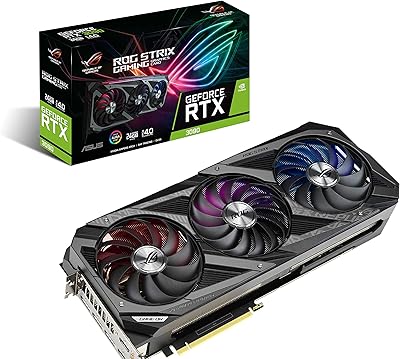
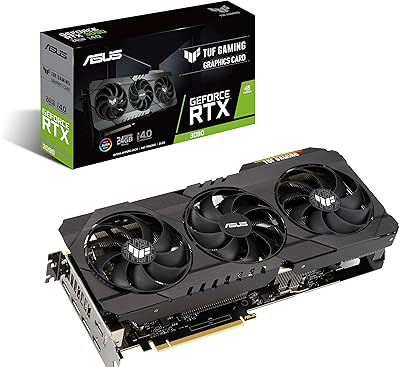
ASUS ROG Strix NVIDIA GeForce RTX 3090 24GB GDDR6X Graphics Card
87%
96%
Gaming Performance
94%
Ray Tracing Quality
91%
Cooling Efficiency
89%
Build Quality
92%
AI and DLSS Support
More
ASUS TUF Gaming NVIDIA GeForce RTX 3090 OC Edition 24GB Graphics Card
85%
94%
Performance in Gaming
88%
Cooling & Thermal Management
91%
Build Quality & Durability
67%
Size & Compatibility
89%
Overclocking & Factory Optimization
More
NVIDIA GeForce RTX 4090 Founders Edition Graphics Card
84%
96%
Gaming Performance
94%
Ray Tracing & Visual Fidelity
62%
Power Consumption
89%
Build Quality & Design
93%
VR Compatibility
More
ASUS TUF Gaming NVIDIA GeForce RTX 3070 OC Edition Graphics Card
88%
94%
Gaming Performance
92%
Cooling Efficiency
88%
Setup & Installation
91%
Build Quality & Durability
90%
Ray Tracing & DLSS
More
ASUS Dual GeForce RTX 3050 6GB OC
81%
78%
1080p Gaming Performance
58%
VRAM Adequacy
72%
Value for Money
83%
Thermal Performance
91%
Noise Level
More
Gigabyte NVIDIA GeForce RTX 4060 Ti WINDFORCE OC 8GB Graphics Card
86%
90%
Gaming Performance
92%
Value for Money
89%
Ray Tracing & DLSS
88%
Cooling & Noise
85%
Installation & Setup
More
ASUS ROG Strix NVIDIA GeForce RTX 3060 V2 OC Edition 12GB Graphics Card
85%
91%
Gaming Performance
88%
Value for Money
89%
Cooling Efficiency
84%
Ease of Installation
87%
Design and Build Quality
More
ASUS ROG Strix NVIDIA GeForce RTX 3070 V2 OC Edition 8GB Graphics Card
86%
91%
Performance for Gaming
88%
Cooling Efficiency
89%
Build Quality and Durability
84%
Value for Money
92%
Noise Levels
More
ASUS TUF Gaming NVIDIA GeForce RTX 3070 Ti OC Edition Graphics Card 8GB GDDR6X
87%
92%
Performance
88%
Cooling Efficiency
94%
Build Quality & Durability
90%
Value for Money
76%
Thermals (Under Load)
More
NVIDIA NVS 510 Graphics Card 2GB
84%
93%
Multi-Display Support
91%
Energy Efficiency
88%
Ease of Installation
86%
Performance for Business Use
89%
Low-Profile Design
More

FAQ

For rendering workloads specifically, yes — the 24 GB VRAM remains a genuine differentiator. If your scenes regularly push past 16 GB of GPU memory, this Titan RTX will handle what most alternatives cannot without system RAM spillover. Where it starts to show its age is raw render speed compared to newer Ampere or Ada-based cards, so if throughput matters more than VRAM headroom, weigh your options carefully.

It is well suited for mid-scale machine learning work — fine-tuning vision models, running inference pipelines, or training networks where keeping a large batch fully on-card speeds up iteration. What it is not suited for is large language model training or anything approaching frontier-scale AI research, where you would need data center accelerators with far more compute and memory bandwidth than any consumer or prosumer GPU can offer.

NVIDIA officially recommends a 650W power supply, but in practice, if you are running a high-core-count CPU alongside the card in a workstation, a 750W to 850W unit gives you more comfortable headroom. The card draws significant power under sustained load, so a quality PSU with stable 12V rails matters more than just hitting the wattage number.

It works, but Linux setup requires more patience than Windows. On mainstream distributions like Ubuntu with well-matched CUDA and driver versions, most users get stable compute performance. The friction tends to show up around display output drivers and specific CUDA version dependencies. If your Linux environment is carefully maintained and not changing frequently, it is manageable — but if you need a plug-and-play experience, Windows is significantly smoother.

Measure carefully before ordering. The card is 12.95 inches long, 3.66 inches wide, and 6.89 inches tall in its dual-slot configuration. Most full-tower workstation and ATX cases accommodate it without issue, but mid-tower builds with front-mounted storage cages or dense cable runs can be tight. Check your case's listed GPU length clearance spec before committing.

The RTX 3090 matches the Titan RTX on VRAM (also 24 GB) but delivers substantially better raw compute throughput thanks to Ampere architecture improvements, and it runs more efficiently per watt. For pure rendering speed or AI throughput, the 3090 wins clearly. The Turing-based workstation card holds its ground in workstation driver maturity and NVLink support, but for most professional buyers entering the market fresh, the RTX 3090 or newer cards present a stronger overall case.

Yes, in specific scenarios. If you are cutting 8K footage, working with heavy noise reduction plugins, or running multiple streams of high-bitrate material simultaneously, the extra VRAM keeps more of your timeline data on-card and reduces dropped frames or proxy dependency. For standard 4K editing with typical color grading, 16 GB cards handle it fine too — so the benefit scales with the complexity of your specific projects.

Yes, NVLink is supported, and a properly bridged dual-card setup gives you a pooled 48 GB VRAM environment in applications that can leverage it. The key qualifier is software support — not every application can actually use NVLink-pooled memory, so verify your specific tool (Redshift, certain ML frameworks, etc.) supports it before investing in a second card and bridge connector.

Under sustained full load — long Blender renders, extended training runs — it gets notably warm and the fans run audibly. Most verified buyers in well-ventilated full-tower cases report stable temperatures within acceptable ranges, but in compact builds or cases with restricted exhaust, thermal throttling has been reported. Ensuring at least two case exhaust fans and good front intake is a practical recommendation, not just a precaution.

It will run games — frame rates are playable in most titles — but it is not the right card to buy if gaming is even a secondary priority. For its price tier, modern consumer RTX cards deliver significantly better gaming performance. This card's design, pricing, and feature set exist to serve professional compute and creative workloads. If gaming matters at all in your decision, your budget is better spent on a gaming-oriented GPU and a separate compute solution, or a newer card that handles both more efficiently.