NexFoto 21.5-inch WiFi Digital Picture Frame







Overview
The NexFoto 21.5-inch WiFi Digital Picture Frame sits in an interesting spot — large enough to make a real visual statement on a wall, but priced where you're genuinely expecting quality rather than just size. Most digital frames top out around 10 inches, so jumping to 21.5 inches changes how the thing actually feels in a room. This is the kind of frame you buy when you want photos to look like they belong on the wall, not just sitting on a desk. It arrives in gift-ready packaging, which matters more than you'd think if you're buying this for a parent or grandparent around the holidays.
Features & Benefits
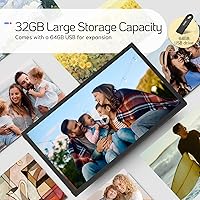
The 21.5-inch IPS matte display is the headline here — full 1920x1080 resolution with wide viewing angles that hold up well even when the frame is mounted slightly off-center on a wall. A built-in light sensor automatically adjusts brightness depending on ambient light, so you're not waking up to a blinding slideshow at 6 a.m. Storage is genuinely generous: 32GB internal plus a bundled 64GB USB drive, expandable further with a microSD card. WiFi photo sharing via the Vphoto app works on both Android and iOS, letting family members add photos remotely. The included remote control is a thoughtful touch for anyone who doesn't want to manage everything through an app.
Best For
This large digital frame makes the most sense for a few specific types of buyers. If you have a parent or grandparent who isn't great with technology, the remote control and straightforward interface lower the barrier considerably — and the ability to push photos from anywhere via the app means they always have fresh content without lifting a finger. It also works well for home decorators who want something large enough to function as actual wall art rather than just a small bedside trinket. Gift shoppers will appreciate the presentation. Anyone wanting to display high-resolution travel photos or portraits at real scale will find the screen size earns its keep.
User Feedback
With 165 ratings and a 4.1 out of 5 score, the NexFoto frame lands in solid but not flawless territory. Buyers consistently praise the display quality — images look sharp and colors hold up well, especially compared to cheaper 10-inch alternatives. The gift packaging draws frequent compliments. That said, app setup friction comes up repeatedly; the Vphoto app connection process can frustrate users who aren't comfortable troubleshooting WiFi issues. The frame only supports 2.4GHz networks, which catches people off guard. At nearly 7 pounds, wall mounting requires care. Customer service responsiveness gets mixed mentions — some report quick replies, others less so.
Pros
- The 21.5-inch IPS matte display produces sharp, vibrant images that genuinely stand out compared to smaller alternatives in this category.
- Full HD 1920x1080 resolution keeps portraits and travel photos looking crisp even at this screen size.
- Bundled 64GB USB drive plus 32GB internal storage means storage limitations are rarely an issue.
- The Vphoto app lets family members add photos remotely, which is ideal for keeping elderly relatives connected.
- Auto-brightness adjustment via the built-in light sensor means the display is never uncomfortably bright at night.
- The included remote control is a practical bonus for users who prefer not to manage everything through a phone.
- Portrait and landscape auto-rotation works reliably when switching how the frame is displayed.
- Gift-ready packaging makes this a low-effort, high-impact present for holidays or milestone occasions.
- A one-year warranty and stated 12-hour customer service response window offer reasonable post-purchase reassurance.
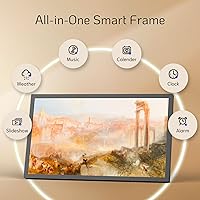
- Built-in extras like weather, clock, and calendar add everyday utility beyond photo display.
Cons
- The Vphoto app setup process has frustrated a meaningful number of buyers, particularly those less comfortable with technology.
- WiFi is limited to 2.4GHz only, which can be a real problem in homes with congested networks or modern router configurations.
- At nearly 7 pounds, wall mounting this large digital frame requires planning and proper wall anchors — not a casual install.
- The swivel wall mount is not included, which catches buyers off guard given the price point.
- With 165 ratings, the review pool is still relatively small, making it harder to assess long-term reliability with confidence.
- Customer service responsiveness appears inconsistent based on user reports, despite the brand's stated 12-hour reply promise.
- The 16:9 aspect ratio can leave noticeable bars when displaying portrait-orientation photos without cropping.
- Some users report occasional lag or connectivity drops with the WiFi photo frame after initial setup.
- The frame's depth and weight make it less practical for leaning casually on a shelf or narrow surface.
- No 5GHz WiFi support limits future-proofing as more households phase out or deprioritize the 2.4GHz band.
Ratings
Our AI-generated scores for the NexFoto 21.5-inch WiFi Digital Picture Frame were produced by analyzing verified global buyer reviews, with spam, bot submissions, and incentivized feedback actively filtered out before scoring. The result is an honest breakdown that reflects both what this large digital frame genuinely gets right and where real buyers have run into frustration. Strengths and pain points are weighted equally so you can make a clear-eyed decision.
Display Quality
WiFi & Connectivity
App Experience
Ease of Setup
Build Quality
Value for Money
Storage & Capacity
Wall Mount Experience
Remote Control
Auto-Brightness
Photo Sharing Experience
Customer Support
Slideshow & Display Modes
Utility Features
Suitable for:
The NexFoto 21.5-inch WiFi Digital Picture Frame is a strong fit for families who want to stay visually connected across distances — particularly those with elderly parents or grandparents who appreciate receiving photos but won't be managing an app themselves. The remote control and auto-rotating display mean a recipient can enjoy a constantly refreshed slideshow without touching a smartphone. Gift shoppers will find the polished, box-ready presentation removes a lot of the wrapping-and-explaining burden around holidays, birthdays, and anniversaries. Home decorators who want something large enough to anchor a wall rather than just sit on a nightstand will appreciate the 21.5-inch screen, which is genuinely uncommon in this category. Anyone who has high-resolution portraits, travel photography, or artwork they want displayed at scale will find the full HD IPS panel does those images real justice.
Not suitable for:
The NexFoto 21.5-inch WiFi Digital Picture Frame is likely to frustrate buyers who expect plug-and-play simplicity right out of the box, as the Vphoto app setup has been a recurring sticking point for users who are not comfortable troubleshooting wireless connections. The frame only connects over 2.4GHz WiFi, which is a real limitation in homes where that band is congested or where routers are configured primarily for 5GHz. At nearly 7 pounds, this is not a lightweight frame you casually reposition — wall installation requires proper hardware and some planning, and the swivel wall mount is not included, which surprises many buyers. Those shopping for something compact for a desk or shelf may find the 21.5-inch size simply too large for the space they have in mind. If app reliability and a polished software experience are top priorities, this WiFi photo frame may not meet expectations consistently enough to justify its price point.
Specifications
- Screen Size: The display measures 21.5 inches diagonally, making it one of the larger options available in the consumer digital frame category.
- Resolution: The IPS panel outputs at 1920x1080 full HD, delivering sharp detail and accurate color across the entire screen surface.
- Panel Type: An IPS matte panel is used, which reduces glare from ambient light and maintains consistent color accuracy across wide viewing angles.
- Aspect Ratio: The screen uses a 16:9 widescreen aspect ratio, best suited for landscape-oriented photos and videos.
- Internal Storage: 32GB of built-in memory is included, with capacity for approximately 8,000 photos depending on file size.
- Bundled Storage: A 64GB USB drive is included in the box, providing immediate additional storage without a separate purchase.
- Expandable Storage: A microSD card slot allows further storage expansion beyond the built-in 32GB and the bundled USB drive.
- WiFi Band: The frame connects exclusively over 2.4GHz WiFi; 5GHz networks are not supported.
- Companion App: The Vphoto app, available for Android and iOS, is used to share photos and videos remotely to the frame over WiFi.
- Orientation: The frame supports both portrait and landscape display orientations, with automatic rotation to match how it is physically positioned.
- Remote Control: A remote control is included in the box for navigating menus and slideshows without using a smartphone or touching the frame.
- Light Sensor: A built-in ambient light sensor automatically adjusts screen brightness based on the lighting conditions in the room.
- Built-in Speaker: The frame includes an integrated speaker, enabling audio playback for video content.
- Extra Features: The interface includes a weather widget, calendar, digital clock, and alarm function accessible alongside the photo display mode.
- Dimensions: The frame measures 19.91 x 11.7 x 0.99 inches overall, with the display area spanning approximately 20 x 11.2 inches at 16:9.
- Weight: The unit weighs 6.98 pounds, which requires sturdy wall anchors or a stable surface for safe mounting or placement.
- Wall Mounting: The frame is designed to be wall-mounted, though the swivel wall mount bracket is sold separately and not included in the package.
- Warranty: NexFoto provides a one-year manufacturer warranty covering defects, with customer support available within a stated 12-hour response window.
- Compatibility: Remote photo sharing via the Vphoto app is compatible with both Android and iOS smartphones and tablets.
- Power: The frame operates via a wired power connection and does not include a battery, so it must remain plugged in during use.
Related Reviews
WONNIE 215KZ 21.5-Inch Digital Picture Frame
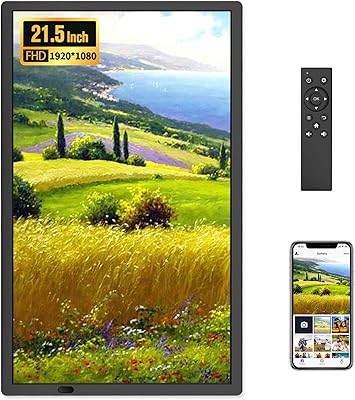
FANGOR 21.5″ 64GB WiFi Digital Picture Frame
Feelcare HN-DPF1003 10-inch Digital Picture Frame

NexFoto 32-Inch 64GB Digital Picture Frame

NexFoto 13.5″ Digital Picture Frame 64GB
NOBKLEN 10.1-Inch WiFi Digital Photo Frame

Aura Mason 9-inch Digital Picture Frame
Akimart 10.5-inch 64GB WiFi Digital Photo Frame

Feelcare 11.6 Inch 16GB WiFi Digital Picture Frame