Overview

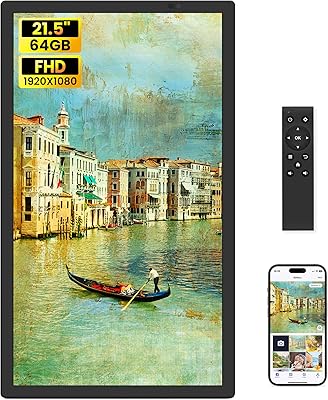
The FANGOR 21.5″ 64GB WiFi Digital Picture Frame enters a category where most competitors top out at 15 inches, and that size difference is immediately noticeable on a wall. At this mid-range price point, buyers are right to expect solid build quality, reliable wireless connectivity, and a display worth showing off. The core sharing experience runs through the Uhale app, which works on both iOS and Android and handles everything from remote uploads to scheduled slideshows. One thing to flag upfront: no touchscreen here. The frame ships with a remote control instead, which works fine but is worth knowing before you buy.
Features & Benefits

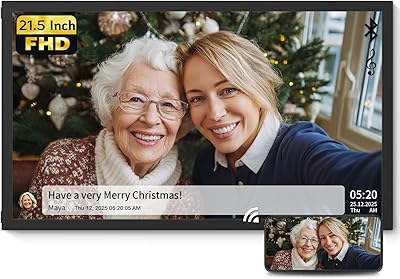
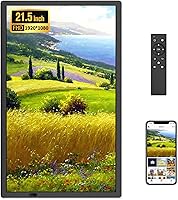
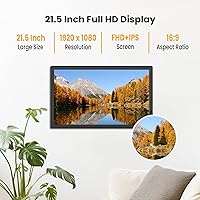
The screen is where this large WiFi photo frame earns its keep. Running at 1920x1080 full HD on an IPS panel, it delivers accurate, punchy colors with a 178-degree viewing angle that holds up even when you are looking at it from across the room. Dual-band WiFi — both 2.4G and 5G — lets you push a hundred photos at once through the Uhale app without waiting around. Storage starts at a generous 64GB built-in, and you can extend that further with an SD card or USB drive, each up to 128GB. The auto-rotate feature handles portrait and landscape photos intelligently, and MP4 video playback with audio works well via SD or USB. Just note: app-uploaded videos are capped at two minutes.

Best For

This digital display makes the most sense as a gift for grandparents or elderly relatives — someone who would love receiving new family photos automatically without having to navigate a smartphone. The remote control setup, while not as intuitive as touch, is manageable for users who just want to press play and watch memories cycle by. Beyond the home, it also works well mounted in a hotel lobby, small gallery, or business reception where a large ambient display adds atmosphere without demanding much maintenance. Anyone upgrading from a small tabletop frame to something wall-mounted and gallery-sized will feel the difference the moment it is up on the wall.

User Feedback

With a 4.6-star average across more than 1,600 ratings, the FANGOR frame has clearly found an audience that is happy with it. Most of the praise centers on screen quality and how straightforward the Uhale app is to set up — buyers frequently mention gifting it to a parent or grandparent and having it running within minutes. The criticism that comes up most consistently is the absence of a touchscreen; users accustomed to modern tablets find the remote a step backward. The two-minute video cap via the app also draws occasional frustration, particularly from buyers who expected to share longer clips wirelessly. That said, comments about after-sales support are largely positive, with most issues resolved quickly.

Pros

  • At 21.5 inches, the screen is noticeably larger than most competing frames and genuinely looks like decor on a wall.
  • The full HD IPS panel renders photos with accurate colors and stays clearly visible from across a room.
  • Dual-band Wi-Fi makes bulk photo transfers fast — sending a hundred photos at once is practical, not just theoretical.
  • The Uhale app is consistently described as easy to set up, even for users who are not tech-savvy.
  • 64GB of built-in storage is generous, and the ability to expand via SD card or USB adds real flexibility.
  • Auto-rotate handles mixed portrait and landscape photo libraries without any manual adjustment needed.
  • MP4 video playback with audio via SD or USB works well for short clips and music videos.
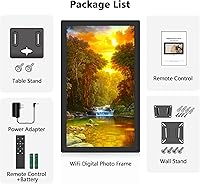
  • Wall-mounting hardware and a remote control are included, so the out-of-box setup is reasonably complete.
  • After-sales support from the brand draws positive mentions, with most issues reportedly resolved within a day.

Cons

  • No touchscreen means navigating the interface requires hunting for the remote, which is easy to misplace.
  • App-uploaded videos are capped at two minutes — a hard limit that catches buyers off guard.
  • The frame is corded only, so placement is constrained by outlet proximity and visible cable runs.
  • At 7.4 pounds, wall installation requires proper anchoring; a casual hook mount may not be sufficient.
  • The Uhale app ecosystem means you are dependent on a third-party platform staying active and functional long-term.
  • Single-band Wi-Fi households will not benefit from the 5G speed advantage, making transfers slower than marketed.
  • The remote control interface is functional but not particularly intuitive for first-time digital frame users.
  • No built-in calendar or family messaging features that some competing frames at this price tier include.

Ratings

The scores below were generated by AI after analyzing thousands of verified buyer reviews for the FANGOR 21.5″ 64GB WiFi Digital Picture Frame from multiple global markets, with spam, incentivized, and bot-flagged submissions actively filtered out before scoring. Every category reflects the honest distribution of real user experiences — not just what went well, but where buyers ran into friction. You will find both the standout strengths and the genuine trade-offs represented transparently across each dimension.

Display Quality
93%
The full HD IPS panel consistently draws praise from buyers who expected a mediocre screen and were genuinely surprised. Colors stay vivid and accurate across the room, and family photos — especially outdoor shots — look rich without any artificial oversaturation. The wide viewing angle means the image holds up whether you are seated directly in front or passing by from the side.
A small number of buyers noted that the default brightness setting can feel too intense in darker rooms, particularly at night. While adjustable, the brightness controls are navigated through the remote rather than an on-screen touch menu, which makes fine-tuning a slightly more deliberate process.
Screen Size Impact
91%
At 21.5 inches, this digital display occupies wall space in a way that genuinely resembles framed artwork rather than a tech gadget. Buyers who upgraded from a 10-inch or 12-inch frame almost universally described the size difference as immediately apparent and well worth it. It reads clearly from across a living room, which smaller frames simply cannot match.
The larger footprint does demand more thoughtful placement — it is not something you can casually prop up on a nightstand or bookshelf without it dominating the space. A handful of buyers in smaller apartments found the scale slightly overwhelming for compact rooms.
App Experience
78%
22%
The Uhale app consistently receives credit for being approachable enough that non-technical family members can figure it out without a support call. Initial pairing via QR code is quick, and the ability to send photos remotely without the recipient doing anything makes it a genuinely useful tool for staying connected with elderly relatives.
Some users report occasional sync delays where photos take longer than expected to appear on the frame after being uploaded. A few buyers also raised the reasonable concern that long-term functionality depends on the Uhale platform remaining operational, which is an inherent risk with any cloud-dependent device.
Ease of Setup
84%
Out-of-box setup is straightforward for most users — the remote is intuitive enough for basic navigation, and the on-screen prompts guide you through Wi-Fi connection and app pairing without requiring technical know-how. Buyers who purchased it as a gift reported that they could set it up fully before handing it over, which is a practical plus.
The Wi-Fi pairing step trips up a small percentage of buyers, particularly those with less common router configurations or those trying to connect to a 5GHz-only network. The instruction manual could do more to address these edge cases rather than assuming a standard setup environment.
Remote Control Usability
61%
39%
For buyers who primarily use the frame as a set-it-and-forget-it slideshow display, the remote is perfectly adequate. Basic functions like play, pause, brightness adjustment, and slideshow speed are accessible without much learning curve, and it works reliably from reasonable distances across a room.
Buyers accustomed to touchscreen interfaces find the remote noticeably limiting — browsing through a large photo library or navigating nested settings menus is slower and more frustrating than it needs to be. The remote is also easy to misplace, and without a touchscreen fallback, losing it means losing control of the frame entirely.
Video Playback
69%
31%
MP4 video playback via SD card or USB is genuinely capable — audio comes through clearly and the full HD resolution makes short clips look polished. Buyers who load holiday videos or music clips directly onto a USB drive report a smooth, TV-like playback experience that adds real versatility to the frame.
The 2-minute cap on videos uploaded through the Uhale app is the most frequently cited disappointment in this category. Buyers who assumed they could wirelessly share full-length family videos were caught off guard, and the workaround of using physical media undercuts the convenience that drew them to a Wi-Fi frame in the first place.
Storage & Expandability
89%
64GB of built-in storage is genuinely generous for a digital frame — it comfortably holds a large, diverse photo library without requiring constant management. The dual expansion options via SD card and USB drive give users the flexibility to add even more content without having to delete anything from internal storage.
There is no cloud-based storage integration beyond the Uhale app ecosystem, so users who want to pull photos directly from Google Photos or iCloud are limited to manual transfers. For buyers with large existing cloud libraries, this adds a step that feels unnecessary on a modern Wi-Fi-connected device.
Build Quality & Finish
77%
23%
The matte black finish looks clean and neutral against most wall colors, and the overall construction feels solid rather than plasticky for the price point. Buyers mounting it in living rooms and home offices consistently note that it does not look out of place alongside actual wall art or other decor.
The bezel is functional but not particularly refined up close — a few buyers noted it looks better at a distance than in person. At this size and weight, some users also expected a more premium frame material, like aluminum, rather than the plastic housing that ships with the unit.
Wall Mounting Experience
72%
28%
Wall mounting hardware is included in the box, which avoids the common frustration of sourcing separate brackets. When properly installed into a stud or with appropriate anchors, the frame sits flush against the wall and looks intentionally designed for the space rather than tacked on.
At 7.4 pounds, installation requires more care than a lightweight frame — buyers who attempted adhesive mounting or used inadequate drywall anchors reported instability. Cable management is also a recurring mention; the power cord exits in a fixed position that can be awkward to conceal depending on outlet placement.
Photo Sharing Speed
82%
18%
On a 5GHz network, bulk photo transfers through the Uhale app are noticeably fast — sending a batch of 50 to 100 photos completes in well under a minute for most users, which is a meaningful improvement over older single-band frames that could take several minutes for the same task.
On 2.4GHz networks, transfer speeds drop to a more modest pace, which matters when sending large batches regularly. Buyers in homes with congested Wi-Fi — multiple devices competing on the same band — occasionally report stalls or incomplete sync sessions that require re-initiating the transfer.
Auto-Rotate Function
86%
Auto-rotate works reliably and handles mixed photo libraries — portrait shots from phone cameras alongside landscape shots from dedicated cameras — without any manual sorting required. Buyers who display a diverse archive of family photos appreciate that nothing gets cropped or distorted when the frame switches between orientations.
In rare cases, buyers report a brief delay or visible transition animation when the frame switches orientation mid-slideshow, which is minor but noticeable on certain photo sequences. There is no option to force a fixed orientation if you prefer to lock the display to landscape regardless of the individual photo's native format.
Value for Money
81%
19%
Relative to other 21-inch Wi-Fi frames on the market, this large WiFi photo frame delivers a competitive combination of screen size, storage capacity, and app functionality at its price tier. Buyers who compared it against smaller competitors at similar prices consistently felt the size advantage alone justified the purchase.
Buyers who prioritize touchscreen interaction or expect longer wireless video uploads may feel the price is harder to justify given those limitations. A handful of users felt that a premium screen deserved a more refined remote or a companion desktop app with a more polished interface.
After-Sales Support
83%
FANGOR's customer support receives notably positive mentions in verified reviews, with most buyers reporting responsive replies and practical solutions within 24 hours. This is not universal in the digital frame category, and buyers who needed help with setup or connectivity issues appreciated the accessibility of real support.
Support quality appears to vary slightly depending on the complexity of the issue — firmware-related problems or app account difficulties sometimes required multiple exchanges before resolution. Buyers outside North America also noted occasional timezone delays in response times.

Suitable for:

The FANGOR 21.5″ 64GB WiFi Digital Picture Frame is an especially strong fit for adult children who want to stay visually connected with elderly parents or grandparents living independently. The Uhale app makes it possible to push new photos remotely without any action required on the recipient's end — the frame just updates itself, which is genuinely useful when the person displaying it is not comfortable with technology. The 21.5-inch screen size also makes this a logical step up for anyone who has outgrown a small tabletop frame and wants something that commands a wall like actual wall art rather than a small desktop accessory. Beyond the home, it holds up well in low-demand commercial settings — think a small hotel lobby, a family-owned business reception, or an art studio display — where a large, attractive ambient screen adds character without requiring constant management.
Not suitable for:

Buyers who expect to interact with the frame directly using touch gestures will find the FANGOR 21.5″ 64GB WiFi Digital Picture Frame frustrating — there is no touchscreen, and all on-device navigation runs through a physical remote control. If you are accustomed to the fluidity of modern tablet-style frames, the remote can feel like a step back, particularly for frequently adjusted settings. Anyone planning to share longer videos wirelessly should also look elsewhere; the Uhale app hard-caps video uploads at two minutes, which is a real constraint for family events or vacation clips. Users in households with unstable or single-band Wi-Fi networks may also encounter slower transfer speeds than advertised, since the 5G band advantage only applies when a compatible router is available. Finally, buyers with tight wall placement options should account for the corded power setup, which requires proximity to an outlet and some cable management planning.

Specifications

  • Screen Size: The display measures 21.5 inches diagonally, making it one of the larger options available in the consumer digital frame category.
  • Resolution: The IPS panel runs at 1920x1080 full HD, delivering sharp, detailed images across the entire screen surface.
  • Panel Type: An IPS panel is used, which provides consistent color accuracy and brightness regardless of the angle from which the screen is viewed.
  • Viewing Angle: The display maintains image quality across a 178-degree viewing angle, both horizontally and vertically.
  • Built-in Storage: 64GB of internal storage is included, which is sufficient to hold well over 100,000 standard-resolution photos.
  • Expandable Storage: Storage can be extended using an SD card or USB drive, each supporting capacities up to 128GB.
  • Wi-Fi: Dual-band Wi-Fi supporting both 2.4GHz and 5GHz networks allows for faster photo transfers when a compatible router is available.
  • Companion App: The frame pairs with the Uhale app, available free on both iOS and Android, which handles remote photo and video sharing.
  • Video Playback: MP4 video files with audio are supported for playback when loaded via SD card or USB drive, with no time restriction on file length.
  • App Video Limit: Videos uploaded wirelessly through the Uhale app are limited to a maximum duration of 2 minutes per clip.
  • Image Formats: The frame supports JPG, JPEG, BMP, and PNG image formats for both local and app-based photo display.
  • Control Method: The frame is operated using an included infrared remote control; there is no touchscreen on this model.
  • Auto-Rotate: The frame automatically detects its physical orientation and rotates photos to fill the screen in either portrait or landscape layout.
  • Mounting: The frame supports wall mounting and can also be placed on a flat surface using an included stand.
  • Dimensions: The unit measures 20.86 inches wide, 12.8 inches tall, and 0.99 inches deep.
  • Weight: The frame weighs 7.4 pounds, which means wall mounting should use properly anchored hardware for secure installation.
  • Power Source: The frame is powered via a corded AC adapter and does not include any battery or wireless charging option.
  • Compatibility: The Uhale app is compatible with smartphones and tablets running iOS or Android operating systems.

Related Reviews

WONNIE 215KZ 21.5-Inch Digital Picture Frame
79%
91%
Display Quality
93%
Screen Size & Presence
72%
WiFi & App Performance
83%
Ease of Initial Setup
63%
Storage & File Compatibility
More
NexFoto 13.5″ Digital Picture Frame 64GB
81%
91%
Display Quality
88%
Ease of Setup
68%
App Performance
83%
Build & Design
86%
Google Photos Integration
More
NexFoto 21.5-inch WiFi Digital Picture Frame
72%
88%
Display Quality
61%
WiFi & Connectivity
58%
App Experience
63%
Ease of Setup
74%
Build Quality
More
Akimart 10.5-inch 64GB WiFi Digital Photo Frame
79%
88%
Display Quality
91%
Ease of Setup
79%
Frameo App Experience
58%
Video Support
74%
WiFi Connectivity & Reliability
More
Feelcare HN-DPF1003 10-inch Digital Picture Frame
76%
88%
Ease of Setup
83%
Display Quality
76%
App Experience
51%
Video Support
79%
Touchscreen Responsiveness
More
pexar 11-Inch WiFi Digital Picture Frame
77%
88%
Image Quality
83%
Anti-Glare Performance
91%
Ease of Setup
79%
App Experience
86%
Storage & Local Capacity
More
Aura Carver 10.1″ WiFi Digital Picture Frame
82%
94%
Ease of Setup
91%
Display Quality
83%
App Experience
92%
Multi-Contributor Sharing
93%
Gifting Experience
More
Uhale 15.6″ Digital Picture Frame 64GB
83%
88%
Display Quality
85%
Ease of Use
90%
WiFi Connectivity
80%
App Experience
91%
Storage Capacity
More
PhotoSpring Classic 10-inch WiFi Digital Picture Frame
80%
91%
Ease of Setup
84%
App Reliability
93%
Photo Sharing Flexibility
74%
Display Quality
89%
Value for Money
More
BSIMB 32-Inch Digital Picture Frame 64GB

83%
88%
Display Quality
92%
Ease of Use
84%
WiFi Functionality
87%
Storage Capacity
90%
Remote Control Performance
More

FAQ

No, Wi-Fi is optional rather than required. If you load photos or videos directly via a USB drive or SD card, the frame works completely offline. Wi-Fi is only needed if you want to use the Uhale app for remote sharing.

The person sending photos downloads the free Uhale app on their smartphone, creates an account, and links it to the frame during setup. After that, they can upload photos directly from their camera roll and the frame displays them automatically — the person at the frame does not need to do anything.

The frame itself is straightforward to power on and navigate with the remote. The trickier part is the initial Uhale app pairing, which involves scanning a QR code and connecting to Wi-Fi. Most buyers report completing the full setup in under ten minutes, though having a family member walk the recipient through it remotely or in person makes the process much smoother.

Yes, but only if you use a USB drive or SD card rather than the Uhale app. The 2-minute cap applies specifically to wireless app uploads. If you load an MP4 file directly onto a USB stick or SD card and insert it into the frame, there is no length restriction.

For everyday use — starting a slideshow, adjusting brightness, changing display settings — the remote handles everything you need. It does feel less convenient than touch for things like browsing through a large photo library, but most users who set it up for ambient slideshow display rarely need to interact with it at all after the initial configuration.

Absolutely. The recipient does not need a smartphone or the app at all. The app is only used on the sending side. As long as someone sets the frame up initially and loads some photos via USB or SD card, it will run independently without any ongoing app interaction.

The frame includes mounting hardware for wall installation. Because it weighs 7.4 pounds, you should anchor it into a wall stud or use appropriate drywall anchors rather than a simple adhesive hook. Also plan your cable routing before drilling, since the power cord needs to reach a nearby outlet.

Yes, the Uhale app supports multiple users sending to a single frame. This makes it practical for a whole family — siblings, grandchildren, cousins — to all contribute photos to one display without coordinating through a single account.

This is a fair concern with any app-dependent device. If the Uhale platform were discontinued, the wireless sharing feature would stop working. However, the frame would still function normally for offline use with SD cards and USB drives, so your photos would not be stranded — just the remote sharing capability would be lost.

You can control playback order through the remote and the frame's settings menu. Options typically include sequential order, shuffle, and date-based sorting, so you are not locked into a random slideshow if you prefer a particular sequence.