Overview

The akimart 32GB 10.1-inch WiFi Digital Picture Frame sits in a crowded but approachable corner of the smart frame market — one where the goal is keeping families visually connected without the steep price tag of premium brands like Aura or Skylight. With a 10.1-inch IPS display and a generous 32GB of built-in storage, it offers real everyday value for the money. What sets it apart from basic plug-in frames is the ability to share photos and videos remotely through an app or email, making it a genuinely practical gift option. Just go in with clear expectations: this is a solid entry-level smart frame, not a flagship.

Features & Benefits

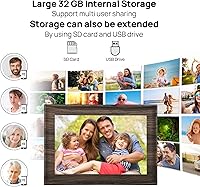
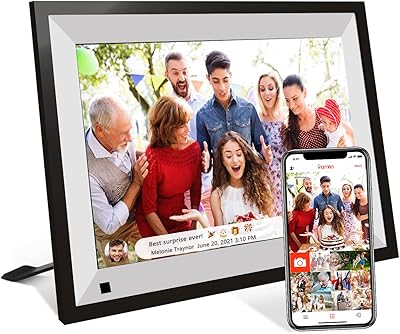
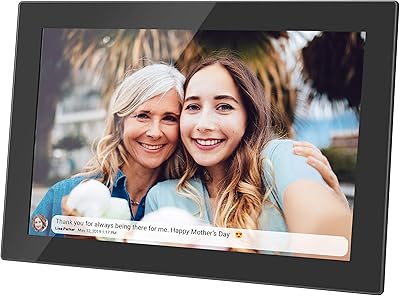
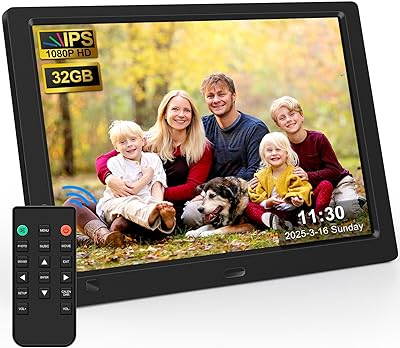
The 10.1-inch IPS touch screen is the most immediately noticeable quality here — colors look reasonably vivid, and the wide viewing angle means you can glance at it from across the room without the image washing out. The remote sharing feature is where this frame really earns its keep: using the companion app or even a standard email address, anyone can push photos directly to the display from anywhere in the world, up to 50 images at a time. Storage flexibility is another strength — 32GB on board plus SD card and USB expansion gives you room to grow. The frame handles a wide range of file types, from JPEGs to MP4 videos, and extras like a calendar, weather display, and clock round out the experience nicely.

Best For

This WiFi picture frame is a natural fit for anyone shopping with a specific recipient in mind — particularly older relatives who are not comfortable fiddling with apps themselves but still benefit from receiving fresh photos automatically. Families spread across different cities use setups like this so grandparents can wake up to new pictures without lifting a finger. It also makes a thoughtful gift choice for birthdays, graduations, or holidays, especially since setup is handled by the gifter rather than the recipient. If you just need a capable frame without paying a premium price, this one delivers. The expandable storage options are a genuine plus for anyone with a large photo library.

User Feedback

Buyers consistently praise how quickly they can get the akimart frame up and running — the setup process draws repeated compliments, particularly from people who bought it for less tech-savvy family members. The touch screen gets good marks for responsiveness, and the display is generally described as clear and easy to read. The app sharing feature earns strong approval too, with most users reporting it works reliably once configured. That said, one recurring frustration stands out: the connection code used to link new devices expires every 12 hours, which can be a headache if the recipient needs to reconnect. Build quality feedback is mixed — the frame looks presentable, but a few buyers note it feels lighter than expected. Video playback is rated acceptable but not exceptional.

Pros

  • Remote photo sharing via app or email works reliably and requires no technical skill from the recipient.
  • Batch sending of up to 50 photos at once saves time when updating the display with new memories.
  • The 10.1-inch IPS screen delivers wide viewing angles, so photos look good from across a room.
  • 32GB of built-in storage is generous enough that most users will never feel cramped.
  • SD card and USB drive support means you can expand storage or load photos without any internet connection.
  • Setup is consistently described as fast and straightforward, even for first-time users.
  • The detachable stand supports both portrait and landscape orientation with no extra tools needed.
  • Auto-rotate adjusts photos to the correct direction automatically, reducing manual fiddling.
  • Broad file format support covers the vast majority of photos and videos people actually have on their phones.
  • Wall-mount compatibility gives you flexible placement options beyond just shelf or desk use.

Cons

  • The connection code used to link devices expires every 12 hours, which can be a recurring frustration for remote managers.
  • Build quality feels lighter and less premium than the price point might lead some buyers to expect.
  • Video playback quality is acceptable but noticeably behind what a dedicated media player would offer.
  • The companion app experience has occasional stability complaints, particularly around initial device pairing.
  • At 1280x800 resolution, the display is not sharp enough to satisfy anyone with high standards for image fidelity.
  • Sending videos is capped at 200MB per file, which limits clips from modern high-resolution smartphone cameras.
  • No cellular connectivity means the frame is entirely dependent on a stable WiFi network to receive new content.
  • The weather and calendar widgets are basic and lack the customization options power users might want.

Ratings

The scores below for the akimart 32GB 10.1-inch WiFi Digital Picture Frame were generated by AI after systematically analyzing verified purchase reviews from buyers worldwide, with spam, bot activity, and incentivized feedback actively filtered out. The results reflect a balanced picture — genuine strengths are recognized, but recurring frustrations are given equal weight. Where buyers consistently agreed, the scores reflect that consensus; where opinions split, the numbers land accordingly.

Ease of Setup
88%
Buyers across age groups consistently describe getting the frame up and running as fast and painless. Even reviewers who bought it specifically for elderly relatives report that the initial WiFi pairing and app connection went smoothly, often completed in under ten minutes without needing outside help.
A small but vocal group of users ran into friction when reconnecting after the 12-hour connection code expired, which can make the setup feel less permanent than expected. Those managing the frame remotely for a family member found this particular step disproportionately annoying to repeat.
Remote Photo Sharing
84%
The app-based and email sharing system is the feature buyers mention most positively, with many describing it as the main reason they chose this frame over a basic non-connected model. Sending a batch of 50 holiday photos from a phone and seeing them appear on a relative's frame within seconds is the kind of experience that earns genuine word-of-mouth recommendations.
The 200MB cap on video files creates a real-world limitation for anyone trying to share clips recorded on a modern smartphone in high resolution. Occasional reports of the app needing a restart before a batch transfer goes through suggest the software is reliable but not completely polished.
Display Quality
71%
29%
For casual everyday photo viewing — family portraits, vacation shots, kids growing up — the 10.1-inch IPS screen delivers a satisfying result. The wide viewing angle means photos look consistent whether you are sitting directly in front of the frame or glancing at it from across a kitchen counter.
At 1280x800 resolution, the display is noticeably soft compared to higher-end frames, and anyone coming from a premium product will feel the difference immediately. Colors are adequate but not vibrant enough to do justice to professionally shot photos or high-resolution images taken on modern flagship smartphones.
Build Quality
63%
37%
The frame has a clean, presentable appearance that suits a living room shelf or a bedside table without looking out of place. The slim profile at under one inch thick gives it a reasonably modern aesthetic for its price category.
The most consistent criticism across reviews is that the frame feels lighter and flimsier than expected when held in hand. Several buyers described the plastic casing as feeling thin, and a handful noted that the stand, while functional, does not inspire confidence when the frame is positioned on an angled surface.
Touch Screen Responsiveness
82%
18%
Day-to-day interaction with the touch screen — swiping through photos, adjusting brightness, changing slideshow settings — is smooth and accurate enough that most users never mention it as a problem. Buyers who purchased this for older relatives specifically called out the touch response as a strength, noting that it did not require precise or forceful taps.
Under heavy use or during longer navigation sessions inside the settings menu, a small number of users reported minor lag or unresponsive taps. This appears to be an edge case rather than a widespread flaw, but it is worth noting for users who plan to interact with the frame frequently rather than letting it run passively.
App Experience
67%
33%
The companion app covers the essentials — pairing the frame, sending photos, managing basic settings — and does so in a way that most buyers found intuitive enough to use without consulting a manual. For the core use case of remotely pushing photos to a family member's frame, the app works dependably the majority of the time.
The app's stability is inconsistent enough that it comes up regularly in critical reviews, with users describing occasional crashes, delayed syncing, or photos failing to transmit on the first attempt. The interface also lacks the refinement of premium competitors, with a few buyers describing it as functional but clearly built to a budget.
Storage & Compatibility
86%
32GB of built-in storage is genuinely more than enough for the average user's photo library, and the added flexibility of SD card and USB drive support means power users are not backed into a corner. The broad format support across photos, videos, and audio means almost any file you throw at it will work without conversion.
The 200MB video sharing cap is the main friction point in an otherwise strong storage story, and it is a limitation that disproportionately affects users trying to share modern smartphone video clips. There is no cloud backup or automatic syncing feature, so if the frame is lost or reset, locally stored content is not recoverable remotely.
Value for Money
81%
19%
When judged against what it costs, this WiFi picture frame punches close to its weight class. Buyers who went in with realistic expectations consistently felt satisfied, particularly those who compared it to non-connected frames at similar price points and found the remote sharing feature alone justified the purchase.
The value equation weakens slightly for buyers who later discovered premium alternatives that cost only marginally more but offer a noticeably better display and more stable software. A few reviewers mentioned feeling they would have stretched their budget had they known the quality gap was narrower than the price gap suggested.
Video Playback
58%
42%
Common video formats like MP4 and MOV play back without major issues, and for short family clips — a kid's birthday candle blow-out, a graduation walk — the playback is perfectly acceptable for casual viewing at home.
Video is clearly a secondary function on this frame, not a selling point, and buyers who expected smooth or visually impressive playback were generally disappointed. The resolution ceiling and occasional stuttering on larger files make it clear that this frame was optimized for still photos first and video as an afterthought.
Slideshow & Display Modes
79%
21%
The slideshow function works reliably and comes with enough customization — transition styles, display duration, shuffle order — to satisfy most users who just want a set-it-and-forget-it photo display running in the background. Auto-rotate handles mixed portrait and landscape photos in a shared album without any manual sorting required.
The transition effects available are limited compared to more feature-rich frames, and there is no option to create themed or curated albums with distinct playback rules. Users with a specific vision for how their slideshow should look may find the options feel a little basic after extended use.
Extra Functions
66%
34%
Having a clock, calendar, weather widget, and alarm built in adds genuine utility beyond pure photo display, especially for users who place the frame in a bedroom or kitchen where a secondary glanceable display is actually useful. These features work consistently and do not require any additional setup beyond the initial WiFi connection.
The weather widget and calendar are functional but basic — they display information without any depth or customization, which makes them feel like checkboxes rather than genuinely useful tools. Users who expected these features to be as refined as on a smart display like a Nest Hub will be underwhelmed.
Wall Mounting
73%
27%
The wall-mount capability is a meaningful plus for buyers who want a permanent installation in a hallway or living room rather than a tabletop display that gets knocked over or moved around. The lightweight build actually works in its favor here, as the frame does not require heavy-duty hardware to hang securely.
Mounting hardware is not included in the box, so buyers need to source their own screws and anchors based on their wall type. A few users noted that the mounting points on the back of the frame are not as clearly labeled as they would like, adding a small but unnecessary friction to what should be a simple process.
Connection Code System
44%
56%
The connection code approach does provide a layer of security that prevents unauthorized devices from sending content to the frame, which is a reasonable safeguard for a device intended to display private family photos.
A 12-hour expiration window is simply too short for a device meant to live quietly on a shelf for months or years without maintenance. Users who manage the frame on behalf of a less tech-savvy relative — often from a different city — find regenerating codes remotely to be a disproportionate and repetitive hassle that undermines what should be a hands-off experience.
Portrait & Landscape Flexibility
78%
22%
Being able to switch between portrait and landscape orientation without any hardware modification is a practical feature that buyers genuinely use, particularly those who want the frame to match the orientation of the wall space where it lives. The auto-rotate function handles mixed photo albums gracefully.
Switching orientations requires repositioning the physical stand, which works fine but is not as elegant as frames that handle orientation changes through a single software toggle. The detachable stand, while functional, feels like it could benefit from a more secure locking mechanism in landscape mode.

Suitable for:

The akimart 32GB 10.1-inch WiFi Digital Picture Frame is genuinely well-suited for families who want to stay visually connected across distances without asking the recipient to do much technical work. It shines brightest as a gift for older parents or grandparents — someone who just wants beautiful photos to appear on a screen without managing an app, syncing cables, or navigating complicated settings. Adult children living far from family can set the whole thing up, configure the sharing permissions, and start sending photos from their phone the same day. The 32GB of built-in storage plus the option to add an SD card or USB drive also makes this a solid pick for anyone with a large existing photo library they want to display offline. Budget-conscious shoppers who want a capable, connected smart frame without crossing into premium territory will find the value proposition here reasonable and honest.

Not suitable for:

The akimart 32GB 10.1-inch WiFi Digital Picture Frame is not the right choice for buyers who expect the polished, near-effortless experience of higher-end frames from brands like Aura or Skylight. The 1280x800 resolution is adequate for casual photo viewing, but if you are a photographer or someone who cares about pixel-level sharpness and color accuracy on a digital display, this frame will feel underwhelming. The 12-hour expiration window on connection codes is a real operational friction point — anyone who forgets to reconnect in time, or who manages the frame for a less tech-savvy relative remotely, may find that process tedious. Users expecting smooth, high-quality video playback as a primary function should also look elsewhere, since that capability is serviceable but clearly secondary. Those who prioritize premium build materials and a solid, substantial feel in the hand may also be disappointed by the lightweight construction.

Specifications

  • Screen Size: The display measures 10.1 inches diagonally, providing a comfortable viewing area for photos and slideshows.
  • Resolution: The IPS panel runs at 1280x800 pixels, delivering clear and adequately detailed images for everyday photo viewing.
  • Touch Screen: The screen uses capacitive touch technology, allowing intuitive navigation with a single finger tap or swipe.
  • Built-in Storage: 32GB of internal memory is included, which is sufficient to store thousands of photos or a mix of photos and short video clips.
  • External Storage: Both USB drives and SD cards are supported for expanding storage beyond the built-in 32GB capacity.
  • Photo Formats: Supported image formats include JPG, JPEG, BMP, PNG, and GIF.
  • Video Formats: The frame plays MP4, MOV, AVI, and MKV video files at up to 1920x1080 resolution at 30 frames per second.
  • Audio Formats: MP3 and WAV audio files are supported for background music playback during slideshows.
  • Photo Sharing: Photos and videos can be sent remotely to the frame via a companion app or by email from anywhere with internet access.
  • Batch Sending: Up to 50 photos can be sent to the frame in a single batch transfer through the companion app or email.
  • Max Video Upload: Videos shared via the app or email are limited to a maximum file size of 200MB per clip.
  • Connectivity: The frame connects to home networks exclusively via WiFi; no wired ethernet or cellular connectivity is available.
  • Orientation: The frame supports both portrait and landscape display modes and includes an auto-rotate function to adjust photos automatically.
  • Mounting Options: A detachable stand is included for tabletop use, and the frame is also compatible with wall mounting.
  • Dimensions: The frame measures 9.84 x 6.69 x 0.99 inches, making it compact enough for most shelves, desks, or side tables.
  • Weight: At 1.68 pounds, the frame is lightweight and easy to reposition or carry between rooms.
  • Extra Functions: Beyond photo display, the frame includes a calendar, weather widget, clock, alarm, and music playback functionality.
  • Brand: The akimart 32GB 10.1-inch WiFi Digital Picture Frame is manufactured by akimart, a consumer electronics brand focused on the digital photo frame category.

Related Reviews

NOBKLEN 10.1-Inch WiFi Digital Photo Frame
81%
91%
Ease of Setup
86%
App Experience
72%
Display Quality
94%
Gifting Experience
88%
Photo Sharing Speed
More
KECAG 10.1-inch 1080p Digital Picture Frame
73%
88%
Display Quality
91%
Ease of Setup
84%
Value for Money
72%
Motion Sensor
63%
Remote Control
More
Feelcare HN-DPF1003 10-inch Digital Picture Frame
76%
88%
Ease of Setup
83%
Display Quality
76%
App Experience
51%
Video Support
79%
Touchscreen Responsiveness
More
Canupdog 10.1″ WiFi Digital Picture Frame 16GB
88%
94%
Display Quality
89%
Touchscreen Responsiveness
87%
Storage Capacity
91%
WiFi Connectivity
88%
Setup & Installation
More
Anna Bella 10.1 Inch Digital Picture Frame
86%
88%
Display Quality
91%
Ease of Setup
82%
WiFi Connectivity
74%
App Performance
89%
Storage Capacity
More
Cozyla 10.1-inch WiFi Digital Photo Frame
75%
88%
Ease of Setup
67%
App Reliability
79%
Display Quality
58%
Video Playback
82%
Cloud Storage
More
ApoloSign DPF103 10.1″ Digital Picture Frame
78%
91%
Ease of Setup
83%
App Experience
74%
Display Quality
88%
Photo Sharing & Connectivity
67%
Smart Sensor (SenseMe)
More
Kodak 14.1-inch WiFi Digital Picture Frame
76%
91%
Display Quality
88%
Build & Design
67%
App Experience
72%
Setup & Connectivity
83%
Photo Sharing
More
KODAK 15.6-inch WiFi Digital Picture Frame 32GB
82%
88%
Ease of Setup
93%
Display Quality
82%
WiFi Connectivity
70%
App Experience
85%
Storage Capacity
More
Akimart 10.5-inch 64GB WiFi Digital Photo Frame
79%
88%
Display Quality
91%
Ease of Setup
79%
Frameo App Experience
58%
Video Support
74%
WiFi Connectivity & Reliability
More

FAQ

You have two options: use the companion app, which lets you select and push photos directly from your phone's gallery, or send images to a dedicated email address linked to the frame. The app method is generally faster and lets you send up to 50 photos at once. Either way, the photos show up on the frame within seconds once the connection is active.

You can absolutely do the full setup before gifting it. Connect it to WiFi, download the app, link the frame to your account, and configure the slideshow settings — all before handing it over. The recipient just needs to plug it in and enjoy. This is one reason it works so well as a gift for older relatives.

The connection code is a temporary code used to link a new device or account to the frame. It expires every 12 hours as a security measure to prevent unauthorized access. If you need to add a new sender after the code has expired, you will need to generate a fresh one from the frame's settings menu under Device Info. It is a minor but recurring inconvenience worth knowing about upfront.

Yes, you can. If you insert a USB drive or SD card with photos on it, the frame will display those images in slideshow mode without needing any internet connection. WiFi is only required if you want to use the remote sharing features or the weather widget.

Video playback is functional and handles common formats like MP4 and MOV without issues, but it is not the frame's primary strength. The 1280x800 screen does cap the visual quality, and videos sent remotely are limited to 200MB per file, which cuts off longer or high-resolution clips from modern smartphones. If video is a major priority for you, this frame is workable but not exceptional.

For basic tasks like swiping between photos, adjusting brightness, or changing the slideshow speed, the touch screen is genuinely intuitive. Most users with minimal tech experience can navigate the core functions without much help. That said, if you expect them to manage the app or troubleshoot WiFi issues independently, some initial hand-holding is still a good idea.

It supports both. The detachable stand lets you prop it on a shelf or desk in portrait or landscape mode. For wall mounting, the frame has the appropriate hardware support, though you will want to confirm the specific mounting accessories needed for your wall type before installing.

It depends on file size, but 32GB can realistically hold tens of thousands of standard smartphone photos. Even with a mix of high-resolution images and a handful of short video clips, most users will not come close to filling the built-in storage. If you have an especially large existing library, the SD card slot gives you room to expand.

Based on the product specifications and typical operation of frames in this category, there is no mention of a required subscription fee for the core photo sharing functionality. However, it is worth checking the app at setup to confirm current terms, as these can occasionally change.

The akimart 32GB 10.1-inch WiFi Digital Picture Frame is a capable and honest value option, but it is not competing at the same level as Aura or Skylight in terms of display sharpness, app polish, or build quality. Premium frames typically offer higher-resolution screens, more refined software, and a more solid physical construction. If your budget is flexible and those refinements matter to you, the premium options are worth the extra cost. If you want solid core functionality without the higher price, this frame holds its own.