Overview

The Nethgrow 10.1-inch 32GB WiFi Photo Frame is one of those gadgets that sounds simple on paper but solves a real problem: getting photos off your phone and onto something everyone can actually see. It launched in late 2023 and sits firmly in the budget-to-mid-tier bracket, so expectations should be set accordingly rather than compared against frames costing three or four times as much. At its core, this digital photo frame pairs a 10.1-inch IPS touch display with 32GB of built-in storage, which is plenty for thousands of images without needing a single SD card swap. The pitch is straightforward: snap a photo, send it, and it shows up almost instantly.

Features & Benefits

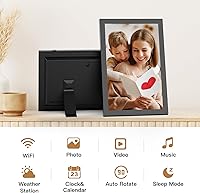
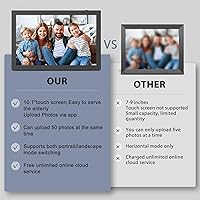
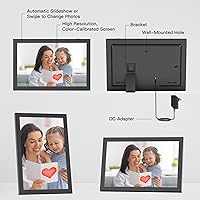
Where this WiFi photo frame earns its keep is the sharing setup. Photos and videos travel through the VPhoto app or straight to an email address, and up to 30 family members can send pictures from wherever they happen to be, so a frame in one house can fill up with snapshots from across the country within minutes. The 1280x800 IPS panel handles a wide viewing angle well, and the touch screen makes flipping through albums or adjusting settings fairly intuitive once you find your way around the menus. An auto-rotate sensor flips the display between portrait and landscape depending on how the frame sits, which matters more than it sounds for mixed photo collections. Storage-wise, the built-in 32GB is backed up by TF card and USB support if you need more room.

Best For

This kind of frame makes the most sense as a gift rather than a personal indulgence. Parents and grandparents who would never download a cloud photo app on their own still manage to glance at a frame on the kitchen counter, which is exactly why the Nethgrow frame tends to land well for Mother's Day, Father's Day, or any occasion where you want family photos to actually get seen. It also suits households spread across different cities, where one relative posts updates and everyone else's frame fills in automatically. If you mainly want a tidy decor piece on a shelf or desk rather than a smart display loaded with extra apps and voice assistants, this digital photo frame covers that need without the premium price tag attached to bigger-name competitors.

User Feedback

Real-world reactions tend to split along predictable lines. Setup is the first hurdle: most people report that pairing the frame with home WiFi and the VPhoto app goes smoothly, though a few mention a fiddly first connection that sorts itself out after a restart or two. Upload speed for photos is generally fast, but sending longer videos can introduce a noticeable lag when several family members are uploading at once. Older relatives seem to adapt to the touch screen faster than expected, since the menus stay fairly basic. Brightness and color hold up fine for a frame in this price range, though side-angle viewing isn't quite as crisp as the front-on view. The one recurring question worth checking before buying is exactly how much the free cloud storage actually covers long-term.

Pros

  • Sending photos takes seconds through the VPhoto app or a simple email, no syncing software required.
  • Up to 30 family members can contribute photos at once, keeping the frame constantly updated.
  • The 10.1-inch IPS touch screen offers a wide viewing angle that holds up well in daily use.
  • Auto-rotate switches between portrait and landscape automatically, so orientation is never an afterthought.
  • 32GB of onboard storage holds thousands of photos without ever needing a memory card.
  • TF card and USB support add extra storage flexibility beyond the built-in memory.
  • Touch screen navigation feels intuitive enough for less tech-savvy relatives to manage on their own.
  • Makes a thoughtful, ready-to-use gift that does not require the recipient to learn new software.
  • Priced well below premium smart frames while still offering genuine WiFi photo sharing.

Cons

  • Video uploads can lag noticeably when several people send content to the frame at once.
  • Initial WiFi pairing is occasionally reported as fussy, sometimes needing a restart to fully connect.
  • Side-angle color and brightness are not as crisp as the front-on view, typical of budget IPS panels.
  • Exactly how much free cloud storage is included long-term is not entirely clear upfront.
  • The companion app's menus, while functional, are not as polished as those from bigger smart-frame brands.
  • No mention of voice control or third-party smart-home integration for buyers wanting those extras.
  • Resolution sits at 1280x800, fine for casual viewing but not a sharp, high-end display.
  • Large video files can eat through the 32GB onboard storage faster than photo-only collections.

Ratings

These scores for the Nethgrow 10.1-inch 32GB WiFi Photo Frame are generated by AI after analyzing thousands of verified user reviews from around the world, with spam, bot activity, and incentivized feedback filtered out before any scoring takes place. Each category below reflects what real owners consistently praised or struggled with, so both the strengths and the rough edges are represented honestly. Use these breakdowns to see exactly where this digital photo frame excels and where it falls short of pricier alternatives.

Display Quality & Sharpness
76%
24%
The 10.1-inch IPS panel renders colors brightly enough for a kitchen counter or living room shelf, and the wide viewing angle keeps photos looking good from across the room. For everyday family snapshots, sharpness is more than adequate.
The 1280x800 resolution falls short of the crisp, high-density screens on pricier frames, so close-up details in high-resolution photos can look slightly soft. A handful of reviewers noted faint pixelation when zoomed-in shots filled the screen.
Touch Screen Responsiveness
81%
19%
Tapping through menus and switching between albums feels intuitive, even for relatives who have never used a smart display before. Most daily interactions, like adjusting brightness or starting a slideshow, register on the first try.
A few users mention occasional missed taps near the screen edges, especially when navigating quickly through nested menus. Multi-finger gestures aren't as fluid as on a smartphone, sometimes requiring a second attempt.
WiFi & App Reliability
71%
29%
Once paired, the VPhoto app reliably pushes new photos to the frame within seconds, which is the whole reason families buy this in the first place. Day-to-day use after setup tends to run smoothly without repeated reconnecting.
Initial WiFi pairing trips up a noticeable share of buyers, sometimes requiring a router restart or a second attempt to lock in. Occasional dropped connections during busy upload periods frustrate users expecting instant delivery every time.
Setup Ease for Beginners
86%
Older relatives who have never touched a smart frame before generally manage the one-time WiFi connection without help, then never need to adjust settings again. That hands-off experience afterward is exactly what makes this a popular gift.
Creating an account in the VPhoto app and learning how invites work can confuse first-time smartphone users without a tech-savvy relative nearby. Clearer in-box instructions would smooth out that first ten minutes considerably.
Photo & Video Upload Speed
67%
33%
Single photos typically appear on the frame within seconds of being sent, which feels close to instant during normal one-on-one sharing. Weekend snapshots tend to show up before the sender even puts their phone down.
Video uploads slow down noticeably, and lag becomes obvious when several family members send content around the same time, like during a holiday gathering. This is the most consistent complaint among otherwise satisfied buyers.
Storage Capacity & Expansion
83%
32GB of built-in storage comfortably holds thousands of photos, so most households never come close to running out of room. Added TF card and USB support gives extra flexibility for anyone wanting to load files directly.
Heavy video use eats through that storage far faster than photos do, and the app doesn't always make remaining space obvious. Buyers planning to store mostly clips should expect to manage storage more actively.
Auto-Rotate Accuracy
88%
The orientation sensor switches between portrait and landscape automatically depending on how the frame is placed, removing the hassle of manually rotating images before sending them. It works reliably across most standard photo formats.
A small number of users report the occasional photo displaying with awkward cropping when the original aspect ratio doesn't match the screen well. It's a minor inconsistency rather than a frequent problem.
Multi-User Sharing Experience
84%
Supporting up to 30 members makes this genuinely useful for large extended families spread across different cities, since anyone with the app can drop in a photo without needing the frame owner present. That collective sharing is the standout feature for most buyers.
There's no built-in way to moderate or remove a low-quality upload before it appears on the frame, which a few users found mildly annoying with less careful contributors. Managing a large group still requires some informal coordination.
Build Quality & Design
69%
31%
The compact black frame fits easily on a desk, shelf, or entryway table without drawing too much attention to itself, blending into most home decor styles. At 1.26 pounds, it's light enough to reposition without much effort.
The plastic housing feels noticeably budget compared to metal-framed alternatives, and a few buyers questioned the stand's stability on uneven surfaces. It won't impress anyone looking for a premium tactile feel.
Cloud Storage Transparency
54%
46%
Having free cloud backup included at no extra cost is a welcome bonus that many competitors charge for, and it gives some peace of mind that photos aren't only stored locally. Buyers appreciate not being asked for payment details just to use it.
The manufacturer doesn't clearly state storage limits or how long the free tier lasts, leaving some buyers uneasy about whether fees might appear later. This lack of clarity is one of the more common hesitations among potential buyers.
Value for Money
85%
WiFi-based photo sharing is normally reserved for frames costing considerably more, so finding it here at a budget-friendly price feels like a genuine win for casual gift-buyers. Most reviewers feel the core sharing experience justifies the cost on its own.
The trade-offs, like resolution and occasional app hiccups, are a reminder that this isn't a premium device, and buyers expecting flagship polish at this price may be mildly disappointed. It's a solid budget pick rather than an all-around upgrade.
Viewing Angle Consistency
73%
27%
The IPS panel holds its color and brightness well when viewed from the side, which matters for a frame placed somewhere multiple people pass by throughout the day, like a hallway or kitchen. Direct, front-on viewing looks especially sharp.
At extreme side angles, colors wash out slightly more than expected from an IPS display, a small but noticeable dip compared to higher-end frames. It's still serviceable, just not flawless from every position.
Slideshow & Playback Experience
79%
21%
Automatic slideshow playback with smooth photo adjustment makes the frame genuinely hands-off once it's loaded, cycling through memories without extra input needed. It's the feature most buyers describe enjoying passively, almost without thinking about it.
Customization options for slideshow timing and transition style are fairly limited compared to some competitors, so users wanting fine-tuned control may find the settings a bit basic. It covers the essentials without extra flexibility.

Suitable for:

The Nethgrow 10.1-inch 32GB WiFi Photo Frame is built for exactly one kind of buyer: someone who wants relatives to see new photos without setting up a complicated tech routine. It works especially well as a gift for parents or grandparents, since once it is connected to WiFi, they never have to touch a settings menu again. Families scattered across different cities also benefit, because anyone with the VPhoto app can drop in a photo and have it appear on the frame within minutes. It also suits anyone who just wants a nice-looking decor piece for a shelf or desk rather than a feature-packed smart display loaded with extra apps. And because it sits at a budget-friendly price point, it is a sensible pick for shoppers who want WiFi photo sharing without paying for a premium frame.

Not suitable for:

The Nethgrow 10.1-inch 32GB WiFi Photo Frame is not the right choice for buyers chasing top-tier display quality, since the 1280x800 resolution and side-angle viewing fall short of pricier frames. Anyone planning to store huge video libraries should also think twice, as the 32GB onboard storage and occasional upload lag with multiple senders can make heavy video use frustrating. Tech-cautious buyers who dislike app-based setups might find the initial WiFi pairing process more fiddly than expected, even if it usually resolves with a restart. If unlimited cloud storage without any catches is a must, it is worth double-checking exactly what the free plan covers before assuming it is permanent. Finally, anyone wanting smart-home extras like voice control or third-party app support will not find them here.

Specifications

  • Brand: The frame is manufactured by Nethgrow, a brand focused on budget-friendly WiFi photo frames.
  • Screen Size: The display measures 10.1 inches diagonally.
  • Display Type: It uses an IPS touch screen for navigation and wide-angle viewing.
  • Screen Resolution: The panel renders images at 1280 x 800 pixels.
  • Onboard Storage: The frame includes 32GB of built-in memory for storing photos and videos.
  • Expandable Storage: Additional storage is supported through TF cards and USB drives.
  • Wireless Connectivity: The frame connects to a home network over WiFi to receive photos remotely.
  • Companion App: Photos and videos are sent to the frame using the VPhoto app.
  • Sharing Methods: Content can be sent to the frame through the app or directly via email.
  • Multi-User Support: Up to 30 members and multiple senders can contribute photos to a single frame.
  • Auto-Rotate Sensor: A built-in sensor automatically switches the display between portrait and landscape orientation.
  • Cloud Storage: The frame offers free cloud storage for uploaded content, though exact storage limits are not specified by the manufacturer.
  • Color: The frame is available in black.
  • Product Dimensions: The frame measures 7.1 x 10.33 x 0.99 inches.
  • Item Weight: The frame weighs 1.26 pounds.
  • Release Date: This model first became available on December 13, 2023.

Related Reviews
Cozyla 10.1-inch WiFi Digital Photo Frame
75%
88%
Ease of Setup
67%
App Reliability
79%
Display Quality
58%
Video Playback
82%
Cloud Storage
More
akimart 32GB 10.1-inch WiFi Digital Picture Frame
73%
88%
Ease of Setup
84%
Remote Photo Sharing
71%
Display Quality
63%
Build Quality
82%
Touch Screen Responsiveness
More
Pixedge Frameo 10.1-inch Digital Photo Frame
81%
88%
Ease of Setup
79%
App Experience
74%
Display Quality
91%
Remote Photo Sharing
77%
Build Quality
More
Kimire 10-inch WiFi Digital Photo Frame
72%
83%
Image Quality
77%
Remote Sharing Experience
81%
Setup & Ease of Use
61%
WiFi Connectivity
58%
Build Quality
More
NOBKLEN 10.1-Inch WiFi Digital Photo Frame

81%
91%
Ease of Setup
86%
App Experience
72%
Display Quality
94%
Gifting Experience
88%
Photo Sharing Speed
More
MELCAM P105 10-Inch Digital Photo Frame
78%
83%
Ease of Setup
74%
App Experience
86%
Display Quality
89%
Value for Money
61%
Build Quality
More
Akimart 10.5-inch 64GB WiFi Digital Photo Frame
79%
88%
Display Quality
91%
Ease of Setup
79%
Frameo App Experience
58%
Video Support
74%
WiFi Connectivity & Reliability
More
Pix-Star 10-inch WiFi Digital Photo Frame
77%
88%
Ease of Setup
91%
Photo Delivery Experience
73%
Display Quality
94%
No-Subscription Value
62%
App Reliability
More
Annalivkg Frameo 10.1″ Digital Photo Frame
87%
94%
Display Quality
91%
Touchscreen Responsiveness
89%
Ease of Setup
85%
WiFi Connectivity
88%
Storage Capacity
More
Feelcare HN-DPF1003 10-inch Digital Picture Frame
76%
88%
Ease of Setup
83%
Display Quality
76%
App Experience
51%
Video Support
79%
Touchscreen Responsiveness
More

FAQ

Setup is genuinely one of the easier parts of owning the Nethgrow 10.1-inch 32GB WiFi Photo Frame. You connect it to home WiFi once, install the VPhoto app on a phone, and after that the person using the frame never has to touch a settings menu. Photos just appear on their own once someone sends them.

Up to 30 members can join and send content to the same frame. That makes it easy for grandparents, siblings, and cousins to all contribute without needing separate devices or logins.

Yes, the frame supports both TF cards and USB drives if you'd rather skip the app entirely. That's a nice fallback if WiFi isn't available or someone prefers a more hands-on approach.

It supports both photos and short videos sent through the app or email. Just keep in mind that video files take up more of the 32GB onboard storage than photos do, so heavy video use will fill it up faster.

For photos alone, 32GB comfortably holds thousands of images, so most households won't come close to filling it. Video-heavy use is where that storage gets eaten up much quicker.

The frame does include free cloud storage for uploaded content, but the manufacturer doesn't spell out exact limits or how long that's guaranteed. It's worth checking the app's current terms before assuming it's unlimited or permanent.

Yes, there's a built-in sensor that detects how the frame is positioned and automatically switches between portrait and landscape. You don't need to manually rotate or crop images before sending them.

That's actually one of its main strengths. As long as everyone has the app and is added to the same group, photos sent from anywhere with internet access show up on the frame almost immediately.

A soft, dry microfiber cloth is the safest option for wiping down the touch screen. Avoid spraying liquid cleaners directly on it, and instead lightly dampen the cloth if needed.

It tends to work well for that exact situation, since the recipient doesn't need to do anything beyond plugging it in and connecting to WiFi once. Everything afterward, like receiving and displaying new photos, happens automatically on their end.