Overview

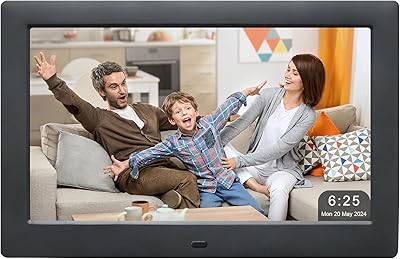
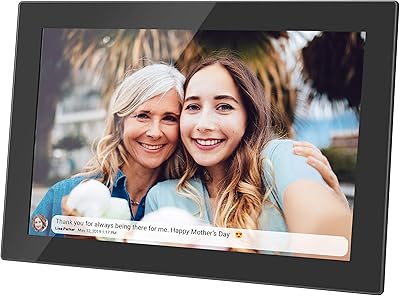
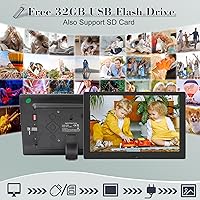
The KECAG 10.1-inch 1080p Digital Picture Frame brings a genuine 1920x1080 IPS display to a mid-range price point — something that's less common in this category than the spec sheets would have you believe. The package includes a 32GB USB flash drive, remote control, and power adapter right out of the box, so there's nothing extra to source on day one. There's also no app or account required, which matters more than it sounds for buyers who want real simplicity. Just insert a USB drive or SD card and photos start playing. It handles video and music too, making it a versatile desk or bedside companion.

Features & Benefits

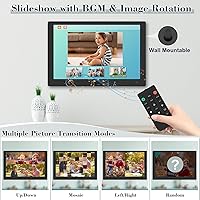
The IPS panel makes a real difference — colors stay accurate from wide angles, so the frame works whether it's front-and-center on a desk or mounted at the side of a room. The motion sensor is a genuinely practical feature: it powers the display down when no one's around and wakes it back up when someone enters. That kind of automatic behavior is easy to take for granted until you've used a frame without it. Slideshow controls are more flexible than you'd expect, covering transition effects, playback order, and a scheduled on/off timer. The slim build and light weight make both wall mounting and tabletop use equally straightforward.

Best For

This photo display earns its keep most clearly as a gift. The box arrives with everything included — storage, remote, adapter — so the recipient doesn't have to track down accessories or figure out an app before getting started. It's particularly well-suited for older adults and seniors who want family photos cycling on a shelf without any ongoing digital management. People who prefer local file storage over cloud services will also appreciate that there's no account to create or maintain. That said, if Wi-Fi photo sharing or remote uploading matters to you, this isn't the right frame — the plug-and-play approach is both its strength and its deliberate limitation.

User Feedback

Buyers consistently point to screen clarity as a standout, with the IPS display frequently surpassing expectations at this price tier. Setup ease is another common positive, particularly from people who gifted the KECAG frame to older relatives — many report that recipients were up and running without outside help. The infrared remote is a recurring sticking point, though: it requires a fairly direct line of sight to work reliably, and some users find it unresponsive from certain positions. The motion sensor gets mixed reviews — accurate for most, but occasionally over-sensitive depending on room layout. Power adapter quality and video file format support are minor but repeated complaints worth knowing about before buying.

Pros

  • The 1080p IPS display delivers noticeably sharp, color-accurate photos that outperform most frames in this price range.
  • No app, no Wi-Fi setup, and no account registration — it works the moment you plug in a USB drive.
  • The included 32GB USB drive means the frame is genuinely ready to use straight out of the box.
  • Motion sensor auto-powers the display on and off, so it is not burning energy in an empty room.
  • Slideshow controls are flexible, covering playback order, transition effects, and a scheduled on/off timer.
  • At under 1.6 pounds with a slim profile, this photo display is easy to mount on a wall or prop on a desk.
  • SD card and USB inputs both work simultaneously, making it simple to mix or swap photo collections.
  • Screen brightness is adjustable, which helps in rooms with varying natural light throughout the day.
  • Seniors and first-time users consistently report getting the frame running without outside help.
  • Infrared remote lets you control playback from across the room without getting up.

Cons

  • No Wi-Fi means someone has to physically update the USB drive or SD card to add new photos.
  • The infrared remote requires a fairly direct line of sight and can be unresponsive from off-angle positions.
  • The motion sensor can be over-sensitive in busy or high-traffic rooms, triggering unexpectedly.
  • Supported video file formats are not clearly documented, and some users have hit compatibility issues.
  • Power adapter quality has been flagged by a portion of buyers as a potential weak point over time.
  • There is no touchscreen — all interaction goes through the remote or buttons on the frame itself.
  • As a lesser-known brand, long-term customer support and parts availability are harder to predict.
  • The 10.1-inch screen size may feel modest for living room display intended to be seen from a distance.

Ratings

Our AI-generated scores for the KECAG 10.1-inch 1080p Digital Picture Frame were produced by analyzing thousands of verified buyer reviews from global markets, with spam, incentivized, and bot-driven feedback actively filtered out before scoring. Each category reflects the honest distribution of real user sentiment — where buyers consistently praised something, the score climbs; where recurring frustrations surfaced across multiple independent reviews, they are reflected without softening. The result is a transparent, balanced snapshot of where this photo display genuinely delivers and where it falls short.
Display Quality
88%
The IPS panel consistently earns strong praise from buyers who were not expecting true 1080p color accuracy at this price point. Users setting it up on a sideboard or office desk frequently mention that photos look vibrant and sharp from across the room, with no washed-out effect from wide angles.
A small but consistent group of buyers note that the screen picks up reflections in brightly lit rooms, particularly near windows. Brightness maxes out at a level that works well indoors but can feel inadequate in spaces with direct natural light.
Ease of Setup
91%
Plug-in-and-go functionality is the single most praised aspect across all buyer segments, especially among gift recipients who are older or less tech-confident. No app installation, no account creation, and no Wi-Fi credentials to enter — just insert the USB drive and the slideshow begins within seconds.
A handful of users report that the initial menu navigation is not entirely intuitive when adjusting settings beyond the default slideshow, particularly around the scheduling and transition options. The user manual, while included, is described by some as brief and occasionally unclear on advanced features.
Value for Money
84%
Buyers repeatedly highlight that getting a genuine HD IPS display plus a 32GB USB drive, remote control, and adapter in a single box at this price feels like a fair deal. The out-of-box completeness is a real differentiator compared to similarly priced frames that ship without storage or accessories.
Some buyers who compared this frame to slightly pricier Wi-Fi-enabled alternatives feel the gap in functionality is not fully justified by the price savings, particularly if they later realized they wanted remote photo sharing. A few noted that build materials feel closer to entry-level than the mid-range positioning suggests.
Motion Sensor
72%
28%
In standard home environments — a living room, a bedroom, or a quiet home office — the motion sensor works as intended, waking the frame when someone enters and cutting power after they leave. Users in less busy households consistently rate it as a genuinely useful energy-saving feature they did not expect to rely on as much as they do.
In open-plan spaces or rooms with frequent incidental movement (hallways, kitchens), the sensor can trigger erratically, turning the display on and off in ways that feel disruptive. A meaningful share of buyers in busier households ultimately disabled the sensor and switched to the manual scheduling timer instead.
Remote Control
63%
37%
Having any remote control included at this price tier is appreciated, and for straightforward tasks like pausing the slideshow or adjusting volume during music playback, it gets the job done without needing to touch the frame itself. Users who place the frame directly in front of their seating position report few issues.
The infrared design is the most consistently cited frustration in buyer feedback — it requires a fairly direct line of sight to the sensor, and even a slight angle can make it unresponsive. Users who have the frame on a wall to one side of their seating position find themselves frequently repositioning before the remote registers a command.
Photo Slideshow Performance
86%
Slideshow playback is smooth and the available controls — shuffle, sequential, adjustable speed, transition effects — give users more flexibility than most frames at this level. Buyers who load a large, mixed photo library report that the frame handles thousands of images without slowdown or skipping.
Some users note that the transition effects, while varied in name, look fairly similar in practice and do not match the visual variety offered by premium-tier frames. The image preview function, though present, is described as functional rather than polished in how it displays thumbnails.
Video Playback
61%
39%
For buyers primarily interested in photos with occasional short video clips, the playback capability works adequately with commonly used formats like MP4. Being able to drop a mix of photos and video clips onto the same USB drive and have them play together is a convenience that gets genuine appreciation.
Supported file formats are not clearly documented anywhere in the packaging or listing, and buyers who tried less common video codecs hit compatibility walls without warning. Video playback quality at the frame's native resolution is serviceable but not the strong suit of this display — it is clearly optimized for still images.
Build Quality
67%
33%
The slim 0.99-inch profile and clean bezel give the frame a presentable appearance that holds up well in living room or office settings. At just under 1.6 pounds, it feels balanced and stable whether standing on a desk or mounted on a wall.
The plastic casing feels noticeably lightweight in hand, and buyers with experience using higher-end frames tend to flag it immediately. The power adapter has drawn specific durability concerns from a recurring subset of long-term users, suggesting it may be a weak point in the overall build chain.
Music Playback
58%
42%
Having a background music feature built into a photo frame is a pleasant bonus for users who want ambient sound during gatherings or at a bedside without setting up a separate speaker. Loading an audio folder onto the same USB drive as photos makes the combined slideshow-and-music experience straightforward to configure.
Audio output quality is limited — the onboard speaker is adequate for quiet rooms but thin-sounding at any meaningful volume. Buyers who hoped to use it as a primary background music source in a larger room found the audio underwhelming, and there is no option to connect external speakers via a headphone jack.
Scheduling Function
79%
21%
The time-window on/off scheduler is one of the more thoughtful features in this category and works reliably once configured. Buyers who set it to mirror their daily routines — turning on at breakfast and off at bedtime — report that it eliminates any need to manually manage the frame on a daily basis.
Setting up the schedule requires navigating a menu system that some users find unintuitive on first use, particularly without clear guidance in the manual. There is no granular per-day scheduling, so users who want different hours on weekdays versus weekends cannot configure that without manual adjustment.
Connectivity & Compatibility
54%
46%
Supporting both USB drives and SD cards simultaneously gives users flexibility when managing photo collections across different devices, and the dual-input design means no adapter is typically needed for cameras that use SD cards alongside phone photos stored on USB.
The complete absence of Wi-Fi, Bluetooth, or any wireless connectivity is a hard limitation that becomes more frustrating over time for buyers who did not fully consider it upfront. There is no workaround — adding new content always requires physical access to the frame, which is a genuine constraint for buyers who intended it as a shared family display.
Packaging & Unboxing
83%
Buyers consistently describe the unboxing as a positive experience, with the frame and all accessories arriving well-protected and neatly arranged. The gift-ready presentation is a genuine advantage for those buying it as a present, removing the need for additional gift wrapping or accessory sourcing.
A small number of buyers received units with minor cosmetic marks on the screen protector or bezel, suggesting quality control at the packaging stage is not perfectly consistent. The included manual could do more work — a quick-start card with illustrated steps would better serve the frame's target audience of less technical users.
Customer Support
59%
41%
The manufacturer claims 24-hour customer support availability, and buyers who contacted them for basic troubleshooting generally describe responses as prompt. For common issues like remote pairing or file format questions, the support team appears capable of resolving problems without escalation.
Buyers dealing with hardware failures — particularly power adapter or sensor issues — report mixed experiences when seeking replacements, with some finding the resolution process slow or requiring persistent follow-up. As a lesser-known brand, there is limited independent service infrastructure, making post-warranty support less predictable than with established manufacturers.

Suitable for:

The KECAG 10.1-inch 1080p Digital Picture Frame is an especially strong fit for anyone buying a gift for an older relative who wants family photos on display without the hassle of a smartphone app or cloud account. Because the entire setup comes down to plugging in a USB drive or SD card, seniors and less tech-savvy users can get a slideshow running in minutes without calling anyone for help. Gift-givers benefit from the complete package too — storage, remote, and adapter are all included, so there is nothing left to source before handing it over. People who prefer keeping their photos on local media rather than uploading them to a third-party service will find the offline-only design refreshing rather than limiting. It also works well on a home office desk or a bedside table where a quietly looping photo and video display adds a personal touch without demanding any ongoing attention.
Not suitable for:

Buyers who want to send photos remotely — say, updating a parent's frame from another city — should look elsewhere, because the KECAG 10.1-inch 1080p Digital Picture Frame has no Wi-Fi, no app, and no way to push new content without physically swapping a USB drive or SD card. If staying connected and sharing moments in real time is the whole point of buying a digital frame, the offline-only approach here will feel like a genuine constraint rather than a reasonable trade-off. Users who need reliable remote control operation from various angles in a large room may also run into frustration, since the infrared remote requires a reasonably direct line of sight to the sensor. Those expecting broad video file format support should verify compatibility before loading up a USB drive, as format limitations have surfaced in user feedback. Finally, anyone prioritizing long-term brand support or warranty confidence from a well-established manufacturer may want to weigh that this is a lesser-known label with limited service history to judge.
Specifications

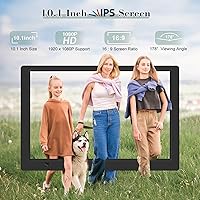
  • Screen Size: The display measures 10.1 inches diagonally, suitable for desk, shelf, or wall placement in a typical room.
  • Resolution: Native resolution is 1920x1080 (Full HD 1080p), delivering sharp detail for both photos and video playback.
  • Panel Type: An IPS panel provides a 180-degree wide viewing angle, keeping colors and contrast consistent from nearly any position.
  • Dimensions: The frame measures 9.7 x 6.4 x 0.99 inches, making it compact enough for a desk or nightstand without dominating the space.
  • Weight: At 1.59 pounds, the unit is light enough for straightforward wall mounting or easy repositioning on a tabletop.
  • Storage Included: A 32GB USB flash drive is included in the box, capable of holding a large photo library without requiring a separate purchase.
  • Input Options: The frame accepts both USB drives and SD cards simultaneously, allowing users to draw from two media sources at once.
  • Motion Sensor: A built-in motion sensor automatically powers the display on when someone enters the room and off when the room is empty.
  • Remote Control: An infrared remote control is included; it requires a clear line of sight to the frame's sensor for reliable operation.
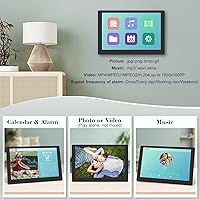
  • Slideshow Modes: Playback order can be set to shuffle, sequential, or repetitive, with adjustable transition effects and slide switching speed.
  • Scheduled On/Off: A time-window scheduling function lets users set specific hours for the frame to turn on and off automatically each day.
  • Brightness: Screen brightness is user-adjustable, allowing the display to be dimmed for nighttime use or brightened for well-lit rooms.
  • Media Support: The frame plays photos, video files, and music audio, functioning as a combined slideshow, video player, and music player.
  • Connectivity: There is no Wi-Fi or Bluetooth; all media must be loaded locally via USB drive or SD card.
  • Power: The unit runs on an included AC adapter; no internal battery is present, so a power outlet is required at all times.
  • Model Number: The official model identifier is KECAG-CA-001, as listed by the manufacturer.
  • Brand: Manufactured and sold under the KECAG brand, with 24-hour customer service support claimed by the manufacturer.
  • App Requirement: No app download, user account, or internet connection is required at any point to operate this frame.

Related Reviews
Anna Bella 10.1 Inch Digital Picture Frame
86%
88%
Display Quality
91%
Ease of Setup
82%
WiFi Connectivity
74%
App Performance
89%
Storage Capacity
More
NOBKLEN 10.1-Inch WiFi Digital Photo Frame
81%
91%
Ease of Setup
86%
App Experience
72%
Display Quality
94%
Gifting Experience
88%
Photo Sharing Speed
More
Frameo Digital Picture Frame 10.1 Inch with 64GB Memory
83%
85%
Display Quality
92%
Ease of Setup
80%
App Performance
91%
Storage Capacity
72%
WiFi Connectivity
More
Uhale CR-1010 10.1-inch Digital Picture Frame
79%
91%
Ease of Setup
88%
Remote Photo Sharing
74%
Display Quality
67%
App Stability
72%
Build Quality
More
akimart 32GB 10.1-inch WiFi Digital Picture Frame

73%
88%
Ease of Setup
84%
Remote Photo Sharing
71%
Display Quality
63%
Build Quality
82%
Touch Screen Responsiveness
More
Jaihonda 10 Inch Digital Picture Frame
80%
90%
Display Quality
88%
Ease of Use
84%
Value for Money
75%
Build Quality
94%
Setup & Installation
More
Atatat Digital Picture Frame 10-inch
84%
90%
Display Quality
85%
Ease of Setup
88%
Slideshow Functionality
80%
Build Quality
83%
Remote Control Usability
More
CozylaHome 10.1″ Digital Picture Frame
82%
88%
Ease of Setup
93%
AI Photo Enhancement
85%
Display Quality
82%
Video Playback Support
70%
Connectivity (WiFi)
More
Feelcare HN-DPF1003 10-inch Digital Picture Frame
76%
88%
Ease of Setup
83%
Display Quality
76%
App Experience
51%
Video Support
79%
Touchscreen Responsiveness
More
Skylight 10-Inch WiFi Digital Picture Frame
78%
93%
Ease of Setup
91%
Photo Sharing Experience
84%
Display Quality
96%
Gift Readiness
67%
Value for Money
More

FAQ

No, and that is genuinely one of its stronger points. You just plug in the included USB drive with your photos already on it, and the slideshow starts automatically. There is no registration, no Wi-Fi setup, and no smartphone required at any stage.

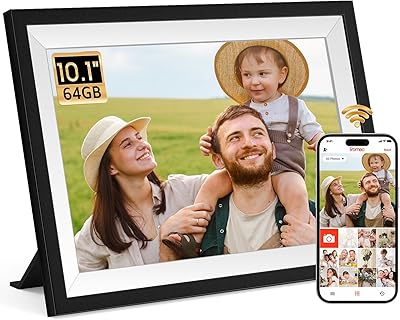
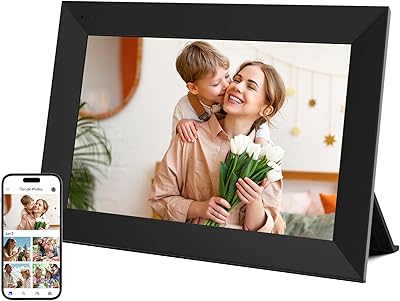
Unfortunately, no. The frame has no Wi-Fi or wireless connectivity of any kind, so there is no way to push new photos to it without physically inserting an updated USB drive or SD card. If remote sharing is important to you, you would need to look at a Wi-Fi-enabled frame from a different brand.

Common formats like JPEG for photos and MP4 for video tend to work without issues on most frames in this category. That said, the manufacturer does not publish a detailed compatibility list, and some users have noted that less common video formats may not play correctly. It is worth sticking to widely used file types to avoid surprises.

The sensor detects movement in the room and wakes the display when someone is present, then powers it down when the room is empty. Most users find it works reliably, though in high-traffic or open-plan spaces it can occasionally trigger from movement that passes through rather than stops. You can also disable the sensor entirely and use the manual scheduling timer instead if you prefer predictable on/off times.

It works well as long as you point it fairly directly at the infrared sensor on the frame. The main menu is straightforward and the remote buttons are clearly labeled, so most seniors find it manageable. The one thing worth noting is that it will not respond if you are pointing it from a sharp angle or from behind an obstacle.

Yes, the frame supports both inputs simultaneously. You can load photos from both sources and the frame will play them together, which is handy if you want to combine collections without copying everything to a single drive.

Yes, the box includes the frame itself, a 32GB USB flash drive, the infrared remote control, an AC power adapter, and a user manual. You do not need to buy anything extra before getting started, which makes it a practical ready-to-gift option.

It works both ways. The frame comes with a stand for tabletop use, and it can also be wall-mounted. At under 1.6 pounds, it is light enough that wall mounting is straightforward with standard hardware.

The 32GB drive can hold well over 30,000 photos at typical smartphone image sizes, so running out of storage is unlikely to be a practical concern for most users.

First, make sure you are pointing it directly at the infrared sensor on the front of the frame, as the sensor has a limited reception angle. If that does not help, check whether the battery needs replacing — the remote uses a standard button cell battery that is easy to swap out. If the issue persists, the manufacturer lists 24-hour customer support as an available resource.