





Overview

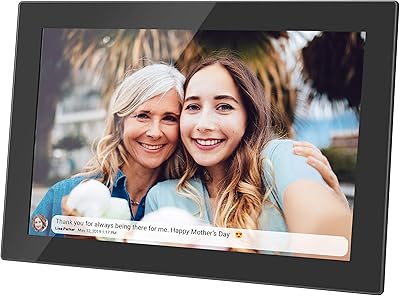
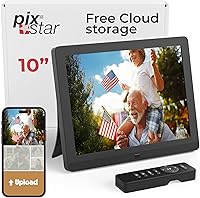
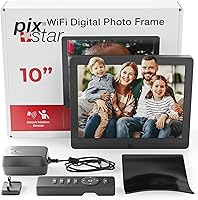
The Pix-Star 10-inch WiFi Digital Photo Frame has carved out a solid reputation since its 2019 launch as a practical, family-focused way to keep distant relatives connected through shared photos. What sets this digital frame apart from most competitors is the genuinely free unlimited cloud storage — no subscription, no expiry, no hidden fees attached. The display is a 9.7-inch IPS panel at 1024x768 resolution, which is modest by today's standards but renders colors accurately with no glare. With over 8,600 ratings sitting at 4.6 stars, its staying power in the market speaks for itself.

Features & Benefits

One of the strongest practical advantages is how many ways you can load photos onto the frame — email to its personal address, the iOS or Android app, a USB stick, an SD card, or direct frame-to-frame sharing. The 4:3 aspect ratio is a deliberate design choice: it matches the native proportions of most smartphone photos, so nothing gets cropped or awkwardly letterboxed. A built-in motion sensor shuts the display off when the room is empty, cutting power use without any manual setup. It also keeps running when your WiFi goes down, which is a genuinely useful fallback. Weather forecasts, web radio, and a calendar round things out, though most owners will treat those as a nice bonus.

Best For

This photo frame is a natural fit for anyone buying a gift for elderly parents or grandparents who are not particularly tech-savvy. The setup is straightforward enough that the recipient can handle it independently, and once it's running, family members anywhere can send photos simply by emailing the frame — no app required on the receiving end. If you manage multiple older relatives, controlling up to 25 frames from a single web account is a real practical advantage. It also suits anyone who has been frustrated by subscription fees on other smart frames — the cloud storage here is genuinely free, with no expiry date attached.

User Feedback

Long-term owners consistently highlight two things: how painless the initial setup is, and how much they value no recurring costs after purchase. Display quality draws genuine praise as well — colors look warm and natural, and photos hold up well in typical indoor lighting. That said, the companion app gets mixed reviews. Some users find it intuitive; others report occasional sync hiccups or an interface that hasn't kept pace with the hardware. A few note the build feels slightly lightweight for the price, though nobody calls it flimsy. The motion sensor generally works well, though placement and room size can affect its sensitivity.

Pros

  • Free unlimited cloud storage with no subscription fee is a genuine long-term money-saver.
  • Photos can be sent to the frame via email — no app needed on the recipient's end.
  • The 4:3 IPS display shows smartphone photos without cropping or distorting the original composition.
  • Motion sensor automatically turns the frame on and off, so it is not running all day to an empty room.
  • Works without WiFi, so the slideshow keeps going even during an internet outage.
  • Remote management of up to 25 frames from one account is a standout feature for larger families.
  • Setup is straightforward enough that elderly recipients can often handle it independently.
  • Over 8,600 ratings at 4.6 stars reflects sustained buyer satisfaction, not just a short-term launch spike.
  • Multiple loading options — email, app, USB, SD card — means flexibility for different family members' habits.
  • Bonus features like weather and a calendar add light everyday utility beyond photo display.

Cons

  • The 1024x768 resolution is noticeably dated compared to competing frames at a similar price.
  • The companion app receives inconsistent reviews, with some users reporting sync issues and a clunky interface.
  • Build quality feels lightweight, which can undercut the premium impression the price tag suggests.
  • Motion sensor performance varies depending on room size and where the frame is placed.
  • WiFi is required to unlock most of the smart features, making it less capable in low-connectivity homes.
  • The web management interface has not been modernized much since the frame launched in 2019.
  • Some users find the menu navigation on the frame itself unintuitive without reading instructions first.
  • At 9.7 inches actual size, the screen can feel small when placed across a larger room.

Ratings

The scores below were generated by AI after analyzing thousands of verified global user reviews for the Pix-Star 10-inch WiFi Digital Photo Frame, with automated filtering applied to remove incentivized, spam, and bot-generated feedback. The results reflect a balanced picture — genuine strengths are recognized, but recurring frustrations are scored honestly and without softening. Buyers can expect an accurate snapshot of what real long-term owners think, not a curated highlight reel.

Ease of Setup
88%
Long-term owners consistently describe the initial setup as one of the smoothest they have experienced with any smart home device. Connecting to WiFi, creating an account, and loading the first photos takes most people well under fifteen minutes, and the frame walks you through each step clearly enough that elderly recipients can often handle it without assistance.
A handful of users report confusion during the account creation step, particularly those without a personal email address or who share a device with a family member. The process assumes a basic level of digital literacy that not every intended recipient will have.
Photo Delivery Experience
91%
The email-to-frame delivery method is the feature buyers talk about most enthusiastically, and for good reason — it requires nothing from the recipient and works reliably across devices and platforms. Family members in different countries can send photos instantly, and long-term owners report it still works just as well years after purchase.
Occasionally photos sent via email can take longer than expected to appear on the frame, which frustrates users expecting a near-instant update. A small number of reviewers report that attachments from certain email clients are occasionally not recognized, requiring a resend.
Display Quality
73%
27%
Colors appear warm and natural on the IPS panel, and the glare-free coating holds up well in typical living room lighting. For standard family snapshots displayed at normal viewing distances, the image quality is comfortable and pleasing, and the 4:3 ratio means portrait-mode phone photos display exactly as shot.
At 1024x768, the resolution is a genuine weak point compared to competing frames at a similar price in 2024. Users who display detailed landscape photography or view the frame up close will notice visible softness, and the pixel density simply cannot match what buyers may be used to on modern tablets or phones.
No-Subscription Value
94%
Buyers who have previously owned subscription-based smart frames are consistently the most vocal advocates here — the absence of any recurring fee is experienced as a real financial relief, not just a marketing point. Over two or three years of use, the savings compared to competing platforms are tangible and significant.
There is little to criticize here in principle, but a few users note that the free model does raise long-term questions about what happens to the cloud service if the company's business model changes. The absence of a formal service-level guarantee makes some buyers slightly uneasy.
App Reliability
62%
38%
When the iOS and Android app works as intended, the experience of browsing albums and pushing photos to a remote frame is genuinely convenient. Users who primarily send photos via email tend to avoid the app entirely and report fewer frustrations overall.
App reliability is the most consistently cited frustration across long-term reviews. Sync issues, occasional login problems, and an interface that has not kept pace with modern app design standards are recurring complaints. Users managing multiple frames find the app experience particularly inconsistent compared to the web interface.
Motion Sensor
71%
29%
In well-proportioned rooms where the frame is placed at roughly eye level and faces the primary seating area, the motion sensor works reliably and genuinely reduces power consumption over the course of a day. Users in smaller apartments or studies report it as one of the most appreciated passive features.
Placement sensitivity is a real issue — frames positioned at an angle, in hallways, or in larger open-plan rooms can miss movement or trigger unexpectedly. A handful of users report the sensor either being too sensitive or not responsive enough, with no granular adjustment available in settings.
Build Quality
67%
33%
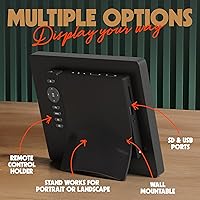
The frame sits stably on a shelf or mantle and the stand is well-designed for both landscape and portrait orientation. Most buyers find the physical footprint compact enough to fit naturally on a side table without dominating the space.
The plastic housing feels noticeably lightweight, which undercuts the premium impression at this price point. Several reviewers describe it as feeling more like a budget device when held in hand, and a few note that the power cable connection point feels less robust than they would prefer for a frame intended to run continuously.
Offline Functionality
83%
The fact that the slideshow keeps running during a WiFi outage is a quiet but meaningful design decision that long-term owners genuinely appreciate. In households where internet connectivity is unreliable, or for elderly recipients in rural areas, this resilience removes a common point of failure.
The offline mode is passive rather than feature-rich — smart functions like weather, radio, and calendar all go dark without connectivity. Users who rely on those bonus features as part of their daily routine will notice the gap when the internet drops.
Multi-Frame Management
79%
21%
For families with multiple older relatives spread across different households, the ability to manage up to 25 frames from a single web account is a practical and well-executed feature. Sending the same batch of holiday photos to several frames simultaneously takes seconds and works consistently.
The web management interface feels dated and has seen minimal redesign since the product launched in 2019. Power users coordinating many frames simultaneously find the organizational tools limited, and there is no bulk-tagging or album management feature sophisticated enough to match the scale the platform technically supports.
Bonus Features
58%
42%
The inclusion of weather forecasts, a web radio player, a calendar, and brain games gives the frame a slightly broader daily-use role than a pure photo display. For elderly users who keep the frame on a kitchen counter, the weather widget in particular gets mentioned as a genuinely used feature.
Most of these extras feel like functional afterthoughts rather than polished additions. The radio and games in particular have not been updated meaningfully, and buyers who try them expecting a modern user experience tend to set them aside quickly. They add novelty but not lasting value for most owners.
Photo Format Compatibility
76%
24%
The frame handles JPEG photos from smartphones, cameras, and email without any conversion required, which is the right priority for a device aimed at non-technical users. USB and SD card support extends compatibility to older cameras and devices that do not use cloud services.
Less common image formats and video files from certain devices may require conversion before they display correctly. Users trying to load content from older Android phones or non-standard camera models occasionally encounter compatibility gaps that require troubleshooting.
Longevity & Reliability
81%
19%
The frame has been commercially available since early 2019, and a meaningful portion of the review base consists of verified owners who have been running their units for three or more years. That track record offers genuine reassurance about hardware durability that newer competitors simply cannot match yet.
A minority of long-term owners report issues with the touchscreen or button responsiveness developing after extended continuous use. Given the frame is typically left running for many hours a day, component wear over a multi-year period is a realistic consideration for buyers thinking about longevity.
Value for Money
74%
26%
When the no-subscription cloud storage is factored into a two-to-three year ownership cost, the overall value proposition improves considerably against competitors who charge monthly fees. Buyers focused on total cost of ownership rather than upfront price tend to rate this more generously.
At its full retail price, the hardware alone — particularly the dated resolution and lightweight build — does not feel like a premium purchase. Buyers comparing screen quality and build materials against similarly priced alternatives in 2024 may feel the core hardware has not kept pace with the market.

Suitable for:

The Pix-Star 10-inch WiFi Digital Photo Frame was clearly designed with one core scenario in mind: a family member — typically an adult child or grandchild — who wants to keep an older, less tech-savvy relative updated with photos without requiring anything from the recipient. Once the frame is set up, anyone in the family can send photos by simply emailing the frame's dedicated address, which means grandparents never need to touch a smartphone or log into anything. It's equally well-suited for gift buyers who are tired of paying monthly fees on other smart frames, since the cloud storage here costs nothing beyond the upfront purchase. Households managing multiple frames across different relatives will appreciate the ability to oversee up to 25 units from a single web account. If display composition matters to you — and it should if you shoot in portrait mode on a phone — the 4:3 ratio means your photos show up exactly as framed, without cropping.

Not suitable for:

Buyers expecting a high-resolution display comparable to modern tablets or premium digital frames will find the Pix-Star 10-inch WiFi Digital Photo Frame underwhelming — 1024x768 pixels is a relatively modest spec in 2024, and it will show if you are displaying very detailed images at close range. Tech-forward users who want a polished, app-first experience may also be frustrated: the companion app works, but it has not consistently impressed users who expect the kind of smooth, modern interface they get from their other smart devices. If your primary use case involves video playback or you want crisp 1080p photo rendering, this frame is not the right tool. Those who prefer a larger display will also want to look elsewhere, as the 9.7-inch screen can feel small in a spacious living room or open-plan kitchen. Finally, anyone who prioritizes a premium, substantial feel in the physical build may find the lightweight construction a little underwhelming at this price point.

Specifications

  • Screen Size: The display measures 9.7 inches diagonally, marketed as a 10-inch frame.
  • Resolution: The IPS panel renders at 1024x768 pixels, using a 4:3 aspect ratio.
  • Display Type: The screen uses IPS technology with a glare-free coating for comfortable indoor viewing.
  • Aspect Ratio: The 4:3 ratio matches the native proportions of most smartphone and standard digital camera photos.
  • Cloud Storage: Free unlimited cloud photo storage is included with no subscription fee or expiry date.
  • Connectivity: WiFi is required for remote features including cloud sync, app control, and email delivery.
  • Motion Sensor: A built-in motion sensor automatically powers the display on when someone enters the room and off when it is empty.
  • Offline Mode: The frame continues displaying stored photos from internal memory or inserted media when WiFi is unavailable.
  • Loading Options: Photos can be loaded via a dedicated frame email address, iOS or Android app, USB stick, SD card, or direct frame-to-frame transfer.
  • Remote Management: A single web account can manage and send photos to up to 25 Pix-Star frames simultaneously.
  • Compatible Apps: The companion app is available for both iOS and Android smartphones and tablets.
  • Bonus Features: The frame includes weather forecasts, web radio streaming, a digital calendar, and brain games as supplementary functions.
  • Dimensions: The frame measures 7.28 x 8.82 x 0.99 inches including the border and stand.
  • Weight: The unit weighs 2 pounds, making it light enough to place on a shelf or mantle without a heavy base.
  • Color: The frame is available in black.
  • Model Number: The manufacturer model number is ART0456.
  • Launch Date: The product was first made available in February 2019.
  • Seller Rank: It holds a Best Sellers Rank of #60 in the Digital Picture Frames category on Amazon.

Related Reviews
Kimire 10-inch WiFi Digital Photo Frame
72%
83%
Image Quality
77%
Remote Sharing Experience
81%
Setup & Ease of Use
61%
WiFi Connectivity
58%
Build Quality
More
Cozyla 10.1-inch WiFi Digital Photo Frame
75%
88%
Ease of Setup
67%
App Reliability
79%
Display Quality
58%
Video Playback
82%
Cloud Storage
More
Akimart 10.5-inch 64GB WiFi Digital Photo Frame
79%
88%
Display Quality
91%
Ease of Setup
79%
Frameo App Experience
58%
Video Support
74%
WiFi Connectivity & Reliability
More
MELCAM P105 10-Inch Digital Photo Frame
78%
83%
Ease of Setup
74%
App Experience
86%
Display Quality
89%
Value for Money
61%
Build Quality
More
Pixedge Frameo 10.1-inch Digital Photo Frame
81%
88%
Ease of Setup
79%
App Experience
74%
Display Quality
91%
Remote Photo Sharing
77%
Build Quality
More
Feelcare HN-DPF1003 10-inch Digital Picture Frame
76%
88%
Ease of Setup
83%
Display Quality
76%
App Experience
51%
Video Support
79%
Touchscreen Responsiveness
More
NOBKLEN 10.1-Inch WiFi Digital Photo Frame
81%
91%
Ease of Setup
86%
App Experience
72%
Display Quality
94%
Gifting Experience
88%
Photo Sharing Speed
More
akimart 32GB 10.1-inch WiFi Digital Picture Frame

73%
88%
Ease of Setup
84%
Remote Photo Sharing
71%
Display Quality
63%
Build Quality
82%
Touch Screen Responsiveness
More
Atatat Digital Picture Frame 10-inch
84%
90%
Display Quality
85%
Ease of Setup
88%
Slideshow Functionality
80%
Build Quality
83%
Remote Control Usability
More
Atatat 8-Inch Digital Photo Frame
84%
88%
Image Quality
94%
Ease of Setup
90%
Versatility (Display Options)
65%
Build Quality
85%
Functionality (Music & Video Support)
More

FAQ

No, and this is genuinely one of the standout aspects of the Pix-Star 10-inch WiFi Digital Photo Frame. The cloud storage is free and unlimited with no subscription attached — you pay once for the hardware and the cloud access stays active without any recurring charges.

Yes, that is exactly the setup most families use. Once the frame is connected to WiFi, anyone can email photos directly to the frame's personal address and they appear in the slideshow automatically. Your mom never needs to touch a phone or log into anything.

No, the frame keeps running using photos already stored locally or on any inserted USB or SD card. The WiFi outage only affects new incoming photos and smart features like weather. Existing content keeps cycling normally.

Setup is designed to be straightforward: plug it in, connect to a WiFi network, and create a free account. Most users complete it in under ten minutes. That said, the initial account creation does require an email address and basic navigation, so some elderly recipients may appreciate a family member setting it up on their behalf first.

Yes, you can share the frame's personal email address with as many family members as you like. Anyone who has that address can email photos directly to the frame, regardless of where they are located or what device they are using.

Yes, the frame supports video playback in addition to photos. Keep in mind the screen resolution is 1024x768, so very high-definition video will not look as sharp as it would on a modern tablet, but for family clips and short recordings it works well enough.

The sensor detects movement and turns the display on when someone is nearby, then switches it off after a period of inactivity to save power. In practice, performance can vary — larger rooms or frames placed at an angle may respond less reliably. Most users find it works well when the frame is positioned at roughly eye level facing the main seating area.

Yes, the web account supports centralized management of up to 25 frames at once. You can send photos to individual frames or to all of them simultaneously, which is very practical for families with multiple older relatives across different households.

At 1024x768, the resolution is serviceable for standard family photos viewed at normal distances, but it is not a high-resolution panel by current standards. If you plan to display highly detailed landscape shots or zoom into faces frequently, you may notice some softness. For everyday family photos on a shelf or sideboard, most people find it perfectly acceptable.

The frame accepts standard USB sticks and SD cards loaded with JPEG photos and common video formats. It is worth checking that your files are in a supported format before gifting the frame pre-loaded, as proprietary formats from some cameras may not be compatible without conversion.

Where to Buy