Overview

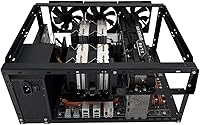
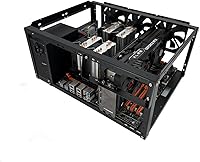
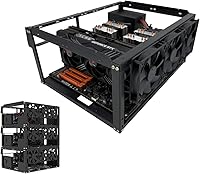
The MININGEEK E02 Stackable Open Air PC Case entered the market in early 2024 as a no-frills, budget-conscious frame built for builders who prioritize access and airflow over aesthetics. What sets this open-air test bench apart is its stackable design — you can run up to 10 layers horizontally, which is genuinely useful for anyone managing multiple rigs in a tight space. Made from alloy steel and weighing under four pounds, the frame is sturdy enough for daily use without being cumbersome to reposition. Just be clear-eyed going in: this is a bare-bones workbench frame, not a polished showpiece. With over 120 user ratings averaging well above four stars, it has earned real-world credibility quickly.
Features & Benefits

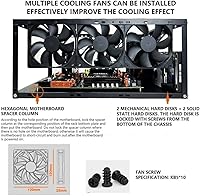
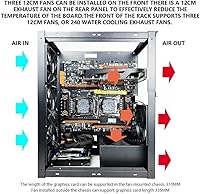
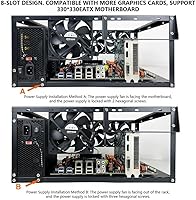
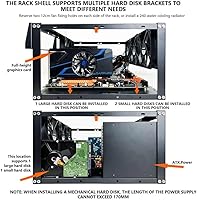
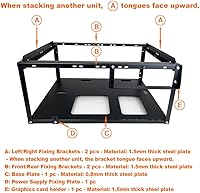
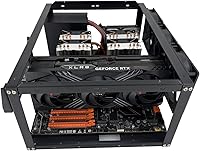
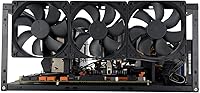
Covering ATX, Micro-ATX, and E-ATX boards up to 330mm x 330mm, this stackable PC frame handles the overwhelming majority of consumer and prosumer motherboards without adapter headaches. The cooling setup is where it genuinely over-delivers for the price: eight 120mm fan positions give you serious airflow flexibility, and radiator slots accommodate everything from a single 120mm unit up to a full 360mm loop. You can orient the frame horizontally or vertically depending on your desk situation, and it holds two HDDs plus four SSDs — enough for a functional workstation, not just a test platform. A 165mm cooler clearance means most popular air coolers fit fine, even in a stacked configuration. The included power switch, wrench, and hardware mean you are not hunting for extras right out of the box.

Best For

This open-air test bench is purpose-built for people who have a practical reason to keep components exposed. Overclockers and stress-testers benefit most — swapping coolers, reseating RAM, or pulling a GPU takes seconds on an open frame versus minutes inside an enclosed case. It is also a natural fit for GPU mining setups where multiple boards need to run in a compact vertical stack; the stackable architecture makes that straightforward. Budget-conscious builders who want strong thermals without paying for a premium enclosure will find it a rational choice. Home lab regulars who cycle through hardware configurations frequently will appreciate how little friction the E02 chassis puts between them and their components.

User Feedback

The general sentiment around this stackable PC frame is positive, with most buyers calling out how straightforward it is to assemble and how well it holds up for the price. Cable management comes up repeatedly as a frustration — that is an inherent trade-off with any open-bench design, and it is worth going in with a plan for keeping things tidy. A few users have raised questions about stacking stability when running three or more layers, so if you are planning a dense multi-board setup, treat those reports as a caution rather than a dealbreaker. The out-of-box hardware was considered sufficient by most buyers, and build quality for the price tier drew consistent praise, even from people who had handled pricier frames before.

Pros

  • Fits ATX, Micro-ATX, and E-ATX motherboards up to 330mm x 330mm without any adapter workarounds.
  • Eight 120mm fan mounts plus support for radiators up to 360mm make serious cooling setups genuinely achievable.
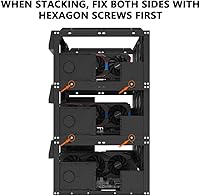
  • Stackable up to 10 layers horizontally, so multi-rig miners can scale without sprawling across an entire desk.
  • Supports both horizontal and vertical orientations, giving you real flexibility based on your workspace.
  • Assembly is straightforward, and the included wrench and mounting hardware mean you can start building immediately.
  • The alloy steel frame weighs under four pounds yet feels solid enough for demanding daily bench use.
  • Open-frame design means unrestricted airflow — component temperatures stay consistently lower than in most enclosed cases.
  • Component access is instant — no side panels, no screws, just direct reach to the board at any time.
  • Holds two HDDs and four SSDs, so it functions as a capable long-term workstation and not just a test platform.

Cons

  • Zero dust protection means components are fully exposed and will need noticeably more frequent cleaning over time.
  • No sound dampening whatsoever — fan noise carries directly into the room with nothing to soften it.
  • No cable routing channels anywhere on the frame, so builds can turn into a tangled mess fast.
  • Stacking stability at three or more layers has raised concerns among some users and deserves verification before scaling up.
  • Entirely utilitarian in appearance — not a frame you would want visible in any aesthetics-driven setup.
  • CPU cooler clearance drops to 165mm in stacked mode, which may be tight for some larger tower cooler designs.
  • USB connectivity is limited to USB 2.0 ports, which will frustrate anyone needing faster peripheral or storage transfer speeds.
  • No side panel option exists if you later decide you want dust filtration or a cleaner look — the open design is permanent.

Ratings

The scores below reflect AI analysis of verified buyer reviews for the MININGEEK E02 Stackable Open Air PC Case, gathered from global sources and actively filtered to remove incentivized, duplicate, and bot-generated submissions. Every category captures both what real users praised and what genuinely frustrated them — nothing has been softened to protect a score. The result is a transparent breakdown that helps you judge whether this open-air test bench fits your specific use case.

Value for Money
91%
For builders who need a capable open-frame chassis without spending on a windowed tower, this stackable PC frame delivers exceptional capability per dollar — wide motherboard support, extensive cooling options, and stackable multi-rig architecture are features typically reserved for pricier products. Users buying in bulk for mining setups consistently highlight the per-unit cost as difficult to beat.
The value proposition weakens if you need more than four USB ports or require USB 3.0 speeds, since onboard connectivity is limited to four USB 2.0 ports. Buyers expecting build quality comparable to dedicated test bench brands will feel the material compromise — the savings are real, but so is the finish gap.
Component Accessibility
93%
Unrestricted access to every component without removing a single panel is the defining practical advantage of this open-air test bench — swapping a GPU, reseating memory, or changing a cooler takes minutes rather than an hour of case surgery. Hardware testers working on multiple configurations daily consistently rate immediate component access as the single most useful feature of the design.
The open frame offers no protection against accidental electrostatic discharge in static-prone environments, and exposed components are a genuine concern in shared workspaces or areas with children. Anyone who occasionally transports the whole build will find that unsecured components on an open bench require extra care and preparation during movement.
Cooling Performance
88%
Eight 120mm fan mount positions give builders enough flexibility to push serious airflow across multiple GPUs, and radiator support for 360mm, dual 240mm, and 120mm loops makes custom water cooling fully viable. Overclockers running sustained stress tests consistently report better thermals compared to enclosed builds at the same hardware tier.
Ambient room temperature plays a much bigger role here than in a filtered enclosure — a warm room or poor surrounding ventilation will directly raise component temperatures with no case insulation to buffer it. There are also no pre-installed fans included, so reaching the full cooling potential requires additional purchases on top of the frame itself.
Cable Management
43%
57%
In a simple test build where minimizing wire count is feasible, the open frame at least makes every cable visually accessible and easy to trace or swap without hunting inside a closed enclosure. Using short modular power supply cables helps significantly in keeping the finished build reasonably tidy within the frame.
There are no built-in routing channels, Velcro anchor points, or management guides of any kind, which means multi-GPU or high-drive-count builds quickly turn into a tangled mess of exposed wiring. This is the most consistently raised frustration in user feedback and a real limitation for anyone running more than two GPUs or several storage drives simultaneously.
Stackability
82%
18%
The ability to stack up to 10 units horizontally is a genuinely useful feature for miners and compute users, allowing multiple rigs to share a compact vertical footprint rather than sprawling across an entire table. Buyers running two or three stacked units report that the system works well in practice and meaningfully reduces the workspace required per board.
Stability and vibration concerns emerge in user feedback once stacks reach three or more layers, with some builders reporting flex and wobble that worsens over time with running fans. The advertised 10-layer maximum should be treated as a theoretical ceiling — higher configurations likely require additional bracing or a solid, vibration-absorbing surface beneath the stack.
Motherboard Compatibility
89%
Covering ATX, Micro-ATX, and E-ATX up to 330mm x 330mm without any adapters is a meaningful strength — the overwhelming majority of consumer and prosumer motherboards fit directly. Users working across multiple board vendors and generations report no compatibility surprises, and the standard standoff pattern means swapping boards between builds is fast and predictable.
Mini-ITX boards, while physically mountable via standard standoffs, are not officially listed and result in a very sparse fit on a frame this size — the space around a small board makes cable routing and component placement feel awkward. The frame also does not accommodate non-standard proprietary form factors used in some OEM or workstation systems.
Ease of Assembly
86%
The frame goes together quickly with the included hardware — most builders with prior PC experience report a complete build-ready assembly in well under an hour, with no missing pieces and no complex instructions to parse. The spacer wrench is a small but appreciated inclusion that saves meaningful time during motherboard installation.
Instruction documentation is minimal, and builders unfamiliar with open-frame chassis may need to rely on community resources or trial and error for certain mounting configurations. Cable organization is left entirely to the user since there is no guidance or built-in routing system, which can significantly extend total build time on complex setups.
Build Quality
78%
22%
The alloy steel construction holds up well for a frame in this price bracket — daily bench use, frequent component swaps, and the occasional accidental nudge do not cause noticeable warping or loosening over time. Buyers upgrading from cheaper acrylic or plastic open-bench alternatives consistently describe the E02 chassis as sturdier than expected for the cost.
The steel gauge is noticeably thinner than what you find on mid-range or premium test benches, and some users report that panel joints can develop a slight rattle under sustained fan vibration over time. It does not inspire premium confidence to the touch, which is a fair trade at this price point but worth knowing before purchasing.
Stability & Rigidity
71%
29%
In a single-unit configuration on a flat, stable surface, the E02 chassis sits firmly without noticeable flex during regular component swaps or fan spin-up. The bottom-mount PSU placement helps keep the center of gravity low, which improves stability compared to top-heavy open-frame designs at a similar price.
Rigidity degrades noticeably when stacking multiple units, with vibration from running fans able to work loose certain joints over extended operation periods. The thin-gauge steel is also susceptible to slight edge bending if handled roughly during transport, and users who regularly move their rigs report needing to be cautious with the frame corners.
Versatility
84%
Supporting both horizontal and vertical orientations, a broad range of motherboard sizes, and both air and water cooling, this stackable PC frame adapts well across a variety of build scenarios — from a dedicated mining rig to a benchmark testbed to a permanent open-bench workstation. Few products at this price bracket offer that deployment range without a forced compromise.
The versatility has a clear ceiling — without any enclosed panel or filter option, it can never serve as a long-term dust-safe build, a display system, or a portable rig. Builders whose use cases might evolve toward any of those scenarios will eventually outgrow the open-frame format entirely and need to migrate to a proper enclosure.
Storage Options
74%
26%
Two HDD bays and four SSD mounting positions give the frame enough storage capacity to function as a proper workstation or multi-drive testbed rather than just a bare platform — that combination covers most everyday storage setups without requiring external enclosures or improvised mounting solutions.
The drive bay count feels limited for users running high-capacity NAS or media server builds who would typically expect more than six total slots. There is also no dedicated M.2 NVMe mounting provision on the frame itself, so users relying on M.2 storage for speed need to manage those drives entirely through the motherboard.
Included Accessories
77%
23%
Having a power switch, a motherboard spacer wrench, and all required mounting screws in the box is more than many competing open-frame products provide, and buyers regularly confirm the included hardware was sufficient for a complete first assembly without sourcing additional fasteners. The spacer wrench in particular is a practical inclusion that saves real time during installation.
No fans, no thermal paste, and no cables are included — which is expected for a bare chassis but worth stating clearly for first-time open-bench buyers who may underestimate how much additional hardware is needed to run a complete system. The power switch wiring is also minimal and purely functional rather than clean or polished.
Dust Protection
22%
78%
The complete lack of enclosure does give every component and cable run unobstructed visibility, making it immediately obvious when dust begins to accumulate rather than hiding buildup inside a closed case for months. That visual transparency at least makes it easier to maintain a consistent cleaning schedule.
Without any filtration, dust settles on every surface — motherboard VRMs, GPU heatsink fins, fan blades, and SSD connectors — significantly faster than inside a case with even basic mesh filters. In dusty homes, workshops, or environments with pets, this accelerates component wear and demands aggressive regular maintenance that most buyers underestimate at the point of purchase.
Noise Dampening
29%
71%
The complete absence of panels does mean there is no resonance or wall amplification from enclosure materials — in environments where fan noise is already controlled through quieter fan choices or speed controllers, there is no additional buzzing or rattling from a case body adding to the overall sound profile.
There is absolutely no sound dampening — fan noise, coil whine, and drive vibration travel directly into the room with zero attenuation, making this a poor fit for any workspace where noise levels matter. Users in bedrooms or shared offices consistently report that the open chassis runs noticeably louder than enclosed alternatives running identical hardware.
Aesthetics
38%
62%
For purely functional environments — a dedicated mining room, a workshop bench, or a basement lab — the clean matte black steel finish is unobtrusive and does not look out of place. The no-nonsense industrial utility has an honest appeal that some technically minded builders genuinely prefer over windowed RGB tower cases.
Exposed wiring, bare motherboards, and zero panel options make this open-air test bench completely unsuitable for any build where appearance matters — there is no side panel upgrade path, no tempered glass option, and no way to contain the visual complexity of a fully cabled running system. Buyers with any concern for aesthetics should look elsewhere.

Suitable for:

The MININGEEK E02 Stackable Open Air PC Case is purpose-built for technically minded builders who value component access and airflow above all else. Overclockers and hardware testers will find this open-air test bench removes every barrier between them and the board — swapping a cooler, reseating RAM, or pulling a GPU takes seconds rather than the minutes spent wrestling with a closed enclosure. Crypto miners and GPU compute users stand to gain the most from the stackable architecture, as it allows multiple boards to run in a tight vertical column without each unit starving the others of airflow. Home lab enthusiasts who benchmark or cycle through several hardware configurations in a given week will appreciate how little friction the chassis introduces into that workflow. Budget-conscious builders who want genuinely strong thermals without committing to a premium enclosure will find this stackable PC frame a practical and rational solution.
Not suitable for:

The MININGEEK E02 Stackable Open Air PC Case is not the right fit for anyone who wants a clean, display-worthy build — exposed wiring, bare steel rails, and absent side panels make it a poor choice for living rooms, streaming backdrops, or anywhere aesthetics matter. Dust accumulation is a real and ongoing concern; without any enclosure, every component surface is exposed to ambient particles, which means more frequent cleaning than most enclosed-case owners are used to. There is also no sound dampening of any kind, so fan noise travels freely into the room, which can be disruptive in quiet home or office environments. Anyone who values tidy cable management should approach this open-bench format with a clear plan, since there are no built-in routing channels to keep things organized. Finally, buyers expecting the structural rigidity of a traditional full-tower should know that multi-layer stacking configurations have generated some stability and vibration questions among users, so scaling beyond two or three units warrants additional research before committing.
Specifications

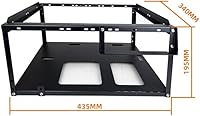
  • Dimensions: The frame measures 435mm x 340mm x 195mm, fitting comfortably on a standard workbench without consuming excessive desk space.
  • Weight: At 3.96 lbs (1.8 kg), the chassis is light enough to reposition or transport without assistance.
  • Material: Constructed from alloy steel, the frame provides a rigid, durable structure that resists everyday flex and handling wear.
  • Motherboard Support: Compatible with ATX, Micro-ATX, and E-ATX motherboards up to a maximum board size of 330mm x 330mm.
  • Fan Mounts: Provides eight 120mm fan mounting positions distributed across the frame for broad, flexible airflow coverage.
  • Radiator Support: Accommodates water cooling radiators in 360mm (x1), 240mm (x2), and 120mm (x1) configurations for full custom-loop builds.
  • CPU Clearance: Maximum CPU cooler height is 165mm when units are stacked, covering the majority of mainstream tower air coolers.
  • Storage Mounts: Includes dedicated mounting positions for two 3.5″ HDDs and four 2.5″ SSDs within the open frame.
  • Stack Capacity: Supports stacking up to 10 units high in horizontal mode, enabling compact multi-rig deployments in a reduced footprint.
  • Orientation: The chassis can be operated in either horizontal or vertical orientation to suit different workspace layouts and airflow preferences.
  • PSU Mount: The power supply unit mounts at the bottom of the frame using a standard bottom-mount configuration.
  • USB Ports: Equipped with four USB 2.0 ports for direct peripheral connectivity from the frame itself.
  • In the Box: Package includes a power switch, a motherboard spacer wrench, and all necessary mounting screws for a complete first assembly.
  • Color & Finish: Available in black with a matte alloy steel finish suited to utilitarian bench and lab environments.
  • Model Info: Manufactured by MININGEEK under the model designation E02, with first availability listed from January 2024.

Related Reviews
Okinos Cypress 5 AIR Mid-Tower PC Case
78%
91%
Aesthetic Design
88%
Front I/O & Connectivity
86%
Value for Money
84%
Side Panel Design
83%
Hardware Compatibility
More
FOIFKIN M9 ATX Mid-Tower PC Case
76%
93%
Aesthetic Design
88%
Value for Money
76%
Cooling Performance
71%
Build Quality
58%
Cable Management
More
FOIFKIN K6 ATX Mid-Tower PC Case
73%
88%
Value for Money
66%
Build Quality
83%
Cooling Performance
54%
Cable Management
81%
Ease of Assembly
More
FOIFKIN F600
FOIFKIN F600
77%
91%
Value for Money
78%
Airflow Performance
74%
Build Quality
93%
Aesthetics & RGB Lighting
63%
Cable Management
More
FOIFKIN F300 2025 ATX Mid-Tower PC Case
76%
88%
Value for Money
91%
Aesthetic Design
79%
Cooling Performance
86%
Hardware Compatibility
58%
Cable Management
More
Vetroo AL900 ATX Mid Tower PC Case
78%
93%
Aesthetic Design
78%
Build Quality
86%
Cooling Potential
63%
Cable Management
88%
GPU Compatibility
More
AsiaHorse Perseus Mid-Tower ATX PC Case
75%
94%
Aesthetic Design
91%
Component Visibility
83%
Build Quality
86%
GPU Compatibility
82%
Interior Spaciousness
More
GIM GM4-B Mid Tower PC Case
79%
83%
Build Quality & Materials
88%
Tempered Glass Panels
79%
Cooling Potential & Airflow
81%
Cable Management
86%
Value for Money
More
Redragon CA606 ATX Mid Tower PC Case
73%
78%
Build Quality
74%
Airflow Performance
88%
Tempered Glass & Aesthetics
83%
Value for Money
61%
Cable Management
More
VEVOR 230B Full-Tower PC Case
79%
88%
Value for Money
84%
Airflow Performance
79%
Build Quality
86%
Dust Filter Design
91%
GPU Compatibility
More

FAQ

Assembly is straightforward for anyone with basic PC building experience. The included spacer wrench and mounting screws cover everything you need for the initial build, and the frame goes together without any complicated steps. Most builders report having it ready to accept a motherboard within about 30 minutes.

Yes — the E02 chassis officially supports standard ATX, Micro-ATX, and E-ATX boards up to 330mm x 330mm. As long as your motherboard falls within those dimensions, it will mount using standard standoff positions without any adapter or frame modification required.

Absolutely. This open-air test bench supports a 360mm radiator, up to two 240mm radiators, and a 120mm radiator, so there is room for a serious custom loop. The open structure actually simplifies tubing and fitting access compared to working inside a closed case, which is one of the underrated advantages of an open-frame build.

The frame itself is not the limiting factor for 24/7 operation — open-bench rigs run continuously all the time in mining and compute environments. The practical concern is dust: without panels or filtration, components accumulate debris faster than they would in an enclosed case, so a regular cleaning routine is part of the commitment. Thermals are typically excellent due to the completely unrestricted airflow.

Two or three layers stack reliably in most reports, but stability and vibration concerns do appear in user feedback when pushing higher counts. If you are planning four or more layers, it is genuinely worth digging into recent user experiences with that specific configuration before scaling up a large deployment — do not assume the theoretical 10-layer maximum translates to rigid structural performance at that height.

The stacked clearance limit is 165mm. That covers the vast majority of popular tower coolers, but a few extra-tall designs sit right at or above that threshold, so always verify your specific cooler's height before purchasing. In single-unit non-stacked use, clearance is effectively limited only by your available vertical space.

Cable management is the honest weak point of any open-bench design, and this stackable PC frame is no exception. There are no built-in routing channels, so organization depends entirely on your own velcro straps, zip ties, and planning discipline. Going in with a cable layout strategy before you start placing components makes a significant difference in how clean the finished build looks and how easy maintenance stays.

Vertical orientation is an officially supported configuration, and single-unit stability in that orientation is generally fine. Airflow behavior does shift — heat rises naturally, so a vertical setup can exhaust warm air upward more efficiently depending on your fan placement and direction. It is worth thinking through your fan configuration if you switch from horizontal to vertical.

On paper it sits exactly at the stated limit, which means real-world fit depends on manufacturing tolerances and how level your stack sits. At that exact threshold there is essentially no margin for error, so for a cooler right at 165mm it is safer to either confirm with hands-on testing or choose a cooler with a few millimeters of headroom to spare.

Compressed air is the most practical tool for maintaining an open-frame build. Without any dust filtration, components and the frame itself collect debris noticeably faster than they would inside an enclosed case. In a typical home environment, a light pass with compressed air every two to three weeks and a more thorough clean every couple of months is a reasonable maintenance rhythm to aim for.