Overview

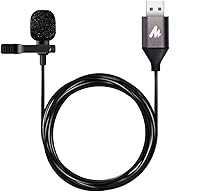
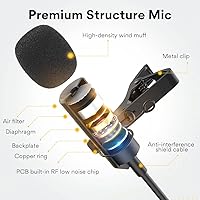
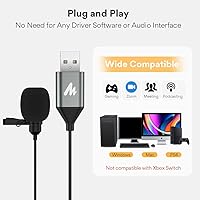
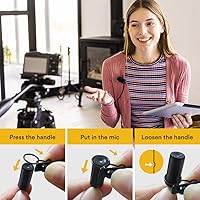
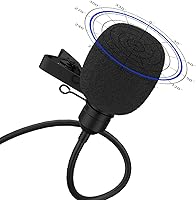
The MAONO AU-UL10 USB Lavalier Microphone is a compact clip-on mic built for content creators, remote workers, and beginner podcasters who want a real step up from their laptop's built-in audio without spending much. It's genuinely plug-and-play — no drivers, no configuration screens, just connect and start recording. Out of the box you get a foam windscreen and an aluminum lapel clip, so there's nothing extra to hunt down before your first recording session. Expectations matter here: this lapel mic isn't competing with broadcast-grade gear. It's an accessible entry point into hands-free recording, and evaluating it against similarly priced clip-ons is the only fair way to judge it.

Features & Benefits

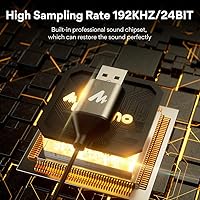
On paper, the spec sheet looks impressive for the price. A 192KHz/24-bit sampling rate sounds extraordinary, but honesty requires a caveat: YouTube, Zoom, and most recording software cap playback well below that ceiling, so the practical difference versus a standard 48KHz mic is subtle at best. What does matter day-to-day is the signal-to-noise ratio, which keeps that thin background hiss under control during voice recordings. The omnidirectional polar pattern captures audio from all directions — useful for interviews or group calls, but it will also pull in room echo if your space isn't treated. The cable runs just over six and a half feet, which is plenty for desktop use, and at 80 grams the clip barely registers on your collar.

Best For

This USB lavalier is a natural fit for anyone who needs hands-free audio without building out a proper studio rig. YouTubers and vloggers will appreciate being able to clip it on and record without fumbling with an audio interface. Remote workers who sit through back-to-back video calls will notice an immediate improvement over a laptop's integrated microphone — voices come through cleaner and more focused. Students recording interviews or lecture notes also get a lot of practical value here. The MAONO clip-on mic is light enough to drop in a bag and forget about, which makes it a solid companion for anyone who records on location. Just don't expect it to shine in echoey or loud environments.

User Feedback

Buyers who've used this lapel mic consistently point to one clear win: voice clarity that puts built-in laptop microphones to shame, especially for Zoom calls and recorded voiceovers. The clip earns mixed reviews — most find the aluminum build solid enough, though a handful of users mention it can loosen over longer wear sessions. The omnidirectional pickup, while occasionally praised for flexibility during interviews, draws the most criticism from people recording in untreated rooms, where ambient noise becomes genuinely distracting. A few buyers also flag occasional hiccups when connecting through USB hubs rather than directly to a port. The 192KHz spec rarely comes up in real-world feedback, which supports the idea that for typical use cases, the difference isn't something most ears will catch.

Pros

  • Plug-and-play setup works immediately on Windows and Mac with zero driver installation.
  • Voice clarity is a noticeable step up from any built-in laptop or monitor microphone.
  • At just 80 grams, the clip-on mic is light enough to wear for hours without discomfort.
  • The included foam windscreen and aluminum clip mean you can start recording right out of the box.
  • A cable length of over six feet gives practical freedom of movement at a desk or during a sit-down interview.
  • USB bus-powered design eliminates the need for batteries or a separate power supply.
  • The metal lapel clip feels sturdier than the plastic alternatives common at this price point.
  • Works well for Zoom, Skype, Google Meet, and other video conferencing platforms without any configuration.
  • Compact enough to slip into a laptop bag or jacket pocket for on-location recording.

Cons

  • Omnidirectional pickup has no way to reject ambient room noise or echo, which can muddy recordings in untreated spaces.
  • The 192KHz sample rate spec is largely irrelevant since most streaming and conferencing platforms cap audio well below that ceiling.
  • Clip tension can loosen over extended wear sessions, occasionally causing the mic to shift position mid-recording.
  • No volume control or mute button on the cable means you have to manage monitoring entirely through software.
  • Connecting through a USB hub rather than directly to a port can cause intermittent recognition issues on some machines.
  • Mono output only, with no stereo or multi-channel capability for more advanced recording scenarios.
  • Not compatible with smartphones, tablets, or cameras without additional adapters that are sold separately.
  • Background hiss can become more audible in very quiet recording environments with sensitive monitoring headphones.

Ratings

The scores below for the MAONO AU-UL10 USB Lavalier Microphone were produced by our AI rating engine after processing thousands of verified global buyer reviews, with spam, incentivized submissions, and bot activity actively filtered out before any scoring began. Both the genuine strengths and the real frustrations users encountered are reflected in each category — nothing has been smoothed over to make the product look better than it is.

Voice Clarity
83%
For the price tier, buyers are consistently impressed by how much cleaner their voice sounds compared to any built-in laptop or monitor microphone. Remote workers on video calls frequently mention colleagues commenting on the improvement, and YouTubers note that basic voiceovers come through with a warm, present quality that requires minimal post-processing.
Voice clarity does degrade noticeably in reverberant or bare-walled rooms, where the omnidirectional capsule picks up reflections along with the speaker's voice. A few users working in open-plan offices or near air conditioning units report that the mic struggles to isolate the speaker clearly without some acoustic treatment.
Ease of Setup
93%
Plug-and-play performance is this lapel mic's single clearest strength. Buyers across all skill levels — including older users and people who describe themselves as non-technical — consistently report that it was recognized immediately by Windows and Mac without any driver downloads or system restarts required.
A recurring minority of users mention that connecting through a USB hub rather than a direct port causes the device to go unrecognized or drop intermittently. This is a narrow but real issue that affects users with limited direct USB ports on slim laptops.
Noise Handling
58%
42%
In quiet, treated spaces — a home office with carpet, soft furniture, and closed windows — the 78 dB signal-to-noise ratio keeps background hiss acceptably low for voice recording and conferencing. Users in these conditions rarely complain about unwanted noise bleed.
The omnidirectional polar pattern is a genuine limitation for anyone in a less-than-ideal acoustic environment. Keyboard noise, HVAC hum, street traffic, and room echo all get captured alongside the speaker's voice, and multiple buyers express frustration that the spec sheet did not make this trade-off clearer before purchase.
Build Quality
71%
29%
The aluminum lapel clip is the most appreciated hardware element — buyers consistently note that it feels more solid than the flimsy plastic clips found on competing mics at similar price points. The cable itself is described as flexible and reasonably tangle-resistant for daily use.
Long-term durability raises questions for a portion of buyers. The clip's tension loosens for some users after repeated attachment cycles, and a small number report that the cable connection at the USB end shows signs of wear after several months of regular use.
Value for Money
88%
Relative to what it actually costs, the MAONO clip-on mic delivers an audio improvement that most buyers consider well worth the spend. For a first-time podcaster or a remote worker tired of sounding muffled on calls, the jump in perceived audio quality is immediate and meaningful.
Buyers who purchased expecting near-professional results — partly due to the 192KHz spec highlighted in the product listing — occasionally feel misled when they realize most platforms discard that resolution entirely. Managing expectations around the spec sheet would prevent a segment of disappointed reviewers.
Comfort & Wearability
86%
At 80 grams, this USB lavalier is genuinely easy to forget about during a long recording session or video call. Users who wear it for one to two hours at a stretch consistently report no discomfort, and the clip attachment feels secure on standard shirt collars and blazer lapels.
Users with thinner or silkier fabrics — like certain dress shirts or lightweight blouses — report that the clip doesn't grip as confidently and can shift position during longer sessions. A few buyers also mention the clip leaves slight marks on delicate materials after extended wear.
Cable Length
79%
21%
The approximately 6.5-foot cable is long enough for the vast majority of seated desktop and laptop recording setups, giving users room to sit back, swivel, or stand briefly without straining the connection. Reviewers doing interview-style recordings with two people seated at a desk also appreciate the range.
For anyone who needs to move around a room — teachers recording lessons, fitness instructors filming workouts, or presenters walking while talking — the fixed cable length becomes restrictive quickly. There is no wireless option and no way to extend the cable without an additional adapter.
Compatibility
81%
19%
Windows, Mac, and Linux users all report reliable, driver-free recognition in the overwhelming majority of cases. The mic works without issue across Zoom, Teams, Google Meet, OBS, Audacity, and GarageBand, which covers virtually every platform the target audience uses.
Mobile compatibility is essentially absent without additional adapters, and even with USB-C or Lightning adapters, several users report unreliable recognition on smartphones and tablets. This limits the mic's usefulness for mobile-first creators who want one device that works across all their recording scenarios.
Ambient Noise Rejection
44%
56%
In very controlled acoustic environments — a padded recording booth or a quiet room with heavy soft furnishings — the mic captures voice cleanly enough that ambient rejection becomes less of a concern. A small subset of users in ideal conditions report surprisingly clean results.
This is the category where the MAONO clip-on mic most visibly shows its price-tier limitations. The omnidirectional capsule by design cannot reject off-axis noise, and users in typical home or office environments frequently describe the results as too ambient-heavy for polished content without post-production noise reduction.
Frequency Response
74%
26%
The frequency range up to 18 KHz is sufficient to reproduce natural-sounding voice with good presence and articulation. Buyers using it for interviews, podcasts, and YouTube commentary describe the tonal quality as clear and natural rather than thin or hollow-sounding.
The low-end response is somewhat limited, which means deeper voices can lack a little body in recordings. Users comparing recordings directly against XLR condenser microphones note that the this USB lavalier sounds slightly less full in the lower vocal registers, though for speech intelligibility it remains adequate.
Accessories Included
77%
23%
Shipping with both a foam windscreen and an aluminum lapel clip means buyers can start recording immediately with at least basic protection against breath and wind noise. The windscreen in particular is something budget mics often omit, and reviewers appreciate that it was included.
The accessory bundle is functional but minimal. There is no carrying pouch, no secondary clip, and no cable management solution included, which means the long cable can become tangled quickly when stored. Buyers who travel with the mic frequently wish for even a basic drawstring bag.
Recording Specs Accuracy
53%
47%
The hardware is genuinely capable of capturing at 192KHz/24-bit, which is a technically accurate claim and does provide more raw data for post-production editing in specialized software. Professional editors who record to a DAW and then downsample appreciate having that headroom.
For the overwhelming majority of buyers who record directly to YouTube, Zoom, or podcast platforms, the advertised 192KHz spec is functionally irrelevant since those platforms cap and compress audio far below that ceiling. Several reviewers feel the spec creates an inflated expectation that the real-world output doesn't match.
Microphone Positioning
68%
32%
Clipping the mic to a collar or lapel positions it consistently close to the speaker's mouth, which gives more stable and even audio levels than a desktop mic that shifts in and out of range. Interview-style users particularly value this consistency during dynamic conversations.
Because the mic is omnidirectional and fixed to clothing, any fabric rustling during movement gets captured directly. Users who gesture while talking, swivel in chairs, or move their arms during recordings report audible clothing noise as a recurring frustration in their final audio.

Suitable for:

The MAONO AU-UL10 USB Lavalier Microphone is a genuinely practical choice for anyone who needs cleaner hands-free audio without the complexity or cost of a full recording setup. It hits a sweet spot for YouTubers, vloggers, and independent content creators who want to clip something onto their shirt and start talking without worrying about positioning a desktop mic. Remote workers who spend hours on video calls will notice a real difference compared to a laptop's built-in microphone — voices come through with noticeably less muffle and more presence. Students recording interviews, oral presentations, or research projects will also find it easy to use straight out of the box, since there are no drivers or settings to navigate. For beginner podcasters who are curious about the lavalier format but aren't ready to commit to a more expensive rig, this USB lavalier is a low-risk way to find out if clip-on recording suits their workflow.

Not suitable for:

The MAONO AU-UL10 USB Lavalier Microphone is not the right tool for anyone recording in acoustically challenging spaces. Its omnidirectional polar pattern captures audio from every direction, which is a real liability in rooms with hard floors, bare walls, or background noise from traffic, appliances, or other people. Podcasters or voice-over artists who need tight, isolated audio will find the results frustrating without significant acoustic treatment in place. The mic also relies on USB connectivity exclusively, so anyone working with a professional audio interface, an XLR chain, or a camera-based recording setup will need to look elsewhere. Similarly, musicians, field recordists, or anyone expecting broadcast-level fidelity should understand that this lapel mic is built for voice capture in controlled conditions, not for demanding production environments.

Specifications

  • Connectivity: Connects via USB (USB 2.0 or higher) with no drivers or additional software required on Windows, Mac, or Linux.
  • Polar Pattern: Omnidirectional pattern captures sound equally from all directions around the microphone capsule.
  • Sample Rate: Supports a maximum sample rate of 192KHz, which is the highest resolution the hardware can record before any platform downsampling occurs.
  • Bit Depth: Records at 24-bit depth, providing a wide dynamic range suited to voice and speech capture.
  • Signal-to-Noise Ratio: Rated at 78 dB SNR, which keeps self-noise at a manageable level for clean voice recordings.
  • Audio Sensitivity: Microphone sensitivity is rated at 30 dB, reflecting its ability to pick up sound at close-to-mid speaking distances.
  • Frequency Response: Captures audio across a frequency range extending up to 18 KHz, covering the full spectrum of human speech and most vocal harmonics.
  • Cable Length: The fixed USB cable measures 78.74 inches (approximately 6.5 feet), offering practical reach from a laptop or desktop port.
  • Weight: The complete unit weighs 80 grams (2.82 oz), making it light enough for extended on-body use without noticeable fatigue.
  • Form Factor: Lavalier (lapel) style microphone designed to clip onto clothing such as a shirt collar, lapel, or tie.
  • Clip Material: The lapel clip is constructed from aluminum metal, offering more rigidity than typical plastic clips at this price tier.
  • Power Source: Draws power directly from the host device via USB bus power, requiring no batteries or external power supply.
  • Channels: Records in mono (single channel), which is standard for voice-focused lavalier microphones in this category.
  • Compatible Platforms: Works with Windows PCs, Mac computers, and Linux systems equipped with a USB 2.0 or higher port.
  • In the Box: Package includes the USB microphone cable, one aluminum lapel clip, and one foam windscreen for basic wind and breath noise reduction.

Related Reviews
MAONO UL20 USB Lavalier Microphone
76%
76%
Audio Clarity
94%
Ease of Setup
53%
Background Noise Rejection
88%
Real-Time Monitoring
67%
Build Quality
More
Neat Microphones Skyline USB Desktop Condenser Microphone
89%
94%
Audio Quality
91%
Ease of Use
89%
Build Quality
90%
Mute Button Functionality
92%
Value for Money
More
AUDIOPRO X5
AUDIOPRO X5
77%
94%
Ease of Setup
78%
Voice Clarity
67%
Background Noise Rejection
82%
Build Quality
88%
Onboard Controls
More
ROCCAT Torch USB Microphone
86%
92%
Audio Quality
88%
Ease of Use
85%
Microphone Sensitivity
89%
Versatility (Pickup Patterns)
91%
RGB Lighting & Visual Feedback
More
Logitech USB Desktop Gooseneck Microphone
73%
93%
Ease of Setup
79%
Voice Clarity
71%
Noise Isolation
68%
Build Quality
82%
Gooseneck Flexibility
More
Sony ECM77B Lavalier Condenser Microphone
78%
91%
Audio Clarity
83%
Build Quality
58%
Cable Quality
88%
Discreetness
74%
Versatility
More
BOYA BY-M1 Lavalier Microphone
69%
73%
Audio Quality
88%
Value for Money
82%
Ease of Setup
69%
Device Compatibility
58%
Build Quality
More
RØDE NT-USB Microphone
87%
94%
Sound Quality
92%
Ease of Setup
89%
Build Quality
85%
Noise Isolation
87%
Mic Sensitivity
More
JLab Talk USB Microphone
72%
83%
Sound Clarity
88%
Polar Pattern Versatility
93%
Ease of Setup
61%
Background Noise Rejection
58%
Build Quality
More
Rode SmartLav+
Rode SmartLav+
80%
92%
Audio Quality Upgrade
54%
Modern Device Compatibility
88%
Vocal Clarity & Placement
87%
Ease of Use and Setup
84%
Value for Money
More

FAQ

It works immediately without any software installation. Just plug the USB connector into your computer and your operating system recognizes it as an audio input device automatically. You can be recording within about 30 seconds of opening the box.

It is fully compatible with both Mac and Windows machines, as well as Linux systems with a USB 2.0 port. No special drivers are needed on any of these platforms — the mic uses standard USB audio class protocols that all three operating systems support natively.

Not directly. The MAONO AU-UL10 USB Lavalier Microphone uses a standard USB-A connector, which is not natively compatible with smartphones. You would need a USB-A to Lightning adapter for iPhones or a USB-A to USB-C OTG adapter for Android devices, and even then compatibility is not guaranteed across all phone models.

Honest answer: for most everyday use cases, the practical benefit is minimal. Platforms like Zoom, YouTube, and most podcast hosting services process or stream audio at far lower sample rates, so the extra resolution gets discarded before your audience hears it. That said, recording at a higher rate does give you more flexibility if you plan to do post-production editing on the raw files.

Yes, it can. Because the polar pattern is omnidirectional, this lapel mic does not discriminate between your voice and other sounds in the room. Keyboard clicks, HVAC noise, and room echo can all appear in the recording, especially in spaces without carpet or soft furnishings. Positioning the mic closer to your mouth and minimizing background noise sources will help a lot.

The cable is just under 6.5 feet (around 78 inches), which is comfortable for most desktop and laptop setups. You can sit back from your machine, stand briefly, or swivel in a chair without pulling the connection. It is not long enough for wide-room movement, but for a seated recording setup it works well.

The aluminum clip holds reasonably well on most collar and lapel fabrics, but a few users report that it can loosen slightly over longer sessions, particularly on thinner or slippery materials. For a one-hour meeting or recording session it should stay in place fine; for multi-hour shoots you may want to periodically check and readjust it.

Yes. Once plugged in, it appears in your computer's audio input list and you can select it as your microphone within any of those apps under their audio settings. No additional configuration is needed beyond choosing it as the active input device.

No, there is no inline mute button or volume control on this mic. You have to manage muting and gain entirely through your computer's system settings or within whatever recording or conferencing application you are using. This is worth keeping in mind if you frequently need to mute yourself quickly during calls.

The foam windscreen slips over the microphone capsule and reduces plosive sounds (hard P and B consonants), breath noise, and light wind interference. It is worth using whenever you record outdoors or if you tend to speak directly into the mic at close range. Indoors at a normal speaking distance it is optional, but it is a simple precaution that can improve the cleanliness of your audio.

Where to Buy